Austin climbing the Most Musical City chart with a bullet!
I’ve received quite a bit of feedback on my recent Most Musical City post, especially from folks from Austin that didn’t like Austin’s 14th place ranking. This reddit/austin comment thread was rather brutal, and this Austinist article Wait, What?! Austin Not Ranked In Top 10 Musical Cities List even closed with this appeal: any data analysts out there up for the challenge to get Austin closer to the top?
Well, John Rees, the Director of Community & Economic Development at Capital Area Council of Governments in Austin is just the data analyst that the Austinist was looking for. He re-ran the analysis but instead of using city populations he calculated the rankings based upon metropolitan statistical areas. In the May issue of Data Points Newsletter John reports on this analysis:
When data from The Echo Nest is adjusted to include metropolitan statistical area population data, the rankings of America’s most musical places changes significantly. Topping the list is Nashville, San Francisco and Los Angeles (which includes Beverly Hills). The Austin region jumps ten places from the original list to become America’s forth [sic] most musical region.

John goes on to point out some of the non-quantifiable aspects of the Austin music scene such as the diversity of music as well as the presence of events such as SXSW and Austin City Limits. John makes a strong argument that Austin is one of the country’s premier music destinations. Even the reaction of Austin’s residents to my post says a lot about Austin as a music city. People from Austin really care about music and don’t take it kindly when they are not at the top of the most musical city list. So congrats to Austin, not just for moving up the chart but also for demonstrating that Austin is the city that is most passionate about music
What is the most musical city in the United States?
Posted by Paul in code, data, fun, The Echo Nest on May 20, 2012
There are many cities in the United States that are known for their music. Cities like Nashville, Detroit, Seattle and New Orleans have played a major part in the musical history and development of this country. But what is the most musical city? Which city has spawned the most musical artists? To answer this question I used the soon-to-be-released artist location data from The Echo Nest artist API. I gathered up the top 50,000 or so U.S. artists, found their city of origin and tallied the number of artists per city. From this tally I calculated the number of artists per 1,000 inhabitants in each city. The more artists per 1000 inhabitants, the more musical the city.
Using the artists per 1k inhabitants, we can easily find the top 25 most musical cities in the United States:
| # | Artists per 1,000 inhabitants | Artists | Population | City |
|---|---|---|---|---|
| 1 | 3.14 | 111 | 35355 | Beverly Hills, CA |
| 2 | 2.26 | 1651 | 732072 | San Francisco, CA |
| 3 | 1.68 | 894 | 530852 | Nashville, TN |
| 4 | 1.64 | 936 | 571281 | Boston, MA |
| 5 | 1.54 | 651 | 422908 | Atlanta, GA |
| 6 | 1.53 | 53 | 34703 | Charlottesville, VA |
| 7 | 1.48 | 817 | 552433 | Washington, DC |
| 8 | 1.39 | 513 | 367773 | Minneapolis, MN |
| 9 | 1.37 | 740 | 540513 | Portland, OR |
| 10 | 1.32 | 51 | 38601 | Burlington, VT |
| 11 | 1.24 | 4789 | 3877129 | Los Angeles, CA |
| 12 | 1.22 | 15 | 12314 | Muscle Shoals, AL |
| 13 | 1.20 | 683 | 569369 | Seattle, WA |
| 14 | 1.11 | 755 | 678368 | Austin, TX |
| 15 | 1.05 | 75 | 71253 | Bloomington, IN |
| 16 | 1.05 | 50 | 47529 | Chapel Hill, NC |
| 17 | 1.05 | 47 | 44916 | Olympia, WA |
| 18 | 1.00 | 13 | 12945 | Princeton, NJ |
| 19 | 0.95 | 182 | 190886 | Richmond, VA |
| 20 | 0.94 | 11 | 11678 | Hendersonville, NC |
| 21 | 0.87 | 12 | 13769 | Malibu, CA |
| 22 | 0.87 | 88 | 100975 | Denton, TX |
| 23 | 0.86 | 179 | 207970 | Orlando, FL |
| 24 | 0.86 | 86 | 100158 | Berkeley, CA |
| 25 | 0.85 | 114 | 133874 | Orange, CA |
I find the results to be pretty interesting. Beverly Hills, the tiny city at the heart of the entertainment world is #1. San Francisco is the most musical of all large cities, followed closely by Nashville. Among, the most musical of small cities is Muscle Shoals AL which, according to Wikipedia, is famous for its contributions to American popular music. Less musical than expected are New Orleans (rank 36), NYC (rank 37), Detroit (rank 52).
Among the least musical cities in the U.S. are my hometown (Manchester NH), with only one artist in the top 50,000 U.S. based artist for the 100K inhabitants. The least musical large city in the U.S. is Kansas City KS, with only 7 top-50k artists for their nearly half million inhabitants. Luckily Kansas City residents can drive a few miles to Kansas city Missouri (with its 194 musicians for its 442k inhabitants) when they get tired of their own seven artists.
You can see the full list of cities with population greater than 5,000 ordered by their musicality here: The Most Musical Cities in the United States. I’d love to do this for all the cities in the world, but I can’t find a good source of city population data for world cities. If you know of one let me know.
I’m rather exited about this upcoming release of artist location data in our API. It will open the doors for a whole bunch of interesting applications, such as road trip playlisters that play music by artists local to the city you are near, contextual playlisters that will favor artists from your home town, or music exploration apps that will let you explore music from a particular region of the world. I can’t wait to see what people build with this data. Stay tuned, I’ll post when the API is released.
WordPress now supports embedding of Spotify, Rdio and Gists.
WordPress now supports direct embedding of Spotify songs:
And direct embedding of Rdio songs:
http://www.rdio.com/#/artist/deadmau5/album/4×4=12_1/track/Raise_Your_Weapon/
And best of all Gist embeddimg!
This file contains hidden or bidirectional Unicode text that may be interpreted or compiled differently than what appears below. To review, open the file in an editor that reveals hidden Unicode characters.
Learn more about bidirectional Unicode characters
| import sys | |
| import urllib | |
| import json | |
| from pyechonest import playlist | |
| def show_playlist(seed_artist): | |
| for s in playlist.basic(artist=seed_artist, type='artist-radio', ] | |
| buckets=['id:lyricfind-US'], results=10, limit=True): | |
| print '==================================================================' | |
| print s.title, 'by', s.artist_name | |
| print '==================================================================' | |
| show_lyrics(s) | |
| def show_lyrics(s): | |
| lfid = s.get_foreign_id('lyricfind-US').replace('lyricfind-US:song:', '') | |
| url = 'http://test.lyricfind.com/api_service/lyric.do' + \ | |
| '?apikey=your_api_key' + \ | |
| '&reqtype=default&output=json&trackid=elid:' + lfid | |
| f = urllib.urlopen(url) | |
| js = f.read() | |
| f.close() | |
| dict = json.loads(js) | |
| try: | |
| lyrics = dict['track']['lyrics'] | |
| for line in lyrics.split('\r\n'): | |
| print line | |
| except: | |
| print '(no lyrics)' | |
| if __name__ == '__main__': | |
| if len(sys.argv) > 1: | |
| show_playlist(' '.join(sys.argv[1:])) | |
| else: | |
| print 'usage: %s artist name' % (sys.argv[0],) |
Life is good! Thanks WordPress. All the details are here in this blog post.
Rethink Music Hackers’ Weekend
This weekend was Rethink Music Hacker’s Weekend where 100 or so music hackers gathered at the Microsoft NERD to not just rethink music, but to rebuild it. There were about two dozen hacks built, showing a wide range of creativity. Some of my favorites are:
Kinect Bomba -As in the latin style of music called “Bomba”, the dancer is in control of the band and music. The virtual band is the kinect — the dancer(s) can create sweet, live beat-locked music over any mp3 (using echonest-remix), remixes, and even control a virtual looper pedal.
Hiptapes – HipTapes is a music marketing APP enables artists to create custom QR codes and push dynamic content to fans via posters, flyers, CDs, etc. HipTapes mobile app scans the QR code & enables users to instantly stream, bookmark or buy music tracks, purchase concerts tickets, discounted merchandise or leave a message on artist’s Facebook page.
Hipsterer – Figures out how hipster you are? (I knew about this site before it was cool).
Jam Page – Hi-resolution listener analytics for artists.

Texture Learning – A simple genetic algorithm learns the short-time fourier transform of a target static texture. The approximation gradually acquires information about the target sound via repeated semi-random modifications to the spectrogram. Phase and magnitude are learned separately. The learning process is sonified and visualized such that the gradual evolution of the sound from silence to target can be seen and heard. Experimentation with several control parameters results in varied output.
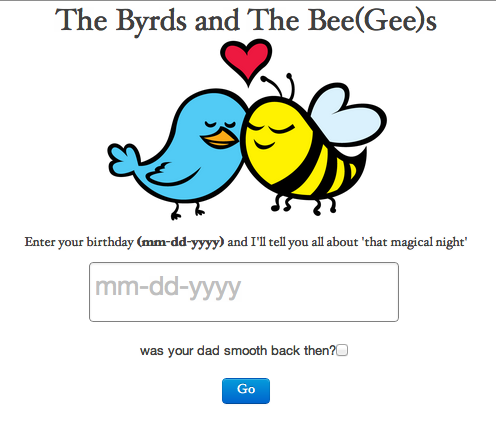
Byrds and the Bee Gees – finds the playlist that your parents could of have used on the night you were conceived. Totally fun app. Toughest part is trying to decide if my dad was ‘smooth back then’.
Lyrical Sonnet Awesome – My favorite hack. Totally origina. Uses lyricfind.com’s API to make a sonnet generator! In Iambic pentameter! The sonnets are in the rhyme scheme of Shakespeare. ABABCDCDEFEFGG, and you can choose key words to populate the themes. Here’s an example:
- Too long values we let them blend and fade
- And with the awesome power they struck
- You’re like a long, cool glass of lemonade
- It’s Knoc-turn’al with a capital K
- Something cool, set one up for me
- If you turn away, oh, honey, please stay
- The center of attention, cool Moe Dee
- I want to take you cool places tonight
- Are you still mad I kicked you out of bed?
- What befalls us in the heat of the night?
- I keep a cool head, I keep a cool head
- That I was mad if they were sane, you see
- The blues my naughty sweetie gives to me.
Map of Music styles – this is my hack – an interactive map of 1000s of music styles, allowing you to explore through the world of music.

See the full list of hacks on hacker league. It was a really fun weekend, with lots of very creative hacking!
Map of Music Styles
Posted by Paul in code, data, events, fun, tags, The Echo Nest, visualization on April 22, 2012
I spent this weekend at Rethink Music Hackers’ Weekend building a music hack called Map of Music Styles (aka MOMS). This hack presents a visualization of over 1000 music styles. You can pan and zoom through the music space just like you can with Google maps. When you see an interesting style of music you can click on it to hear some samples of music of that style.
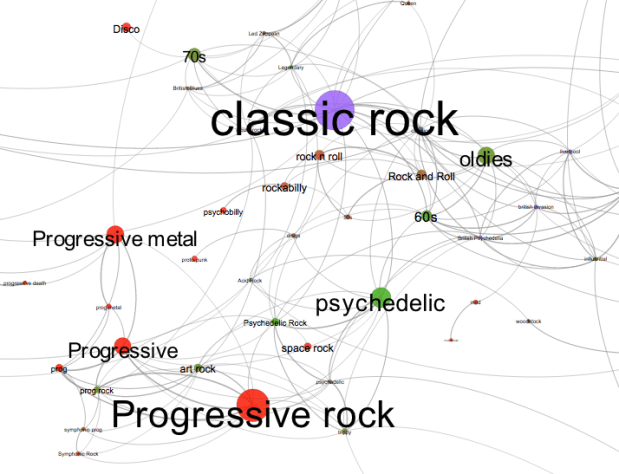
It is fun to explore all the different neighborhoods of music styles. Here’s the Asian corner:
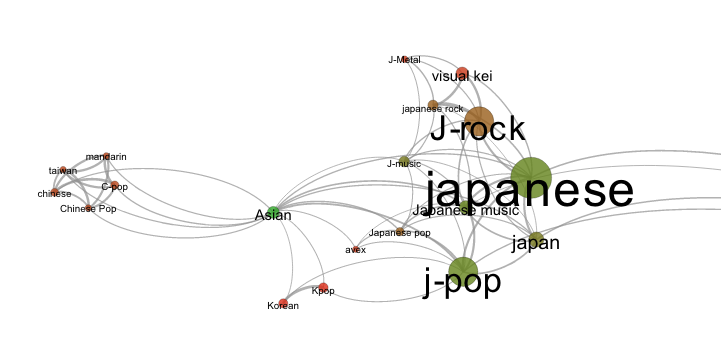
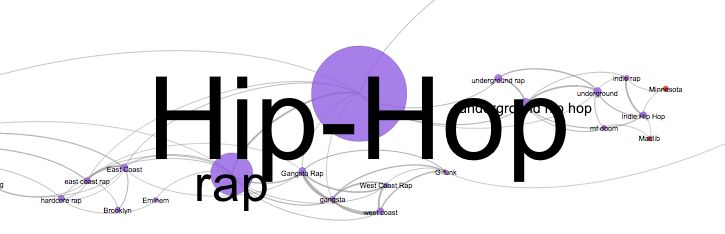
Here’s the Hip-Hop neighborhood:
And a mega-cluster of ambient/chill-out music:

To build the app, I collected the top 2,000 or so terms via The Echo Nest API. For each term I calculated the most similar terms based upon artist overlap (for instance, the term ‘metal’ and ‘heavy metal’ are often applied to the same artists and so can be considered similar, where as ‘metal’ and ‘new age’ are rarely applied to the same artist and are, therefore, not similar). To layout the graph I used Gephi (Its like Photoshop for graphs) and exported the graph to SVG. After that it was just a bit of Javascript, HTML, and CSS to create the web page that will let you pan and zoom. When you click on a term, I fetch audio that matches the style via the Echo Nest and 7Digital APIs.
There are a few non-styles that snuck through – the occasional band name, or mood, but they don’t hurt anything so I let them hang out with the real styles. The app works best in Chrome. There’s a bug in the Firefox version that I need to work out.
Give it a try and let me know how you like it: Map of Music Styles
Why streaming recommendations are different than DVD recommendations at Netflix
From Why Netflix Never Implemented The Algorithm That Won The Netflix $1 Million Challenge
An interesting insight:
when people rent a movie that won’t arrive for a few days, they’re making a bet on what they want at some future point. And, people tend to have a more… optimistic viewpoint of their future selves. That is, they may be willing to rent, say, an “artsy” movie that won’t show up for a few days, feeling that they’ll be in the mood to watch it a few days (weeks?) in the future, knowing they’re not in the mood immediately. But when the choice is immediate, they deal with their present selves, and that choice can be quite different.
When I was a Netflix DVD subscriber the Seven Samurai sat on top of my TV for months. My present self never matched the optimistic view I had of my future self.
Xavier’s blog post on Netfix recommendation is worth the read. Dealing with a household with widely different tastes, the importance of the order of presentation of recommendations
The Hack Day Manifesto
What do you need to do to put on a good hack event like a Music Hack Day? Read The Hack Day Manifesto for insights on what it takes to make sure you don’t have hack event fail. Here’s some choice bits:
Your 4MB DSL isn’t enough
Hack days have special requirements: don’t just trust anyone who tells you that “it’ll be fine”. Think about the networking issues, and verify that they work for the kind of capacity you are going to have. People from the venue or their commercial partner will tell you all sorts of things you want to hear but keep in the back of your mind that they may not have any clue what they are talking about. Given the importance of network access, if you are operating a commercial event consider requiring network performance as part of your contract with venues and suppliers.
Rock solid WiFi
Many commercial WiFi providers plan for much lower use than actually occurs at hack days. The network should be capable of handling at least 4 devices per attendee.
Don’t make people feel unwelcome
Avoid sexism and other discriminatory language or attitudes. Don’t make any assumptions about your attendees. Get someone who is demographically very different from you to check your marketing material through to see if it makes sense and isn’t offensive to someone who doesn’t share your background.
Read The Hack Day Manifesto. If you agree with the sentiment, and you have enough hacker juice to fork the manifesto, edit it and send a pull request, you are invited to add yourself to the list of supporters.
Why do Music Hackers hack?
[vimeo http://vimeo.com/40027211 w=600]
A short film by Pauline de Zeew, with Paul King and Syd Lawrence
The Spotify Play Button – a lightening demo
Spotify just released a nifty embeddable play button. With the play button you can easily embed Spotify tracks in any web page or blog. Since there’s really tight integration between the Spotify and Echo Nest IDs, I thought I’d make a quick demo that shows how we can use the Echo Nest playlist API and the new Spotify Play button to make playlists.
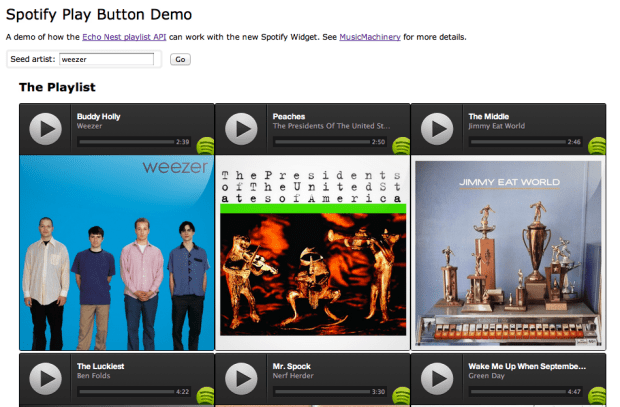
The demo took about 5 minutes to write (shorter than it is taking to write the blog post). It is simple artist radio on a web page. Give it a go at: Echo Nest + Spotify Play Button Demo
Here’s what it looks like.
Update: Charlie and Samuel pointed out that there is a multi-track player too. I made a demo that uses that too:
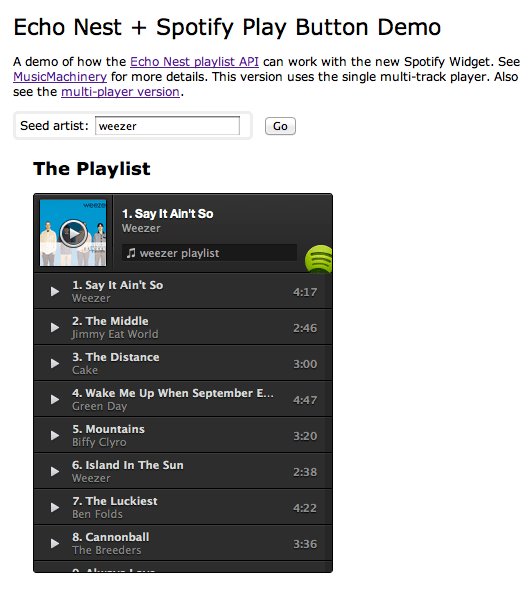
The Spotify Play button is really easy to use, looks great. Well done Spotify.
Syncing Echo Nest analysis to Spotify Playback
Posted by Paul in code, Music, The Echo Nest on April 9, 2012
With the recently announced Spotify integration into Rosetta Stone, The Echo Nest now makes available a detailed audio analysis for millions of Spotify tracks. This audio analysis includes summary features such as tempo, loudness, energy, danceability, key and mode, as well as a set of fine-grained segment features that describe details such as where each bar, beat and tatum fall and the detailed pitch, timbral and loudness content of each audio event in the song. These features can be very useful for driving Spotify applications that need to react to what the music sounds like – from advanced dynamic music visualizations like the MIDEM music machine or synchronized music games like Guitar Hero.
I put together a little Spotify App that demonstrates how to synchronize Spotify Playback with the Echo Nest analysis. There’s a short video here of the synchronization:

video on youtube: http://youtu.be/TqhZ2x86RXs
In this video you can see the audio summary for the currently playing song, as well as a display synchronized ‘bar’ and ‘beat’ labels and detailed loudness, timbre and pitch values for the current segment.
How it works:
To get the detailed audio analysis, call the track/profile API with the Spotify Track ID for the track of interest. For example, here’s how to get the track for Radiohead’s Karma Police using the Spotify track ID:
This returns audio summary info for the track, including the tempo, energy and danceability. It also includes a field called the analysis_url which contains an expiring URL to the detailed analysis data. (A very abbreviated excerpt of an analysis is contained in this gist).
To synchronize Spotify playback with the Echo Nest analysis we need to first get the detailed analysis for the now playing track. We can do this by calling the aforementioned track/profile call to get the analysis_url for the detailed analysis, and then retrieve the analysis (it is stored in JSON format, so no reformatting is necessary). There is one technical glitch though. There is no way to make a JSONP call to retrieve the analysis. This prevents you from retrieving the analysis directly into a web app or a Spotify app. To get around this issue, I built a little proxy at labs.echonest.com that supports a JSONP style call to retrieve the contents of the analysis URL. For example, the call:
http://labs.echonest.com/3dServer/analysis?callback=foo
&url=http://url_to_the_analysis_json
will return the analysis json wrapped in the foo() callback function. The Echo Nest does plan to add JSONP support to retrieving analysis data, but until then feel free to use my proxy. No guarantees on support or uptime since it is not supported by engineering. Use at your own risk.
Once you have retrieved the analysis you can get the current bar, beat, tatum and segment info based upon the current track position, which you can retrieve from Spotify with: sp.getTrackPlayer().getNowPlayingTrack().position. Since all the events in the analysis are timestamped, it is straightforward to find a corresponding bar,beat, tatum and segment given any song timestamp. I’ve posted a bit of code on gist that shows how I pull out the current bar, beat and segment based on the current track position along with some code that shows how to retrieve the analysis data from the Echo Nest. Feel free to use the code to build your own synchronized Echo Nest/Spotify app.
The Spotify App platform is an awesome platform for building music apps. Now, with the ability to use Echo Nest analysis from within Spotify apps, it is a lot easier to build Spotify apps that synchronize to the music. This opens the door to a whole range of new apps. I’m really looking forward to seeing what developers will build on top of this combined Echo Nest and Spotify platform.
 Music Machinery