Posts Tagged The Echo Nest
Installing Playdar
Posted by Paul in code, fun, Music, The Echo Nest, web services on October 18, 2009
A few people have asked me the steps to go through to install playdar. Official instructions are here: Playdar source code. This is what I did to get it running on my Mac:
- Download and install XCode from Apple
- Download build and install Erlang
- Install MacPorts if you haven’t already done so
- Download and install git
- Install Taglib
- Grab the latest Playdar source:
git clone git://github.com/RJ/playdar-core.git - Build it by typing ‘make’ at the top level
- Copy etc/playdar.conf.example to etc/playdar.conf
- If you want to include the Echo Nest resolver do these bits:
- Get an Echo Nest API key from here: developer.echonest.com
- Download and install pyechonest (the python client for the Echo Nest library):
- Add your Echo Nest API key to echonest-resolver.py (at around line 22)
- Make sure the echonest-resolver.py is executable (chmod +x path/to/contrib/echonest-resolver.py)
- Edit etc/playdar.conf and add the path to the resolver in the scripts list. Line 22-26 should look something like this:
{scripts,[
 "/Users/plamere/tools/playdar-core/contrib/echonest/echonest-resolver.py"
 %"/path/to/a/resolver/script1.py",
 %"/path/to/a/resolver/script2.py"
]}.
- If you want to enable p2p sharing remove “p2p” from the module blacklist in the playdar.conf (around line 59)
- start Playdar with:
./start-dev.sh
- To add your local music to playdar – in a separate window type:
./playdarctl start-debug
./playdarctl scan /path/to/your/music - At this point, playdar should be running. You can check its status by going to:
http://localhost:60210/
- Try Playdar by going to http://www.playdar.org/demos/search.html. Click the ‘connect’ button to connect to Playdar – then search for a track – if Playdar finds it, it should appear in the search results. Start listening to music. Then visit Playlick and start building playlists.
- If p2p is enabled you can add a friends music collection to Playdar by typing this into the Erlang console window:
p2p_router:connect("hostname.example.com", 3389).
That’s a long way to go to get Playdar installed – so it is still only for the highly motivated, but people are working on making this easy – so if you aren’t ready to spend an hour tinkering with installs, wait a few days and there will be an easier way to install it all.
Playing with Playdar
Posted by Paul in code, fun, Music, playlist, recommendation, The Echo Nest on October 18, 2009
On Saturday morning I opened my web browser, built a playlist of a few songs and started to listen to them while I went about my morning computer tasks. Some of the songs in the playlist were on my laptop, while some were on the mac mini in the family room, and some were on a laptop of a friend that was on the other side of the Atlantic ocean. And if my friend in London had closed his laptop before I listened to ‘his’ song on my playlist it could have been replaced by a copy of the song that was on the computer of a friend in Seattle. I had a seamless music listening experience despite the fact that the music was scattered across a handful of computers on two continents. Such is the power of Playdar.

Playdar is a music content resolver. It is designed to solve one problem: given the name of track, find me a way to listen to it right now. You run Playdar on any computer that you own that has music and Playdar will make it easy to listen to all of that music as if it were on your local machine. The Playdar content resolver can also talk to other Playdar resolvers too, so if Playdar can’t find a track on my local network, it can ask my friend if it knows where the track is, extending my listening reach.
Playdar runs as a web service using standard web protocols for communicating with applications. When Playdar receives a request to resolve a track it runs through a list of prioritized content resolvers looking for the track. First it checks your local machine, then your local network. If it hasn’t found it there it could, if so configured, try your friends computers, or even a commercial song resolver (One could imagine for example, a music label offering up a portion of their catalog via a content resolver as a way to expose more listeners to their music). Playdar will do its best to find a copy of a song that you can listen to now. Playdar enables a number of new listening modes:
- Listen to my music anywhere – with Playdar, I don’t have to shoehorn my entire music collection onto every computer that I own just so I can listen to it no matter what computer I’m on. I can distribute my music collection over all my computers – and no matter what computer I’m on I have all my music available.
- Save money for music streamers – Music streaming services like Last.fm, Spotify and Pandora spend money for every song that is streamed. Often times, the listener will already own the song that is being streamed. Playdar-enabled music streaming services could save streaming costs by playing a local copy of a song if one is available.
- Share playlists and mixtapes – with Playdar a friend could give me a playlist (perhaps in a XSPF format) and I could listen to the playlist even if I don’t own all of the songs.
- Pool the music – At the Echo Nest, everyone has lots of music in their personal collections. When we are all in the same room it is fun to be able to sample music from each other. iTunes lets you do this but searching through 15 separate collections for music in iTunes is burdensome. With Playdar, all the music on all of the computers running Playdar on your local lan can be available for you to search and play without any of the iTunes awkwardness.
- Add Play buttons to songs on web pages – Since Playdar uses standard web protocols, it is possible to query and control Playdar from Javascript – meaning that Playdar functionality can be embedded in any web page. I could blog about a song and sprinkle in a little Javascript to add a ‘play’ button to the song that would use Playdar to find the best way to play the song. If I write a review about the new Beatles reissue and want the reader to be able to listen to the tracks I’m writing about, I can do that without having to violate Beatles copyrights. When the reader clicks the play button, Playdar will find the local copy that is already on the reader’s computer.
Playdar’s Marconi Moment
Playdar is the brainchild of RJ, the inventor of the audioscrobbler and one of the founders of Last.fm. RJ started coding Playdar in March of this year – but a few weeks ago he threw away the 10,000 lines of C++ code and started to rewrite it from scratch in Erlang. A few days later RJ tweeted: I should be taken aside and shot for using C++ for Playdar originally. It’s criminal how much more concise Erlang is for this. Less than 3 weeks after starting from a clean sheet of paper, the new Erlang-based Playdar had its first transatlantic track resolution and streaming. The moment occurred on Friday, October 16th. Here’s the transcript from the IRC channel (tobyp is Toby Padilla, of MusicMobs and Last.fm fame) when London-based RJ first streamed a track from Toby’s Seattle computer:
[15:40:46] <tobyp> http://www.playdar.org/demos/search.html#artist=pantera&album=&track=burnnn
[15:41:06] <RJ2> woo, transatlantic streaming
[15:41:19] <tobyp> hot!
[15:41:35] <RJ2> playdar’s marconi moment
[15:41:42] <tobyp> hahah
An incredible amount of progress has been made in the last two weeks, a testament to RJ’s skills as much as Erlang’s expressiveness. Still, Playdar is not ready for the general public. It requires a bit of work to install and get running – (yep, the erlang runtime is required), but developer Max Howell has been working on making a user-friendly package to make it easy for anyone to install. Hopefully it won’t be too long before Playdar is ready for the masses.
Even though it is new, there’s already some compelling apps that use Playdar. One is Playlick:
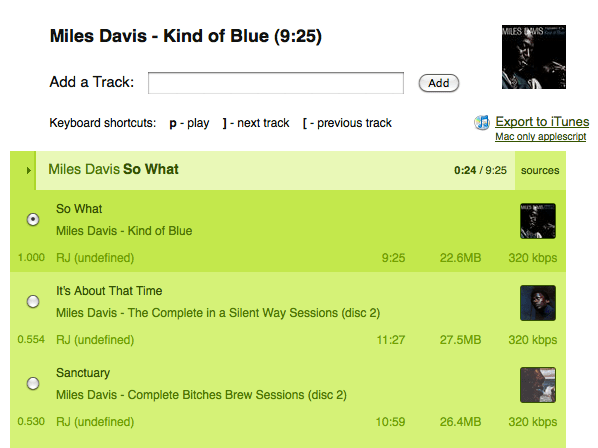
Playlick is a web application, developed by James Wheare that lets you build playlists. It uses Playdar for all music resolution. Type in the name of an album and Playlick / Playdar will find the music for you and let you listen to it. It’s a great way to see/hear the power of Playdar.
Adding custom content resolvers
One of the strengths of Playdar is that it is very easy to add new resolvers. If you are a music service provider you can create a Playdar content resolver that will serve up your content. I wrote a content resolver that uses the Echo Nest to resolve tracks using our index of audio that we’ve found on the web. This resolver can be used as a backstop. If you can’t find a track on your computer or your friend’s computers the Echo Nest resolver might be able to find a version out there on some music blog. Of course, the quality and availability of such free-range music is highly variable, so this resolver is a last resort.
Adding a new resolver to Playdar was extremely easy. It took perhaps 30 minutes to write – the hardest part was figuring out git – (thanks to RJ for walking me through the forks, pushes and ssh key settings). You can see the code here: echonest-resolver.py. Less than 150 lines of code, half of which is boilerplate. 150 lines and 30 minutes to add a whole new collection of music to the Playdar universe. Hopefully soon we’ll see resolvers for music streaming services like Napster, Rhapsody and Spotify.
What’s Next for Playdar?
Playdar is new – and the plumbing and wiring are still be worked on – but already it is doing something pretty magical – letting me listen to any track I want to right now. I can see how Playdar could be extended into acting as my music agent. Over time, my Playdar servers will get to know quite a bit about my music tastes. They’ll know what music I like to listen to, and when I like to listen to it. Perhaps someday, instead of asking Playdar to resolve a specific track by name, I’ll just be able to ask Playdar to give me a playlist of new music that I might like. Playdar can then use an Echo Nest, Last.fm or an AMG playlister to build a playlist of interesting, relevant new music. Playdar won’t just be a music resolver, Playdar will be my music agent helping me explore for and discover new music.
Updated Java client for the Echo Nest API
Posted by Paul in code, java, Music, The Echo Nest, web services on October 15, 2009
We’ve pushed out a new version of the open source Java client for the Echo Nest API. The new version provides support for the different versions of the Echo Nest analyzer. You can use the traditional, but somewhat temperamental version 1 of the analyzer, or the spiffy new, ultra-stable version 3 of the analyzer. By default, the Java client uses the new analyzer version, but if you need your application to work the exactly the same way that it did six months ago you can always use the older version.
Here’s a bit of Java code that will print out the tempo of all the songs in a directory:
void showBPMS(File dir) throws EchoNestException {
     TrackAPI trackAPI = new TrackAPI();
     File[] files = dir.listFiles();
     for (File f : files) {
         if (f.getAbsolutePath().toLowerCase().endsWith(".mp3")) {
             String id = trackAPI.uploadTrack(f, true);
             System.out.printf("Tempo 6%.3f %s\n",
                 trackAPI.getTempo(id).getValue(), f.getAbsoluteFile());
         }
     }
}
Running this code on a folder containing the new Breaking Benjamin album yields this output:
Tempo  85.57 /Users/plamere/Music/Amazon MP3/Breaking Benjamin/Dear Agony/01 - Fade Away.mp3
Tempo 108.01 /Users/plamere/Music/Amazon MP3/Breaking Benjamin/Dear Agony/02 - I Will Not Bow.mp3
Tempo 168.81 /Users/plamere/Music/Amazon MP3/Breaking Benjamin/Dear Agony/03 - Crawl.mp3
Tempo 156.75 /Users/plamere/Music/Amazon MP3/Breaking Benjamin/Dear Agony/04 - Give Me A Sign.mp3
Tempo  85.51 /Users/plamere/Music/Amazon MP3/Breaking Benjamin/Dear Agony/05 - Hopeless.mp3
Tempo  68.34 /Users/plamere/Music/Amazon MP3/Breaking Benjamin/Dear Agony/06 - What Lies Beneath.mp3
Tempo 116.94 /Users/plamere/Music/Amazon MP3/Breaking Benjamin/Dear Agony/07 - Anthem Of The Angels.mp3
Tempo  85.50 /Users/plamere/Music/Amazon MP3/Breaking Benjamin/Dear Agony/08 - Lights Out.mp3
Tempo 125.77 /Users/plamere/Music/Amazon MP3/Breaking Benjamin/Dear Agony/09 - Dear Agony.mp3
Tempo  94.99 /Users/plamere/Music/Amazon MP3/Breaking Benjamin/Dear Agony/10 - Into The Nothing.mp3
Tempo 160.38 /Users/plamere/Music/Amazon MP3/Breaking Benjamin/Dear Agony/11 - Without You.mp3
You can download the new Java client from the echo-nest-java-api code repository. The new version is: echo-nest-java-api-1.2.zip
Music and Bits
Posted by Paul in events, fun, Music, The Echo Nest on October 13, 2009

If you are heading to Amsterdam next week for the Amsterdam Dance Event, you may want to check out the Music & Bits pre-conference. This year Music & Bits is hosting two tracks: a traditional conference-style track with thought leaders from the Music 2.0 space, and a mini-Music Hackday where developers can gather to hack on music APIs to build new and interesting apps.
The Echo Nest will be represented by founder and CTO Brian Whitman. He’ll be giving a keynote talk about the next generation of music search and discovery platform and how these platforms can recommend music or organize your catalog automatically by listening to it, predict which countries to launch your band’s next tour or even help you build synthesizers that play from the entire world of music. It looks to be a really cool talk during a really interesting conference. Wish I were there.
This video from last year gives a taste of what Music & Bits is like:
SoundEchoCloudNest
Posted by Paul in code, data, events, Music, The Echo Nest, web services on September 28, 2009
At the recent Berlin Music Hackday, developer Hannes Tydén developed a mashup between SoundCloud and The Echo Nest, dubbed SoundCloudEchoNest. The program uses the SoundCloud and Echo Nest APIs to automatically annotate your SoundCloud tracks with information such as when the track fades in and fades out, the key, the mode, the overall loudness, time signature and the tempo. Also each Echo Nest section is marked. Here’s an example:
This track is annotated as follows:
- echonest:start_of_fade_out=182.34
- echonest:mode=min
- echonest:loudness=-5.521
- echonest:end_of_fade_in=0.0
- echonest:time_signature=1
- echonest:tempo=96.72
- echonest:key=F#
Additionally, 9 section boundaries are annotated.
The user interface to SoundEchoCloudNest is refreshly simple, no GUIs for Hannes:

Hannes has open sourced his code on github, so if you are a Ruby programmer and want to play around with SoundCloud and/or the Echo Nest, check out the code.
Machine tagging of content is becoming more viable. Photos on Flicker can be automatically tagged with information about the camera and exposure settings, geolocation, time of day and so on. Now with APIs like SoundCloud and the Echo Nest, I think we’ll start to see similar machine tagging of music, where basic info such as tempo, key, mode, loudness can be automatically attached to the audio. This will open the doors for all sorts of tools to help us better organize our music.
Music Hack Day Berlin
Posted by Paul in code, data, Music, The Echo Nest on September 1, 2009
On the heals of the very successful London Music Hackday, comes the Berlin Music Hackday which will be held on September 18/19/20 at the very cool Radialsystem V in Berlin Germany.

Site of the Berlin Music Hacday
The hackday is totally free for participants but is limited to 150 participants. (and if this is organized like the London hackday, if you want to attend, be prepared to describe how you hack hardware, software or music – not just anyone can fill one of the 150 slots).
The London hackday was such a great event, I’m glad to see that it is being repeated in different parts of the world. Look for more Music Hackdays coming to a city near you.

Hacking music at the London Music Hackday
Remixing for the masses at SXSW 2010
Posted by Paul in code, The Echo Nest on August 25, 2009
 We are hoping to be able to present a panel on Echo Nest remix at next year’s SXSW interactive. We want to show lots of rather nifty ways that one can use Echo Nest remix to manipulate music – lots of code plus lots of music and video remix examples. What could be more fun? To actually get to present the panel we have to make it through the SXSW panel picking process. If you think this might be a good panel, head on over to our panel proposal page and vote for our panel called ‘remixing for the masses‘.
The Stairway Detector
Posted by Paul in data, fun, Music, playlist, The Echo Nest, web services on August 17, 2009
Last night I was watching the pilot for Glee (a snarky TV version of High school musical) with my 3 teenage daughters. I was surprised to hear the soundtrack filled with songs by the band Journey, songs that brought me back to my own high school years. The thing that I like the most about Journey is that many of their songs have this slow and gradual build up over the course of the whole song as in this song Lovin Touchin Squeezin:
A number of my favorite songs have this slow build up. The canonical example is Zep’s ‘Stairway to Heaven’ – it starts with a slow acoustic guitar and over the course of 8 minutes builds to metal frenzy. I thought it would be fun to see if I could write a bit of software that could find the songs that have the same arc as ‘Stairway to Heaven’ or ‘Lovin, Touchin Squeezin’ – songs that have this slow build. With this ‘stairway detector’ I could build playlists filled with the songs that fire me up.
The obvious place to start with is to look how the loudness of a song changes overtime. To do this I used the Echo Nest developer API to extract the loudness as a function of time for Journey’s Lovin, Touchin Squeezin:
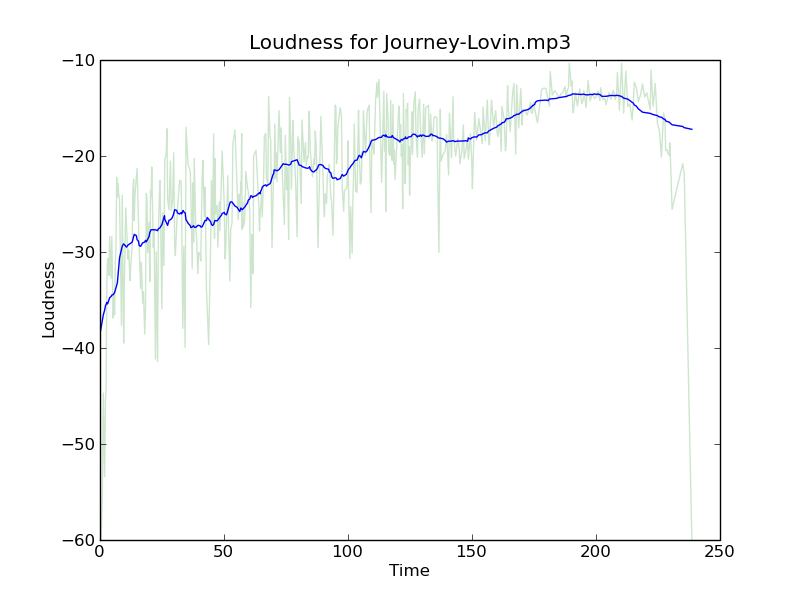 In this plot the light green curve is the loudness, while the blue line is a windowed average of the loudness. This plot shows a nice rise in the volume over the course of the song. Compared to a song like the Beatles ‘Ticket to Ride’ that doesn’t have this upward slope:
 From these two examples, it is pretty clear that we can build our stairway-detector just by looking at the average slope of the volume. The higher the slope, the bigger the build. Now, I suspect that there’s lots of ways to find the average slope of a bumpy line – but I like to always try the simplest thing that could possibly work first – and for me the simplest thing was to just divide the average loudness of the second half of the song by the average loudness of the first half of the song. So for example, with the Journey song the average loudness of the second half of the song is -15.86 db and the average of the first half of the song is -24.37 db. This gives us a ratio of 1.54, while ‘Ticket to ride’ gets a ratio of 1.06. Here’s the Journey song with averages shown:
 Here are a few more songs that fit the ‘slow build’ profile:
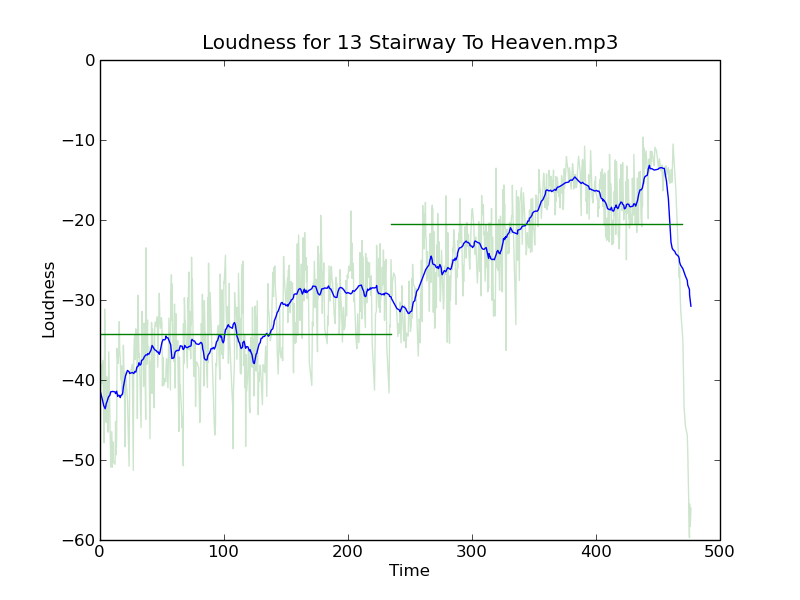 ‘Stairway to Heaven’ has a score of 1.6 so it has a bigger build than Journey’s Lovin’.
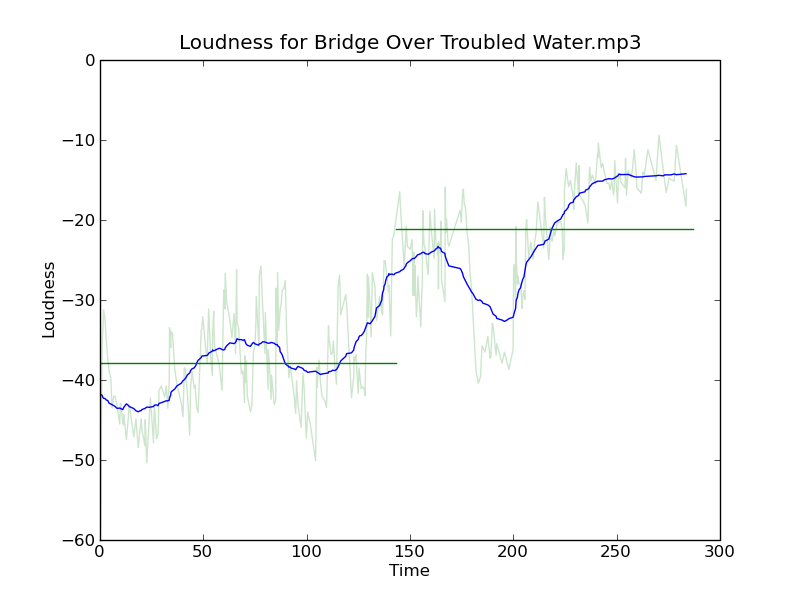 Simon and Garfunkle’s ‘Bridge over troubled water’ has an even bigger build with a score of 1.7.
 Also sprach Zarathustra has a more modest score of 1.56
With this new found metric I analyzed a few thousand of the tracks in my personal collection to find the songs with the biggest crescendos. The biggest of all was this song by Muse with a whopping score of 3.07:
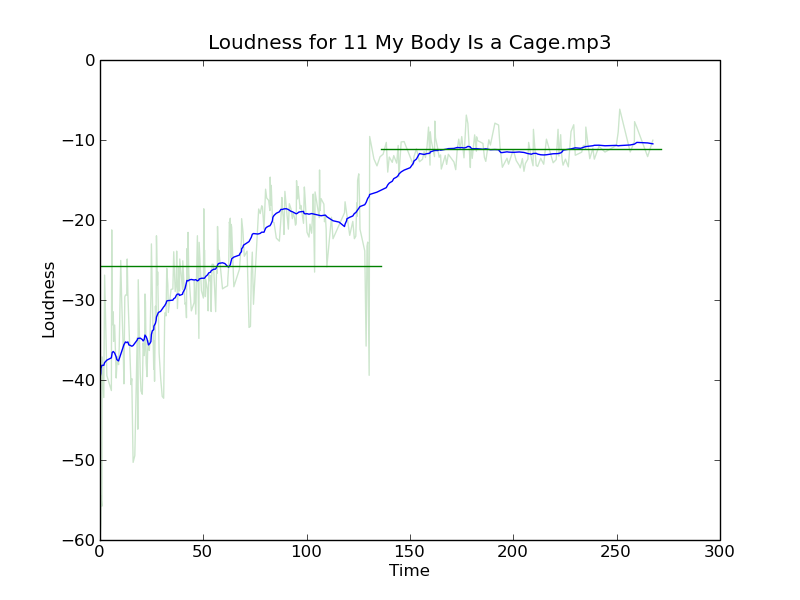
 Another find is Arcade Fire’s “My Body is a Cage” with a score of 2.32.
The metric isn’t perfect. For instance, I would have expected Postal Services ‘Natural Anthem’ to have a high score because it has such a great build up, but it only gets a score of 1.19. Looking at the plot we can see why:
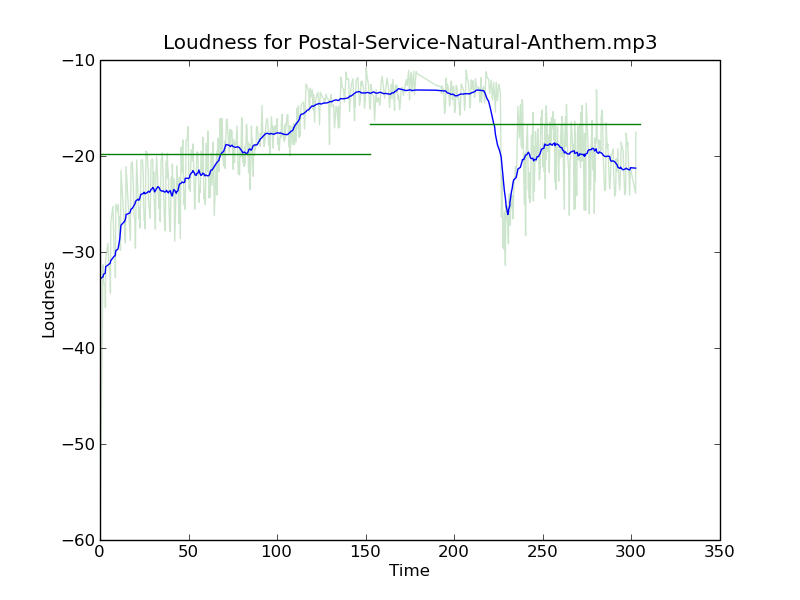 After the initial build up, there’s a drop an energy for that last quarter of the song, so even though the song has a sustained crescendo for 3 minutes it doesn’t get a high score due to this drop.
Of course, we can use this ratio to find tracks that go the other way, to find songs that gradually wind down. These seem to occur less frequently than the songs that build up. One example is Neutral Milk Hotel’s Two Headed Boy:

Despite the fact that I’m using a very naive metric to find the loudness slope, this stairway detector is pretty effective in finding songs that have that slow build. It’s another tool that I can use for helping to build interesting playlists. This is one of the really cool things about how the Echo Nest approaches music playlisting. By having an understanding of what the music actually sounds like, we can build much more interesting playlists than you get from genius-style playlists that only take into account artists co-occurrence.
Making better plots
Posted by Paul in code, fun, The Echo Nest, visualization on August 5, 2009
For many years, I’ve used awk and gnuplot to generate plots but as I switch over to using Python for my day to day programming, I thought there might be a more Pythonic way to do plots. Google pointed me to Matplotlib and after kicking the tires, I’ve decided to retire gnuplot from my programming toolkit and replace it with matplotlib.

Matplotlib is a 2D plotting library that produces a wide variety of high quality figures suitable for interactive applications or for inserting into publications. A quick tour of the gallery shows the wide range of plots that are possible with Matplotlib. The syntax for creating plots is simple and familiar to anyone who’s used matlab for plotting.
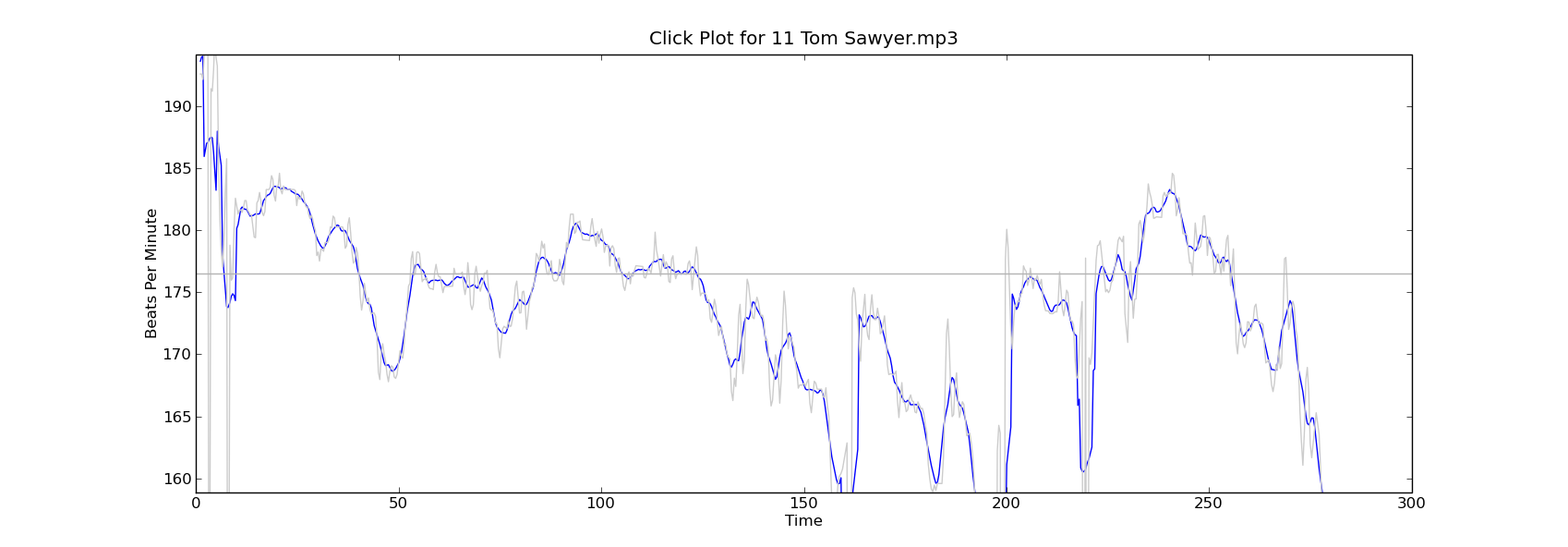
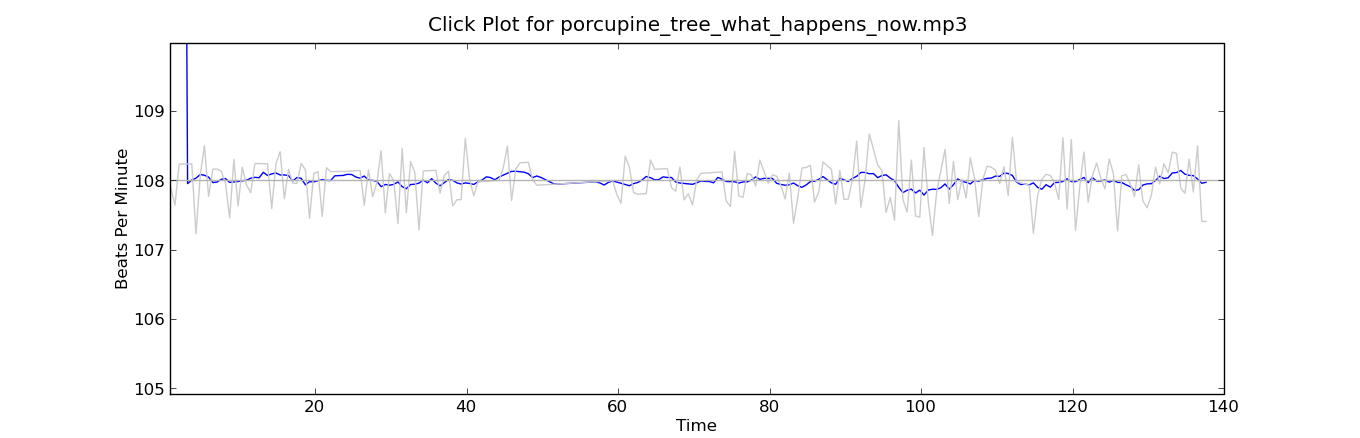
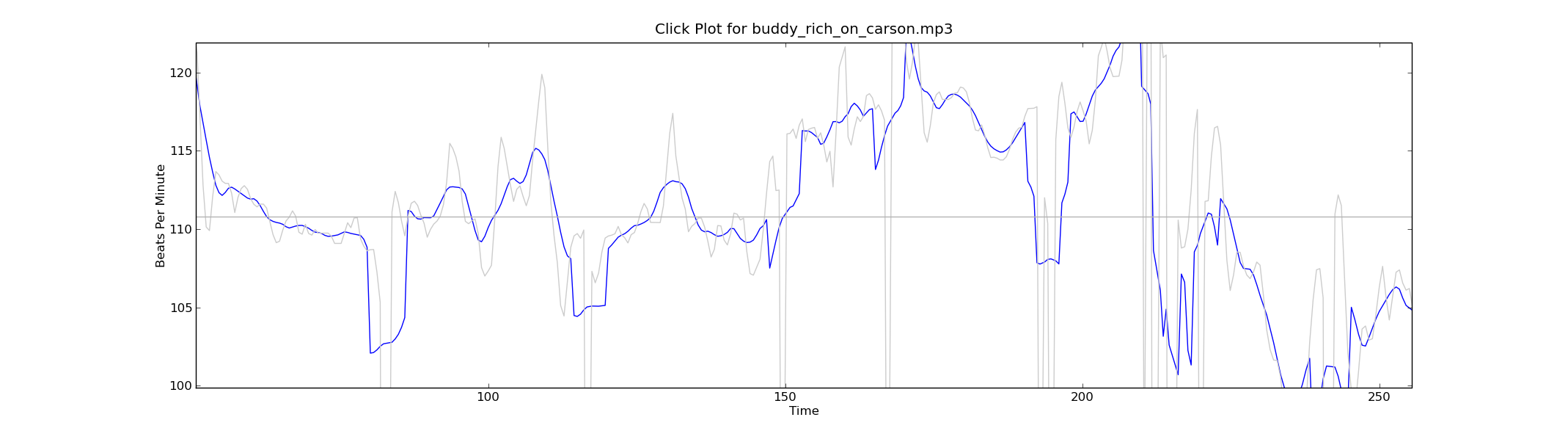
With this new tool in my programming pocket, I thought I’d update my click plotter program to use matplotlib. (The click plotter is a program that generates plots showing how a drummer’s BPM varies over the course of a song. By looking at the generated plots it is easy to see if the beat for a song is being generated by a man or a machine. Read more about it in ‘In Search of the Click Track‘).
The matplotlib code to generate the plots is straightforward:
def plot_click_track(filename): track = track_api.Track(filename) tempo = float(track.tempo['value']) beats = track.beats times = [ dict['start'] for dict in beats ] bpms = get_bpms(times)plt.title('Click Plot for ' + os.path.basename(filename)) plt.ylabel('Beats Per Minute') plt.xlabel('Time') plt.plot(times, get_filtered_bpms(bpms), label='Filtered') plt.plot(times, bpms, color=('0.8'), label='raw') plt.ylim(tempo * .9, tempo * 1.1) plt.axhline(tempo, color=('0.7'), label="Tempo") plt.show()The complete source code for click_plot is in the example directory of the pyechonest module.
Here are a few examples plots generated by click_plot:
To create your own click plots grab the example from the SVN repository, make sure you have pyechonest and matplotlib installed, get an Echo Nest API key and start generating click plots with the command:
% click_plot.py /path/to/music.mp3

New news feed for developer.echonest.com
Posted by Paul in code, Music, The Echo Nest, web services on July 30, 2009
 If you are interested in keeping up with the latest news about the Echo Nest APIs you can now subscribe to a developer.echonest.com news feed where we are posting news and articles about the Echo Nest APIs. Read more and subscribe at developer.echonest.com.
 Music Machinery