Archive for category web services
Flash API for the Echo Nest
Posted by Paul in code, The Echo Nest, web services on July 8, 2009
It’s a busy week for client APIs at the Echo Nest. Developer Ryan Berdeen has released a Flash API for the Echo Nest. Ryan’s API supports the track methods of the Echo Nest API, giving the flash programmer the ability to analyze a track and get detailed info about the track including track metadata, loudness, mode and key along with detailed information relating to the tracks rhythmic, timbrel, and harmonic content.
One of the sticky bits in using the Echo Nest from Flash has been the track uploader. People have had a hard time getting it to work – and since we don’t do very much Flash programming here at the nest it never made it to the top of the list of things to look into. However, Ryan dug in an wrote a MultipartFormDataEncoder that works with the track upload API method – solving the problem not just for him, but for everyone.
Ryan’s timing for this release is most excellent. This release comes just in time for Music Hackday – where hundreds of developers (presumably including a number of flash programmers) will be hacking away at the various music APIs including the Echo Nest. Special thanks goes to Ryan for developing this API and making it available to the world
You make me quantized Miss Lizzy!
Posted by Paul in code, Music, remix, The Echo Nest, web services on July 5, 2009
This week we plan to release a new version of the Echo Nest Python remix API that will add the ability to manipulate tempo and pitch along with all of the other manipulations supported by remix. I’ve played around with the new capabilities a bit this weekend, and its been a lot of fun. The new pitch and tempo shifting features are integrated well with the API, allowing you to adjust tempo and pitch at any level from the tatum on up to the beat or the bar. Here are some quick examples of using the new remix features to manipulate the tempo of a song.
A few months back I created some plots that showed the tempo variations for a number of drummers. One plot showed the tempo variation for The Beatles playing ‘Dizzy Miss Lizzy’. The peaks and valleys in the plot show the tempo variations over the length of the song.
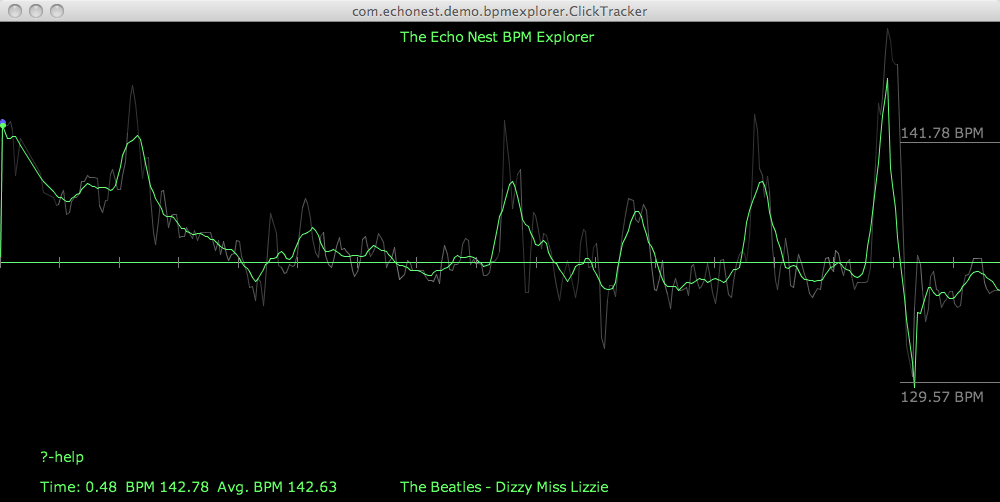
You got me speeding Miss Lizzy
With the tempo shifting capabilities of the API we can now not only look at the detailed tempo information – we can manipulate it. For starters here’s an example where we use remix to gradually increase the tempo of Dizzy Ms. Lizzy so that by the end, its twice as fast as the beginning. Here’s the clickplot:
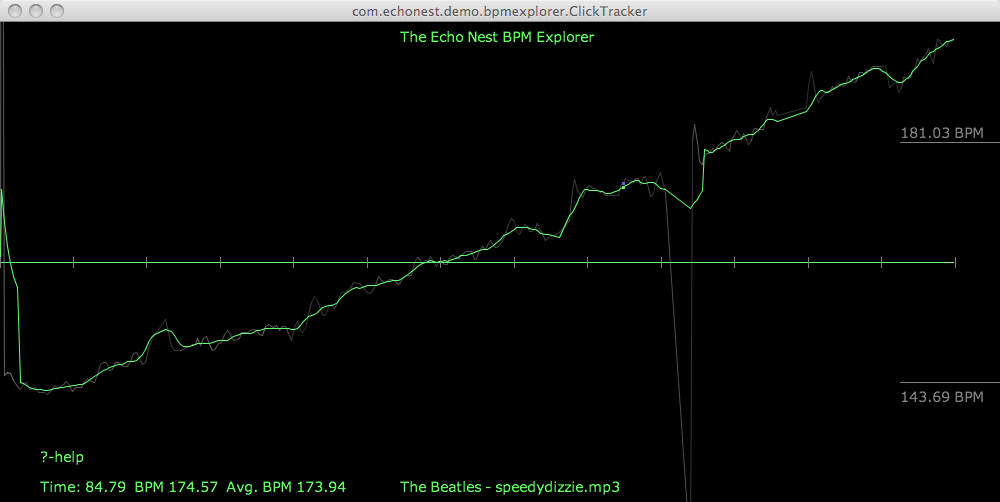
And here’s the audio
I don’t notice the acceleration until about 30 or 45 seconds into the song. I suspect that a good drummer would notice the tempo increase much earlier. I think it’d be pretty fun to watch the dancers if a DJ put this version on the turntable.
As usual with remix – the code is dead simple:
 st = modify.Modify()
 afile = audio.LocalAudioFile(in_filename)
 beats = afile.analysis.beats
 out_shape = (2*len(afile.data),)
 out_data = audio.AudioData(shape=out_shape, numChannels=1, sampleRate=44100)
 total = float(len(beats))
 for i, beat in enumerate(beats):
     delta =  i / total
     new_ad = st.shiftTempo(afile[beat], 1 + delta / 2)
     out_data.append(new_ad)
 out_data.encode(out_filename)
You got me Quantized Miss Lizzy!
For my next experiment, I thought it would be fun if we could turn Ringo into a more precise drummer – so I wrote a bit of code that shifted the tempo of each beat to match the average overall tempo – essentially applying a click track to Ringo. Here’s the resulting click plot, looking as flat as most drum machine plots look:
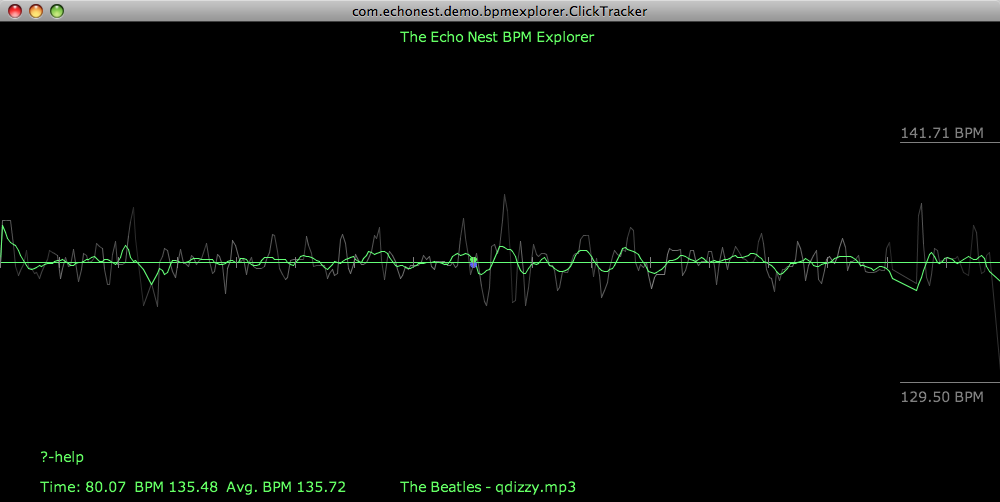
Compare that to the original click plot:
Despite the large changes to the timing of the song visibile in the click plot, it’s not so easy to tell by listening to the audio that Ringo has been turned into a robot – and yes there are a few glitches in there toward the end when the beat detector didn’t always find the right beat.
The code to do this is straightforward:
 st = modify.Modify()
 afile = audio.LocalAudioFile(in_filename)
 tempo = afile.analysis.tempo;
 idealBeatDuration = 60. / tempo[0];
 beats = afile.analysis.beats
 out_shape = (int(1.2 *len(afile.data)),)
 out_data = audio.AudioData(shape=out_shape, numChannels=1, sampleRate=44100)
 total = float(len(beats))
 for i, beat in enumerate(beats):
     data = afile[beat].data
     ratio = idealBeatDuration / beat.duration
     # if this beat is too far away from the tempo, leave it alone
     if ratio < .8 and ratio > 1.2:
         ratio = 1
     new_ad = st.shiftTempoChange(afile[beat], 100 - 100 * ratio)
     out_data.append(new_ad)
 out_data.encode(out_filename)
Is is Rock and Roll or Sines and Cosines?
Here’s another tempo manipulation – I applied a slowly undulating sine wave to the overall tempo – its interesting how more disconcerting it is to hear a song slow down than it does hearing it speed up.
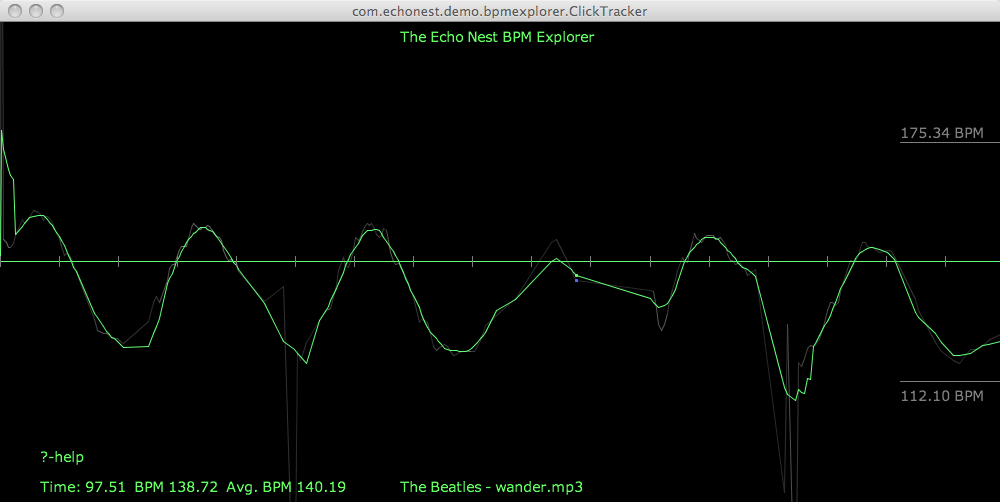
I’ll skip the code for the rest of the examples as an exercise for the reader, but if you’d like to see it just wait for the upcoming release of remix – we’ll be sure to include these as code samples.
The Drunkard’s Beat
Here’s a random walk around the tempo – my goal here was an attempt to simulate an amateur drummer – small errors add up over time resulting in large deviations from the initial tempo:
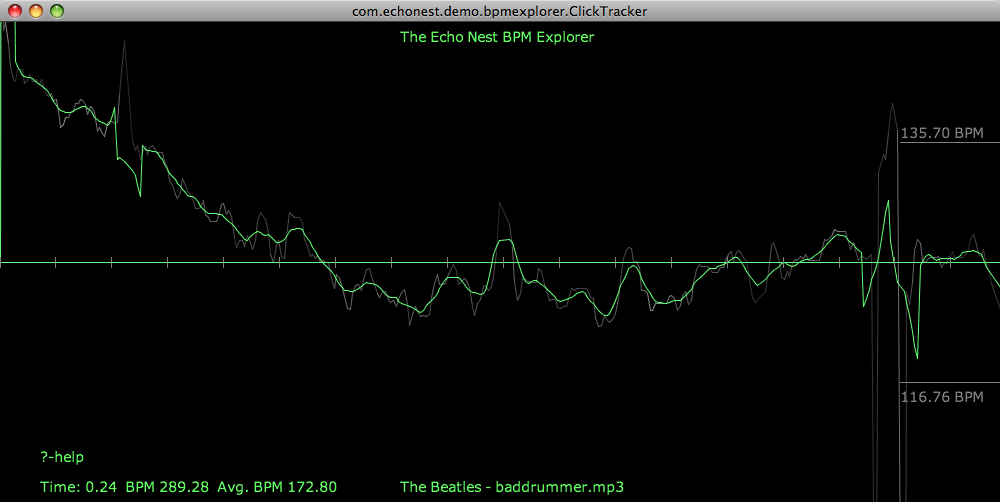
Here’s the audio:
Higher and Higher
In addition to these tempo related shifts, you can also do interesting things to shift the pitch around. I’ll devote an upcoming post to this type of manipulation, but here’s something to whet your appetite. I took the code that gradually accelerated the tempo of a song and replaced the line:
new_ad = st.shiftTempo(afile[beat], 1 + delta / 2) with this:new_ad = st.shiftPitch(afile[beat], 1 + delta / 2)in order to give me tracks that rise in pitch over the course of the song.
Wrapup
Look for the release that supports time and pitch stretching in remix this week. I’ll be sure to post here when it is released. To use the remix API you’ll need an Echo Nest API key, which you can get for free from developer.echonest.com.The click plots were created with the Echo Nest BPM explorer – which is a Java webstart app that you can launch from your browser at The Echo Nest BPM Explorer site.
The Echo Nest Cocoa Framework
Posted by Paul in code, Music, The Echo Nest, web services on July 1, 2009
Kamel Makhloufi (aka melka) has created a Cocoa Framework for the Echo Nest and has released it as open source. This framework makes it easy for Mac developers (and presumable iPhone and iTouch developers) to use the Echo Nest API services. Kamel’s goal is to build an application similar to Audiosurf (a music-adapting puzzle racer that uses your own music), but along the way Kamel realized his framework may be useful to others and so he has released it for all of us to use.
The Framework supports all of the Track/Analysis methods of the API including Track Upload, getting tempos, duration, bar, beat and tatum info as well as detailed segment information. On Melka’s TODO list is to add the Echo Nest artist methods.
Using the framework, Melka created a nifty track visualization tool that will render a colorful representation of the Echo Nest analysis for a track:
 Kamel implemented this in about 300 lines of Objective-C code.
The Echo Nest Cocoa Framework is released under a GPL V3 license and is hosted on google code at: http://code.google.com/p/echonestcocoaframework/.
The release is just in time for Music Hackday – I’m hoping we see an iPhone app or two emerge from this event that use the Echo Nest APIs! Kamel’s framework is just the thing to make it happen
The Dissociated Mixes
Posted by Paul in fun, Music, remix, The Echo Nest, web services on June 30, 2009
Check out Adam Lindsay’s latest post on Dissociated Mixes. He’s got a pretty good collection of automatically shuffled songs that sound interesting and eerily different from the original. One example is this remixed audio/video of Beck’s Record Club cover of “Waiting for my Man” by The Velvet Underground and Nico:
New Echo Nest Java client released
Posted by Paul in code, java, Music, The Echo Nest, web services on June 24, 2009
We’ve just released version 1.1 of the Echo Nest Java Client. The Java Client makes it easy to access the Echo Nest APIs from a Java program. This release fixes some bugs and improves caching support. Here’s a snippet of Java code that shows how you can use the API to find similar artists for the band ‘Weezer’:
 ArtistAPI artistAPI = new ArtistAPI(MY_ECHO_NEST_API_KEY);
 List<Artist> artists = artistAPI.searchArtist("Weezer, false);
 if (artists.size() > 0) {
     for (Artist artist : artists) {
          List<Scored<Artist>> similars =
                artistAPI.getSimilarArtists(artist, 0, 10);
          for (Scored<Artist> simArtist : similars) {
               System.out.println("   " + simArtist.getItem());
          }
      }
  }
Also included in the release is a command line shell that lets you interact with the Echo Nest API. You can start it up from the command line like so:
java -DDECHO_NEST_API_KEY=YOUR_API_KEY -jar EchoNestAPI.jar
Here’s an example session:
Welcome to The Echo Nest API Shell
 type 'help'
nest% help
0) alias - adds a pseudonym or shorthand term for a command
1) chain - execute multiple commands on a single line
2) delay - pauses for a given number of seconds
3) echo - display a line of text
4) enid - gets the ENID for an arist
5) gc - performs garbage collection
6) getMaxCacheTime - gets the cache time
7) get_audio - gets audio for an artist
8) get_blogs - gets blogs for an artist
9) get_fam - gets familiarity for an artist
10) get_hot - gets hotttnesss for an artist
11) get_news - gets news for an artist
12) get_reviews - gets Reviews for an artist
13) get_similar - finds similar artists
14) get_similars - finds similar artists to a set of artists
15) get_urls - gets Reviews for an artist
16) get_video - gets video for an artist

( .. commands omitted  ..)

53) trackTatums - gets the tatums of a track
54) trackTempo - gets the overall Tempo of a track
55) trackTimeSignature - gets the overall time signature of a track
56) trackUpload - uploads a track
57) trackUploadDir - uploads a directory of tracks
58) trackWait - waits for an analysis to be complete
59) version - displays version information
nest%

nest% get_similar weezer
Similarity for Weezer
 1.00 The Smashing Pumpkins
 0.50 Ozma
 0.33 Fountains of Wayne
 0.25 Jimmy Eat World
 0.20 Veruca Salt
 0.17 The Breeders
 0.14 Nerf Herder
 0.13 The Flaming Lips
 0.11 Death Cab for Cutie
 0.10 Rivers Cuomo
 0.09 The Rentals
 0.08 Size 14
 0.08 Nada Surf
 0.07 Third Eye Blind
 0.07 Chopper One
nest%

nest% get_fam Decemberists
Familiarity for The Decemberists 0.8834854
nest%
nest% trackUpload  "09 When I'm Sixty-Four.MP3"
ID: baad7cab21b853ea5ead4db0a12b1df8
nest% trackDuration
Duration: 157.96104
nest%
nest% trackTempo
140.571 (0.717)
nest%
If you are interested in playing around with the Echo Nest API but don’t want to code up your own application, typing in webservice URLs by hand gets pretty old, pretty quickly. The Echo Nest shell gives you a simpler way to try things out.
Music HackDay is coming …
Posted by Paul in code, fun, Music, The Echo Nest, web services on June 23, 2009
If you live within a couple hundred miles of London, and you read this blog, then there’s no reason why you shouldn’t be planning on going to Music Hackday being held on July 11th and 12th at the Guardian offices in London. This is a great opportunity to connect with other developers that are creating next generation music applications, web sites, and gadgets. In addition to the developers, API providers will be showing off their wares (and some will even be unveiling new APIs). Companies include 7digital, Gigulate, Last.fm, People’s Music Store, Songkick, Soundcloud and The Echo Nest. Recently added to the agenda are workshops by Tinker.it and RjDj.
The Echo Nest will be there, represented by Adam Lindsay. He’ll guide you through using our various APIs including our artist recommendation APIs and our music analysis and remix APIs. Oh, and the developer that creates the coolest thing that uses the Echo Nest API will go home with a big, fat (i.e. 32gb) iPod touch.
Looking at the attendee list, the Music Hackday looks to be a who’s who in music tech – not only will it be a day of hacking, but it’s a great place to get to meet all of the folks that are creating the next generation of music apps. It looks like spaces are filling up quickly, so if you haven’t already registered, don’t dally, or you may miss out.
Building a music map
Posted by Paul in data, fun, java, Music, research, The Echo Nest, visualization, web services on May 31, 2009
I like maps, especially maps that show music spaces – in fact I like them so much I have one framed, hanging in my kitchen. I’d like to create a map for all of music. Like any good map, this map should work at multiple levels; it should help you understand the global structure of the music space, while allowing you to dive in and see fine detailed structure as well. Just as Google maps can show you that Africa is south of Europe and moments later that Stark st. intersects with Reservoir St in Nashua NH a good music map should be able to show you at a glance how Jazz, Blues and Rock relate to each other while moments later let you find an unknown 80s hair metal band that sounds similar to Bon Jovi.
My goal is to build a map of the artist space, one the allows you to explore the music space at a global level, to understand how different music styles relate, but then also will allow you to zoom in and explore the finer structure of the artist space.
I’m going to base the music map on the artist similarity data collected from the Echo Nest artist similarity web service. This web service lets you get 15 most similar artists for any artist. Using this web service I collected the artist similarity info for about 70K artists along with each artists familiarity and hotness.
Some Explorations
It would be silly to start trying to visualize 70K artists right away – the 250K artist-to-artist links would overwhelm just about any graph layout algorithm. The graph would look like this. So I started small, with just the near neighbors of The Beatles. (Beatles-K1) For my first experiment, I graphed the the nearest neighbors to The Beatles. This plot shows how the the 15 near neighbors to the Beatles all connect to each other.
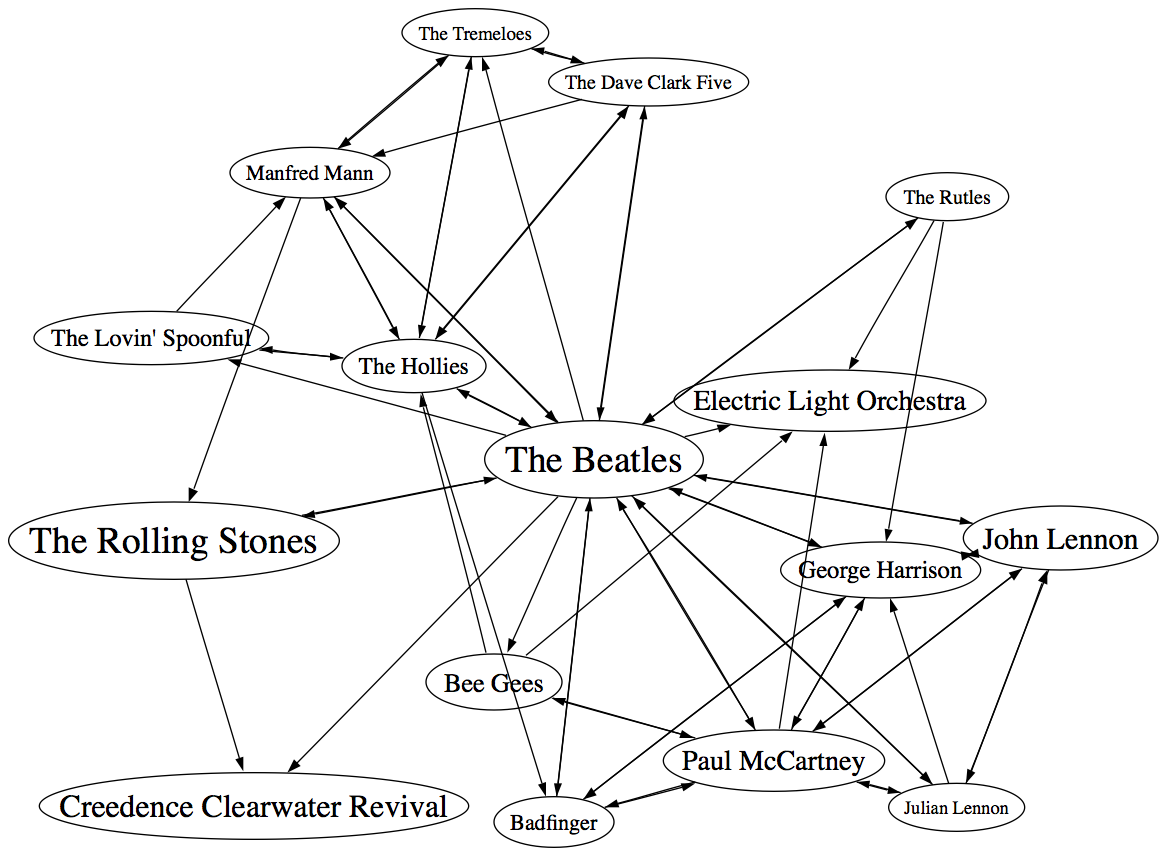
In the graph, artist names are sized proportional to the familiarity of the artist. The Beatles are bigger than The Rutles because they are more familiar. I think the graph is pretty interesting, showing how all of the similar artists of the Beatles relate to each other, however, the graph is also really scary because it shows 64 interconnections for these 16 artists. This graph is just showing the outgoing links for the Beatles, if we include the incoming links to the Beatles (the artist similarity function is asymettric so outgoing similarities and incoming similarities are not the same), it becomes a real mess:

If you extend this graph one more level – to include the friends of the friends of The Beatles (Beatles-K2), the graph becomes unusable. Here’s a detail, click to see the whole mess. It is only 116 artists with 665 edges, but already you can see that it is not going to be usable.


Eliminating the edges
Clearly the approach of drawing all of the artist connections is not going to scale to beyond a few dozen artists. One approach is to just throw away all of the edges. Instead of showing a graph representation, use an embedding algorithm like MDS or t-SNE to position the artists in the space. These algorithms layout items by attempting to minimize the energy in the layout. It’s as if all of the similar items are connected by invisible springs which will push all of the artists into positions that minimize the overall tension in the springs. The result should show that similar artists are near each other, and dissimilar artists are far away. Here’s a detail for an example for the friends of the friends of the Beatles plot. (Click on it to see the full plot)

I find this type of visualization to be quite unsatisfying. Without any edges in the graph I find it hard to see any structure. I think I would find this graph hard to use for exploration. (Although it is fun though to see the clustering of bands like The Animals, The Turtles, The Byrds, The Kinks and the Monkeee).
Drawing some of the edges
We can’t draw all of the edges, the graph just gets too dense, but if we don’t draw any edges, the map loses too much structure making it less useful for exploration. So lets see if we can only draw some of the edges – this should bring back some of the structure, without overwhelming us with connections. The tricky question is “Which edges should I draw?”. The obvious choice would be to attach each artist to the artist that it is most similar to. When apply this to the Beatles-K2 neighborhood we get something like this:

This clearly helps quite a bit. We no longer have the bowl of spaghetti, while we can still see some structure. We can even see some clustering that make sense (Led Zeppelin is clustered with Jimi Hendrix and the Rolling Stones while Air Supply is closer to the Bee Gees). But there are some problems with this graph. First, it is not completely connected, there are a 14 separate clusters varying from a size of 1 to a size of 57. This disconnection is not really acceptable. Second, there are a number of non-intuitive flows from familiar to less familiar artists. It just seems wrong that bands like the Moody Blues, Supertramp and ELO are connected to the rest of the music world via Electric Light Orchestra II (shudder).
To deal with the ELO II problem I tried a different strategy. Instead of attaching an artist to its most similar artist, I attach it to the most similar artist that also has the closest, but greater familiarity. This should prevent us from attaching the Moody Blues to the world via ELO II, since ELO II is of much less familiarity than the Moody Blues. Here’s the plot:
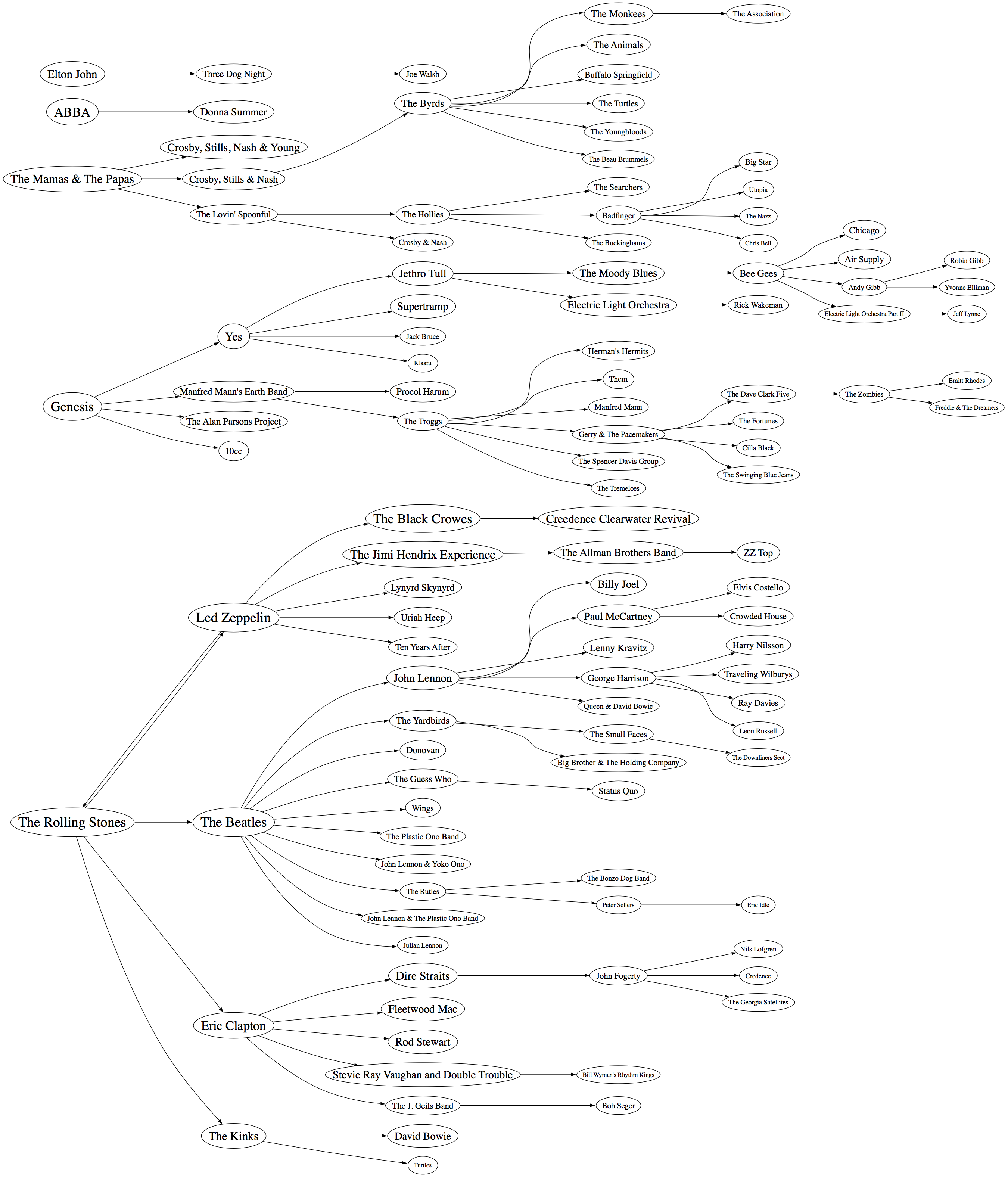
Now we are getting some where. I like this graph quite a bit. It has a nice left to right flow from popular to less popular, we are not overwhelmed with edges, and ELO II is in its proper subservient place. The one problem with the graph is that it is still disjoint. We have 5 clusters of artists. There’s no way to get to ABBA from the Beatles even though we know that ABBA is a near neighbor to the Beatles. This is a direct product of how we chose the edges. Since we are only using some of the edges in the graph, there’s a chance that some subgraphs will be disjoint. When I look at the a larger neighborhood (Beatles-K3), the graph becomes even more disjoint with a hundred separate clusters. We want to be able to build a graph that is not disjoint at all, so we need a new way to select edges.
Minimum Spanning Tree
One approach to making sure that the entire graph is connected is to generate the minimum spanning tree for the graph. The minimum spanning tree of a graph minimizes the number of edges needed to connect the entire graph. If we start with a completely connected graph, the minimum spanning tree is guarantee to result in a completely connected graph. This will eliminate our disjoint clusters. For this next graph, built the minimum spanning tree of the Beatles-K2 graph.

As predicted, we no longer have separate clusters within the graph. We can find a path between any two artists in the graph. This is a big win, we should be able to scale this approach up to an even larger number of artists without ever having to worry about disjoint clusters. The whole world of music is connected in a single graph. However, there’s something a bit unsatisfying about this graph. The Beatles are connected to only two other artists: John Lennon & The Plastic Ono Band and The Swinging Blue Jeans. I’ve never heard of the Swinging Blue Jeans. I’m sure they sound a lot like the Beatles, but I’m also sure that most Beatles fans would not tie the two bands together so closely. Our graph topology needs to be sensitive to this. One approach is to weight the edges of the graph differently. Instead of weighting them by similarity, the edges can be weighted by the difference in familiarity between two artists. The Beatles and Rolling Stones have nearly identical familiarities so the weight between them would be close to zero, while The Beatles and the Swinging Blue Jeans have very different familiarities, so the weight on the edge between them would be very high. Since the minimum spanning is trying to reduce the overall weight of the edges in the graph, it will chose low weight edges before it chooses high weight edges. The result is that we will still end up with a single graph, with none of the disjoint clusters, but artists will be connected to other artists of similar familiarity when possible. Let’s try it out:

Now we see that popular bands are more likely to be connected to other popular bands, and the Beatles are no longer directly connected to “The Swinging Blue Jeans”. I’m pretty happy with this method of building the graph. We are not overwhelmed by edges, we don’t get a whole forest of disjoint clusters, and the connections between artists makes sense.
Of course we can build the graph by starting from different artists. This gives us a deep view into that particular type of music. For instance, here’s a graph that starts from Miles Davis:

Here’s a near neighbor graph starting from Metallica:

And here’s one showing the near neighbors to Johann Sebastian Bach:

This graphing technique works pretty well, so lets try an larger set of artists. Here I’m plotting the top 2,000 most popular artists. Now, unlike the Beatles neighborhood, this set of artists is not guaranteed to be connected, so we may have some disjoint cluster in the plot. That is expected and reasonable. The image of the resulting plot is rather large (about 16MB) so here’s a small detail, click on the image to see the whole thing. I’ve also created a PDF version which may be easier to browse through.

I pretty pleased with how these graphs have turned out. We’ve taken a very complex space and created a visualization that shows some of the higher level structure of the space (jazz artists are far away from the thrash artists) as well as some of the finer details – the female bubblegum pop artists are all near each other. The technique should scale up to even larger sets of artists. Memory and compute time become the limiting factors, not graph complexity. Still, the graphs aren’t perfect – seemingly inconsequential artists sometimes appear as gateways into whole sub genre. A bit more work is needed to figure out a better ordering for nodes in the graph.
Some things I’d like to try, when I have a bit of spare time:
- Create graphs with 20K artists (needs lots of memory and CPU)
- Try to use top terms or tags of nearby artists to give labels to clusters of artists – so we can find the Baroque composers or the hair metal bands
- Color the nodes in a meaningful way
- Create dynamic versions of the graph to use them for music exploration. For instance, when you click on an artist you should be able to hear the artist and read what people are saying about them.
To create these graphs I used some pretty nifty tools:
- The Echo Nest developer web services – I used these to get the artist similarity, familiarity and hotness data. The artist similarity data that you get from the Echo Nest is really nice. Since it doesn’t rely directly on collaborative filtering approaches it avoids the problems I’ve seen with data from other sources of artist similarity. In particular, the Echo Nest similarity data is not plagued by hubs (for some music services, a popular band like Coldplay may have hundreds or thousands of near neighbors due to a popularity bias inherent in CF style recommendation). Note that I work at the Echo Nest. But don’t be fooled into thinking I like the Echo Nest artist similarity data because I work there. It really is the other way around. I decided to go and work at the Echo Nest because I like their data so much.
- Graphviz – a tool for rendering graphs
- Jung – a Java library for manipulating graphs
If you have any ideas about graphing artists – or if you’d like to see a neighborhood of a particular artist. Please let me know.
Artist similarity, familiarity and hotness
Posted by Paul in Music, recommendation, The Echo Nest, visualization, web services on May 25, 2009
 The Echo Nest developer web services offer a number of interesting pieces of data about an artist, including similar artists, artist familiarity and artist hotness. Familiarity is an indication of how well known the artist is, while hotness (which we spell as the zoolanderish ‘hotttnesss’) is an indication of how much buzz the artist is getting right now. Top familiar artists are band like Led Zeppelin, Coldplay, and The Beatles, while top ‘hottt’ artists are artists like Katy Perry, The Boy Least Likely to, and Mastodon.
I was interested in understanding how familiarity, hotness and similarity interact with each other, so I spent my Memorial day morning creating a couple of plots to help me explore this. First, I was interested in learning how the familiarity of an artist relates to the familiarity of that artists’s similar artists. When you get the similar artists for an artist, is there any relationship between the familiarity of these similar artists and the seed artist? Since ‘similar artists’ are often used for music discovery, it seems to me that on average, the similar artists should be less familiar than the seed artist. If you like the very familiar Beatles, I may recommend that you listen to ‘Bon Iver’, but if you like the less familiar ‘Bon Iver’ I wouldn’t recommend ‘The Beatles’. I assume that you already know about them. To look at this, I plotted the average familiarity for the top 15 most similar artists for each artist along with the seed artist’s familiarity. Here’s the plot:
 In this plot, I’ve take the top 18,000 most familiar artists, ordered them by familiarity. The red line is the familiarity of the seed artist, and the green cloud shows the average familiarity of the similar artists. In the plot we can see that there’s a correlation between artist familiarity and the average familiarity of similar artists. We can also see that similar artists tend to be less familiar than the seed artist. This is exactly the behavior I was hoping to see. Our similar artist function yields similar artists that, in general, have an average famililarity that is less than the seed artist.
This plot can help us q/a our artist similarity function. If we see the average familiarity for similar artists deviates from the standard curve, there may be a problem with that particular artist. For instance, T-Pain has a familiarity of 0.869, while the average familiarity of T-Pain’s similar artists is 0.340. This is quite a bit lower than we’d expect – so there may be something wrong with our data for T-Pain. We can look at the similars for T-Pain and fix the problem.
For hotness, the desired behavior is less clear. If a listener starting from a medium hot artist is looking for new music, it is unclear whether or not they’d like a hotter or colder artist. To see what we actually do, I looked at how the average hotness for similar artists compare to the hotness of the seed artist. Here’s the plot:
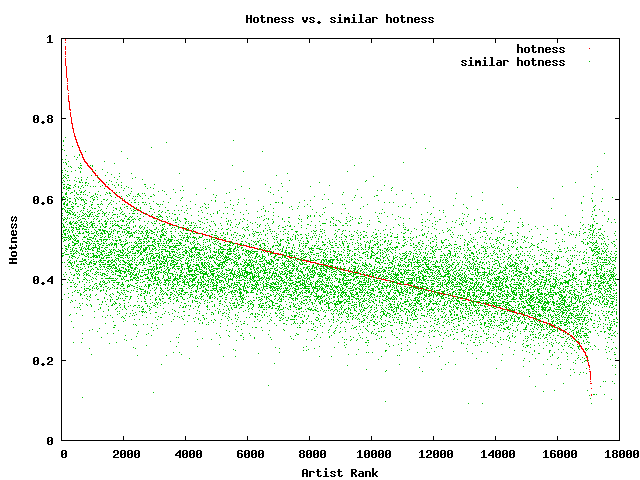 In this plot, the red curve is showing the hotness of the top 18,000 most familiar artists. It is interesting to see the shape of the curve, there are very few ultra-hot artists (artists with a hotness about .8) and very few familiar, ice cold artists (with a hotness of less than 0.2). The average hotness of the similar artists seems to be somewhat correlated with the hotness of the seed artist. But markedly less than with the familiarity curve. For hotness if your seed artist is hot, you are likely to get less hot similar artists, while if the seed artist is not hot, you are likely to get hotter artists. That seems like reasonable behavior to me.
Well, there you have it. Some Monday morning explorations of familiarity, similarity and hotness. Why should you care? If you are building a music recommender, familiarity and hotness are really interesting pieces of data to have access to. There’s a subtle game a recommender has to play, it has to give a certain amount of familiar recommendations to gain trust, while also giving a certain number of novel recommendations in order to enable music discovery.
Spotify + Echo Nest == w00t!
Posted by Paul in Music, The Echo Nest, web services on May 19, 2009
 Yesterday, at the SanFran MusicTech Summit, I gave a sneak preview that showed how Spotify is tapping into the Echo Nest platform to help their listeners explore for and discover new music. I must say that I am pretty excited about this. Anyone who has read this blog and its previous incarnation as ‘Duke Listens!’ knows that I am a long time enthusiast of Spotify (both the application and the team). I first blogged about Spotify way back in January of 2007 while they were still in stealth mode. I blogged about the Spotify haircuts, and their serious demeanor:

Those crazy Spotify guys
I blogged about the Spotify application when it was released to private beta: Woah – Spotify is pretty cool, and continued to blog about them every time they added another cool feature.
I’ve been a daily user of Spotify for 18 months now. It is one of my favorite ways to listen to music on my computer. It gives me access to just about any song that I’d like to hear (with a few notable exceptions – still no Beatles for instance).
It is clear to anyone who uses Spotify for a few hours that having access to millions and millions of songs can be a bit daunting. With so many artists and songs to chose from, it can be hard to decide what to listen to – Barry Schwartz calls this the Paradox of Choice – he says too many options can be confusing and can create anxiety in a consumer. The folks at Spotify understand this. From the start they’ve been building tools to help make it easier for listeners to find music. For instance, they allow you to easily share playlists with your friends. I can create a music inbox playlist that any Spotify user can add music to. If I give the URL to my friends (or to my blog readers) they can add music that they think I should listen to.
Now with the Spotify / Echo Nest connection, Spotify is going one step further in helping their listeners deal with the paradox of choice. They are providing tools to make it easier for people to explore for and discover new music. The first way that Spotify is tapping in to the Echo Nest platform is very simple, and intuitive. Right click on a playlist, and select ‘Extend Playlist’. When you do that, the playlist will automatically be extended with songs that fit in well with songs that are already in the playlist. Here’s an example:
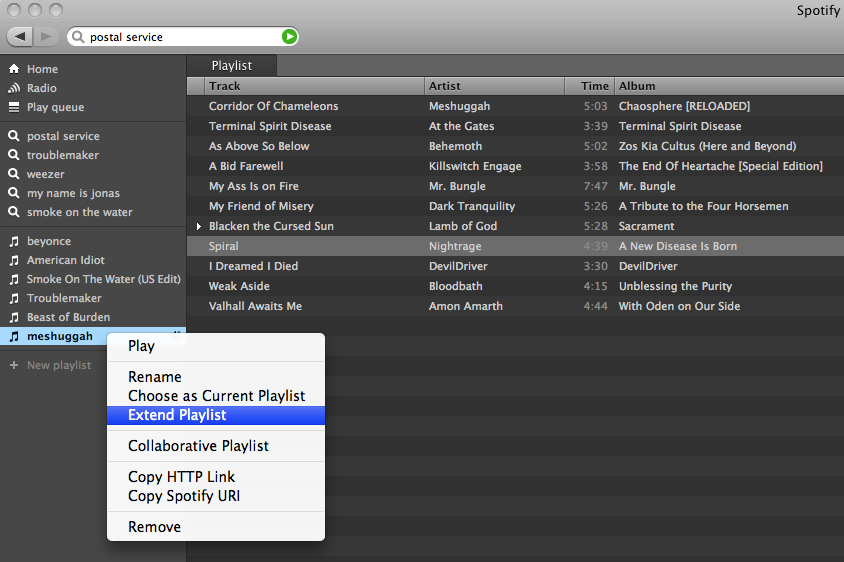
So how is this different from any other music recommender? Well, there are a number of things going on here. First of all, most music recommenders rely on collaborative filtering (a.k.a. the wisdom of the crowds), to recommend music. This type of music recommendation works great for popular and familiar artists recommendations … if you like the Beatles, you may indeed like the Rolling Stones. But Collaborative Filtering (CF) based recommendations don’t work well when trying to recommend music at the track level. The data is often just to sparse to make recommendations. The wisdom of the crowds model fails when there is no crowd. When one is dealing with a Spotify-sized music collection of many millions of songs, there just isn’t enough user data to give effective recommendations for all of the tracks. The result is that popular tracks get recommended quite often, while less well known music is ignored. To deal with this problem many CF-based recommenders will rely on artist similarity and then select tracks at random from the set of similar artists. This approach doesn’t always work so well, especially if you are trying to make playlists with the recommender. For example, you may want a playlist of acoustic power ballads by hair metal bands of the 80s. You could seed the playlist with a song like Mötley Crüe’s Home Sweet Home, and expect to get similar power ballads, but instead you’d find your playlist populated with standard glam metal fair, with only a random chance that you’d have other acoustic power ballads. There are a boatload of other issues with wisdom of the crowds recommendations – I’ve written about them previously, suffice it to say that it is a challenge to get a CF-based recommender to give you good track-level recommendations.
The Echo Nest platform takes a different approach to track-level recommendation. Here’s what we do:
- Read and understand what people are saying about music – we crawl every corner of the web and read every news article, blog post, music review and web page for every artist, album and track. We apply statistical and natural language processing to extract meaning from all of these words. This gives us a broad and deep understanding of the global online conversation about music
- Listen to all music – we apply signal processing and machine learning algorithms to audio to extract a number perceptual features about music. For every song, we learn a wide variety of attributes about the song including the timbre, song structure, tempo, time signature, key, loudness and so on. We know, for instance, where every drum beat falls in Kashmir, and where the guitar solo starts in Starship Trooper.
- We combine this understanding of what people are saying about music and our understanding of what the music sounds like to build a model that can relate the two – to give us a better way of modeling a listeners reaction to music. There’s some pretty hardcore science and math here. If you are interested in the gory details, I suggest that you read Brian’s Thesis: Learning the meaning of music.
What this all means is that with the Echo Nest platform, if you want to make a playlist of acoustic hair metal power ballads, we’ll be able to do that – we know who the hair metal bands are, and we know what a power ballad sounds like. And since we don’t rely on the wisdom of the crowds for recommendation we can avoid some of the nasty problems that collaborative filtering can lead to. I think that when people get a chance to play with the ‘Extend Playlist’ feature they’ll be happy with the listening experience.
It was great fun giving the Spotify demo at the SanFran MusicTech Summit. Even though Spotify is not available here in the U.S., the buzz that is occuring in Europe around Spotify is leaking across the ocean. When I announced that Spotify would be using the Echo Nest, there’s was an audible gasp from the audience. Some people were seeing Spotify for the first time, but everyone knew about it. It was great to be able to show Spotify using the Echo Nest. This demo was just a sneak preview. I expect there will be lots more interestings to come. Stay tuned.
SanFran Music Tech summit
Posted by Paul in recommendation, The Echo Nest, web services on May 13, 2009
This weekend I’ll be heading out to San Francisco to attend the SanFran MusicTech Summit. The summit is a gathering of musicians, suits, lawyers, and techies with a focus on the convergence of music, business, technology and the law. There’s quite a set of music tech luminaries that will be in attendance, and the schedule of panels looks fantastic.
I’ll be moderating a panel on Music Recommendation Services. There are some really interesting folks on the panel: Stephen White from Gracenote, Alex Lascos from BMAT, James Miao from the Sixty One and Michael Papish from Media Unbound. I’ve been on a number of panels in the last few years. Some have been really good, some have been total train wrecks. The train wrecks occur when (1) panelists have an opportunity to show powerpoint slides, (2) a business-oriented panelist decides that the panel is just another sales call, (3) the moderator loses control and the panel veers down a rat hole of irrelevance. As moderator, I’ll try to make sure the panel doesn’t suck .. but already I can tell from our email exchanges that this crew will be relevant, interesting and funny. I think the panel will be worth attending.
We are already know some of the things that we want to talk about in the panel:
- Does anyone really have a problem finding new music? Is this a problem that needs to be solved?
- What makes a good music recommendation?
- What’s better – a human or a machine recommender?
- Problems in high stakes evaluations
And some things that we definitely do not want to talk about:
- Business models
- Music industry crisis
If you are attending the summit, I hope you’ll attend the panel.
 Music Machinery