Posts Tagged The Echo Nest
The Name Dropper
Posted by Paul in data, fun, Music, The Echo Nest, web services on July 10, 2010
[tweetmeme source= ‘plamere’ only_single=false]
TL;DR; I built a game called Name Dropper that tests your knowledge of music artists.
One bit of data that we provide via our web APIs is Artist Familiarity. This is a number between 0 and 1 that indicates how likely it is that someone has heard of that artists. There’s no absolute right answer of course – who can really tell if Lady Gaga is more well known than Barbara Streisand or whether Elvis is more well known than Madonna. But we can certainly say that The Beatles are more well known, in general, than Justin Bieber.
To make sure our familiarity scores are good, we have a Q/A process where a person knowledgeable in music ranks our familiarity score by scanning through a list of artists ordered in descending familiarity until they start finding artists that they don’t recognize. The further they get into the list, the better the list is. We can use this scoring technique to rank multiple different familiarity algorithms quickly and accurately.
One thing I noticed, is that not only could we tell how good our familiarity score was with this technique, this also gives a good indication of how well the tester knows music. The further a tester gets into a list before they can’t recognize artists, the more they tend to know about music. This insight led me to create a new game: The Name Dropper.
The Name Dropper is a simple game. You are presented with a list of dozen artist names. One name is a fake, the rest are real.

If you find the fake, you go onto the next round, but if you get fooled, the game is over. At first, it is pretty easy to spot the fakes, but each round gets a little harder, and sooner or later you’ll reach the point where you are not sure, and you’ll have to guess. I think a person’s score is fairly representative of how broad their knowledge of music artists are.
The biggest technical challenge in building the application was coming up with a credible fake artist name generator. I could have used Brian’s list of fake names – but it was more fun trying to build one myself. I think it works pretty well. I really can’t share how it works since that could give folks a hint as to what a fake name might look like and skew scores (I’m sure it helps boost my own scores by a few points). The really nifty thing about this game is it is a game-with-a-purpose. With this game I can collect all sorts of data about artist familiarity and use the data to help improve our algorithms.
So go ahead, give the Name Dropper a try and see if you can push me out of the top spot on the leaderboard:

Play the Name Dropper
Amsterdam Music Hack Day
Posted by Paul in Music, The Echo Nest on April 24, 2010
The Amsterdam Music Hack Day is underway. The Echo Nest is participating but due to some problems with actually getting there, we are participating virtually. We needed someone to physically give our API presentation – Matt Ogle of Last.fm graciously offered to give it – so around 5AM this morning I had the surreal experience of watching via a streaming webcam, employee #1 of Last.fm don an Echo Nest tee-shirt and talk about the Echo Nest APIs. Surreal especially since many of our APIs overlap with Last.fm’s wonderful APIs – its kind of like seeing a Mercedes car salesman helping BMW meet their sales quota. So many thanks to Matt – he’s a totally classy guy. He did such a great job that people tweeted that they thought the Echo Nest API presentation was one of their favorites of the music hack day.
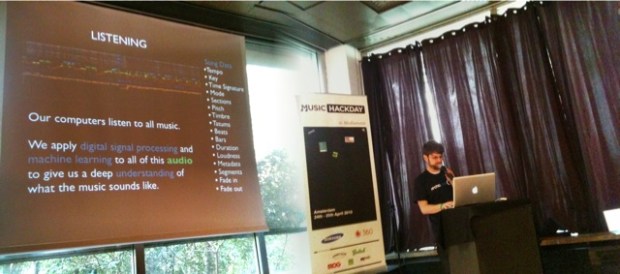
Matt Ogle wearing an Echo Nest shirt presenting the Echo Nest API (photo by frenkie)
We are releasing a bunch of new stuff this weekend. So much stuff, in fact that it is hard to write about it all in one post, so I shall be posting in small doses. Here’s what’s new from the Echo Nest:
- New, awesome music fingerprinter: ENMFP
- New API architecture: harder, faster, better, stronger
- New Song API – get detailed info on just about any song in the world
- New remix technology – create infinite versions of your favorite songs (more on this soon)
- New Java and Python clients that let you access all of our features (such as Rosetta Stone)
So what is a Music Hack Day all about? It’s the hacking! This video gives you a taste:
The Echo Nest Song API
Posted by Paul in Music, The Echo Nest, web services on April 24, 2010
- Performance – api method calls run faster – on average API methods are running 3X faster than the older version.
- JSON Output – all of our methods now support JSON output in addition to XML. This greatly simplifies writing client libraries for the Echo Nest
- Nimble coding – with the new architecture it will be much easier for us to roll out new features – so expect to see new features added to the Echo Nest platform every month
- No cruft – we are revisiting our APIs to try to eliminate inconsistencies, redundancies and unnecessary features to make them as clean as we can.
The beta version of our next generation APIs are here: http://beta.developer.echonest.com/
The first significant new API we are adding is the Song API – this gives you all sorts of ways to search for and retrieve song level data. With the song API you can do the following:
- search for songs via artist name, song title, and description. You can affect the results with constraints and sorts:
- constrain the results by a number of factors including musical attributes like tempo, loudness, time signature and key, artist hotttnesss, location
- sort – the results by any of the attributes
- Find similar songs – find similar songs to a seed song
- Find profile – get all sorts of info about a song including audio, audio summary info, track data for different catalogs, song hottttnesss, artist_hotttnesss, artist_location, and detailed track analysis
- Identify songs – works in conjunction with the ENMFP
There are lots of things you can do with this API. Here’s just a quick sample of the types of queries you can make:
Find the loudest thrash songs
song/search?sort=loudness-desc&description=thrash
Find indie songs for jogging
song/search?min_tempo=120&description=indie&max_tempo=125
Fetch the tempo of Hey Jude
search?title=hey+jude&bucket=audio_summary&artist=the+beatles
Fetch the track audio and analysis of Bad Romance
search?title=bad+romance&bucket=tracks&bucket=id:paulify&artist=lady+gaga
Find songs similar to Bad Romance
song/similar?id=SOAOBBG127D9789749
- jen-api – a java client
- beta_pyechonest – a new branch of the venerable pyechonest library. Grab it from SVN with
svn checkout http://pyechonest.googlecode.com/svn/branches/ beta-pyechonest-read-only
I’ll be writing more about all of the new APIs real soon. Access the beta Echo Nest APIs here:
Lady Gaga meets Edward Tufte
Posted by Paul in Music, The Echo Nest, visualization, web services on March 22, 2010
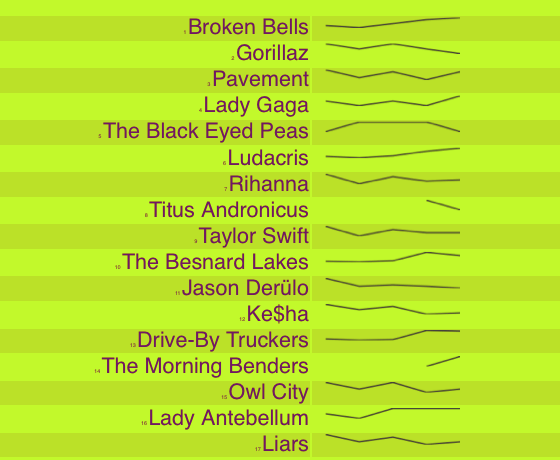
In his spare time, Echo Nest developer Reid Draper built hotttnesss.com – a neat web app that shows the top 50 hotttest artists (according to the Echo Nest get_top_hottt_artists) along with sparklines showing the historical hotttnesss for the last week. Reid used the nifty jquery sparklines plugin to make it happen. Mouse over an artist name to get links to the Last.fm and Spotify pages for the artist so you can find out what the big deal is about Broken Bells or lyaz.
22 students + 10 days + Echo Nest == Awesome!
Posted by Paul in Music, startup, The Echo Nest on March 19, 2010
The students in Mark Chang‘s mobile development course at Olin college just completed the mid-semester #mobdev contest. This was a 10-day sprint to create a compelling product prototype on the Android platform that used the Echo Nest APIs. Teams were judged on the business model, design, and implementation of their prototype. As Mark puts it: Substance, Style and a convincing way to make money.


In 10 days, these students built 7 awesome apps – each with a solid business model behind it. Here’s a summary:
- Beat Counter – A music listening application made especially for choreographers.
- Music Trails – An application that helps listeners freely explore new music by visually navigating a web of connected artists.
- DJMixr – An application that lets people collectively play music. This is the winning app!
- BeatBlocker – a synchronized music game for the casual gaming market
- PacePlayer – an application for casual runners that enjoy listening to music
- Bandroid – An application for finding local concerts
- Driving Beat – an application that was so awesome that it is now a state secret.
I hope to see all of these apps in the Android marketplace very soon. Special thanks to Debcha for connecting The Echo Nest with mobdev
Bad Romance – the memento edition
Posted by Paul in code, events, remix, The Echo Nest on March 18, 2010
At SXSW I gave a talk about how computers can help make remixing music easier. For the talk I created a few fun remixes. Here’s one of my favorites. It’s a beat-reversed version of Lady Gaga’s Bad Romance. The code to create it is here: vreverse.py
Unofficial Artist Guide to SXSW
Posted by Paul in events, Music, recommendation, The Echo Nest on March 4, 2010
I’m excited! Next week I travel to Austin for a week long computer+music geek-fest at SXSW. A big part of SXSW is the music – there are nearly 2,000 different artists playing at SXSW this year. But that presents a problem – there are so many bands going to SXSW (many I’ve never heard of) that I find it very hard to figure out which bands I should go and see. I need a tool to help me find sift through all of the artists – a tool that will help me decide which artists I should add to my schedule and which ones I should skip. I’m not the only one who was daunted by the large artist list. Taylor McKnight, founder of SCHED*, was thinking the same thing. He wanted to give his users a better way to plan their time at SXSW. And so over a couple of weekends Taylor built (with a little backend support from us) The Unofficial Artist Discovery Guide to SXSW.
The Unofficial Artist Discovery Guide to SXSW is a tool that allows you to explore the many artists attending this year’s SXSW. It lets you search for artists, browse popularity, music style, ‘buzzworthiness’, or similarity to your favorite artists – and it will make recommendations for you based on your music taste (using your Last.fm, Sched* or Hype Machine accounts) . The Artist Guide supplies enough context (bios, images, music, tag clouds, links) to help you decide if you might like an artist.
Here’s the guide:
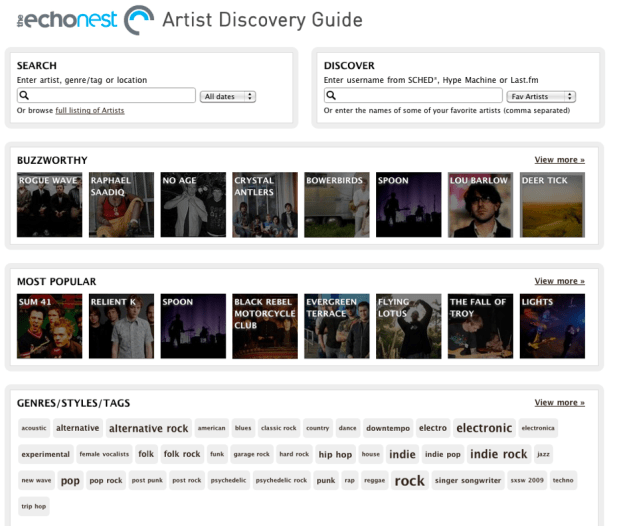
Here’s a quick tour of some of the things you can do with the guide. First off, you can Search for artists by name, genre/tag or location. This helps you find music when you know what you are looking for.
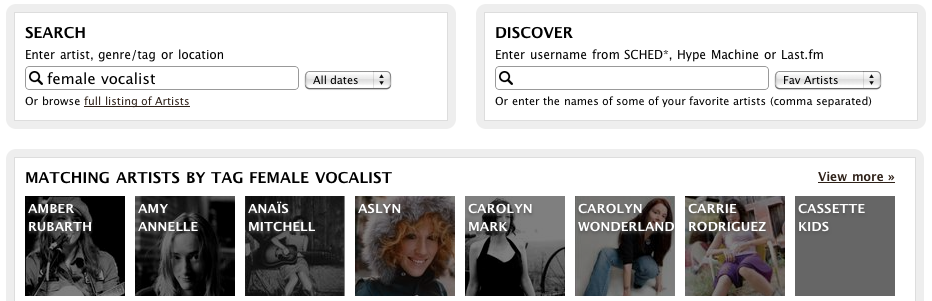
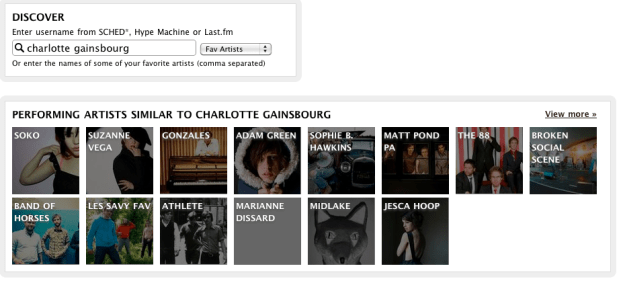
However, you may not always be sure what you are looking for – that’s where you use Discover. This gives you recommendations based on the music you already like. Type in the name of a few artists (even artists that are not playing at SXSW) or your SCHED*, Hype Machine or Last.fm user name, and ‘Discover’ will give you a set of recommendations for SXSW artists based on your music taste. For example, I’ve been listening to Charlotte Gainsbourg lately so I can use the artist guide to help me find SXSW artists that I might like:
If I see an artist that looks interesting I can drill down and get more info about the artist:
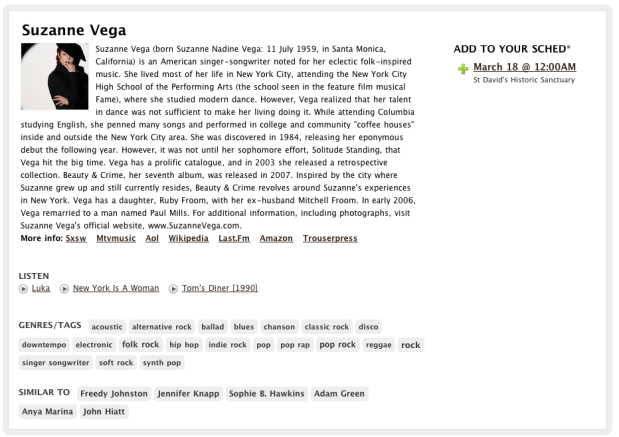 From here I can read the artist bio, listen to some audio, explore other similar SXSW artists or add the event to my SCHED* schedule.
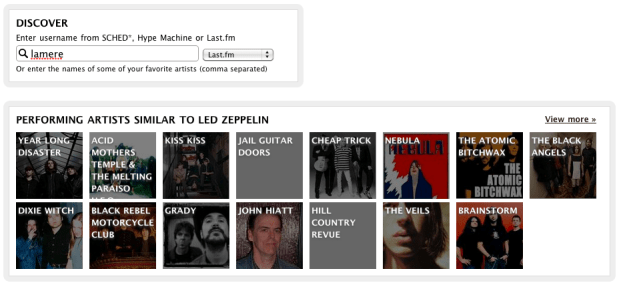
I use Last.fm quite a bit, so I can enter my Last.fm name and get SXSW recommendations based upon my Last.fm top artists. The artist guide tries to mix things up a little bit so if I don’t like the recommendations I see, I can just ask again and I can get a different set. Here are some recommendations based on my recent listening at Last.fm:
If you’ve been using the wonderful SCHED* to keep track of your SXSW calendar you can use the guide to get recommendations based on artists that you’ve already added to your SXSW calendar.
In addition to search and discovery, the guide gives you a number of different ways to browse the SXSW Artist space. You can browse by ‘buzzworthy’ artists – these are artists that are getting the most buzz on the web:

Or the most well-known artists:

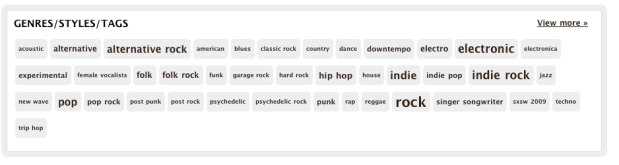
You can browse by the style of music via a tag cloud:
And by venue:

Building the guide was pretty straightforward. Taylor used the Echo Nest APIs to get the detailed artist data such as familiarity, popularity, artist bios, links, images, tags and audio. The only data that was not available at the Echo Nest was the venue and schedule info which was provided by Arkadiy (one of Taylor’s colleagues). Even though SXSW artists can be extremely long tail (some don’t even have Myspace pages), the Echo Nest was able to provide really good coverage for these sets (There was coverage for over 95% of the artists). Still there are a few gaps and I suspect there may be a few errors in the data (my favorite wrong image is for the band Abe Vigoda). If you are in a band that is going to SXSW and you see that we have some of your info wrong, send me an email (paul@echonest.com) and I’ll make it right.
We are excited to see the this Artist Discovery guide built on top of the Echo Nest. It’s a great showcase for the Echo Nest developer platform and working with Taylor was great. He’s one of these hyper-creative, energetic types – smart, gets things done and full of new ideas. Taylor may be adding a few more features to the guide before SXSW, so stay tuned and we’ll keep you posted on new developments.
Here comes the antiphon
Posted by Paul in Music, remix, The Echo Nest on February 25, 2010
I’m gearing up for the SXSW panel on remix I’m giving in a couple of weeks. I thought I should veer away from ‘science experiments’ and try to create some remixes that sound musical. Here’s one where I’ve used remix to apply a little bit of a pre-echo to ‘Here Comes the Sun’. It gives it a little bit of a call and answer feel:
The core (choir?) code is thus:
for bar in enumerate(self.bar):
 cur_data  = self.input[bar]
 if last:
     last_data = self.input[last]
     mixed_data = audio.mix(cur_data, last_data, mix=.3)
     out.append(mixed_data)
 else:
    out.append(cur_data)
 last = bar
Python and Music at PyCon 2010
Posted by Paul in code, Music, The Echo Nest on February 15, 2010
 If you are lucky enough to be heading to PyCon this week and are interested in hacking on music, there are two talks that you should check out:
DJing in Python: Audio processing fundamentals – In this talk Ed Abrams talks about how his experiences in building a real-time audio mixing application in Python. I caught a dry-run of this talk at the local Python SIG – lots of info packed into this 30 minute talk. One of the big takeaways from this talk is the results of Ed’s evaluation of a number of Pythonic audio processing libraries. Sunday 01:15pm, Centennial I
Remixing Music Pythonically – This is a talk by Echo Nest friend and über-developer Adam Lindsay. In this talk Adam talks about the Echo Nest remix library. Adam, a frequent contributor to remix, will offer details on the concise expressiveness offered when editing multimedia driven by content-based features, and some insights on what Pythonic magic did and didn’t work in the development of the modules. Audio and video examples of the fun-yet-odd outputs that are possible will be shown. Sunday 01:55pm, Centennial I
The schedulers at PyCon have done a really cool thing and have put the talks back to back in the same room. Also, keep your eye out for the Hacking on Music OpenSpace
 Music Machinery