Archive for category The Echo Nest
Getting Ready for Boston Music Hack Day
Posted by Paul in Music, The Echo Nest on November 11, 2009

Boston Music Hack Day starts in exactly 10 days. At the Hack day you’ll have about 24 hours of hacking time to build something really cool. If you are going to the Hack Day you will want to maximize your hacking time, so here are a few tips to help you get ready.
- Come with an idea or two but be flexible – one of the really neat bits about the Music Hack Day is working with someone that you’ve never met before. So have a few ideas in your back pocket, but keep your ears open on Saturday morning for people who are doing interesting things, introduce yourself and maybe you’ve made a team. At previous hack days all the best hacks seem to be team efforts. If you have an idea that you’d like some help on, or if you are just looking for someone to collaborate with, check out and/or post to the Music Hack Day Ideas Wiki.
- Prep your APIs – there are a number of APIs that you might want to use to create your hack. Before you get to the Hack Day you might want to take a look at the APIs, figure out which ones you might want to use- and get ready to use them. For instance, if you want to build music exploration and discovery tools or apps that remix music, you might be interested in the Echo Nest APIs. To get a head start for the hack day before you get there you should register for an API Key, browse the API documentation then check out our resources page for code examples and to find a client library in your favorite language.
- Decide if you would like to win a prize – Of course the prime motivation is for hacking is the joy of building something really neat – but there will be some prizes awarded to the best hacks. Some of the prizes are general prizes – but some are category prizes (‘best iPhone / iPod hacks’) and some are company-specific prizes (best application that uses the Echo Nest APIs). If you are shooting for a specific prize make sure you know what the conditions for the prize are. (I have my eye on the Ultra 24 workstation and display, graciously donated by my Alma Mata).
To get the hack day jucies flowing check out this nifty slide deck on Music Hackday created by Henrik Berggren:
The SQL Join is destroying music
Posted by Paul in events, Music, The Echo Nest on October 28, 2009
Brian Whitman,one of the founders of the Echo Nest, gave a provocative talk last week at Music and Bits. Some excerpts:
Useless MIR Problems:
- Genre Identification – “Countless PhDs on this useless task. Trying to teach a computer a marketing construct”
Hard but interesting MIR Problems:
- Finding the saddest song in the world
- Predicting Pitchfork and All Music Guide ratings
- Predicting the gender of a listener based upon their music taste
On Recommendation:
- “The best music experience is still very manual… I am still reading about music, not using a recommender.”
- “If we only used collaborative filtering to discover music, the popular artists would eat the unknowns alive.”
- “The SQL Join is destroying music”
Brian’s notes on the talk are on his blog. The slides are online here. Highly recommended:
Using Visualizations for Music Discovery
Posted by Paul in code, data, events, fun, Music, music information retrieval, research, The Echo Nest, visualization on October 22, 2009
On Monday, Justin and I will present our magnum opus – a three-hour long tutorial entitled: Using Visualizations for Music Discovery. In this talk we look the various techniques that can be used for visualization of music. We include a survey of the many existing visualizations of music, as well as talk about techniques and algorithms for creating visualizations. My hope is that this talk will be inspirational as well as educational spawning new music discovery visualizations. I’ve uploaded a PDF of our slide deck to slideshare. It’s a big deck, filled with examples, but note that large as it is, the PDF isn’t the whole talk. The tutorial will include many demonstrations and videos of visualizations that just are not practical to include in a PDF. If you have the chance, be sure to check out the tutorial at ISMIR in Kobe on the 26th.
Who’s going to Boston Music Hackday?
Posted by Paul in events, fun, Music, The Echo Nest, web services on October 21, 2009
Look at all the companies and organizations going to Music Hack Day.
 The Echo Nest
 SoundCloud
 Indaba Music
Harmonix
Amie Street
8tracks
Playdar
Bandsintown
Tourfilter
NPR
Boxee
Sonos
Aviary
Conduit Labs
Topspin Media
Noteflight
Dorkbot
 Libre.fm
It promises to be a really fun weekend. If you are interested in hacking music and working with the folks that are building the celestial jukebox make sure you sign up, slots are going fast. There’s one guy I’d  to get to come to the hack day. I’m sure he’d be fascinated with all that goes on.
Music Explorer FX – Mobile Edition
Posted by Paul in java, Music, recommendation, The Echo Nest, web services on October 21, 2009
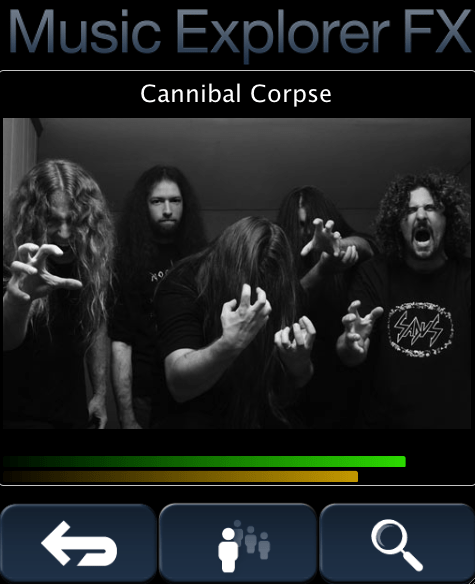
Caption contest: what is the guy in the back thinking?
Sten has created a mobile music discovery application that runs on a mobile device. The application shows similar artists using Echo Nest data. You can read about the app and give it a try (it runs on a desktop too), on Sten’s Blog: Music Explorer FX Mobile Edition
Installing Playdar
Posted by Paul in code, fun, Music, The Echo Nest, web services on October 18, 2009
A few people have asked me the steps to go through to install playdar. Official instructions are here: Playdar source code. This is what I did to get it running on my Mac:
- Download and install XCode from Apple
- Download build and install Erlang
- Install MacPorts if you haven’t already done so
- Download and install git
- Install Taglib
- Grab the latest Playdar source:
git clone git://github.com/RJ/playdar-core.git - Build it by typing ‘make’ at the top level
- Copy etc/playdar.conf.example to etc/playdar.conf
- If you want to include the Echo Nest resolver do these bits:
- Get an Echo Nest API key from here: developer.echonest.com
- Download and install pyechonest (the python client for the Echo Nest library):
- Add your Echo Nest API key to echonest-resolver.py (at around line 22)
- Make sure the echonest-resolver.py is executable (chmod +x path/to/contrib/echonest-resolver.py)
- Edit etc/playdar.conf and add the path to the resolver in the scripts list. Line 22-26 should look something like this:
{scripts,[
 "/Users/plamere/tools/playdar-core/contrib/echonest/echonest-resolver.py"
 %"/path/to/a/resolver/script1.py",
 %"/path/to/a/resolver/script2.py"
]}.
- If you want to enable p2p sharing remove “p2p” from the module blacklist in the playdar.conf (around line 59)
- start Playdar with:
./start-dev.sh
- To add your local music to playdar – in a separate window type:
./playdarctl start-debug
./playdarctl scan /path/to/your/music - At this point, playdar should be running. You can check its status by going to:
http://localhost:60210/
- Try Playdar by going to http://www.playdar.org/demos/search.html. Click the ‘connect’ button to connect to Playdar – then search for a track – if Playdar finds it, it should appear in the search results. Start listening to music. Then visit Playlick and start building playlists.
- If p2p is enabled you can add a friends music collection to Playdar by typing this into the Erlang console window:
p2p_router:connect("hostname.example.com", 3389).
That’s a long way to go to get Playdar installed – so it is still only for the highly motivated, but people are working on making this easy – so if you aren’t ready to spend an hour tinkering with installs, wait a few days and there will be an easier way to install it all.
Playing with Playdar
Posted by Paul in code, fun, Music, playlist, recommendation, The Echo Nest on October 18, 2009
On Saturday morning I opened my web browser, built a playlist of a few songs and started to listen to them while I went about my morning computer tasks. Some of the songs in the playlist were on my laptop, while some were on the mac mini in the family room, and some were on a laptop of a friend that was on the other side of the Atlantic ocean. And if my friend in London had closed his laptop before I listened to ‘his’ song on my playlist it could have been replaced by a copy of the song that was on the computer of a friend in Seattle. I had a seamless music listening experience despite the fact that the music was scattered across a handful of computers on two continents. Such is the power of Playdar.

Playdar is a music content resolver. It is designed to solve one problem: given the name of track, find me a way to listen to it right now. You run Playdar on any computer that you own that has music and Playdar will make it easy to listen to all of that music as if it were on your local machine. The Playdar content resolver can also talk to other Playdar resolvers too, so if Playdar can’t find a track on my local network, it can ask my friend if it knows where the track is, extending my listening reach.
Playdar runs as a web service using standard web protocols for communicating with applications. When Playdar receives a request to resolve a track it runs through a list of prioritized content resolvers looking for the track. First it checks your local machine, then your local network. If it hasn’t found it there it could, if so configured, try your friends computers, or even a commercial song resolver (One could imagine for example, a music label offering up a portion of their catalog via a content resolver as a way to expose more listeners to their music). Playdar will do its best to find a copy of a song that you can listen to now. Playdar enables a number of new listening modes:
- Listen to my music anywhere – with Playdar, I don’t have to shoehorn my entire music collection onto every computer that I own just so I can listen to it no matter what computer I’m on. I can distribute my music collection over all my computers – and no matter what computer I’m on I have all my music available.
- Save money for music streamers – Music streaming services like Last.fm, Spotify and Pandora spend money for every song that is streamed. Often times, the listener will already own the song that is being streamed. Playdar-enabled music streaming services could save streaming costs by playing a local copy of a song if one is available.
- Share playlists and mixtapes – with Playdar a friend could give me a playlist (perhaps in a XSPF format) and I could listen to the playlist even if I don’t own all of the songs.
- Pool the music – At the Echo Nest, everyone has lots of music in their personal collections. When we are all in the same room it is fun to be able to sample music from each other. iTunes lets you do this but searching through 15 separate collections for music in iTunes is burdensome. With Playdar, all the music on all of the computers running Playdar on your local lan can be available for you to search and play without any of the iTunes awkwardness.
- Add Play buttons to songs on web pages – Since Playdar uses standard web protocols, it is possible to query and control Playdar from Javascript – meaning that Playdar functionality can be embedded in any web page. I could blog about a song and sprinkle in a little Javascript to add a ‘play’ button to the song that would use Playdar to find the best way to play the song. If I write a review about the new Beatles reissue and want the reader to be able to listen to the tracks I’m writing about, I can do that without having to violate Beatles copyrights. When the reader clicks the play button, Playdar will find the local copy that is already on the reader’s computer.
Playdar’s Marconi Moment
Playdar is the brainchild of RJ, the inventor of the audioscrobbler and one of the founders of Last.fm. RJ started coding Playdar in March of this year – but a few weeks ago he threw away the 10,000 lines of C++ code and started to rewrite it from scratch in Erlang. A few days later RJ tweeted: I should be taken aside and shot for using C++ for Playdar originally. It’s criminal how much more concise Erlang is for this. Less than 3 weeks after starting from a clean sheet of paper, the new Erlang-based Playdar had its first transatlantic track resolution and streaming. The moment occurred on Friday, October 16th. Here’s the transcript from the IRC channel (tobyp is Toby Padilla, of MusicMobs and Last.fm fame) when London-based RJ first streamed a track from Toby’s Seattle computer:
[15:40:46] <tobyp> http://www.playdar.org/demos/search.html#artist=pantera&album=&track=burnnn
[15:41:06] <RJ2> woo, transatlantic streaming
[15:41:19] <tobyp> hot!
[15:41:35] <RJ2> playdar’s marconi moment
[15:41:42] <tobyp> hahah
An incredible amount of progress has been made in the last two weeks, a testament to RJ’s skills as much as Erlang’s expressiveness. Still, Playdar is not ready for the general public. It requires a bit of work to install and get running – (yep, the erlang runtime is required), but developer Max Howell has been working on making a user-friendly package to make it easy for anyone to install. Hopefully it won’t be too long before Playdar is ready for the masses.
Even though it is new, there’s already some compelling apps that use Playdar. One is Playlick:
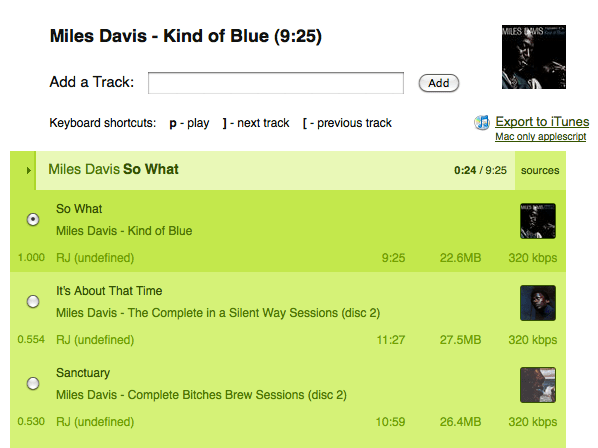
Playlick is a web application, developed by James Wheare that lets you build playlists. It uses Playdar for all music resolution. Type in the name of an album and Playlick / Playdar will find the music for you and let you listen to it. It’s a great way to see/hear the power of Playdar.
Adding custom content resolvers
One of the strengths of Playdar is that it is very easy to add new resolvers. If you are a music service provider you can create a Playdar content resolver that will serve up your content. I wrote a content resolver that uses the Echo Nest to resolve tracks using our index of audio that we’ve found on the web. This resolver can be used as a backstop. If you can’t find a track on your computer or your friend’s computers the Echo Nest resolver might be able to find a version out there on some music blog. Of course, the quality and availability of such free-range music is highly variable, so this resolver is a last resort.
Adding a new resolver to Playdar was extremely easy. It took perhaps 30 minutes to write – the hardest part was figuring out git – (thanks to RJ for walking me through the forks, pushes and ssh key settings). You can see the code here: echonest-resolver.py. Less than 150 lines of code, half of which is boilerplate. 150 lines and 30 minutes to add a whole new collection of music to the Playdar universe. Hopefully soon we’ll see resolvers for music streaming services like Napster, Rhapsody and Spotify.
What’s Next for Playdar?
Playdar is new – and the plumbing and wiring are still be worked on – but already it is doing something pretty magical – letting me listen to any track I want to right now. I can see how Playdar could be extended into acting as my music agent. Over time, my Playdar servers will get to know quite a bit about my music tastes. They’ll know what music I like to listen to, and when I like to listen to it. Perhaps someday, instead of asking Playdar to resolve a specific track by name, I’ll just be able to ask Playdar to give me a playlist of new music that I might like. Playdar can then use an Echo Nest, Last.fm or an AMG playlister to build a playlist of interesting, relevant new music. Playdar won’t just be a music resolver, Playdar will be my music agent helping me explore for and discover new music.
Updated Java client for the Echo Nest API
Posted by Paul in code, java, Music, The Echo Nest, web services on October 15, 2009
We’ve pushed out a new version of the open source Java client for the Echo Nest API. The new version provides support for the different versions of the Echo Nest analyzer. You can use the traditional, but somewhat temperamental version 1 of the analyzer, or the spiffy new, ultra-stable version 3 of the analyzer. By default, the Java client uses the new analyzer version, but if you need your application to work the exactly the same way that it did six months ago you can always use the older version.
Here’s a bit of Java code that will print out the tempo of all the songs in a directory:
void showBPMS(File dir) throws EchoNestException {
     TrackAPI trackAPI = new TrackAPI();
     File[] files = dir.listFiles();
     for (File f : files) {
         if (f.getAbsolutePath().toLowerCase().endsWith(".mp3")) {
             String id = trackAPI.uploadTrack(f, true);
             System.out.printf("Tempo 6%.3f %s\n",
                 trackAPI.getTempo(id).getValue(), f.getAbsoluteFile());
         }
     }
}
Running this code on a folder containing the new Breaking Benjamin album yields this output:
Tempo  85.57 /Users/plamere/Music/Amazon MP3/Breaking Benjamin/Dear Agony/01 - Fade Away.mp3
Tempo 108.01 /Users/plamere/Music/Amazon MP3/Breaking Benjamin/Dear Agony/02 - I Will Not Bow.mp3
Tempo 168.81 /Users/plamere/Music/Amazon MP3/Breaking Benjamin/Dear Agony/03 - Crawl.mp3
Tempo 156.75 /Users/plamere/Music/Amazon MP3/Breaking Benjamin/Dear Agony/04 - Give Me A Sign.mp3
Tempo  85.51 /Users/plamere/Music/Amazon MP3/Breaking Benjamin/Dear Agony/05 - Hopeless.mp3
Tempo  68.34 /Users/plamere/Music/Amazon MP3/Breaking Benjamin/Dear Agony/06 - What Lies Beneath.mp3
Tempo 116.94 /Users/plamere/Music/Amazon MP3/Breaking Benjamin/Dear Agony/07 - Anthem Of The Angels.mp3
Tempo  85.50 /Users/plamere/Music/Amazon MP3/Breaking Benjamin/Dear Agony/08 - Lights Out.mp3
Tempo 125.77 /Users/plamere/Music/Amazon MP3/Breaking Benjamin/Dear Agony/09 - Dear Agony.mp3
Tempo  94.99 /Users/plamere/Music/Amazon MP3/Breaking Benjamin/Dear Agony/10 - Into The Nothing.mp3
Tempo 160.38 /Users/plamere/Music/Amazon MP3/Breaking Benjamin/Dear Agony/11 - Without You.mp3
You can download the new Java client from the echo-nest-java-api code repository. The new version is: echo-nest-java-api-1.2.zip
Music and Bits
Posted by Paul in events, fun, Music, The Echo Nest on October 13, 2009

If you are heading to Amsterdam next week for the Amsterdam Dance Event, you may want to check out the Music & Bits pre-conference. This year Music & Bits is hosting two tracks: a traditional conference-style track with thought leaders from the Music 2.0 space, and a mini-Music Hackday where developers can gather to hack on music APIs to build new and interesting apps.
The Echo Nest will be represented by founder and CTO Brian Whitman. He’ll be giving a keynote talk about the next generation of music search and discovery platform and how these platforms can recommend music or organize your catalog automatically by listening to it, predict which countries to launch your band’s next tour or even help you build synthesizers that play from the entire world of music. It looks to be a really cool talk during a really interesting conference. Wish I were there.
This video from last year gives a taste of what Music & Bits is like:
Music Playlist quiz
Posted by Paul in fun, Music, playlist, The Echo Nest on October 9, 2009
Here’a a quiz for you music junkies. For the following playlist, pick a good next song for the playlist. Hint, there’s some aspect of each of the songs that is similar.
- Made to measure – Umphrey’s McGee
- Diablo Rojo – Rodrigo Y Gabriella
- Livin’ Thing – Electric Light Orchestra
- Two Step – Dave Matthew’s Band
- Vortex – Burst
- Almost Honest – Megadeth
No help from Echo Nesters please

