Music Recommendation and Discovery in the Long Tail
Posted by Paul in Music, music information retrieval, recommendation on February 12, 2009
Over the last couple of years, I’ve been lucky enough to get to know Music Information Retrieval researcher Oscar Celma. Oscar and I collaborated on a tutorial on music information retrieval that we presented at ISMIR 2007. We spent many, many hours on phone, email and IM sifting through every aspect of music recommendation.
This fall, Oscar completed his PhD Thesis. Oscar asked me to be the ‘external reader’ so I spent a good part of my Christmas break reading and re-reading the 230 page thesis. Oscar really has done a phenomenal job at looking at the issues and problems in music recommendation and in particular how they (or more accurately, how they don’t) help you find music in the long tail. Oscar’s analysis of how far different types of recommenders can push you deep into the tail.
Oscar has just published he’s thesis along with some supplementary info and code on the web site: Oscar Celma PhD. If you are involved in Music 2.0, I highly recommend reading it.
Some cool plots:
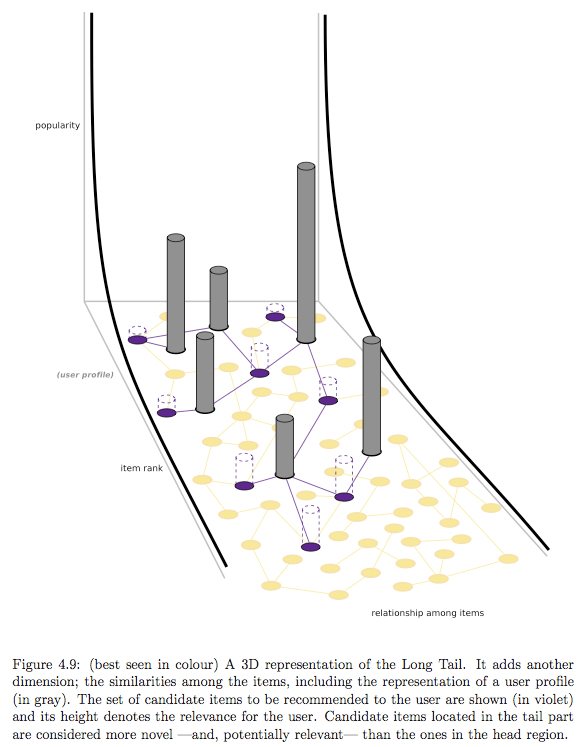
3D Representation of the long tail
And the abstract …
ABSTRACT
Music consumption is biased towards a few popular artists. For instance, in 2007 only 1% of all digital tracks accounted for 80% of all sales. Similarly, 1,000 albums accounted for 50% of all album sales, and 80% of all albums sold were purchased less than 100 times. There is a need to assist people to filter, discover, personalise and recommend from the huge amount of music content available along the Long Tail.
Current music recommendation algorithms try to accurately predict what people demand to listen to. However, quite often these algorithms tend to recommend popular -or well-known to the user- music, decreasing the effectiveness of the recommendations. These approaches focus on improving the accuracy of the recommendations. That is, try to make accurate predictions about what a user could listen to, or buy next, independently of how useful to the user could be the provided recommendations.
In this Thesis we stress the importance of the user’s perceived quality of the recommendations. We model the Long Tail curve of artist popularity to predict -potentially- interesting and unknown music, hidden in the tail of the popularity curve. Effective recommendation systems should promote novel and relevant material (non-obvious recommendations), taken primarily from the tail of a popularity distribution.
The main contributions of this Thesis are: (i) a novel network-based approach for recommender systems, based on the analysis of the item (or user) similarity graph, and the popularity of the items, (ii) a user-centric evaluation that measures the user’s relevance and novelty of the recommendations, and (iii) two prototype systems that implement the ideas derived from the theoretical work. Our findings have significant implications for recommender systems that assist users to explore the Long Tail, digging for content they might like.
A song for Valentine’s day
(via Chris M. )
SXSW Artist Catalog moved
To make sure that we keep up with the increasing demand, we’ve moved the SXSW Artist Catalog to a new home. Jeff set up a nifty redirect, so any visits to the old domain will get forward straight to the new home.
SXSW Artist Catalog updated
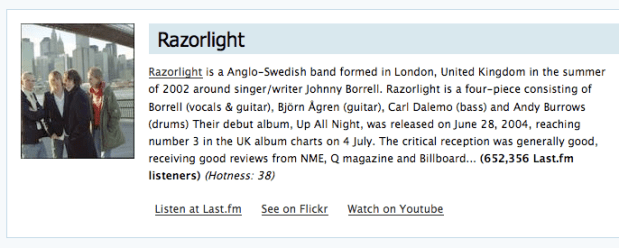
In response to yesterday’s update of the SXSW list of showcase bands, I’ve pushed out a new revision of the SXSW Artist Catalog, that highlights the 500 most recent additions. New bands include The Decemberists, Razorlight, Third Eye Blind and Bowling for Soup. There are going to be a lot of good bands at the festival.
The Blip.fm API
Posted by Paul in Music, web services on February 10, 2009
 Blip.fm is often described as a twitter for music. Blip users post ‘blips’ to tracks – and as with Twitter, others can follow your Blips and listen to what you’ve posted. It’s micro-music-blogging. Now that Twitter has become so popular, there is a whole micro-economy built around Twitter – with multiple companies providing every different style of twitter client that you could possibly want, for just about any platform. Twitter has enabled this economy by providing a rich set of web services around their system that any client can tap into. Blip is hoping to do the same thing. They are providing a rich set of web services around their core that allows any third party to interact with the Blip service.
The current Blip web services are in private beta – and are likely to be extended and modified as the service matures. To use the web services you need to get an API key from blip.fm (via email). Despite the private beta nature of the API – there’s already quite a bit a functionality in the API. Here’s a quick rundown of what you can already do with the API:
- Post a blip
- Delete a blip
- Get a blip by ID
- Get all public blips that occurred over a range of time
- Search for by song or artist name
- User Related Blips
- Get blips for a user ordered by recency
- Get blips for users that a user is following
- Get a user’s playlist blips
- Get blips that have replies
- Get a user by name
- Get a user’s listeners
- Get a user’s preferences
- Get a user’s stats
- Give a user ‘props’
- Save a user’s preferences
- Sign up a new user
- Favorites
- Add a user as a ‘favorite’ dj
- add a blip to a user’s playlist
- remove a user as a a ‘favorite’ dj
- remove a blip from a user’s playlist
- Get a user’s favorite DJs
These services seem to be pretty all inclusive, covering every thing that any 3rd party client would want to do with the blip service.
The Blip services provide output in XML, JSON or serialized PHP. There’s a sample return for a getUserProfile request that returns my most recent blips at the end of this post.
Authentication – In general, any of the Blip web services that are related to a specific user require the call to be authenticated. Creating an authenticated call involves taking a hash of your blip secret key along with a few other fields (such as the timestamp) to create a signature that is appended to the request. (Does anyone else have problems trying to manage these secret keys in an open source project?, they really belong with the code, but if you check them into your open source code repository, they are not secret anymore!).
Terms-of-service – As far as I can tell, the Blip folks haven’t published a terms-of-service for the API. Not surprising since the API is still in private beta. Still, I like to know the rules of the road before I invest too much in an API. In particular, I’d like to know whether or not commercial use of the API is allowed. Blip does have rate limits – no more than one call every 30 seconds per API key for authenticated calls (there are some calls that are excluded from this rate limit).
Documentation – the documentation for the blip service is quite good for a private beta. I especially like the API Tool that lets you play with the API in the browser. They could improve the documentation a bit around what happens with failures – all they say for right now is Error message on failure – which is really not that helpful. In particular, it would be nice if they published a set of status codes that one could expect on error – so I can programmatically tell the difference between an authentication error (a user gave me the wrong password) and a rate limit exceeded error.
Summary – For a private beta, I’m quite impressed at how full featured the Blip.fm API is. They have a wide range of web services already built around their core system. They have figured out a good way to authenticate calls that manipulate user data. The documentation combined with the nifty API tool lets you easily explore the nooks and crannies of the API. They have API client libraries for PHP, Actionscript and Javascript (no Java or Python, sniff!). There’s lots of good stuff here.
Sample Blip return XML

<?xml version="1.0" encoding="UTF-8"?>
<BlipApiResponse>
  <status>
    <code>200</code>
    <message>OK</message>
    <requestTime>1234265571</requestTime>
    <responseTime>1234265571</responseTime>
    <rateLimit>0</rateLimit>
  </status>
  <result>
    <total>2</total>
    <offset>0</offset>
    <limit>25</limit>
    <count>2</count>
    <collection>
      <Blip>
        <id>16946</id>
        <url>http://centralvillage.blogs.com/cv/files/vampireweekend_oxford_comma.mp3</url>
        <ownerId>37237</ownerId>
        <artist>Vampire Weekend</artist>
        <title>Oxford Comma</title>
        <insTime>2008-06-17 12:12:38</insTime>
        <message>vw</message>
        <unixTime>1213704758</unixTime>
        <toId />
        <type>songUrl</type>
        <status>active</status>
        <reblipId />
        <thumbplayLink />
        <via />
        <viaUrl />
        <owner>
          <id>37237</id>
          <urlName>plamere</urlName>
          <profilePic>http://blip.fm/_/images/nousericon.gif</profilePic>
          <status>active</status>
          <propsCount>0</propsCount>
          <countryAbbr>us</countryAbbr>
          <name />
          <website />
          <timeZone>US/Pacific</timeZone>
          <lastBlipTime>0000-00-00 00:00:00</lastBlipTime>
          <insTime>2008-06-17 09:18:28</insTime>
          <updateTime>2009-02-05 12:40:39</updateTime>
        </owner>
      </Blip>
      <Blip>
        <id>16919</id>
        <url>http://www.notontheguestlist.com/MynameIsjonas.mp3</url>
        <ownerId>37237</ownerId>
        <artist>Weezer</artist>
        <title>My Name Is Jonas</title>
        <insTime>2008-06-17 09:19:26</insTime>
        <message>weezer in the morning</message>
        <unixTime>1213694366</unixTime>
        <toId />
        <type>songUrl</type>
        <status>active</status>
        <reblipId />
        <thumbplayLink />
        <via />
        <viaUrl />
        <owner>
          <id>37237</id>
          <urlName>plamere</urlName>
          <profilePic>http://blip.fm/_/images/nousericon.gif</profilePic>
          <status>active</status>
          <propsCount>0</propsCount>
          <countryAbbr>us</countryAbbr>
          <name />
          <website />
          <timeZone>US/Pacific</timeZone>
          <lastBlipTime>0000-00-00 00:00:00</lastBlipTime>
          <insTime>2008-06-17 09:18:28</insTime>
          <updateTime>2009-02-05 12:40:39</updateTime>
        </owner>
      </Blip>
    </collection>
  </result>
</BlipApiResponse>
Most overused animals of indie rock?
The Beat Crave published recently published their list of the top 5 most overused animals names of indie rock. They list the bird, wolf, bear, horse and deer as the top – citing bands like deerhoof, band of horses, panda bear, wolf parade and birds of tokyo. This post got me thinking of these were the top animals in general – or is this just indie rock. So I grabbed myself a copy of WordNet, along with JAWS (the Java API for Wordnet searching) and the 20K most popular artists names from Last.fm, and wrote a bit of code to find out.
Here are my results of the most popular animals of music:
- The Dog – with 14 bands including Temple of the Dog, Three Dog Night, Dog eat Dog, The Black Dog.
- The Wolf – with 11 bands such Wolf, Wolf Parade, and Sea Wolf .
- The Tiger with 10 bands including Tiger, Tiger Army and Timid Tiger
- The Bear with 10 bands like Minus the Bear, Grizzly Bear, and Panda Bear.
- The Cat with 9 artists like The Cat Empire, Space Cat and Super Cat
So it looks like there’s some overlap between Beat Crave’s list of the top 5 most overused animal names of indie rock – we see ‘wolf’ and ‘bear’ on both our lists, but for our analysis, ‘dog’, ‘tiger’ and ‘cat’ are used quite a bit more often than ‘deer’, ‘bird’ and ‘horse’.
Using WordNet is fun (and the JAWS library makes it incredibly easy to use). Here are some more artist name facts:
Most popular colors:
- Black (94)
- Blue (52)
- Brown (40) – but these are mostly names
- Red (36)
- White (36)
Most popular moods/feelings:
- Love (44)
- Joy (10)
- Hate (9)
- Terror ( 8 )
- Fear ( 8 )
Most popular fruit:
- Lemon (10)
- Cherry (7)
- Strawberry (4)
- Banana (3)
- Lime (3)
Perhaps one of my favorite band memes is to add a ‘head’ suffix to a word such as for bands like Radiohead, Buckethead, Zebrahead, The Lemonheads, Mushroomhead, etc.
Getting the most space on the marquee
One way to make sure that your band gets the most space on the marquee at SXSW is to have a really long band name. Some bands have done just that. Here’s a histogram of the name length of the 1200 or so artists that are appearing at SXSW:

This histogram shows that the most frequent band name length is 11 characters, (the average is 12.9 characters) with some as short as 3 characters, but there are quite a few with lengths of 30 characters or more, with one topping out at 43 characters.
Here are the bands that are getting the most space on the marquee:
- Jon Langford And The Pine Valley Cosmonauts
- Johnny Goudie and The Little Champions
- Samantha Crain & the Midnight Shivers
- Someone Still Loves You Boris Yeltsin
- Solange and the Hadley Street Dreams
- Edward Sharpe and the Magnetic Zeros
- Hermano L backed by Ranking Soldiers
- Danny And The Champions Of The World
- I Love You But I’ve Chosen Darkness
- Bryan Scary and The Shredding Tears
- Steve Goldberg and the Arch Enemies
And here the bands that are getting the least space:
- WAZ
- XYX
- TAT
- Mom
- Fun
- fiN
- CLP
- Cla
- CKY
- Blu
- Aun
Note to bands – when you are picking the name for your band, try googling for it first – it is going to be a lot easier for people to find you with a name like “Jon Langford And The Pine Valley Cosmonauts” than for a band with the name “fun”
A test post
Posted by Paul in Uncategorized on February 8, 2009
Well .. what do you know … a new post, in a new blog … I’ m just trying things out a bit. I’m not sure if I like the wsywig editor or not. So far it seems ok. Lets add a picture!

A little bit of country, a little bit of rock'n'roll.
That was pretty easy to do, and I was able to have it align on the left hand side, which is a pretty common way for me to layout my posts. I like how they let you add a caption as well.
But really, blogs are all about links, so lets add a link or two. First a link to this blog: MusicMachinery.wordpress.com and now a link to a search engine that I use quite often.
It looks like wordpress has an autosave feature, which is pretty nice.
Embedding a youtube video is pretty easy too … instead of having to grab all of the embedded object html – with wordpress I can just use the URL to the youtube video. Saves having to go into raw html mode. You can embedd videos like this not only from Youtube but from google video and dailymotion as well. So, let me try embedding a video. I found this video on the web, not sure if anyone has seen it before, but it is pretty funny, about a skateboarding dog. Check it out.
Pretty cool.
They also let you ‘add a poll’. I wonder what that is like. Let’s try it out:
I’m eagerly waiting the results.
Now, just a few more things to try out. Bold, italics, strikethrough .
- Some
- numbered
- lists
- Some
- bullet
- points
And a block quote where I tell you:
Trackbacks are a way to notify legacy blog systems that you’ve linked to them. If you link other WordPress blogs they’ll be notified automatically using pingbacks, no other action necessary.
Sometimes I like colorful text too.
Well, that’s it for now… my first wordpress test post. It seems pretty full featured, which is no surprise since it is used by a number of people. Now I’m going to save this entry, preview it and post it. So there.
 Music Machinery