Archive for category fun
How the Bonhamizer works
Posted by Paul in code, fun, The Echo Nest on February 21, 2013
I spent this weekend at Music Hack Day San Franciso. Music Hack Day is an event where people who are passionate about music and technology get together to build cool, music-related stuff. This San Francisco event was the 30th Music Hack Day with around 200 hackers in attendance. Many cool hacks were built. Check out this Projects page on Hacker League for the full list.
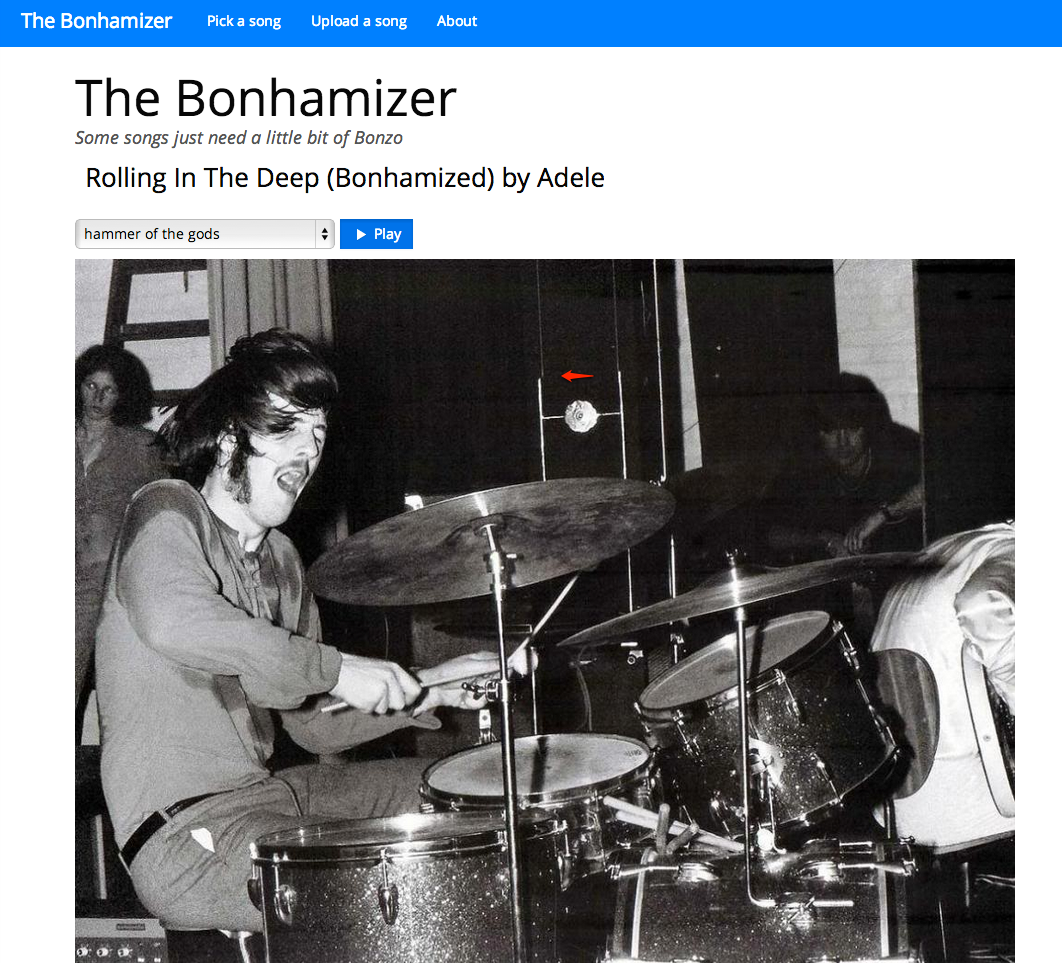
My weekend hack is called The Bonhamizer. It takes just about any song and re-renders it as if John Bonham was playing the drums on the track. For many tracks it works really well (and others not so much). I thought I’d give a bit more detail on how the hack works.
Data Sources
For starters, I needed some good clean recordings of John Bonham playing the drums. Luckily, there’s
set of 23 drum out takes from the “In through the out door” recording session. For instance, there’s
this awesome recording of the drums for “All of my Love”. Not only do you get the sound of Bonhmam
pounding the crap out of the drums, you can hear him grunting and groaning. Super stuff. This particular
recording would become the ‘Hammer of the Gods’ in the Bonhamizer.
From this set of audio, I picked four really solid drum patterns for use in the Bonhamizer.
Of course you can’t just play the drum recording and any arbitrary song recording at the same time and expect the drums to align with the music. To make the drums play well with any song a number of things need to be done (1) Align the tempos of the recordings, (2) Align the beats of the recordings, (3) Play the drums at the right times to enhance the impact of the drums.
To guide this process I used the Echo Nest Analyzer to analyze the song being Bonhamized as well as the Bonham beats. The analyzer provides a detailed map for the beat structure and timing for the song and the beats. In particular, the analyzer provides a detailed map of where each beat starts and stops, the loudness of the audio at each beat, and a measure of the confidence of the beat (which can be interpreted as how likely the logical beat represents a real physical beat in the song).
Aligning the tempos (We don’t need no stinkin’ time stretcher)
Perhaps the biggest challenge of implementing the Bonhamizer is to align the tempo of the song and the Bonham beats. The tempo of the ‘Hammer of the Gods’ Bonham beat is 93 beats per minute. If fun.’s Some Nights is at 107 beats per minute we have to either speed Bonham up or slow fun. down to get the tempos to match.
Since the application is written in Javascript and intended to run entirely in the browser, I don’t have access to server side time stretching/shifting libraries like SoundTouch or Dirac. Any time shifting needs to be done in Javascript. Writing a real-time (or even an ahead-of-time) time-shifter in Javascript is beyond what I could do in a 24 coding session. But with the help of the Echo Nest beat data and the Web Audio API there’s a really hacky (but neat) way to adjust song tempos without too many audio artifacts.
The Echo Nest analysis data includes the complete beat timing info. I know where every beat starts and how long it is. With the Web Audio API I can play any snippet of audio from an MP3, with millisecond timing accuracy. Using this data I can speed a song up by playing a song beat-by-beat, but adjusting the starting time and duration of each beat to correspond to the desired tempo. If I want to speed up the Bonham beats by a dozen beats per minute, I just play each beat about 200 ms shorter than it should be. Likewise, if I need to slow down a song, I can just let each beat play for longer than it should before the next beat plays. Yes, this can lead to horrible audio artifacts, but many of the sins of this hacky tempo adjust will be covered up by those big fat drum hits that will be landing on top of them.
I first used this hacky tempo adjustment in the Girl Talk in a Box hack. Here’s a few examples of songs with large tempo adjustments. In this example, AWOLNation’s SAIL is sped up by 25% you can hear the shortened beats.
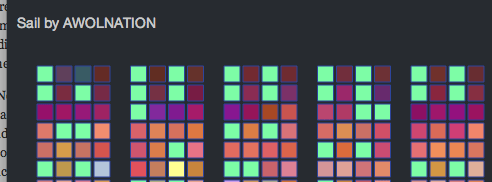
And in this example with Sail slowed down by 25% you can hear double strikes for each beat.
I use this hacky tempo adjust to align the tempo of the song and the Bonham beats, but since I imagine that if a band had John Bonham playing the drums they would be driven to play a little faster, so I make sure that I speed on the song a little bit when I can.
Speeding up the drum beats by playing each drum beat a bit shorter than it is supposed to play gives pretty good audio results. However, using the technique to slow beats down can get a bit touchy. If a beat is played for too long, we will leak into the next beat. Audibly this sounds like a drummer’s flam. For the Bonhamizer this weakness is really an advantage. Here’s an example track with the Bonham beats slowed down enough so that you can easily hear the flam.
When to play (and not play) the drums
If the Bonhamizer overlaid every track with Bonham drums from start to finish, it would not be a very good sounding app. Songs have loud parts and soft parts, they have breaks and drops, they have dramatic tempo changes. It is important for the Bonhamizer to adapt to the song. It is much more dramatic for drums to refrain from striking during the quiet a capella solos and then landing like the Hammer of the Gods when the full band comes in as in this fun. track.
There are a couple of pieces of data from the Echo Nest analysis that I can use to help decide when to the drums should play. First, there’s detailed loudness info. For each beat in the song I retrieve information on how loud the beat is. I can use this info to find the loud and the quiet parts of the song and react accordingly. The second piece of information is the beat confidence. Each beat is tagged with a confidence level by the Echo Nest analyzer. This is an indication of how sure the analyzer is that a beat really happened there. If a song has a very strong and steady beat, most of the beat confidences will be high. If a song is frequently changing tempo, or has weak beat onsets then many of the beat confidence levels will be low, especially during the tempo transition periods. We can use both the loudness and the confidence levels to help us decide when the drums should play.
For example, here’s a plot that shows the beat confidence level for the first few hundred beats of Some Nights.
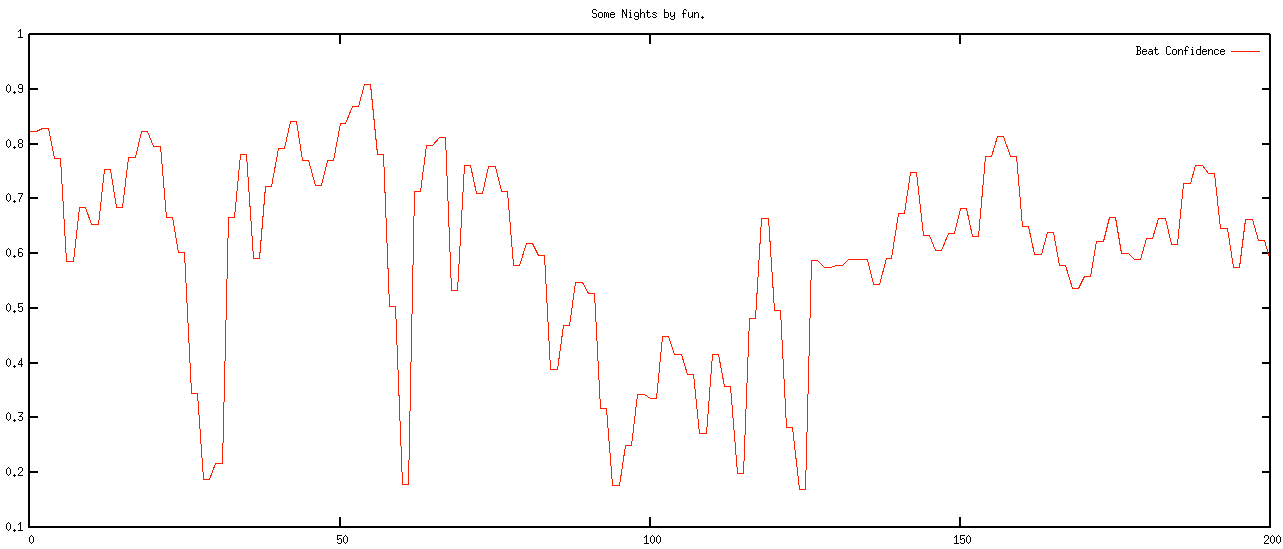
The red curve shows the confidence level of the beats. You can see that the confidence ebbs and flows in the song. Likewise we can look at the normalized loudness levels at the beat level, as shown by the green curve in the plot below:
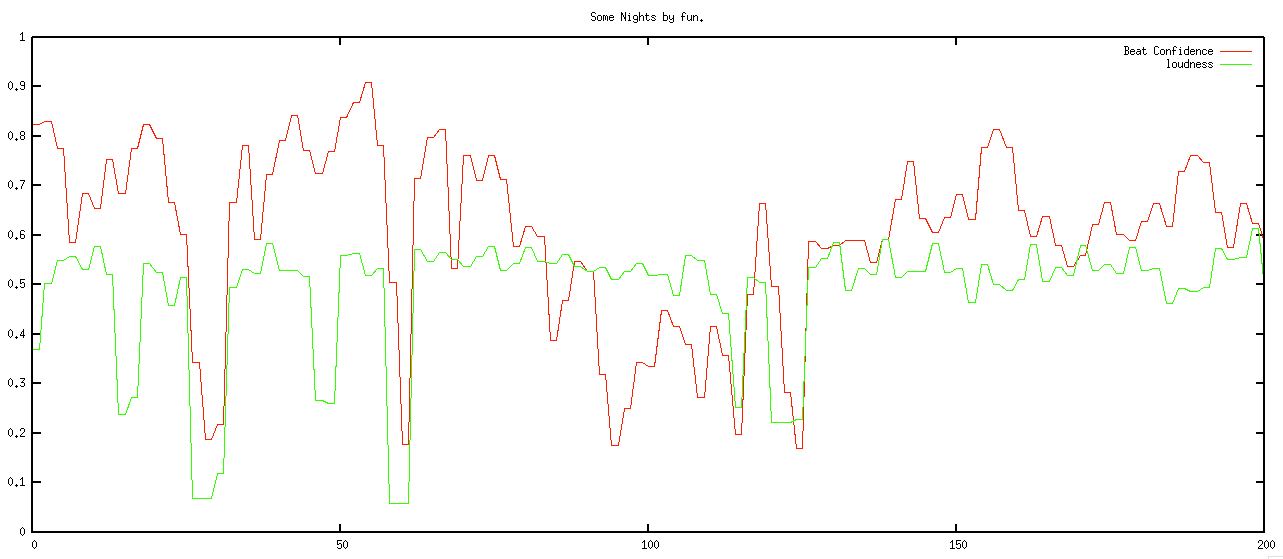
We want to play the drums during the louder and high confidence sections of the song, and not play them otherwise. However, if just simply match the loudness and confidence curves we will have drums that stutter start and stop, yielding a very unnatural sound. Instead, we need to filter these levels so that we get a more natural starting and stopping of the drums. The filter needs to respond quickly to changes – so for instance, if the song suddenly gets loud, we’d like the drums to come in right away, but the filter also needs to reject spurious changes – so if the song is loud and confident for only a few beats, the drums should hold back. To implement this I used a simple forward looking runlength filter. The filter looks for state changes in the confidence and loudness levels. If it sees one and it looks like the new state is going to be stable for the near future, then the new state is accepted, otherwise it is rejected. The code is simple:
This file contains hidden or bidirectional Unicode text that may be interpreted or compiled differently than what appears below. To review, open the file in an editor that reveals hidden Unicode characters.
Learn more about bidirectional Unicode characters
| function runLength(quanta, confidenceThreshold, loudnessThreshold, lookAhead, lookaheadMatch) { | |
| var lastState = false; | |
| for (var i = 0; i < quanta.length; i++) { | |
| quanta[i].needsDrums = false; | |
| } | |
| for (var i = 0; i < quanta.length -1; i+=2) { | |
| var newState = getState(quanta[i], confidenceThreshold, loudnessThreshold); | |
| if (newState != lastState) { | |
| // look ahead | |
| var matchCount = 0 | |
| var curCount = 0; | |
| for (var j = i + 1; j < quanta.length && j <= i + lookAhead; j++) { | |
| var q = quanta[j]; | |
| var nstate = getState(q, confidenceThreshold, loudnessThreshold); | |
| if (nstate == newState) { | |
| matchCount++; | |
| } | |
| curCount++; | |
| } | |
| if (matchCount > lookaheadMatch) { | |
| curState = newState; | |
| } else { | |
| curState = lastState; | |
| } | |
| } else { | |
| curState = newState; | |
| } | |
| quanta[i].needsDrums = curState; | |
| quanta[i+1].needsDrums = curState; | |
| lastState = curState; | |
| } | |
| } | |
| function getState(q, confidenceThreshold, loudnessThreshold) { | |
| var conf = q.confidence; | |
| var volume = q.oseg.loudness_max; | |
| var nstate = conf >= confidenceThreshold && volume > loudnessThreshold; | |
| return nstate; | |
| } |
When the filter is applied we get a nice drum transitions – they start when the music gets louder and the tempo is regular and they stop when its soft or the tempo is changing or irregular:
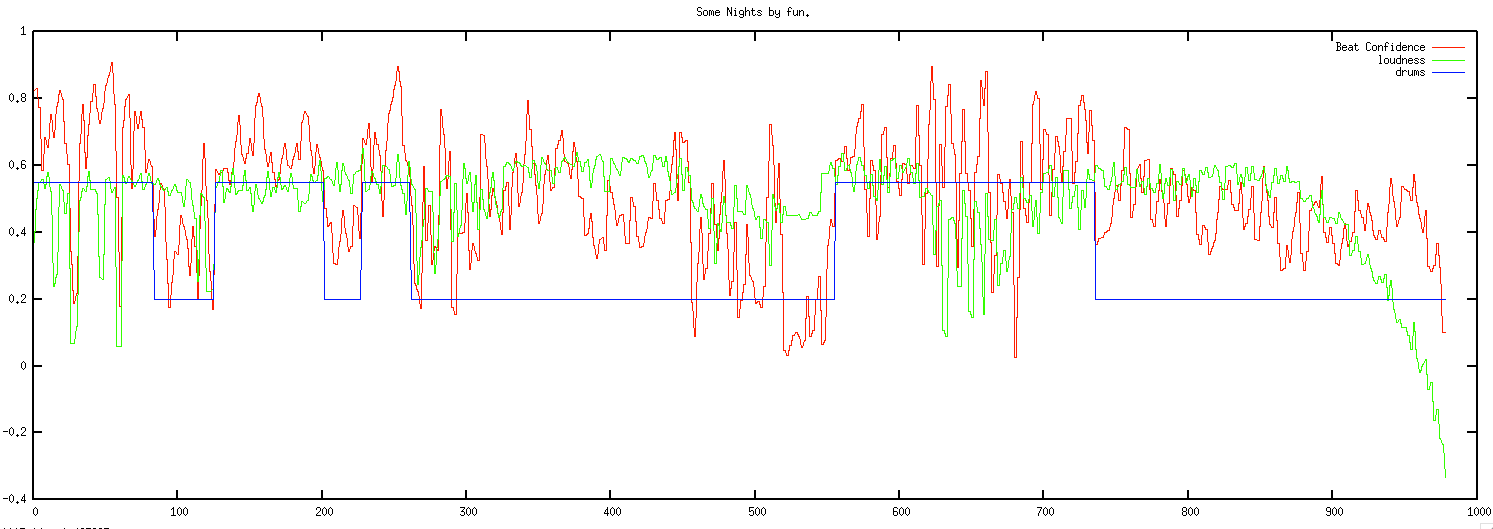
This above plot shows the confidence and loudness levels for the Some Nights by Fun. The blue curve shows when the drums play. Here’s a detailed view of the first 200 beats:
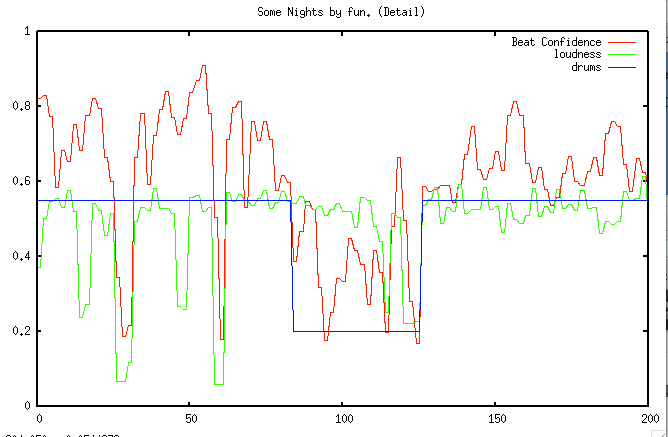
You can see how transient changes in loudness and confidence are ignored, while longer term changes trigger state changes in the drums.
Note that some songs are always too soft or most of the beats are not confident enough to warrent adding drums. If the filter rejects 80% of the song, then we tell the user that ‘Bonzo doesn’t really want to play this song’.
Aligning the song and the beats
At this point we now have tempo matched the song and the drums and have figured out when to and when not to play the drums. There’s just a few things left to do. First thing, we need to make sure that each of the song and drum beats in a bar lines up so the both the song and drums are playing the same beat within a bar (beat 1, beat 2, beat 3, beat 4, beat 1 …). This is easy to do since the Echo Nest analysis provides bar info along with the beat info. We align the beats by finding the bar position of the starting beat in the song and shifting the drum beats so that the bar position of the drum beats align with the song.
A seemingly more challenging issue is to deal with mismatched time signatures. All of the Bonham beats are in 4-4 time, but not all songs are in 4. Luckily, the Echo Nest analysis can tell us the time signature of the song. I use a simple but fairly effective strategy. If a song is in 3/4 time I just drop one of the beats in the Bonham beat pattern to turn the drumming into a matching 3/4 time pattern. It is 4 lines of code:
if (timeSignature == 3) {
    if (drumInfo.cur % 4 == 1) {
        drumInfo.cur+=1;
    }
 }
Here’s an example with Norwegian Wood (which is in 3/4 time). This approach can be used for more exotic time signatures (such as 5/4 or 7/4) as well. For songs in 5/4, an extra Bonham beat can be inserted into each measure. (Note that I never got around to implementing this bit, so songs that are not in 4/4 or 3/4 will not sound very good).
Playing it all
Once we have aligned tempos, filtered the drums and aligned the beats, it is time to play the song. This is all done with the Web Audio API, which makes it possible for us to play the song beat by beat with fine grained control of the timing.
Issues + To DOs
There are certainly a number of issues with the Bonhamizer that I may address some day.
I’d like to be able to pick the best Bonham beat pattern automatically instead of relying on the user to pick the beat. It may be interesting to try to vary the beat patterns within a song too, to make things a bit more interesting. The overall loudness of the songs vs. the drums could be dynamically matched. Right now, the songs and drums play at their natural volume. Most times that’s fine, but sometimes one will overwhelm the other. As noted above, I still need to make it work with more exotic time signatures too.
Reception
The Bonhamizer has been out on the web for about 3 days but in that time about 100K songs have been Bonhamized. There have been positive articles in The Verge, Consequence of Sound, MetalSucks, Bad Ass Digest and Drummer Zone. It is big in Japan. Despite all its flaws, people seem to like the Bonhamizer. That makes me happy. One interesting bit of feedback I received was from Jonathan Foote (father of MIR). He pointed me to Frank Zappa and his experiments with xenochrony The mind boggles. My biggest regret is the name. I really should have called it the autobonhamator. But it is too late now … sigh.
All the code for the Bonhamizer is on github. Feel free to explore it, fork and it make your own Peartifier or Moonimator or Palmerizer.
Going Undercover
My Music Hack Day Stockholm hack is ‘Going Undercover‘. This hack uses the extensive cover song data from SecondHandSongs to construct paths between artists by following chains of cover songs. Type in the name of a couple of your favorite artists and Going Undercover will try to find a chain of cover songs that connects the two artists. The resulting playlist will likely contain familiar songs played by artists that you never heard of before. Here’s a Going Undercover playlist from Carly Rae Jepsen to Johnny Cash:
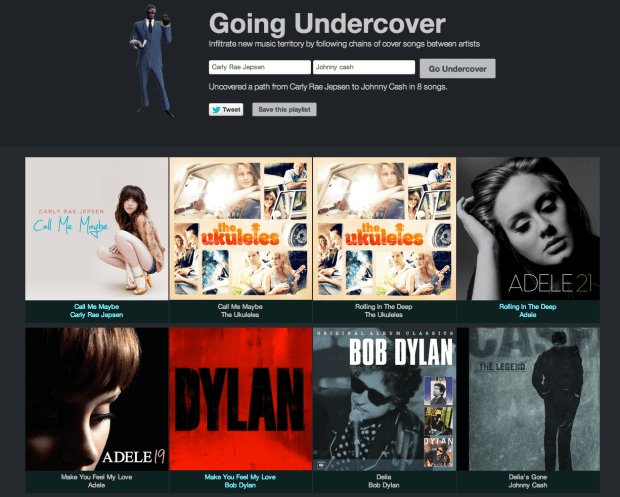
For this hack I stole a lot of code from my recent Boil the Frog hack, and good thing I could do that otherwise I would never have finished the hack in time. I spent many hours working to reconcile the Second Hand Songs data with The Echo Nest and Rdio data (Second Hand Songs is not part of Rosetta stone, so I had to write lots of code to align all the IDs up). Even with leveraging the Boil the Frog code, I had a very late night trying to get all the pieces working (and of course, the bug that I spent 2 hours banging my head on at 3AM was 5 minutes of work after a bit of sleep).
I am pretty pleased with the results of the hack. It is fun to build a path between a couple of artists and listen to a really interesting mix of music. Cover songs are great for music discovery, they give you something familiar to hold on to while listening to a new artist.
Boil The Frog
Posted by Paul in code, fun, Music, The Echo Nest on January 2, 2013
You know the old story – if you put a frog in a pot of cold water and gradually heat the pot up, the frog won’t notice and will happily sit in the pot until the water boils and the frog is turned into frog soup. This story is at the core of my winter break programming project called Boil the Frog. Boil the Frog will take you from one music style to another gradually enough so that you may not notice the changes in music style. Just like the proverbial frog sitting in a pot of boiling water, with a Boil the Frog playlist, the Justin Bieber fan may find themselves listening to some extreme brutal death metal such as Cannibal Corpse or Deicide (the musical equivalent to sitting in a pot of boiling water).
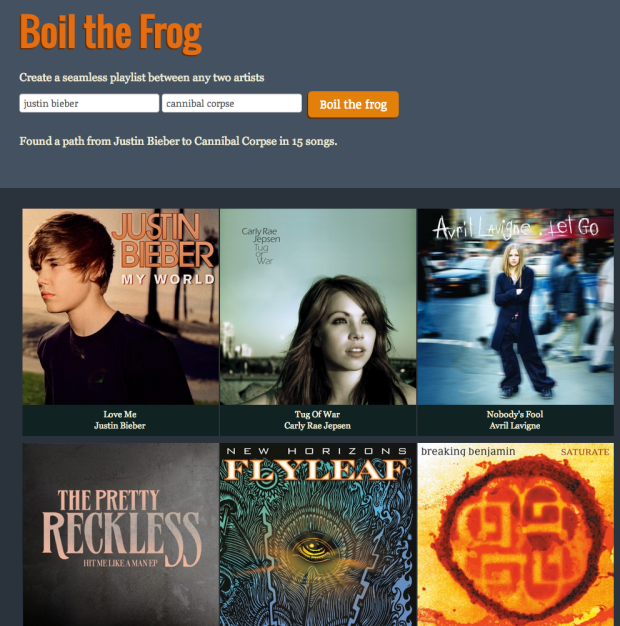
To use Boil the Frog, you type in the names of any two artists you’ll be given a playlist that connects the two artists. Click on the first artist to start listening to the playlist. If you don’t like the route taken to connect two artists, you can make a new route by bypassing an offending artist. The app uses Rdio to play the music. If you are an Rdio subscriber, you’ll hear full tracks, if not you’ll hear a 30 second sample of the music.
You can create some fun playlists with this app such as:
- Miley Cyrus to Miles Davis
- Justin Bieber to Jimi Hendrix
- Patti Smith to the Smiths
- Elvis to Elvis
- The Carter Family to Rammstein
- Kanye West to Taylor Swift
- Cage the Elephant to John Cage
- Ryan Adams to Bryan Adams
- Righteous Brothers to Steven Wright
How does it work? To create this app, I use The Echo Nest artist similarity info to build an artist similarity graph of about 100,000 of the most popular artists. Each artist in the graph is connected to it’s most similar neighbors according to the Echo Nest artist similarity algorithm.

To create a new playlist between two artists, the graph is used to find the path that connects the two artists. The path isn’t necessarily the shortest path through the graph. Instead, priority is given to paths that travel through artists of similar popularity. If you start and end with popular artists, you are more likely to find a path that takes you though other popular artists, and if you start with a long-tail artist you will likely find a path through other long-tail artists. Without this popularity bias many routes between popular artists would venture into back alleys that no music fan should dare to tread.
Once the path of artists is found, we need to select the best songs for the playlist. To do this, we pick a well-known song for each artist that minimizes the difference in energy between this song, the previous song and the next song. Once we have selected the best songs, we build a playlist using Rdio’s nifty web api.
This is the second version of this app. I built the first version during a Spotify hack weekend. This was a Spotify app that would only run inside Spotify. I never released the app (the Spotify app approval process was a bit too daunting for my weekend effort), so I though I’d make a new version that runs on the web that anyone can use.
I enjoy using Boil the Frog to connect up artists that I like. I usually end up finding a few new artists that I like. For example, this Boil The Frog playlist connecting Deadmau5 and Explosions in the Sky is in excellent coding playlist.
Give Boil the Frog a try and if you make some interesting playlists let me know and I’ll add them to the Gallery.
An Infinite Thanksgiving
For that long Thanksgiving drive, there’s nothing better than a handful of infinitely long songs to keep your ears occupied on the way to Grandma’s house:
- Autumn Sweater by Yo La Tengo
- Thanksgiving Day by Ray Davies
- It’s Thanksgiving – Nicole Westbrook
- Alice’s Restaurant Massacre by Arlo Guthrie
- Turkey in the Straw by ZEPP
Or you may want to head over to Evolver and check out the community built Thanksgiving playlist that will actually end before heat death of the universe.
Johnny Cash Has Been EVERYWHERE (Man)!
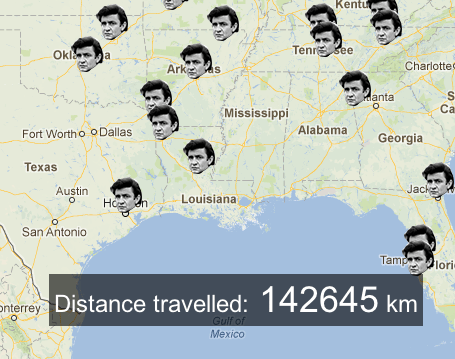
My favorite hack to come out of last week’s Music Hack Day London (and perhaps one of my favorite music hack of all time) is the hack by Iain Mullan called “Johnny Cash Has Been EVERYWHERE (Man)!“. This hack has all the ingredients of a great music hack – great music, great execution, a bucket full of whimsy, and absolutely nothing about it that would make an MBA start writing a business plan. It’s practically a perfect hack. The only flaw is that Johnny Cash would never measure his distance travelled in kilometers. Check it out: Johnny Cash Has Been EVERYWHERE (Man)!“.
High Five Hero

A guest post by Jennie Lamere. This weekend, I had the pleasure of attending MIT’s Music Hack Day with my friend Barbie. We, along with about 250 others, worked all weekend to develop a music hack. In the twenty four hours we had, Barbie and I collectively slept a mere 6 hours. After endless cups of coffee and soda, we finally emerged with our hack, “High Five Hero.”
Our hack was a remixing tool driven by MaKey MaKey. MaKey Makey, created by Jay Silver and Eric Rosenbaum, is a device that plugs into computers, allowing virtually anything to be used in place of a keyboard. For our hack, we took four beats from various songs and made it so that each completed circuit yielded a different beat – the song could be remixed by completing the circuit in different orders. While neither Barbie nor I knew Javascript or html at the beginning of the weekend, we were well-versed in it by the end. A few hours in, we had the basic code written, so we decided to add more to the hack. We added a game mode, in which the two users must complete the circuit in specific patterns to play the song. We also added an “Expert’s Only” mode, in which combo moves must be done in order to play a beat.
While writing the code itself wasn’t exactly easy, we left the hack day around 8:00 on Saturday feeling very confident – all we had left to do was add the hardware component. Our idea was to have the MaKey Makey hooked up so that when we high fived, a circuit would be completed. However, we couldn’t get the MaKey MaKey set up in such a manner that the beats would all play at the same time. After gloves, tape, wire, more tape, aluminum and even more tape, we finally got the MaKey MaKey set up. This time, we were the problem – we could not get our timing to align in a way that would make the music sound good. We decided to abandon our original idea, and try to hook the MaKey MaKey up to something else besides our hands. After hours of brainstorming, we decided to go back to our original idea, but place the points for the MaKey MaKey in different places – one on each hand, and one on each knee. This seemed to work better, and the sound produced began to sound like music.
Barbie and I were extremely proud of our first music hack- High Five Hero. Despite being extremely nervous for our demo, showing off our hack seemed to go over well! We loved being able to talk to the other hackers, and seeing what they did. We are excited to attend our next Hack Day together!
[youtube http://www.youtube.com/watch?v=KozsJ-pIID4]
Editor: I took a video of the demo presentation of High Five Hero. Apologies for the unsteady hand:
[youtube http://www.youtube.com/watch?v=fFO46bGINzk]
Bangarang Boomerang
Posted by Paul in code, fun, The Echo Nest on August 18, 2012
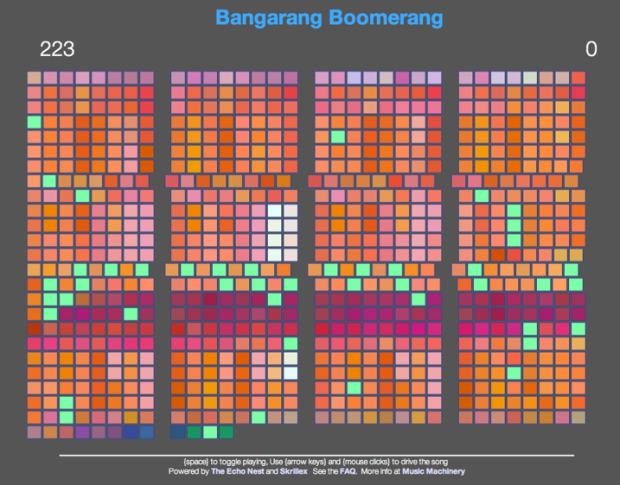
My latest music hack is Bangarang Boomerang. It is a web app (runs in Chrome or the latest Safari), that lets you ‘drive’ the Skrillex song. You can freeze-frame the song on a beat, you can make the song go backwards beat by beat, you can advance through the song at double time, or triple time, and set bookmarks to let you easily jump to different sections of the song. It is a rather fun app that lets you feel like a musician, even if you have very little musical talent.
Watch the quick Youtube demo, and then try it yourself: Bangarang Boomerang
[youtube http://youtu.be/GJQ1K1dnU2A]
Music, Tech, Art and Interactivity in one great party
This friday, my daughter Jennie and I will be heading down to Brooklyn’s DUMBO neighborhood to take part in DUMBO Summer Friday. We’ll be showing off some nifty music hacks that have been built recently, including our OMA winning Bohemian Rhapsichord. We are especially excited to show off a brand new hack called Bangarang Boomerang. This hack can turn you into Skrillex with about 5 minutes of practice. I’ll be sure to post a link after the event on Friday. Here’s the link: Bangarang Boomerang
If you are in NYC on Friday, head on over to the DUMBO Arch for day of music, tech, art and interactivity.
Update: We had a great day at the dumbo arch showing off all sorts of music hacks. It was great to see some of the local music tech celebs (Eliot, Jason, Peter). Demoing music in the arch was quite a challenge. Strange acoustics, trains driving by every 5 minutes overhead. Special thanks to Cy Cary for going the extra mile to make sure that our sound was top notch. Here’s a picture while we were setting up:

What’s your musical stereotype?
Posted by Paul in fun, Music, The Echo Nest on July 12, 2012
 You can usually learn something about a person by looking at what music they listen to. Someone who listens to the Sex Pistols and the Ramones is likely to be from a very different demographic than someone whose favorite artist is Julie Andrews. Of course there are always exceptions to the rule – there are probably a few playlists out there in the world that have both “Anarchy in the UK” and “My Favorite things” but I’m quite sure you won’t be finding a mosh pit at a Julie Andrews concert any time soon.
As we collect more data about what people listen to we begin to learn more about the demographics of listening. Who really listens to Country music? Are they really mostly right-leaning southerners? Are all Hanson fans now 30 years old? To learn how we can answer some of these questions be sure to read Echo Nest founder Brian Whitman’s latest post on Variogr.am about the kinds of predictions we can make about people based upon what they listen to.
This week, The Echo Nest is releasing some new API features that make it easy for developers to build apps that take advantage of this listening data. One new API is Taste Profile Similarity. This API lets you take a seed taste profile (a taste profile is how The Echo Nest represents an individual’s music taste) and find other taste profiles that are similar to that seed. To demonstrate one type of application you can build with this new similarity API, we’ve created a web app called “What’s your stereotype?” This application will look at your music taste (based on your Facebook likes, or your jams from This is my Jam), and tell you which Internet meme best fits your listening style.

Yes, the app will pigeonhole you into a narrow, and probably demeaning demographic. You will probably be offended. Here’s my musical stereotype:
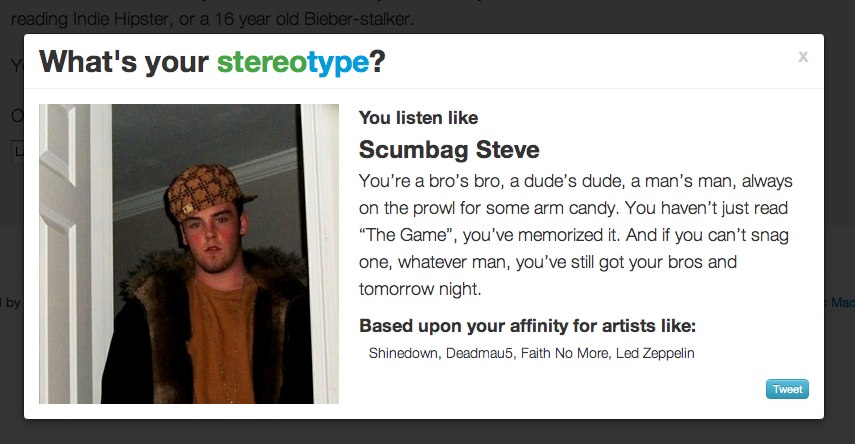
If you want to have your own music tastes pigeonholed like this can try the app yourself at What’s your stereotype? Just remember, you will probably be offended.
To create this app, we identified a whole bunch of Internet memes and personas and made some predictions about the type of music each of these personas would listen to. We then look at the music taste similarity between you and each of the personas – the closest matching one becomes your musical stereotype.
The hardest part about building this app was identifying all of the appropriate Internet memes, predicting the music taste for each meme, collecting images, links and attribution, and most challenging of all, writing the witticisms that accompany each meme. Leading this effort was Matthew Santiago, our chief data quality guy here at The Echo Nest. Matthew organized the meme-dream team to collect and massage all this data. Our highly creative meme-dream team includes Michelle, Nell, Charlie, Alyse, Ryan, Sonja, Nicola, Sam, Roisin, Julie, Sara and Alex.
This app demonstrates what we can do with just a little bit of data about your music tastes. Using the techniques that Brian describes coupled with all the deep data we are gathering around listening habits will help us get a much deeper understanding of your music tastes. This understanding will be key to helping us craft the best music listening experience for you. So, go check out the What’s your stereotype? . I hope you’ll have as much fun with the app as we had in building it.
Hear Here Version 0.3
More weekend programming on ‘Hear Here’ the mobile version of the Road Trip mixtape. I’ve added a familiarity filter so you can chose whether you want to listen to only the most recognizable artists in a region, or you want to listen to everything. Screenshots:
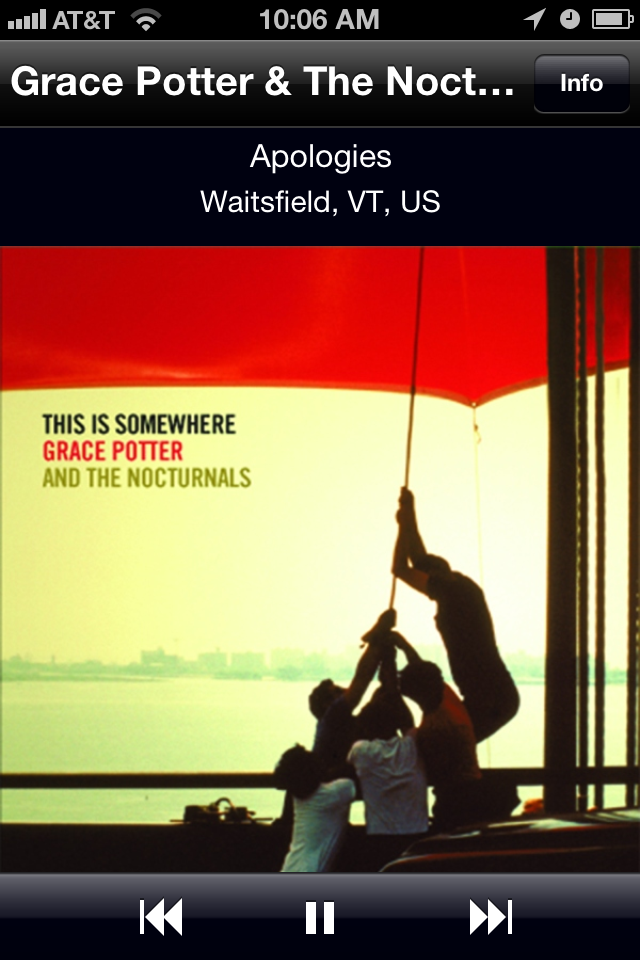
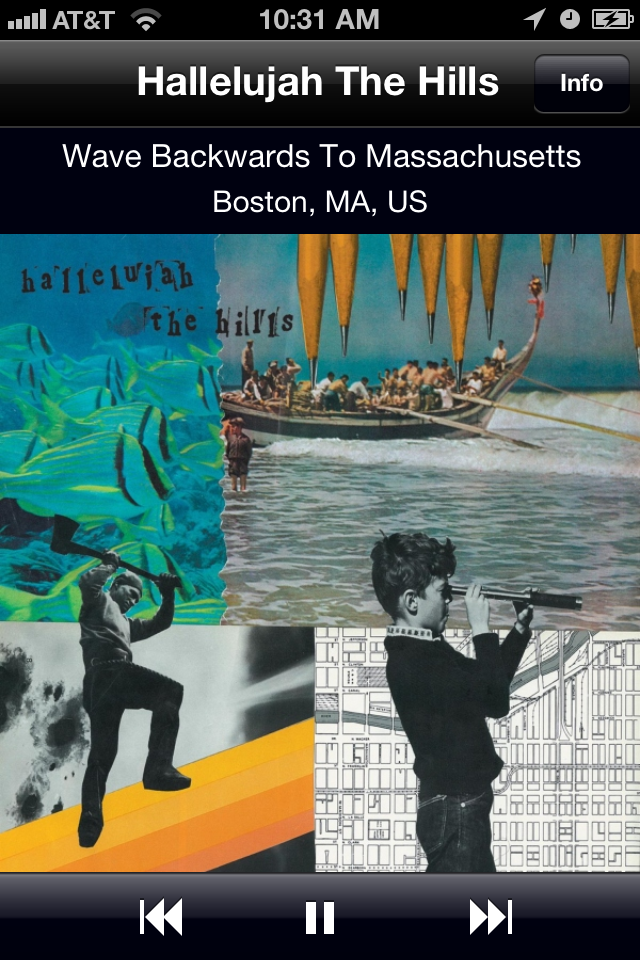
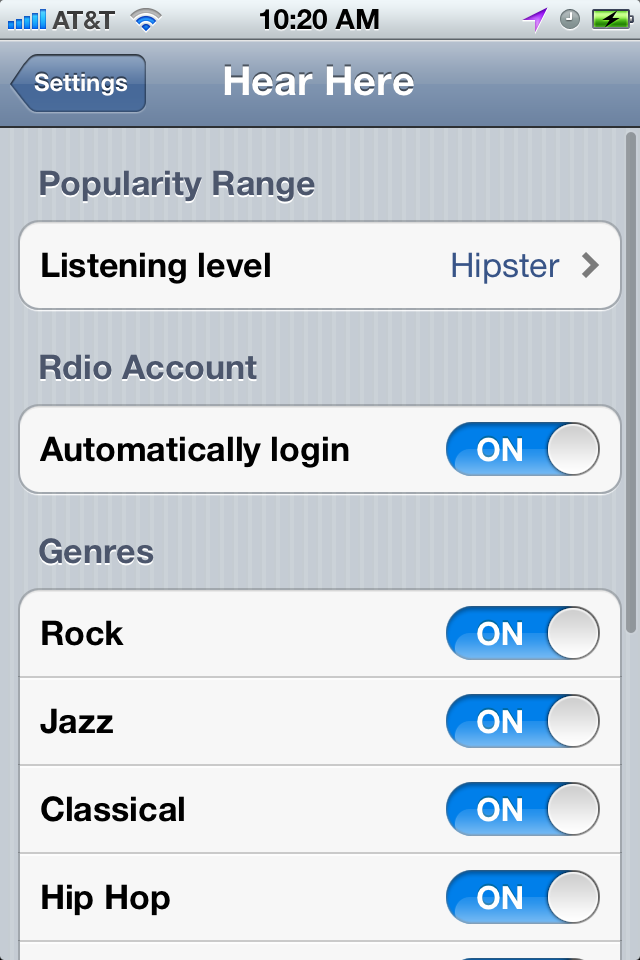
I’ve taken the app on a few road tests. There were a few crashes (of the app kind, not the car kind, luckily). Stability and responsiveness with unreliable networking is a fun challenge. I’m taking a 1000 mile roadtrip in a week or two, hopefully will have it 100% ready by then.

