Archive for category fun
What is a Music Hackday?
Hernik Berggren put together a nifty slide deck along with some video to show people what a Music Hackday is all about. Check it out on Henrik’s blog: Music Hackday Revisited.
The Music Hackday Comes to Boston
Posted by Paul in code, events, fun, Music, startup, The Echo Nest, web services on September 11, 2009
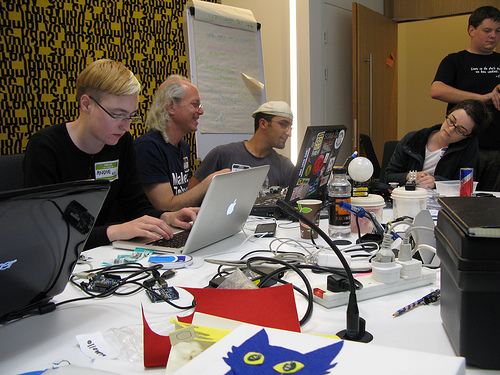
<W00T!> -The Music Hackday is coming to Boston. Set aside the weekend of November 21 and 22 for the Boston Music Hackday being held at the Microsoft New England Research and Develpment Center (aka NERD). The Music Hackday is a place where folks can gather for a weekend of nearly uninterrupted hacking on music. Expect to see (and hear) all kinds of music hacks: from web-hacks, iPhone apps, analog noisemakers to cool visualizations. Anything goes as long as it is music related. The Boston hackday is being organized by Dave Haynes (SoundCloud), Jon Pierce (Betahouse) and myself (The Echo Nest). We here at the Echo Nest are pretty excited to be involved. It should be really fun.
If you hack music and are going to be within a day’s drive of Boston on the weekend before Thanksgiving, you really should be planning to attend the hackday. Registration is free, but space is limited. To guarantee a spot register early and be sure you tell us how you want to hack music (because of the limited number of slots, we give preference to music hackers).
Event: Boston Music Hackday
When: November 21, 22
Where: NERD
PRICE: $FREE
Register: http://musichackdayboston.eventbrite.com/
Looking for hacking inspiration? Check out all of the music hacks that were built during the London Music Hackday:
- LonelyHarps won 7digital prize
- Music Zeitgeist won BBC prize
- iPhone Music Visualiser won The Echo Nest prize
- pythoniphication of SoundCloud API won Gigulate prize
- MusicBore won Last.fm and Be Broadband Overall prize
- trackmap won Songkick prize
- SoundCloud playlist sampler won SoundCloud prize
- Percussion Machine won RjDj and Tinker it! prize
- SpaceBass won LOLCODE prize
- TrippyAudioWaves
- Music Feeds
- Record Label Website and Data Access
- Cantarino
- Danzen Party MIX!!!
- iPhone Music Visualiser
- Pix n Mixer
- IRC Duckestra
- BotTalk
- SoundCloud AS3 Wrapper
- TwinkleStarduino
- Music Price Comparison
- Outcast
- CloudPost
- Gig news
- LONCYN
- MP3 music news blog plugin
- last.fm Events on iPhone
- SoundCloud Dropbox Manager
- MakeMyMixtape
- Bass Race RjDj Scene
- 7digital and Guardian news mashup
- YouLoop
- CitySounds.fm
- RFID objects with a taste in music
- Amenator
- Theremag
- ookoi_ShakeNRoll
- Soup.io SoundCloud import & Radio alpha
- Bass Race RjDj Scene
- JAEZZESiZER
People who shopped for baseball bats …
Posted by Paul in freakomendation, fun, recommendation on September 11, 2009

Auto-tune for the iPhone
According to Rebecca, it is already the in the top 5 iPhone paid apps, (and it was only released yesterday). Congrats to Rebecca and the rest of the Smule team for creating yet another really cool iPhone music app.
The Stairway Detector
Posted by Paul in data, fun, Music, playlist, The Echo Nest, web services on August 17, 2009
Last night I was watching the pilot for Glee (a snarky TV version of High school musical) with my 3 teenage daughters. I was surprised to hear the soundtrack filled with songs by the band Journey, songs that brought me back to my own high school years. The thing that I like the most about Journey is that many of their songs have this slow and gradual build up over the course of the whole song as in this song Lovin Touchin Squeezin:
A number of my favorite songs have this slow build up. The canonical example is Zep’s ‘Stairway to Heaven’ – it starts with a slow acoustic guitar and over the course of 8 minutes builds to metal frenzy. I thought it would be fun to see if I could write a bit of software that could find the songs that have the same arc as ‘Stairway to Heaven’ or ‘Lovin, Touchin Squeezin’ – songs that have this slow build. With this ‘stairway detector’ I could build playlists filled with the songs that fire me up.
The obvious place to start with is to look how the loudness of a song changes overtime. To do this I used the Echo Nest developer API to extract the loudness as a function of time for Journey’s Lovin, Touchin Squeezin:
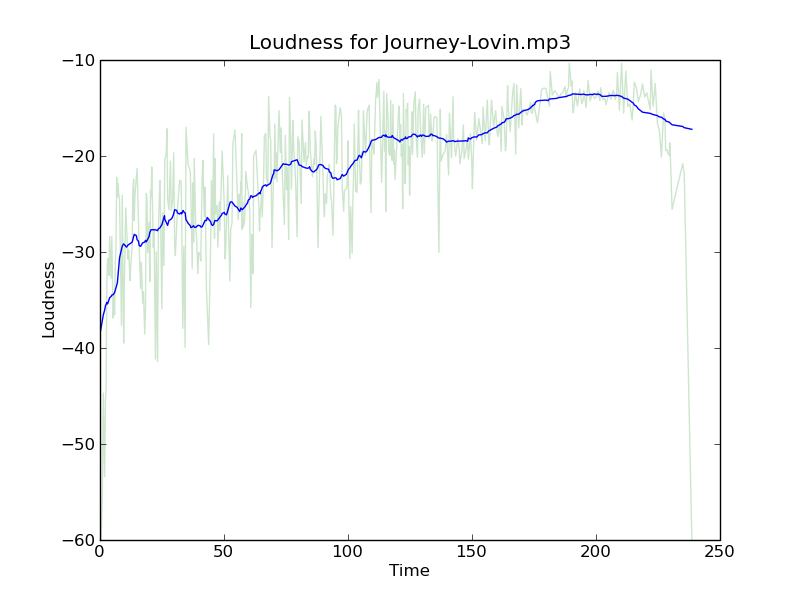 In this plot the light green curve is the loudness, while the blue line is a windowed average of the loudness. This plot shows a nice rise in the volume over the course of the song. Compared to a song like the Beatles ‘Ticket to Ride’ that doesn’t have this upward slope:
 From these two examples, it is pretty clear that we can build our stairway-detector just by looking at the average slope of the volume. The higher the slope, the bigger the build. Now, I suspect that there’s lots of ways to find the average slope of a bumpy line – but I like to always try the simplest thing that could possibly work first – and for me the simplest thing was to just divide the average loudness of the second half of the song by the average loudness of the first half of the song. So for example, with the Journey song the average loudness of the second half of the song is -15.86 db and the average of the first half of the song is -24.37 db. This gives us a ratio of 1.54, while ‘Ticket to ride’ gets a ratio of 1.06. Here’s the Journey song with averages shown:
 Here are a few more songs that fit the ‘slow build’ profile:
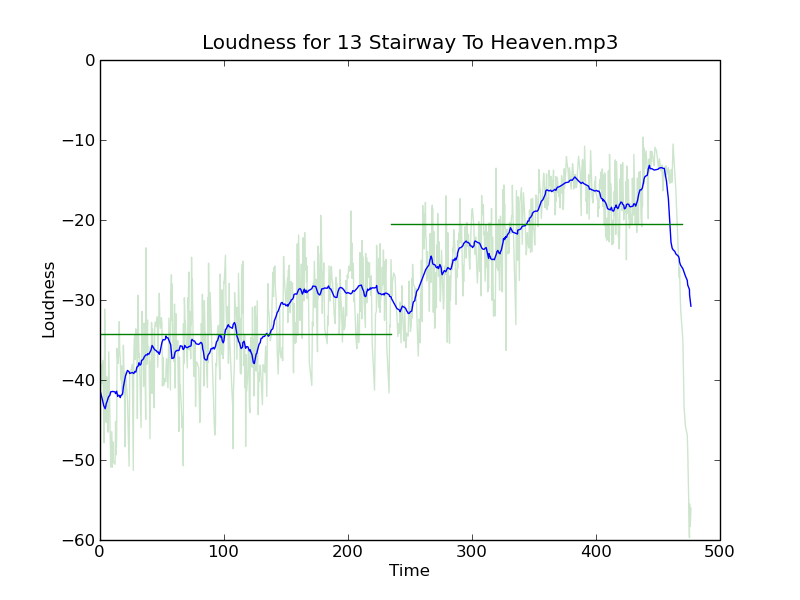 ‘Stairway to Heaven’ has a score of 1.6 so it has a bigger build than Journey’s Lovin’.
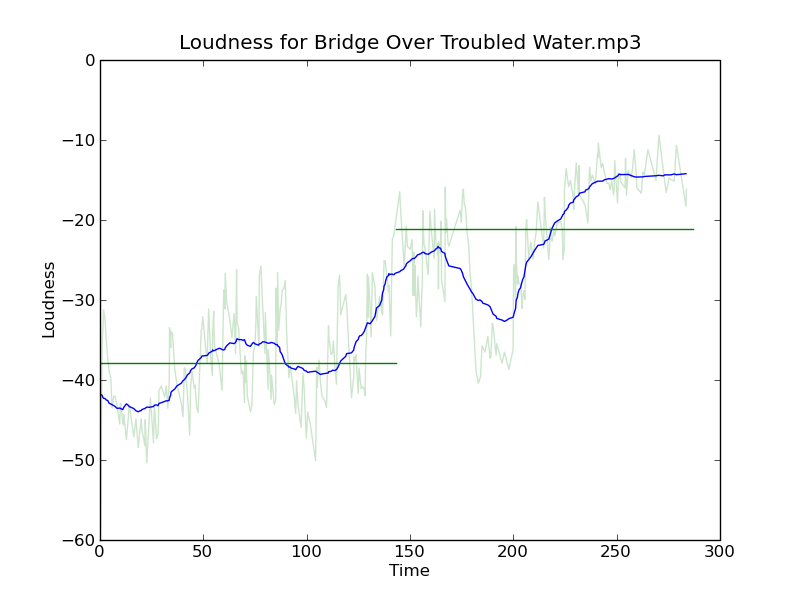 Simon and Garfunkle’s ‘Bridge over troubled water’ has an even bigger build with a score of 1.7.
 Also sprach Zarathustra has a more modest score of 1.56
With this new found metric I analyzed a few thousand of the tracks in my personal collection to find the songs with the biggest crescendos. The biggest of all was this song by Muse with a whopping score of 3.07:
 Another find is Arcade Fire’s “My Body is a Cage” with a score of 2.32.
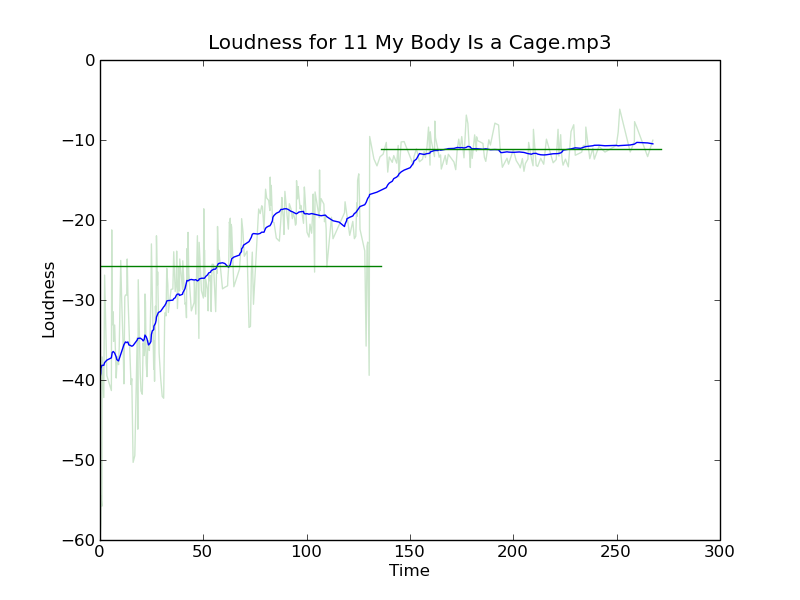
The metric isn’t perfect. For instance, I would have expected Postal Services ‘Natural Anthem’ to have a high score because it has such a great build up, but it only gets a score of 1.19. Looking at the plot we can see why:
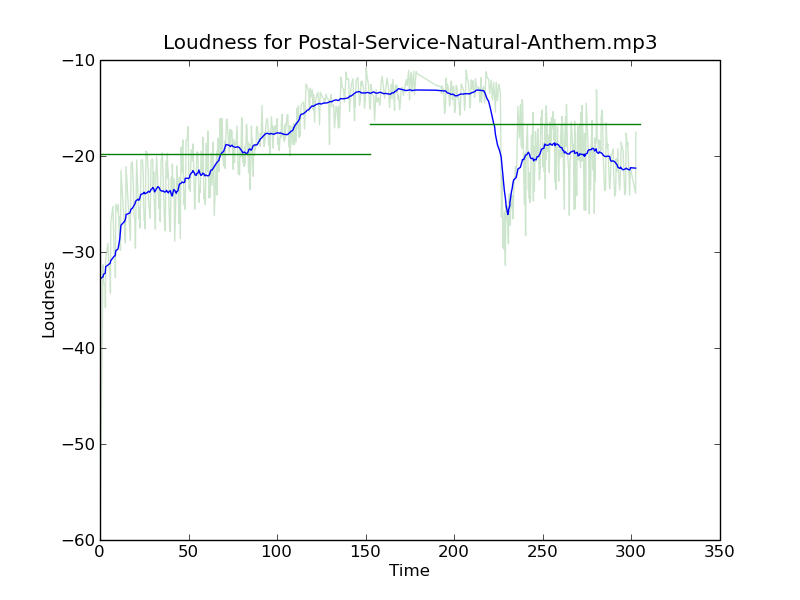 After the initial build up, there’s a drop an energy for that last quarter of the song, so even though the song has a sustained crescendo for 3 minutes it doesn’t get a high score due to this drop.
Of course, we can use this ratio to find tracks that go the other way, to find songs that gradually wind down. These seem to occur less frequently than the songs that build up. One example is Neutral Milk Hotel’s Two Headed Boy:

Despite the fact that I’m using a very naive metric to find the loudness slope, this stairway detector is pretty effective in finding songs that have that slow build. It’s another tool that I can use for helping to build interesting playlists. This is one of the really cool things about how the Echo Nest approaches music playlisting. By having an understanding of what the music actually sounds like, we can build much more interesting playlists than you get from genius-style playlists that only take into account artists co-occurrence.
Making better plots
Posted by Paul in code, fun, The Echo Nest, visualization on August 5, 2009
For many years, I’ve used awk and gnuplot to generate plots but as I switch over to using Python for my day to day programming, I thought there might be a more Pythonic way to do plots. Google pointed me to Matplotlib and after kicking the tires, I’ve decided to retire gnuplot from my programming toolkit and replace it with matplotlib.

Matplotlib is a 2D plotting library that produces a wide variety of high quality figures suitable for interactive applications or for inserting into publications. A quick tour of the gallery shows the wide range of plots that are possible with Matplotlib. The syntax for creating plots is simple and familiar to anyone who’s used matlab for plotting.
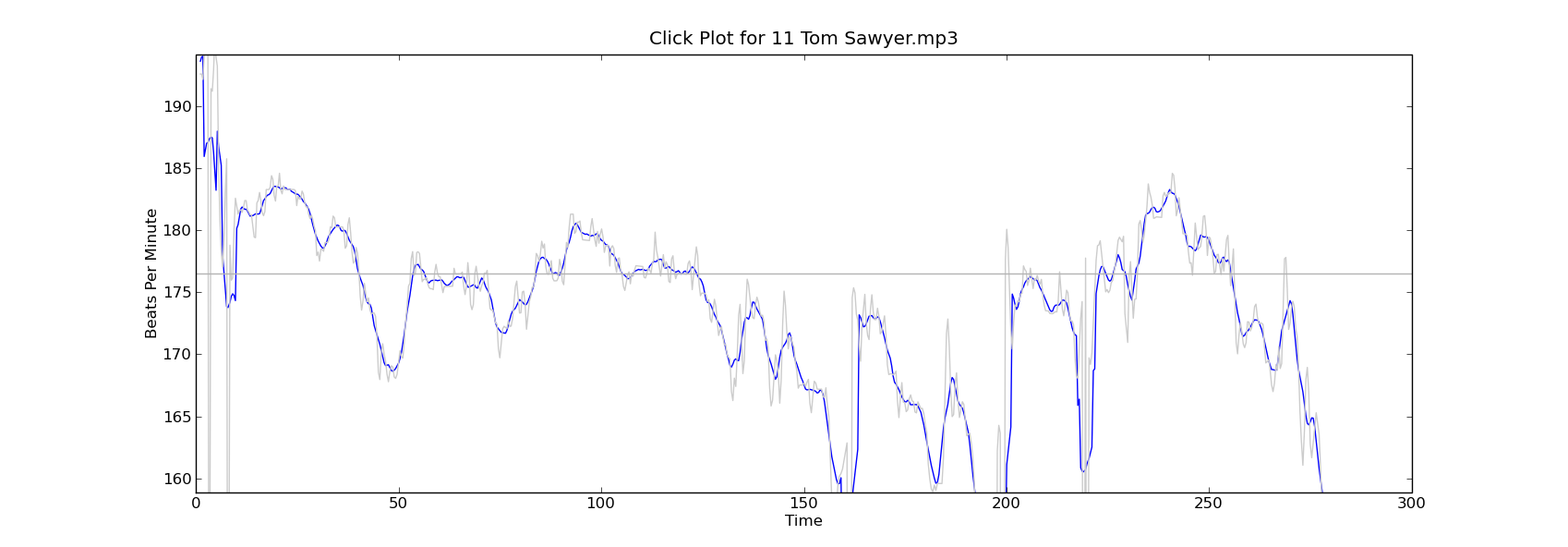
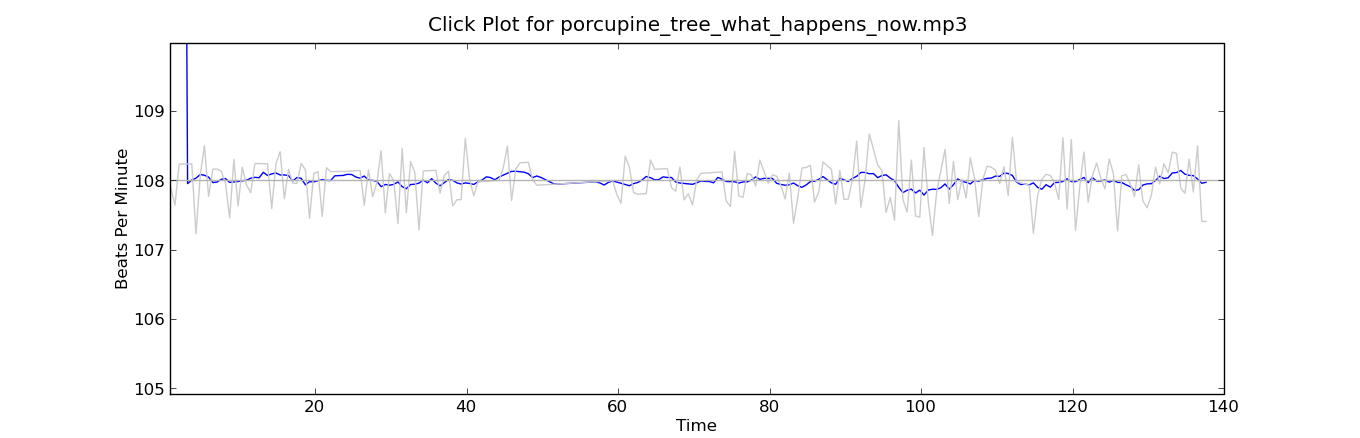
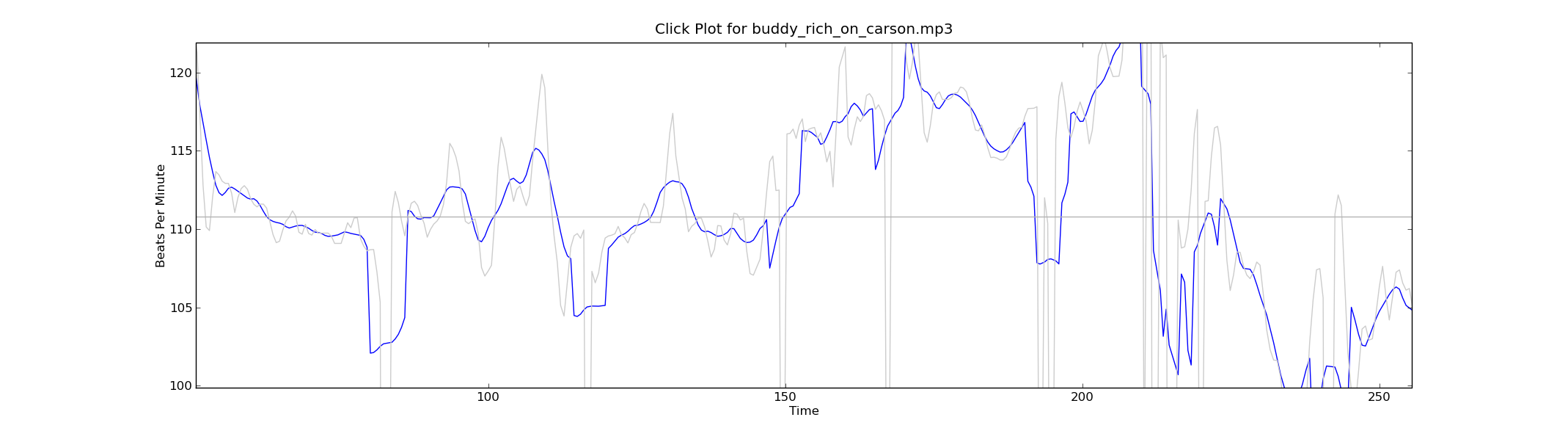
With this new tool in my programming pocket, I thought I’d update my click plotter program to use matplotlib. (The click plotter is a program that generates plots showing how a drummer’s BPM varies over the course of a song. By looking at the generated plots it is easy to see if the beat for a song is being generated by a man or a machine. Read more about it in ‘In Search of the Click Track‘).
The matplotlib code to generate the plots is straightforward:
def plot_click_track(filename): track = track_api.Track(filename) tempo = float(track.tempo['value']) beats = track.beats times = [ dict['start'] for dict in beats ] bpms = get_bpms(times)plt.title('Click Plot for ' + os.path.basename(filename)) plt.ylabel('Beats Per Minute') plt.xlabel('Time') plt.plot(times, get_filtered_bpms(bpms), label='Filtered') plt.plot(times, bpms, color=('0.8'), label='raw') plt.ylim(tempo * .9, tempo * 1.1) plt.axhline(tempo, color=('0.7'), label="Tempo") plt.show()The complete source code for click_plot is in the example directory of the pyechonest module.
Here are a few examples plots generated by click_plot:
To create your own click plots grab the example from the SVN repository, make sure you have pyechonest and matplotlib installed, get an Echo Nest API key and start generating click plots with the command:
% click_plot.py /path/to/music.mp3

DJ API’s secret sauce
Last week at the Echo Nest 4 year anniversary party we had two renown DJs keeping the music flowing. DJ Rupture was the featured act – but opening the night was the Echo Nest’s own DJ API (a.k.a Ben Lacker) who put together a 30 minute set using the Echo Nest remix.

DJ API at work (Photo by Jason Sundram
I was really quite astounded at the quality of the tracks Ben put together (and all of them apparently done on the afternoon before the gig). I asked Ben to explain how he created the tracks. Here’s what he said:
1. ‘One Thing’ – featuring Michael Jackson’s (dj api’s rip)
I found a half-dozen a cappella Michael Jackson songs as well as instrumental and a cappella recordings of Amerie’s “One Thing” on YouTube. To get Michael Jackson to sing “One Thing”, I stitched all his a cappella tracks together into a single track, then ran afromb: for each segment in the a cappella version of “One Thing”, I found the segment in the MJ a cappella medley that was closest in pitch, timbre, and loudness. The result sounded pretty convincing, but was heavy on the “uh”s and breath sounds. Using the pitch-shifting methods in modify.py, I shifted an a cappella version of “Ben” to be in the same key as “One Thing”, then ran afromb again. I edited together part of this result and part of the first result, then synced them up with the instrumental version of “One Thing.”
2. One Thing (dj api’s gamelan version)
I used afromb again here, this time resynthesizing the instrumental version of “One Thing” from the segments of a recording of a Balinese Gamelan Orchestra. I synced this with the a cappella version of “One Thing” and added some kick drums for a little extra punch
3. Billie Jean (dj api screwdown)
First I ran summary on an instrumental version of Beyoncé’s “Single Ladies (another YouTube find) to produce a version consisting only of the “ands” (every second eighth note). I then used modify.shiftRate to slow down an a cappella version of “Billie Jean” until its tempo matched that of the summarized “Single Ladies”. I synced the two, and repeated some of the final sections of “Single Ladies” to follow the form of “Billie Jean
Artist radio in 10 lines of code
Posted by Paul in code, fun, Music, playlist, The Echo Nest, web services on July 16, 2009
Last week we released Pyechonest, a Python library for the Echo Nest API. Pyechonest gives the Python programmer access to the entire Echo Nest API including artist and track level methods. Now after 9 years working at Sun Microsystems, I am a diehard Java programmer, but I must say that I really enjoy the nimbleness and expressiveness of Python. It’s fun to write little Python programs that do the exact same thing as big Java programs. For example, I wrote an artist radio program in Python that, given a seed artist, generates a playlist of tracks by wandering around the artists in the neighborhood of the seed artists and gathering audio tracks. With Pyechonest, the core logic is 10 lines of code:
def wander(band, max=10):
   played = []
   while max:
     if band.audio():
         audio = random.choice(band.audio())
         if audio['url'] not in played:
             play(audio)
             played.append(audio['url'])
             max -= 1
     band = random.choice(band.similar())

(You can see/grab the full code with all the boiler plate in the SVN repository)
This method takes a seed artist (band) and selects a random track from set of audio that The Echo Nest has found on the web for that artist, and if we haven’t already played it, then do so. Then we select a near neighbor to the seed artist and do it all again until we’ve played the desired number of songs.
For such a simple bit of code, the playlists generated are surprisingly good..Here are a few examples:
Seed Artist: Led Zeppelin:
- You Shook Me by Led Zeppelin via licorice-pizza
- Suicide by Thin Lizzy via dmg541
- I Ain’t The One by Lynyrd Skynrd via artdecade
- Fortunate Son by Creedence Clearwater Revival via onesweetsong
- Susie-Q by Dale Hawkins via boogiewoogieflu
(I think the Dale Hawkins version of Susie-Q after CCR’s Fortunate Son is just brilliant)
Seed Artist: The Decemberists:
- The Wanting Comes In Waves/Repaid by The Decemberists via londononburgeoningmetropolis
- Amazing Grace by Sufjan Stevens via itallstarted
- Baby’s Romance by Chris Garneau via slowcoustic
- Saint Simon by The Shins via pastaprima
- Made Up Love Song #43 by Guillemots via merryswankster
(Note that audio for these examples is audio found on the web – and just like anything on the web the audio could go away at any time)
I think these artist-radio style playlists rival just about anything you can find on current Internet radio sites – which ain’t to0 bad for 10 lines of code.
Echo Nest Remix 1.2 has just been released
Posted by Paul in code, fun, The Echo Nest on July 10, 2009
Just in time for hack day … Quoting Brian:
Hi all, 1.2 just “released.” There are prebuilt binary installers for Mac and Windows, and pretty detailed instructions for Linux and other source installs.
The main features of Remix 1.2 are video processing and time/pitch stretching, along with a reliance of “pyechonest” to do the communication with EN. This lets you do more than just track API calls.
Some relevant examples included in the stretch and videx folders.
Thanks to all for the hard work.
This release ties together the video processing, time and pitch stretching, making it possible to do the video and the stretching remixes from the same install. Awesome!

