Archive for category code
Remixing for the masses at SXSW 2010
Posted by Paul in code, The Echo Nest on August 25, 2009
 We are hoping to be able to present a panel on Echo Nest remix at next year’s SXSW interactive. We want to show lots of rather nifty ways that one can use Echo Nest remix to manipulate music – lots of code plus lots of music and video remix examples. What could be more fun? To actually get to present the panel we have to make it through the SXSW panel picking process. If you think this might be a good panel, head on over to our panel proposal page and vote for our panel called ‘remixing for the masses‘.
Making better plots
Posted by Paul in code, fun, The Echo Nest, visualization on August 5, 2009
For many years, I’ve used awk and gnuplot to generate plots but as I switch over to using Python for my day to day programming, I thought there might be a more Pythonic way to do plots. Google pointed me to Matplotlib and after kicking the tires, I’ve decided to retire gnuplot from my programming toolkit and replace it with matplotlib.

Matplotlib is a 2D plotting library that produces a wide variety of high quality figures suitable for interactive applications or for inserting into publications. A quick tour of the gallery shows the wide range of plots that are possible with Matplotlib. The syntax for creating plots is simple and familiar to anyone who’s used matlab for plotting.
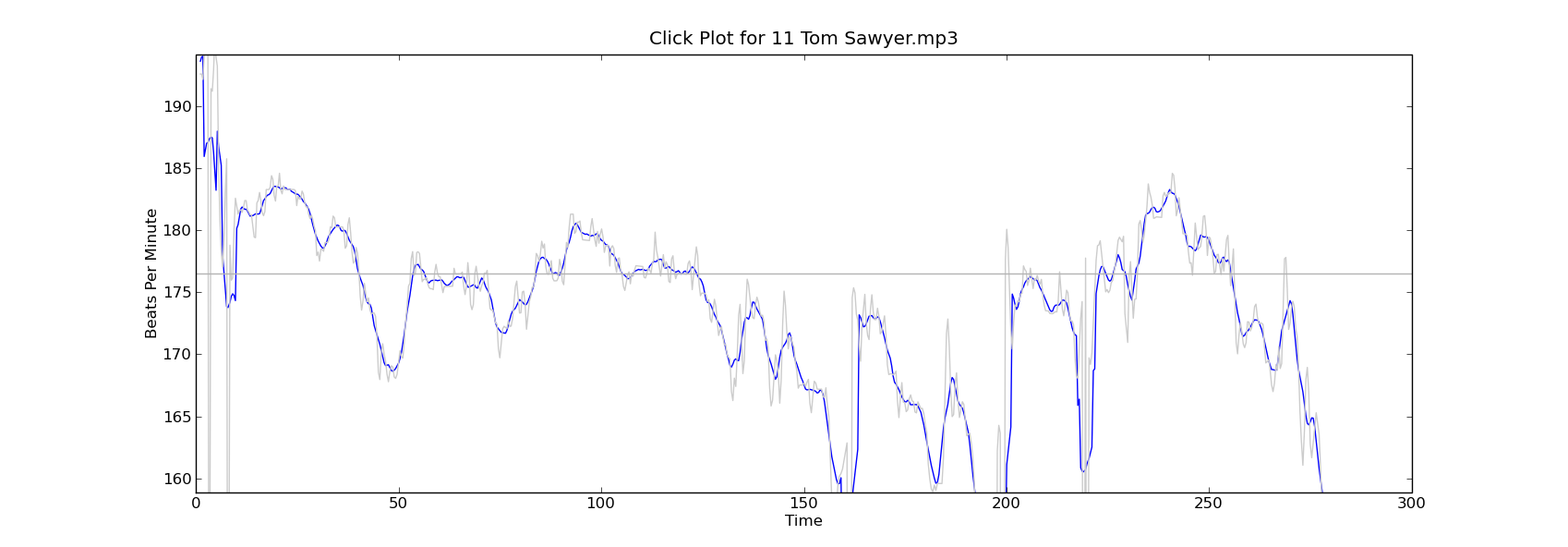
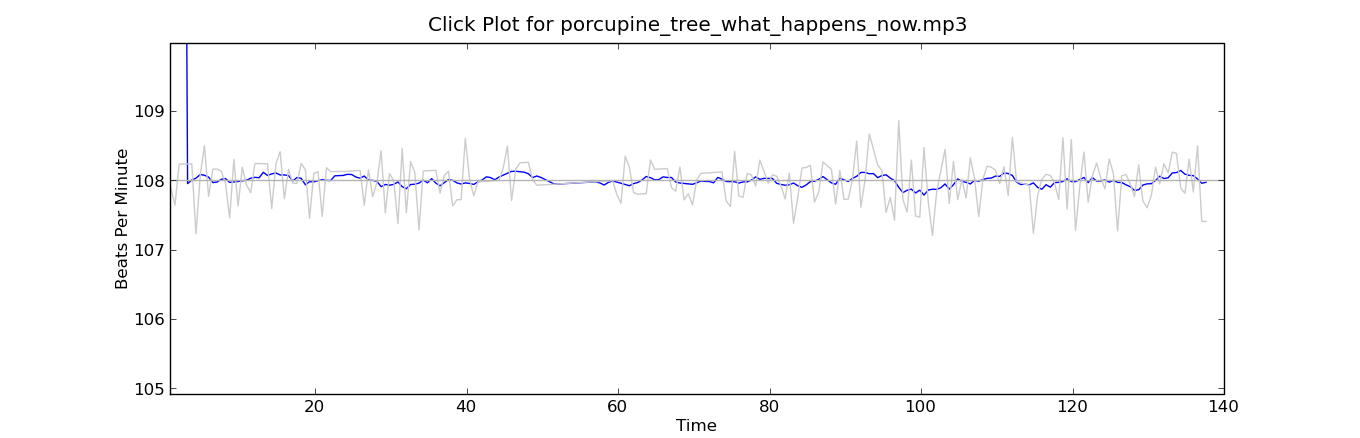
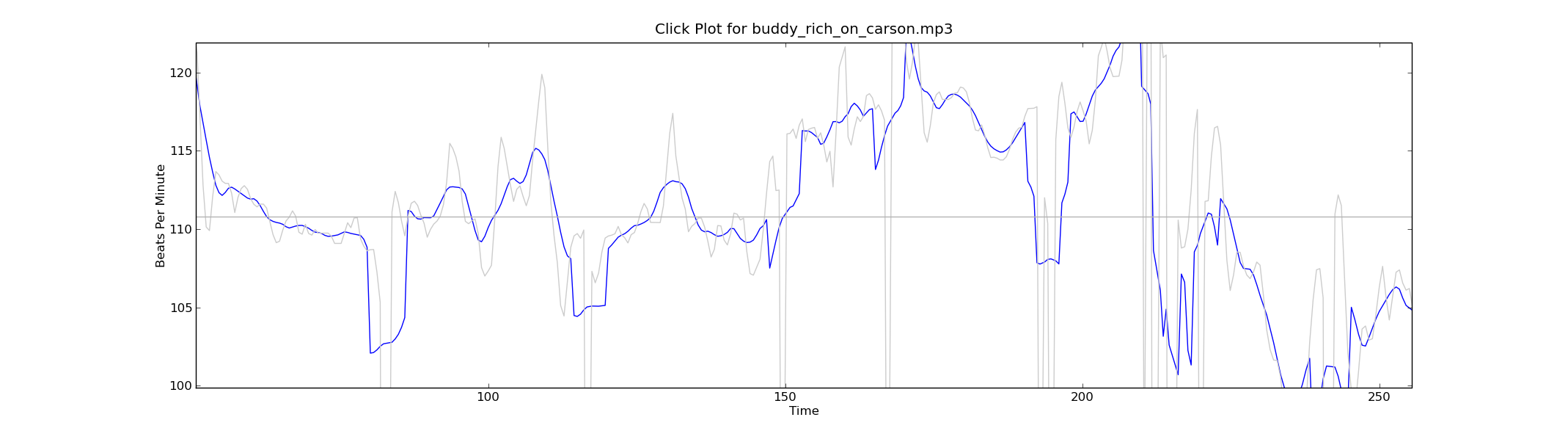
With this new tool in my programming pocket, I thought I’d update my click plotter program to use matplotlib. (The click plotter is a program that generates plots showing how a drummer’s BPM varies over the course of a song. By looking at the generated plots it is easy to see if the beat for a song is being generated by a man or a machine. Read more about it in ‘In Search of the Click Track‘).
The matplotlib code to generate the plots is straightforward:
def plot_click_track(filename): track = track_api.Track(filename) tempo = float(track.tempo['value']) beats = track.beats times = [ dict['start'] for dict in beats ] bpms = get_bpms(times)plt.title('Click Plot for ' + os.path.basename(filename)) plt.ylabel('Beats Per Minute') plt.xlabel('Time') plt.plot(times, get_filtered_bpms(bpms), label='Filtered') plt.plot(times, bpms, color=('0.8'), label='raw') plt.ylim(tempo * .9, tempo * 1.1) plt.axhline(tempo, color=('0.7'), label="Tempo") plt.show()The complete source code for click_plot is in the example directory of the pyechonest module.
Here are a few examples plots generated by click_plot:
To create your own click plots grab the example from the SVN repository, make sure you have pyechonest and matplotlib installed, get an Echo Nest API key and start generating click plots with the command:
% click_plot.py /path/to/music.mp3

New news feed for developer.echonest.com
Posted by Paul in code, Music, The Echo Nest, web services on July 30, 2009
 If you are interested in keeping up with the latest news about the Echo Nest APIs you can now subscribe to a developer.echonest.com news feed where we are posting news and articles about the Echo Nest APIs. Read more and subscribe at developer.echonest.com.
DJ API’s secret sauce
Last week at the Echo Nest 4 year anniversary party we had two renown DJs keeping the music flowing. DJ Rupture was the featured act – but opening the night was the Echo Nest’s own DJ API (a.k.a Ben Lacker) who put together a 30 minute set using the Echo Nest remix.

DJ API at work (Photo by Jason Sundram
I was really quite astounded at the quality of the tracks Ben put together (and all of them apparently done on the afternoon before the gig). I asked Ben to explain how he created the tracks. Here’s what he said:
1. ‘One Thing’ – featuring Michael Jackson’s (dj api’s rip)
I found a half-dozen a cappella Michael Jackson songs as well as instrumental and a cappella recordings of Amerie’s “One Thing” on YouTube. To get Michael Jackson to sing “One Thing”, I stitched all his a cappella tracks together into a single track, then ran afromb: for each segment in the a cappella version of “One Thing”, I found the segment in the MJ a cappella medley that was closest in pitch, timbre, and loudness. The result sounded pretty convincing, but was heavy on the “uh”s and breath sounds. Using the pitch-shifting methods in modify.py, I shifted an a cappella version of “Ben” to be in the same key as “One Thing”, then ran afromb again. I edited together part of this result and part of the first result, then synced them up with the instrumental version of “One Thing.”
2. One Thing (dj api’s gamelan version)
I used afromb again here, this time resynthesizing the instrumental version of “One Thing” from the segments of a recording of a Balinese Gamelan Orchestra. I synced this with the a cappella version of “One Thing” and added some kick drums for a little extra punch
3. Billie Jean (dj api screwdown)
First I ran summary on an instrumental version of Beyoncé’s “Single Ladies (another YouTube find) to produce a version consisting only of the “ands” (every second eighth note). I then used modify.shiftRate to slow down an a cappella version of “Billie Jean” until its tempo matched that of the summarized “Single Ladies”. I synced the two, and repeated some of the final sections of “Single Ladies” to follow the form of “Billie Jean
Artist radio in 10 lines of code
Posted by Paul in code, fun, Music, playlist, The Echo Nest, web services on July 16, 2009
Last week we released Pyechonest, a Python library for the Echo Nest API. Pyechonest gives the Python programmer access to the entire Echo Nest API including artist and track level methods. Now after 9 years working at Sun Microsystems, I am a diehard Java programmer, but I must say that I really enjoy the nimbleness and expressiveness of Python. It’s fun to write little Python programs that do the exact same thing as big Java programs. For example, I wrote an artist radio program in Python that, given a seed artist, generates a playlist of tracks by wandering around the artists in the neighborhood of the seed artists and gathering audio tracks. With Pyechonest, the core logic is 10 lines of code:
def wander(band, max=10):
   played = []
   while max:
     if band.audio():
         audio = random.choice(band.audio())
         if audio['url'] not in played:
             play(audio)
             played.append(audio['url'])
             max -= 1
     band = random.choice(band.similar())

(You can see/grab the full code with all the boiler plate in the SVN repository)
This method takes a seed artist (band) and selects a random track from set of audio that The Echo Nest has found on the web for that artist, and if we haven’t already played it, then do so. Then we select a near neighbor to the seed artist and do it all again until we’ve played the desired number of songs.
For such a simple bit of code, the playlists generated are surprisingly good..Here are a few examples:
Seed Artist: Led Zeppelin:
- You Shook Me by Led Zeppelin via licorice-pizza
- Suicide by Thin Lizzy via dmg541
- I Ain’t The One by Lynyrd Skynrd via artdecade
- Fortunate Son by Creedence Clearwater Revival via onesweetsong
- Susie-Q by Dale Hawkins via boogiewoogieflu
(I think the Dale Hawkins version of Susie-Q after CCR’s Fortunate Son is just brilliant)
Seed Artist: The Decemberists:
- The Wanting Comes In Waves/Repaid by The Decemberists via londononburgeoningmetropolis
- Amazing Grace by Sufjan Stevens via itallstarted
- Baby’s Romance by Chris Garneau via slowcoustic
- Saint Simon by The Shins via pastaprima
- Made Up Love Song #43 by Guillemots via merryswankster
(Note that audio for these examples is audio found on the web – and just like anything on the web the audio could go away at any time)
I think these artist-radio style playlists rival just about anything you can find on current Internet radio sites – which ain’t to0 bad for 10 lines of code.
Echo Nest Remix 1.2 has just been released
Posted by Paul in code, fun, The Echo Nest on July 10, 2009
Just in time for hack day … Quoting Brian:
Hi all, 1.2 just “released.” There are prebuilt binary installers for Mac and Windows, and pretty detailed instructions for Linux and other source installs.
The main features of Remix 1.2 are video processing and time/pitch stretching, along with a reliance of “pyechonest” to do the communication with EN. This lets you do more than just track API calls.
Some relevant examples included in the stretch and videx folders.
Thanks to all for the hard work.
This release ties together the video processing, time and pitch stretching, making it possible to do the video and the stretching remixes from the same install. Awesome!
Flash Remix Demo
Posted by Paul in code, remix, The Echo Nest on July 10, 2009
Ryan Berdeen has been doing some cool things with Flash and the Echo Nest. He’s been making it the Echo Nest track analysis work with audio mixing functionality of Flash 10, effectively giving remix capabilities to the Flash programmer. He’s put together a simple demo that lets you upload a track and perform some manipulations of it. Check it out here: Flash Remix Demo (and the source is here). The demo uses Ryan’s new Echo Nest Flash API. Cool Stuff!
Hacking on the Echo Nest on Music Hackday
Posted by Paul in code, Music, The Echo Nest, web services on July 9, 2009
Music Hackday is nearly upon us. If you want to maximize your hacking time during the hackday there are a few things that you can do in advance to get ready to hack on the Echo Nest APIs:
- Get an Echo Nest API Key – If you are going to be using the API, you need to get a key. You can get one for free from: developer.echonest.com
- Read the API overview – The overview gives you a good idea of the capabilities of the API. If you are thinking of writing a remix application, be sure to read Adam Lindsay’s wonderful remix tutorial.
- Pick a client library – There are a number of client libraries for The Echo Nest (link will be live soon)- select one for your language of choice and install it.
- Think of a great application – easier said than done. If you are looking for some inspiration, checkout these examples: morecowbell, donkdj, Music Explorer FX, and Where’s the Pow? . You’ll find more examples in the Echo Nest gallery of Showcase Apps. If you are stuck for an idea ask me (paul@echonest.com) or Adam Lindsay – we have a list of application ideas that we think would be fun to write.
At the end of the hackday, Adam will choose the Most Awesome Echo Nest Hackday Application. The developer of this application will go home a shiny new iPod touch. If you want your application to catch Adam’s eye write an Echo Nest application that makes someone say “woah! how did you do that!”, extra points if its an application with high viral potential.
I’m rather bummed that I won’t be attending the event, so I hope folks takes lots of pictures and post them to flickr so I can have a vicarious hackday experience.
Flash API for the Echo Nest
Posted by Paul in code, The Echo Nest, web services on July 8, 2009
It’s a busy week for client APIs at the Echo Nest. Developer Ryan Berdeen has released a Flash API for the Echo Nest. Ryan’s API supports the track methods of the Echo Nest API, giving the flash programmer the ability to analyze a track and get detailed info about the track including track metadata, loudness, mode and key along with detailed information relating to the tracks rhythmic, timbrel, and harmonic content.
One of the sticky bits in using the Echo Nest from Flash has been the track uploader. People have had a hard time getting it to work – and since we don’t do very much Flash programming here at the nest it never made it to the top of the list of things to look into. However, Ryan dug in an wrote a MultipartFormDataEncoder that works with the track upload API method – solving the problem not just for him, but for everyone.
Ryan’s timing for this release is most excellent. This release comes just in time for Music Hackday – where hundreds of developers (presumably including a number of flash programmers) will be hacking away at the various music APIs including the Echo Nest. Special thanks goes to Ryan for developing this API and making it available to the world
You make me quantized Miss Lizzy!
Posted by Paul in code, Music, remix, The Echo Nest, web services on July 5, 2009
This week we plan to release a new version of the Echo Nest Python remix API that will add the ability to manipulate tempo and pitch along with all of the other manipulations supported by remix. I’ve played around with the new capabilities a bit this weekend, and its been a lot of fun. The new pitch and tempo shifting features are integrated well with the API, allowing you to adjust tempo and pitch at any level from the tatum on up to the beat or the bar. Here are some quick examples of using the new remix features to manipulate the tempo of a song.
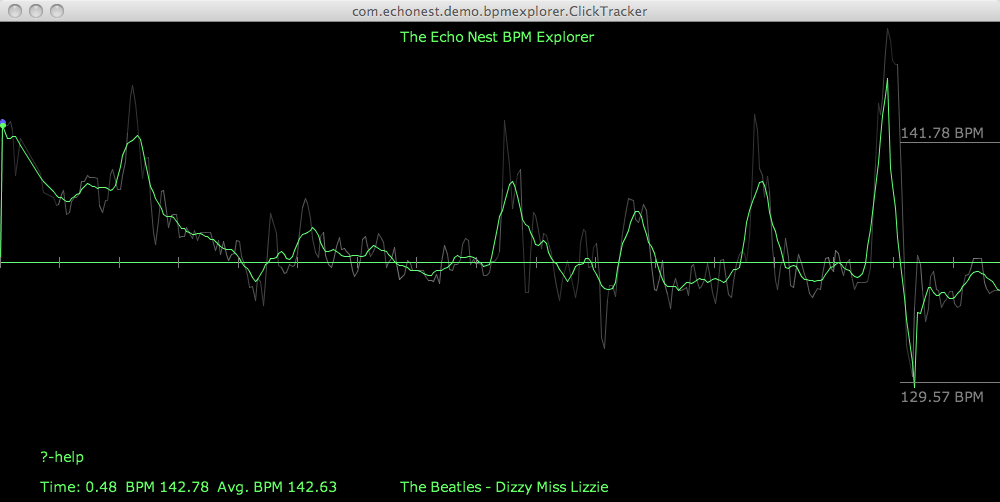
A few months back I created some plots that showed the tempo variations for a number of drummers. One plot showed the tempo variation for The Beatles playing ‘Dizzy Miss Lizzy’. The peaks and valleys in the plot show the tempo variations over the length of the song.
You got me speeding Miss Lizzy
With the tempo shifting capabilities of the API we can now not only look at the detailed tempo information – we can manipulate it. For starters here’s an example where we use remix to gradually increase the tempo of Dizzy Ms. Lizzy so that by the end, its twice as fast as the beginning. Here’s the clickplot:
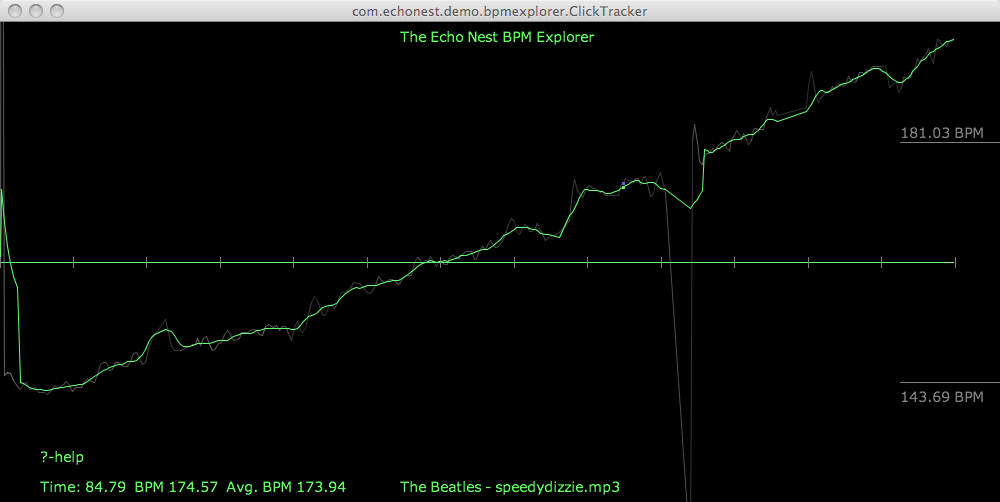
And here’s the audio
I don’t notice the acceleration until about 30 or 45 seconds into the song. I suspect that a good drummer would notice the tempo increase much earlier. I think it’d be pretty fun to watch the dancers if a DJ put this version on the turntable.
As usual with remix – the code is dead simple:
 st = modify.Modify()
 afile = audio.LocalAudioFile(in_filename)
 beats = afile.analysis.beats
 out_shape = (2*len(afile.data),)
 out_data = audio.AudioData(shape=out_shape, numChannels=1, sampleRate=44100)
 total = float(len(beats))
 for i, beat in enumerate(beats):
     delta =  i / total
     new_ad = st.shiftTempo(afile[beat], 1 + delta / 2)
     out_data.append(new_ad)
 out_data.encode(out_filename)
You got me Quantized Miss Lizzy!
For my next experiment, I thought it would be fun if we could turn Ringo into a more precise drummer – so I wrote a bit of code that shifted the tempo of each beat to match the average overall tempo – essentially applying a click track to Ringo. Here’s the resulting click plot, looking as flat as most drum machine plots look:
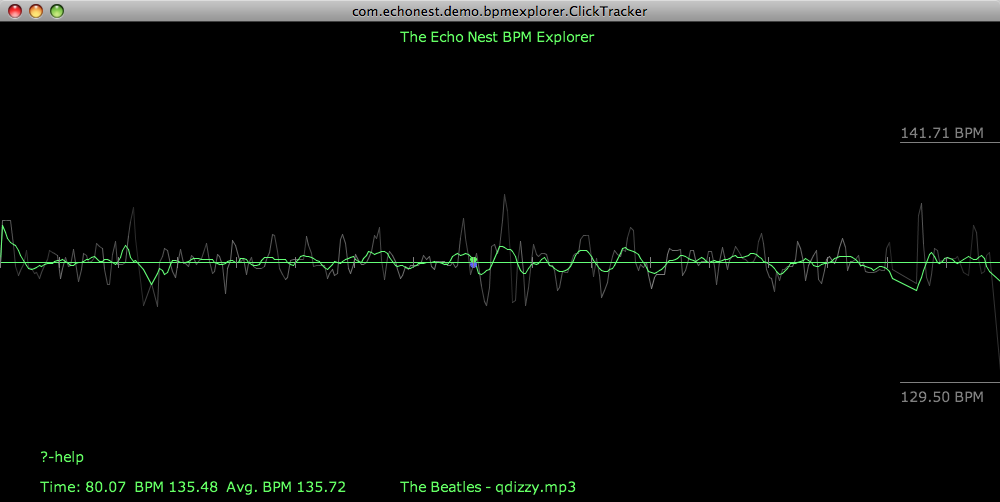
Compare that to the original click plot:
Despite the large changes to the timing of the song visibile in the click plot, it’s not so easy to tell by listening to the audio that Ringo has been turned into a robot – and yes there are a few glitches in there toward the end when the beat detector didn’t always find the right beat.
The code to do this is straightforward:
 st = modify.Modify()
 afile = audio.LocalAudioFile(in_filename)
 tempo = afile.analysis.tempo;
 idealBeatDuration = 60. / tempo[0];
 beats = afile.analysis.beats
 out_shape = (int(1.2 *len(afile.data)),)
 out_data = audio.AudioData(shape=out_shape, numChannels=1, sampleRate=44100)
 total = float(len(beats))
 for i, beat in enumerate(beats):
     data = afile[beat].data
     ratio = idealBeatDuration / beat.duration
     # if this beat is too far away from the tempo, leave it alone
     if ratio < .8 and ratio > 1.2:
         ratio = 1
     new_ad = st.shiftTempoChange(afile[beat], 100 - 100 * ratio)
     out_data.append(new_ad)
 out_data.encode(out_filename)
Is is Rock and Roll or Sines and Cosines?
Here’s another tempo manipulation – I applied a slowly undulating sine wave to the overall tempo – its interesting how more disconcerting it is to hear a song slow down than it does hearing it speed up.
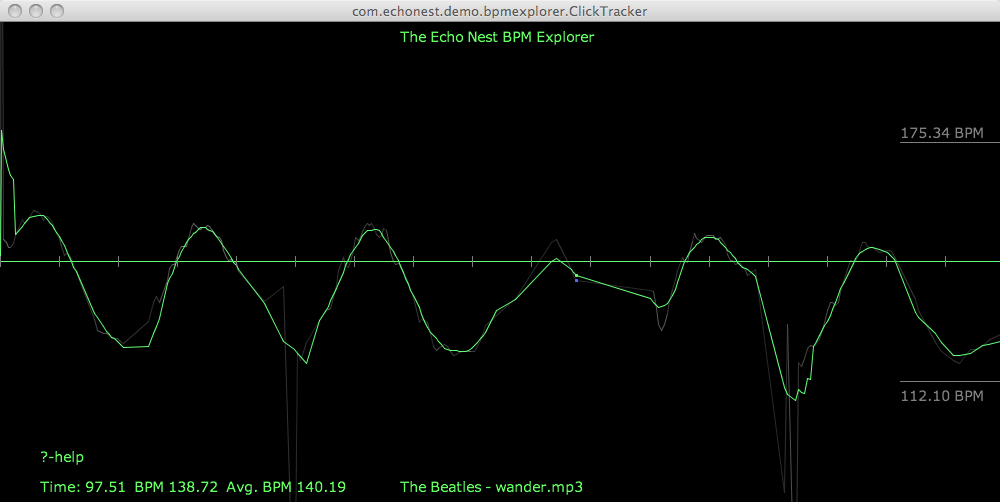
I’ll skip the code for the rest of the examples as an exercise for the reader, but if you’d like to see it just wait for the upcoming release of remix – we’ll be sure to include these as code samples.
The Drunkard’s Beat
Here’s a random walk around the tempo – my goal here was an attempt to simulate an amateur drummer – small errors add up over time resulting in large deviations from the initial tempo:
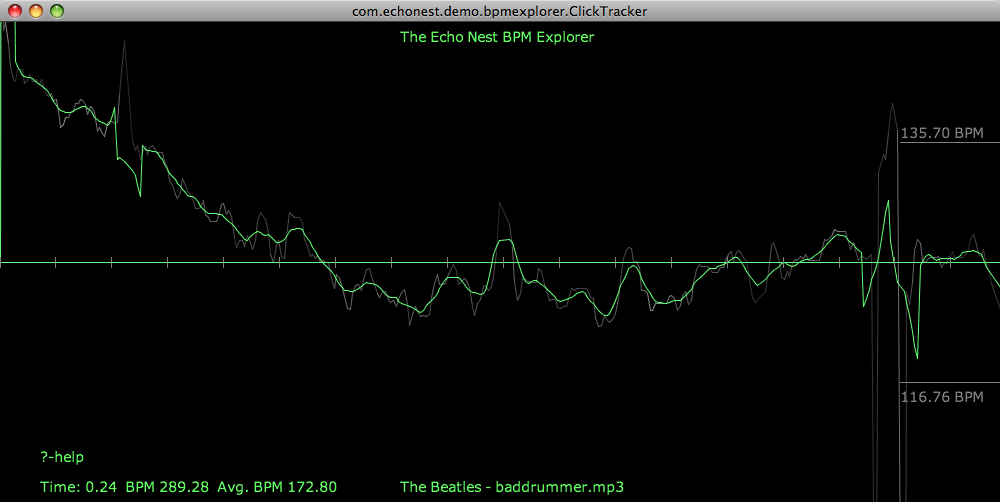
Here’s the audio:
Higher and Higher
In addition to these tempo related shifts, you can also do interesting things to shift the pitch around. I’ll devote an upcoming post to this type of manipulation, but here’s something to whet your appetite. I took the code that gradually accelerated the tempo of a song and replaced the line:
new_ad = st.shiftTempo(afile[beat], 1 + delta / 2) with this:new_ad = st.shiftPitch(afile[beat], 1 + delta / 2)in order to give me tracks that rise in pitch over the course of the song.
Wrapup
Look for the release that supports time and pitch stretching in remix this week. I’ll be sure to post here when it is released. To use the remix API you’ll need an Echo Nest API key, which you can get for free from developer.echonest.com.The click plots were created with the Echo Nest BPM explorer – which is a Java webstart app that you can launch from your browser at The Echo Nest BPM Explorer site.
 Music Machinery