Archive for category code
Bad Romance – the memento edition
Posted by Paul in code, events, remix, The Echo Nest on March 18, 2010
At SXSW I gave a talk about how computers can help make remixing music easier. For the talk I created a few fun remixes. Here’s one of my favorites. It’s a beat-reversed version of Lady Gaga’s Bad Romance. The code to create it is here: vreverse.py
NodeJS and DonkDJ
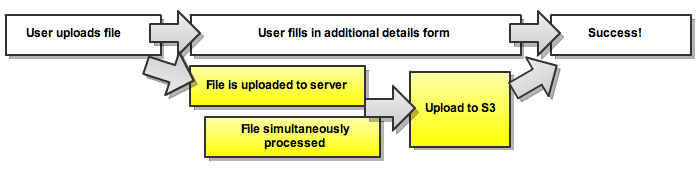
Brian points me to RF Watson’s (creator of DonkDj) interesting post about how he’s using NodeJS to solve concurrency problems in his audio-uploading web apps. Worth a read.
Echo Nest Client Library for the Android Platform
Posted by Paul in code, Music, The Echo Nest on February 24, 2010
 The Echo Nest is participating in annual mobdev contest for the Mobile Application Development (mobdev) course at Olin College offered by Mark L. Chang. Already, our participation is bearing fruit. Ilari Shafer, one of our course assistants created a version of the Echo Nest Java client library that runs on Android. You can fetch it here: echo-nest-android-java-api [zip].
I spent a few hours yesterday talking to the mobdev class. The students had lots of great questions and lots of really interesting ideas on how to use the Echo Nest APIs to build interesting mobile apps. I can’t wait to see what they build in 10 days.
Python and Music at PyCon 2010
Posted by Paul in code, Music, The Echo Nest on February 15, 2010
 If you are lucky enough to be heading to PyCon this week and are interested in hacking on music, there are two talks that you should check out:
DJing in Python: Audio processing fundamentals – In this talk Ed Abrams talks about how his experiences in building a real-time audio mixing application in Python. I caught a dry-run of this talk at the local Python SIG – lots of info packed into this 30 minute talk. One of the big takeaways from this talk is the results of Ed’s evaluation of a number of Pythonic audio processing libraries. Sunday 01:15pm, Centennial I
Remixing Music Pythonically – This is a talk by Echo Nest friend and über-developer Adam Lindsay. In this talk Adam talks about the Echo Nest remix library. Adam, a frequent contributor to remix, will offer details on the concise expressiveness offered when editing multimedia driven by content-based features, and some insights on what Pythonic magic did and didn’t work in the development of the modules. Audio and video examples of the fun-yet-odd outputs that are possible will be shown. Sunday 01:55pm, Centennial I
The schedulers at PyCon have done a really cool thing and have put the talks back to back in the same room. Also, keep your eye out for the Hacking on Music OpenSpace
Jason’s cool screensaver
Posted by Paul in code, fun, Music, The Echo Nest on February 13, 2010
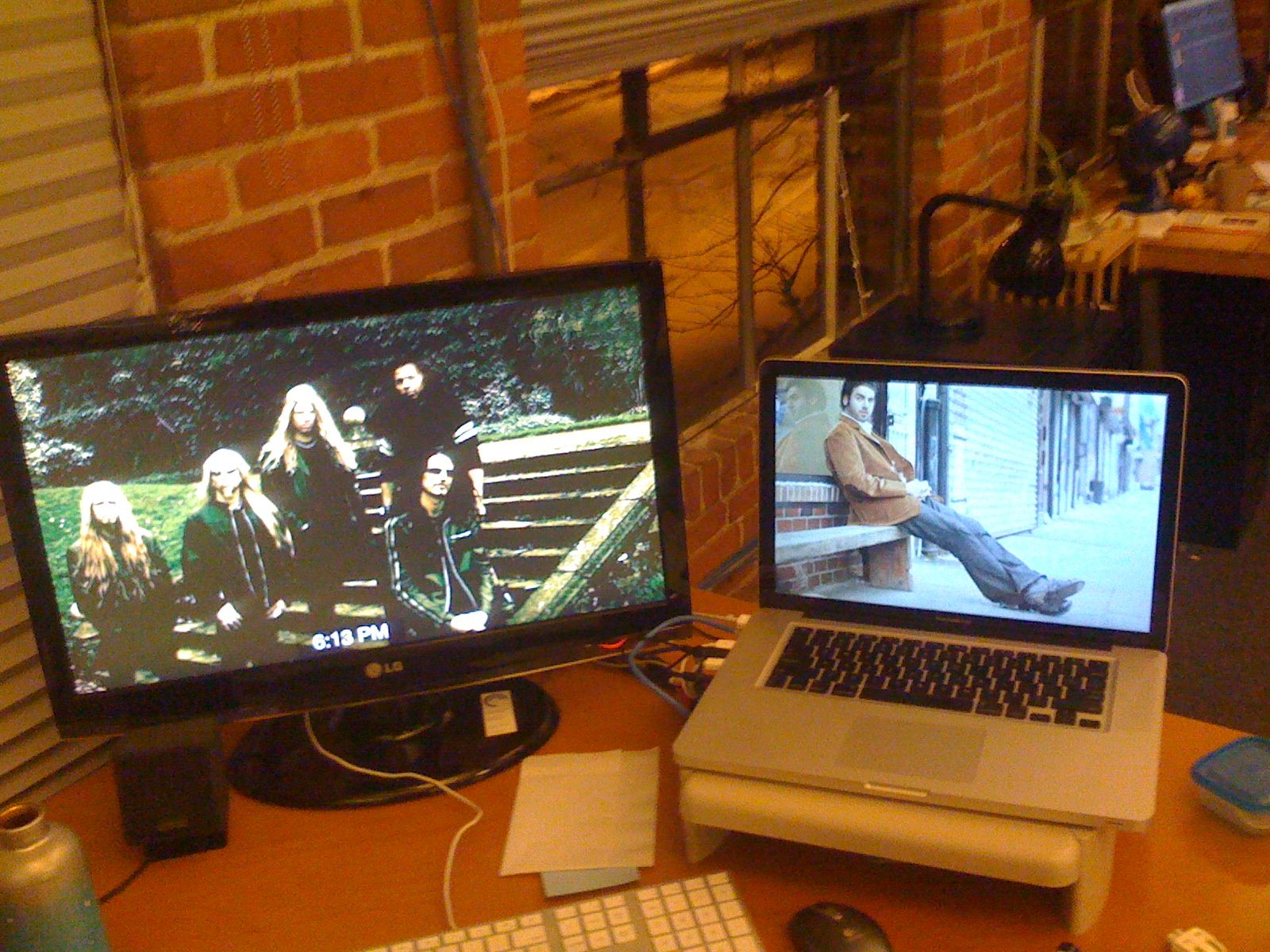
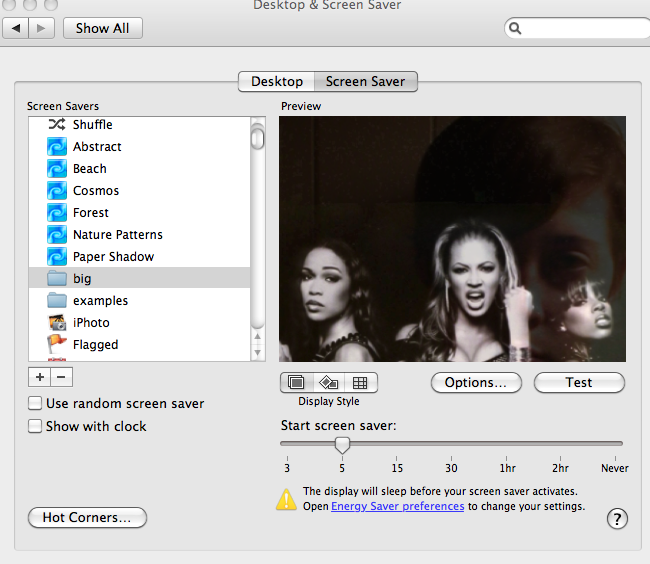
I noticed some really neat images flowing past Jason’s computer over the last week. Whenever Jason was away from his desk, our section of the Echo Nest office would be treated to a very interesting slideshow – mostly of musicians (with an occasional NSFW image (but hey, everything is SFW here at The Echo Nest)). Since Jason is a photographer I first assumed that these were pictures that he took of friends or shows he attended – but Jason is a classical musician and the images flowing by were definitely not of classical musicians – so I was puzzled enough to ask Jason about it. Turns out, Jason did something really cool. He wrote a Python program that gets the top hotttt artists from the Echo Nest, and then collects images for all of those artists and their similars – yielding a huge collection of artist images. He then filters them to include only high res images (thumbnails don’t look great when blown up to screen saver size). He then points is Mac OS Slideshow screensaver at the image folder and voilá – a nifty music-oriented screensaver.
Jason has added his code to the pyechonest examples. So if you are interested in having a nifty screen saver, grab Pyechonest, get an Echo Nest API key if you don’t already have one and run the get_images example. Depending upon how many images you want, it may take a few hours to run. To get 100K images plan to run it over night. Once you’ve done that, point your Pictures screensaver at the image folder and you’re done.
Introducing Project Rosetta Stone
Posted by Paul in code, Music, The Echo Nest, web services on February 10, 2010
 Here at The Echo Nest we want to make the world easier for music app developers. We want to solve as many of the problems that developers face when writing music apps so that the developers can focus on building cool stuff instead of worrying about the basic plumbing . One of the problems faced by music application developers is the issue of ID translation. You may have a collection of music that is in one ID space (Musicbrainz for instance) but you want to use a music service (such as the Echo Nest’s Artist Similarity API) that uses a completely different ID space. Before you can use the service you have to translate your Musicbrainz IDs into Echo Nest IDs, make the similarity call and then, since the artist similarity call returns Echo Nest IDs, you have to then map the IDs back into the Musicbrainz space. The mapping from one id space to another takes time (perhaps even requiring another API method call to ‘search_artists’) and is a potential source of error — mapping artist names can be tricky – for example there are artists like Duran Duran Duran, Various Artists (the electronic musician), DJ Donna Summer, and Nirvana (the 60’s UK band) that will trip up even sophisticated name resolvers.
We hope to eliminate some of the trouble with mapping IDs with Project Rosetta Stone. Project Rosetta Stone is an update to the Echo Nest APIs to support non-Echo-Nest identifiers. The goal for Project Rosetta Stone is to allow a developer to use any music id from any music API with the Echo Nest web services. For instance, if you have a Musicbrainz ID for weezer, you can call any of the Echo Nest artist methods with the Musicbrainz ID and get results. Additionally, methods that return IDs can be told to return them in different ID spaces. So, for example, you can call artist.get_similar and specify that you want the similar artist results to include Musicbrainz artist IDs.
Dealing with the many different music ID formats One of the issues we have to deal with when trying to support many ID spaces is that the IDs come in many shapes and sizes. Some IDs like Echo Nest and Musicbrainz are self-identifying URLs, (self-identifying means that you can tell what the ID space is and the type of the item being identified (whether it is an artist track, release, playlist etc.)) and some IDs (like Spotify) use self-identifying URNs. However, many ID spaces are non-self identifying – for instance a Napster Artist ID is just a simple integer. Note also that many of the ID spaces have multiple renderings of IDs. Echo Nest has short form IDs (AR7BGWD1187FB59CCB and TR123412876434), Spotify has URL-form IDs (http://open.spotify.com/artist/6S58b0fr8TkWrEHOH4tRVu) and Musicbrainz IDs are often represented with just the UUID fragment (bd0303a-f026-416f-a2d2-1d6ad65ffd68) – and note that the use of Spotify and Napster in these examples are just to demonstrate the wide range of ID format.
We want to make the all of the ID types be self-identifying. IDs that are already self-identifying can be used without change. However, non-self-identifying ID types need to be transformed into a URN-style syntax of the form: vendor:type:vendor-specific-id. So for example, and a Napster track ID would be of the form: ‘napster:track:12345678’
What do we support now? In this first release of Rosetta Stone we are supporting URN-style Musicbrainz ids (probably one of the most requested enhancements to the Echo Nest APIs has been to include support for Musicbrainz). This means that any Echo Nest API method that accepts or returns an Echo Nest ID can also take a Musicbrainz ID. For example to get recent audio found on the web for Weezer, you could make the call with the URN form of the musicbrainz ID for weezer:
http://developer.echonest.com/api/get_audio
         ?api_key=5ZAOMB3BUR8QUN4PE
         &id=musicbrainz:artist:6fe07aa5-fec0-4eca-a456-f29bff451b04
         &rows=2&version=3 - (try it)
For a call such as artist.get_similar, if we are using Musicbrainz IDs for input, it is likely that you’ll want your results in the form of Musicbrainz ids. To do this, just add the bucket=id:musicbrainz parameter to indicate that you want Musicbrainz IDs included in the results:
http://developer.echonest.com/api/get_similar
               ?api_key=5ZAOMB3BUR8QUN4PE
               &id=musicbrainz:artist:6fe07aa5-fec0-4eca-a456-f29bff451b04
               &rows=10&version=3
               &bucket=id:musicbrainz  (try it)

<similar>
    <artist>
          <name>Death Cab for Cutie</name>
          <id>music://id.echonest.com/~/AR/ARSPUJF1187B9A14B8</id>
          <id type="musicbrainz">musicbrainz:artist:0039c7ae-e1a7-4a7d-9b49-0cbc716821a6</id>
          <rank>1</rank>
    </artist>
<!– more omitted –>
</similar>
Limiting results to a particular ID space – sometimes you are working within a particular ID space and you only want to include items that are in that space. To support this, Rosetta Stone adds an idlimit parameter to some of the calls. If this is set to ‘Y’ then results are constrained to be within the given ID space. This means that if you want to guarantee that only Musicbrainz artists are returned from the get_top_hottt_artists call you can do so like this:
http://developer.echonest.com/api/get_top_hottt_artists
       ?api_key=5ZAOMB3BUR8QUN4PE
       &rows=20
       &version=3
       &bucket=id:musicbrainz
       &idlimit=Y
What’s Next? In this initial release of Rosetta Stone we’ve built the infrastructure for fast ID mapping. We are currently supporting mapping between Echo Nest Artist IDs and Musicbrainz IDs. We will be adding support for mapping at the track level soon – and keep an eye out for the addition of commercial ID spaces that will allow easy mapping being Echo Nest IDs and those associated with commercial music service providers.
In the near future we’ll be rolling out support to the various clients (pyechonest and the Java client API) to support Rosetta Stone.
As always, we love any feedback and suggestions to make writing music apps easier. So email me (paul@echonest.com) or leave a comment here.
Goodnight Netbeans, Hello Eclipse
I’ve been a user of Netbeans, Sun’s Java IDE for about 5 years now. In general I’ve been pretty happy with it – it was the first IDE that made me want to give up using VIM and a command line to develop Java. However there have been some nagging issues in the last few releases. Sometimes the Netbeans syntax highlighter will insist that there are syntax errors in the source when there are none. No matter what I do, I can’t convince Netbeans that the code is good. The code compiles and runs just fine, but Netbeans keeps telling me that there’s a problem with the code:

The ‘artist’ object indeed has a getHotness() method but Netbeans just doesn’t know about it. There have been a few other problems – I’ve had to resort to the commandline for SVN – netbeans seems to get confused about my repository, and performance has always been a bit slow, (startup time in particular).
This week I saw that there’s a new release candidate for Netbeans 6.8. I downloaded and installed it, hoping that it would fix some of the problems I was having. However, after using it for a few days I’m ready to toss it off my hard drive.
The performance of Netbeans on my system is abysmal. The editor frequently freezes for 5 seconds or more, likewise, I can’t scroll through a source file without seeing the beachball. Even simple cursor movement can take a second for the editor to respond. At first I assumed that there was something wrong with my install, so I uninstalled and re-installed, telling Netbeans to not import any of my old Netbeans data, but that didn’t help. Looking at my CPU, I see that Netbeans wants to use nearly 100% of my CPU even when it is idling.
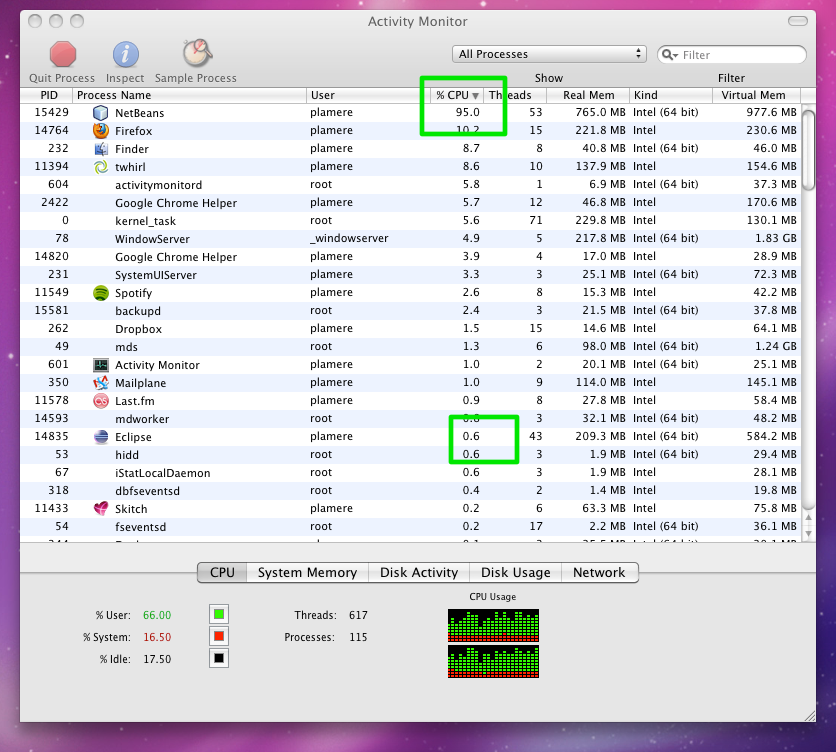
Compare the Netbeans CPU load to Eclipse as they both sit idle (this is after Netbeans has been running for 30 minutes at least, so it should be done with all of its scanning). Now to be fair, I checked with SteveG – he said he hasn’t had any of these problems, so it seems that my performance issues with the new Netbeans are atypical, but that doesn’t really help me get my work done.
This week Google released GWT 2.0 – I’ve always been a big fan of GWT so I thought I’d give the new version a whirl. GWT has really good Eclipse integration, so I used this as an excuse to give Eclipse a try. So far, I like what I see. The GWT and App engine integration is really well done. I was able to create and deploy a GWT application to the Google app engine in about 30 minutes, while watching a rerun of the office (the episode where Dwight sets the office on fire and gives Stanley a heart attack).
And so, after using Netbeans for 5 years, I’m ready to give Eclipse a try. The next app from scratch I write I’ll use Eclipse.
Hottt or Nottt?
Posted by Paul in code, data, Music, The Echo Nest on December 9, 2009
At the Echo Nest we have lots of data about millions of artists. It can be interesting to see what kind of patterns can be extracted from this data. Tim G suggested an experiment where we see if we can find artists that are on the verge of breaking out by looking at some of this data. I tried a simple experiment to see what we could find. I started with two pieces of data for each artist.
- Familiarity – this corresponds to how well known in artist is. You can look at familiarity as the likelihood that any person selected at random will have heard of the artist. Beatles have a familiarity close to 1, while a band like ‘Hot Rod Shopping Cart’ has a familiarity close to zero.
- Hotttnesss – this corresponds to how much buzz the artist is getting right now. This is derived from many sources, including mentions on the web, mentions in music blogs, music reviews, play counts, etc.
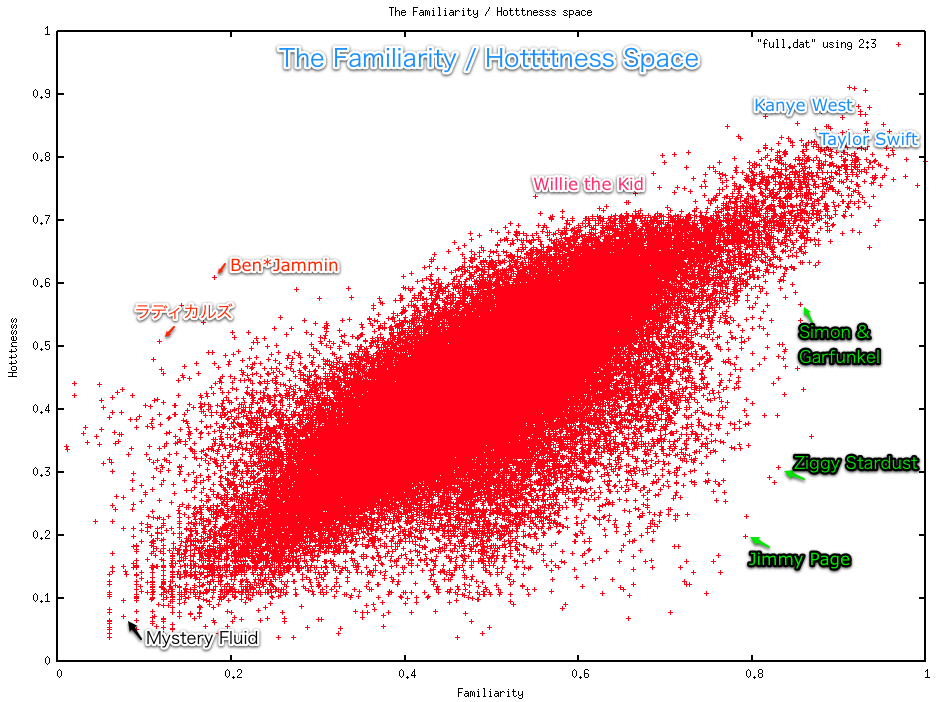
I collected these 2 pieces of data for 130K+ artists and plotted them. The following plot shows the results. The x-axis is familiarity and the y-axis is hotttnesss. Clearly there’s a correlation between hotttnesss and familiarity. Familiar artists tend to be hotter than non-familiar artists. At the top right are the Billboard chart toppers like Kanye West and Taylor Swift, while at the bottom left are artists that you’ve probably never heard of like Mystery Fluid. We can use this plot to find the up and coming artists as well as the popular artists that are cooling off. Outliers to the left and above the main diagonal are the rising stars (their hotttnesss exceeds their familiarity). Here we see artists like Willie the Kid, Ben*Jammin and ラディカルズ (a.k.a. Rock the Queen). While artists below the diagonal are well known, but no longer hot. Here we see artists like Simon & Garfunkel, Jimmy Page and Ziggy Stardust. Note that this is not a perfect science – for instance, it is not clear how to rate the familiarity for artist collaborations – you may know James Brown and you may know Luciano Pavarotti, but you may not be familiar with the Brown/Pavarotti collaboration – what should the familiarity of this collaboration be? the average of the two artists, or should it be related to how well known the collaboration itself is? Hotttnesss can also be tricky with extremely unfamiliar artists. If a Hot Rod Shopping Cart track gets 100 plays it could substantially increase the band’s hotttnesss (‘Hey! We are twice as popular as we were yesterday!’)
 Despite these types of confounding factors, the familiarity / hotttnesss model still seems to be a good way to start exploring for new, potentially unsigned acts that are on the verge of breaking out. To select the artists, I did the simplest thing that could possibly work: I created a ‘break-out’ score which is simply ratio of hotttnesss to familiarity. Artists that have a high hotttnesss as compared to their familiarity are getting a lot of web buzz but are still relatively unknown. I calculated this break-out score for all artists and used it to select the top 1000 artists with break-out potential, as well as the bottom 1000 artists (the fade-aways). Here’s a plot showing the two categories:
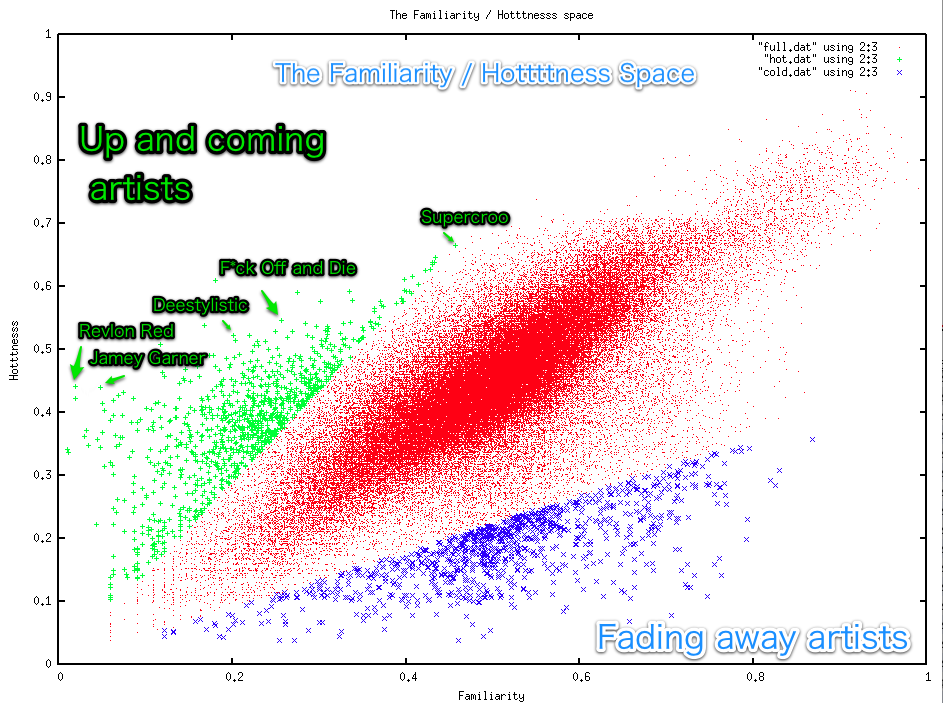
Here are 10 artists with high break-out scores that might be worth checking out:
- Ben*Jammin – German pop, with 249 Last.fm listeners with an awesome youtube video (really, you have to watch it)
- Lord Vampyr’s Shadowsreign – 32 Last.fm listeners – I’m not sure whether they are being serious or not in this video.
- Waking Vision Trio – 429 Last.fm Listeners – on youtube
- The Bart Crow Band – alt-country – 3K last.fm listeners – youtube
- Urine Festival – 500 last.fm listeners – really, not for the faint of heart – youtube
- Fictivision vs Phynn – 250 Last.fm listeners – trance – youtube
- korablove – 1,500 Last.fm listeners – minimal, deep house – youtube
- Deelstylistic – 1,800 Last.fm listeners – r&b – youtube
- Luke Doucet and the White Falcon – 900 Last.fm listeners – youtube
- i-sHiNe – 1,700 Last.fm listeners – on youtube
From Nickelback to Bickelnack
I saw that Nickelback just received a Grammy nomination for Best Hard Rock Performance with their song ‘Burn it to the Ground’ and wanted to celebrate the event. Since Nickelback is known for their consistent sound, I thought I’d try to remix their Grammy-nominated performance to highlight their awesome self-similarity. So I wrote a little code to remix ‘Burning to the Ground’ with itself. The algorithm I used is pretty straightforward:
- Break the song down into smallest nuggets of sound (a.k.a segments)
- For each segment, replace it with a different segment that sounds most similar
I applied the algorithm to the music video. Here are the results:
Considering that none of the audio is in its original order, and 38% of the original segments are never used, the remix sounds quite musical and the corresponding video is quite watchable. Compare to the original (warning, it is Nickelback):
Feel free to browse the source code, download remix and try creating your own.
 Music Machinery