Paul

I'm the Director of Developer Community at The Echo Nest, a research-focused music intelligence startup that provides music information services to developers and partners through a data mining and machine listening platform. I am especially interested in hybrid music recommenders and using visualizations to aid music discovery.
Organize your online music with ExtensionFM
Posted in Music on February 21, 2010
On Friday I installed ExtensionFM– a chrome extension that helps you manage your online music listening. Dan Kantor, the creator, has a little video that shows you how it works:
The idea behind ExtensionFM is very simple. When I visit a site that has music ExtensionFM notices and squirrels away all of the links to the music into an iTunes like player:
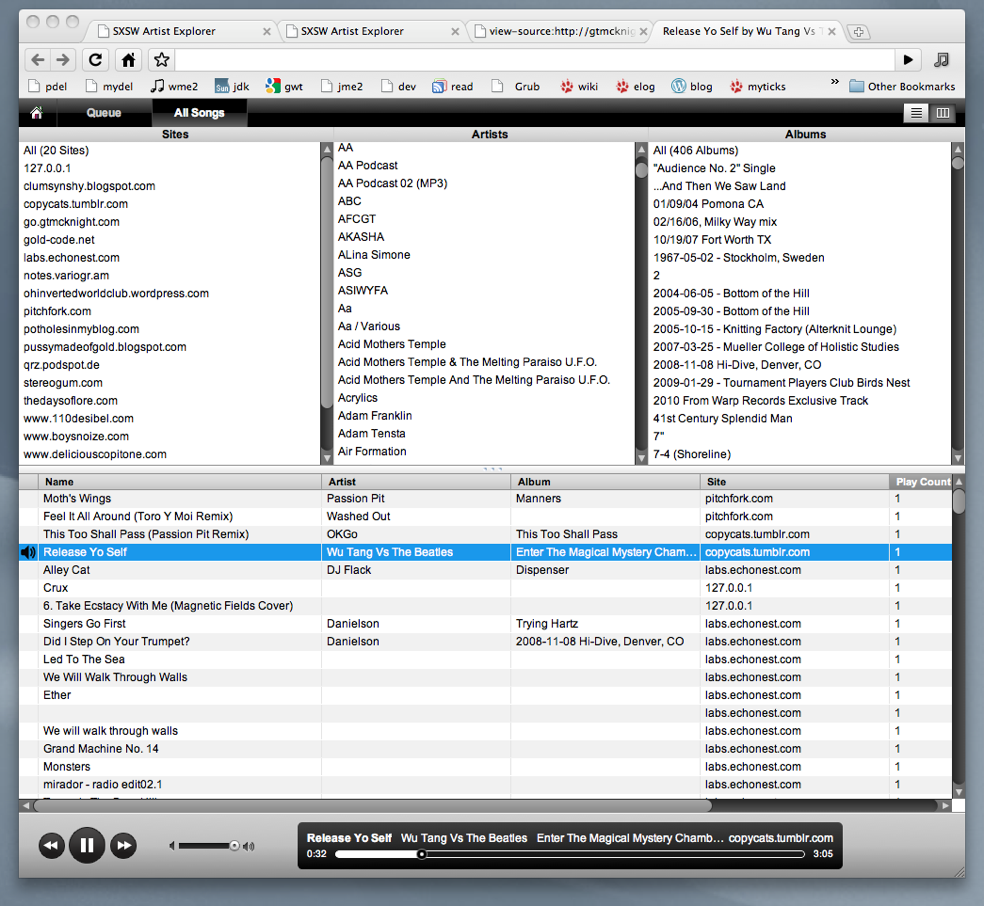
It does all of this work in the background without me having to do anything. After a weekend of browsing, ExtensionFM found music on 20 sites from over 300 artists, over 400 albums – for a total of over 1,000 tracks. ExtensionFM remembers the sites where the music was from and keeps track of when the links die. Note that it doesn’t actually copy music onto your computer, ExtensionFM just makes it easier to play music that is already out there.
There are many nice touches in ExtensioFM. It keeps a play queue, and when you visit a music site you can easily add music to the queue.
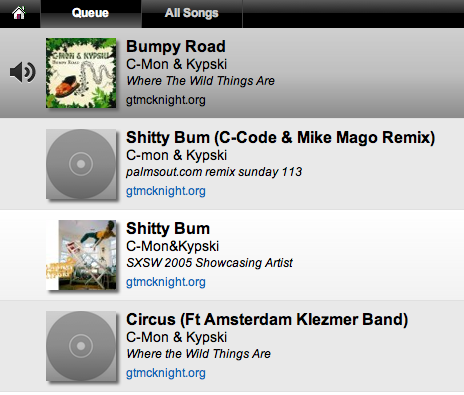
You can edit the play queue easily adding and removing tracks from it.
ExtensionFM also augments a music laden site with music player buttons. So a site that looks like this:
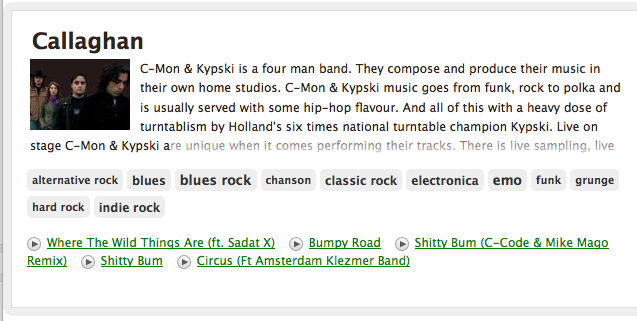
is transformed into something like this:
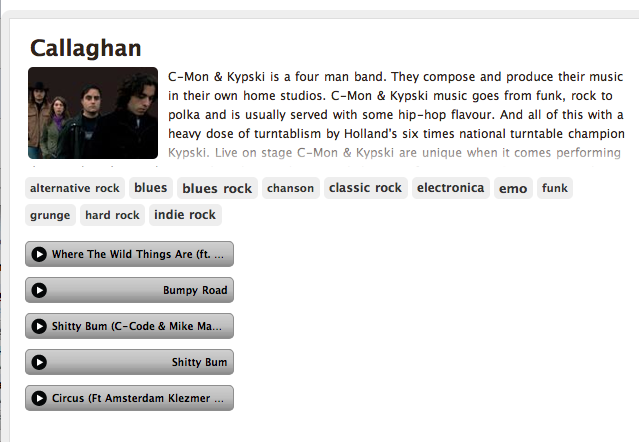
Dan Kantor says he’ll be adding an option soon that will allow the disabling of this re-formatting for those who don’t like their web pages tampered with.
Unfortunately, ExtensionFM doesn’t always find music on a web page. Certain sites (Hype Machine for example) doesn’t expose Mp3 links so ExtensionFM can’t find the music. Dan says that right now ExtensionFM only grabs links that end in .mp3 or .ogg. It also works on Tumblr since they offer a very easy API to get a user’s audio posts. It is going to support Soundcloud embeds soon as well since they also offer an easy API. So the best way for developers to make sure their songs work with ExtensionFM is to make sure that the audio links are exposed in the html or to use Tumblr, or Soundcloud.
ExtensionFM is still in pre-release mode, but if you are lucky enough to get a release code, get the app, install it (it’s very easy to install), and start organizing your online music listening.
LastHistory – Visualizing Last.fm Listening Histories
Posted in fun, Music, visualization on February 16, 2010
This week Klaas, one of the researchers at Last.fm released to the Last.fm playground the ability to plot data from your personal listening history. (read about it here: Now in the Playground: Scrobbling Timelines).
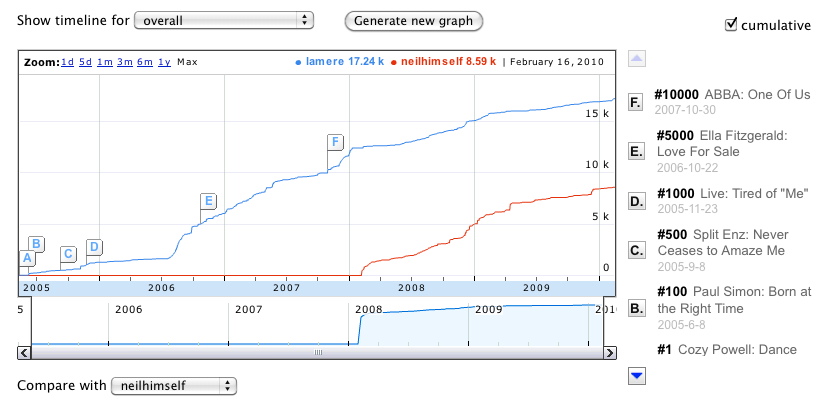 You can look at when you started to listen to particular bands, or even compare your listening to one of your Last.fm friends (here you can see my cumulative listening as compared to my good Last.fm friend Neil Gaiman. It’s a really neat app that highlights the awesome listening data that Last.fm has been collecting for the last 6 or so years.

With the new Last.fm plots you can look at your listening history – but there’s a new app that takes this idea one step further. LastHistory, an application by Frederik Seiffert and Dominikus Baur from the Media Informatics Group of the University of Munich allows you to analyze music listening histories from Last.fm through an interactive visualization and to explore your own past by combining the music you listened to with your own photos and calendar entries. Like Klaas’s scrobbling graphs, LastHistory lets you browse music listening history, but LastHistory goes beyond that – it lets you interact with the visualization, allowing you to use your listening history for music exploration, and playlisting. And since the listening history can be any Last.fm listener, it is a great vehicle for music discovery too. The video makes it all really clear:
The integration with your iPhoto library is genius. While you listen to the music that you played in the car on that road trip to Tennessee in 2oo8 you can see a slide show of your photos from that same trip.
LastHistory runs on a Mac. When you run it for the first time, you tell it your last.fm name. It then goes to Last.fm to collect your listening history and info about all of the tracks. (This can take a few minutes depending on how long you’ve been listening at Last.fm). But even while it is retrieving your data you can start to interact with the data. And interacting with this application is very fun.
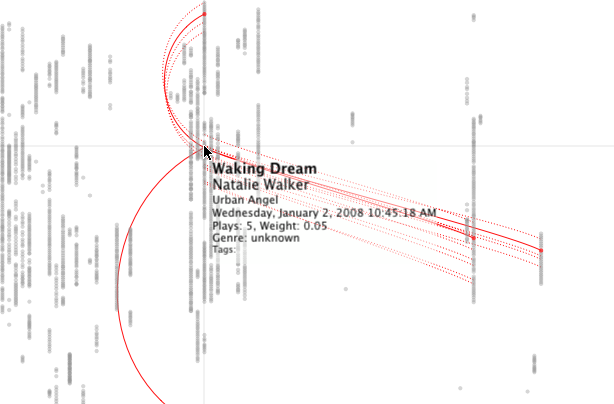 Each dot on the display represents a single song play at a point in the past. Mouse over the point to see the song name and to see other times when you played the song. Click on the song to hear it. The dots are colored by the genre (discovered by using the last.fm tags applied to the song). It is quite fun exploring my own listening history. Here’s the time when I first got the Weezer ‘Red’ Album:
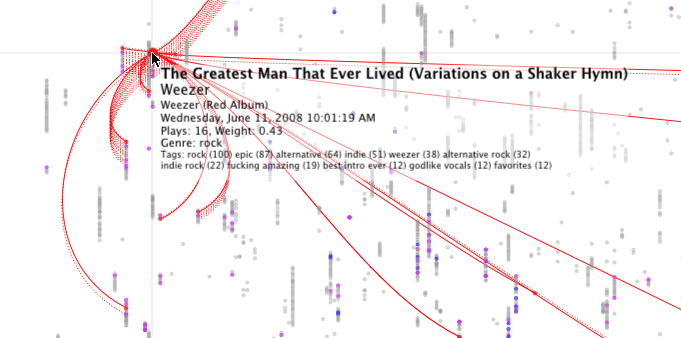
This app is cool in so many ways, I know that I’m going to spend a lot of time playing with this app. But ff you try it out, remember that it is a 1.0 version. I did experience a crash or two, but it seemed to pick up where it left off without trouble. Oh yes, one more thing that moves this app from totally cool into über-cool is that it is all open source. Get the code here: LastHistory on Github. Congrats to Frederik and Dominikus for creating the first novel music exploration app of the decade. Nice job!
Python and Music at PyCon 2010
Posted in code, Music, The Echo Nest on February 15, 2010
 If you are lucky enough to be heading to PyCon this week and are interested in hacking on music, there are two talks that you should check out:
DJing in Python: Audio processing fundamentals – In this talk Ed Abrams talks about how his experiences in building a real-time audio mixing application in Python. I caught a dry-run of this talk at the local Python SIG – lots of info packed into this 30 minute talk. One of the big takeaways from this talk is the results of Ed’s evaluation of a number of Pythonic audio processing libraries. Sunday 01:15pm, Centennial I
Remixing Music Pythonically – This is a talk by Echo Nest friend and über-developer Adam Lindsay. In this talk Adam talks about the Echo Nest remix library. Adam, a frequent contributor to remix, will offer details on the concise expressiveness offered when editing multimedia driven by content-based features, and some insights on what Pythonic magic did and didn’t work in the development of the modules. Audio and video examples of the fun-yet-odd outputs that are possible will be shown. Sunday 01:55pm, Centennial I
The schedulers at PyCon have done a really cool thing and have put the talks back to back in the same room. Also, keep your eye out for the Hacking on Music OpenSpace
Name That Artist
Posted in fun, Music, The Echo Nest, web services on February 14, 2010
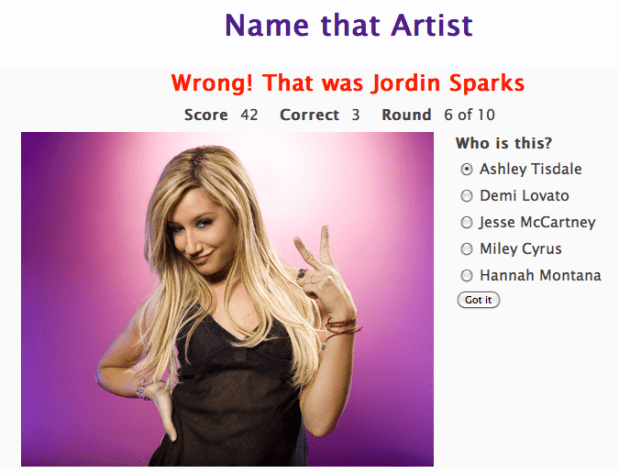
While watching the Olympics over the weekend, I wrote a little web-app game that uses the new Echo Nest get_images call. The game is dead simple. You have to identify the artists in a series of images. You get to chose a level of difficulty and the style of your favorite music, and if you get a high score, your name and score will appear on the Top Scores board. Instead of using a simple score of percent correct, the score gets adjusted by a number of factors. There’s a time bonus, so if you answer fast you get more points, there’s a difficulty bonus, so if you identify unfamiliar artists you get more points, and if you chose the ‘Hard’ level of difficulty you get also get more points for every correct answer. The absolute highest score possible is 600 but that any score above 200 is rather awesome.
The app is extremely ugly (I’m a horrible designer), but it is fun – and it is interesting to see how similar artists from a single genre appear. Give it a go, post some high scores and let me know how you like it.
Jason’s cool screensaver
Posted in code, fun, Music, The Echo Nest on February 13, 2010
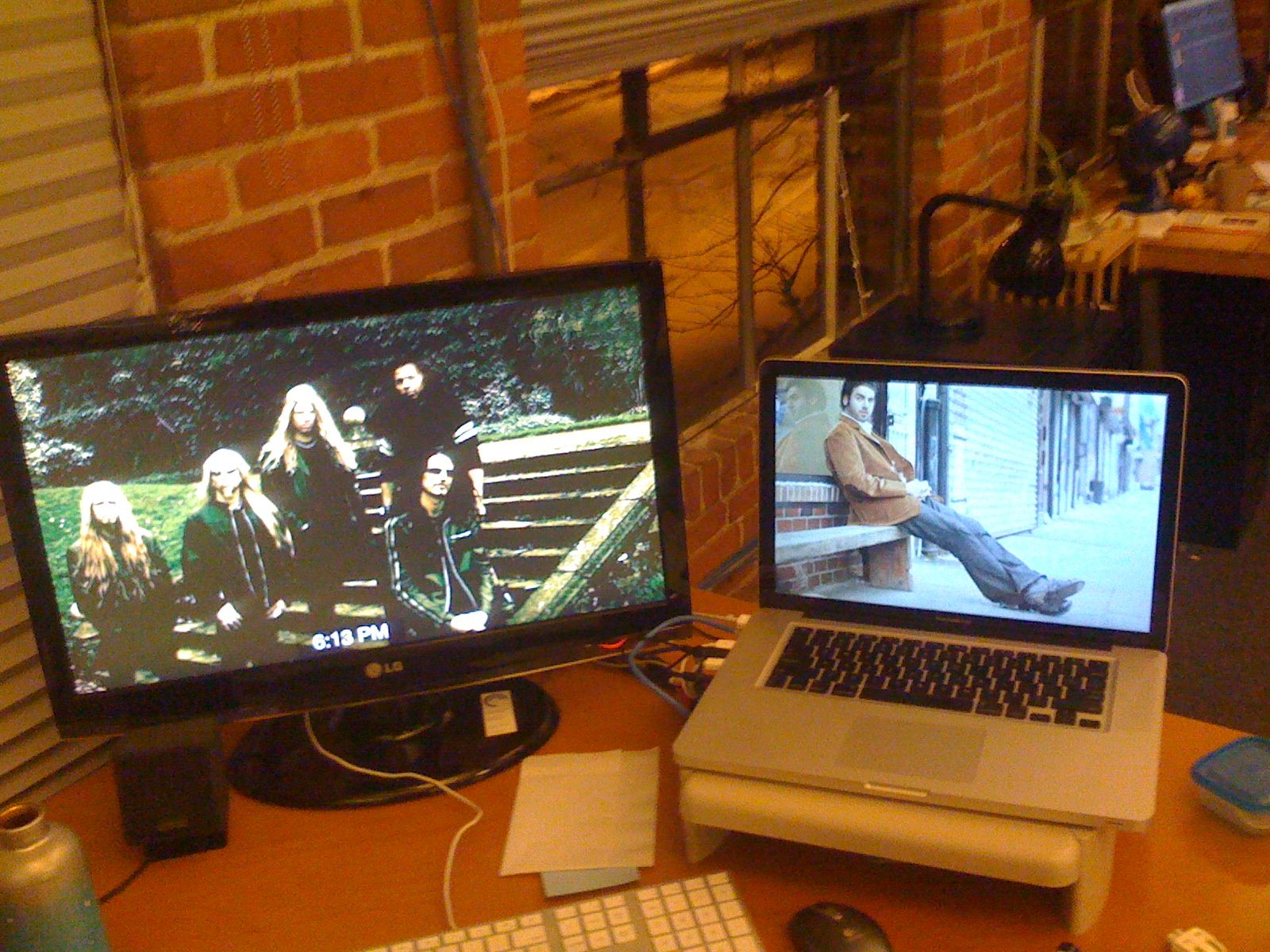
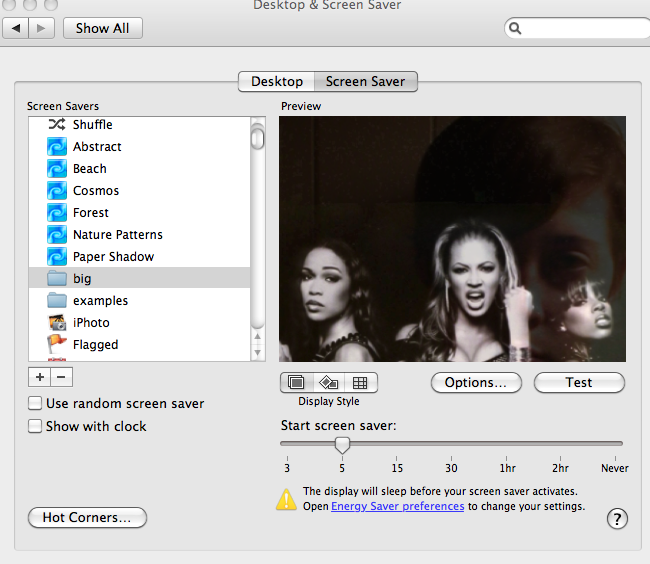
I noticed some really neat images flowing past Jason’s computer over the last week. Whenever Jason was away from his desk, our section of the Echo Nest office would be treated to a very interesting slideshow – mostly of musicians (with an occasional NSFW image (but hey, everything is SFW here at The Echo Nest)). Since Jason is a photographer I first assumed that these were pictures that he took of friends or shows he attended – but Jason is a classical musician and the images flowing by were definitely not of classical musicians – so I was puzzled enough to ask Jason about it. Turns out, Jason did something really cool. He wrote a Python program that gets the top hotttt artists from the Echo Nest, and then collects images for all of those artists and their similars – yielding a huge collection of artist images. He then filters them to include only high res images (thumbnails don’t look great when blown up to screen saver size). He then points is Mac OS Slideshow screensaver at the image folder and voilá – a nifty music-oriented screensaver.
Jason has added his code to the pyechonest examples. So if you are interested in having a nifty screen saver, grab Pyechonest, get an Echo Nest API key if you don’t already have one and run the get_images example. Depending upon how many images you want, it may take a few hours to run. To get 100K images plan to run it over night. Once you’ve done that, point your Pictures screensaver at the image folder and you’re done.
The 6th Beatle
Posted in Music, recommendation, The Echo Nest on February 12, 2010
 When I test-drive a new music recommender I usually start by getting recommendations based upon ‘The Beatles’ (If you like the Beatles, you make like XX). Most recommenders give results that include artists like John Lennon, Paul McCartney, George Harrison, The Who, The Rolling Stones, Queen, Pink Floyd, Bob Dylan, Wings, The Kinks and Beach Boys. These recommendations are reasonable, but they probably won’t help you find any new music. The problem is that these recommenders rely on the wisdom of the crowds and so an extremely popular artist like The Beatles tends to get paired up with other popular artists – the results being that the recommender doesn’t tell you anything that you don’t already know. If you are trying to use a recommender to discover music that sounds like The Beatles, these recommenders won’t really help you – Queen may be an OK recommendation, but chances are good that you already know about them (and The Rolling Stones and Bob Dylan, etc.) so you are not finding any new music.
At The Echo Nest we don’t base our artist recommendations solely on the wisdom of crowds, instead we draw upon a number of different sources (including a broad and deep crawl of the music web). This helps us avoid the popularity biases that lead to ineffectual recommendations. For example, looking at some of the Echo Nest recommendations based upon the Beatles we find some artists that you may not see with a wisdom of the crowds recommender – artists that actually sound like the Beatles – not just artists that happened to be popular at the same time as the Beatles. Echo Nest recommendations include artists such as The Beau Brummels , The Dukes of Stratosphear, Flamin’ Groovies and an artist named Emitt Rhodes. I had never ever seen Emitt Rhodes occur in any recommendation based on the Beatles, so I was a bit skeptical, but I took a listen and this is what I found:
Update: Don Tillman points to this Beatle-esque track:
Emitt could be the sixth Beatles. I think it’s a pretty cool recommendation
Two kinds of Cock Rock
I like the rooster better.
Sync/Lost
Posted in fun, java, Music, visualization on February 11, 2010
This looks like it’d be fun to play with:
Introducing Project Rosetta Stone
Posted in code, Music, The Echo Nest, web services on February 10, 2010
 Here at The Echo Nest we want to make the world easier for music app developers. We want to solve as many of the problems that developers face when writing music apps so that the developers can focus on building cool stuff instead of worrying about the basic plumbing . One of the problems faced by music application developers is the issue of ID translation. You may have a collection of music that is in one ID space (Musicbrainz for instance) but you want to use a music service (such as the Echo Nest’s Artist Similarity API) that uses a completely different ID space. Before you can use the service you have to translate your Musicbrainz IDs into Echo Nest IDs, make the similarity call and then, since the artist similarity call returns Echo Nest IDs, you have to then map the IDs back into the Musicbrainz space. The mapping from one id space to another takes time (perhaps even requiring another API method call to ‘search_artists’) and is a potential source of error — mapping artist names can be tricky – for example there are artists like Duran Duran Duran, Various Artists (the electronic musician), DJ Donna Summer, and Nirvana (the 60’s UK band) that will trip up even sophisticated name resolvers.
We hope to eliminate some of the trouble with mapping IDs with Project Rosetta Stone. Project Rosetta Stone is an update to the Echo Nest APIs to support non-Echo-Nest identifiers. The goal for Project Rosetta Stone is to allow a developer to use any music id from any music API with the Echo Nest web services. For instance, if you have a Musicbrainz ID for weezer, you can call any of the Echo Nest artist methods with the Musicbrainz ID and get results. Additionally, methods that return IDs can be told to return them in different ID spaces. So, for example, you can call artist.get_similar and specify that you want the similar artist results to include Musicbrainz artist IDs.
Dealing with the many different music ID formats One of the issues we have to deal with when trying to support many ID spaces is that the IDs come in many shapes and sizes. Some IDs like Echo Nest and Musicbrainz are self-identifying URLs, (self-identifying means that you can tell what the ID space is and the type of the item being identified (whether it is an artist track, release, playlist etc.)) and some IDs (like Spotify) use self-identifying URNs. However, many ID spaces are non-self identifying – for instance a Napster Artist ID is just a simple integer. Note also that many of the ID spaces have multiple renderings of IDs. Echo Nest has short form IDs (AR7BGWD1187FB59CCB and TR123412876434), Spotify has URL-form IDs (http://open.spotify.com/artist/6S58b0fr8TkWrEHOH4tRVu) and Musicbrainz IDs are often represented with just the UUID fragment (bd0303a-f026-416f-a2d2-1d6ad65ffd68) – and note that the use of Spotify and Napster in these examples are just to demonstrate the wide range of ID format.
We want to make the all of the ID types be self-identifying. IDs that are already self-identifying can be used without change. However, non-self-identifying ID types need to be transformed into a URN-style syntax of the form: vendor:type:vendor-specific-id. So for example, and a Napster track ID would be of the form: ‘napster:track:12345678’
What do we support now? In this first release of Rosetta Stone we are supporting URN-style Musicbrainz ids (probably one of the most requested enhancements to the Echo Nest APIs has been to include support for Musicbrainz). This means that any Echo Nest API method that accepts or returns an Echo Nest ID can also take a Musicbrainz ID. For example to get recent audio found on the web for Weezer, you could make the call with the URN form of the musicbrainz ID for weezer:
http://developer.echonest.com/api/get_audio
         ?api_key=5ZAOMB3BUR8QUN4PE
         &id=musicbrainz:artist:6fe07aa5-fec0-4eca-a456-f29bff451b04
         &rows=2&version=3 - (try it)
For a call such as artist.get_similar, if we are using Musicbrainz IDs for input, it is likely that you’ll want your results in the form of Musicbrainz ids. To do this, just add the bucket=id:musicbrainz parameter to indicate that you want Musicbrainz IDs included in the results:
http://developer.echonest.com/api/get_similar
               ?api_key=5ZAOMB3BUR8QUN4PE
               &id=musicbrainz:artist:6fe07aa5-fec0-4eca-a456-f29bff451b04
               &rows=10&version=3
               &bucket=id:musicbrainz  (try it)

<similar>
    <artist>
          <name>Death Cab for Cutie</name>
          <id>music://id.echonest.com/~/AR/ARSPUJF1187B9A14B8</id>
          <id type="musicbrainz">musicbrainz:artist:0039c7ae-e1a7-4a7d-9b49-0cbc716821a6</id>
          <rank>1</rank>
    </artist>
<!– more omitted –>
</similar>
Limiting results to a particular ID space – sometimes you are working within a particular ID space and you only want to include items that are in that space. To support this, Rosetta Stone adds an idlimit parameter to some of the calls. If this is set to ‘Y’ then results are constrained to be within the given ID space. This means that if you want to guarantee that only Musicbrainz artists are returned from the get_top_hottt_artists call you can do so like this:
http://developer.echonest.com/api/get_top_hottt_artists
       ?api_key=5ZAOMB3BUR8QUN4PE
       &rows=20
       &version=3
       &bucket=id:musicbrainz
       &idlimit=Y
What’s Next? In this initial release of Rosetta Stone we’ve built the infrastructure for fast ID mapping. We are currently supporting mapping between Echo Nest Artist IDs and Musicbrainz IDs. We will be adding support for mapping at the track level soon – and keep an eye out for the addition of commercial ID spaces that will allow easy mapping being Echo Nest IDs and those associated with commercial music service providers.
In the near future we’ll be rolling out support to the various clients (pyechonest and the Java client API) to support Rosetta Stone.
As always, we love any feedback and suggestions to make writing music apps easier. So email me (paul@echonest.com) or leave a comment here.
Revisiting the click track
Posted in Music, The Echo Nest on February 8, 2010
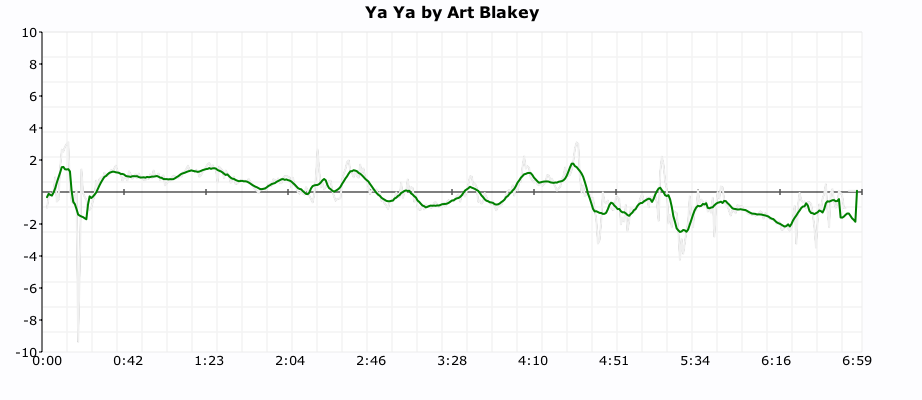
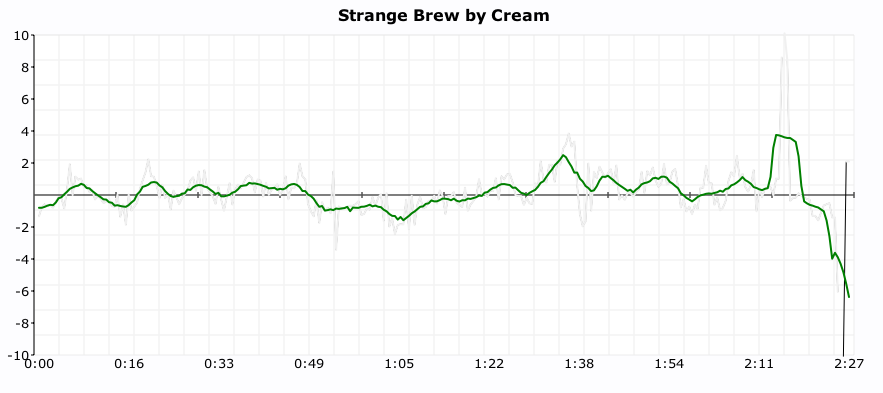
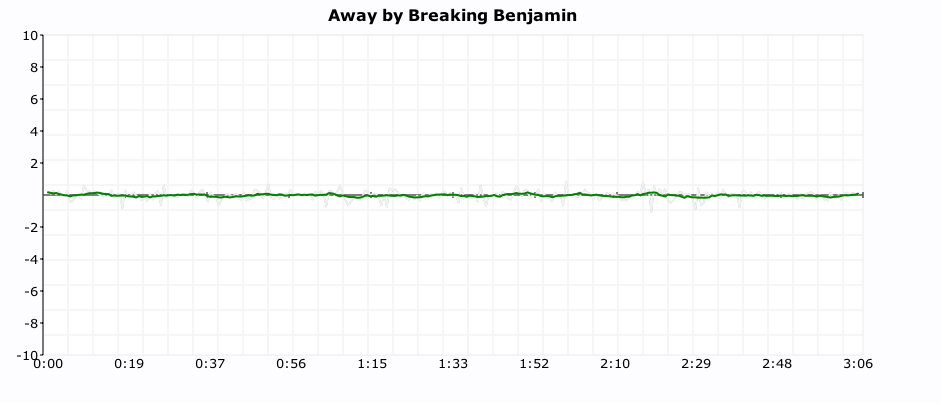
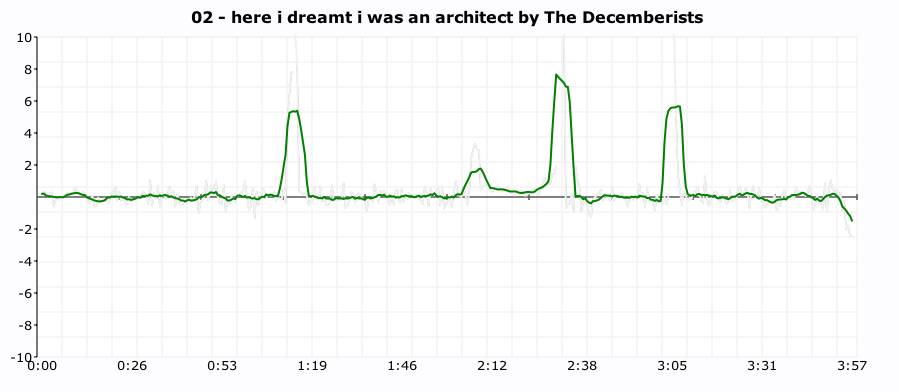
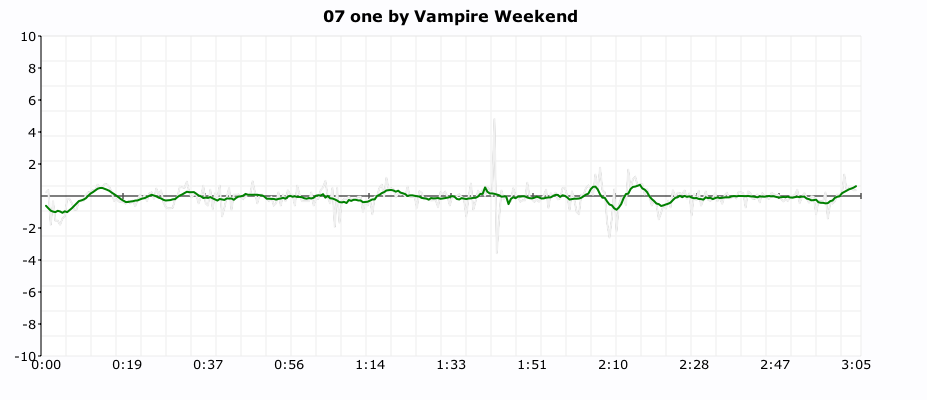
One of my more popular posts from last year was ‘In Search of the Click track‘ where I posted some plots showing the tempo deviations from the average tempo for a number of songs. From these plots it was pretty easy to see which songs had a human setting the beat and which songs had a machine setting the beat (be it a click track, drum machine or an engineer fitting the song to a tempo grid). I got lots of feedback along with many requests to generate click plots for particular drummers. It was a bit of work to generate a click plot (find the audio, upload it to the analyzer, get the results, normalize the data, generate the plot, convert it to an image and finally post it to the web) so I didn’t create too many more.
Last week Brian released the alpha version of a nifty new set of APIs that give access to the analysis data for millions of tracks. Over the weekend, I wrote a web application that takes advantage of the new APIs to make it easy to get a click plot for just about any track. Just type in the name of the artist and track and you’ll get the click plot – you don’t have to find the audio or upload it or wrestle with python or gnuplot. The web app is here:
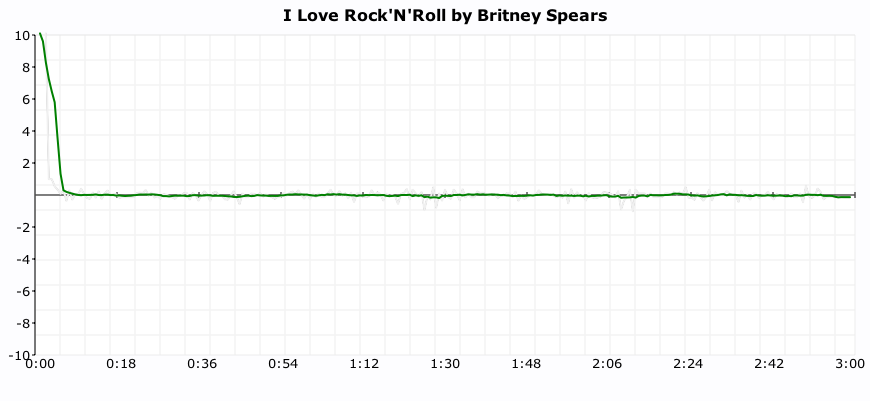
Here are some examples of the output. First up is a plot of “I love rock’n’ roll’ by Britney Spears. The plot shows the tempo deviations from the average song tempo over the course of the song. The plot shows that there’s virtually no deviation at all. Britney is using a machine to set the beat.
Now compare Britney’s plot to the click plot for the song ‘So Lonely’ by the Police:
 Here we see lots of tempo variation. There are four main humps each corresponding to each chorus where Police drummer Stewart Copeland accelerates the beat. Over the course of the song there is an increase in the average tempo that build tension and excitement. In this song the tempo is maintained by a thinking, feeling human, whereas Britney is using a coldhearted, sterile machine to set the tempo for her song.
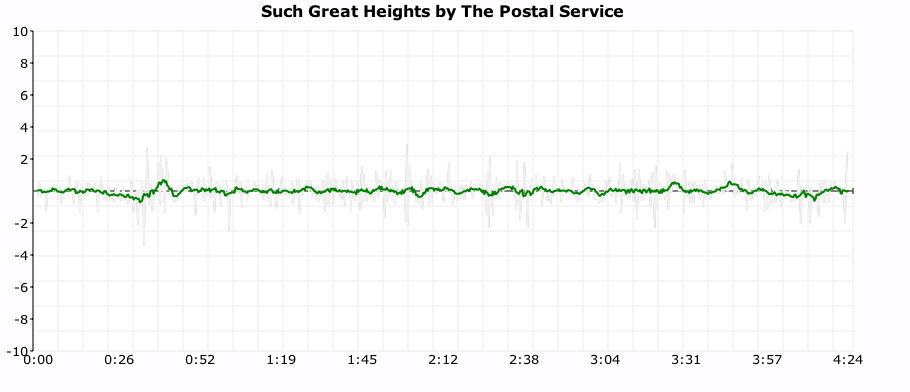
For some types of music, machine generated tempos are appropriate. Electronica, synthpop and techno benefit from an ultra-precise tempo. Some examples are Kraftwerk and The Postal Service:

 But for many songs, the tempo variations add much to the song. The gradual speed up in Jefferson Airplane’s White Rabbit:

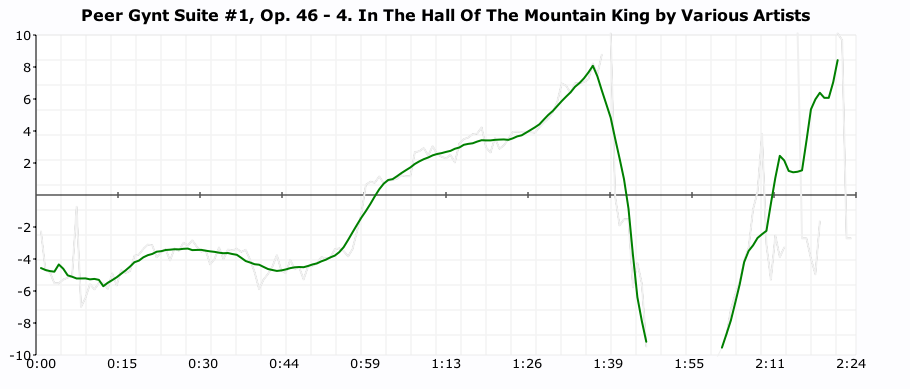
and the crescendo in ‘In the Hall of the Mountain King’:
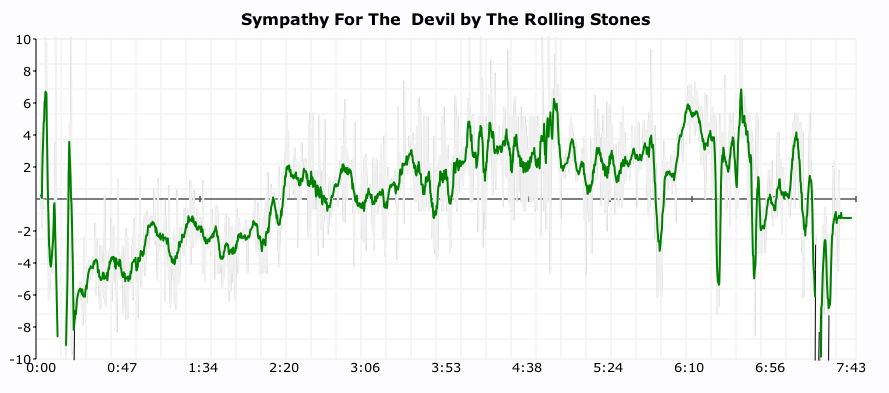
 And in the Rolling Stone’s Sympathy for the Devil
It is also fun to use the click plots to see how steady drummers are (and to see which ones use clicktracks). Some of my discoveries:
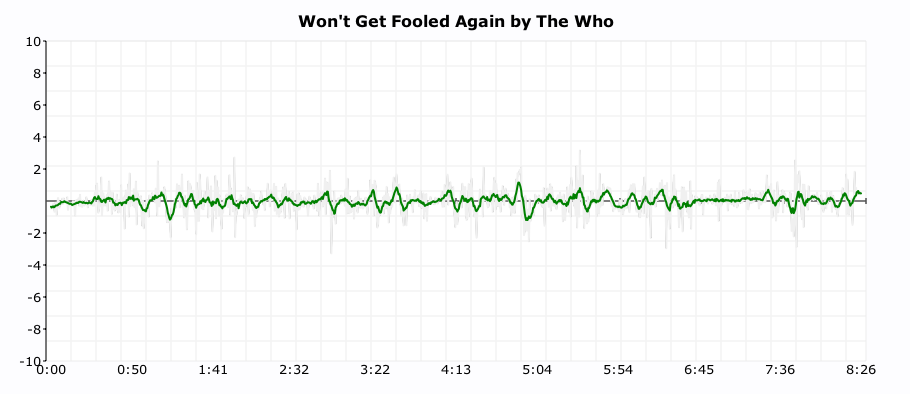
Keith Moon used a click track on ‘Won’t Get Fooled Again’:
 (You can see him wearing headphones in this video)
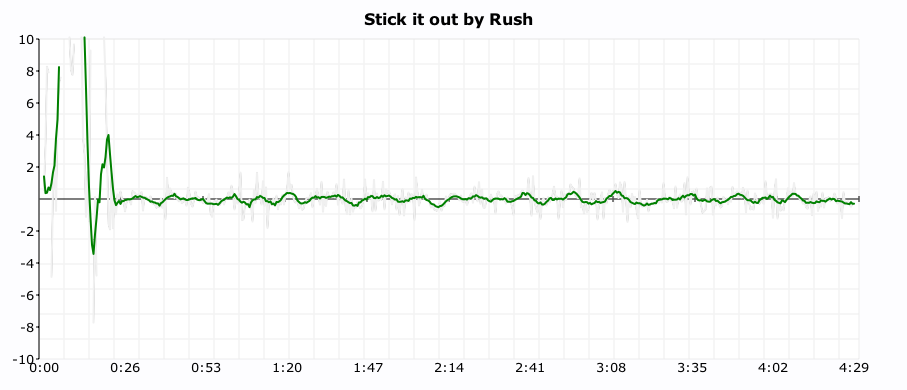
It looks like Neil Peart uses a click track on Stick it out:
Art Blakey can really lay it down without a click track (he really looks like a machine here):
 As does Ginger Baker (or does he use a click?):
It seems that all of the nümetal bands use clicks:
Breaking Benjamin
Seether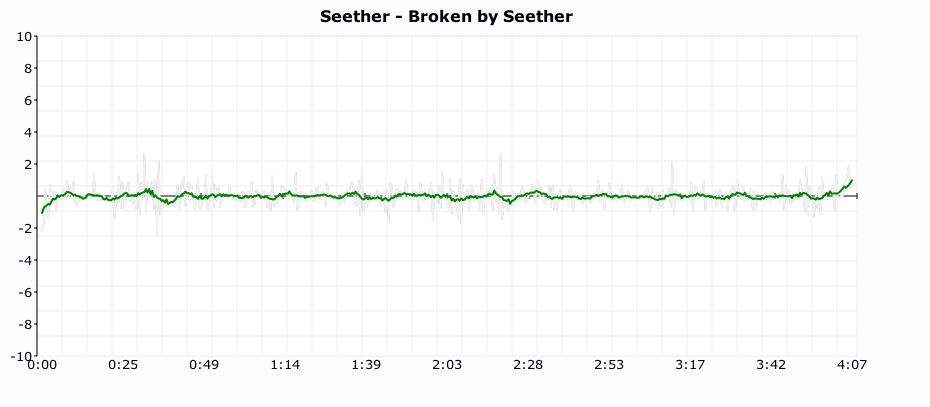
Nickelback
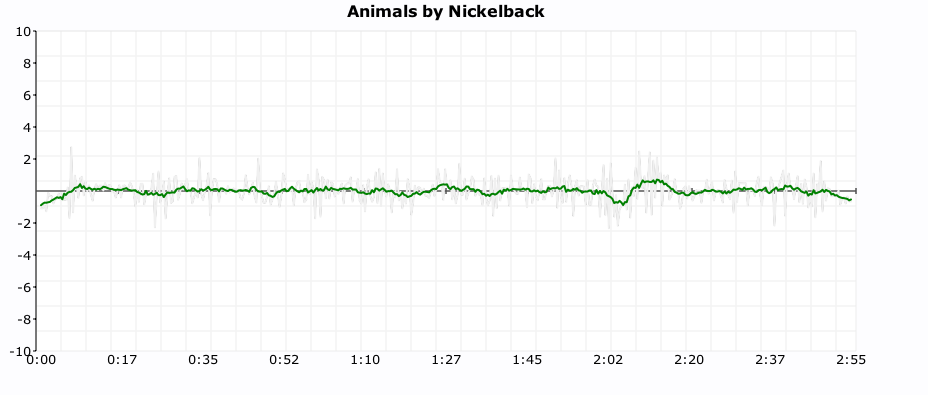 As do some of the indie bands:
The Decemberists
 Vampire Weekend
 MGMT
MGMT

I find it interesting to look at the various click plots. It gives me a bit more insight into the band and the drummer. However, some types of music such as progressive rock – with its frequent time signature and tempo changes are really hard to plot – which is too bad since many of the best drummers play prog rock.
In addition the plots I attempted a couple of objective metrics that can be used to measure the machine like quality of drummer. The Machine Score is a measure of how often the beat is within a 2 BPM window of the average tempo of the song. Higher numbers indicate that the drummer is more like a machine. This metric is a bit troublesome for songs that change tempo, a song that changes tempo often may have a lower machine score than it should. The Longest run of machine like drumming is the count of the longest stretch of continuous beats that are within 1BPM of the average tempo of the song. Long runs (over a couple hundred beats) tend to indicate that a machine is in charge of the beat. Both these metrics are somewhat helpful in determining whether or not the drumming is live, but I still find that the best determinate is to look at the plot. More work is needed here.
The new click plotter was a fun weekend project. I got to use rgraph – an HTML5 canvas graph library (thanks to Ryan for suggesting client-side plotting), along with cherrypy, pound and, of course, the Brian’s new web services. The whole thing is just 500 lines of code.
I hope you enjoy generating your own click plots. If you find some interesting ones post a link here and I’ll add them to the Gallery of Drummers.

