The Passion Index
Posted by Paul in data, fun, Music, recommendation, research, The Echo Nest on June 18, 2009
One of the ways that Music 2.0 has changed how we think about music is that there is so much interesting data available about how people are listening to music. Sites like Last.fm automatically track all sorts of interesting data that just was not available before. Forty years ago, a music label like Capitol would know how many copies the album Abbey Road sold in the U.S., but the label wouldn’t know how many times people actually listened to the album. Today, however, our iPods and desktop music players keep careful track of how many times we play each song, album and artist – giving us a whole new way to look at artist popularity. 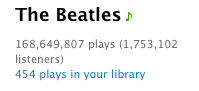 It’s not just sales figures anymore, its how often are people actually listening to an artist. If you go to Last.fm you can see that The Beatles have over 1.75 million listeners and 168 million plays. It makes it easy for us to see how popular the Beatles are compared to another band (the monkees, for instance have 2.5m plays and 285K listeners).
With all of this new data available, there are some new ways we can look at artists. Instead of just looking at artists in terms of popularity and sales rank, I think it is interesting to see which artists generate the most passionate listeners. These are artists that dominate the playlists of their fans. I think this ‘passion index’ may be an interesting metric to use to help people explore for and discovery music. Artists that attract passionate fans may be longer lived and worth a listeners investment in time and money.
How can we calculate a passion index? There are probably a number of indicators: the number of edits to the bands wikipedia page, the average distance a fan travels to attend a show by the artist, the number of fan sites for an artist. All of these may be a bit difficult to collect, especially for a large set of artists. One simple passion metric is just the average number of artist plays per listener. Presumably if an artist’s listeners are playing an artist’s songs more than average they are more passionate about the artist. One thing that I like about this approach to the passion index is that it is extremely easy to calculate – just divide the total artist plays by the total number of artist listeners and you have the passion index. Yes, there are many confounding factors – for instance, artists with longer songs are penalized – still I think it is a pretty good measure.
I calculated the passion index for a large collection of artists. I started with about a million artists (it is really nice to have all this data at the Echo Nest;), and filtered these down to the 50K most popular artists. I plotted the number of artist plays vs. the number of artist listeners for each of the 50 K listeners. The plot shows that most artists fall into the central band (normal passion), but some (the green points) are high passion artists and some (the blue points) are low passion artists.
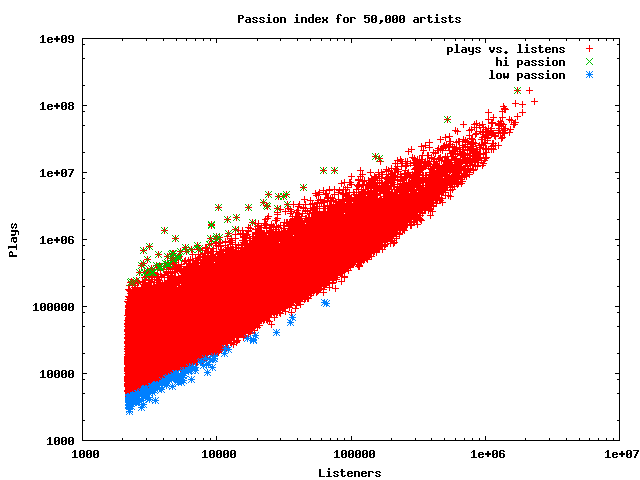
For the 50K artists, the average track plays per artist/listener is just 11 plays (with a std deviation of about 11.5). Considering that there are a substantial number of artists in my iTunes collection that I’ve played only once, this seems pretty resaonable.
So who are the artists with the highest passion index? Here are the top ten:
| Passion | Listeners | Plays | Artist |
|---|---|---|---|
| 332 | 4065 | 1352719 | 上海アリス幻樂団 |
| 292 | 10374 | 3032373 | Belo |
| 245 | 3147 | 773959 | Petos |
| 241 | 2829 | 683191 | Reilukerho |
| 208 | 4887 | 1020538 | Sound Horizon |
| 190 | 24422 | 4652968 | 동방신기 |
| 185 | 9133 | 1691866 | 岡崎律子 |
| 175 | 9171 | 1611106 | Kollegah |
| 173 | 17279 | 3004410 | Super Junior |
| 170 | 62592 | 10662940 | Böhse Onkelz |
I didn’t recognize any of these artists (and I’m not even sure if 上海アリス幻樂団 is really an artist – according to the Japanese wikipedia it is a fan club in Japan  to produce a music game coterie – whatever that means). Belo is a Brazilian pop artist that does indeed seem to have some rather passionate fans.
It is not surprising that it is hard for popular artists to rank at the very top of the passion index. Popular artists are exposed to many, many listeners which can easily reduce the passion index. Here are the top passion-ranked artists drawn from the top-1000 most popular artists:
| Passion | Listeners | Plays | Artist |
|---|---|---|---|
| 115 | 527653 | 60978053 | In Flames |
| 95 | 1748159 | 167765187 | The Beatles |
| 79 | 2140659 | 170106143 | Radiohead |
| 78 | 282308 | 22071498 | Die Ärzte |
| 75 | 269052 | 20293399 | Mindless Self Indulgence |
| 75 | 691100 | 52217023 | Nightwish |
| 74 | 332658 | 24645786 | Porcupine Tree |
| 74 | 1056834 | 79135038 | Nine Inch Nails |
| 72 | 384574 | 27901385 | Opeth |
| 70 | 601587 | 42563097 | Rise Against |
| 69 | 357317 | 24911669 | Sonata Arctica |
| 69 | 1364096 | 95399150 | Metallica |
| 66 | 460518 | 30625121 | Children of Bodom |
| 66 | 619396 | 41440369 | Paramore |
| 65 | 504464 | 33271871 | Dream Theater |
| 65 | 1391809 | 90888046 | Pink Floyd |
| 64 | 540184 | 34635084 | Brand New |
| 62 | 862468 | 54094977 | Iron Maiden |
| 62 | 1681914 | 105935202 | Muse |
| 61 | 381942 | 23478290 | Beirut |
I find it interesting to see all of the heavy metal bands in the top 20. Metal fans are indeed true fans.
Going to the other end of passion, we find the 20 popular artists that have the least passionate fans:
| Passion | Listeners | Plays | Artist |
|---|---|---|---|
| 6 | 270692 | 1767977 | Julie London |
| 6 | 284087 | 1964292 | Smoke City |
| 6 | 294100 | 1784358 | Dinah Washington |
| 6 | 295200 | 1799303 | The Bangles |
| 6 | 295990 | 1832771 | Donna Summer |
| 6 | 306018 | 1905285 | Bonnie Tyler |
| 6 | 307407 | 2123599 | Buffalo Springfield |
| 6 | 311543 | 2085085 | Franz Schubert |
| 6 | 312078 | 1909769 | The Hollies |
| 6 | 313732 | 2190008 | Tom Jones |
| 6 | 325454 | 2025366 | Eric Prydz |
| 6 | 331837 | 2259892 | Sarah Vaughan |
| 6 | 332072 | 2016898 | Soft Cell |
| 6 | 407622 | 2622570 | Steppenwolf |
| 5 | 275770 | 1605268 | Diana Ross |
| 5 | 281037 | 1615125 | Isaac Hayes |
| 5 | 282095 | 1685959 | The Isley Brothers |
| 5 | 283467 | 1666824 | Survivor |
| 5 | 311867 | 1694947 | Peggy Lee |
| 5 | 333437 | 1925611 | Wham! |
| 5 | 388183 | 2244878 | Kool & The Gang |
I guess people are not too passionate about Soft Cell.
Here’s a passion chart for the top 100 most popular artists. Even the artists at the bottom of this chart are way above average on the passion index.
| Passion | Listeners | Plays | Artist |
|---|---|---|---|
| 95 | 1748159 | 167765187 | The Beatles |
| 79 | 2140659 | 170106143 | Radiohead |
| 74 | 1056834 | 79135038 | Nine Inch Nails |
| 69 | 1364096 | 95399150 | Metallica |
| 65 | 1391809 | 90888046 | Pink Floyd |
| 62 | 1681914 | 105935202 | Muse |
| 61 | 1397442 | 85685015 | System of a Down |
| 61 | 1403951 | 86849524 | Linkin Park |
| 60 | 1346298 | 81762621 | Death Cab for Cutie |
| 57 | 1060269 | 61127025 | Fall Out Boy |
| 56 | 1155877 | 65324424 | Arctic Monkeys |
| 55 | 1897332 | 104932225 | Red Hot Chili Peppers |
| 54 | 950416 | 52019102 | My Chemical Romance |
| 50 | 1131952 | 56622835 | blink-182 |
| 49 | 2313815 | 115653456 | Coldplay |
| 48 | 964970 | 47102550 | Sigur Rós |
| 48 | 1108397 | 53260614 | Modest Mouse |
| 48 | 1350931 | 65865988 | Placebo |
| 47 | 1129004 | 53771343 | Jack Johnson |
| 44 | 1297020 | 57111763 | Led Zeppelin |
| 43 | 1011131 | 43930085 | Kings of Leon |
| 42 | 947904 | 39970477 | Marilyn Manson |
| 42 | 1065375 | 45459226 | Britney Spears |
| 42 | 1246213 | 52656343 | Incubus |
| 42 | 1256717 | 53610102 | Bob Dylan |
| 41 | 1527721 | 62654675 | Green Day |
| 41 | 1881718 | 78473290 | The Killers |
| 40 | 1023666 | 41288978 | Queens of the Stone Age |
| 40 | 1057539 | 42472755 | Kanye West |
| 40 | 1108044 | 44845176 | Interpol |
| 40 | 1247838 | 49914554 | Depeche Mode |
| 40 | 1318140 | 53594021 | Bloc Party |
| 39 | 1266502 | 49492511 | The White Stripes |
| 38 | 1048025 | 40174997 | Evanescence |
| 38 | 1091324 | 42195854 | Pearl Jam |
| 38 | 1734180 | 67541885 | Nirvana |
| 37 | 978342 | 36561552 | The Kooks |
| 37 | 1097968 | 41046538 | The Shins |
| 37 | 1114190 | 42051787 | The Offspring |
| 37 | 1379096 | 51313607 | The Cure |
| 37 | 1566660 | 58923515 | Foo Fighters |
| 36 | 1326946 | 48738588 | The Smashing Pumpkins |
| 35 | 1091278 | 39194471 | Björk |
| 35 | 1271334 | 45619688 | The Strokes |
| 34 | 955876 | 33376744 | Jimmy Eat World |
| 34 | 1251461 | 42949597 | Daft Punk |
| 33 | 989230 | 33257150 | Pixies |
| 33 | 1012060 | 34225186 | Eminem |
| 33 | 1051836 | 35529878 | Avril Lavigne |
| 33 | 1110087 | 36785736 | Johnny Cash |
| 33 | 1121138 | 37645208 | AC/DC |
| 33 | 1161536 | 38615571 | Air |
| 32 | 961327 | 31286528 | The Prodigy |
| 32 | 1038491 | 33270172 | Amy Winehouse |
| 32 | 1410438 | 45614720 | David Bowie |
| 32 | 1641475 | 52612972 | Oasis |
| 32 | 1693023 | 54971351 | U2 |
| 31 | 1258854 | 39598249 | Madonna |
| 31 | 1622198 | 51669720 | Queen |
| 30 | 1032223 | 31750683 | Portishead |
| 30 | 1178755 | 35600916 | Rage Against the Machine |
| 30 | 1249417 | 38284572 | The Doors |
| 30 | 1393406 | 42717325 | Beck |
| 29 | 1030982 | 30044419 | Yeah Yeah Yeahs |
| 29 | 1187160 | 34712193 | Massive Attack |
| 29 | 1348662 | 39131095 | Weezer |
| 29 | 1361510 | 39753640 | Snow Patrol |
| 28 | 985715 | 28485679 | The Postal Service |
| 28 | 1045205 | 30105531 | The Clash |
| 28 | 1305984 | 37807059 | Guns N’ Roses |
| 28 | 1532003 | 43998517 | Franz Ferdinand |
| 27 | 1000950 | 27262441 | Nickelback |
| 27 | 1395278 | 37856776 | Gorillaz |
| 26 | 1503035 | 40161219 | The Rolling Stones |
| 25 | 1345571 | 33741254 | R.E.M. |
| 24 | 1311410 | 32588864 | Moby |
| 23 | 973319 | 22962953 | Audioslave |
| 23 | 976745 | 22557111 | 3 Doors Down |
| 23 | 1123549 | 26696878 | Keane |
| 22 | 998933 | 21995497 | Justin Timberlake |
| 22 | 1025990 | 23145062 | Rihanna |
| 22 | 1109529 | 24687603 | Maroon 5 |
| 22 | 1120968 | 24796436 | Jimi Hendrix |
| 22 | 1160410 | 26641513 | [unknown] |
| 21 | 1151225 | 25081110 | The Who |
| 20 | 1057288 | 22084785 | The Chemical Brothers |
| 20 | 1105159 | 22925198 | Kaiser Chiefs |
| 20 | 1117306 | 22390847 | Nelly Furtado |
| 20 | 1201937 | 25019675 | Aerosmith |
| 20 | 1253613 | 25582503 | Blur |
| 19 | 968885 | 19219364 | Simon & Garfunkel |
| 19 | 974687 | 18528890 | Christina Aguilera |
| 19 | 1025305 | 20157209 | The Cranberries |
| 19 | 1144816 | 22252304 | Michael Jackson |
| 16 | 996649 | 16234996 | Black Eyed Peas |
| 16 | 1019886 | 16618386 | Eric Clapton |
| 15 | 980141 | 15317182 | The Police |
| 15 | 981451 | 15289554 | Dido |
| 14 | 973520 | 13781896 | Elton John |
| 13 | 949742 | 12624027 | The Verve |
I think it would be really interesting to incorporate the passion index into a recommender, so instead of just recommending artists that are similar to artists that a listener already likes, filter the similar artists with a passion filter and offer up the artists that listeners are most passionate about. I think these recommendations would be more valuable to the listener.
Music Hackday is coming
Posted by Paul in code, fun, The Echo Nest on June 11, 2009

Open your calendars and reserve July 11th and 12th for Music Hackday for 24 plus hours of solid music hacking in the heart of London. Music Hackday is a chance for developers to get together and share ideas and code while building a music application using the music APIs from companies like Last.fm, 7digital, Gigulate, People’s Music Store, SongKick, SoundCloud and The Echo Nest. This looks to be a really fun event.
Remix 1.1 is released
Posted by Paul in fun, Music, remix, The Echo Nest on June 11, 2009
Version 1.1 of the Echo Nest remix has been released. Adam Lindsay, in his Remix Overview describes it thus:
Remix is a sophisticated tool to allow you to quickly, expressively, and intuitively chop up existing audio content and create new content based on the old. It allows you to reach inside the music, and let the music’s own musical qualities be your — or your computer’s — guide in finding something new in the old. By using Remix’s knowledge of a given song’s structure, you can render the familiar strange, or the strange slightly more familiar-sounding. You can create countless parameterized variations of a given song — or one of near-limitless length — that respect or desecrate the original, or land on any of countless steps in between.
This release as concentrated on making it easier to install. We now have install instructions for Linux, Mac and Windows. We also now use the FFMpeg encoder/decoder instead of mad and lame. This has a number of advantages; it makes it easier to install, it supports a larger number of file formats, and perhaps most importantly, it is the same decoder that the Echo nest Analyze uses. This ensures that audio segment boundaries fall exactly on zero-crossings.
Remix is really fun to play with, and the results are always interesting and sometimes even musical. Here’s an example of a song released in the last year (can you guess it?) that has been remixed to include only the first beat of each measure.
Music Explorer FX
Posted by Paul in java, Music, recommendation, The Echo Nest, visualization on June 11, 2009
Sten has posted a link to his super nifty Music Explorer FX. Music Explorer FX is a Java Fx application for exploring and discovering music. In some ways, the application is like a much slicker version of Music Plasma or Musicovery. You can explore a particular neighborhood in the music world – looking at artist photos and videos, listening to music, reading reviews and blog posts, and following paths to similar artists. It’s a very engaging application that makes it easy to learn about new bands. I especially like the image gallery mode – when I find a band that I think might be interesting, I hit the play button to listen to their music, and then enter the image gallery to get a slide show of the band playing. Here’s an example of ‘Pull Tiger Tail’ – a band that I just learned about today while exploring with MEFX.
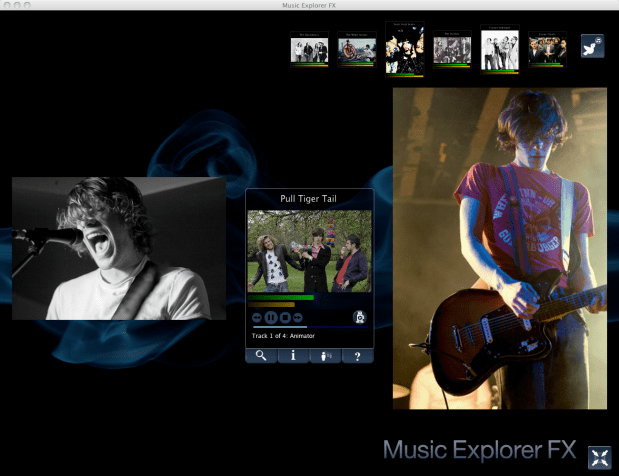
Sten uses a number of APIs to make MEFX happen. He uses the Echo Nest for artist search and to get all sorts of info including artist familiarity, hotness, artist similarity, blogs, news, reviews and audio. He gets artist images from Flickr and Last.fm – and just to make sure he’s relevant in this Twitter-centric world, he uses the Twitter API to let you tweet about any interesting paths you’ve taken through the music space.
We are living in a remarkable world now – there’s such an incredible amount of music available. There are millions of artists creating music in all styles. The challenge for today’s music listener is to find a way to navigate through this music space to find music that they will like. Traditional music recommenders can help, but I really think that applications like the MEFX that enable exploration of the music space are going to be important tools for the adventurous music listener
The end of an era at Last.fm
RJ just announced that he, along with the other two founders of Last.fm are leaving Last.fm. Details in this post: Message from the Last.fm founders, Felix, RJ and Martin. This is a big deal. RJ, Felix and Martin laid out the roadmap that just about every music 2.0 company would follow. They continuously brought new innovations to music discovery that are now standard for music sites, innovations like scrobbling of music taste, web services to allow access to all of their music data, social tagging of music, recommendation radio, to name just a few.
I hope that the folks remaining at Last.fm will keep the vision of Felix, RJ and Martin alive, and I wish Felix, RJ and Martin the very best in their next venture(s). (I guess it is time to pay really close attention to playdar).
A glimpse of the Music Explorer
Posted by Paul in java, Music, The Echo Nest on June 9, 2009
I noticed that Sten posted a photo from the JavaOne pavillion that happens to show the Music Explorer FX in the background.

Sten at JavaOne
Using my photo-forensic skills, I’ve extracted a detail that shows the Music Explorer FX:
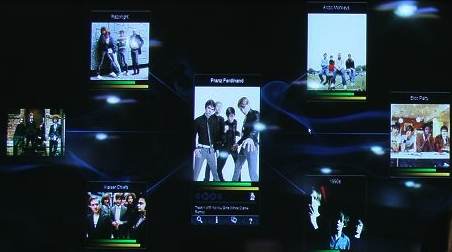
Here you can see Franz Ferdinand, surrounded by a set of similar artists, as well as a audio player, along with graphics that show familiarity and hotness (all derived from the Echo Nest). The Music Explorer FX is pretty neat. I hope Sten releases it soon.
New desks at the nest
Posted by Paul in The Echo Nest on June 8, 2009
Yes, this is big news … we have some new furniture at the nest. No longer are there doors on file cabinets masquerading as desks. Everyone now has a real desk.

New desks at the nest
Clearly, there’s no stopping us now.
The Beat that follows your feet
Posted by Paul in Music, The Echo Nest on June 4, 2009
 There’s a new application in the Echo Nest developer showcase called SynchStep. SynchStep is an iPhone/iTouch application (currently only for jailbroken devices) that automatically synchronizes the music to your walking or running pace. SynchStep uses the Echo Nest Analyze API to extract the tempo for each song in your collection and when you are out for a walk or a run it will pick a song that matches your tempo.
I’ve seen a few academic systems that do this sort of thing. For instance, at last year’s ISMIR there was a paper called Development of an automatic music selection system based on runner’s step frequency that described a similar system. But SynchStep is the first system I’ve seen that is available to the general public on a popular platform like the iPhone.
SynchStep is a great example of a context-sensitive playlister. Instead of a list of songs selected via a random number generator, or via a DJ sitting in some dark, smoke-filled sound booth you get a playlist that matches what you are doing. I think we are going to see more attention paid to context-sensitive playlists: ‘Music for the root canal’, ‘Music that synchronizes with my windshield wipers’, ‘music for that first date with that girl who you think may be kind of emo’, and so on. To make these kind of playlists, the playlist generators will have to know what you are doing, and they’ll have to know what the music sounds like. Platforms like the iPhone already provides lots of context – the iPhone knows where you are, what time it is, it can hear you, it can see you, it can feel you move, it knows that the emo girl just sent you a ‘dear john’ IM, it can even hear your heartbeat. Signal processing and music analysis provides the other piece of the puzzle – knowing what the music sounds like. Just like SynchStep picks a track with a tempo that matches your pace, these next generation, context-aware playlisters will select music that fits the context. So when that kind-of-emo girl dumps you, your iPhone will know about it and will try to cheer you up with a little Katrina & The Waves. This song has super powers, it can even make the emo boys happy.
Help! My iPod thinks I’m EMO – the Podcast
Posted by Paul in Music, recommendation, The Echo Nest on June 3, 2009
I notice that the audio for the panel session “Help! My iPod thinks I’m emo” that Anthony (of the Hype Machine) and I gave at SXSW is online. You can listen to it here
And follow along with the slides on slide share here.
The first music app in the Java App Store?
Posted by Paul in java, Music, The Echo Nest on June 2, 2009
At the JavaOne keynote this morning, James Gosling and Jonathan Schwartz gave a demo of the new Java App store in front of 20,000 Java developers. The Java App store is new online store for Java apps. It’s just like the iPhone App store for Java. Oh .. and it has about a billion potential shoppers. One of the very first apps in the store (and as far as I can tell, the only music app) is an application called Music Explorer FX. This is a soon to be released Java FX application designed to help you explore the world of music. I’ve had the opportunity to play with the Music Explorer – it is really quite cool. (and it makes heavy use of the Echo Nest API, which makes it doubly cool). The developer of the application, Sten Anderson has written a teaser about the app on his blog. As he says, stay tuned for to find out when the app will be available.
 Music Machinery