‘Tis the Season
‘Tis the season for artists to release Christmas music … and they release lots of it. In the last two weeks Spotify has added thousands of releases with ‘Christmas’ in the title. I though it would be fun to build a little web app that lets you explore through all the releases. Here it is: ‘Tis the Season.
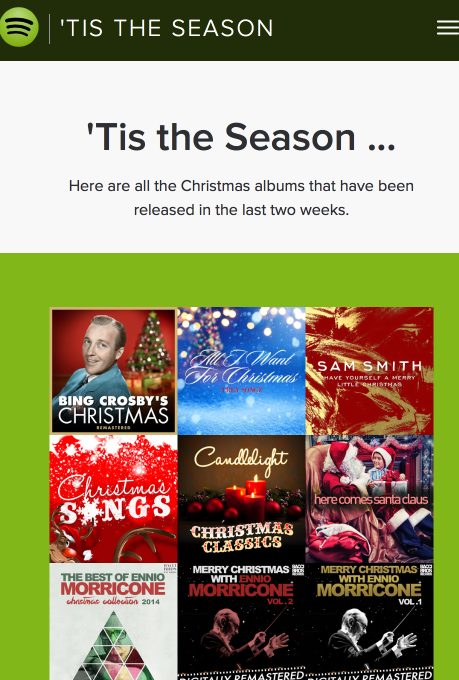
It shows you all the Christmas albums that have been released in the last few weeks, lets you listen to them and lets you open them in Spotify.
It makes use of the Spotify Web API – there’s a nifty search feature that lets you restrict album searches to albums that have just been recently release. That’s what makes this app possible. Check out the app at ‘Tis the Season. The source is on github.
The Mobile Infinite Jukebox Survey results
Over the last six months or so The Infinite Jukebox had a link to a survey about features peopled would like to see in a mobile version of The Infinite Jukebox. Since then, over 10,000 people have taken the survey. Here are the results.
The survey was linked to directly from the Infinite Jukebox. The questions asked were:
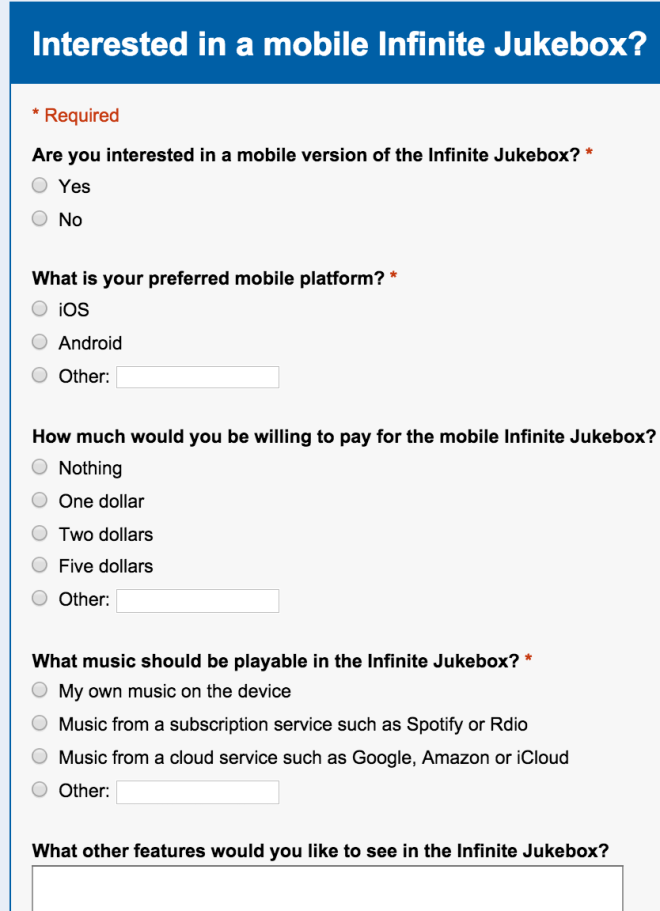
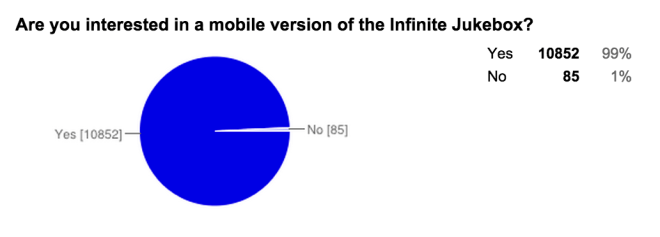
Since the text in link to the survey was “Interested in a mobile version of the Infinite Jukebox? Then take this one minute survey” it is no surprise that 99% of all respondents are interested in a mobile version of the app.
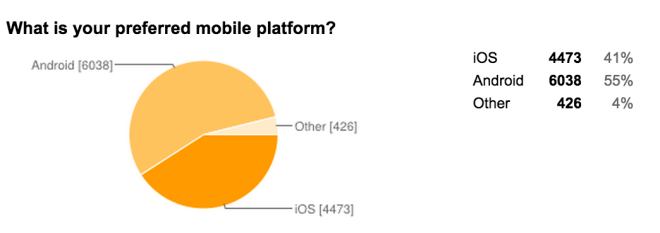
The split between Android and iOS aligns with other iOS vs Android metrics out there on the webs.
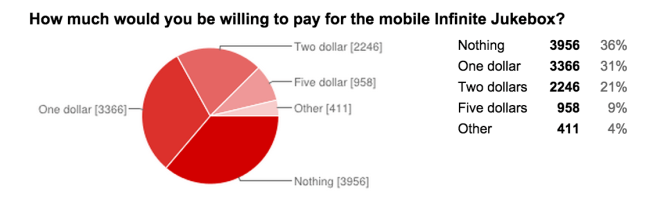
As for how much people would be willing to pay, 64% would be willing to pay something for the app.
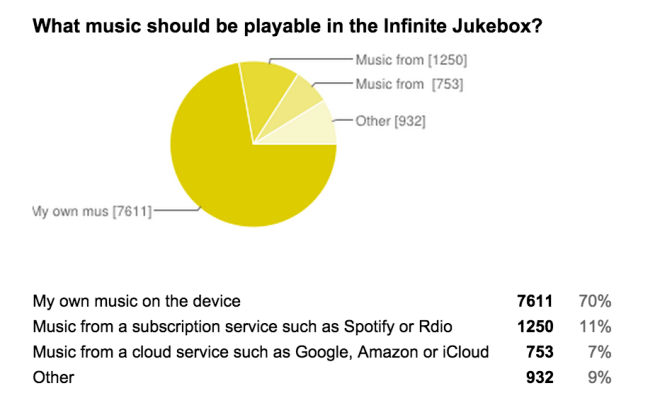
This was a bit surprising – 70% of folks want to play music from their own collection, and only 11% are interested in playing music from a streaming service like Spotify or Rdio.
The final question was an open-ended question asking about what other features would you like to see in the Infinite Jukebox. Many of the responses were about what features would like to see in the current web version, while many were about what features should be in a mobile version. Some of the more common results are here:
Common new feature suggestions
- Background playing
- Offline playling
- No Ads
- Simple tuning options
- Playlist support
- Choose song length
- Time limits per song
- Infinitise multiple songs
- Color schemes
- Volume controls
- Social features (voting on best tunings)
So, you may be wondering where is the mobile version of the Infinite Jukebox? It is coming along, all the hard coding bits are done, but it has been very much a spare time project. I do hope to release it sometime in the near future. Here’s a short clip of the app in action:
[youtube http://youtu.be/jTTYIunVK1I]Thanks to everyone who took the survey, its been quite informative.
Tracking play coverage in the Infinite Jukebox
Yesterday, I upgraded the Infinite Jukebox to make it less likely that it would get stuck in a section of the song. As part of this work, I needed an easy way to see the play coverage in the song. To do so, I updated the Infinite Jukebox visualization so that it directly shows play coverage. With this update, the height of any beat in the visualization is proportional to how often that beat has been played relative to the other beats in the song. Beats that have been played more have taller bars in the visualization.
This makes it easy to see if we’ve improved play coverage. For example, here’s the visualization of Radiohead’s Karma Police with the old play algorithm after about an hour of play:
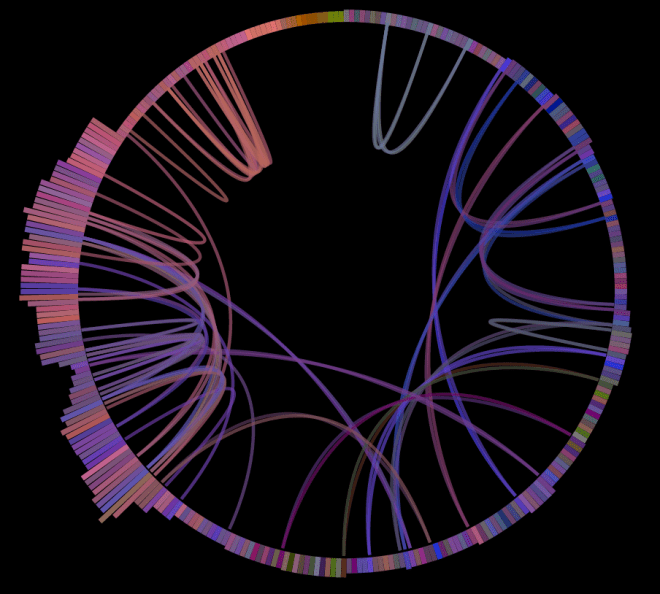
As you can see, there’s quite a bit of bunching up of plays in the third quarter of the song (from about 7 o’clock to 10 o’clock). Now compare that to the visualization of the new algorithm:
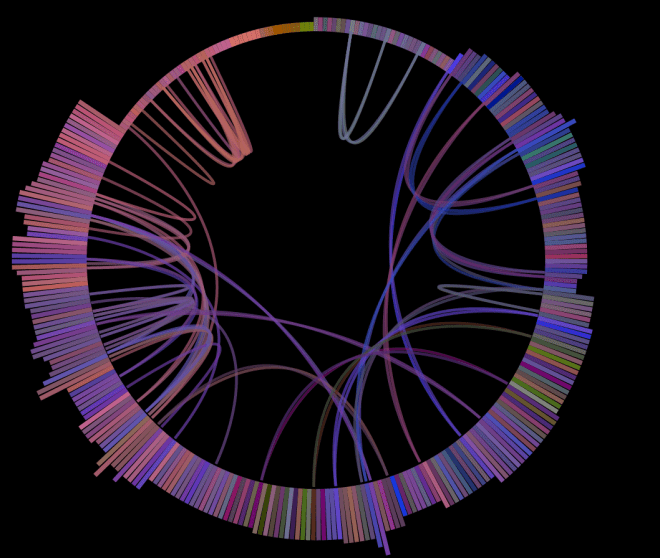
With the new algorithm, there’s much less bunching of play. Play is much more evenly distributed across the whole song.
Here’s another example. The song First of the Year (Equinox) by Skrillex played for about seven hours with the old algorithm:
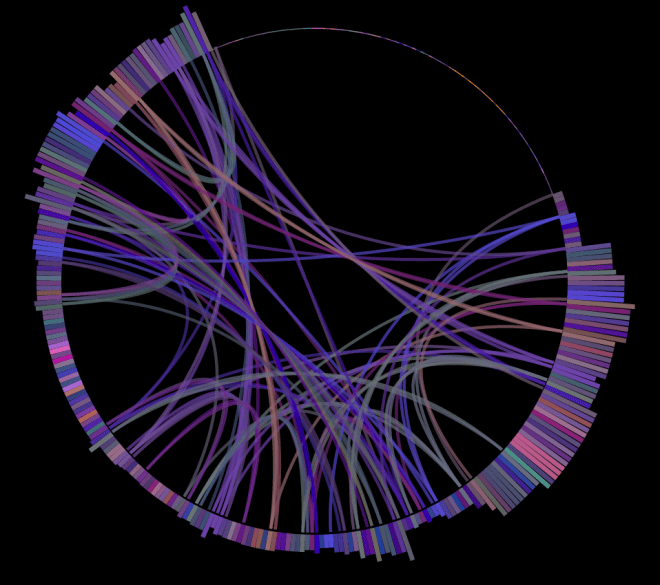
As you can see, it has quite uneven coverage. Note the intro and outro of the song are almost always the least played of any song, since those parts of the song typically have very little similarity with the rest of the song.
Here’s the same song with the new algorithm:
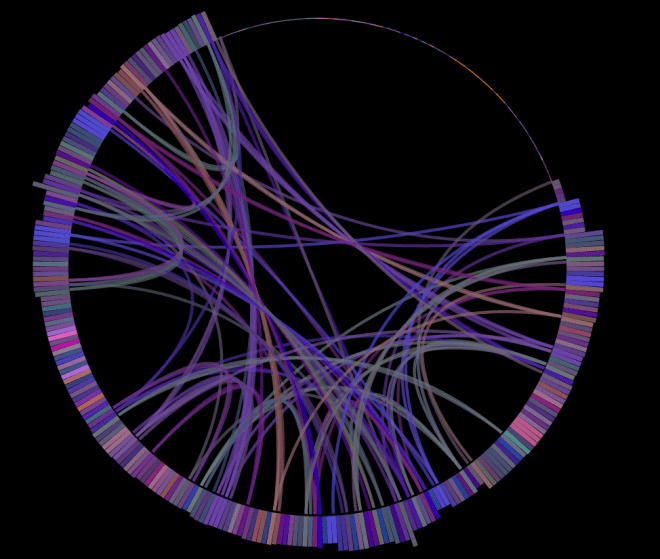
Again, play coverage is much more even across all of the song outside of the intro and the outro.
I like this play coverage visualization so much that I’ve now made it part of the standard Infinite Jukebox. Now as you play a song in the Jukebox, you’ll get to see the song coverage map as well. Give it a try and let me know what you think.
Infinite Jukebox improved
It has been over two years since the Infinite Jukebox was first released after Music Hack Day Boston 2012. Since then millions of people have spent nearly a million hours listening to infinite versions of their favorite songs. It has been my most popular hack.
There has always been a problem with the Infinite Jukebox. Certain songs have sections with very dense interconnections. For these songs the Infinite Jukebox would sometimes get stuck playing the same section of the song for many minutes or hours before breaking free. This morning I finally sat down and worked out a good way to deal with this problem. The Infinite Jukebox will now try to steer the song toward the beats that have been played the least. When the jukebox is deciding which beat to play next, it will search through all the possible future paths up to five beats into the future to find the path that brings the jukebox to the least played part of the song. The result is that we exit out of the rats nest of connections rather quickly. The code is quite succinct – just 20 lines in one recursive function. Good payback for such a small amount of code.

While I was in the codebase, I made a few other minor changes. I switched around the color palettes to favor more green and blue colors, and I use a different color to draw the beat connections when we make a jump.
The Ultimate Thanksgiving Playlist
On the annual drive to Thanksgiving dinner I’ve tortured my family with Alice’s Restaurant too many times over the years. Arlo Guthrie’s classic is still, in my mind, the classic Thanksgiving song, but there has to be more. So this year, I set out to expand my repertoire of Thanksgiving music – to build the ultimate Thanksgiving playlist. To do so, I looked through the top 300 or so most listened to Thanksgiving playlists on Spotify and found the top 100 songs that most frequently appear in all of these playlists, after discounting for popularity. Here are the results: The Ultimate Thanksgiving Playlist:
[spotify spotify:user:plamere:playlist:7EOwcqcYhCDsrvoutSVP9E]This is six hours of Thanksgiving music. All the classics are there, from Alice’s Restaurant to We are going to be Friends by the White Stripes. It should get you through the Thanksgiving drive, the meal, dessert and maybe even an after dinner snack.
However, if you want to synchronize your cooking and your music listening, there’s no better way then to hop on over to Time For Turkey for your basting+music needs.
And since the Christmas season starts immediately after the last piece of pumpkin pie has been consumed, lets not waste time breaking out the Christmas playlist. Here are the top 100 songs appearing across the most popular 1,000 Christmas playlists: Top Christmas Songs
[spotify spotify:user:plamere:playlist:26fUkb0ZQdg62IY497OdNL]Sort Your Music
A few weeks ago, the Spotify Web API team pushed out some updates to the API that allows developers to update the tracks in a listener’s playlist. With these changes a developer can add, replace, remove and rearrange tracks in a playlist on behalf of a listener. This week I wanted to try out these new API features so I built an app called Sort Your Music.
Sort Your Music lets you sort the tracks in any of your playlists based on a number of Echo Nest parameters. You can sort a playlist by BPM, Energy, Danceability, Loudness, Acousticness, Valence and more. Once you’ve sorted a playlist you can save it back to Spotify, letting you listen to it on any of your music devices. For example, here’s a copy of the Spotify Top 50 playlist, where the tracks have been sorted from highest energy to lowest.
[spotify spotify:user:plamere:playlist:5feKJB4zyQaFT6aw4i80tZ]Using Sort Your Music is quite simple, login with your Spotify credentials and give the app permission to modify your playlists. Then, select the playlist you want to work on and, after a few seconds (while all of the song data is retrieved from The Echo Nest), your playlist will appear in table form like so:
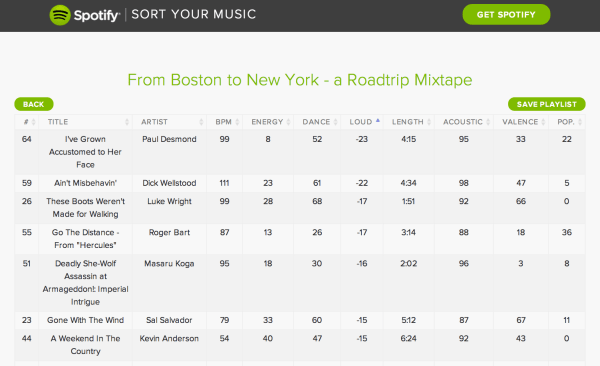
To sort the playlist, just click on the column headings for any of the parameters. When you are happy with the changes, just click save, and your playlist will be updated.
Under the Hood
This is a pretty straightforward app, but there were a few challenging bits. The primary challenge was dealing with the large number of calls to The Echo Nest. Each song in a playlist requires a call to The Echo Nest to fetch the song attributes, so even a modest playlist of 40 songs results in 40 Echo Nest calls. Multiply that by a few dozen active users and the app will be overwhelming my Echo Nest API rate limit. To avoid this, I created my own caching server that sits between the web app and The Echo Nest. It fields bulk requests from the web app (all the IDs at once), and retrieves the song data from The Echo Nest, eliminating any unneeded data, and passing it back to the web app. The big performance win comes from keeping a cache of the song info. After a bit of usage, most popular songs will be in the cache making most playlist song resolving quite snappy. Still, if you have a long and obscure playlist it may take 10 seconds to resolve.
Having a caching server gives me a few other benefits – I have a central point to handle rate limit throttling – if the app gets busy and we start hitting the rate limit, the server can do the throttling automatically, and I can take action. Another big advantage is that I don’t have to expose my Echo Nest API key to the world like I would need to do if I made Echo Nest calls directly from the web client.
My caching server has an info endpoint that returns some json data about the server status, including the average time to process each request to resolve a playlist. The current average resolve time is about 700ms – not too bad.
A Safari glitch – when I tested the finished app on Safari, I found that authentication didn’t work. This was quite puzzling, as it had worked for me before. I went back to some of my older Spotify apps that perform authentication and it turns out that they were no longer working as well. What changed? Well, I’m running the spiffy new Yosemite with an update to Safari. Digging deeper it turned out that the new Safari doesn’t like redirect URLs without a trailing slash. Once I added a trailing slash to the redirect URL all was well.
The code for the app is at github if you are interested in seeing how it all works. And be sure to give it the app a try. It is time to get your music in the right order.
Top US Artists on a map
This week I took yet another crack at putting artists on a map. This time, I created a map that shows the top artists for every state in the US for every day of 2014 up until today. You can go through the calendar year, day-by-day to see which artists managed to capture the hearts and ears of different parts of the country. It is fascinating to see if there is a Super Bowl bump for the half-time artist, or if there is any change in how people listen to music on St. Patrick’s day, or to see which artists are regional and which are national.
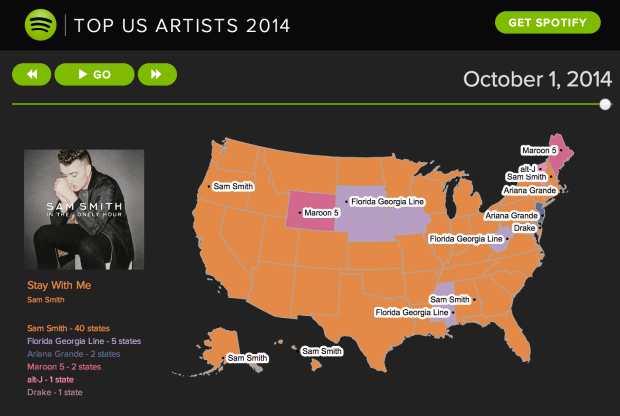
You can read more about the app on the insights.spotify.com blog and then take the app for a test drive. Hit the ‘GO!’ button to animate through the days of the year or hit the arrow keys to step through the calendar day by day. Click on a state to hear the most popular song by the most popular artist in that state on that day of the year.
It was a super fun app to write. I shall certainly write a bit more about some of the tech involved in the next couple of days.
How Students Listen
The Spotify Insights team took a deep dive into some of the listening data of college students to see if there were any differences in how students at different schools listen. We looked at a wide range of data including what artists were played, what songs were played and when, what playlists played, what genres were played and so on. We focused mostly on looking for distinctive listening patterns and behaviors at the different schools. The results were a set of infographic style visualizations that summarize the distinctive listening patterns for each school.
 It was a fun study to do and really shows how much we learn about listening behavior based upon music streaming behavior. Read about the study on the Spotify Insights Blog: Top 40 Musical Universities in America:How Students Listen
More on “Where’s the Drama?”
Posted by Paul in code, events, Music, music hack day, Spotify, The Echo Nest on September 8, 2014
My Music Hack Day Berlin hack was “Where’s the Drama?” – a web app that automatically identifies the most dramatic moment in any song and plays it for you. I’ve been having lots of fun playing with it … and even though (or perhaps because) I know how it works, I’m often surprised at how well it does at finding the most dramatic moments. Here are some examples:
- When will the Bass Drop – Lonely Island
- Stairway to Heaven – Led Zeppelin
- Doomsday – Nero
- November Rain – Guns N Roses
How does it work? The app grabs the detailed audio analysis for the song from The Echo Nest. This includes a detailed loudness map of the song. This is the data I use to find the drama. To do so, I look for the part of the song with the largest rise in volume over the course of a 30 second window (longer songs can have a bit of a longer dramatic window). I give extra weight to crescendos that culminate in louder peaks (so if there are two crescendos that are 20dB in range but one ends at 5dB louder, it will win). Once I identify the most dynamic part of a song, I pad it a bit (so we get to hear a bit of the drop after the build).
The rest is just UI – the song gets plotted as a heavily filtered loudness curve with the dramatic passage highlighted. I plot things with Highcharts, which is a pretty nifty javascript plotting and charting library. I recommend.
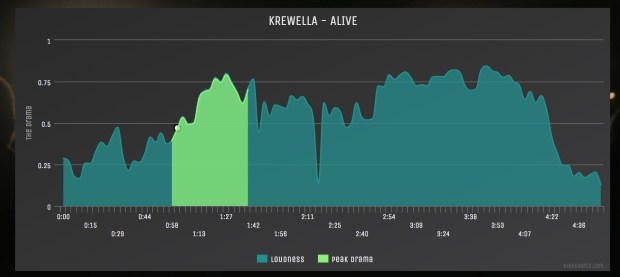
Playing the music – I wanted to use Spotify to play the music, which was a bit problematic since there currently isn’t a way to play full streams with the Spotify Web API, so I did a couple of hacky hacks that got me pretty far. First of all, I discovered that you can add a time offset to a Spotify URI like so:
When this URI is opened in Spotify (even when opened via a browser), Spotify will start to play the song a the 1:05 time offset.
I still needed to be able to stop playing the track – and there’s no way to do that directly – so instead, I just open the URI:
which happens to be the URI for John Cage’s 4’33. In other words, to stop playing one track, I just start playing another (that happens to be silent). The awesome side effect of this is that I’ll be slowly turning anyone who uses “Where’s the Drama?” into experimental music listeners as the Spotify recommendation system responds to all of those John Cage ‘plays’. This should win some sort of ‘hackiest hack of the year’ award.
It was a fun hack to make, and great fun to demo. And now that I have the app, I am no longer wasting time listening to song intros and outros, I can just get to the bit of the song that matters the most.
Where’s the Drama?
Posted by Paul in Uncategorized on September 6, 2014
I’m at Music Hack Day Berlin this week where I’m just finishing up my hack called Where’s the Drama?
Where’s The Drama? will automatically find the most dramatic bits in your favorite music, so you can skip right to the best part of the song. No need to listen to anything else. Here’s a video of the app in action:
[youtube https://www.youtube.com/watch?v=D_ctniiyOcI&feature=youtu.be]So get out your cigarette lighter, stand up and start to listen more dramatically.
The app is online, but please treat it gently – it has a really hacky Spotify integration that will probably fall over if you look at it too hard. The code is on github.

