Archive for category Music
In search of the click track
Posted by Paul in code, fun, Music, The Echo Nest on March 2, 2009
Sometime in the last 10 or 20 years, rock drumming has changed. Many drummers will now don headphones in the studio (and sometimes even for live performances) and synchronize their playing to an electronic metronome – the click track. This allows for easier digital editing of the recording. Since all of the measures are of equal duration, it is easy to move measures or phrases around without worry that the timing may be off. The click track has a down side – some say that songs recorded against a click track sound sterile, that the missing tempo deviations added life to a song.
I’ve always been curious about which drummers use a click track and which don’t, so I thought it might be fun to try to build a click track detector using the Echo Nest remix SDK ( remix is a Python library that allows you to analyze and manipulate music). In my first attempt, I used remix to analyze a track and then I just printed out the duration of each beat in a song and used gnuplot to plot the data. The results weren’t so good – the plot was rather noisy. It turns out there’s quite a bit of variation from beat to beat. In my second attempt I averaged the beat durations over a short window, and the resulting plot was quite good.
Now to see if we can use the plots as a click track detector. I started with a track where I knew the drummer didn’t use a click track. I’m pretty sure that Ringo never used one – so I started with the old Beatle’s track – Dizzy Miss Lizzie. Here’s the resulting plot:
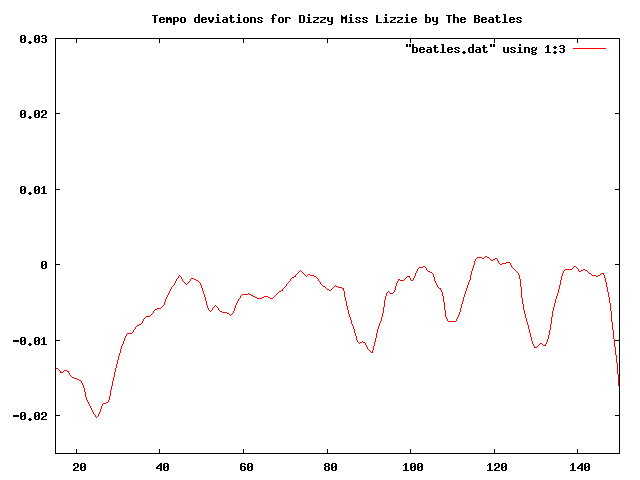 This plot shows the beat duration variation (in seconds) from the average beat duration over the course of about two minutes of the song (I trimmed off the first 10 seconds, since many songs take a few seconds to get going). In this plot you can clearly see the beat duration vary over time. The 3 dips at about 90, 110 and 130 correspond to the end of a 12 bar verse, where Ringo would slightly speed up.
Now lets compare this to a computer generated drum track. I created a track in GarageBand with a looping drum and ran the same analysis. Here’s the resulting plot:
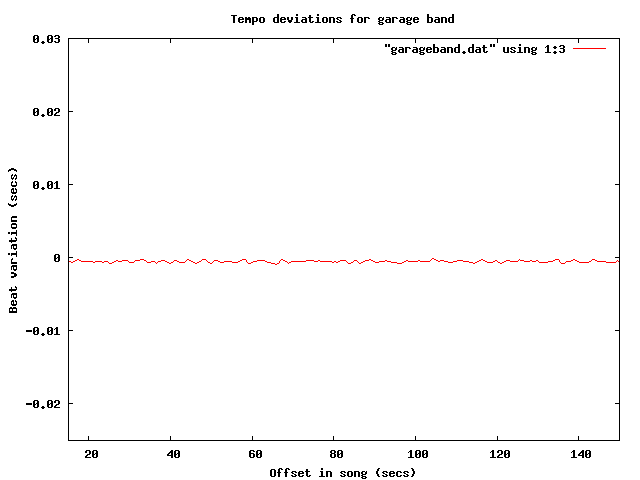
Tempo deviations for a computer generated track
The difference is quite obvious, and stark. The computer gives a nice steady, sterile beat, compared to Ringo’s.
Now let’s try some real music that we suspect is recorded to a click track. It seems that most pop music nowadays is overproduced, so my suspicion is that an artist like Britney Spears will record against a click track. I ran the analysis on “Hit me baby one more time” (believe it or not, the song was not in my collection, so I had to go and find it on the internet, did you know that it is pretty easy to find music on the internet?). Here’s the plot:
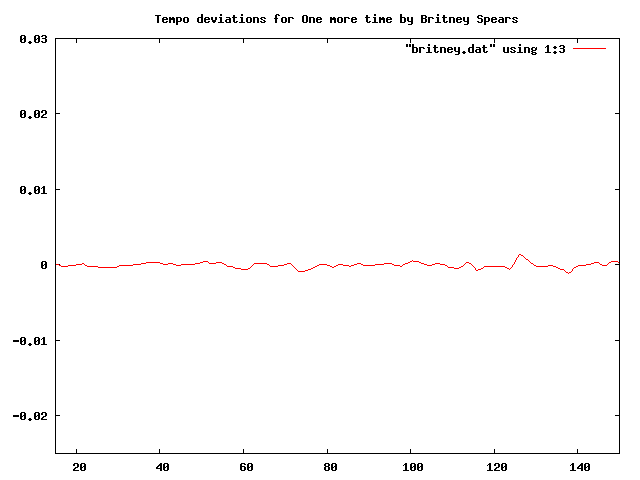
Britney is as flat as a computer
I think it is pretty clear from the plot that “Hit me baby one more time” was recorded with a click track. And it is pretty clear that these plots make a pretty good click track detector. Flat lines correspond to tracks with little variation in beat duration. So lets explore some artists to see if they use click tracks.
First up: Weezer:

Troublemaker by weezer
Nope, no click track for Weezer. This was a bit of a surprise for me.
How about Green Day?
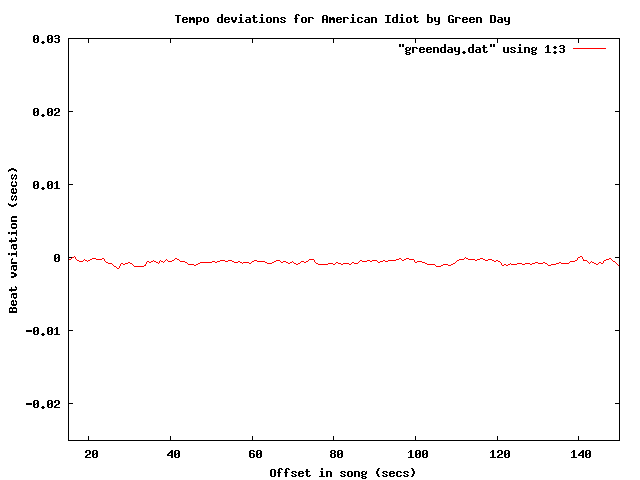
Yep – clearly a click track there. How about Metallica?

No click track for Lars! Nickeback?
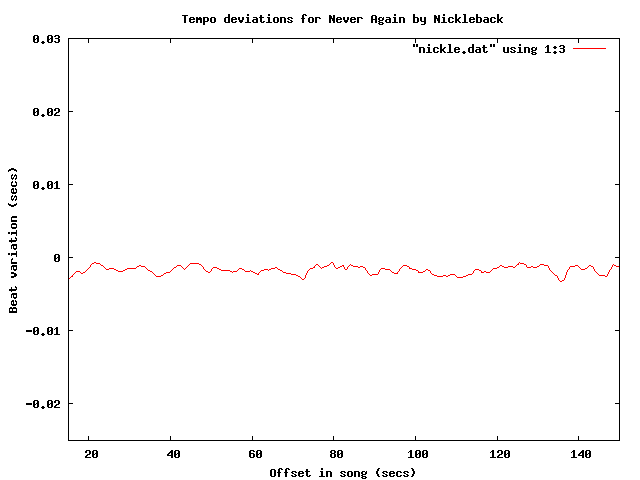 update: fixed nickleback plot labels (thanks tedder)
No surprise there – Nickleback uses a click track. Another numetal band (one that I rather like alot) is Breaking Benjamin:
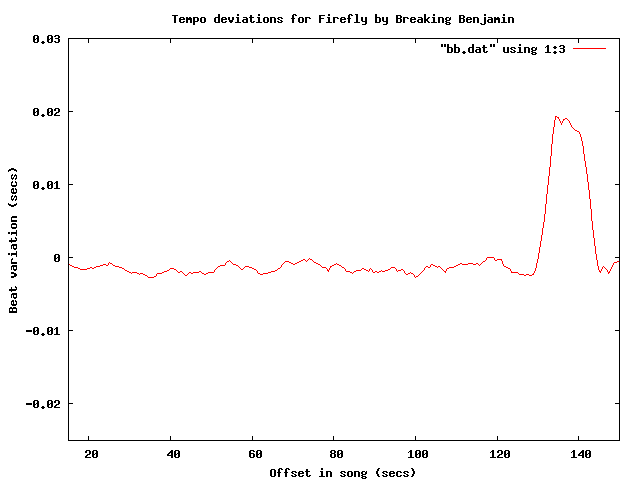 It is clear that they use a click track too – but what is interesting here is that you can see the bridge – the hump that starts at about 130 seconds into the song.
Of course John Bonham never used a click track – but lets check for fun:

So there you have it, using the Echo Nest remix SDK, gnuplot and some human analysis of the generated plots it is pretty easy to see which tracks are recorded against a click track. To make it really clear, I’ve overlayed a few of the plots:

One final plot … the venerable stairway to heaven is noted for its gradual increase in intensity – part of that is from the volume and part comes from in increase in tempo. Jimmy Page stated that the song “speeds up like an adrenaline flow”. Let’s see if we can see this:

The steady downward slope shows shorter beat durations over the course of the song (meaning a faster song). That’s something you just can’t do with a click track. Update – as a number of commenters have pointed out, yes you can do this with a click track.
The code to generate the data for the plots is very simple:
def main(inputFile):
    audiofile = audio.LocalAudioFile(inputFile)
    beats = audiofile.analysis.beats
    avgList = []
    time = 0;
    output = []
    sum = 0
    for beat in beats:
        time += beat.duration
        avg = runningAverage(avgList, beat.duration)
        sum += avg
        output.append((time, avg))
    base = sum / len(output)
    for d in output:
        print d[0], d[1] - base

def runningAverage(list, dur):
   max = 16
   list.append(dur)
   if len(list) > max:
        list.pop(0)
   return sum(list) / len(list)
I’m still a poor python programmer, so no doubt there are better Pythonic ways to do things – so let me know how to improve my Python code.
If any readers are particularly curious about whether an artist uses a click track let me know and I’ll generate the plots – or better yet, just get your own API key and run the code for yourself.
Update: If you live in the NYC area, and want to see/hear some more about remix, you might want to attend dorkbot-nyc tomorrow (Wednesday, March 4) where Brian will be talking about and demoing remix.
Update – Sten wondered (in the comments) how his band Hungry Fathers would plot given that their drummer uses a click track. Here’s an analysis of their crowd pleaser “A day without orange juice” that seems to indicate that they do indeed use a click track:
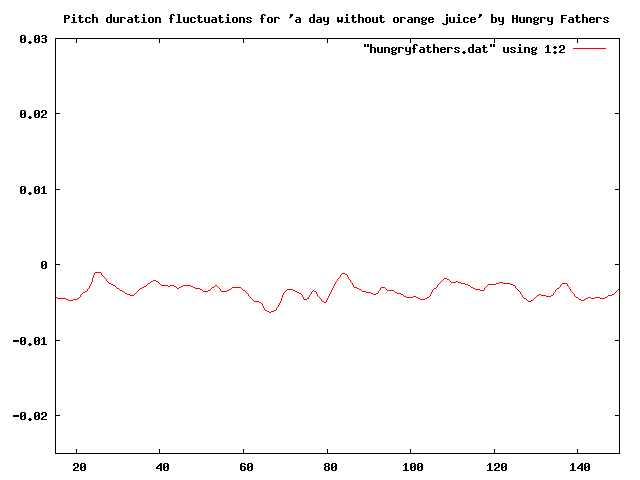
Update: More reader contributed click plots are here: More on click tracks ….
Update 2: I’ve written an application that lets you generate your own interactive click plots: The Echo Nest BPM Explorer
The Echo Nest Remix SDK
Posted by Paul in fun, Music, The Echo Nest on February 28, 2009
One of the joys of working at the Echo Nest is the communal music playlist. Anyone can add, rearrange or delete music from the queue. Of course, if you need to bail out (like when that Cindi Lauper track is sending you over the edge) you can always put on your headphones and tune out the mix. The other day, George Harrison’s “Here Comes the Sun” started playing, but this was a new version – with a funky drum beat, that I had never heard before – perhaps this was a lost track from the Beatle’s Love? Nope, turns out it was just Ben, one of the Echo Nest developers, playing around with The Echo Nest Remix SDK.
The Echo Nest Remix SDK is an open source Python library that lets you manipulate music and video. It sits on top of the Echo Nest Analyze API, hides all of the messy details of sending audio back to the Echo Nest, and parsing the XML response, while still giving you access to the full power of the API.
remix – is one of The Echo Nest’s secret weapons – it gives you the ability to analyze and manipulate music – and not just audio manipulations such as filtering or equalizing, but the ability to remix based on the hierarchical structure of a song. remix sits on top of a very deep analysis of the music that teases out all sorts of information about a track. There’s high level information such as the key, tempo time signature, mode (major or minor) and overall loudness. There’s also information about the song structure. A song is broken down into sections (think verse, chorus, bridge, solo), bars, beats, tatums (the smallest perceptual metrical unit of the song) and segments (short, uniform sound entities). remix gives you access to all of this information.
I must admit that I’ve been a bit reluctant to use remix – mainly because after 9 years at Sun Microsystems I’m a hard core Java programmer (the main reason I went to Sun in the first place was because I liked Java so much). Every time I start to use Python I get frustrated because it takes me 10 times longer than it would in Java. I have to look everything up. How do I concatenate strings? How do I find the length of a list? How do I walk a directory tree? I can code so much faster in Java. But … if there was ever a reason for me to learn Python it is this remix SDK. It is just so much fun – and it lets you do some of the most incredible things. For example, if you want to add a cowbell to every beat in a song, you can use remix to get the list of all of the beats (and associated confidences) in a song, and simply overlap a cowbell strike at each of the time offsets.
So here’s my first bit of Python code using remix. I grabbed one of the code samples that’s included in the distribution, had the aforementioned Ben spend two minutes walking me through the subtleties of Audio Quantum and I was good to go. My first bit of code just takes a song and swaps beat two and beat three of all measures that have at least 3 beats.
def swap_beat_2_and_3(inputFile, outputFile):
    audiofile = audio.LocalAudioFile(inputFile)
    bars = audiofile.analysis.bars
    collect = audio.AudioQuantumList()
    for bar in bars:
        beats = bar.children()
        if (len(beats) >= 3):
            (beats[1], beats[2]) = (beats[2], beats[1])
        for beat in beats:
            collect.append(beat);
    out = audio.getpieces(audiofile, collect)
    out.encode(outputFile)
The code analyzes the input, iterates through the bars and if a bar has more than three beats, swaps them. (I must admit, even as a hard core Java programmer, the ability to swap things with (a,b) = (b,a) is pretty awesome) and then encodes and writes out a new audiofile. The resulting audio is surprisingly musical. Here’s the result as applied to Maynard Ferguson’s “Birdland”:
This is just great programming fun. I think I’ll be spending my spare coding time learning more Python so I can explore all of the things one can do with remix.
Hacking spotify
Spotify is the new “old napster” – everyone who uses it seems to love it. As this Google trends plot shows it is starting to become very popular.
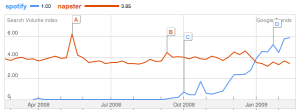
But there is a downside to becoming popular – when you are popular you start to become a target of hackers. This is happening to Spotify now – Spotify is another platform waiting to be explored and exploited. Some notable hacks:
- Lastify – this is a rather benign hack – it adds a couple of buttons to the bottom of your spotify client that let you apply Last.fm ‘love’ and ‘ban’ to the currently playing track.
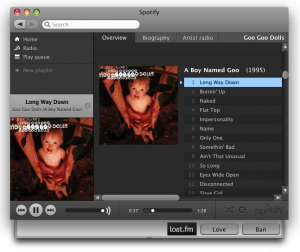
- Despotify – the open source Spotify client – this is a rather extensive hack. #hack.se has reverse engineeered the Spotify protocols and have built an open source Spotify client (with curses text-mode goodness). The client includes code that decrypts the encrypted music served by Spotify, potentially allowing anyone to not just listen to music, but to download and save it as well. Here’s a video of Despotify in action:
Already, Spotify seems to have responded to this hack, according to the Despotify page: “Despotify has been blocked for users using ‘free’ or ‘daypass’ accounts. You can still use despotify using ‘Premium’ accounts.”. That seems fair – if you pay for Spotify, you can use whatever client you want.
- Geographic hacks – Spotify is only released in certain countries. If you don’t live in the UK, Spain, France, Sweden, Norway or Finland you are out of luck – but not really. According to this article in Wired, some users are using a UK-based proxy to allow access to Spotify from places like the USA.
As Spotify gains in popularity, the Spotify engineers are going to be playing a bit of wack-a-mole to keep the hackers at bay in order to keep the Spotify platform stable and performant. So far, they seem to be doing a very good job.
setlist.fm – the setlist wiki
 setlist.fm is a wiki-like service where people can record and share the setlists for concerts they’ve attended. Interested in learning what Yes might play should you see them, you can look at the setlist for their recent concert in Georgia:
Firebird Suite
Siberian Khatru
I’ve Seen All Good People
Tempus Fugit
Onward
Astral Traveler
Close To The Edge
J’s Theme
Intersection Blues
And You And I
Long Distance Runaround
The Fish (Schindleria Praematurus)
Aliens (Are Only Us From The Future)
Machine Messiah
Starship Trooper
Owner Of A Lonely Heart
Roundabout
setlist.fm doesn’t just show you the setlist, it also creates links to Youtube videos for each of the tracks, finds the lyrics from the LyricWiki. setlist calculates nifty statistics about which songs a band has played most in their concerts. Setlist.fm is a neat idea – and the site design and implementation is really slick. It’s a pretty cool site.
The Led Zeppelin Graph
Posted by Paul in fun, Music, The Echo Nest on February 26, 2009
I’ve been pretty busy figuring out the lay of the land at the new job, so I haven’t had too much time for recreational programming. However, last night, while my lovely wife was watching Dr. House demonstrate his excellent interpersonal skills, I got a chance to write a little bit of code to generate an artist graph using the Echo Nest Developer API.
The idea is to generate a graph that shows the artist similarity space in a fashion that can encourage exploration of the artist space. To do this, I simply use the Echo Nest get_similar call to walk the artist graph. Instead of getting bogged down in some graphics library to create the visualization, I just output ‘.DOT’ commands and render the whole thing using graphviz. Graphviz does all the hard work figuring out how to layout the graph. Here’s a tiny example of some graphviz output:
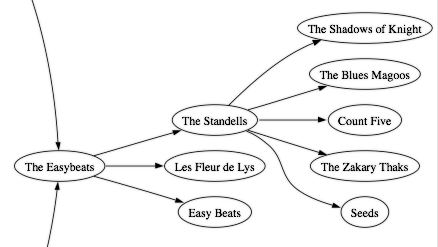 One of the problems with making these sort of graphs is that they can get extremely complicated, very quickly. Even after just a few steps away from the seed artist in the crawl of the artist graph there can be 100s of artists and 1000s of connections. Without some care, the graph quickly turns into an unreadable tangle. However, since we want to use these graphs for exploration of the artist space we can make a simplification that eliminates much of the complexity. For exploration, people tend to start from a known artist, and then proceed to lesser known artists. If we make our graph work in the same way, we will eliminate a large number of extraneous connections. Instead of connecting all artists that we encounter in our crawl of the artist graph, we only connect new artists to more popular artists that are already in the graph. This gives us an easy to manage directed, acyclic graph that flows from very familiar artists to unknown artists.
The pseudocode to do this is very simple:
  add a seed artist to the work queue
  while the work queue is not empty
      curArtist <=  the next artist from the queue
      for each artist similar to curArtist
          if similar artist less familiar than curArtist
               plot link to similar artist
               add similar artist to workqueue
The real java code is not much more complicated:
while (workQueue.size() > 0) {
  Artist artist = workQueue.remove(0);
  List<Scored<Artist>> simArtists = echoNest.getSimilarArtists(artist, 0, 6);
  float familiarity = echoNest.getFamiliarity(artist);
  for (Scored<Artist> scoredArtist : simArtists) {
    Artist similarArtist = scoredArtist.getItem();
    float simFamiliarity = echoNest.getFamiliarity(similarArtist);
    if (simFamiliarity < familiarity) {
       out.printf("\"%s\" -> \"%s\";\n", artist.getId(), similarArtist.getId());
       if (!plottedSet.contains(similarArtist)) {
          workQueue.add(similarArtist);
          plottedSet.add(similarArtist);
          out.printf("\"%s\" [label=\"%s\"]\n", similarArtist.getId(), similarArtist.getName());
        }
    }
  }
}
This yields some fun graphs. Here’s a detail from a graph created using Led Zeppelin as the see artist:
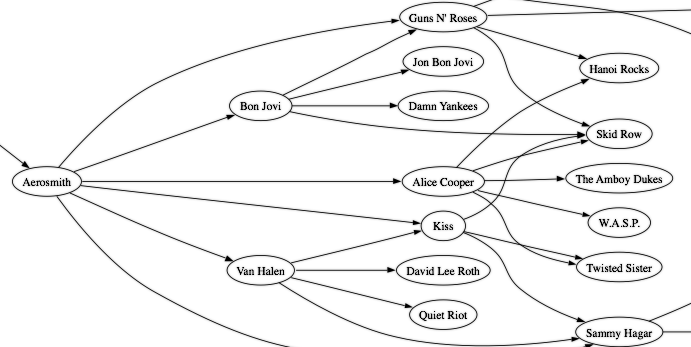
And the full graph in all its glory is here:

Full plot (click to see it full size)
I can think of all sorts of things to add to this artist graph. We could size the nodes based upon the familiarity of the artist. We could color the artists based upon how ‘hot‘ the artist is. We could replace the graphviz with a real graphing library like prefuse and make the whole graph interactive – so you could actively explore the artist space, click on a node, read reviews about the artist, listen to their music, watch their videos.
Astute readers may have noticed that I’m making calls using an EchoNest library. That’s one of the things I’ve been working on in the last week – building a Java client library for the EchoNest developer API. I’ll be releasing this soon, once I figure out the best way to release an open source client library here at The Echo Nest. I should hopefully get something released by the end of this week. If you are interested in a sneak preview of the Java client library, let me know.
Last.fm and the iPhone
Here’s a nifty iPhone commercial that highlights Last.fm that has been running in the UK. Cool stuff, nicely done Toby!
The Billboard API
Posted by Paul in Music, web services on February 24, 2009
 Billboard, the venerable maintainer of the Billboard Hot 100 and a bevy of other music charts, is now making this data available via an API. The API “puts the entire rich history of the Billboard charts at your fingertips to sample and mix into your web pages and applications.”. The API is in public beta – but already it is supplying some really good information.
The first service that they’ve rolled out is the ‘Chart’ service, which lets you search and retrieve Billboard chart information.
For example, to find all appearances of The Beatles on any of the Billboard charts during the first week of June in 1964, you could make the call:
With results:
<?xml version='1.0' encoding='UTF-8'?>
<searchResults firstPosition='1' totalReturned='6' totalRecords='6'>
    <chartItem id='8807769' rank='2' exrank='0'>
        <chart id='3070264'>
            <name>The Billboard Hot 100</name>
            <issueDate>1964-06-06</issueDate>
            <specId>379</specId>
            <specType>Singles</specType>
        </chart>
        <artist>The Beatles</artist>
        <writer />
        <song>Love Me Do</song>
        <producer />
        <catalogNo>9008</catalogNo>
        <promotion />
        <distribution>Tollie</distribution>
        <peak>1</peak>
        <weeksOn>14</weeksOn>
    </chartItem>
    <chartItem id='8715479' rank='4' exrank='0'>
        <chart id='3068613'>
            <name>The Billboard 200</name>
            <issueDate>1964-06-06</issueDate>
            <specId>305</specId>
            <specType>Albums</specType>
        </chart>
        <artist>The Beatles</artist>
        <writer />
        <song>The Beatles' Second Album</song>
        <producer />
        <catalogNo>2080</catalogNo>
        <promotion />
        <distribution>Capitol</distribution>
        <peak>1</peak>
        <weeksOn>55</weeksOn>
    </chartItem>
    <chartItem id='8715481' rank='6' exrank='0'>
        <chart id='3068613'>
            <name>The Billboard 200</name>
            <issueDate>1964-06-06</issueDate>
            <specId>305</specId>
            <specType>Albums</specType>
        </chart>
        <artist>The Beatles</artist>
        <writer />
        <song>Meet The Beatles!</song>
        <producer />
        <catalogNo>2047</catalogNo>
        <promotion />
        <distribution>Capitol</distribution>
        <peak>1</peak>
        <weeksOn>71</weeksOn>
    </chartItem>
    <chartItem id='8807803' rank='36' exrank='0'>
        <chart id='3070264'>
            <name>The Billboard Hot 100</name>
            <issueDate>1964-06-06</issueDate>
            <specId>379</specId>
            <specType>Singles</specType>
        </chart>
        <artist>The Beatles</artist>
        <writer />
        <song>Do You Want To Know A Secret</song>
        <producer />
        <catalogNo>587</catalogNo>
        <promotion />
        <distribution>Vee-Jay</distribution>
        <peak>2</peak>
        <weeksOn>11</weeksOn>
    </chartItem>
    <chartItem id='8715486' rank='11' exrank='0'>
        <chart id='3068613'>
            <name>The Billboard 200</name>
            <issueDate>1964-06-06</issueDate>
            <specId>305</specId>
            <specType>Albums</specType>
        </chart>
        <artist>The Beatles</artist>
        <writer />
        <song>Introducing...The Beatles</song>
        <producer />
        <catalogNo>1062</catalogNo>
        <promotion />
        <distribution>Vee-Jay</distribution>
        <peak>2</peak>
        <weeksOn>49</weeksOn>
    </chartItem>
    <chartItem id='8807777' rank='10' exrank='0'>
        <chart id='3070264'>
            <name>The Billboard Hot 100</name>
            <issueDate>1964-06-06</issueDate>
            <specId>379</specId>
            <specType>Singles</specType>
        </chart>
        <artist>The Beatles</artist>
        <writer />
        <song>P.S. I Love You</song>
        <producer />
        <catalogNo>9008</catalogNo>
        <promotion />
        <distribution>Tollie</distribution>
        <peak>10</peak>
        <weeksOn>8</weeksOn>
    </chartItem>
</searchResults>
You can restrict searches to various charts (Hot Country, Pop 100, Top Latin, etc.) , and you can search by artist and/or song name over a range of dates. (Unfortunately, but not too surprisingly, the data for the current month is not available in the searches).
The terms-of-service seem pretty reasonable- you are allowed to make 1,500 API calls per day at up to 2 queries per second. Commercial use seems to be allowed (But I’m not a lawyer, so you should check for yourself). However, according to the terms, you are not allowed to store any of the Billboard data. The services are well documented, support JSON as well as XML output and query times are fast.
I can think of all sorts of uses for this data – to help create playlists for the 25 year high school reunion, tracking artist popularity over time, answering bar room music questions like “What was the highest charting instrumental-only single?” or “Did Ringo ever have a hit?”. It is perfect data for the Music Alchemists that are trying to build an automatic hit predictor.
The Billboard chart API is an excellent addition to the world of music web services. It goes straight into my Top Ten Music APIs chart – with a bullet.
Damn you, Mr. Bezos!
Posted by Paul in fun, Music, recommendation on February 22, 2009

Once again, I was blind-sided by the Amazon recommender. I was placing an order for a few books that my wife wanted. Easy enough, and it would only take 5 minutes. But while I was adding Marie’s books to the shopping cart, a recommendation for a new Keith Emerson CD caught my eye. The last thing I bought by KE was not so good, but the reviews for this CD were rather positive – and so I added it to the cart. And then another Keith Emerson Anthology CD was recommened “just for me” – which has some songs I haven’t listened to for years and are still sitting on vinyl in my attic. That 2 CD set found its way into my shopping cart too.

And then, while at the final checkout, the new Ben Fry / Processing book was sitting there, with 13 excellent reviews. How could I pass that up? And so with an extra $80 removed from my wallet, I finally checked out of the store. Really, that should be illegal. But I’m looking forward to the new tunes and the new book.
Day #2 at the startup
Posted by Paul in Music, startup, The Echo Nest, web services on February 20, 2009
 I just finished day #2 at my new job. Sorry to be so cagey about where I was going, but they wanted to keep it quiet until they could do a press release about it. I see the press release is public now, so I’m free to talk about my new job.
As many of the commenters have guessed, I’ve joined, as the director of the developer community, The Echo Nest – a company that is devoted to providing music intelligence for the next generation of online music application. In this role, I will work with the rest of the Echo Nest team to help grow an active, vibrant music application developer community around The Echo Nest developer API.
I’m really excited to be here at The Echo Nest. The Echo Nest has already established a reputation as a company that provides a new breed of hardcore music intelligence. The Echo Nest goes far beyond the “wisdom of the crowds” model of music discovery (“People who listened to the Beatles also listened to the Rolling Stones”). Instead of just data mining user behavior, The Echo Nest crawls the web to learn everything it can about music by analyzing what the world is saying about music. The Echo Nest also directly analyzes the audio content of music – extracting musical traits such as key, tempo, structure, timbre from the audio.

Home of The Echo Nest
From this analysis of the social context, the user behavior and the actual audio, the Echo Nest gets a deep understanding of the entire world music. It knows which artists are getting the most buzz, which artists are getting stale, how and why artists are related, what words are being used to describe the music. This data goes far beyond the “if you like Britney, you might like Christina” level. The Echo Nest understands enough about music to be able to answer queries such as “make me a playlist of songs with a tempo of 90 beats per minute by an unknown emo artist that sounds something like Dashboard Confessional, and has violins”. The really neat thing is that the Echo Nest is exposing a lot of this functionality in their developer API. This lets anyone who is building a music application to tap into this large resource of music intelligence.
One of my main duties is to be the voice of the developer in the Echo Nest. I’ve written my fair share of music apps, so I have a good idea of some of the many pain points and difficulties that a music application developer has to face, but I’d like to hear more, so if you are developing a music application and you need a particular problem solved let me know – or better yet, post to The Echo Nest developer forums.
I’ll be writing a lot about The Echo Nest in upcoming posts – in particular about using the developer APIs, but I shall still continue to post about all of the interesting things going on the music space – so this blog won’t be too much different from Duke Listens!
An old guy goes to a startup

The new office digs
I’m tired but very happy. Today was my first day at my new gig at a music 2.0 startup. It was a great day … I arrived mid-morning was handed a new laptop (mmmm, that new laptop smell), given a new, completely empty desk and got right down business. As you’d expect in a startup, everyone (except the suits) sits in the same room, the average employee age is under 30 and the staff is entirely male. I’m surrounded by people who eat, drink and breathe music.
The big excitement for the day for the office was the new music setup. One of the guys had just connected a Sonos system to the office stereo which lets the entire office share a single playlist. Anyone in the office can queue any track, by any artist for the whole office to hear. The music for the day was a very eclectic mix – ranging from cool jazz, to power pop – some was a bit hard to work through (the Zappa and the Wedding March) – and there was a surprising amount of 80s pop (the last time I listened to Toto’s Rosanna was in the supermarket).
My first day at work was an interesting contrast to my first day at Sun Microsystems almost 9 years ago. On my first day at Sun, there were about 30 other people who were starting on that same day, and we all spent the first few hours in the Human Resources meeting from hell learning about TPS reports and coversheets. It ultimately took a week to get my login, and email setup by the IT department. And no one played any music at all.
The only downer for the day was the commute – I’ve added an extra 40 minutes to my daily drive – that will take a bit of getting used to.
It is really exciting to be working at a company that I suspect know will be at the heart of the next wave of music on the web. The team is top notch, driven and perhaps most important of all are extreme music fans. The company founders and CEO seem to have a real vision for the future of music. This is the place where things can happen. I feel lucky to be part of the team.
 Music Machinery