Archive for category Music
The Echo Nest remix 1.0 is released!
Posted by Paul in code, fun, Music, remix, The Echo Nest, web services on May 12, 2009
Version 1.0 of the Echo Nest remix has been released. Echo Nest Remix is an open source SDK for Python that lets you write programs that manipulate music. For example, here’s a python function that will take all the beats of a song, and reverse their order:
def reverse(inputFilename, outputFilename):
    audioFile = audio.LocalAudioFile(inputFilename)
    chunks = audioFile.analysis.beats
    chunks.reverse()
    reversedAudio = audio.getpieces(audioFile, chunks)
    reversedAudio.encode(outputFilename)
When you apply this to a song by The Beatles you get something that sounds like this:
which is surprisingly recognizable, musical – and yet different from the original.
Quite a few web apps have been written that use remix. One of my favorites is DonkDJ, which will ‘put a donk‘ on any song. Here’s an example: Hung Up by Madonna (with a Donk on it):
This is my jam lets you create mini-mixes to share with people.

And where would the web be without the ability to add more cowbell to any song.
There’s lots of good documentation already for remix. Adam Lindsay has created a most excellent overview and tutorial for remix. There’s API documentation and there’s documentation for the underlying Echo Nest web services that perform the audio analysis. And of course, the source is available too.
So, if you are looking for that fun summer coding project, or if you need an excuse to learn Python, or perhaps you are a budding computational remixologist download remix, grab an API key from the Echo Nest and start writing some remix code.
Here’s one more example of the fun stuff you can do with remix. Guess the song, and guess the manipulation:
Social Tags and Music Information Retrieval
Posted by Paul in Music, music information retrieval, research, tags on May 11, 2009
It is paper writing season with the ISMIR submission deadline just four days away. In the last few days a couple of researchers have asked me for a copy of the article I wrote for the Journal of New Music Research on social tags. My copyright agreement with the JNMR lets me post a pre-press version of the article – so here’s a version that is close to what appeared in the journal.
Social Tagging and Music Information Retrieval
Abstract
Social tags are free text labels that are applied to items such as artists, albums and songs. Captured in these tags is a great deal of information that is highly relevant to Music Information Retrieval (MIR) researchers including information about genre, mood, instrumentation, and quality. Unfortunately there is also a great deal of irrelevant information and noise in the tags.
Imperfect as they may be, social tags are a source of human-generated contextual knowledge about music that may become an essential part of the solution to many MIR problems. In this article, we describe the state of the art in commercial and research social tagging systems for music. We describe how tags are collected and used in current systems. We explore some of the issues that are encountered when using tags, and we suggest possible areas of exploration for future research.
Here’s the reference:
Paul Lamere. Social tagging and music information retrieval. Journal of New Music Research, 37(2):101–114.
Last.fm’s new player
Posted by Paul in Music, recommendation, tags on May 6, 2009
Last.fm pushed out a new web-based music player that has some nifty new features including an artist slideshow, multi-tag radio and multi-artist radio. It is pretty nice.

I like the new artist slide show (it is very Snapp Radio like), but they seem to run out of unique artist images rather quickly – and what’s with the grid? It looks like I am looking at the artists through a screen window.
I really like the multi-tag radio, but it is not 100% clear to me whether it is finding music that has been tagged with all the tags or whether it just alternates between the tags. Hopefully it is the former. Update: It is the former.

It is nice to see Multi-tag radio come out of the playground and into the main Last.fm player. It is a great way to get a much more fined-tuned listening experience. I do worry that Last.fm is de-emphasizing tags though. They only show a couple of tags in the player and it is hard to tell whether these are artist, album or track tags. Last.fm’s biggest treasure trove is their tag data, so they should be very careful to avoid any interface tweaks that may reduce the number of tags they collect.
#recsplease – the Blip.fm Recommender bot
Posted by Paul in Music, recommendation, The Echo Nest, web services on May 5, 2009
 Jason has put together a mashup (ah, that term seems so old and dated now) that combines twitter, blip.fm, and the Echo Nest. When you Blip a song, just add the tag #recsplease to the twitter blip and you’ll get a reply with some artists that you might like to listen to.

This is similar to recomme developed by Adam Lindsay but recomme has been down for a few weeks, so clearly there was a twitter-music-recommendation gap that needed to be filled.
Check out Jason’s Blip.fm/twitter recommender bot.
Cool Spotify trick
Ever wonder how deep the Spotify catalog is? Spotify won’t tell you directly, but you can figure it out pretty easily. Spotify lets you search their catalog by date – so a search like this:
will return the entire catalog, which lets you view their stats:
- Total tracks: 3,586,179
- Total albums: 319,106
- Total artists: 264,461
Spotify orders their results (apparently), by popularity, so the search results for this ‘all music’ query not only shows you the size of the Spotify catalog, it shows you what are the most popular tracks in the entire catalog, which happens to be topped by Lady Gaga, The Killers, Beyoncé, and Coldplay. This popularity sort is pretty handy when combined with the year-based seach. You can quickly and easy listen to the most popular songs of any year – here’s the year I graduated from high school: 1977 at Spotify.
With 40K new users signing up every day, Spotify is capturing the music world. It will be really amazing to see what happens if/when they open their doors in the U.S.
79 Versions of Popcorn, remixed.
Posted by Paul in Music, remix, The Echo Nest on May 1, 2009
 Aaron Meyer’s issued a challenge for someone to remix 79 versions of the song Popcorn. So I fired up one of the remix applications that Tristan and Brian wrote a while back that uses our remix API to stitch all 79 versions of Popcorn together into one 12 minute track – songs are beat matched, tempos are stretched and beats are aligned to form a single seamless (well, almost seamless) version of the Hot Buttered classic. I’m interested to hear what some of the other computational remixologists could do with this challenge. Everyone, stop writing your thesis, and make some popcorn!
Listen:
Download: A Kettle of Echo Nest Popcorn.
If you are interested in creating your own remix, check out the Echo Nest API and the Echo Nest Remix SDK. (Thanks Andy, for the tip!).
TagatuneJam
Posted by Paul in data, Music, music information retrieval, research on April 28, 2009
 TagATune, the music-oriented ‘game with a purpose’ is now serving music from Jamendo.com. TagATune has already been an excellent source of high quality music labels. Now they will be getting gamers to apply music labels to popular music. A new dataset will be forthcoming. Also, adding to the excitement of this release, is the announcment of a contest. The highest scoring Jammer will be formally acknowledged as a contributor to this dataset as well as receive a special mytery prize. (I think it might be jam). Sweet.
Echo Nest hero
When I’m not blogging about hacking online polls – I spend my time at The Echo Nest where I get to do some really cool things with music. Over the weekend, I wrote a program that uses the Echo Nest API to extract musical features to build the core of a guitar-hero like game. Even though this is a quick and dirty program, it performs quite well. Here ‘s a video of it in action.
Hopefully I’ll get a few programming cycles over the next couple of weeks to turn this into a real game where you can play Echo Nest hero with your own tracks on your computer. Of course, I’ll post all the code too so you can follow along and build your own computer game synchronized to music.
libre.fm – what’s the point?
Posted by Paul in code, data, Music, recommendation, web services on April 24, 2009
 Libre.fm is essentially an open source clone of Last.fm’s audioscrobbler. With Libre.fm you can scrobble your music play behavior to a central server, where your data is aggregated with all of the other scrobbles and can be used to create charts, recommendations, playlists – all the sorts of things we see at Last.fm. As the name implies, everything about Libre.fm is free. All the Libre.fm code is released under the GNU AGPL. You can run your own server. You own your own data.
The Libre project is just getting underway. Not only is paint is not dry, they’ve only just put down the drop cloth, got the brushes ready and opened the can. Right now there’s a minimal scrobbler server (called GNUkebox) that will take anyone’s scrobbles and adds them to a postgres database. This server is compatible with Last.fm’s so nearly all scrobbling clients will scrobble to Libre.fm. (Note that to get many clients to work you actually have to modify your /etc/hosts file to redirect outgoing connections that would normally go to post.audioscrobbler.com so that they go to the libre.fm scrobbling machine. It is a clever way to get instant support for Libre.fm by lots of clients, but I must admit I feel a bit dirty lying to my computer about where to send the scrobbles.)
Another component of Libre.fm is the web front end (called nixtape) that shows what people are playing, what is popular, artist charts and clouds. (Imagine what Audioscrobbler.com looked like in 2005). Here’s my Libre.fm page:
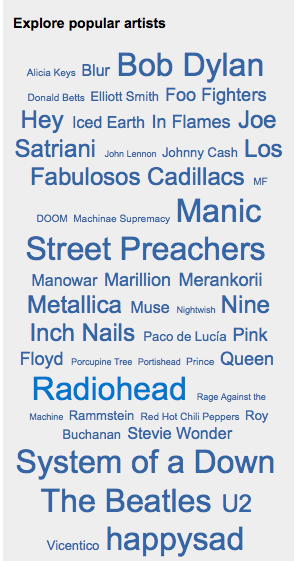
 There is already quite a lot of functionality on the web front end – there are (at least minimal) user, artist, album and track pages. However, there are some critical missing bits – perhaps most significant of these is the lack of a recommender. The only discovery tool so far at Libre.fm is the clickable ‘Explore popular artist’ cloud:
Libre.fm has only been live for a few week – but it is already closing in on its millionth scrobble. As I write this, about 340K tracks have been scrobbled by 2011 users with a total of 920052 plays. (Note that since Libre.fm lets you import your Last.fm listening history, many of these plays have been previously scrobbled at Last.fm).
When you compare these numbers to Last.fm’s, Libre.fm’s numbers are very small – but if you consider the very short time that it has been live, these numbers start to look pretty good. What is even more important is that Libre.fm has already built a core team of over two dozen developers. Two dozen developers can write a crazy amount of code in a short time – so I’m expecting to see the gaps in Libre.fm functionality to be filled rather quickly. And as the gaps in functionality are eliminated, more users will come (especially those users who’ve recently abandoned Last.fm when Last.fm started to charge users that don’t live in the U.S., U.K. or Germany).
I remember way back in 1985 reading this article in Byte magazine about this seemingly crazy guy named Richard Stallman who was creating his own operating system called GNU. I couldn’t understand why he was doing it. We already had MS-DOS and Unix (I was using DEC’s Ultrix at the time which was a mighty fine OS). I didn’t think we needed anything else. But Stallman was on a mission – that mission was to create free software. Software that you were free to run, free to modify, free to distribute. I was wrong about Stallman. His set of tools became key parts of Linux and his ideas about ‘CopyLeft’ enabled the open source movement.
When I first heard about Libre.fm, my reaction was very similar to my reaction back in 1985 to Stallman – what’s the point? Last.fm already provides all these services and much more. Last.fm lets you get access to your data via their web services. Last.fm already has billions of scrobbles from millions of users. Why do we need another Last.fm? But this time I’m prepared to be wrong. Perhaps we don’t really want our data held by one company. Perhaps a community of passionate developers can take the core concept of the audioscrobbler to somewhere new. Just as Stallman’s crazy idea has changed the way we think about developing software, perhaps Libre.fm is the begining of the next revolution in music discovery.
Update – I asked mattl, founder of libre.fm, what his motivation for creating libre.fm is. He says there are two prime motivations:
- Artistic – “I wants to support libre musicians. To give them a platform where they are the ruling class.”
- freedom – “give everyone access to their data, so even if they don’t like what we’re doing with libre music, the software is still free (to them and us)”
The Free Music Archive
Posted by Paul in Music, recommendation, startup on April 20, 2009
 Last week The Free Music Archive opened its virtual doors offering thousands of free tracks for streaming or download. Yes, there are tons of sites on the web that offer new music for free, but the FMA is different. The music on the FMA is curated by music experts (radio programmers, webcasters, venues, labels, collectives and so on) – so that instead of a slush pile dominated by bad music typical of other free music sites, the music at the FMA is really good (or at least one human expert thinks it is good). Most of the music on the FMA is released under some form of a Creative Commons license that allows for free non-commercial use making it suitable for you to use in your podcast, remix, video game or MIR research.
For free-music aggregation sites like the FMA, music discovery has always been a big challenge. Without any well-known artists to use as starting points into the collection, it is hard for a visitor to find music that they might like. The FMA does have and advantage over other free-music aggregators – with the human curator in the loop, you’ll spend less time wading through bad music trying to find the music gems. But the FMA and and other free-music sites need to do whole lot better if they are going to really become sources of new music for people. It would be great if I could go to a site like FMA and tell them about my music tastes (perhaps by giving them a link to my APML, or itunesLibrary.xml or last.fm name) and have them point me to the music in their collection that best matches my music taste. If they could give me a weekly customized music podcast with their newest music that best matches my music taste, I’d be in new-music heaven.
The FMA is pretty neat. I like the human-in-the-loop approach that leads to a high-quality music catalog.

