Archive for category code
Map of Music Styles
Posted by Paul in code, data, events, fun, tags, The Echo Nest, visualization on April 22, 2012
I spent this weekend at Rethink Music Hackers’ Weekend building a music hack called Map of Music Styles (aka MOMS). This hack presents a visualization of over 1000 music styles. You can pan and zoom through the music space just like you can with Google maps. When you see an interesting style of music you can click on it to hear some samples of music of that style.
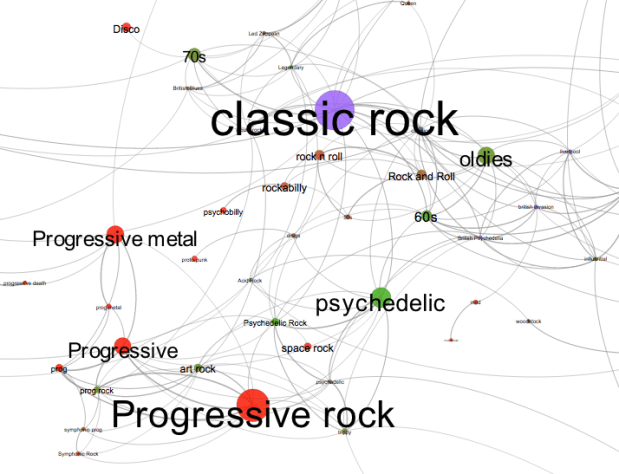
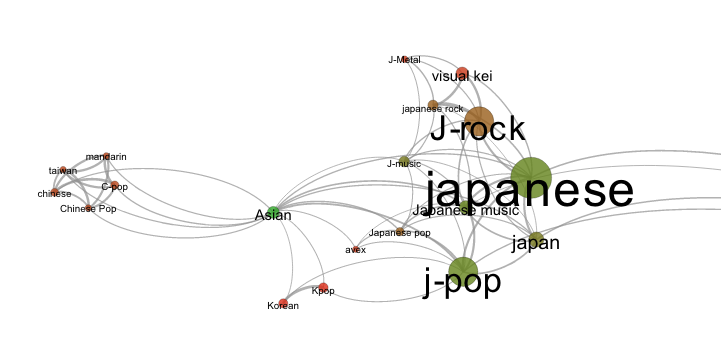
It is fun to explore all the different neighborhoods of music styles. Here’s the Asian corner:
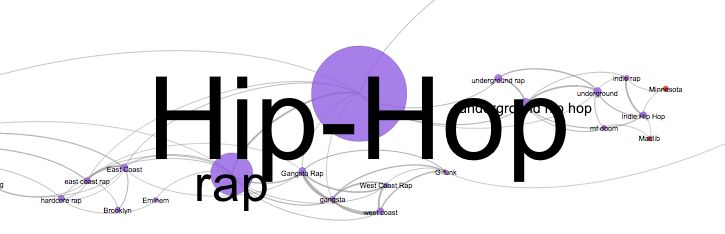
Here’s the Hip-Hop neighborhood:
And a mega-cluster of ambient/chill-out music:

To build the app, I collected the top 2,000 or so terms via The Echo Nest API. For each term I calculated the most similar terms based upon artist overlap (for instance, the term ‘metal’ and ‘heavy metal’ are often applied to the same artists and so can be considered similar, where as ‘metal’ and ‘new age’ are rarely applied to the same artist and are, therefore, not similar). To layout the graph I used Gephi (Its like Photoshop for graphs) and exported the graph to SVG. After that it was just a bit of Javascript, HTML, and CSS to create the web page that will let you pan and zoom. When you click on a term, I fetch audio that matches the style via the Echo Nest and 7Digital APIs.
There are a few non-styles that snuck through – the occasional band name, or mood, but they don’t hurt anything so I let them hang out with the real styles. The app works best in Chrome. There’s a bug in the Firefox version that I need to work out.
Give it a try and let me know how you like it: Map of Music Styles
The Spotify Play Button – a lightening demo
Spotify just released a nifty embeddable play button. With the play button you can easily embed Spotify tracks in any web page or blog. Since there’s really tight integration between the Spotify and Echo Nest IDs, I thought I’d make a quick demo that shows how we can use the Echo Nest playlist API and the new Spotify Play button to make playlists.
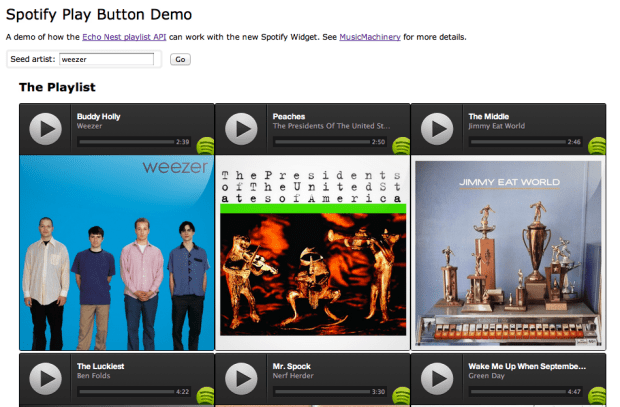
The demo took about 5 minutes to write (shorter than it is taking to write the blog post). It is simple artist radio on a web page. Give it a go at: Echo Nest + Spotify Play Button Demo
Here’s what it looks like.
Update: Charlie and Samuel pointed out that there is a multi-track player too. I made a demo that uses that too:
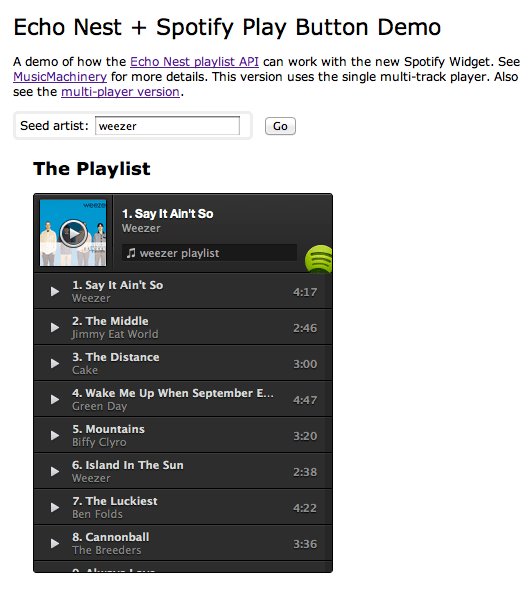
The Spotify Play button is really easy to use, looks great. Well done Spotify.
Syncing Echo Nest analysis to Spotify Playback
Posted by Paul in code, Music, The Echo Nest on April 9, 2012
With the recently announced Spotify integration into Rosetta Stone, The Echo Nest now makes available a detailed audio analysis for millions of Spotify tracks. This audio analysis includes summary features such as tempo, loudness, energy, danceability, key and mode, as well as a set of fine-grained segment features that describe details such as where each bar, beat and tatum fall and the detailed pitch, timbral and loudness content of each audio event in the song. These features can be very useful for driving Spotify applications that need to react to what the music sounds like – from advanced dynamic music visualizations like the MIDEM music machine or synchronized music games like Guitar Hero.
I put together a little Spotify App that demonstrates how to synchronize Spotify Playback with the Echo Nest analysis. There’s a short video here of the synchronization:

video on youtube: http://youtu.be/TqhZ2x86RXs
In this video you can see the audio summary for the currently playing song, as well as a display synchronized ‘bar’ and ‘beat’ labels and detailed loudness, timbre and pitch values for the current segment.
How it works:
To get the detailed audio analysis, call the track/profile API with the Spotify Track ID for the track of interest. For example, here’s how to get the track for Radiohead’s Karma Police using the Spotify track ID:
This returns audio summary info for the track, including the tempo, energy and danceability. It also includes a field called the analysis_url which contains an expiring URL to the detailed analysis data. (A very abbreviated excerpt of an analysis is contained in this gist).
To synchronize Spotify playback with the Echo Nest analysis we need to first get the detailed analysis for the now playing track. We can do this by calling the aforementioned track/profile call to get the analysis_url for the detailed analysis, and then retrieve the analysis (it is stored in JSON format, so no reformatting is necessary). There is one technical glitch though. There is no way to make a JSONP call to retrieve the analysis. This prevents you from retrieving the analysis directly into a web app or a Spotify app. To get around this issue, I built a little proxy at labs.echonest.com that supports a JSONP style call to retrieve the contents of the analysis URL. For example, the call:
http://labs.echonest.com/3dServer/analysis?callback=foo
&url=http://url_to_the_analysis_json
will return the analysis json wrapped in the foo() callback function. The Echo Nest does plan to add JSONP support to retrieving analysis data, but until then feel free to use my proxy. No guarantees on support or uptime since it is not supported by engineering. Use at your own risk.
Once you have retrieved the analysis you can get the current bar, beat, tatum and segment info based upon the current track position, which you can retrieve from Spotify with: sp.getTrackPlayer().getNowPlayingTrack().position. Since all the events in the analysis are timestamped, it is straightforward to find a corresponding bar,beat, tatum and segment given any song timestamp. I’ve posted a bit of code on gist that shows how I pull out the current bar, beat and segment based on the current track position along with some code that shows how to retrieve the analysis data from the Echo Nest. Feel free to use the code to build your own synchronized Echo Nest/Spotify app.
The Spotify App platform is an awesome platform for building music apps. Now, with the ability to use Echo Nest analysis from within Spotify apps, it is a lot easier to build Spotify apps that synchronize to the music. This opens the door to a whole range of new apps. I’m really looking forward to seeing what developers will build on top of this combined Echo Nest and Spotify platform.
Writing an Echo Nest + Spotify App
Posted by Paul in code, Music, The Echo Nest on April 7, 2012
Last week The Echo Nest and Spotify announced an integration of APIs making it easy for developers to write Spotify Apps that take advantage of the deep music intelligence offered by the Echo Nest. The integration is via Project Rosetta Stone (PRS). PRS is an ID mapping layer in the API that allows developers to use the IDs from any supported music service with the Echo Nest API. For instance, a developer can request via the Echo Nest playlist API a playlist seeded with a Spotify artist ID and receive Spotify track IDs in the results.
This morning I created a Spotify App that demonstrates how to use the Spotify and Echo Nest APIs together. The app is a simple playlister with the following functions:
- Gets the artist for the currently playing song in Spotify
- Creates an artist radio playlist based upon the now playing artist
- Shows the playlist, allowing the user to listen to any of the playlist tracks
- Allows the user to save the generated playlist as a Spotify playlist.

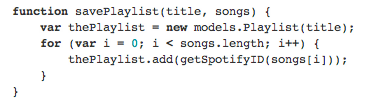
The entire app, including all of the HTML, CSS and JavaScript, is 150 lines long.I’ve made all the code available in the github repository SpotifyEchoNestPlaylistDemo. Here are some of the salient bits. (apologies for the screenshots of code. WordPress.com has poor support for embedding sourcecode. I’ve been waiting for gist embeds for a year)
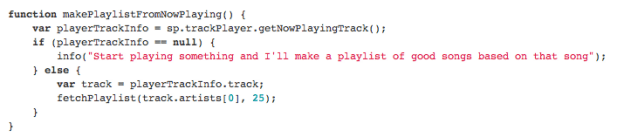
makePlaylistFromNowPlaying() – grabs the current track from spotify and fetches and displays the playlist from The Echo Nest.
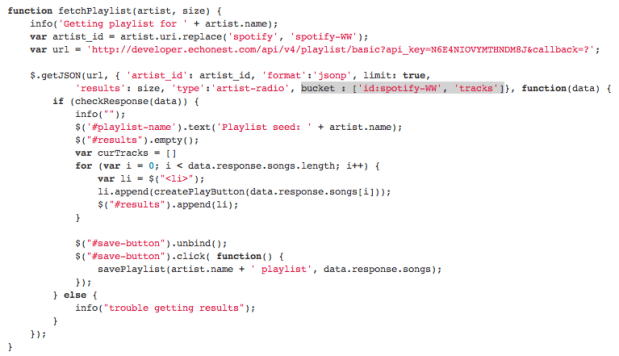
fetchPlayst() – The bulk of the work is done in the fetchPlaylist method. This method makes a jsonp call to the Echo Nest API to generate a playlist seeded with the Spotify artist. The Spotify Artist ID needs to be massaged slightly. In the Echo Nest world Spotify artist IDs look like ‘spotify-WW:artist:12341234’ so we convert from the Spotify form to the Echo Nest form with the one liner:
var artist_id = artist.uri.replace('spotify', 'spotify-WW');
Here’s the code:
The function createPlayButton creates a doc element with a clickable play image, that when clicked, calls the playSong method, which grabs the Spotify Track ID from the song and tells Spotify to play it:
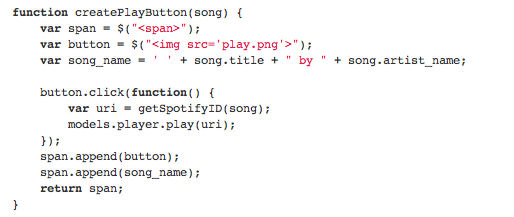
Update: I was using a deprecated method of playing tracks. I’ve updated the code and example to show the preferred method (Thanks @mager).
When we make the playlist call we include a buckets parameter requesting that spotify IDs are returned in the returned tracks. We need to reverse the ID mapping to go from the Echo Nest form of the ID to the Spotify form like so:

Saving the playlist as a spotify playlist is a 3 line function:
Installing and running the app
To install the app, follow these steps:
- make sure you have a Spotify Developer Account
- Make a ‘playlister’ directory in your Spotify apps folder (On a mac this is in ~/Spotify/playlister)
- Get the project files from github
- Copy the project files into the ‘playlister’ directory. The files are:
- index.html – the app (html and js)
- manifest.json – describes your app to Spotify. The most important bit is the ‘RequiredPermissions’ section that lists ‘http://*echonest.com’. Without this entry, your app won’t be able to talk to The Echo Nest.
- js/jquery.min.js – jquery
- styles.css – minimal css for the app
- play.png – the image for the play button
- icon.png – the icon for the app
To run the app type ‘spotify:app:playlister’ in the Spotify search bar. The app should appear in the main window.
Wrapping Up
Well, that’s it – a Spotify playlisting app that uses the Echo Nest playlist API to generate the playlist. Of course, this is just the tip of the iceberg. With the Spotify/Echo Nest connection you can easily make apps that use all of the Echo Nest artist data: artist news, reviews, blogs, images, bios etc, as well as all of the detailed Echo Nest song data: tempo, energy, danceability, loudness, key, mode etc. Spotify has created an awesome music app platform. With the Spotify/Echo Nest connection, this platform has just got more awesome.
Waltzify – turn any 4/4 song into a waltz with Echo Nest remix
Posted by Paul in code, fun, The Echo Nest on March 23, 2012
Tristan Jehan, one of the founders here at the Echo Nest, has created a Python script that will take a 4/4 song and turn it into a waltz. The script uses Echo Nest remix, a Python library that lets you algorithmically manipulate music. Here’s an example of the output of the script when applied to the song ‘Fame’:
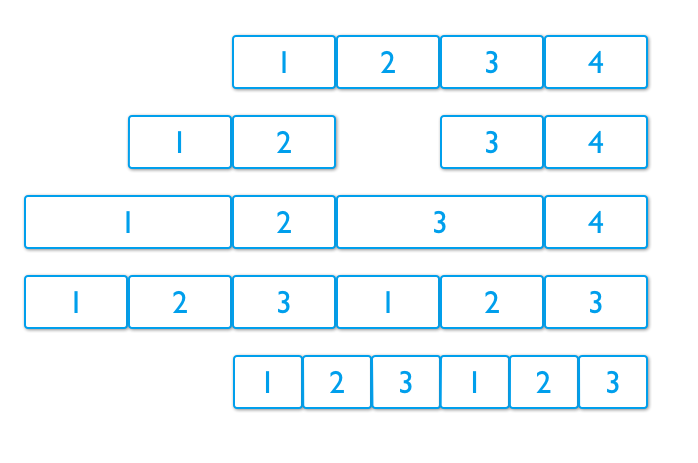
Turning a 4/4 song into a 3/4 song while still keeping the song musical is no easy feat. But Tristan’s algorithm does a pretty good job. Here’s what he does:
- Start with a 4/4 measure
- Cut the 4/4 measure into 2 bars with 2 beats in each bar
- Stretch the first beat of each bar by 100%
- Adjust the tempo to a typical waltz tempo
Here’s a graphic that shows the progression:
Here are some more examples:
Tristan has made the waltzifier code available on github. If you want to make your own waltzes, get yourself an Echo Nest API key and grab Echo Nest remix and start enjoying the power of 3.
Boil the Frog – the unreleased Spotify Version
Update – You are probably looking for this web-based version of Boil The Frog and the blog post about it.
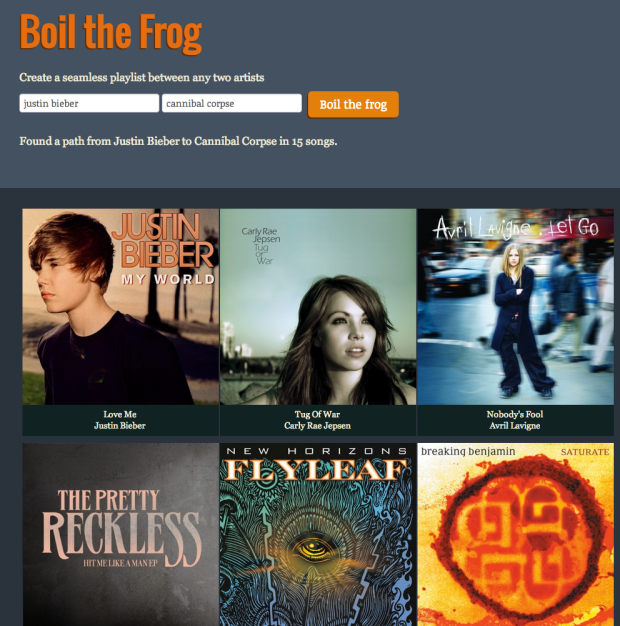
The rest of this article is about the unreleased Spotify Version of Boil the Frog.

I’m at Music Apps Hack Weekend doing my favorite thing: hacking on music. I’ve just finished my hack called Boil the Frog. Boil the Frog is a Spotify App that will create playlists that gradually take you from one music style to another. It is like the proverbial story of the frog in the pot of water. If you heat the water gradually, the frog won’t notice and will happily sit in the pot until it becomes frog stew. With Boil the Frog you can do the same thing musically. Create a playlist that gradually takes your pre-teen from Miley Cyrus to Miles Davis, or perhaps more perversely the Kenny G fan to Cannibal Corpse.
To build the app I built an artist similarity graph of 100,000 of the most popular artists. I use The Echo Nest artist similarity to connect each artist to its four nearest neighbors. To find the path between any two artists I use a bidirectional Dijkstra shortest path algorithm. Most paths can be computed in less than 100ms.
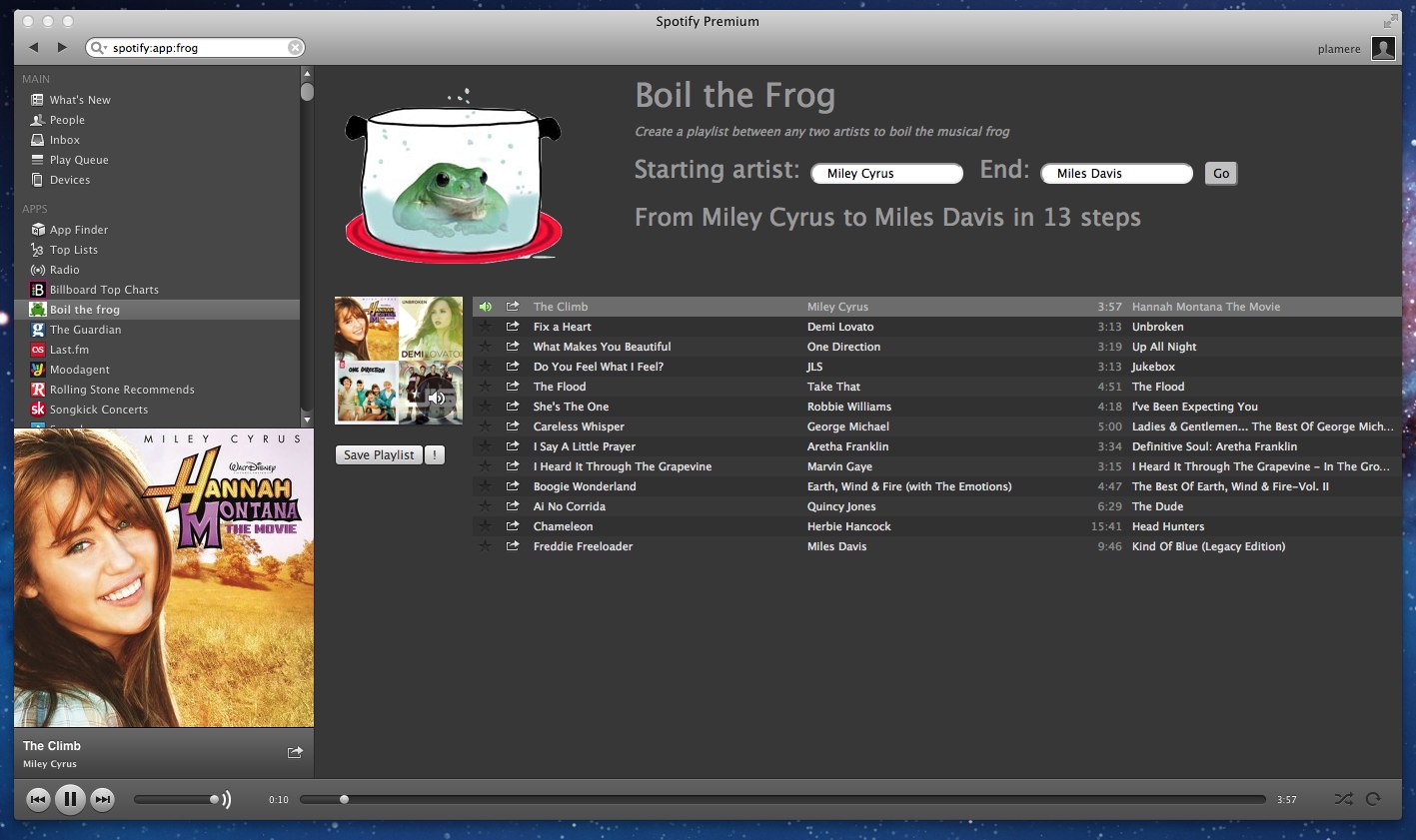
The Spotify Apps API is the perfect hacking platform. You can build a Spotify app that has full access to the vast Spotify music catalog and artwork, along with access to the listener’s catalog. Since the Spotify Apps run in an embedded browser all of your web app programming skills apply. You can use jQuery, make calls to JSON APIs, use HTML 5 canvas. It is all there. Spotify has done a really good job putting together this platform. The only downside is that, unlike the web, it is hard to actually release Spotify apps, but the Spotify team is working to make this easier. I’d love to release Boil the Frog because it is really fun to make playlists that bring you from one music style to another. It is interesting to see what musical neighborhoods you wander through on your way. For instance, I made a Kenny G to Cannibal Corpse playlist. To get there, the playlist brought me from easy listening, to movie soundtracks and then through video game soundtracks to get to the heavy metal world. Cool stuff. If you want to see a playlist between two artists let me know in the comments and I’ll create and share the playlist with you.
I made a video of Boil the Frog in action. Check it out:
[youtube http://youtu.be/Nj6JAxm9aPE]
Update: I’ve just pushed the client code out to github: https://github.com/plamere/boilthefrog
Paul vs. Billboard
Posted by Paul in code, data, fun, The Echo Nest on February 12, 2012
Another weekend, another Music Hack Day. This weekend I’m at Tokbox headquarters in San Francisco at the 3rd annual Music Hack Day San Francisco, where 200 music hackers are building the future of music.
For my hack, I thought I would try to predict who would win the Grammy awards (the annual music awards presented by The Recording Academy) which is being held this evening. To do this, I used the Echo Nest APIs to gather of lots of news and blog posts for each nominated artist. I then peered into the articles looking for mentions of the Grammy nominated items. I tallied up the mentions and combined this with the overall artist hotttnesss to give me a ranked order of each nominated item, which I could then use to create my prediction.
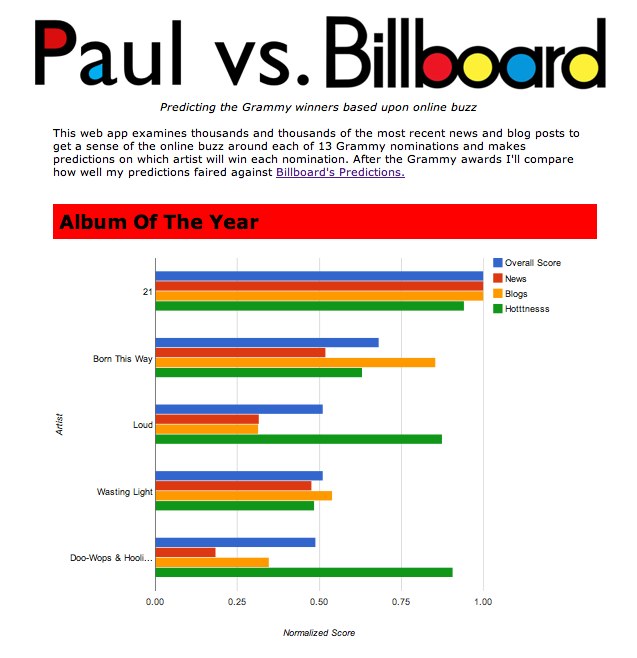
Since Billboard has also made some Grammy predictions, I thought it’d be interesting to do a post-facto comparison on how well each of us predicts the winners – thus the hack title ‘Paul vs. Billboard’.
The hack is online here: Paul vs. Billboard
Be sure to check out all of the other music hacks being created this weekend:
Building a Seatwave + Echo Nest App
Posted by Paul in code, data, Music, The Echo Nest on February 8, 2012
 This weekend at Music Hack Day SF, Seatwave is launching their Ticketing and Event API. This API will make it easy for developers to add event discovery and ticket-buying functionality to their apps. At the Echo Nest we’ve incorporated Seatwave artist IDs into our Rosetta ID mapping layer making it possible to use Seatwave IDs directly with the Echo Nest API. This makes it easier for you to use the Seatwave and the Echo Nest APIs together. For instance, you can call the Seatwave API, get artist event IDs in response and use those IDs with the Echo Nest API to get more context about the artist.
For example, we can make a call to the Seatwave API to get the set of Featured Contest with an API call:
The results include blocks of events like this:
{
“CategoryId”: 12,
“Currency”: “GBP”,
“Id”: 934,
“ImageURL”: “http://cdn2.seatwave.com/filestore/season/image/thestoneroses_934_1_1_20111018165906.jpg”,
“MinPrice”: 95,
“Name”: “The Stone Roses”,
“SwURL”: “http://www.seatwave.com/the-stone-roses-tickets/season”,
“TicketCount”: 1810
},
{
“CategoryId”: 10,
“Currency”: “GBP”,
“Id”: 702,
“ImageURL”: “http://cdn2.seatwave.com/filestore/season/image/redhotchilipeppers_702_1_1_20110617124457.jpg”,
“MinPrice”: 45,
“Name”: “Red Hot Chili Peppers”,
“SwURL”: “http://www.seatwave.com/red-hot-chilli-peppers-tickets/season”,
“TicketCount”: 1134
},
We see events for the Stone Roses and for RHCP. The Seatwave ID for RHCP is 702. We can use this ID directly with in Echo Nest calls. For instance, to get lots of Echo Nest info on the RHCP using the Seatwave ID, we can make an artist/profile call like so:
To show off the integration of Seatwave and Echo Nest, I’ve built a little web app that shows a list of top Seatwave concerts (generated via the Seatwave API). For each artist, the app shows the number of tickets available, the artist’s biography, along with a play button that will let you listen to a sample of the artist (via 7Digital).
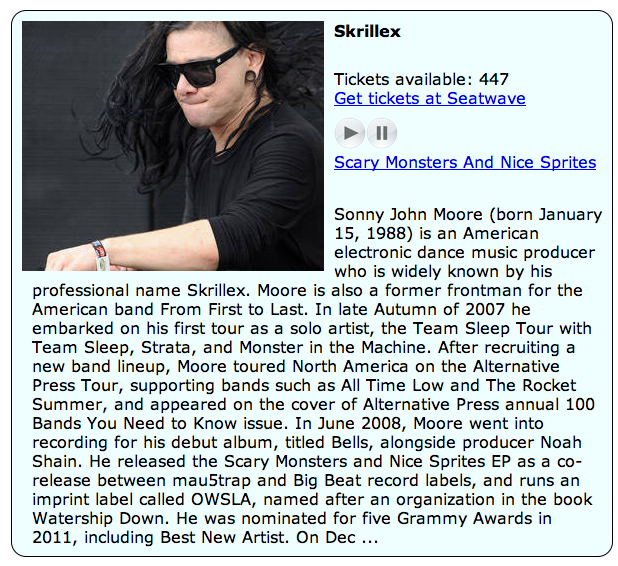
The application is live here: Listen to Top Seatwave Artists. The code is on github: plamere/SWDemo
The Seatwave API is quite easy to work with. They support JSON, JSONP, XML and SOAP(bleh). Lots of good data, very nice artist images, generous affiliate program, easy to understand TOS. Highly recommended. See the Seatwave page in The Echo Nest Developer Center for more info on the Seatwave / Echo Nest integration.
The Midem Music Machine
Just a quick post before it is demo time. This weekend at MIDEM Hack Day, I teamed up this weekend with the famous Mr. Doob to build a music hack. We created the Midem Music Machine. It creates a beautiful visualization of music using The Echo Nest analyzer and Three.js. Here’s a pic:

As you can see, our hack was inspired by the Animusic folks. Working with Mr. Doob was awesome. He did just amazing stuff.
You can see the Midem Music Machine online here: Midem Music Machine. You’ll need a browser that supports WebGL like Chrome.
Controlling the artist distribution in playlists
Posted by Paul in code, data, Music, The Echo Nest on January 12, 2012
The Echo Nest engineering team just pushed out a new feature giving you more control over the artist makeup in playlists. There is a new parameter to the playlist/static API called distribution that can be set to wandering or focused. When the distribution is set to wandering the artists will appear with approximately equal distribution in the playlist. If the distribution is set to focused artists that are more similar to the seed artists will appear more frequently. When combined with the variety parameter, you have excellent control over the number and distribution of artists in a playlist. If you want to create a playlist suitable for music discovery, create a playlist with high variety and a wandering distribution. If you want to create a playlist that more closely mimics the radio experience choose a low variety and a focused distribution.
I’ve put together a little demo that lets you create playlists with different levels of variety and distribution settings. The demo will create a playlist given a seed artist and show you the artist distribution for the playlist. Here’s the output of the demo with distribution set to focused:

You can see from the artist histogram that the playlist draws more from artists that are very similar to the seed artist (Weezer). Compare to these results from a wandering playlist with the same seed and variety:

You can see that there is flatter distribution of artists in the playlist. You can use variety and distribution to tailor playlists to the listener. For instance, you can give the Classic Rock Radio experience to a listener by setting variety to relatively low, setting the distribution to focused and seeding with a classic rock artist like Led Zeppelin. Here’s the artist distribution for the resulting playlist:
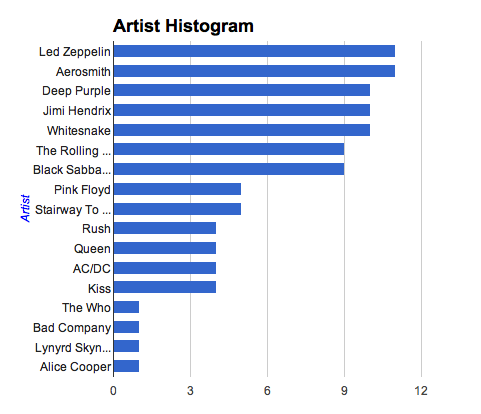
That looks like the artist rotation for my local classic rock radio.
Give the demo a try to see how you can use variety and distribution to match playlists to your listener’s taste. Then read the playlist API docs to see how to use the API to start incorporating these attributes into your apps.
The Demo: Playlist Distribution Demo (source)
 Music Machinery

