Archive for category code
Removing accents in artist names
Posted by Paul in code, data, java, Music, The Echo Nest, web services on April 10, 2009
If you write software for music applications, then you understand the difficulties in dealing with matching artist names. There are lots of issues: spelling errors, stop words (‘the beatles’ vs. ‘beatles, the’ vs ‘beatles’), punctuation (is it “Emerson, Lake and Palmer” or “Emerson, Lake & Palmer“), common aliases (ELP, GNR, CSNY, Zep), to name just a few of the issues. One common problem is dealing with international characters. Most Americans don’t know how to type accented characters on their keyboards so when they are looking for Beyoncé they will type ‘beyonce’. If you want your application to find the proper artist for these queries you are going to have deal with these missing accents in the query. One way to do this is to extend the artist name matching to include a check against a version of the artist name where all of the accents have been removed. However, this is not so easy to do – You could certainly build a mapping table of all the possible accented characters, but that is prone to failure. You may neglect some obscure character mapping (like that funny ř in Antonín Dvořák).
Luckily, in Java 1.6 there’s a pretty reliable way to do this. Java 1.6 added a Normalizer class to the java. text package. The Normalize class allows you to apply Unicode Normalization to strings. In particular you can apply Unicode decomposition that will replace any precomposed character into a base character and the combining accent. Once you do this, its a simple string replace to get rid of the accents. Here’s a bit of code to remove accents:
    public static String removeAccents(String text) {
          return Normalizer.normalize(text, Normalizer.Form.NFD)
               .replaceAll("\\p{InCombiningDiacriticalMarks}+", "");
    }
This is nice and straightforward code, and has no effect on strings that have no accents.
Of course ‘removeAccents’ doesn’t solve all of the problems – it certainly won’t help you deal with artist names like ‘KoЯn’ nor will it deal with the wide range of artist name misspellings. If you are trying to deal normalizing aritist names you should read how Columbia researcher Dan Ellis has approached the problem. I suspect that someday, (soon, I hope) there will be a magic music web service that will solve this problem once and for all and you”ll never again have to scratch our head at why you are listening to a song by Peter, Bjork and John, instead of a song by Björk.
The BPM Explorer
Posted by Paul in code, fun, java, processing, startup, tags, The Echo Nest, Uncategorized, visualization, web services on April 9, 2009
Last month I wrote about using the Echo Nest API to analyze tracks to generate plots that you can use to determine whether or not a machine is responsible for setting the beat of a song. I received many requests to analyze tracks by particular artists, far too many for me to do without giving up my day job. To satisfy this pent up demand for click track analysis I’ve written an application called the BPM Explorer that you let you create your own click plots. With this application you can analyze any song in your collection, view its click plot and listen to your music, synchronized with the plot. Here’s what the app looks like:

Check out the application here: The Echo Nest BPM Explorer. It’s written in Processing and deployed with Java Webstart, so it (should) just work.
My primary motiviation for writing this application was to check out the new Echo Nest Java Client to make sure that it was easy to use from Processing. One of my secret plans is to get people in the Processing community interested in using the Echo Nest API. The Processing community is filled with some ultra-creative folks that have have strong artistic, programming and data visualization skills. I’d love to see more song visualizations like this and this that are built using the Echo Nest APIs. Processing is really cool – I was able to write the BPM explorer in just a few hours (it took me longer to remember how to sign jar files for webstart than it did to write the core plotter). Processing strips away all of the boring parts of writing graphic programming (create a frame, lay it out with a gridbag, make it visible, validate, invalidate, repaint, paint arghh!). For processing, you just write a method ‘draw()’ that will be called 30 times a second. I hope I get the chance to write more Processing programs.
Update: I’ve released the BPM Explorer code as open source – as part of the echo-nest-demos project hosted at google-code. You can also browse the read for the BPM Explorer.
New Java Client for the Echo Nest API
Posted by Paul in code, java, The Echo Nest, web services on April 7, 2009
Today we are releasing a Java client library for the Echo Nest developer API. This library gives the Java programmer full access to the Echo Nest developer API. The API includes artist-level methods such as getting artist news, reviews, blogs, audio, video, links, familiarity, hotttnesss, similar artists, and so on. The API also includes access to the renown track analysis API that will allow you to get a detailed musical analysis of any music track. This analysis includes loudness, mode, key, tempo, time signature, detailed beat structure, harmonic content, and timbre information for a track.
To use the API you need to get an Echo Nest developer key (it’s free) from developer.echonest.com. Here are some code samples:
// a quick and dirty audio search engine
   ArtistAPI artistAPI = new ArtistAPI(MY_ECHO_NEST_API_KEY);

   List<Artist> artists = artistAPI.searchArtist("The Decemberists", false);
   for (Artist artist : artists) {
       DocumentList<Audio> audioList = artistAPI.getAudio(artist, 0, 15);
       for (Audio audio : audioList.getDocuments()) {
          System.out.println(audio.toString())
       }
   }
// find similar artists for weezer
   ArtistAPI artistAPI = new ArtistAPI(MY_ECHO_NEST_API_KEY);
   List<Artist> artists = artistAPI.searchArtist("weezer", false);
    for (Artist artist : artists) {
          List<Scored<Artist>> similars = artistAPI.getSimilarArtists(artist, 0, 10);
          for (Scored<Artist> simArtist : similars) {
              System.out.println("   " + simArtist.getItem().getName());
          }
     }

// Find the tempo of a track
    TrackAPI trackAPI = new TrackAPI(MY_ECHO_NEST_API_KEY);
    String id = trackAPI.uploadTrack(new File("/path/to/music/track.mp3"), false);
    AnalysisStatus status = trackAPI.waitForAnalysis(id, 60000);
    if (status == AnalysisStatus.COMPLETE) {
       System.out.println("Tempo in BPM: " + trackAPI.getTempo(id));
    }
There are some nifty bits in the API. The API will cache data for you so frequently requested data (everyone wants the latest news about Cher) will be served up very quickly. The cache can be persisted, and the shelf-life for data in the cache can be set programmatically (the default age is one week). The API will (optionally) schedule requests to ensure that you don’t exceed your call limit. For those that like to look under the hood, you can turn on tracing to see what the method URL calls look like and see what the returned XML looks like.
If you are interested in kicking the tires of the Echo Nest API and you are a Java or Processing programmer, give the API a try.
If you have any questions / comments or problems abut the API post to the Echo Nest Forums.
track upload sample code
Posted by Paul in code, The Echo Nest, web services on April 4, 2009
One of the biggest pain points users have with the Echo Nest developer API is with the track upload method. This method lets you upload a track for analysis (which can be subsequently retrieved by a number of other API method calls such as get_beats, get_key, get_loudness and so on). The track upload, unlike all of the other of The Echo Nest methods requires you to construct a multipart/form-data post request. Since I get a lot of questions about track upload I decided that I needed to actually code my own to get a full understanding of how to do it – so that (1) I could answer detailed questions about the process and (2) point to my code as an example of how to do it. I could have used a library (such as the Jakarta http client library) to do the heavy lifting but I wouldn’t have learned a thing nor would I have some code to point people at. So I wrote some Java code (part of the forthcoming Java Client for the Echo Nest web services) that will do the upload.
You can take a look at this post method in its google-code repository. The tricky bits about the multipart/form-data post is getting the multip-part form boundaries just right. There’s a little dance one has to do with the proper carriage returns and linefeeds, and double-dash prefixes and double-dash suffixes and random boundary strings. Debugging can be a pain in the neck too, because if you get it wrong, typically the only diagnostic one gets is a ‘500 error’ which means something bad happened.
Track upload can also be a pain in the neck because you need to wait 10 or 20 seconds for the track upload to finish and for the track analysis to complete. This time can be quite problematic if you have thousands of tracks to analyze. 20 seconds * one thousand tracks is about 8 hours. No one wants to wait that long to analyze a music collection. However, it is possible to short circuit this analysis. You can skip the upload entirely if we already have performed an analysis on your track of interest. To see if an analysis of a track is already available you can perform a query such as ‘get_duration’ using the MD5 hash of the audio file. If you get a result back then we’ve already done the analysis and you can skip the upload and just use the MD5 hash of your track as the ID for all of your queries. With all of the apps out there using the track analysis API, (for instance, in just a week, donkdj has already analyzed over 30K tracks) our database of pre-cooked analyses is getting quite large – soon I suspect that you won’t need to perform an upload of most tracks (certainly not mainstream tracks). We will already have the data.
Put a DONK on it
Posted by Paul in code, fun, Music, The Echo Nest on March 25, 2009
rfwatson has just released a site called donkdj that will ‘remix your favourite song into a bangin’ hard dance anthem‘. You upload a track and donkdj turns it into a dance remix. The results are just brilliant. Here are a few examples:
The site uses The Echo Nest Remix API to do all of the heavy lifting – adding a kick, snap, claps and the infamous donk (I had to look it up … a donk is a a pipe/plank-sound, that is used in Bouncy/scouse house/NRG music). What is doubly cool is rfwatson has open sourced his remix code so you can look under the hood and see how it works and adapt it for your own use. The core of this remix is done in just 200 lines of python code.
donkdj is really cool – the results sound fantastic and the open sourcing of the code makes it easy for anyone else to make their own remixer. I can’t wait to see it when someone makes an automatic Stephen Colbert remixer.
Update: Ben showed me this post that points to this video about Donk:
The full series is available here.
The Loudness War Analyzed
Posted by Paul in code, data, fun, Music, research, The Echo Nest, visualization on March 23, 2009
Recorded music doesn’t sound as good as it used to. Recordings sound muddy, clipped and lack punch. This is due to the ‘loudness war’ that has been taking place in recording studios. To make a track stand out from the rest of the pack, recording engineers have been turning up the volume on recorded music. Louder tracks grab the listener’s attention, and in this crowded music market, attention is important. And thus the loudness war – engineers must turn up the volume on their tracks lest the track sound wimpy when compared to all of the other loud tracks. However, there’s a downside to all this volume. Our music is compressed. The louds are louds and the softs are loud, with little difference. The result is that our music seems strained, there is little emotional range, and listening to loud all the time becomes tedious and tiring.
I’m interested in looking at the loudness for the recordings of a number of artists to see how wide-spread this loudness war really is. To do this I used the Echo Nest remix API and a bit of Python to collect and plot loudness for a set of recordings. I did two experiments. First I looked at the loudness for music by some of my favorite or well known artists. Then I looked at loudness over a large collection of music.
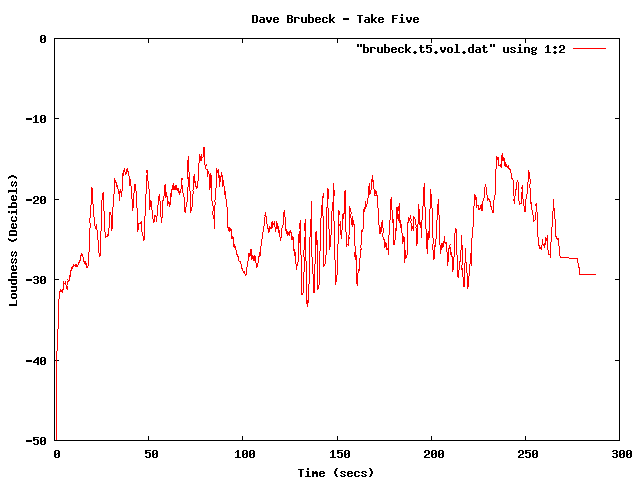
First, lets start with a loudness plot of Dave Brubeck’s Take Five. There’s a loudness range of -33 to about -15 dBs – a range of about 18 dBs.
Dave Brubeck - Take Five
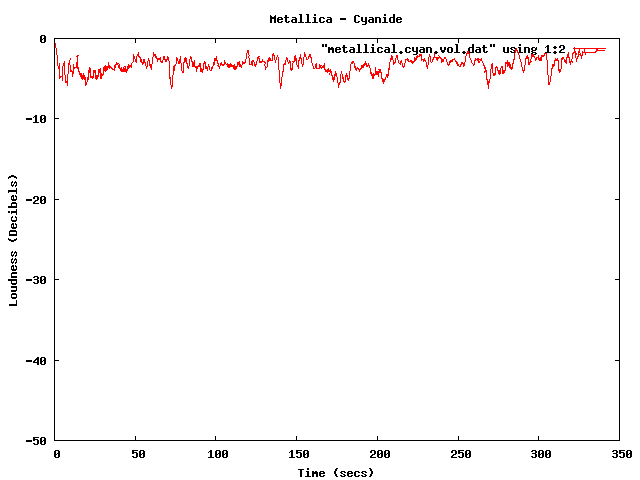
Now take a look at a track from the new Metallica album. Here we see a dB range of from about -3 dB to about -6 dB – for a range of about 3 dB. The difference is rather striking. You can see the lack of dynamic range in the plot quite easily.
Metallica - Cyanide
Now you can’t really compare Dave Brubeck’s cool jazz with Metallica’s heavy metal – they are two very different kinds of music – so lets look at some others. (One caveat for all of these experiments – I don’t always know the provenance of all of my mp3s – some may be from remasters where the audio engineers may have adjusted the loudness, while some may be the original mix).
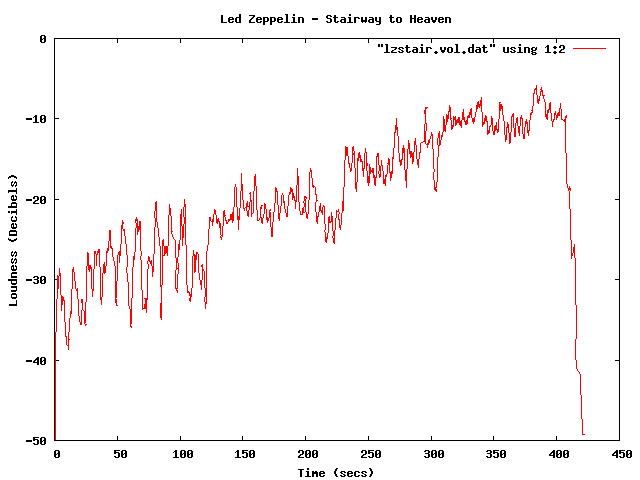
Here’s the venerable Stairway to Heaven – with a dB range of -40 dB to about -5dB for a range of 35 dB. That’s a whole lot of range.
Led Zeppelin - Stairway to Heaven
Compare that to the track ‘supermassive black hole’ – by Muse – with a range of just 4dB. I like Muse, but I find their tracks to get boring quickly – perhaps this is because of the lack of dynamic range robs some of the emotional impact. There’s no emotional arc like you can see in a song like Stairway to Heaven.

Muse - Supermassive Black Hole
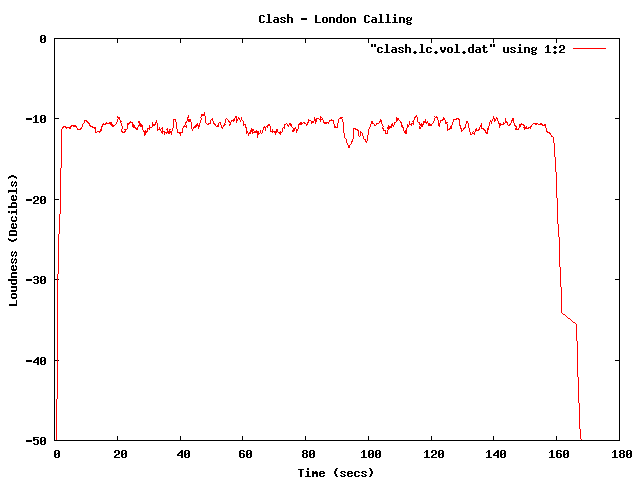
Some more examples – The Clash – London Calling. Not a wide dynamic range – but still not at ear splitting volumes.
Clash - London Calling
This track by Nickleback is pushing the loudness envelope, but does have a bit of dynamic range.
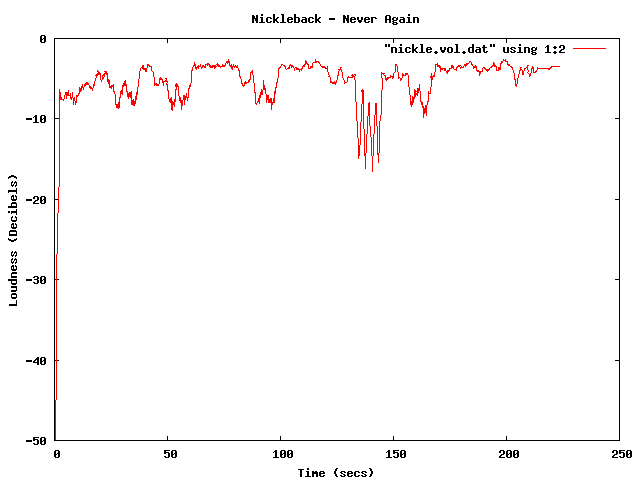
Nickleback - Never Again
Compare the loudness level to the Sex Pistols. Less volume, and less dynamic range – but that’s how punk is – all one volume.
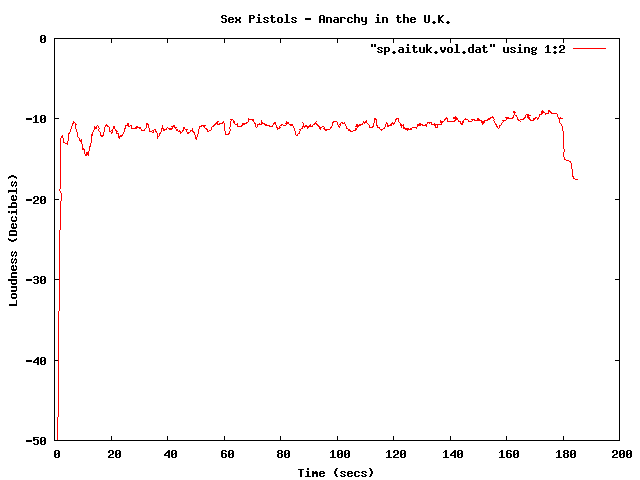
Sex Pistols - Anarchy in the U.K.
The Stooges – Raw Power is considered to be one of the loudest albums of all time. Indeed, the loudness curve is bursting through the margins of the plot.
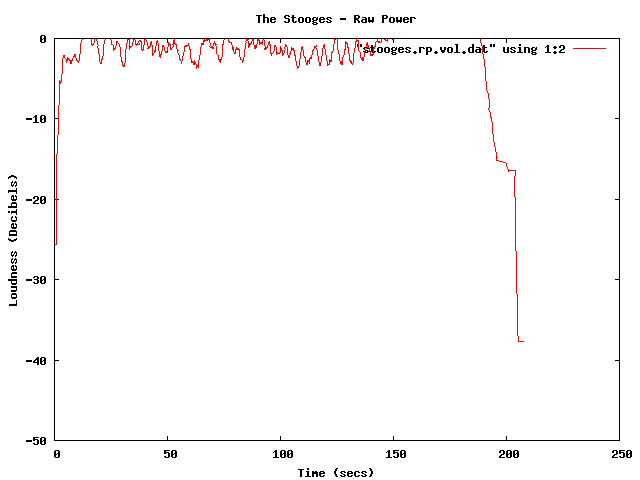
The Stooges - Raw Power
Here in one plot are 4 tracks overlayed – Red is Dave Brubeck, Blue is the Sex Pistols, Green is Nickleback and purple is the Stooges.

Combined plot
There been quite a bit of writing about the loudness war. The wikipedia entry is quite comprehensive, with some excellent plots showing how some recordings have had a loudness makeover when remastered. The Rolling Stone’s article: The Death of High Fidelity gives reactions of musicians and record producers to the loudness war. Producer Butch Vig says “Compression is a necessary evil. The artists I know want to sound competitive. You don’t want your track to sound quieter or wimpier by comparison. We’ve raised the bar and you can’t really step back.”
The loudest artists
I have analyzed the loudness of about 15K tracks from the top 1,000 or so most popular artists. The average loudness across all 15K tracks is about -9.5 dB. The very loudest artists from this set – those with a loudness of -5 dB or greater are:
| Artist | dB |
|---|---|
| Venetian Snares | -1.25 |
| Soulja Boy | -2.38 |
| Slipknot | -2.65 |
| Dimmu Borgir | -2.73 |
| Andrew W.K. | -3.15 |
| Queens of the Stone Age | -3.23 |
| Black Kids | -3.45 |
| Dropkick Murphys | -3.50 |
| All That Remains | -3.56 |
| Disturbed | -3.64 |
| Rise Against | -3.73 |
| Kid Rock | -3.86 |
| Amon Amarth | -3.88 |
| The Offspring | -3.89 |
| Avril Lavigne | -3.93 |
| MGMT | -3.94 |
| Fall Out Boy | -3.97 |
| Dragonforce | -4.02 |
| 30 Seconds To Mars | -4.08 |
| Billy Talent | -4.13 |
| Bad Religion | -4.13 |
| Metallica | -4.14 |
| Avenged Sevenfold | -4.23 |
| The Killers | -4.27 |
| Nightwish | -4.37 |
| Arctic Monkeys | -4.40 |
| Chromeo | -4.42 |
| Green Day | -4.43 |
| Oasis | -4.45 |
| The Strokes | -4.49 |
| System of a Down | -4.51 |
| Blink 182 | -4.52 |
| Bloc Party | -4.53 |
| Katy Perry | -4.76 |
| Barenaked Ladies | -4.76 |
| Breaking Benjamin | -4.80 |
| My Chemical Romance | -4.81 |
| 2Pac | -4.94 |
| Megadeth | -4.97 |
It is interesting to see that Avril Lavigne is louder than Metallica and Katy Perry is louder than Megadeth.
The Quietest Artists
Here are the quietest artists:
| Artist | dB |
|---|---|
| Brian Eno | -17.52 |
| Leonard Cohen | -16.24 |
| Norah Jones | -15.75 |
| Tori Amos | -15.23 |
| Jeff Buckley | -15.21 |
| Neil Young | -14.51 |
| Damien Rice | -14.33 |
| Lou Reed | -14.33 |
| Cat Stevens | -14.22 |
| Bon Iver | -14.14 |
| Enya | -14.13 |
| The Velvet Underground | -14.05 |
| Simon & Garfunkel | -14.03 |
| Pink Floyd | -13.96 |
| Ben Harper | -13.94 |
| Aphex Twin | -13.93 |
| Grateful Dead | -13.85 |
| James Taylor | -13.81 |
| The Very Hush Hush | -13.73 |
| Phish | -13.71 |
| The National | -13.57 |
| Paul Simon | -13.53 |
| Sufjan Stevens | -13.41 |
| Tom Waits | -13.33 |
| Elvis Presley | -13.21 |
| Elliott Smith | -13.06 |
| Celine Dion | -12.97 |
| John Lennon | -12.92 |
| Bright Eyes | -12.92 |
| The Smashing Pumpkins | -12.83 |
| Fleetwood Mac | -12.82 |
| Tool | -12.62 |
| Frank Sinatra | -12.59 |
| A Tribe Called Quest | -12.52 |
| Phil Collins | -12.27 |
| 10,000 Maniacs | -12.04 |
| The Police | -12.02 |
| Bob Dylan | -12.00 |
(note that I’m not including classical artists that tend to dominate the quiet side of the spectrum)
Again, there are caveats with this analysis. Many of the recordings analyzed may be remastered versions that have have had their loudness changed from the original. A proper analysis would be to repeat using recordings where the provenance is well known. There’s an excellent graphic in the wikipedia that shows the effect that remastering has had on 4 releases of a Beatles track.
Loudness as a function of Year
Here’s a plot of the loudness as a function of the year of release of a recording (the provenance caveat applies here too). This shows how loudness has increased over the last 40 years
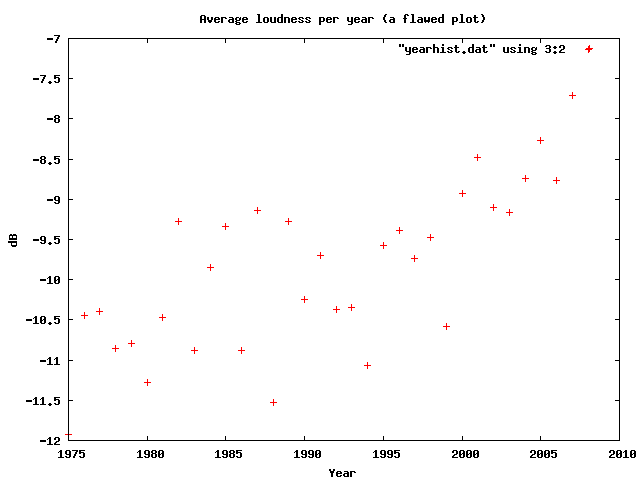
Loudness as a function of year
I suspect that re-releases and re-masterings are affecting the Loudness averages for years before 1995. Another experiment is needed to sort that all out.
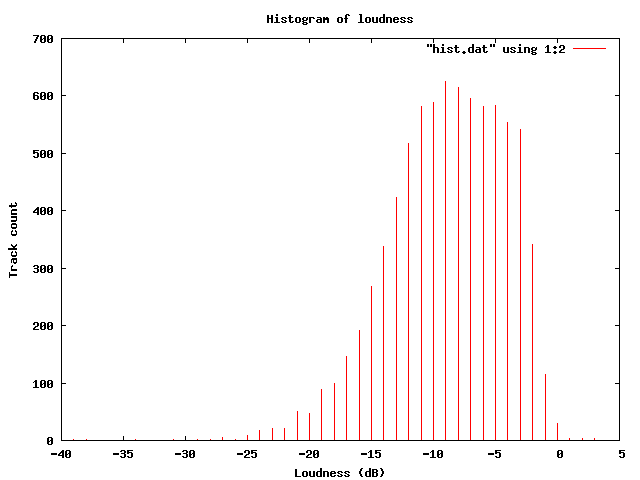
Loudness Histogram:
This table shows the histogram of Loudness:
Histogram of loudness
Average Loudness per genre
This table shows the average loudness as a function of genre. No surprise here, Hip Hop and Rock is loud, while Children’s and Classical is soft:
| Genre | dB |
|---|---|
| Hip Hop | -8.38 |
| Rock | -8.50 |
| Latin | -9.08 |
| Electronic | -9.33 |
| Pop | -9.60 |
| Reggae | -9.64 |
| Funk / Soul | -9.83 |
| Blues | -9.86 |
| Jazz | -11.20 |
| Folk, World, & Country | -11.32 |
| Stage & Screen | -14.29 |
| Classical | -16.63 |
| Children’s | -17.03 |
So, why do we care? Why shouldn’t our music be at maximum loudness? This Youtube video makes it clear:
 Luckily, there are enough people that care about this to affect some change. The organization Turn Me Up! is devoted to bringing dynamic range back to music. Turn Me Up! is a non-profit music industry organization working together with a group of highly respected artists and recording professionals to give artists back the choice to release more dynamic records.
If I had a choice between a loud album and a dynamic one, I’d certainly go for the dynamic one.
Update: Andy exhorts me to make code samples available – which, of course, is a no-brainer – so here ya go: volume.py
In search of the click track
Posted by Paul in code, fun, Music, The Echo Nest on March 2, 2009
Sometime in the last 10 or 20 years, rock drumming has changed. Many drummers will now don headphones in the studio (and sometimes even for live performances) and synchronize their playing to an electronic metronome – the click track. This allows for easier digital editing of the recording. Since all of the measures are of equal duration, it is easy to move measures or phrases around without worry that the timing may be off. The click track has a down side – some say that songs recorded against a click track sound sterile, that the missing tempo deviations added life to a song.
I’ve always been curious about which drummers use a click track and which don’t, so I thought it might be fun to try to build a click track detector using the Echo Nest remix SDK ( remix is a Python library that allows you to analyze and manipulate music). In my first attempt, I used remix to analyze a track and then I just printed out the duration of each beat in a song and used gnuplot to plot the data. The results weren’t so good – the plot was rather noisy. It turns out there’s quite a bit of variation from beat to beat. In my second attempt I averaged the beat durations over a short window, and the resulting plot was quite good.
Now to see if we can use the plots as a click track detector. I started with a track where I knew the drummer didn’t use a click track. I’m pretty sure that Ringo never used one – so I started with the old Beatle’s track – Dizzy Miss Lizzie. Here’s the resulting plot:
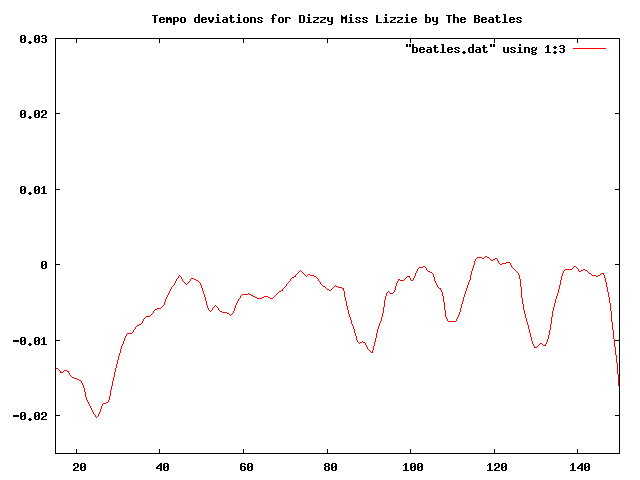 This plot shows the beat duration variation (in seconds) from the average beat duration over the course of about two minutes of the song (I trimmed off the first 10 seconds, since many songs take a few seconds to get going). In this plot you can clearly see the beat duration vary over time. The 3 dips at about 90, 110 and 130 correspond to the end of a 12 bar verse, where Ringo would slightly speed up.
Now lets compare this to a computer generated drum track. I created a track in GarageBand with a looping drum and ran the same analysis. Here’s the resulting plot:
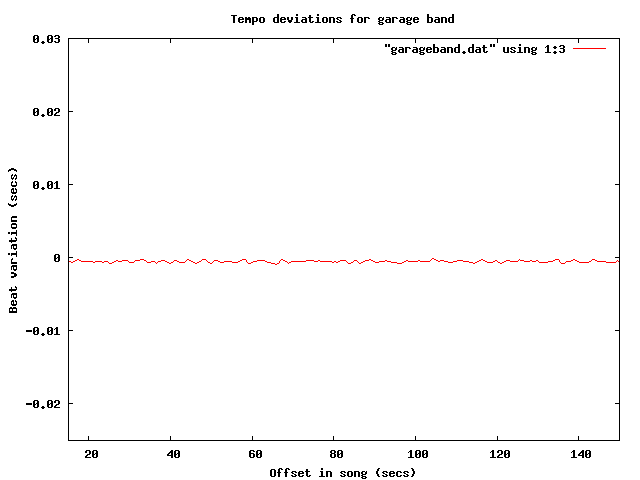
Tempo deviations for a computer generated track
The difference is quite obvious, and stark. The computer gives a nice steady, sterile beat, compared to Ringo’s.
Now let’s try some real music that we suspect is recorded to a click track. It seems that most pop music nowadays is overproduced, so my suspicion is that an artist like Britney Spears will record against a click track. I ran the analysis on “Hit me baby one more time” (believe it or not, the song was not in my collection, so I had to go and find it on the internet, did you know that it is pretty easy to find music on the internet?). Here’s the plot:
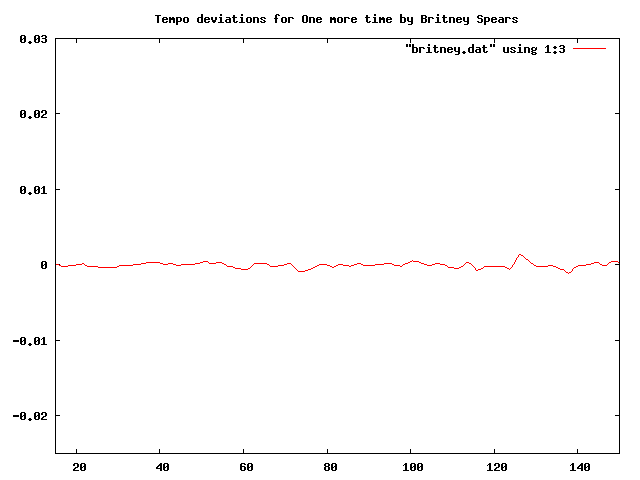
Britney is as flat as a computer
I think it is pretty clear from the plot that “Hit me baby one more time” was recorded with a click track. And it is pretty clear that these plots make a pretty good click track detector. Flat lines correspond to tracks with little variation in beat duration. So lets explore some artists to see if they use click tracks.
First up: Weezer:

Troublemaker by weezer
Nope, no click track for Weezer. This was a bit of a surprise for me.
How about Green Day?
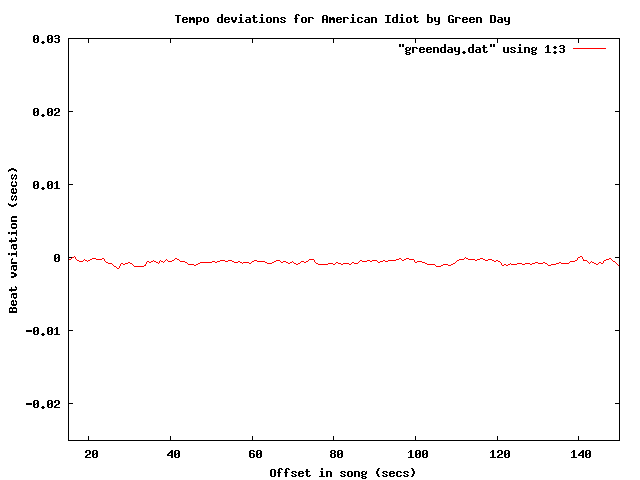
Yep – clearly a click track there. How about Metallica?

No click track for Lars! Nickeback?
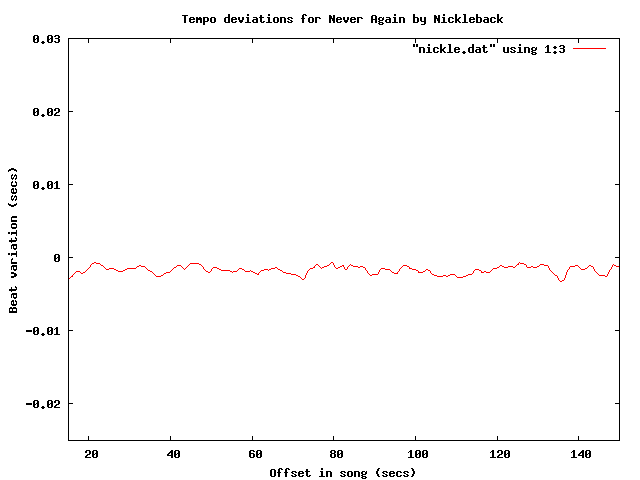 update: fixed nickleback plot labels (thanks tedder)
No surprise there – Nickleback uses a click track. Another numetal band (one that I rather like alot) is Breaking Benjamin:
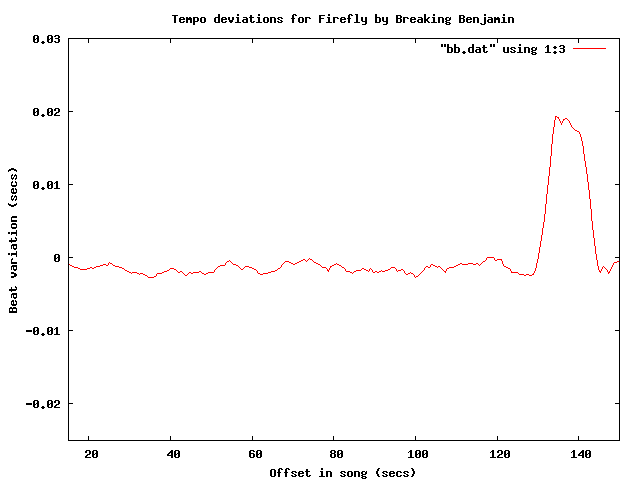 It is clear that they use a click track too – but what is interesting here is that you can see the bridge – the hump that starts at about 130 seconds into the song.
Of course John Bonham never used a click track – but lets check for fun:

So there you have it, using the Echo Nest remix SDK, gnuplot and some human analysis of the generated plots it is pretty easy to see which tracks are recorded against a click track. To make it really clear, I’ve overlayed a few of the plots:

One final plot … the venerable stairway to heaven is noted for its gradual increase in intensity – part of that is from the volume and part comes from in increase in tempo. Jimmy Page stated that the song “speeds up like an adrenaline flow”. Let’s see if we can see this:

The steady downward slope shows shorter beat durations over the course of the song (meaning a faster song). That’s something you just can’t do with a click track. Update – as a number of commenters have pointed out, yes you can do this with a click track.
The code to generate the data for the plots is very simple:
def main(inputFile):
    audiofile = audio.LocalAudioFile(inputFile)
    beats = audiofile.analysis.beats
    avgList = []
    time = 0;
    output = []
    sum = 0
    for beat in beats:
        time += beat.duration
        avg = runningAverage(avgList, beat.duration)
        sum += avg
        output.append((time, avg))
    base = sum / len(output)
    for d in output:
        print d[0], d[1] - base

def runningAverage(list, dur):
   max = 16
   list.append(dur)
   if len(list) > max:
        list.pop(0)
   return sum(list) / len(list)
I’m still a poor python programmer, so no doubt there are better Pythonic ways to do things – so let me know how to improve my Python code.
If any readers are particularly curious about whether an artist uses a click track let me know and I’ll generate the plots – or better yet, just get your own API key and run the code for yourself.
Update: If you live in the NYC area, and want to see/hear some more about remix, you might want to attend dorkbot-nyc tomorrow (Wednesday, March 4) where Brian will be talking about and demoing remix.
Update – Sten wondered (in the comments) how his band Hungry Fathers would plot given that their drummer uses a click track. Here’s an analysis of their crowd pleaser “A day without orange juice” that seems to indicate that they do indeed use a click track:
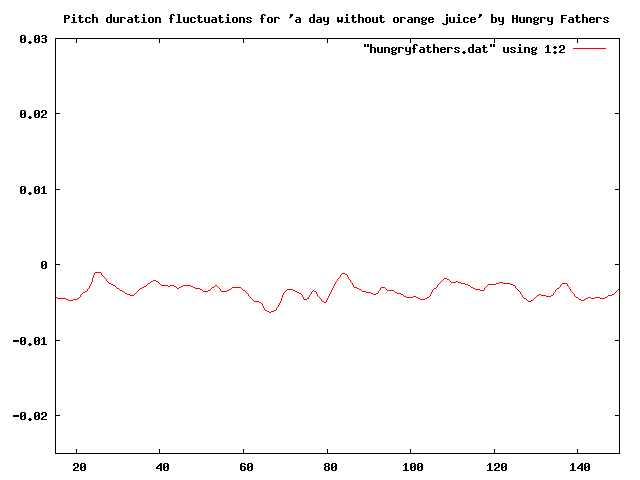
Update: More reader contributed click plots are here: More on click tracks ….
Update 2: I’ve written an application that lets you generate your own interactive click plots: The Echo Nest BPM Explorer
 Music Machinery