Archive for category code
Looking for the Slow Build
This is the second in a series of posts exploring the Million Song Dataset.

Every few months you’ll see a query like this on Reddit – someone is looking for songs that slowly build in intensity. It’s an interesting music query since it is primarily focused on what the music sounds like. Since we’ve analyzed the audio of millions and millions of tracks here at The Echo Nest we should be able to automate this type of query. One would expect that Slow Build songs will have a steady increase in volume over the course of a song, so lets look at the loudness data for a few Slow Build songs to confirm this intuition. First, here’s the canonical slow builder: Stairway to Heaven:
 The green line is the raw loudness data, the blue line is a smoothed version of the data. Clearly we see a rise in the volume over the course of the song. Let’s look at another classic Slow Build – The Hall Of the Mountain King – again our intuition is confirmed:

Looking at a non-Slow Build song like Katy Perry’s California Gurls we see that the loudness curve is quite flat by comparison:

Of course there are other aspects beyond loudness that a musician may use to build a song to a climax – tempo, timbre and harmony are all useful, but to keep things simple I’m going to focus only on loudness.
Looking at these plots it is easy to see which songs have a Slow Build. To algorithmically identify songs that have a slow build, we can use a technique similar to the one I described in The Stairway Detector. It is a simple algorithm that compares the average loudness of the first half of the song to the average loudness of the second half of the song. Songs with the biggest increase in average loudness rank the highest. For example, take a look at a loudness plot for Stairway to Heaven. You can see that there is a distinct rise in scores from the first half to the second half of the song (the horizontal dashed lines show the average loudness for the first and second half of the song). Calculating the ramp factor we see that Stairway to Heaven scores an 11.36 meaning that there is an increase in average loudness of 11.36 decibels between the first and the second half of the song.
This algorithm has some flaws – for instance it will give very high scores to ‘hidden track’ songs. Artists will sometimes ‘hide’ a track at the end of a CD by padding the beginning of the track with a few minutes of silence. For example, this track by ‘Fudge Tunnel’ has about five minutes of silence before the band comes in.

Clearly this song isn’t a Slow Build, our simple algorithm is fooled. To fix this we need to introduce a measure of how straight the ramp is. One way to measure the straightness of a line is to calculate the Pearson correlation for the loudness data as a function of time. XY Data with correlation that approaches one (or negative one) is by definition, linear. This nifty wikipedia visualization of the correlation of different datasets shows the correlation for various datasets:
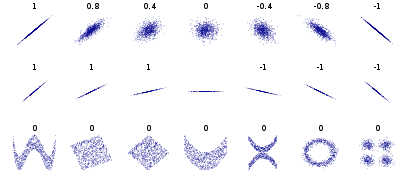 We can combine the correlation with our ramp factors to generate an overall score that takes into account the ramp of the song as well as the straightness of the ramp. The overall score serves as our Slow Build detector. Songs with a high score are Slow Build songs. I suspect that there are better algorithms for this so if you are a math-oriented reader who is cringing at my naivete please set me and my algorithm straight.
Armed with our Slow Build Detector, I built a little web app that lets you explore for Slow Build songs. The app – Looking For The Slow Build – looks like this:
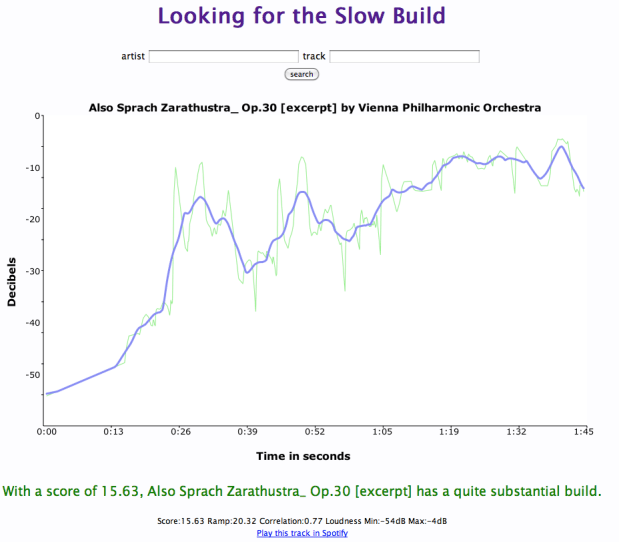
The application lets you type in the name of your favorite song and will give you a plot of the loudness over the course of the song, and calculates the overall Slow Build score along with the ramp and correlation. If you find a song with an exceptionally high Slow Build score it will be added to the gallery. I challenge you to get at least one song in the gallery.
You may find that some songs that you think should get a high Slow Build score don’t score as high as you would expect. For instance, take the song Hoppipolla by Sigur Ros. It seems to have a good build, but it scores low:

It has an early build but after a minute it has reached it’s zenith. The ending is symmetrical with the beginning with a minute of fade. This explains the low score.
Another song that builds but has a low score is Weezer’s The Angel and the One.

This song has a 4 minute power ballad build – but fails to qualify a a slow build because the last 2 minutes of the song are nearly silent.
Finding Slow Build songs in the Million Song Dataset
Now that we have an algorithm that finds Slow Build songs, lets apply it to the Million Song Dataset. I can create a simple MapReduce job in Python that will go through all of the million tracks and calculate the Slow Build score for each of them to help us find the songs with the biggest Slow Build. I’m using the same framework that I described in the post “How to Process a Million Songs in 20 minutes“. I use the S3 hosted version of the Million Song Dataset and process it via Amazon’s Elastic MapReduce using mrjob – a Python MapReduce library. Here’s the mapper that does almost all of the work, the full code is on github in cramp.py:
    def mapper(self, _, line):
        """ The mapper loads a track and yields its ramp factor """
        t = track.load_track(line)
        if t and t['duration'] > 60 and len(t['segments']) > 20:
            segments = t['segments']
            half_track = t['duration'] / 2
            first_half = 0
            second_half = 0
            first_count = 0
            second_count = 0

            xdata = []
            ydata = []
            for i in xrange(len(segments)):
                seg = segments[i]
                seg_loudness = seg['loudness_max'] * seg['duration']

                if seg['start'] + seg['duration'] <= half_track:
                    seg_loudness = seg['loudness_max'] * seg['duration']
                    first_half += seg_loudness
                    first_count += 1
                elif seg['start'] < half_track and seg['start'] + seg['duration'] > half_track:
                    # this is the nasty segment that spans the song midpoint.
                    # apportion the loudness appropriately
                    first_seg_loudness = seg['loudness_max'] * (half_track - seg['start'])
                    first_half += first_seg_loudness
                    first_count += 1

                    second_seg_loudness = seg['loudness_max'] * (seg['duration'] - (half_track - seg['start']))
                    second_half += second_seg_loudness
                    second_count += 1
                else:
                    seg_loudness = seg['loudness_max'] * seg['duration']
                    second_half += seg_loudness
                    second_count += 1

                xdata.append( seg['start'] )
                ydata.append( seg['loudness_max'] )

            correlation = pearsonr(xdata, ydata)
            ramp_factor = second_half / half_track - first_half / half_track
            if YIELD_ALL or ramp_factor > 10 and correlation > .5:
                yield (t['artist_name'], t['title'], t['track_id'], correlation), ramp_factor
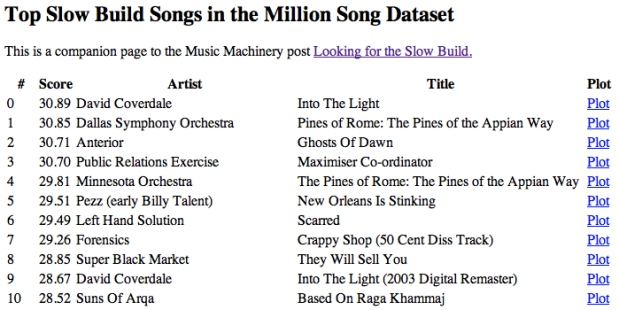
This code takes less than a half hour to run on 50 small EC2 instances and finds a bucketload of Slow Build songs. I’ve created a page of plots of the top 500 or so Slow Build songs found by this job. There are all sorts of hidden gems in there. Go check it out:
Looking for the Slow Build in the Million Song Dataset
The page has 500 plots all linked to Spotify so you can listen to any song that strikes your fancy. Here are some my favorite discoveries:
Respighi’s The Pines of the Appian Way
I remember playing this in the orchestra back in high school. It really is sublime. Click the plot to listen in Spotify.

Maria Friedman’s Play The Song Again
So very theatrical

Mandy Patinkin’s Rock-A-Bye Your Baby With A Dixie Melody
Another song that seems to be right off of Broadway – it has an awesome slow build.

- The Million Song Dataset – deep data about a million songs
- The Stairway Index – my first look at this stuff about 2 years ago
- How to process a million songs in 20 minutes – a blog post about how to process the MSD with mrjob and Elastic Map Reduce
- Looking for the Slow Build – a simple web app that calculates the Slow Build score and loudness plot for just about any song
- cramp.py – the MapReduce code for calculating Slow Build scores for the MSD
- Looking for the Slow Build in the Million Song Dataset – 500 loudness plots of the top Slow Builders
- Top Slow Build songs in the Million Song Dataset – the top 6K songs with a Slow Build score of 10 and above
- A Spotify collaborative playlist with a bunch of Slow Build songs in it. Feel free to add more.
How to process a million songs in 20 minutes
The recently released Million Song Dataset (MSD), a collaborative project between The Echo Nest and Columbia’s LabROSA is a fantastic resource for music researchers. It contains detailed acoustic and contextual data for a million songs. However, getting started with the dataset can be a bit daunting. First of all, the dataset is huge (around 300 gb) which is more than most people want to download. Second, it is such a big dataset that processing it in a traditional fashion, one track at a time, is going to take a long time. Even if you can process a track in 100 milliseconds, it is still going to take over a day to process all of the tracks in the dataset. Luckily there are some techniques such as Map/Reduce that make processing big data scalable over multiple CPUs. In this post I shall describe how we can use Amazon’s Elastic Map Reduce to easily process the million song dataset.
The Problem

From 'Creating Music by Listening' by Tristan Jehan
For this first experiment in processing the million song data set I want to do something fairly simple and yet still interesting. One easy calculation is to determine each song’s density – where the density is defined as the average number of notes or atomic sounds (called segments) per second in a song. To calculate the density we just divide the number of segments in a song by the song’s duration. The set of segments for a track is already calculated in the MSD. An onset detector is used to identify atomic units of sound such as individual notes, chords, drum sounds, etc. Each segment represents a rich and complex and usually short polyphonic sound. In the above graph the audio signal (in blue) is divided into about 18 segments (marked by the red lines). The resulting segments vary in duration. We should expect that high density songs will have lots of activity (as an Emperor once said “too many notes”), while low density songs won’t have very much going on. For this experiment I’ll calculate the density of all 1 million songs and find the most dense and the least dense songs.
MapReduce
A traditional approach to processing a set of tracks would be to iterate through each track, process the track, and report the result. This approach, although simple, will not scale very well as the number of tracks or the complexity of the per track calculation increases. Luckily, a number of scalable programming models have emerged in the last decade to make tackling this type of problem more tractable. One such approach is MapReduce.
MapReduce is a programming model developed by researchers at Google for processing and generating large data sets. With MapReduce you specify a map function that processes a key/value pair to generate a set of intermediate key/value pairs, and a reduce function that merges all intermediate values associated with the same intermediate key. There are a number of implementations of MapReduce including the popular open sourced Hadoop and Amazon’s Elastic MapReduce.
There’s a nifty MapReduce Python library developed by the folks at Yelp called mrjob. With mrjob you can write a MapReduce task in Python and run it as a standalone app while you test and debug it. When your mrjob is ready, you can then launch it on a Hadoop cluster (if you have one), or run the job on 10s or even 100s of CPUs using Amazon’s Elastic MapReduce. Writing an mrjob MapReduce task couldn’t be easier. Here’s the classic word counter example written with mrjob:
from mrjob.job import MRJob

class MRWordCounter(MRJob):
    def mapper(self, key, line):
        for word in line.split():
            yield word, 1

    def reducer(self, word, occurrences):
        yield word, sum(occurrences)

if __name__ == '__main__':
    MRWordCounter.run()
The input is presented to the mapper function, one line at a time. The mapper breaks the line into a set of words and emits a word count of 1 for each word that it finds. The reducer is called with a list of the emitted counts for each word, it sums up the counts and emits them.
When you run your job in standalone mode, it runs in a single thread, but when you run it on Hadoop or Amazon (which you can do by adding a few command-line switches), the job is spread out over all of the available CPUs.
MapReduce job to calculate density
We can calculate the density of each track with this very simple mrjob – in fact, we don’t even need a reducer step:
class MRDensity(MRJob):
    """ A  map-reduce job that calculates the density """

    def mapper(self, _, line):
        """ The mapper loads a track and yields its density """
        t = track.load_track(line)
        if t:
            if t['tempo'] > 0:
                density = len(t['segments']) / t['duration']
                yield (t['artist_name'], t['title'], t['song_id']), density
(see the full code on github)
The mapper loads a line and parses it into a track dictionary (more on this in a bit), and if we have a good track that has a tempo then we calculate the density by dividing the number of segments by the song’s duration.
Parsing the Million Song Dataset
We want to be able to process the MSD with code running on Amazon’s Elastic MapReduce. Since the easiest way to get data to Elastic MapReduce is via Amazon’s Simple Storage Service (S3), we’ve loaded the entire MSD into a single S3 bucket at http://tbmmsd.s3.amazonaws.com/. (The ‘tbm’ stands for Thierry Bertin-Mahieux, the man behind the MSD). This bucket contains around 300 files each with data on about 3,000 tracks. Each file is formatted with one track per line following the format described in the MSD field list. You can see a small subset of this data for just 20 tracks in this file on github: tiny.dat. I’ve written track.py that will parse this track data and return a dictionary containing all the data.
You are welcome to use this S3 version of the MSD for your Elastic MapReduce experiments. But note that we are making the S3 bucket containing the MSD available as an experiment. If you run your MapReduce jobs in the “US Standard Region” of Amazon, it should cost us little or no money to make this S3 data available. If you want to download the MSD, please don’t download it from the S3 bucket, instead go to one of the other sources of MSD data such as Infochimps. We’ll keep the S3 MSD data live as long as people don’t abuse it.
Running the Density MapReduce job
You can run the density MapReduce job on a local file to make sure that it works:
% python density.py tiny.dat
This creates output like this:
["Planet P Project", "Pink World", "SOIAZJW12AB01853F1"]	3.3800521773317689
["Gleave", "Come With Me", "SOKBZHG12A81C21426"]	7.0173630509232234
["Chokebore", "Popular Modern Themes", "SOGVJUR12A8C13485C"]	2.7012807851495166
["Casual", "I Didn't Mean To", "SOMZWCG12A8C13C480"]	4.4351713380683542
["Minni the Moocher", "Rosi_ das M\u00e4dchen aus dem Chat", "SODFMEL12AC4689D8C"]	3.7249476012698159
["Rated R", "Keepin It Real (Skit)", "SOMJBYD12A6D4F8557"]	4.1905674943168156
["F.L.Y. (Fast Life Yungstaz)", "Bands", "SOYKDDB12AB017EA7A"]	4.2953929132587785
Where each ‘yield’ from the mapper is represented by a single line in the output, showing the track ID info and the calculated density.
Running on Amazon’s Elastic MapReduce
When you are ready to run the job on a million songs, you can run it the on Elastic Map Reduce. First you will need to set up your AWS system. To get setup for Elastic MapReduce follow these steps:
- create an Amazon Web Services account: <http://aws.amazon.com/>
- sign up for Elastic MapReduce: <http://aws.amazon.com/elasticmapreduce/>
- Get your access and secret keys (go to <http://aws.amazon.com/account/> and click on “Security Credentials”)
- Set the environment variables $AWS_ACCESS_KEY_ID and $AWS_SECRET_ACCESS_KEY accordingly for mrjob.
Once you’ve set things up, you can run your job on Amazon using the entire MSD as input by adding a few command switches like so:
% python density.py --num-ec2-instances 100 --python-archive t.tar.gz -r emr 's3://tbmmsd/*.tsv.*' > out.dat
The ‘-r emr’ says to run the job on Elastic Map Reduce, and the ‘–num-ec2-instances 100’ says to run the job on 100 small EC2 instances. A small instance currently costs about ten cents an hour billed in one hour increments, so this job will cost about $10 to run if it finishes in less than an hour, and in fact this job takes about 20 minutes to run. If you run it on only 10 instances it will cost 1 or 2 dollars. Note that the t.tar.gz file simply contains any supporting python code needed to run the job. In this case it contains the file track.py. See the mrjob docs for all the details on running your job on EC2.
The Results
The output of this job is a million calculated densities, one for each track in the MSD. We can sort this data to find the most and least dense tracks in the dataset. Here are some high density examples:
Ichigo Ichie by Ryuji Takeuchi has a density of 9.2 segments/second

Ichigo Ichie by Ryuji Takeuchi
129 by Strojovna 07 has a density of 9.2 segments/second

129 by Strojovna 07
The Feeding Circle by Makaton with a density of 9.1 segments per segment

The Feeding Circle by Makaton
Indeed, these pass the audio test, they are indeed high density tracks. Now lets look at some of the lowest density tracks.
Deviation by Biosphere with a density of .014 segments per second

Deviation by Biosphere
The Wire IV by Alvin Lucier with a density of 0.014 segments per second

The Wire IV by Alvin Lucier
improvisiation_122904b by Richard Chartier with a density of .02 segments per second

improvisation by Richard Chartier
Wrapping up
The ‘density’ MapReduce task is about as simple a task for processing the MSD that you’ll find. Consider this the ‘hello, world’ of the MSD. Over the next few weeks, I’ll be creating some more complex and hopefully interesting tasks that show some of the really interesting knowledge about music that can be gleaned from the MSD.
(Thanks to Thierry Bertin-Mahieux for his work in creating the MSD and setting up the S3 buckets. Thanks to 7Digital for providing the audio samples)
How do you spell ‘Britney Spears’?
Posted by Paul in code, data, Music, music information retrieval, research, The Echo Nest on July 28, 2011
I’ve been under the weather for the last couple of weeks, which has prevented me from doing most things, including blogging. Luckily, I had a blog post sitting in my drafts folder almost ready to go. I spent a bit of time today finishing it up, and so here it is. A look at the fascinating world of spelling correction for artist names.
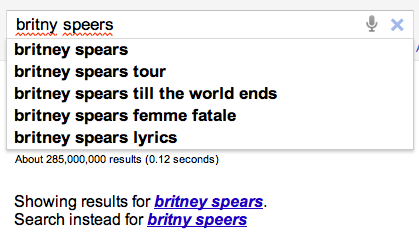 In today’s digital music world, you will often look for music by typing an artist name into a search box of your favorite music app. However this becomes a problem if you don’t know how to spell the name of the artist you are looking for. This is probably not much of a problem if you are looking for U2, but it most definitely is a problem if you are looking for Röyksopp, Jamiroquai or Britney Spears. To help solve this problem, we can try to identify common misspellings for artists and use these misspellings to help steer you to the artists that you are looking for.
A spelling corrector in 21 lines of code
A good place for us to start is a post by Peter Norvig (Director of Research at Google) called ‘How to write a spelling corrector‘ which presents a fully operational spelling corrector in 21 lines of Python. (It is a phenomenal bit of code, worth the time studying it). At the core of Peter’s algorithm is the concept of the edit distance which is a way to represent the similarity of two strings by calculating the number of operations (inserts, deletes, replacements and transpositions) needed to transform one string into the other. Peter cites literature that suggests that 80 to 95% of spelling errors are within an edit distance of 1 (meaning that most misspellings are just one insert, delete, replacement or transposition away from the correct word). Not being satisfied with that accuracy, Peter’s algorithm considers all words that are within an edit distance of 2 as candidates for his spelling corrector. For Peter’s small test case (he wrote his system on a plane so he didn’t have lots of data nearby), his corrector covered 98.9% of his test cases.
Spell checking Britney
A few years ago, the smart folks at Google posted a list of Britney Spears spelling corrections that shows nearly 600 variants on Ms. Spears name collected in three months of Google searches. Perusing the list, you’ll find all sorts of interesting variations such as ‘birtheny spears’ , ‘brinsley spears’ and ‘britain spears’. I suspect that some these queries (like ‘Brandi Spears’) may actually not be for the pop artist. One curiosity in the list is that although there are 600 variations on the spelling of ‘Britney’ there is exactly one way that ‘spears’ is spelled. There’s no ‘speers’ or ‘spheres’, or ‘britany’s beers’ on this list.
One thing I did notice about Google’s list of Britneys is that there are many variations that seem to be further away from the correct spelling than an edit distance of two at the core of Peter’s algorithm. This means that if you give these variants to Peter’s spelling corrector, it won’t find the proper spelling. Being an empiricist I tried it and found that of the 593 variants of ‘Britney Spears’, 200 were not within an edit distance of two of the proper spelling and would not be correctable. This is not too surprising. Names are traditionally hard to spell, there are many alternative spellings for the name ‘Britney’ that are real names, and many people searching for music artists for the first time may have only heard the name pronounced and have never seen it in its written form.
Making it better with an artist-oriented spell checker
A 33% miss rate for a popular artist’s name seems a bit high, so I thought I’d see if I could improve on this. I have one big advantage that Peter didn’t. I work for a music data company so I can be pretty confident that all the search queries that I see are going to be related to music. Restricting the possible vocabulary to just artist names makes things a whole lot easier. The algorithm couldn’t be simpler. Collect the names of the top 100K most popular artists. For each artist name query, find the artist name with the smallest edit distance to the query and return that name as the best candidate match. This algorithm will let us find the closest matching artist even if it is has an edit distance of more than 2 as we see in Peter’s algorithm. When I run this against the 593 Britney Spears misspellings, I only get one mismatch – ‘brandi spears’ is closer to the artist ‘burning spear’ than it is to ‘Britney Spears’. Considering the naive implementation, the algorithm is fairly fast (40 ms per query on my 2.5 year old laptop, in python).
Looking at spelling variations
With this artist-oriented spelling checker in hand, I decided to take a look at some real artist queries to see what interesting things I could find buried within. I gathered some artist name search queries from the Echo Nest API logs and looked for some interesting patterns (since I’m doing this at home over the weekend, I only looked at the most recent logs which consists of only about 2 million artist name queries).
Artists with most spelling variations
Not surprisingly, very popular artists are the most frequently misspelled. It seems that just about every permutation has been made in an attempt to spell these artists.
- Michael Jackson – Variations: michael jackson, micheal jackson, michel jackson, mickael jackson, mickal jackson, michael jacson, mihceal jackson, mickeljackson, michel jakson, micheal jaskcon, michal jackson, michael jackson by pbtone, mical jachson, micahle jackson, machael jackson, muickael jackson, mikael jackson, miechle jackson, mickel jackson, mickeal jackson, michkeal jackson, michele jakson, micheal jaskson, micheal jasckson, micheal jakson, micheal jackston, micheal jackson just beat, micheal jackson, michal jakson, michaeljackson, michael joseph jackson, michael jayston, michael jakson, michael jackson mania!, michael jackson and friends, michael jackaon, micael jackson, machel jackson, jichael mackson
- Justin Bieber – Variations: justin bieber, justin beiber, i just got bieber’ed by, justin biber, justin bieber baby, justin beber, justin bebbier, justin beaber, justien beiber, sjustin beiber, justinbieber, justin_bieber, justin. bieber, justin bierber, justin bieber<3 4 ever<3, justin bieber x mstrkrft, justin bieber x, justin bieber and selens gomaz, justin bieber and rascal flats, justin bibar, justin bever, justin beiber baby, justin beeber, justin bebber, justin bebar, justien berbier, justen bever, justebibar, jsustin bieber, jastin bieber, jastin beiber, jasten biber, jasten beber songs, gestin bieber, eiine mainie justin bieber, baby justin bieber,
- Red Hot Chili Peppers – Variations: red hot chilli peppers, the red hot chili peppers, red hot chilli pipers, red hot chilli pepers, red hot chili, red hot chilly peppers, red hot chili pepers, hot red chili pepers, red hot chilli peppears, redhotchillipeppers, redhotchilipeppers, redhotchilipepers, redhot chili peppers, redhot chili pepers, red not chili peppers, red hot chily papers, red hot chilli peppers greatest hits, red hot chilli pepper, red hot chilli peepers, red hot chilli pappers, red hot chili pepper, red hot chile peppers
- Mumford and Sons – Variations: mumford and sons, mumford and sons cave, mumford and son, munford and sons, mummford and sons, mumford son, momford and sons, modfod and sons, munfordandsons, munford and son, mumfrund and sons, mumfors and sons, mumford sons, mumford ans sons, mumford and sonns, mumford and songs, mumford and sona, mumford and, mumford &sons, mumfird and sons, mumfadeleord and sons
- Katy Perry – Even an artist with a seemingly very simple name like Katy Perry has numerous variations: katy perry, katie perry, kate perry, kathy perry, katy perry ft.kanye west, katty perry, katy perry i kissed a girl, peacock katy perry, katyperry, katey parey, kety perry, kety peliy, katy pwrry, katy perry-firework, katy perry x, katy perry, katy perris, katy parry, kati perry, kathy pery, katey perry, katey perey, katey peliy, kata perry, kaity perry
Some other most frequently misspelled artists:
- Britney Spears
- Linkin Park
- Arctic Monkeys
- Katy Perry
- Guns N’ Roses
- Nicki Minaj
- Muse
- Weezer
- U2
- Oasis
- Moby
- Flyleaf
- Seether
- byran adams – ryan adams
- Underworld – Uverworld
Finding duplicate songs in your music collection with Echoprint
Posted by Paul in code, Music, The Echo Nest on June 25, 2011
 This week, The Echo Nest released Echoprint – an open source music fingerprinting and identification system. A fingerprinting system like Echoprint recognizes music based only upon what the music sounds like. It doesn’t matter what bit rate, codec or compression rate was used (up to a point) to create a music file, nor does it matter what sloppy metadata has been attached to a music file, if the music sounds the same, the music fingerprinter will recognize that. There are a whole bunch of really interesting apps that can be created using a music fingerprinter. Among my favorite iPhone apps are Shazam and Soundhound – two fantastic over-the-air music recognition apps that let you hold your phone up to the radio and will tell you in just a few seconds what song was playing. It is no surprise that these apps are top sellers in the iTunes app store. They are the closest thing to magic I’ve seen on my iPhone.
In addition to the super sexy applications like Shazam, music identification systems are also used for more mundane things like copyright enforcement (helping sites like Youtube keep copyright violations out of the intertubes), metadata cleanup (attaching the proper artist, album and track name to every track in a music collection), and scan & match like Apple’s soon to be released iCloud music service that uses music identification to avoid lengthy and unnecessary music uploads. One popular use of music identification systems is to de-duplicate a music collection. Programs like tuneup will help you find and eliminate duplicate tracks in your music collection.
This week I wanted to play around with the new Echoprint system, so I decided I’d write a program that finds and reports duplicate tracks in my music collection. Note: if you are looking to de-duplicate your music collection, but you are not a programmer, this post is *not* for you, go and get tuneup or some other de-duplicator. The primary purpose of this post is to show how Echoprint works, not to replace a commercial system.
How Echoprint works
Echoprint, like many music identification services is a multi-step process: code generation, ingestion and lookup. In the code generation step, musical features are extracted from audio and encoded into a string of text. In the ingestion step, codes for all songs in a collection are generated and added to a searchable database. In the lookup step, the codegen string is generated for an unknown bit of audio and is used as a fuzzy query to the database of previously ingested codes. If a suitably high-scoring match is found, the info on the matching track is returned. The devil is in the details. Generating a short high level representation of audio that is suitable for searching that is insensitive to encodings, bit rate, noise and other transformations is a challenge. Similarly challenging is representing a code in a way that allows for high speed querying and allows for imperfect matching of noisy codes.
Echoprint consists of two main components: echoprint-codegen and echoprint-server.
Code Generation
echoprint-codegen is responsible for taking a bit of audio and turning it into an echoprint code. You can grab the source from github and build the binary for your local platform. The binary will take an audio file as input and give output a block of JSON that contains song metadata (that was found in the ID3 tags in the audio) along with a code string. Here’s an example:
plamere$ echoprint-codegen test/unison.mp3 0 10
[
{"metadata":{"artist":"Bjork",
    "release":"Vespertine",
     "title":"Unison",
     "genre":"",
     "bitrate":128,"sample_rate":44100, "duration":405,
     "filename":"test/unison.mp3",
     "samples_decoded":110296,
     "given_duration":10, "start_offset":1,
     "version":4.11,
     "codegen_time":0.024046,
     "decode_time":0.641916},
     "code_count":174,
     "code":"eJyFk0uyJSEIBbcEyEeWAwj7X8JzfDvKnuTAJIojWACwGB4QeM\
       HWCw0vLHlB8IWeF6hf4PNC2QunX3inWvDCO9WsF7heGHrhvYV3qvPEu-\
       87s9ELLi_8J9VzknReEH1h-BOKRULBwyZiEulgQZZr5a6OS8tqCo00cd\
       p86ymhoxZrbtQdgUxQvX5sIlF_2gUGQUDbM_ZoC28DDkpKNCHVkKCgpd\
       OHf-wweX9adQycnWtUoDjABumQwbJOXSZNur08Ew4ra8lxnMNuveIem6\
       LVLQKsIRLAe4gbj5Uxl96RpdOQ_Noz7f5pObz3_WqvEytYVsa6P707Jz\
       j4Oa7BVgpbKX5tS_qntcB9G--1tc7ZDU1HamuDI6q07vNpQTFx22avyR",
     "tag":0}
]
In this example, I’m only fingerprinting the first 10 second of the song to conserve space. The code string is just a base64 encoding of a zlib compression of the original code string, which is a hex encoded series of ASCII numbers. A full version of this code is what is indexed by the lookup server for fingerprint queries. Codegen is quite fast. It scans audio at roughly 250x real time per processor after decoding and resampling to 11025 Hz. This means a full song can be scanned in less than 0.5s on an average computer, and an amount of audio suitable for querying (30s) can be scanned in less than 0.04s. Decoding from MP3 will be the bottleneck for most implementations. Decoders like mpg123 or ffmpeg can decode 30s mp3 audio to 11025 PCM in under 0.10s.
The Echoprint Server
The Echoprint server is responsible for maintaining an index of fingerprints of (potentially) millions of tracks and serving up queries. The lookup server uses the popular Apache Solr as the search engine. When a query arrives, the codes that have high overlap with the query code are retrieved using Solr. The lookup server then filters through these candidates and scores them based on a number of factors such as the number of codeword matches, the order and timing of codes and so on. If the best matching code has a high enough score, it is considered a hit and the ID and any associated metadata is returned.
To run a server, first you ingest and index full length codes for each audio track of interest into the server index. To perform a lookup, you use echoprint-codegen to generate a code for a subset of the file (typically 30 seconds will do) and issue that as a query to the server.
The Echo Nest hosts a lookup server, so for many use cases you won’t need to run your own lookup server. Instead , you can make queries to the Echo Nest via the song/identify call. (We also expect that many others may run public echoprint servers as well).
Creating a de-duplicator
With that quick introduction on how Echoprint works let’s look at how we could create a de-duplicator. The core logic is extremely simple:
       create an empty echoprint-server
       foreach mp3 in my-music-collection:
          code = echoprint-codegen(mp3)            // generate the code
          result = echoprint-server.query(code)    // look it up
          if result:                               // did we find a match?
               print 'duplicate for', mp3, 'is', result
          else:                                    // no, so ingest the code
               echoprint-server.ingest(mp3, code)
We create an empty fingerprint database. For each song in the music collection we generate an Echoprint code and query the server for a match. If we find one, then the mp3 is a duplicate and we report it. Otherwise, it is a new track, so we ingest the code for the new track into the echoprint server. Rinse. Repeat.
I’ve written a python program dedup.py to do just this. Being a cautious sort, I don’t have it actually delete duplicates, but instead, I have it just generate a report of duplicates so I can decide which one I want to keep. The program also keeps track of its state so you can re-run it whenever you add new music to your collection.
Here’s an example of running the program:
% python dedup.py ~/Music/iTunes
          1  1 /Users/plamere/Music/misc/ABBA/Dancing Queen.mp3
               ( lines omitted...)
        173 41 /Users/plamere/Music/misc/Missy Higgins - Katie.mp3
        174 42 /Users/plamere/Music/misc/Missy Higgins - Night Minds.mp3
        175 43 /Users/plamere/Music/misc/Missy Higgins - Nightminds.mp3

duplicate /Users/plamere/Music/misc/Missy Higgins - Nightminds.mp3
          /Users/plamere/Music/misc/Missy Higgins - Night Minds.mp3

        176 44 /Users/plamere/Music/misc/Missy Higgins - This Is How It Goes.mp3
Dedup.py print out each mp3 as it processes it and as it finds a duplicate it reports it. It also collects a duplicate report in a file in pblml format like so:
duplicate <sep> iTunes Music/Bjork/Greatest Hits/Pagan Poetry.mp3 <sep> original <sep> misc/Bjork Radio/Bjork - Pagan Poetry.mp3
duplicate <sep> iTunes Music/Bjork/Medulla/Desired Constellation.mp3 <sep> original <sep> misc/Bjork Radio/Bjork - Desired Constellation.mp3
duplicate <sep> iTunes Music/Bjork/Selmasongs/I've Seen It All.mp3 <sep> original <sep> misc/Bjork Radio/Bjork - I've Seen It All.mp3
Again, dedup.py doesn’t actually delete any duplicates, it will just give you this nifty report of duplicates in your collection.
Trying it out
If you want to give dedup.py a try, follow these steps:
- Download, build and install echoprint-codegen
- Download, build, install and run the echoprint-server
- Get dedup.py.
- Edit line 10 in dedup.py to set the sys.path to point at the echoprint-server API directory
- Edit line 13 in dedup.py to set the _codegen_path to point at your echoprint-codegen executable
% python dedup.py ~/Music
This will find all of the dups and write them to the dedup.dat file. It takes about 1 second per song. To restart (this will delete your fingerprint database) run:
% python dedup.py --restart
Note that you can actually run the dedup process without running your own echoprint-server (saving you the trouble of installing Apache-Solr, Tokyo cabinet and Tokyo cabinet). The downside is that you won’t have any persistent server, which means that you’ll not be able to incrementally de-dup your collection – you’ll need to do it in all in one pass. To use the local mode, just add local-True to the fp.py calls. The index is then kept in memory, no solr or Tokyo tyrant is needed.
Wrapping up
dedup.py is just one little example of the kind of application that developers will be able to create using Echoprint. I expect to see a whole lot more in the next few months. Before Echoprint, song identification was out of the reach of the typical music application developer, it was just too expensive. Now with Echoprint, anyone can incorporate music identification technology into their apps. The result will be fewer headaches for developers and much better music applications for everyone.
Bipolar Radio
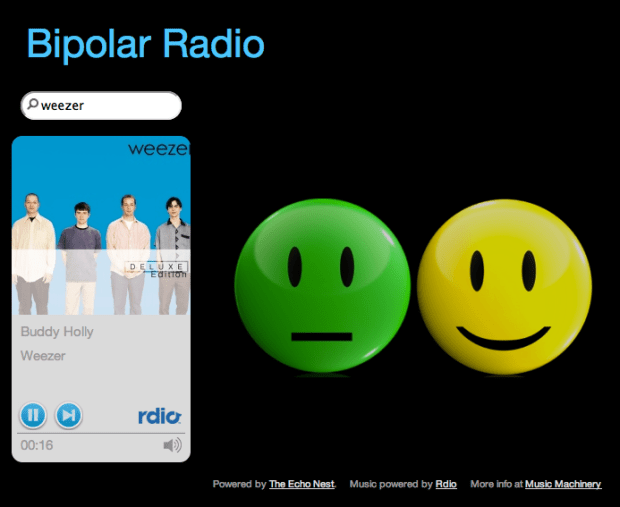
I just finished my hack for Music Hack Day SF. It is called Bipolar Radio. It is your standard Pandora-style artist radio but with a twist. Type in an artist, and you’ll get an endless stream of music by similar artists. When you need to hear a high energy song, just click on the yellow happy face and you’ll instantly hear a high energy song by the currently playing artist. Similarly, if you’d like to chill out, just click on the green face and you’ll instantly hear a low energy song that should help you relax a bit.
The hack uses the Echo Nest song data to help find the high and low energy songs. I use a combination of loudness, energy, danceability, and tempo to sort and filter the songs by an artist into the high and low energy buckets. I’m taking advantage of the new Rdio / Echo Nest integration to get Rdio IDs so I can play them in Rdio’s nifty player.
Give it a whirl and let me know what you think: Bipolar Radio
Memento Friday
It had to be done. Created with Echo Nest Remix.
Create an autocompleting artist suggest interface
Posted by Paul in code, Music, The Echo Nest on March 17, 2011
At The Echo Nest, we just rolled out the beta version of a new API method: artist/suggest – that lets you build autocomplete interfaces for artists. I wrote a little artist suggestion demo to show how to use the artist/suggest to build an autocomplete interface with jQuery.
The artist/suggest API tries to do the right thing when suggesting artist names. It presents matching artists in order of artist familiarity:
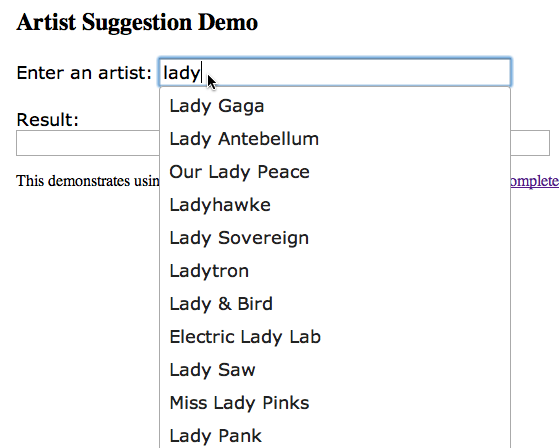
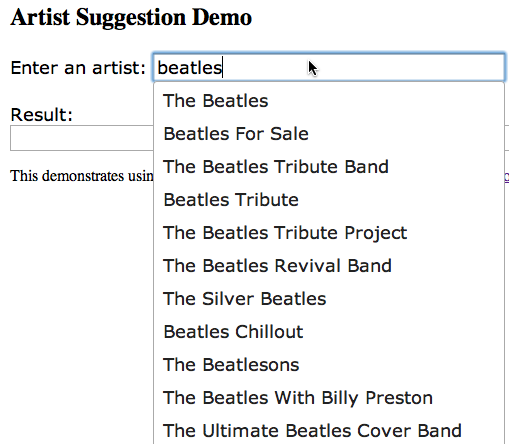
It deals with stop words (like the, and, and a) properly. You don’t need to type ‘the bea’ if you are looking for The Beatles but you can if you want to.
It deals with international characters in the expected way, so that we poor Americans that don’t know how to type umlauts can still listen to Björk:
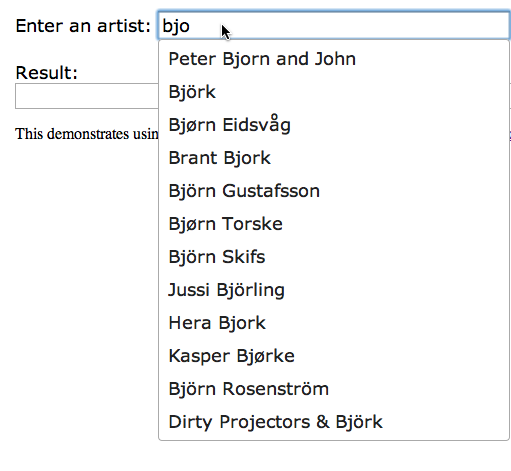
The artist/suggest API is backed by millions of artists, including many, many artists that you’ve never heard of:
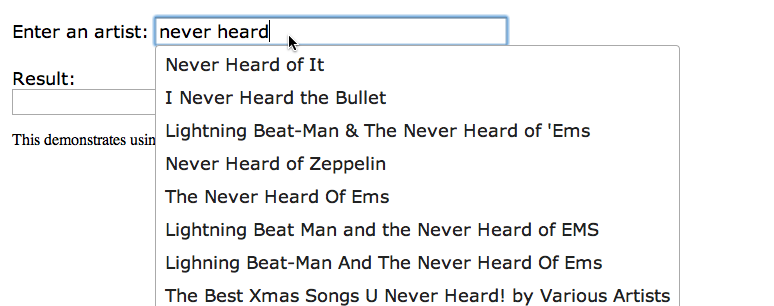
Integrating with jQuery is straightforward using the jQuery UI Autocomplete widget. The core code is:
$(function() {
    $("#artist" ).autocomplete({
        source: function( request, response ) {
            $.ajax({
                url: "http://developer.echonest.com/api/v4/artist/suggest",
                dataType: "jsonp",
                data: {
                    results: 12,
                    api_key: "YOUR_API_KEY",
                    format:"jsonp",
                    name:request.term
                },
                success: function( data ) {
                    response( $.map( data.response.artists, function(item) {
                        return {
                            label: item.name,
                            value: item.name,
                            id: item.id
                        }
                    }));
                }
            });
        },
        minLength: 3,
        select: function( event, ui ) {
            $("#log").empty();
            $("#log").append(ui.item ? ui.item.id + ' ' + ui.item.label : '(nothing)');
        },
    });
});
The full code is here: http://static.echonest.com/samples/suggest/ArtistSuggestAutoComplete.html
A source function is defined that makes the jsonp call to the artist/suggest interface, and the response handler gets the extracts the matching artist names and ids from the result and puts them in a dictionary for use by the widget. Since the artist/suggest API also returns Echo Nest Artist IDs it is straightforward to turn make further Echo Nest calls to get detailed data for the artists. (Note that the artist/suggest API doesn’t allow you to specify buckets to add more data to the response like many of our other artist calls. This is so that we can keep the response time of the suggest API as low as possible for interactive applications).
We hope people will find the artist/suggest API. We are releasing it as a beta API – we may change how it works as we get a better understanding of how people want to use it. Feel free to send us any suggestions you may have.
The SXSW Music Maze
Posted by Paul in code, fun, visualization on March 10, 2011
There are thousands of artists playing at SXSW this year. To help sort it all out, I thought I’d adapt my Music Maze to work within the world of SXSW 2011 artists. It is a good way to figure out which bands you’d like to see.

This visualization fits in with the SXSW talk I’m giving in a few days: Finding Music With Pictures
Finding the most dramatic bits in music
Posted by Paul in code, fun, Music, The Echo Nest on February 20, 2011
Evanescence is one of my guilty listening pleasures. I enjoy how Amy Lee’s voice is juxtaposed against the wall of sound produced by the rest of the band. For instance, in the song Imaginary, there’s a 30 seconds of sweet voice + violins before you get slammed by the hammer of the gods:
This extreme change in energy makes for a very dramatic moment in the music. It is one of the reasons that I listen to progressive rock and nu-metal (despite the mockery of my co-workers). However, finding these dramatic gems in the music is hard – there’s a lot of goth- and nu-metal to filter through, and much of it is really bad. After even just a few minutes of listening I feel like I’m lost at a Twicon. What I need is a tool to help me find these dramatic moments, to filter through the thousands of songs to find the ones that have those special moments when the beauty comes eye to eye with the beast.
My intuition tells me that a good place to start is to look at the loudness profile for songs with these dramatic moments. I should expect to see a sustained period of relatively soft music followed by sharp transition to a sustained period of loud music. This is indeed what we see:
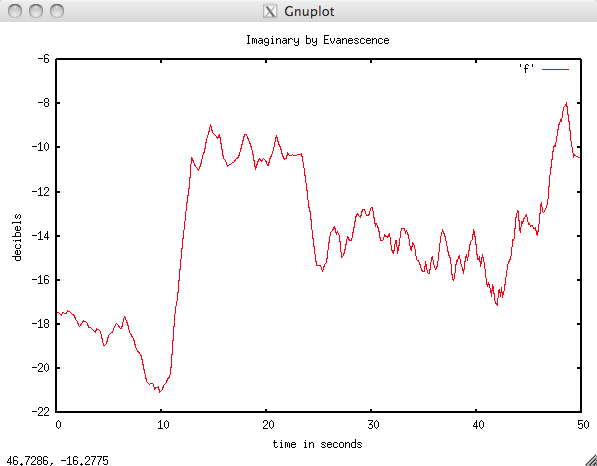
Loudness plot for 'Imaginary'
This plot shows a windowed average of the Echo Nest loudness for the first 50 seconds of the song. In this plot we see a relatively quiet first 10 seconds (hovering between -21 and -18 db), followed by an extremely loud section of around -10db). (Note that this version of the song has a shorter intro than the version in the Youtube video). If we can write some code to detect these transitions, then we will have a drama detector.
The Drama Detector: Finding a rising edge in a loudness profile is pretty easy, but we want to go beyond that and make sure we have a way to rank then so that we can find the most dramatic changes. There are two metrics that we can use to rank the amount of drama: (1) The average change in loudness at the transition and (2) the length of the quiet period leading up to the transition. The bigger the change in volume and the the longer it has been quiet means more drama. Let’s look at another dramatic moment as an example:
The opening 30 seconds of Blackest Eyes by Porcupine Tree fit the dramatic mold. Here’s an annotated loudness plot for the opening:
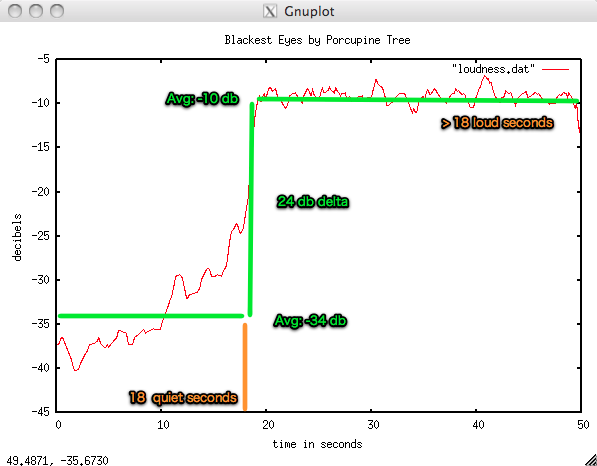
The drama-finding algorithm simply looks for loudness edges above a certain dB threshold and then works backward to find the beginning of the ‘quiet period’. To make a ranking score that combines both the decibel change and the quiet period, I tried the simplest thing that could possible work which is to just multiply the change in decibels by the quiet period (in seconds). Let’s try this metric out on a few songs to see how it works:
- Porcupine Tree – Blackest Eyes – score: 18 x 24 = 432
- Evanescence – Imaginary (w/ 30 second intro) – score: 299
- Lady Gaga – Poker Face- score: 82 – not very dramatic
- Katy Perry – I kissed a girl – score: 33 – extremely undramatic
This seems to pass the sanity test, dramatic songs score high, non-dramatic songs score low (using my very narrow definition of dramatic). With this algorithm in mind, I then went hunting for some drama. To do this, I found the 50 artists most similar to Evanescence, and for each of these artists I found the 20 most hotttest songs. I then examined each of these 1,000 songs and ranked them in dramatic order. So, put on your pancake and eye shadow, dim the lights, light the candelabra and enjoy some dramatic moments
First up is the wonderfully upbeat I want to Die by Mortal Love. This 10 minute long song has a whopping drama score of 2014. There a full two minutes of quiet starting at 5 minutes into the song before the dramatic moment (with 16 dB of dramatic power!) occurs:
The dramatic moment occurs at 7:12 seconds into the song – but I’m not sure if it is worth the wait. Not for me, but probably something they could play at the Forks Washington High School prom though.
The song Jillian by Within Temptation gets a score of 861 for this dramatic opening:
Now that’s drama! Take a look at the plot:
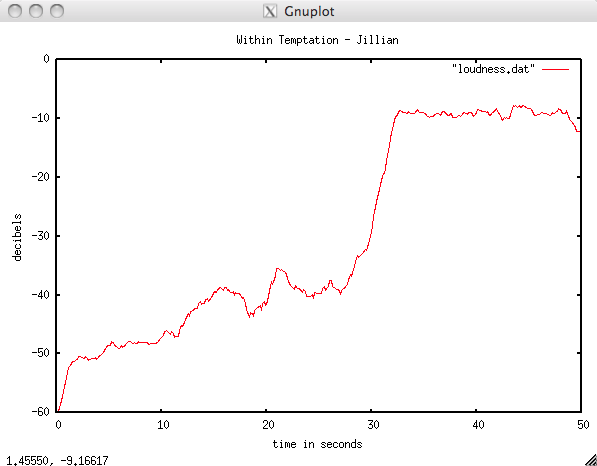
The slow build – and then the hammer hits. You can almost see the vampires and the werewolves colliding in a frenzy.
During this little project I learned that most of the original band members of Evanescence left and formed another band called We are the Fallen – with a very similar sound (leading me to suspect that there was a whole lot of a very different kind of drama in Evanescence). Here’s their dramatic Tear The World Down (scores a 468):
Finally we have this track Maria Guano Apes – perhaps my favorite of the bunch:
Update: @han wondered how well the dramatic detector faired on Romantic-era music. Here’s a plot for Berlioz’s Symphony Fantastique: March to the Scaffold:
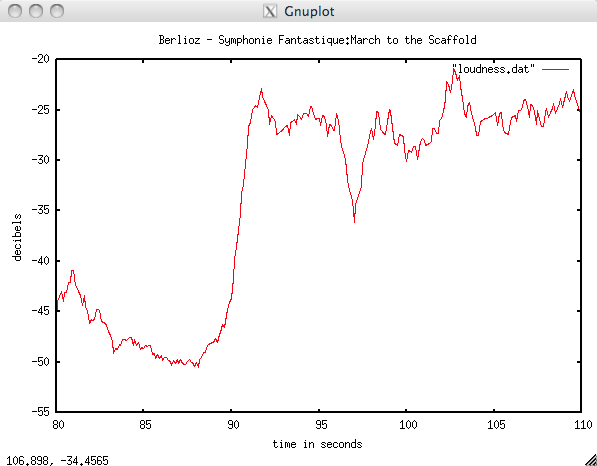
This gets a very dramatic score 361. Note that in the following rendition the dramatic bit that aligns with the previous plot occurs at 1:44:
Well – there you have it , a little bit of code to detect dramatic moments in music. It can’t, of course, tell you whether or not the music is good, but it can help you filter music down to a small set where you can easily preview it all. To build the drama detector, I used a few of The Echo Nest APIs including:
- song/search – to search for songs by name and to get the analysis data (where all the detailed loudness info lives)
- artist/similar – to find all the similar artists to a seed (in this case Evanescence)
The code is written in Python using pyechonest, and the plots were made using gnuplot. If you are interested in finding your own dramatic bits let me know and I’ll post the code somewhere.
MIDEM Hack Day
I’m just back from a whirlwind trip to Cannes where I took part in the first ever MIDEM Hack Day where 20 hotshot music hackers gathered to build the future of music. The hackers were from music tech companies like Last.fm, SoundCloud, Songkick, The Echo Nest, BMAT, MusixMatch, from universities like Queen Mary and Goldsmiths, one of the four major Labels, and a number of independent developers. We all arrived to the exotic French Riviera, with its casinos, yachts and palm trees. But instead of spending our time laying on the beach we all willingly spent our time in this wonderful room called Auditorium J:

First thing was we did was rearrange the furniture so we could all see each other making interactions easier. It wasn’t long before we had audio hooked up – with hackers taking turns at being the DJ for the room.

Dave and I took a break from the hacking to give a talk on the ‘New Developer Ecosystem’. We talked about how developers were becoming the new gatekeepers in the world of music. The talk was well attended with lots of good questions from the audience. (Yes, I was a bit surprised. I was half expecting that MIDEM would be filled with the old guard – reps from the traditional music industry that would be hostile toward self-proclaimed new gatekeepers. There were indeed folks from the labels there and asking questions, but they seemed very eager to engage with us).

While Dave and I were talking, the rest of the gang had self-organized, giving project pitches, forming teams, making coding assignments and perhaps most importantly figuring out how to make the espresso machine work.

Here are some of the project pitches:
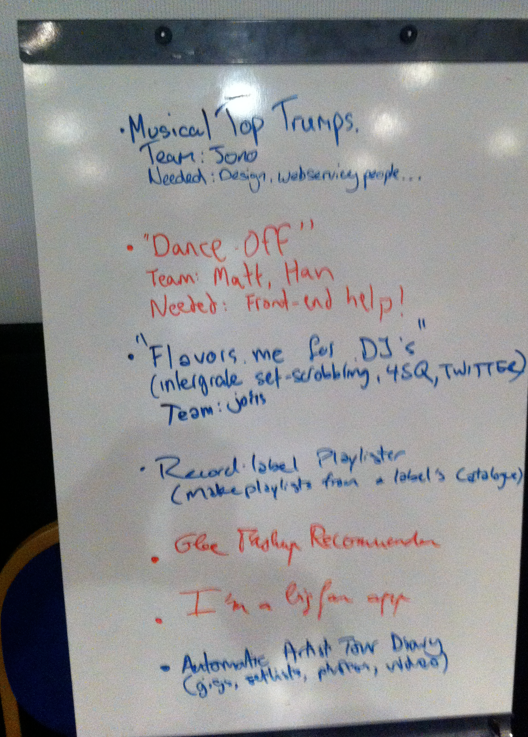
Some teams started with designs with dataflow diagrams, while others dived straight into coding (one team instead, starting composing the music for their app)

Dataflow diagrams, system architecture, and UI minispecs became the artwork for the hacking space.

After the lightening design rounds, people settled into their hacking spots to start hacking:

By mid-afternoon on the first day of hacking, the teams were focused on building their hacks.

There were some interesting contrasts during the day. While we were hacking away in Auditorium J, right next door was a seminar on HADOPI. (the proposed French law where those accused of copyright violations could be banned from the Internet forever).

As we got further in to our hacks, we gave demos for each other

Over the course of the weekend, we had a few ‘walk-ins’ who were interested in understanding what was going on. We did feel a little bit like zoo animals as we coded with an audience.

Taylor Hanson dropped by to see what was going on. He was really interested in the idea of connecting artists with hackers/technologists. After the visit we were MMMboppping the rest of the day.

Towards the end of the first day, the Palais cleared out, so we had the whole conference center to ourselves. We made the beer run, had a couple and then went right back to hacking.

Finally, the demo time had arrived. After more than 24 hours of hacking we were ready (or nearly ready). Demos were created, rehearsed and recorded.

We presented our demos to an enthusiastic audience. We laughed, we cried …

There were some really creative hacks demoed – Evolver.fm has chronicled them all: MIDEM Hack Day Hacks Part 1 and MIDEM Hack Day Hacks Part 2. At the end of the hack day, we were all very tired, but also very excited about what we had accomplished in one weekend.

Thanks much to the MIDEMNet organizers who took care of all of the details for the event – sandwiches, soda, coffee, flawless Internet. They provided everything we needed to make this event possible. Special thanks to Thomas Bonte (unofficial Music Hack Day photographer) for taking so many awesome photos.
 Music Machinery