Archive for category The Echo Nest
Save Justin Bieber from the death metal
Posted by Paul in code, data, Music, The Echo Nest on January 1, 2012
I just finished my holiday break coding project. It’s a 3D music maze built with WebGL that runs in your browser. You can wander around the maze and sample music and enjoy the album art. It’s like being in 1992 with a fresh copy of Castle Wolfenstein 3D – but with music instead of Nazis. If you wander through the maze long enough you may stumble upon a little game embedded in the maze called ‘Save Justin Bieber from the death metal’. That’s all I’m going to say about that.
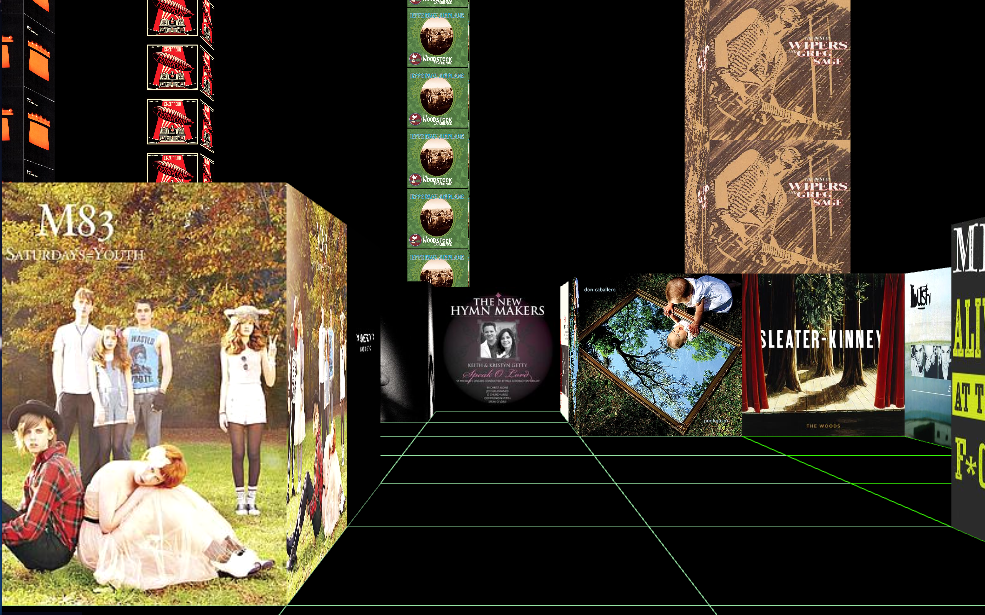
The maze uses Echo Nest playlists and 7Digital media (album art and 30 second samples). I used the totally awesome Three.js by my new hero MrDoob. You’ll need a WebGL-enabled browser like Google’s chrome. Give it a go here: The 3D Music Maze.
Update: Bieber Death Metal really exists.
Artists that called it a day in 2011
Posted by Paul in code, data, fun, The Echo Nest on December 18, 2011
It is that time of year when music critics make their year-in-review lists: best albums, worst albums, best new artists and so on. To help critics with their year-end review, I’ve put together a list of the top artists that stopped performing in 2011 – due to retirement, breaking up or due to death.
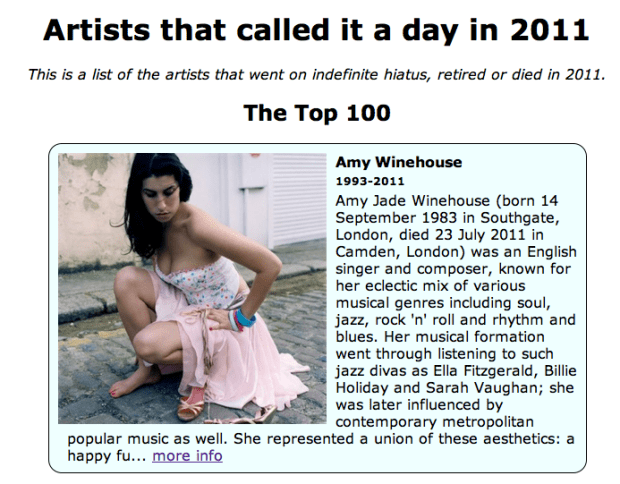
I made this list using by calling Echo Nest artist search call, limiting the results to artists with an ending year of 2011. Here’s the salient bit of python:
           results = artist.search(artist_end_year_after=2010, artist_end_year_before=2012,
                             buckets=['urls', 'years_active'], sort='hotttnesss-desc')
You can see the list of the 3,300 or so artists that stopped performing in 2011 here: Artists that called it a day in 2011. Thanks to Matt Santiago, master of data quality at The Echo Nest, for coming up with the idea for the list.
In the same vein, I created a list of the top 100 artists (based upon Echo Nest hotttnesss) that became active or released their first recording in 2011.

Check this list out at: Top New Artists for 2011
The Future of Mood in Music
Posted by Paul in The Echo Nest on December 6, 2011
One of my favorite hacks from Music Hack Day London is Mood Knobs. It is a Spotify App that generates Echo Nest playlists by mood. Turn some cool virtual analog knobs to generate playlists.

The developers have put the source in github. W00t. Check it all out here: The Future of Mood in Music.
My Music Hack Day London hack
Posted by Paul in code, data, events, The Echo Nest on December 4, 2011
It is Music Hack Day London this weekend. However, I am in New England, not Olde England, so I wasn’t able to enjoy in all the pizza, beer and interesting smells that come with a 24 hour long hackathon. But that didn’t keep me from writing code. Since Spotify Apps are the cool new music hacking hotttnesss, I thought I’d create a Spotify related hack called the Artist Picture Show. It is a simple hack – it shows a slide show of artist images while you listen to them. It gets the images from The Echo Nest artist images API and from Flickr. It is a simple app, but I find the experience of being able to see the artist I’m listening too to be quite compelling.
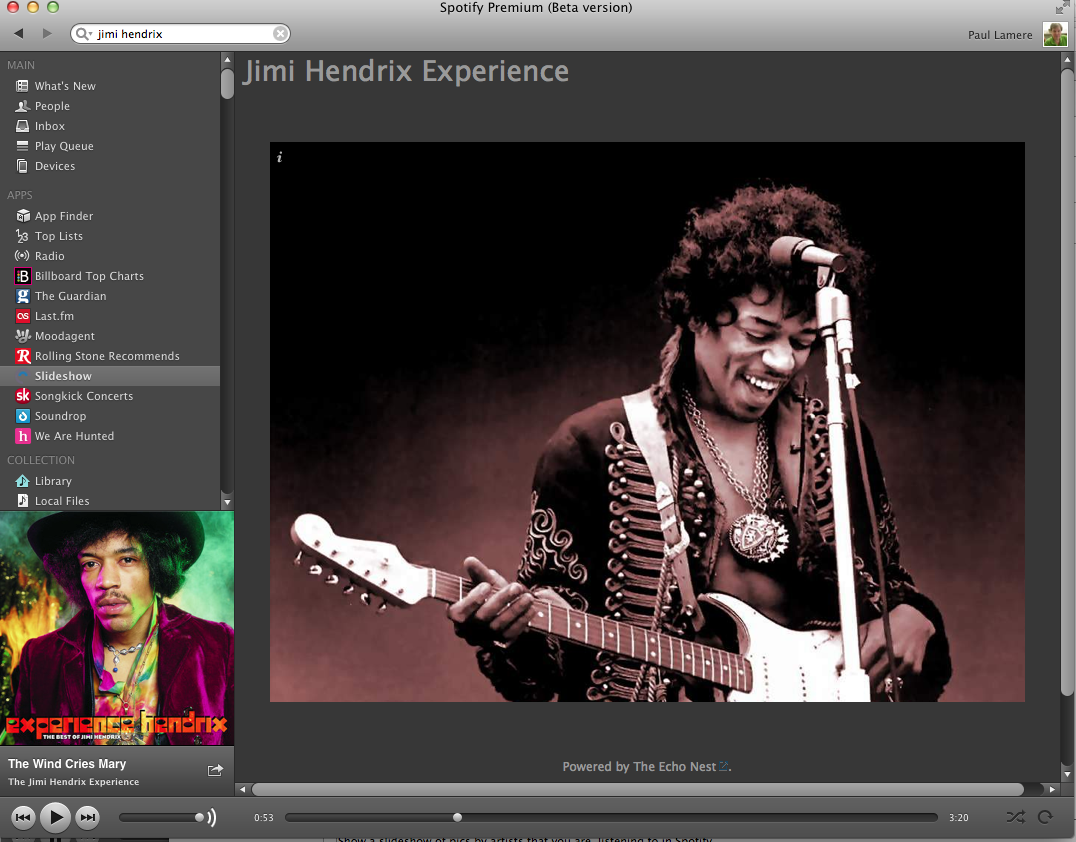
Slightly more info on the hack here.
Building a Spotify App
Posted by Paul in code, Music, The Echo Nest on December 2, 2011
On Wednesday November 30, Spotify announced their Spotify Apps platform that will let developers create Spotify-powered music apps that run inside the Spotify App. I like Spotify and I like writing music apps so I thought I would spend a little time kicking the tires and write about my experience.
First thing, the Spotify Apps are not part of the official Spotify client, so you need to get the Spotify Apps Preview Version. This version works just like the version of Spotify except that it includes an APPS section in the left-hand navigator.
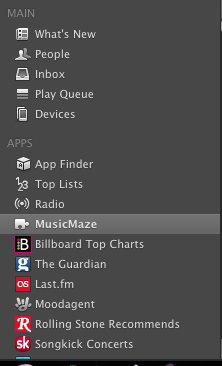
If you click on the App Finder you are presented with a dozen or so Spotify Apps including Last.fm, Rolling Stones, We are Hunted and Pitchfork. It is worth your time to install a few of these apps and see how they work in Spotify to get a feel for the platform. MoodAgent has a particularly slick looking interface:

A Spotify App is essentially a web app run inside a sandboxed web browser within Spotify. However, unlike a web app you can’t just create a Spotify App, post it on a website and release it to the world. Spotify is taking a cue from Apple and is creating a walled-garden for their apps. When you create an app, you submit it to Spotify and if they approve of it, they will host it and it will magically appear in the APPs sections on millions of Spotify desktops.
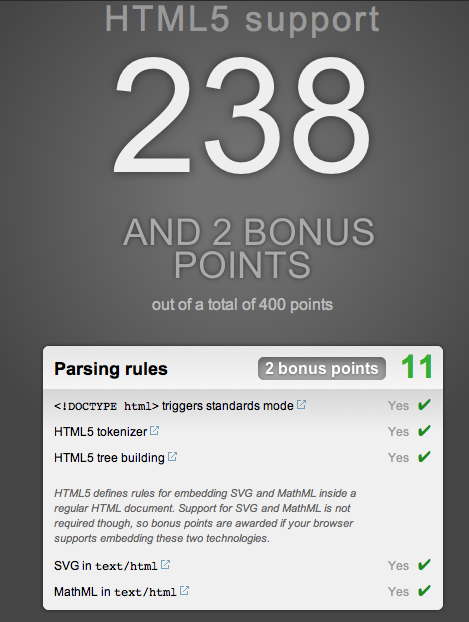
To get started you need to have your Spotify account enabled as a ‘developer’. To do this you have to email your credentials to platformsupport@spotify.com. I was lucky, it took just a few hours for my status to be upgraded to developer (currently it is taking one to three days for developers to get approved). Once you are approved as a developer, the Spotify client automagically gets a new ‘Develop’ menu that gives you access to the Inspector, shows you the level of HTML5 support and lets you easily reload your app:

Under the hood, Spotify Apps is based on Chromium so those that are familiar with Chrome and Safari will feel right at home debugging apps. Right click on your app and you can bring up the familiar Inspector to get under the hood of your application.

Developing a Spotify App is just like developing a modern HTML5 app. You have a rich toolkit: CSS, HTML and Javascript. You can use jQuery, you can use the many Javascript libraries. Your app can connect to 3rd party web services like The Echo Nest. The Spotify Apps supports just about everything your Chrome browser supports with some exceptions: no web audio, no video, no geolocation and no Flash (thank god).
Since your Spotify App is not being served over the web, you have to do a bit of packaging to make it available to Spotify during development. To do this you create a single directory for your app. This directory should have at least the index.html file for your app and a manifest.json file that contains info about your app. The manifest has basic info about your app. Here’s the manifest for my app:
% more manifest.json
{
 "BundleType": "Application",
 "AppIcon": {
     "36x18": "MusicMaze.png"
  },
 "AppName": {
     "en": "MusicMaze"
  },
 "SupportedLanguages": [
     "en"
 ],
 "RequiredPermissions": [
     "http://*.echonest.com"
 ]
}
The most important bit is probably the ‘RequiredPermissions’ field. This contains a list of hosts that my app will communicate with. The Spotify App sandbox will only let your app talk to hosts that you’ve explicitly listed in this field. This is presumably to prevent a rogue Spotify App using the millions of Spotify desktops as a botnet. There are lots of other optional fields in the manifest. All the details are on the Spotify Apps integration guidelines page.
I thought it would be pretty easy to port my MusicMaze to Spotify. And it turned out it really was. I just had to toss the HTML, CSS and Javascript into the application directory, create the manifest, and remove lots of code. Since the Spotify App version runs inside Spotify, my app doesn’t have to worry about displaying album art, showing the currently playing song, album and artist name, managing a play queue, support searching for an artist. Spotify will do all that for me. That let me remove quite a bit of code.
Integrating with Spotify is quite simple (at least for the functionality I needed for the Music Maze). To get the currently playing artist I used this code snippet:
var sp = getSpotifyApi(1);
function getCurrentArtist() {
   var playerTrackInfo = sp.trackPlayer.getNowPlayingTrack();
   if (playerTrackInfo == null) {
      return null;
   } else {
      return track.album.artist;
   }
}
To play a track in spotify given its Spotify URI use the snippet:
function playTrack(uri) {
     sp.trackPlayer.playTrackFromUri(uri, {
        onSuccess: function() { console.log("success");} ,
        onFailure: function () { console.log("failure");},
        onComplete: function () { console.log("complete"); }
    });
}
You can easily add event listeners to the player so you are notified when a track starts and stops playing. Here’s my code snippet that will create a new music maze whenever the user plays a new song.
function addAudioListener() {
    sp.trackPlayer.addEventListener("playerStateChanged", function (event) {
        if (event.data.curtrack) {
            if (getCurrentTrack()  != curTrackID) {
                var curArtist = getCurrentArtist();
                if (curArtist != null) {
                    newTree(curArtist);
                }
            }
        }
    });
}
Spotify cares what your app looks like. They want apps that run in Spotify to feel like they are part of Spotify. They have a set of UI guidelines that describe how to design your app so it fits in well with the Spotify universe. They also helpfully supply a number of CSS themes.
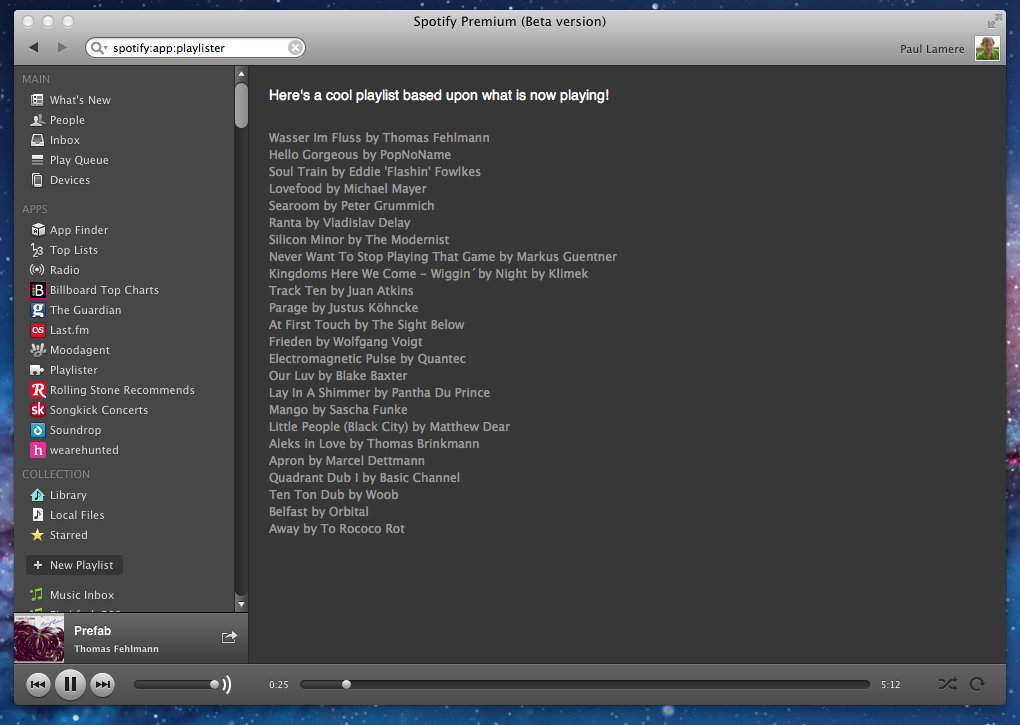
Getting the app up and running and playing music in Spotify was really easy. It took 10 minutes from when I received my developer enabled account until I had a simple Echo Nest playlisting app running in Spotify
Getting the full Music Maze up and running took a little longer, mainly because I had to remove so much code to make it work. The Maze itself works really well in Spotify. There’s quite a bit of stuff that happens when you click on an artist node. First, an Echo Nest artist similarity call is made to find the next set of artists for the graph. When those results arrive, the animation for the expanding the graph starts. At the same time another call to Echo Nest is made to get an artist playlist for the currently selected artist. This returns a list of ‘good’ songs by that artist. The first one is sent off to Spotify for it to play. Click on a node again and the next song it that list of good songs plays. Despite all these web calls, there’s no perceptible delay from the time you click on a node in the graph until you hear the music.

Here’s a video of the Music Maze in action. Apologies for the crappy audio, it was recorded from my laptop speakers.
[youtube http://youtu.be/finObm36V6Y]Here’s the down side of creating a Spotify App. I can’t show it to you right now. I have to submit it to Spotify and only when and if the approve it, and when they decided to release it will it appear in Spotify. One of the great things about web development is that you can have an idea on Friday night and spend a weekend writing some code and releasing it to the world by Sunday night. In the Spotify Apps world, the nimbleness of the web is lost .
Overall, the developer experience for writing Spotify Apps is great. It is a very familiar programming environment for anyone who’s made a modern web app. The debugging tools are the same ones you use for building web apps. You can use all your favorite libraries and toolkits and analytics packages that you are used to. I did notice some issues with some of the developer docs – in the tutorial sample code the ‘manifest.json’ is curiously misspelled ‘maifest.json’. The JS docs didn’t always seem to match reality. For instance, as far as I can tell, there’s no docs for the main Spotify object or the trackPlayer. To find out how to do things, I gave up on the JS docs and instead just dove into some of the other apps to see how they did stuff . (I love a world where you ship the source when you ship your app). Update – In the comments Matthias Buchetics points us to this Stack Overflow post that points out where to find the Spotify JavaScript source in the Spotify Bundle. At least we can look at the code until the time when Spotify releases better docs.
Update2 – here’s a gist that shows the simplest Spotify App that calls the Echo Nest API. It creates a list of tracks that are similar to the currently playing artist. Another Echo Nest based Spotify App called Mood Knobs is also on github.
From a technical perspective, Spotify has done a good job of making it easy for developers to write apps that can tap into the millions of songs in the Spotiverse. For music app developers, the content and audience that Spotify brings to the table will be hard to ignore. Still there are some questions about the Spotify Apps program that we don’t know the answer to:
- How quickly will they turn around an app? How long will it take for Spotify to approve a submitted app? Will it be hours, days, weeks? How will updates be managed? Typical web development turnaround on a bug fix is measured in seconds or minutes not days or weeks. If I build a Music Hack Day hack in Spotify, will I be the only one able to use it?
- How liberal will Spotify be about approving apps? Will they approve a wide range of indie apps or will the Spotify App store be dominated by the big music brands?
- How will developers make money? Spotify says that there’s no way for developers to make money building Spotify apps. No Ads, no revenue share. No 99 cent downloads. It is hard to imagine why developers would flock to a platform if there’s no possibility of making money.
I hope to try to answer some of these questions. I have a bit of cleanup to do on my app, but hopefully sometime this weekend, I’ll submit it to Spotify to see how the app approval process works. I’ll be sure to write more about my experiences as I work through the process.
The Music Matrix – Exploring tags in the Million Song Dataset
Posted by Paul in code, data, Music, The Echo Nest on November 27, 2011
Last month Last.fm contributed a massive set of tag data to the Million Song Data Set. The data set includes:
- 505,216 tracks with at least one tag
- 522,366 unique tags
- 8,598,630 (track – tag) pairs
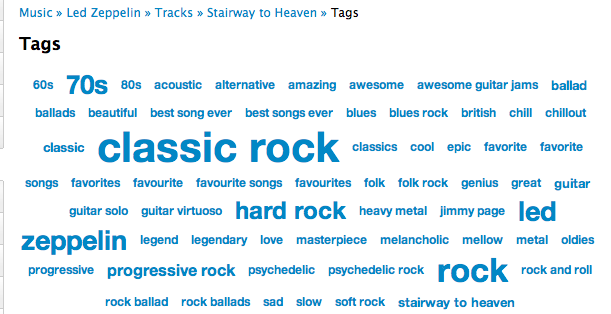
A popular track like Led Zep’s Stairway to Heaven has dozens of unique tags applied hundreds of times.
There is no end to the number of interesting things you can do with these tags: Track similarity for recommendation and playlisting, faceted browsing of the music space, ground truth for training autotagging systems etc.
I think there’s quite a bit to be learned about music itself by looking at these tags. We live in a post-genre world where most music no longer fits into a nice tidy genre categories. There are hundreds of overlapping subgenres and styles. By looking at how the tags overlap we can get a sense for the structure of the new world of music. I took the set of tags and just looked at how the tags overlapped to get a measure of how often a pair of tags co-occur. Tags that have high co-occurrence represent overlapping genre space. For example, among the 500 thousand tracks the tags that co-occur the most are:
- rap co-occurs with hip hop 100% of the time
- alternative rock co-occurs with rock 76% of the time
- classic rock co-occurs with rock 76% of the time
- hard rock co-occurs with rock 72% of the time
- indie rock co-occurs with indie 71% of the time
- electronica co-occurs with electronic 69% of the time
- indie pop co-occurs with indie 69% of the time
- alternative rock co-occurs with alternative 68% of the time
- heavy metal co-occurs with metal 68% of the time
- alternative co-occurs with rock 67% of the time
- thrash metal co-occurs with metal 67% of the time
- synthpop co-occurs with electronic 66% of the time
- power metal co-occurs with metal 65% of the time
- punk rock co-occurs with punk 64% of the time
- new wave co-occurs with 80s 63% of the time
- emo co-occurs with rock 63% of the time
It is interesting to see how the subgenres like hard rock or synthpop overlaps with the main genre and how all rap overlaps with Hip Hop. Using simple overlap we can also see which tags are the least informative. These are tags that overlap the most with other tags, meaning that they are least descriptive of tags. Some of the least distinctive tags are: Rock, Pop, Alternative, Indie, Electronic and Favorites. So when you tell someone you like ‘rock’ or ‘alternative’ you are not really saying too much about your musical taste.
The Music Matrix
I thought it might be interesting to explore the world of music via overlapping tags, and so I built a little web app called The Music Matrix. The Music Matrix shows the overlapping tags for a tag neighborhood or an artist via a heat map. You can explore the matrix, looking at how tags overlap and listening to songs that fit the tags.
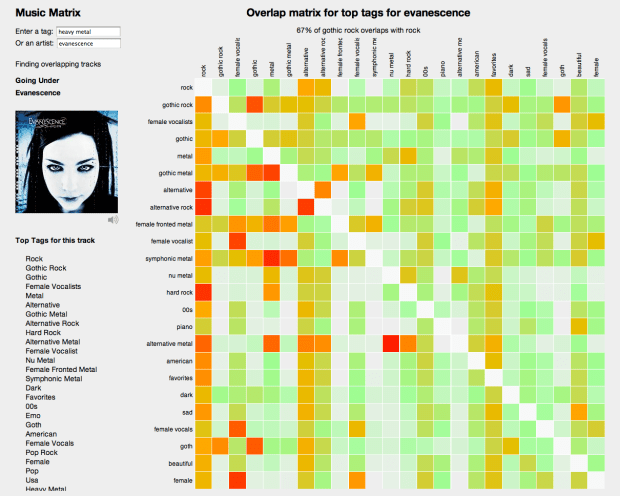
With this app you can enter a genre, style, mood or other type of tag. The app will then find the 24 tags with the highest overlap with the seed and show the confusion matrix. Hotter colors indicate high overlap. Mousing over a cell will show you the percentage overlap between the two corresponding tags and clicking on a cell will play a track that has high tag counts for the two tags. I find that I can learn a lot about a genre of music by looking at the 24 tag neighborhood for a genre and listening to examples. Some interesting neighborhoods to explore are:
You can also explore by moods:
If you are not sure what genre or style is for an artist, you can just start with the top tags for the artist like so:
Use the Music Matrix to explore a new genre of music or to find music that matches a set of styles. Find out how genres overlap. Listen to prototypical examples of different styles. Click on things, have fun. Check it out:
The code for the Music Matrix is on Github. Thanks to Thierry for creating the Million Song Data Set (the best research data set ever created) and thanks to Last.fm for contributing a very nice set of tag data to the data set.
Bohemian Rhapsichord – a Music Hack Day Hack
Posted by Paul in code, events, Music, The Echo Nest on November 6, 2011
It is Music Hack Day Boston this weekend. I worked with my daughter Jennie (of Jennie’s Ultimate Roadtrip fame) to build a music hack. This year we wanted to build a hack that actually made music. And so we built Bohemian Rhapsichord.
Bohemian Rhapsichord is a web app that turns the song Bohemian Rhapsody into a musical instrument. It uses TheEcho Nest analyzer to break the song into segments of quasi-stable musical events. It then shows these as an array of colored tiles (where the colors are based on timbre) that you can interact with like a musical instrument.
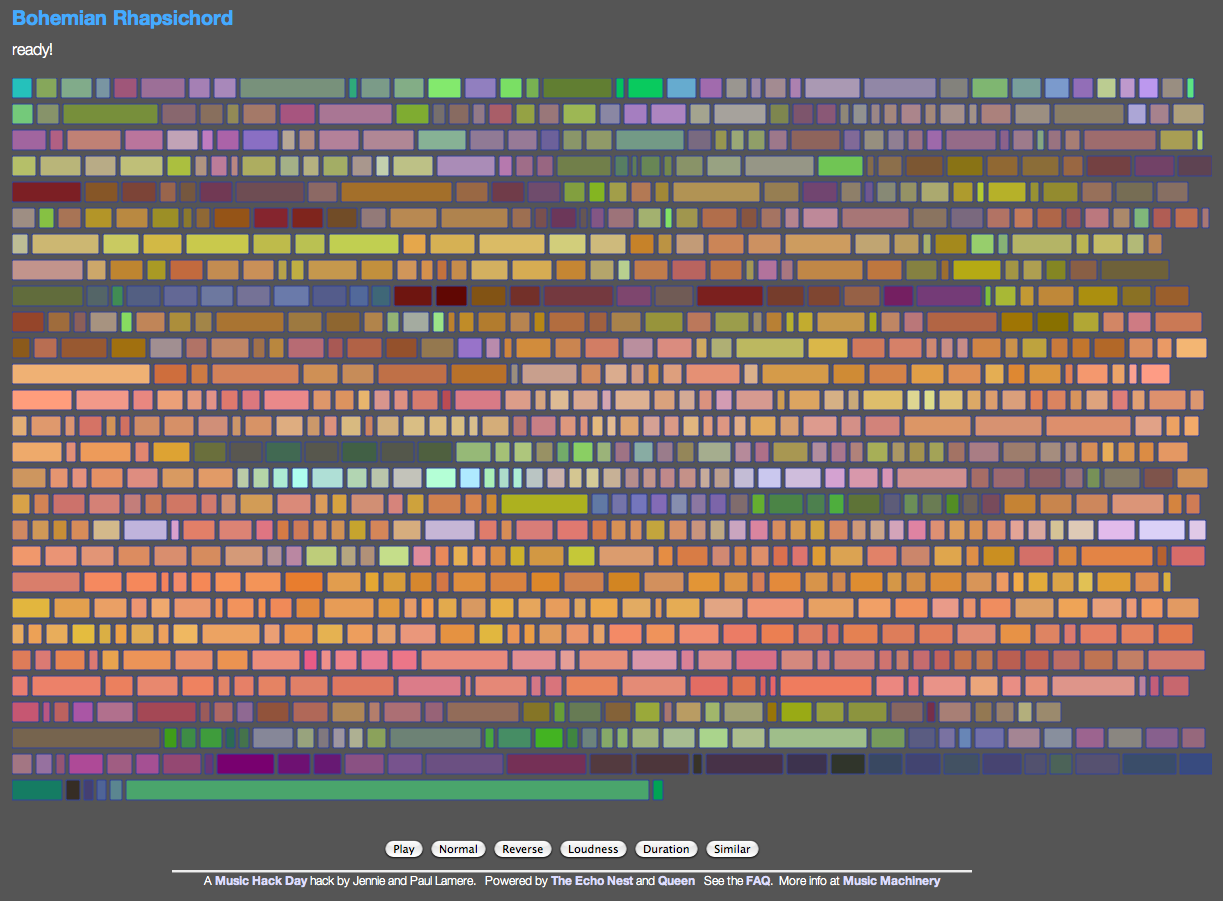
If you click on a tile, you play that portion of the song (or hold down shift or control and play tiles just by mousing over them). You can bind different segments to keys letting you play the ‘instrument’ with your keyboard too (See the FAQ for all the details). You can re-sort the tiles based on a few criteria (sequential order, by loudness, duration or by similarity to the last played note). It is a fun way to make music based on one of the best songs in the world.
The app makes use of the very new (and not always the most stable) web audio API. Currently, the only browser that I know that supports the web audio API is Chrome. The app is online so give it a try: Bohemian Rhapsichord
Speechiness – is it banjo or banter?
Posted by Paul in Music, The Echo Nest on November 4, 2011
There’s no bigger buzz kill when listening to a playlist of songs by your favorite artists than to find that you are no longer listening to music, but instead to some radio interview the drummer of the band gave to some local radio station in 1963. If you’ve listened to much Internet radio this has probably happened to you. An algorithmic playlisting engine may know that it is time to play a track by The Beatles, but it probably doesn’t know which tracks in the Beatles discography are music and which ones are interviews, and so sooner or later you’ll find yourself listening to Ringo talking about his new haircut instead of listening to While My Guitar Gently Weeps.

To help deal with this type of problem, The Echo Nest has just pushed out a new analysis attribute called Speechiness. Speechiness is a number between zero and one that indicates how likely a particular audio file is speech. Whenever you analyze a track with the Echo Nest analyzer, the track will be assigned a speechiness score. If the track has a high speechiness score, it is probably mostly speech, if it has a low score it is mostly non-speech. This speechiness parameter is a pretty good way to distinguish between music tracks and non-music tracks. As an example, lets look at tracks by comedian and banjo player Steve Martin. Steve has a large collection of comedy tracks, but he’s also an accomplished blue grass banjo player (What’s the difference between a chain saw and a banjo? You can turn a chain saw off.). We took 35 Steve Martin tracks and calculated the speechiness of them all and ordered them by increasing speechiness. Here’s a plot of the speechiness for these tracks:

You can see there’s a nice stable flat zone of low speechiness tracks – these are the banjo and blue grass ones and a stable flat zone of high speechiness tracks – the standup comedy. In between are some hybrid tracks – like Ramblin man – a comedy routine with a banjo accompaniment. I created a web page where you can audition the tracks to see how well the speechiness attribute has separated the banjo from the banter.

I think it is quite cool how the speechiness attribute was able to separate the music from the spoken word.
Trying this yourself
Brian put together a quick demo that lets you calculate the speechiness of any track that’s on SoundCloud. Brian put the demo together in an hour so he says it is ‘totally buggy and hacky’ – but so far it has worked great for me. Just enter the URL to any SoundCloud tracks, wait a half-a-minute and see the speechiness score. A result in the green is probably music (or some other non-speech audio), while a result in the red is speech.
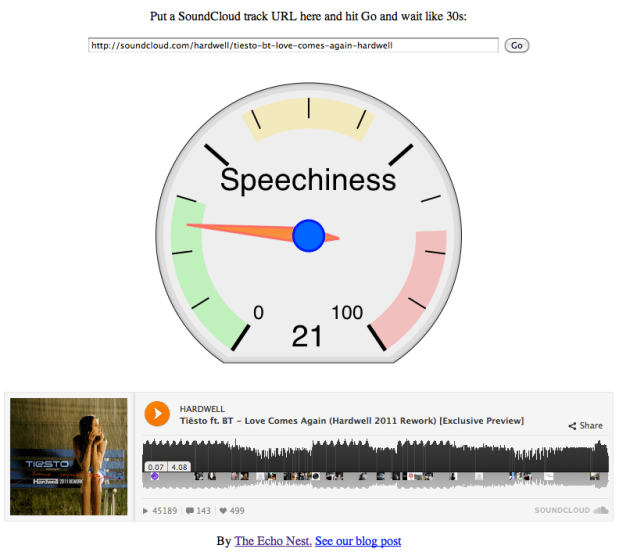 The demo is pretty cool. Go to speechiness.echonest.com to try it out. If you don’t have any SoundCloud tracks handy, here are some tracks to try (expect these direct links to take 30 seconds to load since the speechiness web app is triggering a full song analysis on page load):
- hiddenvalley/obama
- kfw/variations-for-oud-synthesizer-1-excerpt
- bwhitman/16-holy-night/
- hardwell/tiesto-bt-love-comes-again-hardwell
{
    "response": {
        "status": {
            "code": 0,
            "message": "Success",
            "version": "4.2"
        },
        "track": {
            "analyzer_version": "3.08d",
            "artist": "The Beatles",
            "artist_id": "AR6XZ861187FB4CECD",
            "audio_summary": {
                "analysis_url": "https://echonest-analysis.s3.amazonaws.com/TR/TRAVQYP13369CD8BDC/3/full.json?Signature=EEiMYDzPquMmlW7fJlLvdWKI6PI%3D&Expires=1320409614&AWSAccessKeyId=AKIAJRDFEY23UEVW42BQ",
                "danceability": 0.37855052706867015,
                "duration": 54.999549999999999,
                "energy": 0.85756107654449365,
                "key": 9,
                "loudness": -10.613,
                "mode": 1,
 "speechiness": 0.1824877387165752,
                "tempo": 91.356999999999999,
                "time_signature": 5
            },
            "bitrate": 2425500,
            "id": "TRAVQYP13369CD8BDC",
            "md5": "ec2d40704439f5650b67884e00242d99",
            "release": "Help!",
            "samplerate": 44100,
            "song_id": "SOINKRY12B20E5E547",
            "status": "complete",
            "title": "Dizzy Miss Lizzie"
        }
    }
}
Wrapping up
The speechiness attribute is an alpha release. There may still be some tweaks to the algorithm in the near future. We’ve currently applied the attribute to the top 100,000 or so most popular tracks in The Echo Nest. Once we are totally satisfied with the algorithm we will apply it to all of our many millions of tracks as well as incorporating it into our search and playlisting APIs allowing you to filter and sort results based upon speechiness. In the future you’ll be able to make that Beatles playlist and limit the results to only tracks that have a low speechiness, eliminating the hair cut interviews entirely from your listening rotation (or conversely and perversely you’ll be able to create a playlist with just the hair cut interviews.) Congrats to The Echo Nest Audio team for rolling out this really useful feature.
Search for music by drawing a picture of it
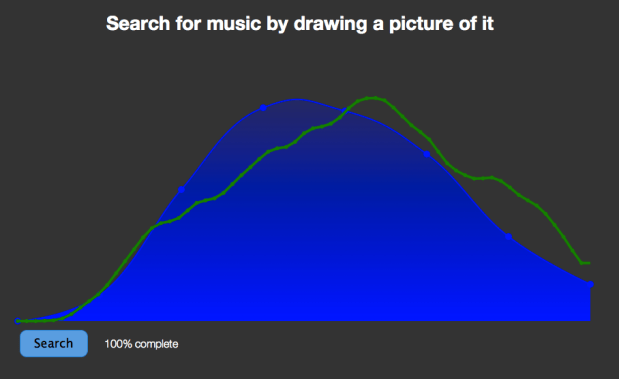
I’ve spent the weekend hacking on a project at Music Hack Day Montreal. For my hack I created an application with the catchy title “Search for music by drawing a picture of it”. The hack lets you draw the loudness profile for a song and the app will search through the Million Song Data Set to find the closest match. You can then listen to the song in Spotify (if the song is in the Spotify collection).
Coding a project in 24 hours is all about compromise. I had some ideas that I wanted to explore to make the matching better (dynamic time warping) and the lookup faster (LSH). But since I actually wanted to finish my hack I’ve saved those improvements for another day. The simple matching approach (Euclidean distance between normalized vectors) works surprisingly well. The linear search through a million loudness vectors takes about 20 seconds, too long for a web app, this can be made palatable with a little Ajax .
The hack day has been great fun, kudos to the Montreal team for putting it all together.
Searching for chilled metal
It seems like every heavy metal band has at least one chill-out song – from Metallica’s Nothing Else Matters to Led Zeppelin’s That’s the Way. These tracks give some relief from the otherwise relentless pounding of the hammer of the gods. It’d be nice to be able to collect up a bunch of these chilled-metal songs into a playlist – perfect for when your mom’s visiting (she tells me that she doesn’t like pounding metal).

ChilLed Zeppelin - Some rights (by-nc-sa) reserved by Heinrich Klaffs
To find chilled metal, we can use The Echo Nest API. The Echo Nest has calculated a wide range of acoustic and musical attributes for millions of songs. One such attribute is energy . We can make a simple song/search query for heavy metal songs that have low energy. These will be our chilled-metal songs that your mom enjoys so much. Here’s the API query:
http://developer.echonest.com/api/v4/song/search?&style=heavy+metal&sort=energy-asc
This query searches for songs by heavy metal artists, and sorts the results in order of ascending energy (so the lowest energy tracks will be returned first). The query does a really good job of finding chilled metal. Here’s a sampling of the results:

Sphinx (The Guardian) by Black Sabbath
[audio http://previews.7digital.com/clips/34/645345.clip.mp3]
Sphinx (The Guardian) by Black Sabbath – energy: 0.0003

Demon Driver reprise by Gillan
[audio http://previews.7digital.com/clips/34/4179195.clip.mp3]
Demon Drive by Gillan – energy: 0.010

The Return by Saxon
[audio http://previews.7digital.com/clips/34/5318312.clip.mp3]
The Return by Saxon – energy: 0.013

Solitude by Judas Priest
[audio http://previews.7digital.com/clips/34/3544312.clip.mp3]
Solitude by Judas Priest – energy: 0.049

Joan of Arc by UFO
[audio http://previews.7digital.com/clips/34/7952114.clip.mp3]
Joan of Arc by UFO – Energy: 0.05

Fear by Black Label Society
[audio http://previews.7digital.com/clips/34/5768332.clip.mp3]
Fear by Black Label Society – Energy – 0.119
You can also use the Echo Nest Playlist API to generate a chilled metal playlist. Here’s a call to create a playlist of chilled metal in XSPF format.
You can toss this playlist into a player like VLC or Songbird that supports XSPF and start listening to chilled metal right away (30 second samples only) like this:
% curl 'http://developer.echonest.com/api/v4/playlist/static?api_key=N6E4NIOVYMTHNDM8J\
   &style=heavy+metal&max_energy=.1\
   &type=artist-description&bucket=id:7digital&bucket=tracks&limit=true\
   &format=xspf' > chilled-metal.xspf
% open chilled-metal.xspf
There you go, you now have all the tools you need to keep your chilled metal queue filled and fresh, almost everything you need to keep your mom happy.
Thanks much to 7Digital for providing audio clips and album art.

