Posts Tagged claude
Sort Your Music Gets an Update.
Sort Your Music has been helping people sort their Spotify playlists since 2012. Millions of playlists later, the app just got its first major rewrite. The core idea is the same — pick a playlist, sort by tempo or energy or danceability, save it back — but pretty much everything else is new.
Why Now?
Spotify updated their auth API to require HTTPS for all redirect URIs. Fair enough — it’s 2026, everything should be HTTPS. But that meant I needed a proper TLS setup, and the server Sort Your Music had been running on was a 10-year-old Linode instance that was getting increasingly painful to maintain. Upgrading the OS, patching dependencies, coaxing ancient packages into working with modern TLS — at some point it’s easier to just start fresh.
So that’s what happened. Spanking new server, spic and span secure endpoints. And once I was in there anyway, I figured the app itself deserved a refresh too. The original code was written in a single sitting in 2012 and it showed. The rewrite was also written in a single sitting — but this time Claude wrote all the code. I described what I wanted, reviewed what came back, and nudged things along. The whole thing came together in an afternoon.
Playlist Filtering
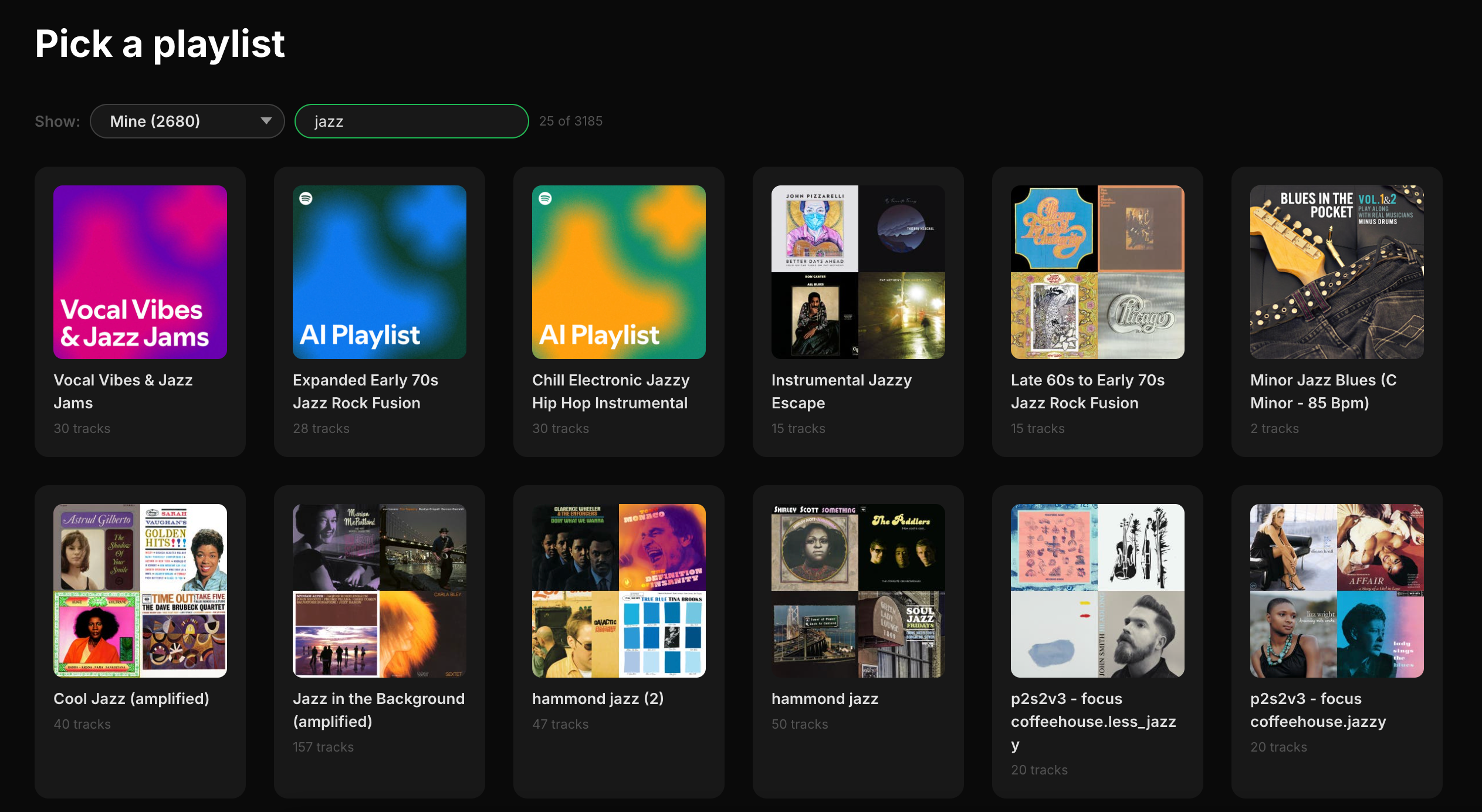
The biggest new feature is filtering. If you’re like me and have hundreds of playlists, scrolling through all of them to find the right one is a drag. Now you can filter by category:
- Mine — playlists you created
- Personalized — Spotify’s algorithmic playlists like Discover Weekly, Daily Mixes, and Release Radar
- Spotify — editorial playlists like Today’s Top Hits and RapCaviar
- Others — playlists by other users
- Collaborative — multi-user playlists
There’s also a search box for filtering by name, and a counter showing how many playlists match.
Podcast Episode Support
Spotify playlists can contain podcast episodes alongside tracks now. The old version choked on these. The new version handles them fine — episodes show up in the table (in italics), audio attributes like BPM and energy are just omitted since they don’t apply, and episodes are preserved when you save.
Richer Playlist Metadata
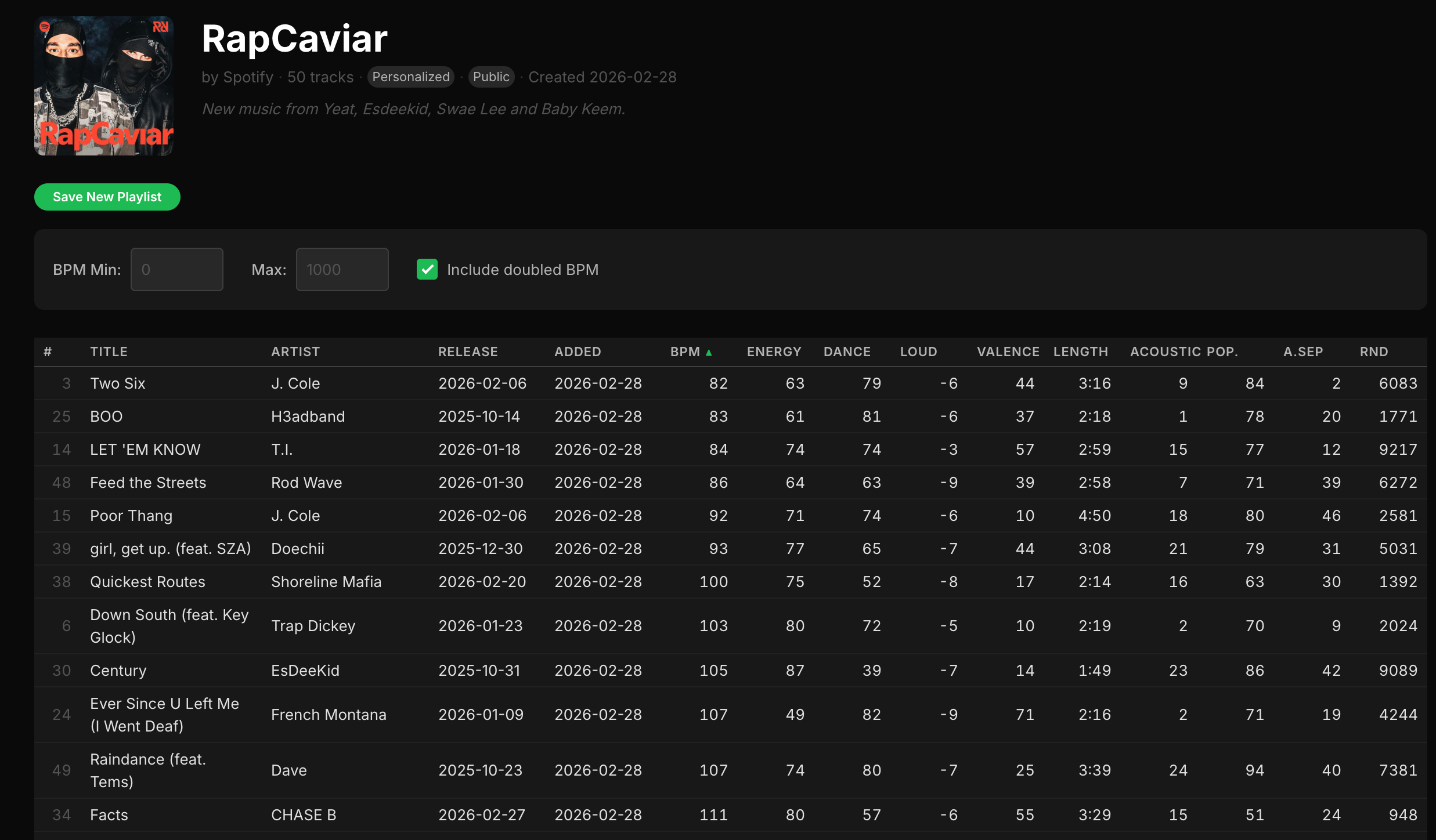
When you open a playlist, the header now shows cover art alongside the title, owner, track count, category, and creation date. Public and collaborative playlists get badges. If the playlist has a description, that shows up too. There’s also a new “Added” column showing when each track was added to the playlist.
Smarter Save Behavior
The save workflow got smarter. The app detects when a playlist is read-only (Spotify editorial playlists, Discover Weekly, etc.) and hides the “Overwrite” option, showing only “Save as New.” When you do save, the new playlist’s description notes how it was sorted. The button gives you a spinner during the save and a confirmation when it’s done.
Progressive Loading
Both playlists and tracks load incrementally now. A progress bar shows how far along things are, and items appear on screen as they arrive. Navigate away mid-load and the request gets properly cancelled — no more zombie API calls.
Modern Landing Page
The landing page makes it clear the app is open source and runs entirely in your browser. No data goes to any server other than Spotify’s.
Comprehensive FAQ
The FAQ got a big expansion — privacy policy, detailed explanations of each audio attribute, guidance on playlist categories, and a screenshot so you can see what the app looks like before committing to a login.
Under the Hood
The original was a product of its era: everything crammed into a single index.html, jQuery, Bootstrap 3, Underscore, DataTables, Q.js for promises. It worked, but it was very much 2012.
The rewrite is vanilla ES modules with zero runtime dependencies. The code is split into proper modules — views, utilities, API helpers, state management — but there’s still no build step or bundler. Edit a file, refresh the browser. Some things don’t need to change.
Auth moved from Spotify’s now-deprecated implicit grant flow to Authorization Code with PKCE, which is more secure and supports refresh tokens. No more re-authenticating every hour.
The CSS uses custom properties for theming with a Spotify-inspired dark palette, and the layout is responsive down to mobile.
Try It
Sort Your Music is live at sortyourmusic.playlistmachinery.com. The source is on GitHub.
 Music Machinery