Finding soundtracks on spotify, mog and rdio
Posted by Paul in Music, recommendation on July 11, 2011
Ethan Kaplan over at hypebot had a problem with how hard it is to find soundtracks by John Williams on music services like Spotify and Rdio. Here’s what he said:
Try going to Spotify and browsing movie soundtracks. I’ll wait.
Try searching for John Williams. He is not a guitarist, but that is what comes up mixed in with all of the soundtrack work he has done.
And this is not something unique to Spotify, but also endemic to Rdio and Mog. Mog at least has a page of curated soundtracks, but its just as hard to find them “in the wild” as it is on Spotify. The same applies to Rdio.
Well, of course, if you search for John Williams you’ll get music by both the movie composer and by the guitarist. That is only natural, because, you may really want the music by the guitarist and not music by the composer. Let’s see what happens if you go one step further than Ethan did and search for “john williams soundstracks”. Here are the results on Spotify:
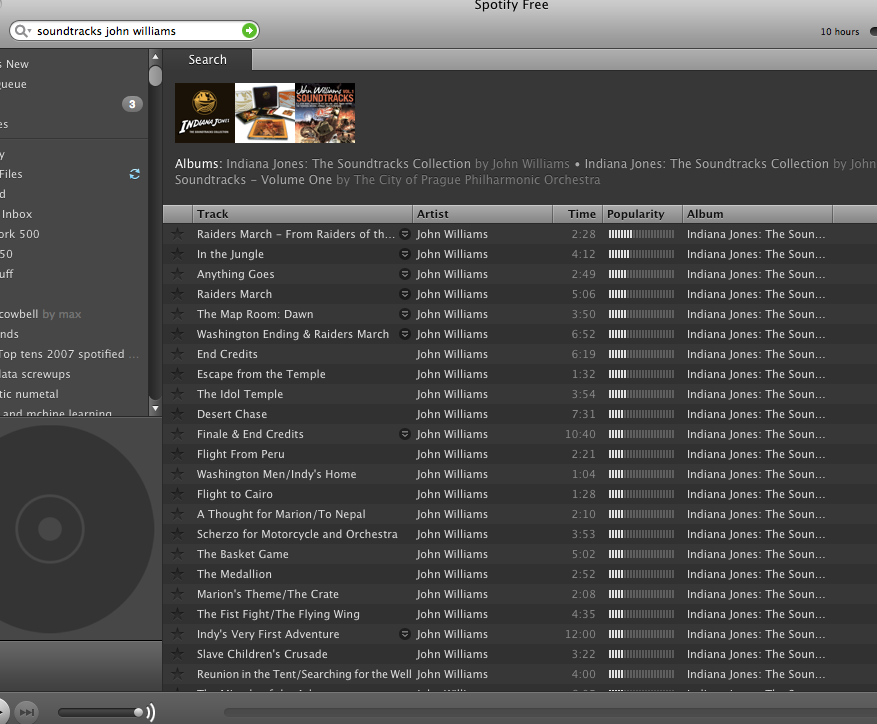
Not surprisingly, there are hundreds of matches of John Williams and soundtracks. Similar results with Rdio:
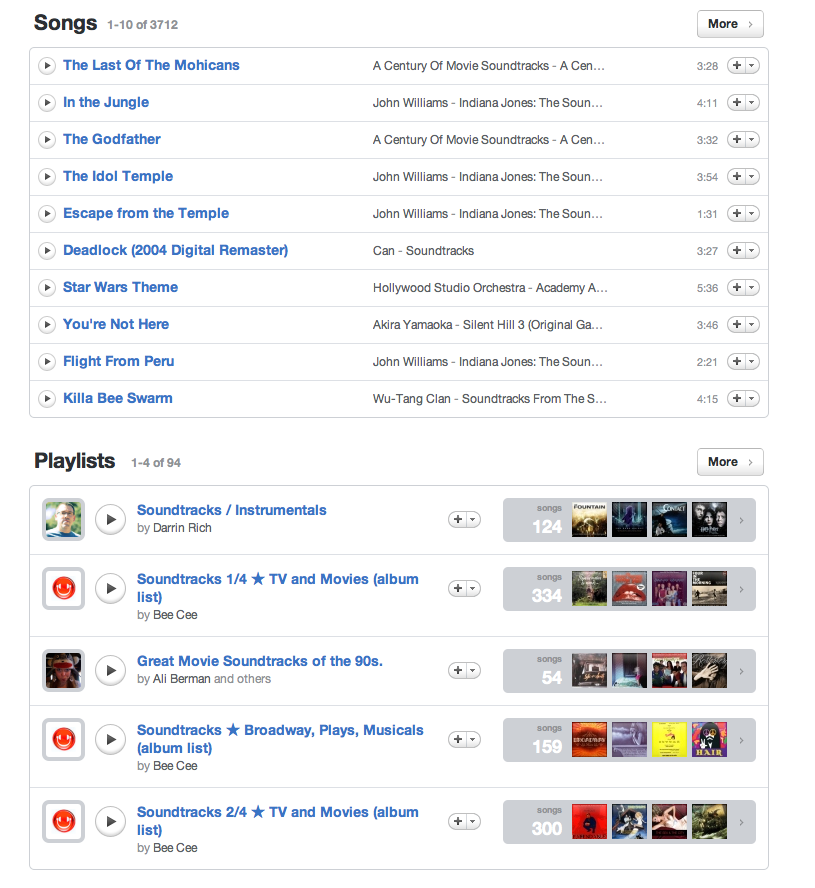
Lots of John Williams soundtrack results. Rdio even offers human curated playlists filled with soundtracks. What could be better? Likewise, if you just search for soundtracks there are lots of hits:
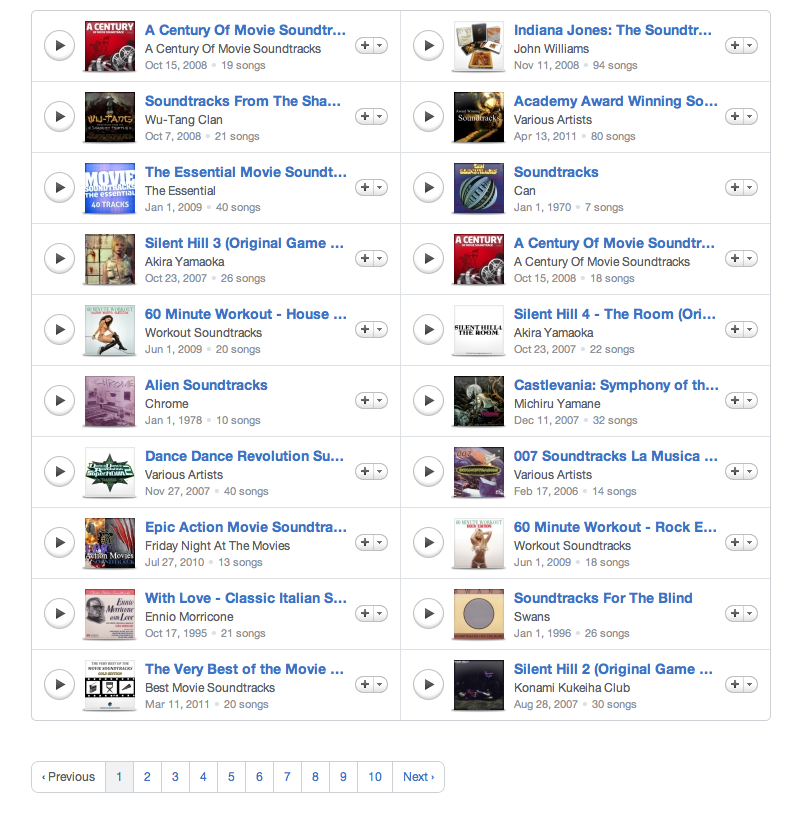
So I don’t buy Ethan’s premise that it is hard to find soundtracks or music by the movie composer John Williams. However, Ethan’s point still stands: finding new music on current generation music services really sucks. The next generation music services need to do much better to help people explore and discover new music. Music exploration should be fun and yet we are doomed to try to explore and discover music using a tool that looks like an accountant’s spreadsheet.
Finding duplicate songs in your music collection with Echoprint
Posted by Paul in code, Music, The Echo Nest on June 25, 2011
 This week, The Echo Nest released Echoprint – an open source music fingerprinting and identification system. A fingerprinting system like Echoprint recognizes music based only upon what the music sounds like. It doesn’t matter what bit rate, codec or compression rate was used (up to a point) to create a music file, nor does it matter what sloppy metadata has been attached to a music file, if the music sounds the same, the music fingerprinter will recognize that. There are a whole bunch of really interesting apps that can be created using a music fingerprinter. Among my favorite iPhone apps are Shazam and Soundhound – two fantastic over-the-air music recognition apps that let you hold your phone up to the radio and will tell you in just a few seconds what song was playing. It is no surprise that these apps are top sellers in the iTunes app store. They are the closest thing to magic I’ve seen on my iPhone.
In addition to the super sexy applications like Shazam, music identification systems are also used for more mundane things like copyright enforcement (helping sites like Youtube keep copyright violations out of the intertubes), metadata cleanup (attaching the proper artist, album and track name to every track in a music collection), and scan & match like Apple’s soon to be released iCloud music service that uses music identification to avoid lengthy and unnecessary music uploads. One popular use of music identification systems is to de-duplicate a music collection. Programs like tuneup will help you find and eliminate duplicate tracks in your music collection.
This week I wanted to play around with the new Echoprint system, so I decided I’d write a program that finds and reports duplicate tracks in my music collection. Note: if you are looking to de-duplicate your music collection, but you are not a programmer, this post is *not* for you, go and get tuneup or some other de-duplicator. The primary purpose of this post is to show how Echoprint works, not to replace a commercial system.
How Echoprint works
Echoprint, like many music identification services is a multi-step process: code generation, ingestion and lookup. In the code generation step, musical features are extracted from audio and encoded into a string of text. In the ingestion step, codes for all songs in a collection are generated and added to a searchable database. In the lookup step, the codegen string is generated for an unknown bit of audio and is used as a fuzzy query to the database of previously ingested codes. If a suitably high-scoring match is found, the info on the matching track is returned. The devil is in the details. Generating a short high level representation of audio that is suitable for searching that is insensitive to encodings, bit rate, noise and other transformations is a challenge. Similarly challenging is representing a code in a way that allows for high speed querying and allows for imperfect matching of noisy codes.
Echoprint consists of two main components: echoprint-codegen and echoprint-server.
Code Generation
echoprint-codegen is responsible for taking a bit of audio and turning it into an echoprint code. You can grab the source from github and build the binary for your local platform. The binary will take an audio file as input and give output a block of JSON that contains song metadata (that was found in the ID3 tags in the audio) along with a code string. Here’s an example:
plamere$ echoprint-codegen test/unison.mp3 0 10
[
{"metadata":{"artist":"Bjork",
    "release":"Vespertine",
     "title":"Unison",
     "genre":"",
     "bitrate":128,"sample_rate":44100, "duration":405,
     "filename":"test/unison.mp3",
     "samples_decoded":110296,
     "given_duration":10, "start_offset":1,
     "version":4.11,
     "codegen_time":0.024046,
     "decode_time":0.641916},
     "code_count":174,
     "code":"eJyFk0uyJSEIBbcEyEeWAwj7X8JzfDvKnuTAJIojWACwGB4QeM\
       HWCw0vLHlB8IWeF6hf4PNC2QunX3inWvDCO9WsF7heGHrhvYV3qvPEu-\
       87s9ELLi_8J9VzknReEH1h-BOKRULBwyZiEulgQZZr5a6OS8tqCo00cd\
       p86ymhoxZrbtQdgUxQvX5sIlF_2gUGQUDbM_ZoC28DDkpKNCHVkKCgpd\
       OHf-wweX9adQycnWtUoDjABumQwbJOXSZNur08Ew4ra8lxnMNuveIem6\
       LVLQKsIRLAe4gbj5Uxl96RpdOQ_Noz7f5pObz3_WqvEytYVsa6P707Jz\
       j4Oa7BVgpbKX5tS_qntcB9G--1tc7ZDU1HamuDI6q07vNpQTFx22avyR",
     "tag":0}
]
In this example, I’m only fingerprinting the first 10 second of the song to conserve space. The code string is just a base64 encoding of a zlib compression of the original code string, which is a hex encoded series of ASCII numbers. A full version of this code is what is indexed by the lookup server for fingerprint queries. Codegen is quite fast. It scans audio at roughly 250x real time per processor after decoding and resampling to 11025 Hz. This means a full song can be scanned in less than 0.5s on an average computer, and an amount of audio suitable for querying (30s) can be scanned in less than 0.04s. Decoding from MP3 will be the bottleneck for most implementations. Decoders like mpg123 or ffmpeg can decode 30s mp3 audio to 11025 PCM in under 0.10s.
The Echoprint Server
The Echoprint server is responsible for maintaining an index of fingerprints of (potentially) millions of tracks and serving up queries. The lookup server uses the popular Apache Solr as the search engine. When a query arrives, the codes that have high overlap with the query code are retrieved using Solr. The lookup server then filters through these candidates and scores them based on a number of factors such as the number of codeword matches, the order and timing of codes and so on. If the best matching code has a high enough score, it is considered a hit and the ID and any associated metadata is returned.
To run a server, first you ingest and index full length codes for each audio track of interest into the server index. To perform a lookup, you use echoprint-codegen to generate a code for a subset of the file (typically 30 seconds will do) and issue that as a query to the server.
The Echo Nest hosts a lookup server, so for many use cases you won’t need to run your own lookup server. Instead , you can make queries to the Echo Nest via the song/identify call. (We also expect that many others may run public echoprint servers as well).
Creating a de-duplicator
With that quick introduction on how Echoprint works let’s look at how we could create a de-duplicator. The core logic is extremely simple:
       create an empty echoprint-server
       foreach mp3 in my-music-collection:
          code = echoprint-codegen(mp3)            // generate the code
          result = echoprint-server.query(code)    // look it up
          if result:                               // did we find a match?
               print 'duplicate for', mp3, 'is', result
          else:                                    // no, so ingest the code
               echoprint-server.ingest(mp3, code)
We create an empty fingerprint database. For each song in the music collection we generate an Echoprint code and query the server for a match. If we find one, then the mp3 is a duplicate and we report it. Otherwise, it is a new track, so we ingest the code for the new track into the echoprint server. Rinse. Repeat.
I’ve written a python program dedup.py to do just this. Being a cautious sort, I don’t have it actually delete duplicates, but instead, I have it just generate a report of duplicates so I can decide which one I want to keep. The program also keeps track of its state so you can re-run it whenever you add new music to your collection.
Here’s an example of running the program:
% python dedup.py ~/Music/iTunes
          1  1 /Users/plamere/Music/misc/ABBA/Dancing Queen.mp3
               ( lines omitted...)
        173 41 /Users/plamere/Music/misc/Missy Higgins - Katie.mp3
        174 42 /Users/plamere/Music/misc/Missy Higgins - Night Minds.mp3
        175 43 /Users/plamere/Music/misc/Missy Higgins - Nightminds.mp3

duplicate /Users/plamere/Music/misc/Missy Higgins - Nightminds.mp3
          /Users/plamere/Music/misc/Missy Higgins - Night Minds.mp3

        176 44 /Users/plamere/Music/misc/Missy Higgins - This Is How It Goes.mp3
Dedup.py print out each mp3 as it processes it and as it finds a duplicate it reports it. It also collects a duplicate report in a file in pblml format like so:
duplicate <sep> iTunes Music/Bjork/Greatest Hits/Pagan Poetry.mp3 <sep> original <sep> misc/Bjork Radio/Bjork - Pagan Poetry.mp3
duplicate <sep> iTunes Music/Bjork/Medulla/Desired Constellation.mp3 <sep> original <sep> misc/Bjork Radio/Bjork - Desired Constellation.mp3
duplicate <sep> iTunes Music/Bjork/Selmasongs/I've Seen It All.mp3 <sep> original <sep> misc/Bjork Radio/Bjork - I've Seen It All.mp3
Again, dedup.py doesn’t actually delete any duplicates, it will just give you this nifty report of duplicates in your collection.
Trying it out
If you want to give dedup.py a try, follow these steps:
- Download, build and install echoprint-codegen
- Download, build, install and run the echoprint-server
- Get dedup.py.
- Edit line 10 in dedup.py to set the sys.path to point at the echoprint-server API directory
- Edit line 13 in dedup.py to set the _codegen_path to point at your echoprint-codegen executable
% python dedup.py ~/Music
This will find all of the dups and write them to the dedup.dat file. It takes about 1 second per song. To restart (this will delete your fingerprint database) run:
% python dedup.py --restart
Note that you can actually run the dedup process without running your own echoprint-server (saving you the trouble of installing Apache-Solr, Tokyo cabinet and Tokyo cabinet). The downside is that you won’t have any persistent server, which means that you’ll not be able to incrementally de-dup your collection – you’ll need to do it in all in one pass. To use the local mode, just add local-True to the fp.py calls. The index is then kept in memory, no solr or Tokyo tyrant is needed.
Wrapping up
dedup.py is just one little example of the kind of application that developers will be able to create using Echoprint. I expect to see a whole lot more in the next few months. Before Echoprint, song identification was out of the reach of the typical music application developer, it was just too expensive. Now with Echoprint, anyone can incorporate music identification technology into their apps. The result will be fewer headaches for developers and much better music applications for everyone.
Visualizing the active years of popular artists
Posted by Paul in data, Music, The Echo Nest, visualization on June 21, 2011
This week the Echo Nest is extending the data returned for an artist to include the active years for an artist. For thousands of artists you will be able to retrieve the starting and ending date for an artists career. This may include multiple ranges as groups split and get back together for that last reunion tour. Over the weekend, I spent a few hours playing with the data and built a web-based visualization that shows you the active years for the top 1000 or so hotttest artists.
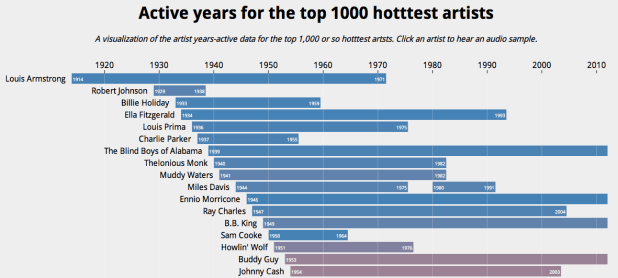
The visualization shows the artists in order of their starting year. You can see the relatively short careers of artists like Robert Johnson and Sam Cooke, and the extremely long careers of artists like The Blind Boys of Alabama and Ennio Morricone. The color of an artist’s range bar is proportional to the artist’s hotttnesss. The hotter the artist, the redder the bar. Thanks to 7Digital, you can listen to a sample of the artist by clicking on the artist. To create the visualization I used Mike Bostock’s awesome D3.js (Data Driven Documents) library.
It is fun to look at some years active stats for the top 1000 hotttest artists:
- Average artist career length: 17 years
- Percentage of top artists that are still active: 92%
- Longest artist career: The Blind Boys of Alabama – 73 Years and still going
- Gone but not forgotten – Robert Johnson – Hasn’t recorded since 1938 but still in the top 1,000
- Shortest Career – Joy Division – Less than 4 Years of Joy
- Longest Hiatus – The Cars – 22 years – split in 1988, but gave us just what we needed when they got back together in 2010
- Can’t live with’em, can’t live without ’em – Simon and Garfunkel – paired up 9 separate times
- Newest artist in the top 1000 – Birdy – First single released in March 2011
Check out the visualization here: Active years for the top 1000 hotttest artists and read more about the years-active support on the Echo Nest blog
Reidentification of artists and genres in the KDD cup data
Posted by Paul in data, recommendation, research on June 21, 2011
Back in February I wrote a post about the KDD Cup ( an annual Data Mining and Knowledge Discovery competition), asking whether this year’s cup was really music recommendation since all the data identifying the music had been anonymized. The post received a number of really interesting comments about the nature of recommendation and whether or not context and content was really necessary for music recommendation, or was user behavior all you really needed. A few commenters suggested that it might be possible de-anonymize the data using a constraint propagation technique.
 Many voiced an opinion that such de-anonymizing of the data to expose user listening habits would indeed be unethical. Malcolm Slaney, the researcher at Yahoo! who prepared the dataset offered the plea:
If you do de-anonymize the data please don’t tell anybody. We’ll NEVER be able to release data again.
As far as I know, no one has de-anonymized the KDD Cup dataset, however, researcher Matthew J. H. Rattigan of The University of Massachusetts at Amherst has done the next best thing. He has published a paper called Reidentification of artists and genres the KDD cup that shows that by analyzing at the relational structures within the dataset it is possible to identify the artists, albums, tracks and genres that are used in the anonymized dataset. Here’s an excerpt from the paper that gives an intuitive description of the approach:
For example, consider Artist 197656 from the Track 1 data. This artist has eight albums described by different combinations of ten genres. Each album is associated with several tracks, with track counts ranging from 1 to 69. We make the assumption that these albums and tracks were sampled without replacement from the discography of some real artist on the Yahoo! Music website. Furthermore, we assume that the connections between genres and albums are not sampled; that is, if an album in the KDD Cup dataset is attached to three genres, its real-world counterpart has exactly three genres (or “Categories”, as they are known on the Yahoo! Music site).
Under the above assumptions, we can compare the unlabeled KDD Cup artist with real-world Yahoo! Music artists in order to find a suitable match. The band Fischer Z, for example, is an unsuitable match, as their online discography only contains seven albums. An artist such as Meatloaf certainly has enough albums (56) to be a match, but none of those albums contain more than 31 tracks. The entry for Elvis Presley contains 109 albums, 17 of which boast 69 or more tracks; however, there is no consistent assignment of genres that satisfies our assumptions. The band Tool, however, is compatible with Artist 197656. The Tool discography contains 19 albums containing between 0 and 69 tracks. These albums are described by exactly 10 genres, which can be assigned to the unlabeled KDD Cup genres in a consistent manner. Furthermore, the match is unique: of the 134k artists in our labeled dataset, Tool is the only suitable match for Artist 197656.
Of course it is impossible for Matthew to evaluate his results directly, but he did create a number of synthetic, anonymized datasets draw from Yahoo and was able to demonstrate very high accuracy for the top artists and a 62% overall accuracy.
The motivation for this type of work is not to turn the KDD cup dataset into something that music recommendation researchers could use, but instead is to get a better understanding of data privacy issues. By understanding how large datasets can be de-anonymized, it will be easier for researchers in the future to create datasets that won’t be easily yield their hidden secrets. The paper is an interesting read – so since you are done doing all of your reviews for RecSys and ISMIR, go ahead and give it a read: https://www.cs.umass.edu/publication/docs/2011/UM-CS-2011-021.pdf. Thanks to @ocelma for the tip.
Finding artist names in text

Let’s say you have a block of text – perhaps a tweet or a web page from a music review site. If you want to find out if the text mentions a particular artist such as Weezer, it is a pretty straightforward task: Just search through the text for the artist name and all the variants and aliases for that artist. It is pretty easy.
What is harder is trying to figure out if any artists are mentioned in a block of text, and if so, which ones. Since there are millions of artists, each with their own set of aliases and variants, the simple search that we use to find ‘Weezer’ in a tweet doesn’t work so well. The fact that many artist names are also common words adds to the difficulty.
Luckily I work with a bunch of really smart folks at The Echo Nest who’ve already had to solve this problem in order to make The Echo Nest work. Over on the Echo Nest blog, there’s a nifty description of the problem of artist name identification and extraction and an announcement of the release of a new (and very much beta) API called artist/extract that will expose some of this functionality to application developers that use our APIs.
This morning I spent a few minutes and created a little web app that lets you play with the artist/extract API. Here’s a screenshot:
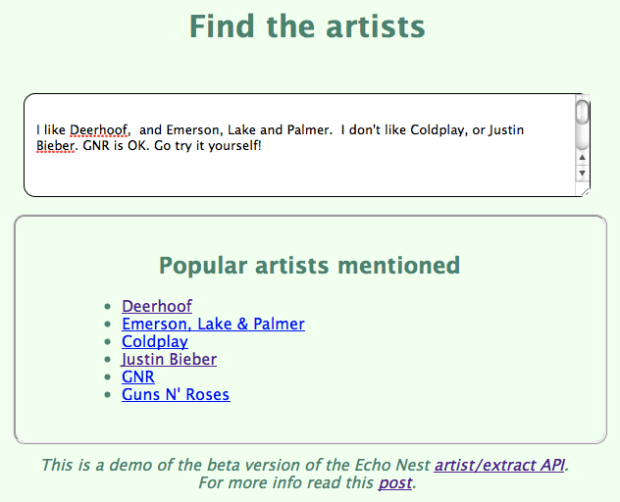
In this example I’ve typed in the text:
I like Deerhoof, and Emerson, Lake and Palmer. I don’t like Coldplay, or Justin Bieber. GNR is OK. Go try it yourself!
You can see that it found Deerhoof and Coldplay, (easy enough), and a spelling variant of Emerson, Lake & Palmer. It also recognized GNR as two bands – GNR (a Portuguese rock band), and as a nickname for Guns N’ Roses. Also notice that it didn’t get confused by the mention of ‘ OK. Go’ that is embedded in there. The extractor is not always perfect – it tries hard to avoid confusing artists with regular English words (since just about every English word is a band name), so it will rely on letter case and other hints to try to separate real artist mentions from accidental ones.
The artist extractor is very much a beta api so it may be a bit unsteady on its feet and may sometimes not work as you’d expect it to. Nevertheless, it is a nifty bit of music data infrastructure that will help us understand better who is talking about what artists.
Read the API docs for Artist/Extract – or try out the little web demo.
Where did my Google Music go?
I just fired up my Google Music account this afternoon and this is what I found:
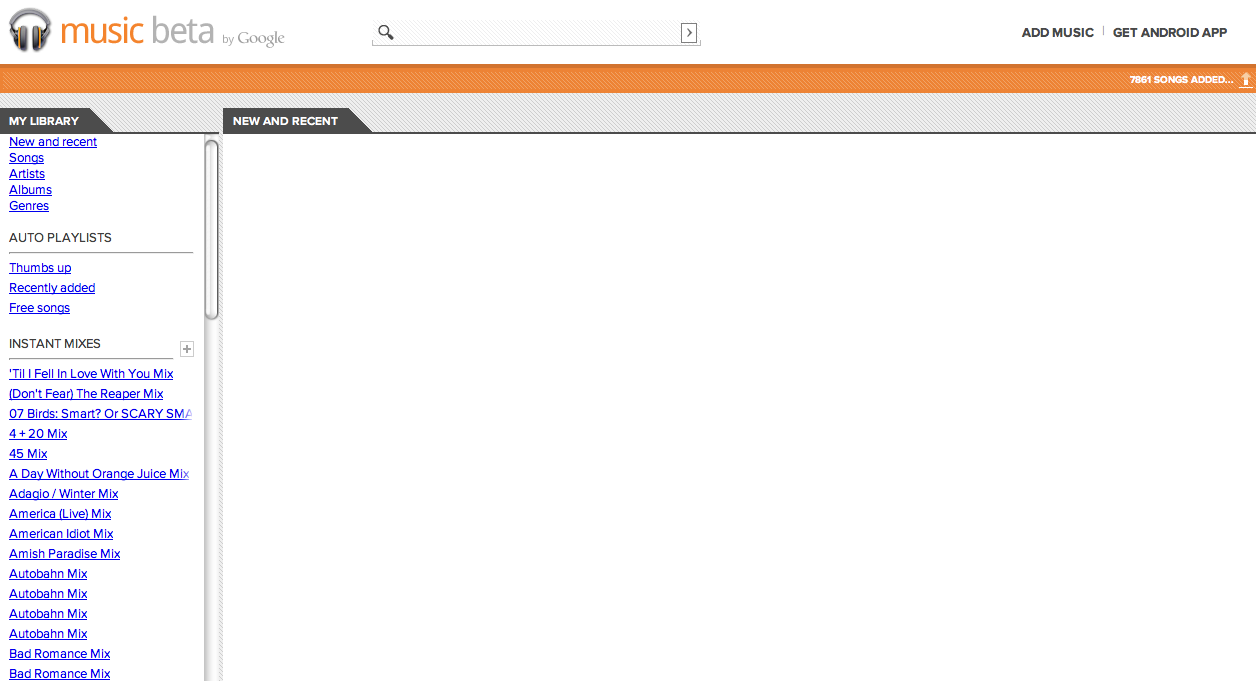
All 7,861 songs are gone. I hope they come back. Apparently, I’m not the only one this is happening to.
Update – all my music has returned sometime overnight.
R.I.P. iTunes
 Yesterday, was a great day! During the WWDC Keynote, I found out that soon I will no longer experience the massive slowdown that occurs whenever I plug my iPhone into my computer. The next version of iOS will support over the air updates and syncing, eliminating the need to connect the device to a PC or Mac running iTunes.
Ten years ago iTunes was a pretty good way to listen to music and get that music onto my iPod. However, with each successive version, Apple has piled the features on to iTunes, gradually morphing it from a simple music player to a behemoth that makes all my other apps slow down and my cooling fans speed up. iTunes is no longer a music player – it is a music organizer, a CD ripper, a device manager, a music store, a video player, a video store, a podcast organizer, a book store, a music recommender, a playlist generator and probably a dozen other things. Today, iTunes is unusable bloatware that I only run when I have to move content onto or off of my iPhone. Yesterday, Steve eliminated the last reason that I had to run iTunes. With the iCloud, I can cut the cord, I won’t need iTunes any more. R.I.P. iTunes.
This is not the iCloud I was looking for
 Today, Apple announced two new music services: iTunes in the Cloud that will let you download your purchased music to any of your Apple devices and iTunes Match that will let you put all of your ripped CDs into the cloud so it can be sent to any of your Apple devices. With these two services Apple has leapfrogged both Amazon’s and Google’s most recent cloud offerings. Unlike Amazon and Google’s cloud music services that require you to upload each track you own to the cloud, iTunes Match can check to see if Apple already knows about your tracks and if so, bypass the lengthy upload. Uploading my modest collection of 7,500 tracks to Google Music took about 3 days. Steve Jobs says this will take ‘minutes’.
Although I was happy to see Apple push cloud music forward, I think that Apple (along with Amazon and Google) are going down the wrong path. The music cloud shouldn’t be a locker in the sky where I can put all the music I own, it should be the Celestial Jukebox – a place where all music is available for me to listen to. For the last 40 years, I’ve been suffering under a delusion that I was buying music. I bought 45s, and 12″ vinyl. I bought cassettes, I bought 8 track tapes, I bought CDs and I bought digital files (often protected by some sort of DRM). Every 10 years or so, the format that my music was in became obsolete. I wasn’t buying music, I was renting it until the next format change came along. (The regular format change was instrumental in keeping the recording industry afloat)
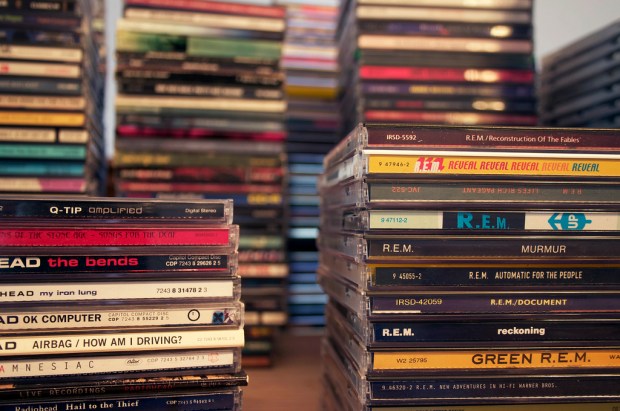
Photo by ChrisM70
I’m done ‘buying’ music – the best music value is the music subscription service. For $10 a month I can listen to just about any song, anywhere at anytime. As our devices become permanently connected to the cloud, the value proposition of having access to millions and millions of songs for a few dollars a month will become obvious to all. We will switch from owning music, to renting music. The music locker services being released this year by Apple, Google and Amazon, will be momentary blips in the history of music distribution. In a few years, you will be as likely to purchase a song as you would be to purchase a VHS tape of The Guild. I was really hoping that Apple would skip the music locker completely and release an iTunes subscription service. But alas, we will have to wait a few more whiles. In the mean time, there are plenty of music subscription services like Rdio, Spotify, Rhapsody, Napster, Mog and Thumbplay that will really move listening to the cloud.
Google Instant Mix and iTunes Genius fix their WTFs
Last week I compared the playlisting capabilities of iTunes Genius, Google’s new Instant Mix and The Echo Nest’s Playlist API. I found that Google’s Instant Mix Playlist were filled with many WTF selections (Coldplay on a Miles Davis playlist) and iTunes Genius had problems generating playlists for any track by the Beatles. I rechecked some of the playlists today to see how they were doing. It looks like both services have received an upgrade since my last post. Here’s the new Google Instant Mix playlist based on a Miles Davis seed song:
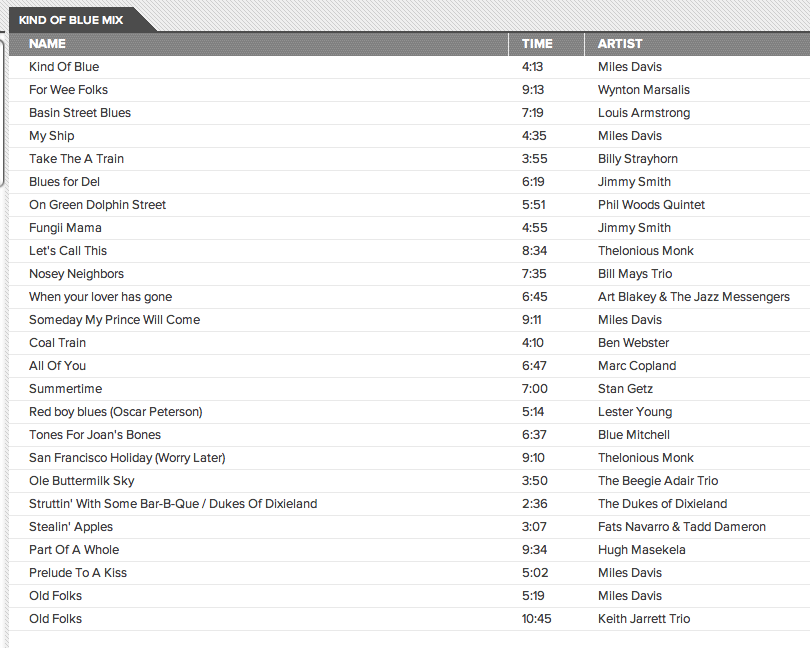
All the big WTFs from last week’s test are gone – yay Google for fixing this so quickly. The only problem I see is the doubled ‘Old Folks’ song, but that’s not a WTF. However, I can’t give Google Instant Mix a clean slate yet. Google had a chance to study my particular collection (they asked, and I gave them my permission to do so), so I am sure that they paid particular attention to the big WTFs from last week. I’ll need to test again with a new collection and different seeds to see if their upgrade is a general one. Still, for the limited seeds that I tried, the WTFs seem to be gone.
Similarly, iTunes seems to have had an upgrade. Last week, it couldn’t make any playlist from a Beatles’s song, but this week they can. Here’s a playlist created with iTunes Genius with Polythene Pam as a seed:
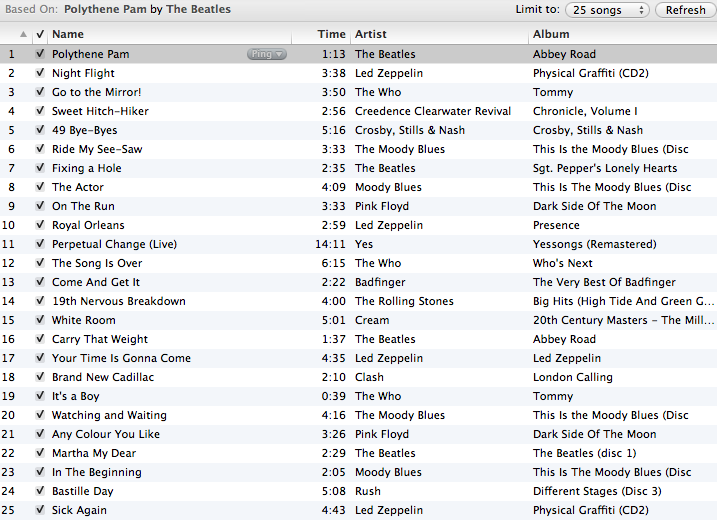
Genius creates a serviceable playlist, with no WTFs with the Beatles as a seed, so like Google they were able to clear up their WTFs that I noted from last weeks post. No clean slate for Apple though .. I have seen some comments about how Genius appears to have problems generating playlists for new tracks. More investigation is needed to understand if this is really a problem.
Given the traffic that last week’s post received, it is not surprising that these companies noticed the problems and dug in and fixed the problems quickly. I like to think that my post made playlisting just a little bit better for a few million people.
The Wub Machine
Posted by Paul in remix, Uncategorized on May 24, 2011
 Music Machinery