Music Hack Day London Photos
Thomas Bonte, master photographer has posted his photos for Music Hack Day London. Thomas really captures what it is like to be there in person. Thanks Thomas!
My Music Hack Day London hack
Posted by Paul in code, data, events, The Echo Nest on December 4, 2011
It is Music Hack Day London this weekend. However, I am in New England, not Olde England, so I wasn’t able to enjoy in all the pizza, beer and interesting smells that come with a 24 hour long hackathon. But that didn’t keep me from writing code. Since Spotify Apps are the cool new music hacking hotttnesss, I thought I’d create a Spotify related hack called the Artist Picture Show. It is a simple hack – it shows a slide show of artist images while you listen to them. It gets the images from The Echo Nest artist images API and from Flickr. It is a simple app, but I find the experience of being able to see the artist I’m listening too to be quite compelling.
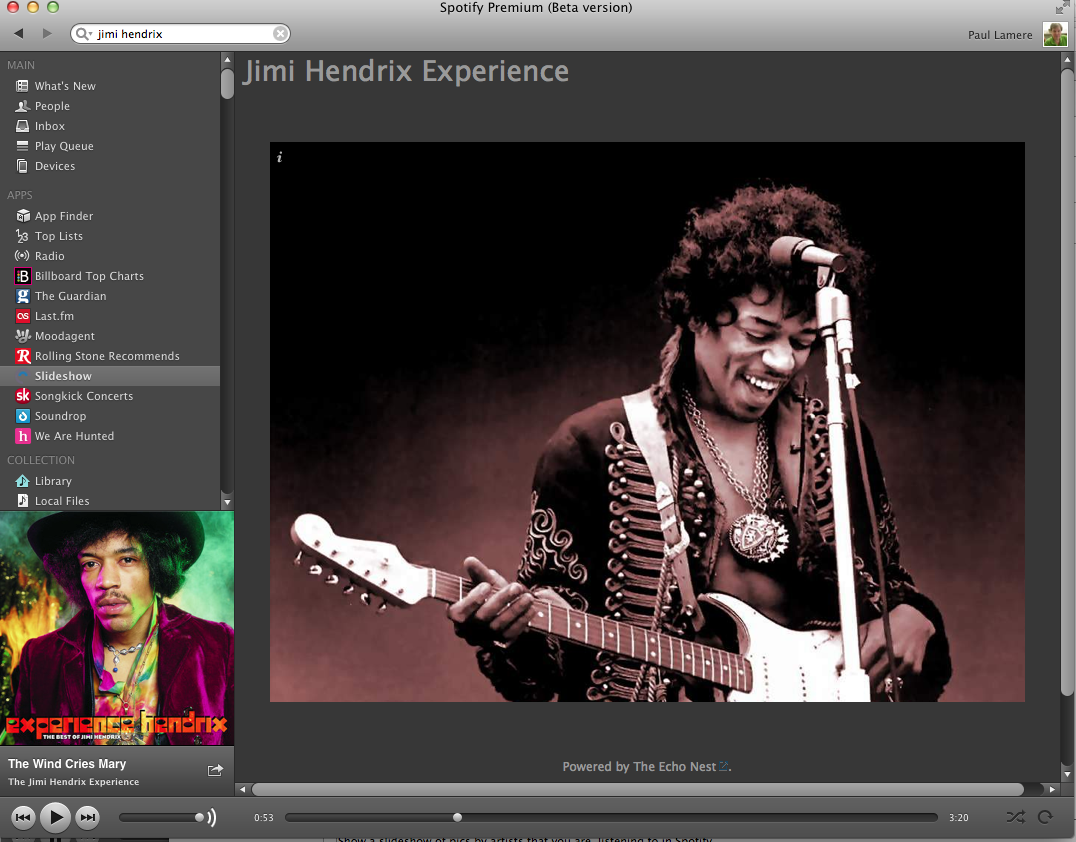
Slightly more info on the hack here.
Building a Spotify App
Posted by Paul in code, Music, The Echo Nest on December 2, 2011
On Wednesday November 30, Spotify announced their Spotify Apps platform that will let developers create Spotify-powered music apps that run inside the Spotify App. I like Spotify and I like writing music apps so I thought I would spend a little time kicking the tires and write about my experience.
First thing, the Spotify Apps are not part of the official Spotify client, so you need to get the Spotify Apps Preview Version. This version works just like the version of Spotify except that it includes an APPS section in the left-hand navigator.
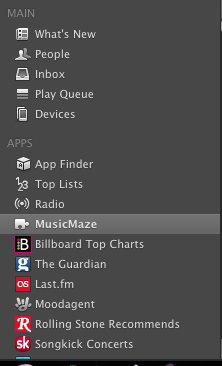
If you click on the App Finder you are presented with a dozen or so Spotify Apps including Last.fm, Rolling Stones, We are Hunted and Pitchfork. It is worth your time to install a few of these apps and see how they work in Spotify to get a feel for the platform. MoodAgent has a particularly slick looking interface:
A Spotify App is essentially a web app run inside a sandboxed web browser within Spotify. However, unlike a web app you can’t just create a Spotify App, post it on a website and release it to the world. Spotify is taking a cue from Apple and is creating a walled-garden for their apps. When you create an app, you submit it to Spotify and if they approve of it, they will host it and it will magically appear in the APPs sections on millions of Spotify desktops.
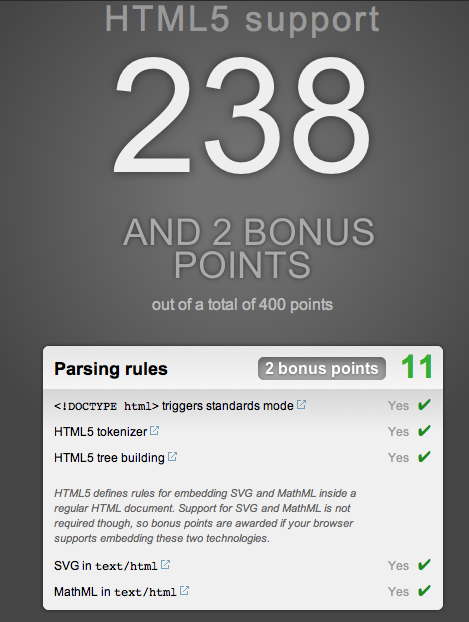
To get started you need to have your Spotify account enabled as a ‘developer’. To do this you have to email your credentials to platformsupport@spotify.com. I was lucky, it took just a few hours for my status to be upgraded to developer (currently it is taking one to three days for developers to get approved). Once you are approved as a developer, the Spotify client automagically gets a new ‘Develop’ menu that gives you access to the Inspector, shows you the level of HTML5 support and lets you easily reload your app:
Under the hood, Spotify Apps is based on Chromium so those that are familiar with Chrome and Safari will feel right at home debugging apps. Right click on your app and you can bring up the familiar Inspector to get under the hood of your application.
Developing a Spotify App is just like developing a modern HTML5 app. You have a rich toolkit: CSS, HTML and Javascript. You can use jQuery, you can use the many Javascript libraries. Your app can connect to 3rd party web services like The Echo Nest. The Spotify Apps supports just about everything your Chrome browser supports with some exceptions: no web audio, no video, no geolocation and no Flash (thank god).
Since your Spotify App is not being served over the web, you have to do a bit of packaging to make it available to Spotify during development. To do this you create a single directory for your app. This directory should have at least the index.html file for your app and a manifest.json file that contains info about your app. The manifest has basic info about your app. Here’s the manifest for my app:
% more manifest.json
{
"BundleType": "Application",
"AppIcon": {
"36x18": "MusicMaze.png"
},
"AppName": {
"en": "MusicMaze"
},
"SupportedLanguages": [
"en"
],
"RequiredPermissions": [
"http://*.echonest.com"
]
}
The most important bit is probably the ‘RequiredPermissions’ field. This contains a list of hosts that my app will communicate with. The Spotify App sandbox will only let your app talk to hosts that you’ve explicitly listed in this field. This is presumably to prevent a rogue Spotify App using the millions of Spotify desktops as a botnet. There are lots of other optional fields in the manifest. All the details are on the Spotify Apps integration guidelines page.
I thought it would be pretty easy to port my MusicMaze to Spotify. And it turned out it really was. I just had to toss the HTML, CSS and Javascript into the application directory, create the manifest, and remove lots of code. Since the Spotify App version runs inside Spotify, my app doesn’t have to worry about displaying album art, showing the currently playing song, album and artist name, managing a play queue, support searching for an artist. Spotify will do all that for me. That let me remove quite a bit of code.
Integrating with Spotify is quite simple (at least for the functionality I needed for the Music Maze). To get the currently playing artist I used this code snippet:
var sp = getSpotifyApi(1);
function getCurrentArtist() {
var playerTrackInfo = sp.trackPlayer.getNowPlayingTrack();
if (playerTrackInfo == null) {
return null;
} else {
return track.album.artist;
}
}
To play a track in spotify given its Spotify URI use the snippet:
function playTrack(uri) {
sp.trackPlayer.playTrackFromUri(uri, {
onSuccess: function() { console.log("success");} ,
onFailure: function () { console.log("failure");},
onComplete: function () { console.log("complete"); }
});
}
You can easily add event listeners to the player so you are notified when a track starts and stops playing. Here’s my code snippet that will create a new music maze whenever the user plays a new song.
function addAudioListener() {
sp.trackPlayer.addEventListener("playerStateChanged", function (event) {
if (event.data.curtrack) {
if (getCurrentTrack() != curTrackID) {
var curArtist = getCurrentArtist();
if (curArtist != null) {
newTree(curArtist);
}
}
}
});
}
Spotify cares what your app looks like. They want apps that run in Spotify to feel like they are part of Spotify. They have a set of UI guidelines that describe how to design your app so it fits in well with the Spotify universe. They also helpfully supply a number of CSS themes.
Getting the app up and running and playing music in Spotify was really easy. It took 10 minutes from when I received my developer enabled account until I had a simple Echo Nest playlisting app running in Spotify
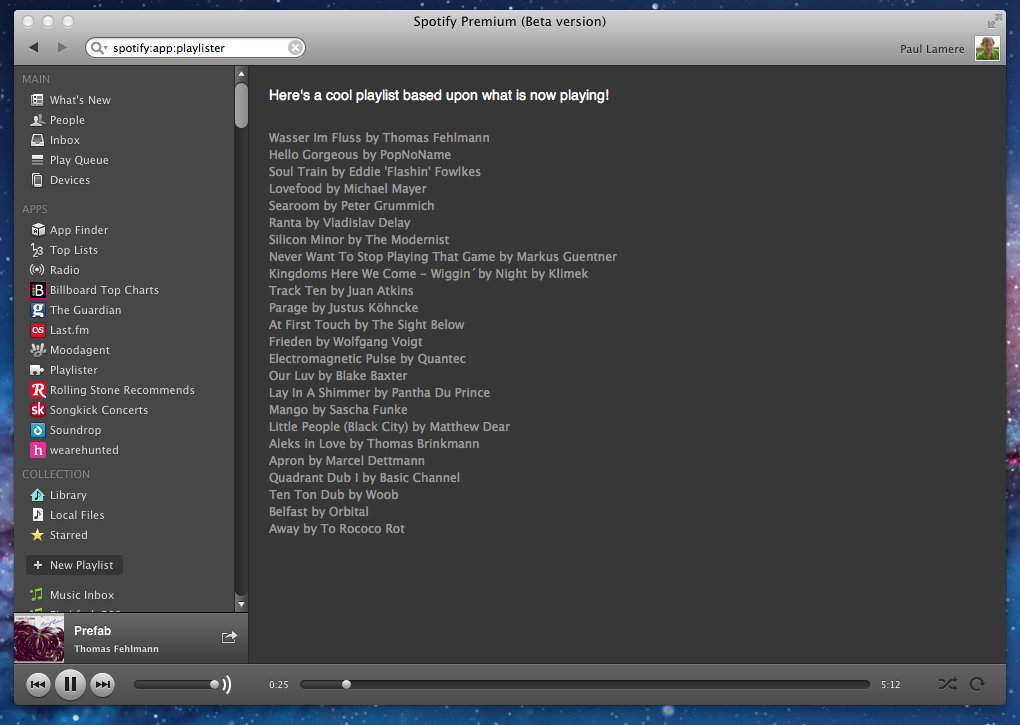
Getting the full Music Maze up and running took a little longer, mainly because I had to remove so much code to make it work. The Maze itself works really well in Spotify. There’s quite a bit of stuff that happens when you click on an artist node. First, an Echo Nest artist similarity call is made to find the next set of artists for the graph. When those results arrive, the animation for the expanding the graph starts. At the same time another call to Echo Nest is made to get an artist playlist for the currently selected artist. This returns a list of ‘good’ songs by that artist. The first one is sent off to Spotify for it to play. Click on a node again and the next song it that list of good songs plays. Despite all these web calls, there’s no perceptible delay from the time you click on a node in the graph until you hear the music.
Here’s a video of the Music Maze in action. Apologies for the crappy audio, it was recorded from my laptop speakers.
[youtube http://youtu.be/finObm36V6Y]Here’s the down side of creating a Spotify App. I can’t show it to you right now. I have to submit it to Spotify and only when and if the approve it, and when they decided to release it will it appear in Spotify. One of the great things about web development is that you can have an idea on Friday night and spend a weekend writing some code and releasing it to the world by Sunday night. In the Spotify Apps world, the nimbleness of the web is lost .
Overall, the developer experience for writing Spotify Apps is great. It is a very familiar programming environment for anyone who’s made a modern web app. The debugging tools are the same ones you use for building web apps. You can use all your favorite libraries and toolkits and analytics packages that you are used to. I did notice some issues with some of the developer docs – in the tutorial sample code the ‘manifest.json’ is curiously misspelled ‘maifest.json’. The JS docs didn’t always seem to match reality. For instance, as far as I can tell, there’s no docs for the main Spotify object or the trackPlayer. To find out how to do things, I gave up on the JS docs and instead just dove into some of the other apps to see how they did stuff . (I love a world where you ship the source when you ship your app). Update – In the comments Matthias Buchetics points us to this Stack Overflow post that points out where to find the Spotify JavaScript source in the Spotify Bundle. At least we can look at the code until the time when Spotify releases better docs.
Update2 – here’s a gist that shows the simplest Spotify App that calls the Echo Nest API. It creates a list of tracks that are similar to the currently playing artist. Another Echo Nest based Spotify App called Mood Knobs is also on github.
From a technical perspective, Spotify has done a good job of making it easy for developers to write apps that can tap into the millions of songs in the Spotiverse. For music app developers, the content and audience that Spotify brings to the table will be hard to ignore. Still there are some questions about the Spotify Apps program that we don’t know the answer to:
- How quickly will they turn around an app? How long will it take for Spotify to approve a submitted app? Will it be hours, days, weeks? How will updates be managed? Typical web development turnaround on a bug fix is measured in seconds or minutes not days or weeks. If I build a Music Hack Day hack in Spotify, will I be the only one able to use it?
- How liberal will Spotify be about approving apps? Will they approve a wide range of indie apps or will the Spotify App store be dominated by the big music brands?
- How will developers make money? Spotify says that there’s no way for developers to make money building Spotify apps. No Ads, no revenue share. No 99 cent downloads. It is hard to imagine why developers would flock to a platform if there’s no possibility of making money.
I hope to try to answer some of these questions. I have a bit of cleanup to do on my app, but hopefully sometime this weekend, I’ll submit it to Spotify to see how the app approval process works. I’ll be sure to write more about my experiences as I work through the process.
The Music Matrix – Exploring tags in the Million Song Dataset
Posted by Paul in code, data, Music, The Echo Nest on November 27, 2011
Last month Last.fm contributed a massive set of tag data to the Million Song Data Set. The data set includes:
- 505,216 tracks with at least one tag
- 522,366 unique tags
- 8,598,630 (track – tag) pairs
A popular track like Led Zep’s Stairway to Heaven has dozens of unique tags applied hundreds of times.
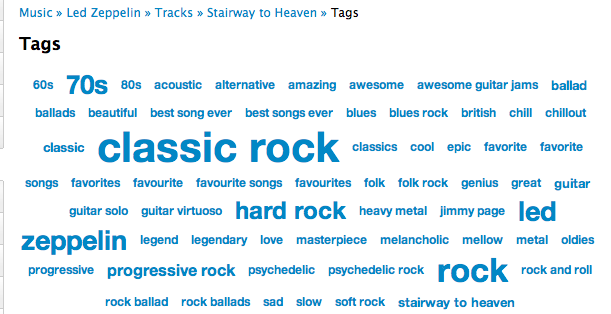
There is no end to the number of interesting things you can do with these tags: Track similarity for recommendation and playlisting, faceted browsing of the music space, ground truth for training autotagging systems etc.
I think there’s quite a bit to be learned about music itself by looking at these tags. We live in a post-genre world where most music no longer fits into a nice tidy genre categories. There are hundreds of overlapping subgenres and styles. By looking at how the tags overlap we can get a sense for the structure of the new world of music. I took the set of tags and just looked at how the tags overlapped to get a measure of how often a pair of tags co-occur. Tags that have high co-occurrence represent overlapping genre space. For example, among the 500 thousand tracks the tags that co-occur the most are:
- rap co-occurs with hip hop 100% of the time
- alternative rock co-occurs with rock 76% of the time
- classic rock co-occurs with rock 76% of the time
- hard rock co-occurs with rock 72% of the time
- indie rock co-occurs with indie 71% of the time
- electronica co-occurs with electronic 69% of the time
- indie pop co-occurs with indie 69% of the time
- alternative rock co-occurs with alternative 68% of the time
- heavy metal co-occurs with metal 68% of the time
- alternative co-occurs with rock 67% of the time
- thrash metal co-occurs with metal 67% of the time
- synthpop co-occurs with electronic 66% of the time
- power metal co-occurs with metal 65% of the time
- punk rock co-occurs with punk 64% of the time
- new wave co-occurs with 80s 63% of the time
- emo co-occurs with rock 63% of the time
It is interesting to see how the subgenres like hard rock or synthpop overlaps with the main genre and how all rap overlaps with Hip Hop. Using simple overlap we can also see which tags are the least informative. These are tags that overlap the most with other tags, meaning that they are least descriptive of tags. Some of the least distinctive tags are: Rock, Pop, Alternative, Indie, Electronic and Favorites. So when you tell someone you like ‘rock’ or ‘alternative’ you are not really saying too much about your musical taste.
The Music Matrix
I thought it might be interesting to explore the world of music via overlapping tags, and so I built a little web app called The Music Matrix. The Music Matrix shows the overlapping tags for a tag neighborhood or an artist via a heat map. You can explore the matrix, looking at how tags overlap and listening to songs that fit the tags.
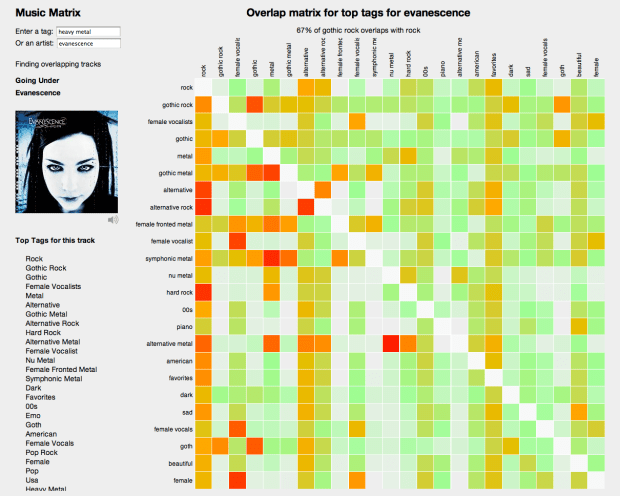
With this app you can enter a genre, style, mood or other type of tag. The app will then find the 24 tags with the highest overlap with the seed and show the confusion matrix. Hotter colors indicate high overlap. Mousing over a cell will show you the percentage overlap between the two corresponding tags and clicking on a cell will play a track that has high tag counts for the two tags. I find that I can learn a lot about a genre of music by looking at the 24 tag neighborhood for a genre and listening to examples. Some interesting neighborhoods to explore are:
You can also explore by moods:
If you are not sure what genre or style is for an artist, you can just start with the top tags for the artist like so:
Use the Music Matrix to explore a new genre of music or to find music that matches a set of styles. Find out how genres overlap. Listen to prototypical examples of different styles. Click on things, have fun. Check it out:
The code for the Music Matrix is on Github. Thanks to Thierry for creating the Million Song Data Set (the best research data set ever created) and thanks to Last.fm for contributing a very nice set of tag data to the data set.
How to avoid demo fail
So you’ve spent all weekend working on an awesome hack. It is demo time. You have exactly 2 mins to show it off to your hacking peers. You are at the podium, you look out at the faces in the crowd that are anticipating your demo. And nothing works. The 2 minutes stretch to two hours as you wait for that web page with your hack to load. You stammer a “what you would see if this was working” explanation and you leave the stage to a smattering of applause a much more humble person.
As one of the organizers for the Music Hack Day hackathon, I’ve sat through about 500 music hack demos in the last few years and I’ve probably seen at least 50 demo failures. Most of them could have been avoided with just a little bit of preparation. So here’s a list of the most common ways for demos to fail and how you can avoid them.
Hardware Failures
Hooking your computer up to a projector and audio projector should be easy, but sometimes it can be the most vexing of all. If you have the opportunity, do an A/V check before the demo session so you will have all the kinks worked out. Here are the most common failures:
- Missing Adapter – Don’t be surprised if you get to the podium to give your demo and the only thing there is a VGA connector. It never hurts to have an adapter that works with your computer/device in your pocket just in case. (but if you leave your adapter at the podium, you will never see it again).

- Projector won’t sync – it is the worst feeling in the world to connect your laptop to a projector and have it not see the projector. You should know how to force your computer to detect displays.
- No Internet – you are sitting in the audience hitting refresh on your demo web page ever 3 seconds. All is well. It is your turn to give your demo, you close your laptop, walk up to the podium, open it up, plug it in and find that your web page is no longer loading. I’ve see this happen dozens of times. It is easy to forget that when you close your laptop you may lose your network connection and may have to re-login to the local Internet provider before you get access. If you are running a non-web based demo that needs the Internet, this may be hard to notice. What’s worse, when there’s a big demo audience, with lots of laptops, iPads and iPhones, you may no longer even be able to reconnect to the local network. All the local IPs may be used up.

- Non-mirrored display – Lots of hackers have dual display setups. This can work against you when it is time to give a demo. What you see on your laptop in front of you is not what your audience can see. Moreover, the display topology probably won’t match the demo room layout so you may find you can’t even find a way to get your mouse onto the proper screen. Before you give a demo, make sure display mirroring is on. Pro-tip – on a Mac hit CMD-F1 to toggle mirror mode.
- Unexpected display resolution – Projectors usually have a much lower resolution than your desktop. If you are running your demo in a browser, usually you can adjust to a lower resolution, but if your app is written to expect a fixed display size (such as common with a 3D library, or Processing), your app may just not work. Be especially careful if your app needs to switch into fullscreen mode.
- Colors don’t show properly – I’ve seen demos with beautiful visualizations fail because projectors couldn’t show the colors well. If you are relying on colors and textures in your app an A/V check is mandatory.

- No audio jack – At a Music Hack Day you can expect that there will be an audio jack that pipes your laptop audio to the P/A system, but this is not always the case for other hacking events. If you are at a non-music hacking event, double check to make sure that there is an adequate audio hookup. There’s nothing that sounds worse than a demo where you have to hold a microphone up to your laptop speakers so the audience can hear your music.
- Audio Problems – (Added on 12/6/11) (This tip from Yuli Levtov). For those doing hacks based on certain audio-based programming languages e.g. Pure Data, SuperCollider, MaxMSP etc., plugging and un-plugging the mini-jack in a laptop can make these applications behave strangely, as some OSs think the soundcard is being swapped.The solution to this is either a) use a USB soundcard and plug into the headphone jack output at the podium, or b) leave a headphone splitter (small, inexpensive piece of kit) plugged into the headphone output of your laptop at all times, and simply plug the podium minijack into the headphone splitter when you come to give your demo. This will prevent your OS thinking the soundcard has changed, and avoid any nasty needs to re-boot your whole music masterpiece.
- Too many things to hook up – No, you probably don’t need your power supply for a 2 minute demo. Probably don’t need your mouse either. Think twice about that turntable, those lasers, the full rack of keyboards and midi sequencers. Every extra item you bring to the podium doubles the chances of demo fail. Some of the best hacks ever were essentially slide show presentations

Podium Failures
Even if you have successfully hooked up your gear to the projector and audio you are not out of the woods yet. Giving a demo at a podium can be tricky
- Can’t type and hold a microphone at the same time – it is hard enough to type in front of a room full of people. The adrenalin is flowing and your hands are shaking. It is ten times worse if you are also trying to hold a microphone while typing. If there’s a podium or clip on microphone use it. Don’t try to type with a handheld microphone.

- That’s no podium, that’s a table – sometimes there’s no podium, your laptop will be on a desk. You can chose to give your demo standing up and do crouch typing, or sit at the desk where no one will be able to see you. Be ready for unusual setups.

- Notificatus Interruptus – Don’t forget to turn off growl, email and twitter clients that like to put up friendly messages in the middle of your demo.

- No place to put my mouse – If you really need to use a mouse, be ready to find that there’s no room at the podium for a mouse and a laptop.

- It’s chaos up there! – When timing is tight, you’ll find that you are trying to setup your demo while the previous demo is tearing down and while the MC is at the same time trying to get the on deck demo ready. Too many people, too many things to setup, too little time make for a very stressful couple of minutes. Don’t get flustered.

Presentation Failures
Once you have everything setup and connected properly it is time to give actually give your demo. There are still ways to snatch success from the jaws of failure:
- Practice – Giving a demo can be challenging. You are standing at a podium in front of a couple hundred people. Your showing off something that you’ve only just finished building. There may be bugs that you need to work around, the screen may be at the wrong resolution, your hands may be shaking. You may get flustered because the audio volume was too low. With all of this stuff going on, you will forget to demo that cool feature, or you will run out of time before you get to the showstopper. The key to a great demo is Practice Practice Practice. Know what you are going to demo, know what the results will be. Know what you are going to say. Time it, give yourself a few extra seconds of time. Run through it all 10 times.

- Tell us what your demo does – You’ve been living your demo all weekend, you know what it does, but the 200 people in the audience don’t. Tell us what it does. Tell us in a couple of different ways. Make it clear why it is new, cool and worth paying attention to.

- Budget the time properly – You have 2 minutes. We don’t need to know about the github issue you had. We don’t need to know about the difficulties you had installing numpy and scipy. Get to the meat of the demo.
- Don’t waste time telling us about what you failed to do – I’ve heard lots of demos where I was told about this nifty feature that they couldn’t get to work. Don’t demo your failures, demo you successes.
- Make your demo do one thing – Two minutes is not a long time. Especially when you are showing something complex. You may have 5 nifty features in your demo, but you will never be able to demo them all. Pick the coolest feature in your demo and plan to show it a couple of times in a couple of different ways.

- Demo it! – Don’t tell us what your demo is going to do. Show it to us.

- Be enthusiastic – Excitement is contagious. If you are excited about what you are showing, we will get excited too. If you are bored, we will be checking our twitter feed.

Music Hack Day Boston 2011
Music Hack Day Boston 2011 is in the can. But what a weekend it was. 250 hackers from all over New England and the world gathered at the Microsoft NERD in Cambridge MA for a weekend of hacking on music. Over the course of the weekend, fueled by coffee, red bull, pizza and beer, we created 56 extremely creative music hacks that we demoed in a 3 hour music demo extravaganza at the end of the day on Sunday.
Music Hack Day Boston is held at the Microsoft NERD in Cambridge MA. This is a perfect hacking space – with a large presentation room for talks and demos, along with lots of smaller rooms and nooks and crannies for hackers to camp out .
Hackers started showing up at 9AM on Saturday morning and by 10AM hundreds of hackers were gathered and ready to get started.
After some intelligent and insightful opening remarks by the MC, about 20 companies and organizations gave 5 minute lightening workshops about their technology.
There were a few new (to Music Hack Day) companies giving workshops: Discogs announced Version 2 of their API at the Music Hack Day; Shoudio – the location based audio platform. Peachnote – and API for accessing symbolic music ngram data; EMI who were making a large set of music and data available for hackers as part of their OpenEMI initiative; the Free Music Archive showed their API to give access to 40,000 creative commons licensed songs and WinAmp – showed their developer APIs and network.
After lunch, hacking began in earnest. Some organizations held in-depth workshops giving a deeper dive in to their technologies. Hacking continued in to the evening after shifting to the over night hacking space at The Echo Nest.
Hackers were ensconced in their nests while one floor below there was a rager DJ’d by Ali Shaheed Muhammad (one third of A Tribe called Quest).
Thanks to the gods of time, we were granted one extra hour over night to use to hack or to sleep. Nevertheless, there were many bleary eyes on Sunday morning as hackers arrived back at the NERD to finish their hacks.
Finally at 2:30 PM at 25+ hours of hacking, we were ready to show our hacks.There was an incredibly diverse set of hacks including new musical instruments, new social web sites, new ways to explore for music. The hacks spanned from the serious to the whimsical. Here are some of my favorites.
Free Music Archive Radio – this hack uses the Echo Nest and the Creative Commons licensed music of the Free Music Archive to create interesting playlists for use anywhere.
Mustachiness – Can you turn music into a mustache? The answer is yes. This hack uses sophisticated moustache caching technology to create the largest catalog of musical mustaches in history.
Bohemian Rhapsichord – Turning a popular song into a musical instrument. This is my hack. It lets you play Bohemian Rhapsody like you’ve never played it before.
Spartify – Host a Party and let people choose what songs to play on Spotify. No more huddling in front of one computer or messing up the queue!
Snuggle – I want you to snuggle this. Synchronize animated GIFs to jams of the future. These guys get the prize for most entertaining patter during their demo.
Drinkify – Never listen to music alone again – This app has gone viral. Han, Lindsay and Matt built an app to scratch their own itch. Drinkify automatically generates the perfect cocktail recipe to accompany any music.
Peachnote Musescore and Noteflight search – searching by melody in the two social music score communities.
bitbin – Create and share short 8-bit tunes
The Videolizer – music visualizer that syncs dancing videos to any song. Tristan’s awesome hack – he built a video time stretcher allowing you to synchronize any video that has a soundtrack to a song. The demos are fantastic.
The Echo Nest Prize Winners
Two hacks received the Echo Nest prizes:
unity-echonest – An echonest + freemusicarchive dynamic soundtrack plugin for Unity3D projects. This was a magical demo. David Nunez created a Unity3D plugin that dynamically generates in game soundtracks using the Echo Nest playlist API and music from the Free Music Archive. Wow!
MidiSyncer – sync midi to echo nest songs. Art Kerns built An iPhone app that lets you choose a song from your iTunes library, retrieves detailed beat analysis information from Echo Nest for the song, and then translates that beat info to MIDI clock as the song plays. This lets you sync up an electronic music instrument such as a drum machine or groovebox to a song that’s playing on your iPhone. So wow! Play a song on your iPod and have a drum machine play in sync with it. Fantastic!
Hardware Hacks
Some really awesome hardware hacks.
Neurofeedback – Electroencephalogram + strobe goggles + Twilio Chat Bot + Max/MSP patches which control Shephard-risset rhythms and binaural beats
Sonic Ninja – Zebra Tube Awesomeness – John Shirley develops PVC helmholtz resonator while hacking a WiiMote and bluetooth audio transmission.
SpeckleSounds – Super-sensitive 3D Sound Control w/ Lasers! Yes, with lasers.
Kinect BeatWheel – Control a quantized looping sample with your arm
Demo Fail
There were a few awesome hacks that were cursed by the demo demi gods. Great ideas, great hacks, frustrating (for the hacker) demos. Here are some of the best demo fail hacks .
Kinetic – Kinetic Typography driven by user selected music and text. This was a really cool hack that was plagued by a podium display issue leading to a demi-demo-fail. But the Olin team regrouped and posted a video of the app.
BetterTaste – improve your Spotify image – this was an awesome idea – use a man-in-the-middle proxy to intercept those embarassing scrobbles. Unfortunately Arkadiy had a network disconnect that lead to a demo fail.
Tracker – Connect your turntable to the digital world. Automatically identifies tracks, saves mp3s, and scrobbles plays, while displaying a beautiful UI that’s visible from across the room, or across the web. Perhaps the most elaborate of the demos – with a real Hi Fi setup including a turntable. But something wasn’t clicking, so Abe had to tell us about it instead of showing it.
Carousel – tell the story behind your pictures – it was a display fail – but luckily Johannes had a colleague who had his back and re-gave the demo. That’s what hacker friends are for.
This was a fantastic weekend. Thanks to Thomas Bonte of MuseScore for taking these super images. Special thanks to the awesome Echo Nest crew lead by Elissa for putting together this event, staffing it and making it run like clockwork. It couldn’t have happened without her. I was particularly proud of The Echo Nest this week. We created some awesome hacks, threw a killer party, and showed how to build the future of music while having a great time. What a place to work!
Bohemian Rhapsichord – a Music Hack Day Hack
Posted by Paul in code, events, Music, The Echo Nest on November 6, 2011
It is Music Hack Day Boston this weekend. I worked with my daughter Jennie (of Jennie’s Ultimate Roadtrip fame) to build a music hack. This year we wanted to build a hack that actually made music. And so we built Bohemian Rhapsichord.

Bohemian Rhapsichord is a web app that turns the song Bohemian Rhapsody into a musical instrument. It uses TheEcho Nest analyzer to break the song into segments of quasi-stable musical events. It then shows these as an array of colored tiles (where the colors are based on timbre) that you can interact with like a musical instrument.
If you click on a tile, you play that portion of the song (or hold down shift or control and play tiles just by mousing over them). You can bind different segments to keys letting you play the ‘instrument’ with your keyboard too (See the FAQ for all the details). You can re-sort the tiles based on a few criteria (sequential order, by loudness, duration or by similarity to the last played note). It is a fun way to make music based on one of the best songs in the world.
The app makes use of the very new (and not always the most stable) web audio API. Currently, the only browser that I know that supports the web audio API is Chrome. The app is online so give it a try: Bohemian Rhapsichord
Speechiness – is it banjo or banter?
Posted by Paul in Music, The Echo Nest on November 4, 2011
There’s no bigger buzz kill when listening to a playlist of songs by your favorite artists than to find that you are no longer listening to music, but instead to some radio interview the drummer of the band gave to some local radio station in 1963. If you’ve listened to much Internet radio this has probably happened to you. An algorithmic playlisting engine may know that it is time to play a track by The Beatles, but it probably doesn’t know which tracks in the Beatles discography are music and which ones are interviews, and so sooner or later you’ll find yourself listening to Ringo talking about his new haircut instead of listening to While My Guitar Gently Weeps.

To help deal with this type of problem, The Echo Nest has just pushed out a new analysis attribute called Speechiness. Speechiness is a number between zero and one that indicates how likely a particular audio file is speech. Whenever you analyze a track with the Echo Nest analyzer, the track will be assigned a speechiness score. If the track has a high speechiness score, it is probably mostly speech, if it has a low score it is mostly non-speech. This speechiness parameter is a pretty good way to distinguish between music tracks and non-music tracks. As an example, lets look at tracks by comedian and banjo player Steve Martin. Steve has a large collection of comedy tracks, but he’s also an accomplished blue grass banjo player (What’s the difference between a chain saw and a banjo? You can turn a chain saw off.). We took 35 Steve Martin tracks and calculated the speechiness of them all and ordered them by increasing speechiness. Here’s a plot of the speechiness for these tracks:
You can see there’s a nice stable flat zone of low speechiness tracks – these are the banjo and blue grass ones and a stable flat zone of high speechiness tracks – the standup comedy. In between are some hybrid tracks – like Ramblin man – a comedy routine with a banjo accompaniment. I created a web page where you can audition the tracks to see how well the speechiness attribute has separated the banjo from the banter.
I think it is quite cool how the speechiness attribute was able to separate the music from the spoken word.
Trying this yourself
Brian put together a quick demo that lets you calculate the speechiness of any track that’s on SoundCloud. Brian put the demo together in an hour so he says it is ‘totally buggy and hacky’ – but so far it has worked great for me. Just enter the URL to any SoundCloud tracks, wait a half-a-minute and see the speechiness score. A result in the green is probably music (or some other non-speech audio), while a result in the red is speech.
The demo is pretty cool. Go to speechiness.echonest.com to try it out. If you don’t have any SoundCloud tracks handy, here are some tracks to try (expect these direct links to take 30 seconds to load since the speechiness web app is triggering a full song analysis on page load):
- hiddenvalley/obama
- kfw/variations-for-oud-synthesizer-1-excerpt
- bwhitman/16-holy-night/
- hardwell/tiesto-bt-love-comes-again-hardwell
{
"response": {
"status": {
"code": 0,
"message": "Success",
"version": "4.2"
},
"track": {
"analyzer_version": "3.08d",
"artist": "The Beatles",
"artist_id": "AR6XZ861187FB4CECD",
"audio_summary": {
"analysis_url": "https://echonest-analysis.s3.amazonaws.com/TR/TRAVQYP13369CD8BDC/3/full.json?Signature=EEiMYDzPquMmlW7fJlLvdWKI6PI%3D&Expires=1320409614&AWSAccessKeyId=AKIAJRDFEY23UEVW42BQ",
"danceability": 0.37855052706867015,
"duration": 54.999549999999999,
"energy": 0.85756107654449365,
"key": 9,
"loudness": -10.613,
"mode": 1,
"speechiness": 0.1824877387165752,
"tempo": 91.356999999999999,
"time_signature": 5
},
"bitrate": 2425500,
"id": "TRAVQYP13369CD8BDC",
"md5": "ec2d40704439f5650b67884e00242d99",
"release": "Help!",
"samplerate": 44100,
"song_id": "SOINKRY12B20E5E547",
"status": "complete",
"title": "Dizzy Miss Lizzie"
}
}
}
Wrapping up
The speechiness attribute is an alpha release. There may still be some tweaks to the algorithm in the near future. We’ve currently applied the attribute to the top 100,000 or so most popular tracks in The Echo Nest. Once we are totally satisfied with the algorithm we will apply it to all of our many millions of tracks as well as incorporating it into our search and playlisting APIs allowing you to filter and sort results based upon speechiness. In the future you’ll be able to make that Beatles playlist and limit the results to only tracks that have a low speechiness, eliminating the hair cut interviews entirely from your listening rotation (or conversely and perversely you’ll be able to create a playlist with just the hair cut interviews.) Congrats to The Echo Nest Audio team for rolling out this really useful feature.
ISMIR Session – the web
The first session at ISMIR today is on the Web. 4 really interesting sets of papers:
Songle – an active music listening experience
Mastaka Goto presented Songle at ISMIR this morning. Songle is a web site for active music listening and content-based music browsing. Songle takes many of the MIR techniques that researchers have been working on for years and makes it available to non-MIR experts to help them understand music better. You can also use Songle to modify the music. You can interactively change the beat and melody, copy and paste sections. Your edits can be shared with others. Masataka hopes that Songle can serve as a showcase of MIR and music-understanding of technologies and will serve as a platform for other researchers as well. There’s a lot of really powerful music technology behind Songle. I look forward to trying it out. Paper.
Improving Perceptual Tempo estimation with Crowd-Source Annotations
Mark Levy from Last.fm describes the Last.fm experiment to crowd source the gathering of tempo information (fast, slow and BPM) that can be used to help eliminate tempo ambiguity in machine-estimated tempo (typically known as the octave error). They ran their test over 4K songs from a number of genres. So far they’ve had 27K listeners apply 200k labels and bpm estimates. (woah!). Last.fm is releasing this dataset. Very interesting work. Paper
Investigating the similarity space of music artists on the micro-blogosphere
Markus Schedl analyzed 6 million tweets by searching tweets for artist names and conducted a number of experiments to see if artist similarity could be determined based upon these tweets. (They used the Comirva framework to conduct the experiments). Findings: document based techniques work best (cosine similarity, while not always yielding the best result yielded the most stable results). Unsurprisingly adding the term ‘music’ to the twitter search helps a lot (Reducing the CAKE, Spoon and KISS problems). Surprising result is that using tweets for deriving similarity works better than using larger documents derived from web search. Markus suggest that this may be due to the higher information content in the much shorter tweets. Datasets are available. Paper
Music Influence Network Analysis and Rank of Sample-based Music
Nick Bryan from Stanford – trying to understand how songs/artists and genres interact with the sampled-base music (remixes etc). Using data from Whosampled.com – (42K user-generated sample info sets). From this data they created an directed graph and did some network analysis on the graph (centrality / influence) – Hypothesized that there’s a power law distribution of connectivity (typical small-worlds, scale-free distribution with a rich-gets-richer effect). They confirmed this hypothesis. Use Katz Influence to help understand sample-chains. From the song-sample graph, artist sample graphs (who sampled whom) and genre sample graphs (which genres sample from other genres) were derived. With all these graphs, Nick was then able to understand which songs and artists are the most influential (James Brown is king of sampling), surprisingly, the AMEN break is only the second most influential sample. Interesting and fun work. Paper
Music Recommendation and Discovery Remastered – A Tutorial
Posted by Paul in events, Music, recommendation on October 24, 2011
Oscar and I just finished giving our tutorial on music recommendation and discovery at ACM RecSys 2011. Here are the slides: