Boil The Frog
Posted by Paul in code, fun, Music, The Echo Nest on January 2, 2013
You know the old story – if you put a frog in a pot of cold water and gradually heat the pot up, the frog won’t notice and will happily sit in the pot until the water boils and the frog is turned into frog soup. This story is at the core of my winter break programming project called Boil the Frog. Boil the Frog will take you from one music style to another gradually enough so that you may not notice the changes in music style. Just like the proverbial frog sitting in a pot of boiling water, with a Boil the Frog playlist, the Justin Bieber fan may find themselves listening to some extreme brutal death metal such as Cannibal Corpse or Deicide (the musical equivalent to sitting in a pot of boiling water).
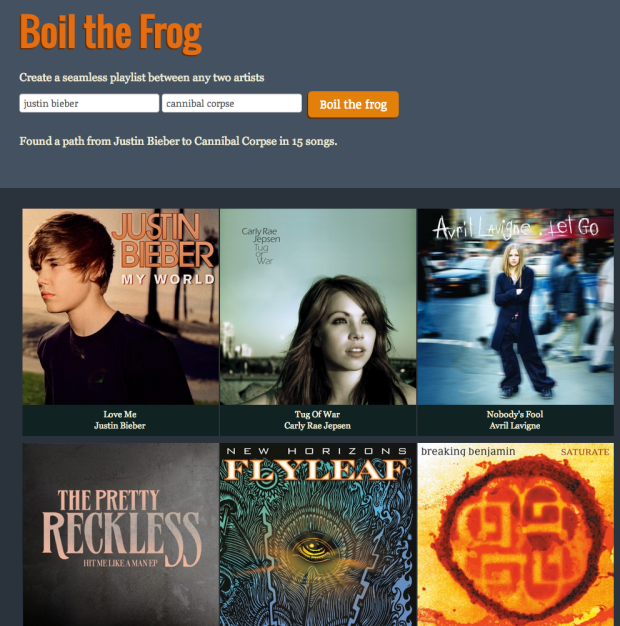
To use Boil the Frog, you type in the names of any two artists you’ll be given a playlist that connects the two artists. Click on the first artist to start listening to the playlist. If you don’t like the route taken to connect two artists, you can make a new route by bypassing an offending artist. The app uses Rdio to play the music. If you are an Rdio subscriber, you’ll hear full tracks, if not you’ll hear a 30 second sample of the music.
You can create some fun playlists with this app such as:
- Miley Cyrus to Miles Davis
- Justin Bieber to Jimi Hendrix
- Patti Smith to the Smiths
- Elvis to Elvis
- The Carter Family to Rammstein
- Kanye West to Taylor Swift
- Cage the Elephant to John Cage
- Ryan Adams to Bryan Adams
- Righteous Brothers to Steven Wright
How does it work? To create this app, I use The Echo Nest artist similarity info to build an artist similarity graph of about 100,000 of the most popular artists. Each artist in the graph is connected to it’s most similar neighbors according to the Echo Nest artist similarity algorithm.

To create a new playlist between two artists, the graph is used to find the path that connects the two artists. The path isn’t necessarily the shortest path through the graph. Instead, priority is given to paths that travel through artists of similar popularity. If you start and end with popular artists, you are more likely to find a path that takes you though other popular artists, and if you start with a long-tail artist you will likely find a path through other long-tail artists. Without this popularity bias many routes between popular artists would venture into back alleys that no music fan should dare to tread.
Once the path of artists is found, we need to select the best songs for the playlist. To do this, we pick a well-known song for each artist that minimizes the difference in energy between this song, the previous song and the next song. Once we have selected the best songs, we build a playlist using Rdio’s nifty web api.
This is the second version of this app. I built the first version during a Spotify hack weekend. This was a Spotify app that would only run inside Spotify. I never released the app (the Spotify app approval process was a bit too daunting for my weekend effort), so I though I’d make a new version that runs on the web that anyone can use.
I enjoy using Boil the Frog to connect up artists that I like. I usually end up finding a few new artists that I like. For example, this Boil The Frog playlist connecting Deadmau5 and Explosions in the Sky is in excellent coding playlist.
Give Boil the Frog a try and if you make some interesting playlists let me know and I’ll add them to the Gallery.
The Music We Lost in 2012
Posted by Paul in data, The Echo Nest on December 19, 2012
It’s the time of the year when music critics make their lists of artists that we passed away or bands that broke up in the last twelve months. To help them write their retrospectives I’ve put together two lists: One of well-known musicians that died during 2012, and one of well-known bands that called it quits during the year.
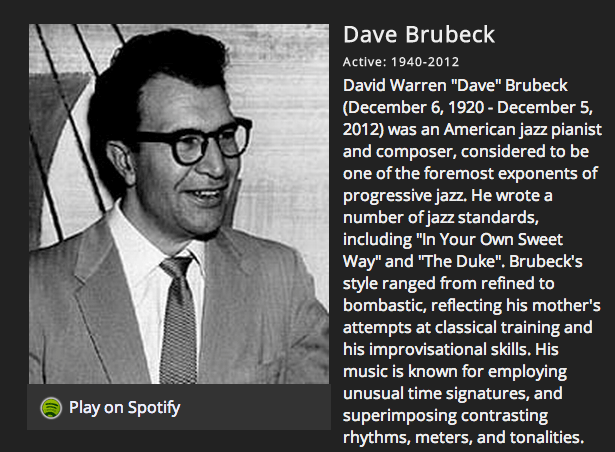
I made the list using the Echo Nest Artist Search API, restricting the results to artists that had a year ending in 2012.
Lots of great music left us in 2012. See the lists here: 2012 Music Memoriam
How music recommendation works – and doesn’t work
Posted by Paul in Music, music information retrieval, recommendation, The Echo Nest on December 12, 2012
Brian just posted ‘How Music Recommendation works – and doesn’t work‘ over at his Variogr.am blog. It is a must-read for anyone interested in the state of the art in music recommendation. Here’s an excerpt:
Try any hot new artist in Pandora and you’ll get the dreaded:

Pandora not knowing about YUS
This is Pandora showing its lack of scale. They won’t have any information for YUS for some time and may never unless the artist sells well. This is bad news and should make you angry: why would you let a third party act as a filter on top of your very personal experiences with music? Why would you ever use something that “hid” things from you?
Grab a coffee, sit back and read Brian’s post. Highly recommended.
TimesOpen 2012 Hack Day Wrap-Up
I spent Saturday at the New York Times attending the TimesOpen Hack Day. It was great fun, with lots of really smart folks creating neat (and not always musical stuff). Some great shots here:
Check out the wrap up at the Times: TimesOpen 2012 Hack Day Wrap-Up
No Kyle, music discovery isn’t a lie
This week, the usually excellent Hypebot published a post by Kyle Bylin called Music Discovery: The Path to Digital Failure. In this post, Kyle takes issue with a recent Billboard article about how music discovery is one of the key areas in the new music business. Kyle pulls no punches. He says “Music Discovery is a lie that is never going to come true”. His argument is threefold:
(1) “Music discovery is a dead pool of music startups, where zero successes exist”
I’m not sure which world Kyle lives in, but it is not my world. I see music discovery success everywhere I look, from emerging startups like Discovr, Songza, Turntable.fm, SpotOn, The Sixty One, We Are Hunted, and many more, to more established companies such as The Hype Machine, Shazam, Soundhound, Last.fm and Pandora. There are companies like The Echo Nest (where I work), Rovi and Gracenote that supply data and tools for music discovery. The biggest tech companies in the world: Google, Amazon, Microsoft and Apple, are all investing heavily in music discovery technology such as music recommendation and playlisting. Likewise, the growing music subscription services like Spotify, Rhapsody and Rdio are working hard to provide tools to make it easier for their listeners to explore and discover new music, recognizing that this is essential for subscriber retention. Even the traditional music tastemakers – such as the music labels, MTV and broadcast radio increasingly rely on discovery technology to surface new, interesting music. Oh, and by the way, three of the largest exits in the digital music space are discovery-related: Last.fm ($280m), Gracenote ($260m) and Pandora (with a current market cap of 1.5bn). I wouldn’t mind going for a swim in that dead pool.
There are hundreds of companies, big and small, all around the world successfully improving the music discovery experience. The success is quantifiable and real: more music sales, longer listening time, improved subscriber retention, more satisfied listeners. Asserting that there are zero successes is just plain wrong.
(2) “Music discovery isn’t a problem, and it’s not a solution either. Music listeners don’t have trouble figuring out what to listen to; they simply don’t know what to listen to next. They have more than enough music, but not enough time to explore it.”
This is crazy time. First, Kyle says ‘Music discovery isn’t a problem’ and then in the very next sentence he says that listeners ‘simply don’t know what to listen to next’. The only way that this can make sense is for Kyle to have a very narrow understanding of what music discovery is. I suspect that when Kyle says ‘music discovery’ he means ‘artist recommendation’, which is a very small part of the music discovery world. Music discovery is so much more than just artist recommendation and a big part of music discovery is helping that listener decide what to listen to next.
(3) “Music discovery requires a lot of work; no service can do that work for you.”
So we went from “Music discovery isn’t a problem” to “Music discovery requires a lot of work“. Which is it? Certainly if it isn’t a problem then it shouldn’t require a lot of work. If I really don’t have trouble figuring out what to listen to why must I “set aside a few hours to sift through and listen to a lot of “bad” music“. Yes, music discovery can be hard. That is why so many people are trying to build tools to help you explore for and discover new music. That’s why Billboard suggests that music discovery is one of the key areas in the new music business. Today’s music listener is totally overwhelmed by the amount of music available. Helping that listener sort through the 20 million songs that they have in their pocket to find something that they’d enjoy listening to next, perhaps something new, or perhaps an old favorite, will indeed be a key part of the new music business. Music discovery is not “a lie” – it is real, it is a big part of today’s listening experience and will be an even bigger part of tomorrow’s listening experience.
Dynamically adjusting the tweet button
The Infinite Jukebox has a tweet button that allows you to tweet the URL of a song so you can share it with others. The recently added tuning feature encodes all of the tuning information into the URL, making it easy to share a ‘tuned’ infinite song. One challenge I encountered it making this work was dynamically changing the URL that the tweet button will ‘tweet’.
The ‘tweet’ button is a twitter supplied widget. When your page load, a script runs that finds the tweet button on the page and does a bunch of twitter magic to the button (for one thing, it turns the button into an iFrame). When you click the button, the twitter dialog has the URL ready to go. However, if the URL has been programmatically changed (as in my tuning feature), the tweet button won’t pick this up. To make this work, whenever you change the URL of the page, you need to remove the tweet button, re-attach it and then call twttr.widgets.load() to force the twitter button to update.
Here’s the gist:
This file contains hidden or bidirectional Unicode text that may be interpreted or compiled differently than what appears below. To review, open the file in an editor that reveals hidden Unicode characters.
Learn more about bidirectional Unicode characters
| <body> | |
| The tweet button: | |
| <span id='tweet-span'> | |
| <a href="https://twitter.com/share" id='tweet' | |
| class="twitter-share-button" | |
| data-lang="en" | |
| data-count='none'>Tweet</a> | |
| <script>!function(d,s,id){varjs,fjs=d.getElementsByTagName(s)[0];if(!d.getElementById(id)){js=d.createElement(s);js.id=id;js.src="https://platform.twitter.com/widgets.js";fjs.parentNode.insertBefore(js,fjs);}}(document,"script","twitter-wjs");</script> | |
| </span> | |
| <script> | |
| function tweetSetup() { | |
| $(".twitter-share-button").remove(); | |
| var tweet = $('<a>') | |
| .attr('href', "https://twitter.com/share") | |
| .attr('id', "tweet") | |
| .attr('class', "twitter-share-button") | |
| .attr('data-lang', "en") | |
| .attr('data-count', "none") | |
| .text('Tweet'); | |
| $("#tweet-span").prepend(tweet); | |
| tweet.attr('data-text', "#InfiniteJukebox of " + t.fixedTitle); | |
| tweet.attr('data-url', document.URL); | |
| twttr.widgets.load(); | |
| } | |
| </script> | |
| </body> |
Tuning the Infinite Jukebox
The Infinite Jukebox works hard to find the best way to make a song play forever. This is a balancing act. The jukebox needs to add branches to a song that will allow it to hyper-jump from one section to another. If the destination of the branch sounds similar to the starting point of the branch, the listener won’t notice the jump (which is good), so we only want to pick branches that are between two very similar sounding beats. However, if we restrict ourselves to only adding branches between very similar sounding beats, then, for some songs, there may not be enough branches too allow the Infinite Jukebox to really play the song forever. So the Infinite Jukebox must weigh similarity against branch density. Most of the time it does a good job, but sometimes it gets it wrong. Until now, if the Jukebox got it wrong, you had no option but to try another song, but today I’ve just released a new tuning feature that will allow you to optimize the balance between similarity and graph density, so when the Jukebox can’t get it exactly right, you can finish the job.
The new tuning feature allows you to delete offending branches, and to help determine the proper balance between similarity and branch density. Here’s what you can do:
 Delete branches – sometimes the Jukebox gets everything right except that a few of the branches give a jarring audio transition. This can especially occur with lyric heavy music. If there’s a particular branch that you want to get rid of, you can now just delete it. To delete an edge, click on it. It will turn red. Then hit the [delete] key and the edge will be removed from the graph. (You can restore deleted edges by hitting the reset button in the Tuning dialog).
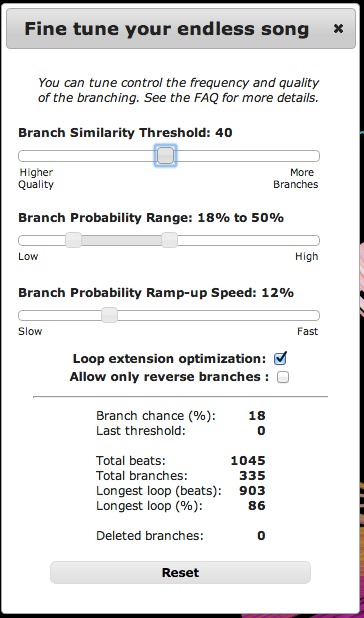
For more detailed tuning, press the new Tune button. This button will bring up a dialog that will let you adjust a number of parameters. You can drag the dialog around so you can see the song visualization, and you can play the song while you are tuning it, to get real-time feedback as to how your tuning is affecting the song. The tuning options are:
Branch Similarity Threshold – this is a slider that determines the similarity threshold between two beats. A branch between two beats will be created only if the sim-distance between the beats is less than this threshold. Lower values will yield higher quality (but fewer) branches. So, if your song has lots of jarring beat transitions, move this slider to the left. In general, branches with a sim-distance less than around 55 sound pretty good, and below 40 are usually inaudible.
Branch Probability Range – when the Jukebox is about to play a beat that has branches to other beats, there’s a random chance that the Jukebox will follow one of the branches to play the similar beat. This slider, along with the Branch Probability Ramp-up Speed slider control the probability that the Jukebox will take a branch. The branch probability will start at the low end of the given range, and will gradually heat up until it reaches the high end of the range. The speed of the heating is controlled by the Ramp-up speed. Once a branch is taken the probability is reset to the low end of the range. The effect is, that over time, the chance that the Jukebox will follow a branch increases at the ramp-up speed, until a branch is taken at which point the process starts over again.
Loop extension optimization – the Jukebox will try to add in some extra paths in the song that may go above the branch similarity threshold in order to increase the amount of the song that is will be included in the infinite play. If you want total control, you can turn this feature off.
Allow only reverse branches: To increase song variety the Jukebox normally allows for jumps that go forward and backwards. Click this checkbox if you only want backward branches.
Reset – Click the reset button to restore the song to the ‘factory’ settings.
The tuning dialog also shows some data that you can use to help you tune the song:
- Branch chance: this is a dynamic value that shows the current percentage chance of taking a branch.
- Last Threshold – this shows the sim-distance of the last branch that was taken.
- Total Beats – the total beats in the song
- Total Branches – the total branches in the song
- Longest loop – the longest loop in the song, this is given both in terms of beats and in total percentage of the song.
- Deleted Branches – the number of branches that have been deleted.
Sharing your tuned songs All of the tuning that you apply to a song is captured in the URL for the song, so if you bookmark, tweet or share the URL for the song, you are also sharing all of your tuning and edits. For example, here’s a version of Skrillex’s Scary Monsters that has been tuned to have very frequent branching between only the best branches.

In the last two weeks, there have been a million visitors to the Infinite Jukebox, with many thousands of songs uploaded. With the new tuning feature, I’m looking forward to seeing (and hearing) better sounding infinite songs.
4’33” Visualized
Here’s a visualization of the live performance of John Cage’s 4’33 in the Infinite Jukebox performed live by the BBC Orchestra.
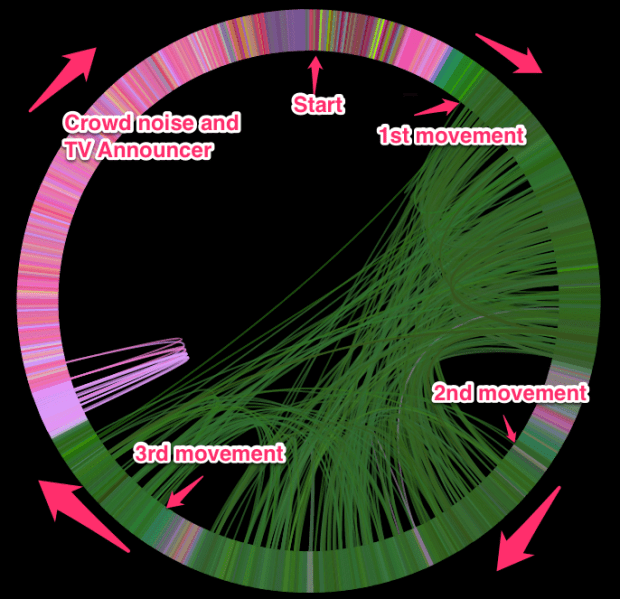
Fun to watch. Use the ‘bring it on home’ mode (press H) to listen to it without any loops.
Why does the Infinite Jukebox only work in Chrome and Safari?
The most common complaint I’ve heard about the Infinite Jukebox is that it doesn’t work in Firefox or Internet Explorer. I’ve been accused of either being part of some vast conspiracy to infect everyone’s computer with the Chrome virus or being a lazy programmer that couldn’t go the extra mile and deal with the usual cross-browser differences.

Indeed, I may be lazy, but that’s not why you need Chrome or Safari to run the Infinite Jukebox. The real reason is that the Infinite Jukebox relies on the Web Audio API for rendering audio. The Web Audio API is a W3C draft standard that provides a high-level Javascript API for manipulating, processing and synthesizing audio in web applications. The Infinite Jukebox needs to be able to take an MP3 and play subsections of that MP3 at very accurate time intervals. This capability is provided by the Web Audio API. Without this capability, the Infinite Jukebox would be impossible.
As the following chart shows, only Webkit-based browsers like Safari and Chrome support the Web Audio API.
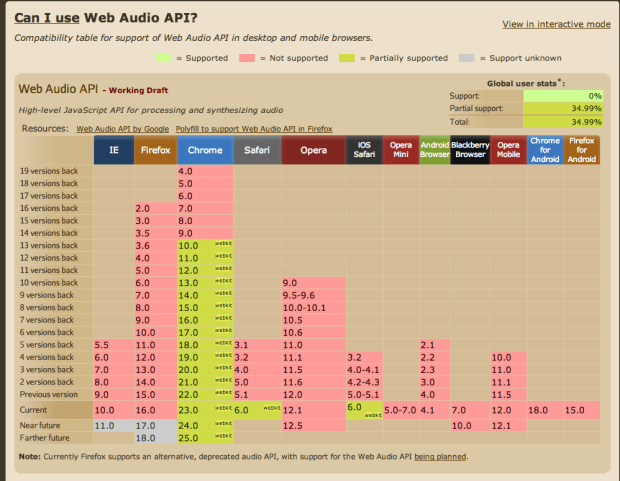
Can I use the Web Audio API? from caniuse.com
The exciting bit is that the Web Audio API is supported by Safari on IOS 6.0 devices. This means that the Infinite Jukebox will run on your iPhone or your iPad. Surprisingly, it even runs on my two year old, very slow iPhone 4:

The good news is that Mozilla has announced that they will support the Web Audio API in an upcoming version of Firefox. It is on their roadmap, but it no date has been given. Even when they do though, there still is the problem that Firefox does not support the playing of MP3 audio. As for IE, Microsoft hasn’t announced any plans to support Web Audio.
So no vast conspiracy, it’s just that the Infinite Jukebox needs an advanced browser feature that is only supported in 2 of the 4 major browsers. Perhaps in a year, Firefox and IE will have caught up. Until then, you’ll need to download Chrome or if you are on a Mac, fire up Safari to play an infinite version of your favorite song.
The Web Audio API is an extremely powerful API and I suspect will be a big part of music on the web for the next decade. If you write music apps, you should pay attention to it. Some good places to start are: HTML5 Audio and the multimedia section of HTML5 Rocks.
An Infinite Thanksgiving
For that long Thanksgiving drive, there’s nothing better than a handful of infinitely long songs to keep your ears occupied on the way to Grandma’s house:
- Autumn Sweater by Yo La Tengo
- Thanksgiving Day by Ray Davies
- It’s Thanksgiving – Nicole Westbrook
- Alice’s Restaurant Massacre by Arlo Guthrie
- Turkey in the Straw by ZEPP
Or you may want to head over to Evolver and check out the community built Thanksgiving playlist that will actually end before heat death of the universe.
 Music Machinery