Archive for category The Echo Nest
Loudest songs in the world
Posted by Paul in fun, Music, The Echo Nest on August 17, 2011
Lots of ink has been spilled about the Loudness war and how modern recordings keep getting louder as a cheap method of grabbing a listener’s attention. We know that, in general, music is getting louder. But what are the loudest songs? We can use The Echo Nest API to answer this question. Since the Echo Nest has analyzed millions and millions of songs, we can make a simple API query that will return the set of loudest songs known to man. (For the hardcore geeks, here’s the API query that I used). Note that I’ve restricted the results to those in the 7Digital-US catalog in order to guarantee that I’ll have a 30 second preview for each song.
So without further adieu, here are the loudest songs

Topping and Core by Grimalkin555
The song Topping and Core by Grmalking555 has a whopping loudness of 4.428 dB.

Modifications by Micron
The song Modifications by Micron has a loudness of 4.318 dB.

Hey You Fuxxx! by Kylie Minoise
The song Hey You Fuxxx! by Kylie Minoise with a loudness of 4.231 dB
Here’s a little taste of Kylie Minoise live (you may want to turn down your volume)

War Memorial Exit by Noma
The song War Memorial Exit by Noma with a loudness of 4.166 dB

Hello Dirty 10 by Massimo
The song Hello Dirty 10 by Massimo with a loudness of 4.121 dB.
These songs are pretty niche. So I thought it might be interesting to look the loudest songs culled from the most popular songs. Here’s the query to do that. The loudest popular song is:

Welcome to the Jungle by Guns 'N Roses
The loudest popular song is Welcome to the Jungle by Guns ‘N Roses with a loudness of -1.931 dB.
You may be wondering how a loudness value can be greater than 0dB. Loudness is a complex measurement that is both a function of time and frequency. Unlike traditional loudness measures, The Echo Nest analysis models loudness via a human model of listening, instead of directly mapping loudness from the recorded signal. For instance, with a traditional dB model a simple sinusoidal function would be measured as having the same exact “amplitude” (in dB) whether at 3KHz or 12KHz. But with The Echo Nest model, the loudness is lower at 12KHz than it is at 3KHz because you actually perceive those signals differently.
Thanks to the always awesome 7Digital for providing album art and 30 second previews in this post.
25 SXSW Music Panels worth voting for
Posted by Paul in events, Music, The Echo Nest on August 16, 2011
Yesterday, SXSW opened up the 2012 Panel Picker allowing you to vote up (or down) your favorite panels. The SXSW organizers will use the voting info to help whittle the nearly 3,600 proposals down to 500. I took a tour through the list of music related panel proposals and selected a few that I think are worth voting for. Talks in green are on my “can’t miss this talk” list. Note that I work with or have collaborated with many of the speakers on my list, so my list can not be construed as objective in any way.
There are many recurring themes. Turnatable.fm is everywhere. Everyone wants to talk about the role of the curator in this new world of algorithmic music recommendations. And Spotify is not to be found anywhere!
I’ve broken my list down into a few categories:
Social Music – there must be a twenty panels related to social music. (Eleven(!) have something to do with Turntable.fm) My favorites are:
- Social Music Strategies: Viral & the Power of Free – with folks from MOG, Turntable, Sirius XM, Facebook and Fred Wilson. I’m not a big fan of big panels (by the time you get done with the introductions, it is time for Q&A), but this panel seems stacked with people with an interesting perspective on the social music scene. I’m particularly interested in hearing the different perspectives from Turntable vs. Sirius XM.
- Can Social Music Save the Music Industry? – Rdio, Turntable, Gartner, Rootmusic, Songkick – Another good lineup of speakers (Turntable.fm is everywhere at SXSW this year) exploring social music. Curiously, there’s no Spotify here (or as far as I can tell on any talks at SXSW).
- Turntable.fm the Future of Music is Social – Turntable.fm – This is the turntable.fm story.
- Reinventing Tribal Music in the land of Earbuds – AT&T – this talk explores how music consumption changes with new social services and the technical/sociological issues that arise when people are once again free to choose and listen to music together.
Man vs. Machine – what is the role of the human curator in this age of algorithmic recommendation and music. Curiously, there are at least 5 panel proposals on this topic.
- Music Discovery:Man Vs. Machine – MOG, KCRW, Turntable.fm, Heather Browne
- Music/Radio Content: Tastemakers vs. Automation – Slacker
- Editor vs. Algorithm in the Music Discovery Space – SPIN, Hype Machine, Echo Nest, 7Digital
- Curation in the age of mechanical recommendations – Matt Ogle / Echo Nest – This is my pick for the Man vs. Machine talk. Matt is *the* man when it comes to understanding what is going on in the world of music listening experience.
- Crowding out the Experts – Social Taste Formation – Last.fm, Via, Rolling Stone – Is social media reducing the importance of reviewers and traditional cultural gatekeepers? Are Yelp, Twitter, Last.fm and other platforms creating a new class of tastemakers?
Music Discovery – A half dozen panels on music recommendation and discovery. Favs include:
- YouKnowYouWantIt: Recommendation Engines that Rock – Netflix, Pandora, Match.com – this panel is filled with recommendation rock stars
- The Dark Art of Digital Music Recommendations – Rovi – Michael Papish of Rovi promises to dive under the hood of music recommendation.
- No Points for Style: Genre vs. Music Networks – SceneMachine – Any talk proposal with statements like “Genre uses a 19th-century tool — a Darwinian tree — to solve a 21st-century problem. And unlike evolutionary science, it’s subjective. By the time a genre branch has been labeled (viz. “grunge”), the scene it describes is as dead as Australopithecus.” is worth checking out.
Mobile Music – Is that a million songs in your pocket or are you just glad to see me?
- Music Everywhere: Are we there yet? – Soundcloud, Songkick, Jawbone – Have we arrived at the proverbial celestial jukebox? What are the challenges?
Big Data – exploring big data sets to learn about music
- Data Mining Music – Paul Lamere – Shameless self promotion. What can we learn if we have really deep data about millions of songs?
- The Wisdom of Thieves: Meaning in P2P Behavior – Ben Fields – Don’t miss Ben’s talk about what we can learn about music (and other media) from mining P2P behavior. This talk is on my must see list.
- Big data for Everyman: Help liberate the data serf – Splunk – webifying and exploiting big data
Echo Nesty panels – proposals from folks from the nest. Of course, I recommend all of these fine talks.
- Active Listening – Tristan Jehan – Tristan takes a look at how the music experience is changing now that the listener can take much more active control of the listening experience. There’s no one who understands music analysis and understanding better than Tristan.
- Data Mining Music – Paul Lamere – This is my awesome talk about extracting info from big data sets like the Million Song Dataset. If you are a regular reader of this blog, you’ll know that I’ll be looking at things like click track detectors, passion indexes, loudness wars and son on.
- What’s a music fan worth? – Jim Lucchese – Echo Nest CEO takes a look at the economics of music, from iOS apps to musicians. Jim knows this stuff better than anyone.
- Music Apps Gone Wild – Eliot Van Buskirk – Eliot takes a tour of the most advanced, wackiest music apps that exist — or are on their way to existing.
- Curation in the age of mechanical recommendations – Matt Ogle – Matt is a phenomenal speaker and thinker in the music space. His take on the role of the curator in this world of algorithms is at the top of my SXSW panel list.
- Editor vs. Algorithm in the Music Discovery Space – SPIN, Hype Machine, Echo Nest (Jim Lucchese), 7Digital
- Defining Music Discovery through Listening – Echo Nest (Tristan Jehan), Hunted Media – This session will examine “true” music discovery through listening and how technology is the facilitator.
Miscellaneous topics
- Designing Future Music Experiences – Rdio, Turntable, Mary Fagot – A look at the user experience for next generation music apps.
- Music at the App Store: Lessons from Eno and Björk – Are albums as apps gimmicks or do they provide real value?
- Participatory Culture: The Discourse of Pitchfork – An analysis of ten years of music writing to extract themes.
Data Mining Music – a SXSW 2012 Panel Proposal
Posted by Paul in data, events, Music, music information retrieval, The Echo Nest on August 15, 2011

I’ve submitted a proposal for a SXSW 2012 panel called Data Mining Music. The PanelPicker page for the talk is here: Data Mining Music. If you feel so inclined feel free to comment and/or vote for the talk. I promise to fill the talk with all sorts of fun info that you can extract from datasets like the Million Song Dataset.
Here’s the abstract:
Data mining is the process of extracting patterns and knowledge from large data sets. It has already helped revolutionized fields as diverse as advertising and medicine. In this talk we dive into mega-scale music data such as the Million Song Dataset (a recently released, freely-available collection of detailed audio features and metadata for a million contemporary popular music tracks) to help us get a better understanding of the music and the artists that perform the music.
We explore how we can use music data mining for tasks such as automatic genre detection, song similarity for music recommendation, and data visualization for music exploration and discovery. We use these techniques to try to answers questions about music such as: Which drummers use click tracks to help set the tempo? or Is music really faster and louder than it used to be? Finally, we look at techniques and challenges in processing these extremely large datasets.
Questions answered:
- What large music datasets are available for data mining?
- What insights about music can we gain from mining acoustic music data?
- What can we learn from mining music listener behavior data?
- Who is a better drummer: Buddy Rich or Neil Peart?
- What are some of the challenges in processing these extremely large datasets?
Flickr photo CC by tristanf
How do you spell ‘Britney Spears’?
Posted by Paul in code, data, Music, music information retrieval, research, The Echo Nest on July 28, 2011
I’ve been under the weather for the last couple of weeks, which has prevented me from doing most things, including blogging. Luckily, I had a blog post sitting in my drafts folder almost ready to go. I spent a bit of time today finishing it up, and so here it is. A look at the fascinating world of spelling correction for artist names.
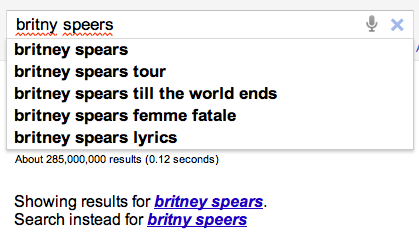 In today’s digital music world, you will often look for music by typing an artist name into a search box of your favorite music app. However this becomes a problem if you don’t know how to spell the name of the artist you are looking for. This is probably not much of a problem if you are looking for U2, but it most definitely is a problem if you are looking for Röyksopp, Jamiroquai or Britney Spears. To help solve this problem, we can try to identify common misspellings for artists and use these misspellings to help steer you to the artists that you are looking for.
A spelling corrector in 21 lines of code
A good place for us to start is a post by Peter Norvig (Director of Research at Google) called ‘How to write a spelling corrector‘ which presents a fully operational spelling corrector in 21 lines of Python. (It is a phenomenal bit of code, worth the time studying it). At the core of Peter’s algorithm is the concept of the edit distance which is a way to represent the similarity of two strings by calculating the number of operations (inserts, deletes, replacements and transpositions) needed to transform one string into the other. Peter cites literature that suggests that 80 to 95% of spelling errors are within an edit distance of 1 (meaning that most misspellings are just one insert, delete, replacement or transposition away from the correct word). Not being satisfied with that accuracy, Peter’s algorithm considers all words that are within an edit distance of 2 as candidates for his spelling corrector. For Peter’s small test case (he wrote his system on a plane so he didn’t have lots of data nearby), his corrector covered 98.9% of his test cases.
Spell checking Britney
A few years ago, the smart folks at Google posted a list of Britney Spears spelling corrections that shows nearly 600 variants on Ms. Spears name collected in three months of Google searches. Perusing the list, you’ll find all sorts of interesting variations such as ‘birtheny spears’ , ‘brinsley spears’ and ‘britain spears’. I suspect that some these queries (like ‘Brandi Spears’) may actually not be for the pop artist. One curiosity in the list is that although there are 600 variations on the spelling of ‘Britney’ there is exactly one way that ‘spears’ is spelled. There’s no ‘speers’ or ‘spheres’, or ‘britany’s beers’ on this list.
One thing I did notice about Google’s list of Britneys is that there are many variations that seem to be further away from the correct spelling than an edit distance of two at the core of Peter’s algorithm. This means that if you give these variants to Peter’s spelling corrector, it won’t find the proper spelling. Being an empiricist I tried it and found that of the 593 variants of ‘Britney Spears’, 200 were not within an edit distance of two of the proper spelling and would not be correctable. This is not too surprising. Names are traditionally hard to spell, there are many alternative spellings for the name ‘Britney’ that are real names, and many people searching for music artists for the first time may have only heard the name pronounced and have never seen it in its written form.
Making it better with an artist-oriented spell checker
A 33% miss rate for a popular artist’s name seems a bit high, so I thought I’d see if I could improve on this. I have one big advantage that Peter didn’t. I work for a music data company so I can be pretty confident that all the search queries that I see are going to be related to music. Restricting the possible vocabulary to just artist names makes things a whole lot easier. The algorithm couldn’t be simpler. Collect the names of the top 100K most popular artists. For each artist name query, find the artist name with the smallest edit distance to the query and return that name as the best candidate match. This algorithm will let us find the closest matching artist even if it is has an edit distance of more than 2 as we see in Peter’s algorithm. When I run this against the 593 Britney Spears misspellings, I only get one mismatch – ‘brandi spears’ is closer to the artist ‘burning spear’ than it is to ‘Britney Spears’. Considering the naive implementation, the algorithm is fairly fast (40 ms per query on my 2.5 year old laptop, in python).
Looking at spelling variations
With this artist-oriented spelling checker in hand, I decided to take a look at some real artist queries to see what interesting things I could find buried within. I gathered some artist name search queries from the Echo Nest API logs and looked for some interesting patterns (since I’m doing this at home over the weekend, I only looked at the most recent logs which consists of only about 2 million artist name queries).
Artists with most spelling variations
Not surprisingly, very popular artists are the most frequently misspelled. It seems that just about every permutation has been made in an attempt to spell these artists.
- Michael Jackson – Variations: michael jackson, micheal jackson, michel jackson, mickael jackson, mickal jackson, michael jacson, mihceal jackson, mickeljackson, michel jakson, micheal jaskcon, michal jackson, michael jackson by pbtone, mical jachson, micahle jackson, machael jackson, muickael jackson, mikael jackson, miechle jackson, mickel jackson, mickeal jackson, michkeal jackson, michele jakson, micheal jaskson, micheal jasckson, micheal jakson, micheal jackston, micheal jackson just beat, micheal jackson, michal jakson, michaeljackson, michael joseph jackson, michael jayston, michael jakson, michael jackson mania!, michael jackson and friends, michael jackaon, micael jackson, machel jackson, jichael mackson
- Justin Bieber – Variations: justin bieber, justin beiber, i just got bieber’ed by, justin biber, justin bieber baby, justin beber, justin bebbier, justin beaber, justien beiber, sjustin beiber, justinbieber, justin_bieber, justin. bieber, justin bierber, justin bieber<3 4 ever<3, justin bieber x mstrkrft, justin bieber x, justin bieber and selens gomaz, justin bieber and rascal flats, justin bibar, justin bever, justin beiber baby, justin beeber, justin bebber, justin bebar, justien berbier, justen bever, justebibar, jsustin bieber, jastin bieber, jastin beiber, jasten biber, jasten beber songs, gestin bieber, eiine mainie justin bieber, baby justin bieber,
- Red Hot Chili Peppers – Variations: red hot chilli peppers, the red hot chili peppers, red hot chilli pipers, red hot chilli pepers, red hot chili, red hot chilly peppers, red hot chili pepers, hot red chili pepers, red hot chilli peppears, redhotchillipeppers, redhotchilipeppers, redhotchilipepers, redhot chili peppers, redhot chili pepers, red not chili peppers, red hot chily papers, red hot chilli peppers greatest hits, red hot chilli pepper, red hot chilli peepers, red hot chilli pappers, red hot chili pepper, red hot chile peppers
- Mumford and Sons – Variations: mumford and sons, mumford and sons cave, mumford and son, munford and sons, mummford and sons, mumford son, momford and sons, modfod and sons, munfordandsons, munford and son, mumfrund and sons, mumfors and sons, mumford sons, mumford ans sons, mumford and sonns, mumford and songs, mumford and sona, mumford and, mumford &sons, mumfird and sons, mumfadeleord and sons
- Katy Perry – Even an artist with a seemingly very simple name like Katy Perry has numerous variations: katy perry, katie perry, kate perry, kathy perry, katy perry ft.kanye west, katty perry, katy perry i kissed a girl, peacock katy perry, katyperry, katey parey, kety perry, kety peliy, katy pwrry, katy perry-firework, katy perry x, katy perry, katy perris, katy parry, kati perry, kathy pery, katey perry, katey perey, katey peliy, kata perry, kaity perry
Some other most frequently misspelled artists:
- Britney Spears
- Linkin Park
- Arctic Monkeys
- Katy Perry
- Guns N’ Roses
- Nicki Minaj
- Muse
- Weezer
- U2
- Oasis
- Moby
- Flyleaf
- Seether
- byran adams – ryan adams
- Underworld – Uverworld
Finding duplicate songs in your music collection with Echoprint
Posted by Paul in code, Music, The Echo Nest on June 25, 2011
 This week, The Echo Nest released Echoprint – an open source music fingerprinting and identification system. A fingerprinting system like Echoprint recognizes music based only upon what the music sounds like. It doesn’t matter what bit rate, codec or compression rate was used (up to a point) to create a music file, nor does it matter what sloppy metadata has been attached to a music file, if the music sounds the same, the music fingerprinter will recognize that. There are a whole bunch of really interesting apps that can be created using a music fingerprinter. Among my favorite iPhone apps are Shazam and Soundhound – two fantastic over-the-air music recognition apps that let you hold your phone up to the radio and will tell you in just a few seconds what song was playing. It is no surprise that these apps are top sellers in the iTunes app store. They are the closest thing to magic I’ve seen on my iPhone.
In addition to the super sexy applications like Shazam, music identification systems are also used for more mundane things like copyright enforcement (helping sites like Youtube keep copyright violations out of the intertubes), metadata cleanup (attaching the proper artist, album and track name to every track in a music collection), and scan & match like Apple’s soon to be released iCloud music service that uses music identification to avoid lengthy and unnecessary music uploads. One popular use of music identification systems is to de-duplicate a music collection. Programs like tuneup will help you find and eliminate duplicate tracks in your music collection.
This week I wanted to play around with the new Echoprint system, so I decided I’d write a program that finds and reports duplicate tracks in my music collection. Note: if you are looking to de-duplicate your music collection, but you are not a programmer, this post is *not* for you, go and get tuneup or some other de-duplicator. The primary purpose of this post is to show how Echoprint works, not to replace a commercial system.
How Echoprint works
Echoprint, like many music identification services is a multi-step process: code generation, ingestion and lookup. In the code generation step, musical features are extracted from audio and encoded into a string of text. In the ingestion step, codes for all songs in a collection are generated and added to a searchable database. In the lookup step, the codegen string is generated for an unknown bit of audio and is used as a fuzzy query to the database of previously ingested codes. If a suitably high-scoring match is found, the info on the matching track is returned. The devil is in the details. Generating a short high level representation of audio that is suitable for searching that is insensitive to encodings, bit rate, noise and other transformations is a challenge. Similarly challenging is representing a code in a way that allows for high speed querying and allows for imperfect matching of noisy codes.
Echoprint consists of two main components: echoprint-codegen and echoprint-server.
Code Generation
echoprint-codegen is responsible for taking a bit of audio and turning it into an echoprint code. You can grab the source from github and build the binary for your local platform. The binary will take an audio file as input and give output a block of JSON that contains song metadata (that was found in the ID3 tags in the audio) along with a code string. Here’s an example:
plamere$ echoprint-codegen test/unison.mp3 0 10
[
{"metadata":{"artist":"Bjork",
    "release":"Vespertine",
     "title":"Unison",
     "genre":"",
     "bitrate":128,"sample_rate":44100, "duration":405,
     "filename":"test/unison.mp3",
     "samples_decoded":110296,
     "given_duration":10, "start_offset":1,
     "version":4.11,
     "codegen_time":0.024046,
     "decode_time":0.641916},
     "code_count":174,
     "code":"eJyFk0uyJSEIBbcEyEeWAwj7X8JzfDvKnuTAJIojWACwGB4QeM\
       HWCw0vLHlB8IWeF6hf4PNC2QunX3inWvDCO9WsF7heGHrhvYV3qvPEu-\
       87s9ELLi_8J9VzknReEH1h-BOKRULBwyZiEulgQZZr5a6OS8tqCo00cd\
       p86ymhoxZrbtQdgUxQvX5sIlF_2gUGQUDbM_ZoC28DDkpKNCHVkKCgpd\
       OHf-wweX9adQycnWtUoDjABumQwbJOXSZNur08Ew4ra8lxnMNuveIem6\
       LVLQKsIRLAe4gbj5Uxl96RpdOQ_Noz7f5pObz3_WqvEytYVsa6P707Jz\
       j4Oa7BVgpbKX5tS_qntcB9G--1tc7ZDU1HamuDI6q07vNpQTFx22avyR",
     "tag":0}
]
In this example, I’m only fingerprinting the first 10 second of the song to conserve space. The code string is just a base64 encoding of a zlib compression of the original code string, which is a hex encoded series of ASCII numbers. A full version of this code is what is indexed by the lookup server for fingerprint queries. Codegen is quite fast. It scans audio at roughly 250x real time per processor after decoding and resampling to 11025 Hz. This means a full song can be scanned in less than 0.5s on an average computer, and an amount of audio suitable for querying (30s) can be scanned in less than 0.04s. Decoding from MP3 will be the bottleneck for most implementations. Decoders like mpg123 or ffmpeg can decode 30s mp3 audio to 11025 PCM in under 0.10s.
The Echoprint Server
The Echoprint server is responsible for maintaining an index of fingerprints of (potentially) millions of tracks and serving up queries. The lookup server uses the popular Apache Solr as the search engine. When a query arrives, the codes that have high overlap with the query code are retrieved using Solr. The lookup server then filters through these candidates and scores them based on a number of factors such as the number of codeword matches, the order and timing of codes and so on. If the best matching code has a high enough score, it is considered a hit and the ID and any associated metadata is returned.
To run a server, first you ingest and index full length codes for each audio track of interest into the server index. To perform a lookup, you use echoprint-codegen to generate a code for a subset of the file (typically 30 seconds will do) and issue that as a query to the server.
The Echo Nest hosts a lookup server, so for many use cases you won’t need to run your own lookup server. Instead , you can make queries to the Echo Nest via the song/identify call. (We also expect that many others may run public echoprint servers as well).
Creating a de-duplicator
With that quick introduction on how Echoprint works let’s look at how we could create a de-duplicator. The core logic is extremely simple:
       create an empty echoprint-server
       foreach mp3 in my-music-collection:
          code = echoprint-codegen(mp3)            // generate the code
          result = echoprint-server.query(code)    // look it up
          if result:                               // did we find a match?
               print 'duplicate for', mp3, 'is', result
          else:                                    // no, so ingest the code
               echoprint-server.ingest(mp3, code)
We create an empty fingerprint database. For each song in the music collection we generate an Echoprint code and query the server for a match. If we find one, then the mp3 is a duplicate and we report it. Otherwise, it is a new track, so we ingest the code for the new track into the echoprint server. Rinse. Repeat.
I’ve written a python program dedup.py to do just this. Being a cautious sort, I don’t have it actually delete duplicates, but instead, I have it just generate a report of duplicates so I can decide which one I want to keep. The program also keeps track of its state so you can re-run it whenever you add new music to your collection.
Here’s an example of running the program:
% python dedup.py ~/Music/iTunes
          1  1 /Users/plamere/Music/misc/ABBA/Dancing Queen.mp3
               ( lines omitted...)
        173 41 /Users/plamere/Music/misc/Missy Higgins - Katie.mp3
        174 42 /Users/plamere/Music/misc/Missy Higgins - Night Minds.mp3
        175 43 /Users/plamere/Music/misc/Missy Higgins - Nightminds.mp3

duplicate /Users/plamere/Music/misc/Missy Higgins - Nightminds.mp3
          /Users/plamere/Music/misc/Missy Higgins - Night Minds.mp3

        176 44 /Users/plamere/Music/misc/Missy Higgins - This Is How It Goes.mp3
Dedup.py print out each mp3 as it processes it and as it finds a duplicate it reports it. It also collects a duplicate report in a file in pblml format like so:
duplicate <sep> iTunes Music/Bjork/Greatest Hits/Pagan Poetry.mp3 <sep> original <sep> misc/Bjork Radio/Bjork - Pagan Poetry.mp3
duplicate <sep> iTunes Music/Bjork/Medulla/Desired Constellation.mp3 <sep> original <sep> misc/Bjork Radio/Bjork - Desired Constellation.mp3
duplicate <sep> iTunes Music/Bjork/Selmasongs/I've Seen It All.mp3 <sep> original <sep> misc/Bjork Radio/Bjork - I've Seen It All.mp3
Again, dedup.py doesn’t actually delete any duplicates, it will just give you this nifty report of duplicates in your collection.
Trying it out
If you want to give dedup.py a try, follow these steps:
- Download, build and install echoprint-codegen
- Download, build, install and run the echoprint-server
- Get dedup.py.
- Edit line 10 in dedup.py to set the sys.path to point at the echoprint-server API directory
- Edit line 13 in dedup.py to set the _codegen_path to point at your echoprint-codegen executable
% python dedup.py ~/Music
This will find all of the dups and write them to the dedup.dat file. It takes about 1 second per song. To restart (this will delete your fingerprint database) run:
% python dedup.py --restart
Note that you can actually run the dedup process without running your own echoprint-server (saving you the trouble of installing Apache-Solr, Tokyo cabinet and Tokyo cabinet). The downside is that you won’t have any persistent server, which means that you’ll not be able to incrementally de-dup your collection – you’ll need to do it in all in one pass. To use the local mode, just add local-True to the fp.py calls. The index is then kept in memory, no solr or Tokyo tyrant is needed.
Wrapping up
dedup.py is just one little example of the kind of application that developers will be able to create using Echoprint. I expect to see a whole lot more in the next few months. Before Echoprint, song identification was out of the reach of the typical music application developer, it was just too expensive. Now with Echoprint, anyone can incorporate music identification technology into their apps. The result will be fewer headaches for developers and much better music applications for everyone.
Visualizing the active years of popular artists
Posted by Paul in data, Music, The Echo Nest, visualization on June 21, 2011
This week the Echo Nest is extending the data returned for an artist to include the active years for an artist. For thousands of artists you will be able to retrieve the starting and ending date for an artists career. This may include multiple ranges as groups split and get back together for that last reunion tour. Over the weekend, I spent a few hours playing with the data and built a web-based visualization that shows you the active years for the top 1000 or so hotttest artists.
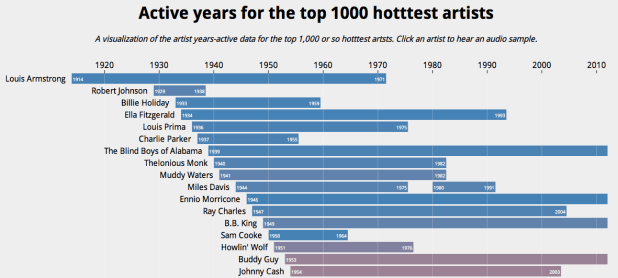
The visualization shows the artists in order of their starting year. You can see the relatively short careers of artists like Robert Johnson and Sam Cooke, and the extremely long careers of artists like The Blind Boys of Alabama and Ennio Morricone. The color of an artist’s range bar is proportional to the artist’s hotttnesss. The hotter the artist, the redder the bar. Thanks to 7Digital, you can listen to a sample of the artist by clicking on the artist. To create the visualization I used Mike Bostock’s awesome D3.js (Data Driven Documents) library.
It is fun to look at some years active stats for the top 1000 hotttest artists:
- Average artist career length: 17 years
- Percentage of top artists that are still active: 92%
- Longest artist career: The Blind Boys of Alabama – 73 Years and still going
- Gone but not forgotten – Robert Johnson – Hasn’t recorded since 1938 but still in the top 1,000
- Shortest Career – Joy Division – Less than 4 Years of Joy
- Longest Hiatus – The Cars – 22 years – split in 1988, but gave us just what we needed when they got back together in 2010
- Can’t live with’em, can’t live without ’em – Simon and Garfunkel – paired up 9 separate times
- Newest artist in the top 1000 – Birdy – First single released in March 2011
Check out the visualization here: Active years for the top 1000 hotttest artists and read more about the years-active support on the Echo Nest blog
How good is Google’s Instant Mix?
Posted by Paul in Music, playlist, The Echo Nest on May 14, 2011
 This week, Google launched the beta of its music locker service where you can upload all your music to the cloud and listen to it from anywhere. According to Techcrunch, Google’s Paul Joyce revealed that the Music Beta killer feature is ‘Instant Mix,’ Google’s version of Genius playlists, where you can select a song that you like and the music manager will create a playlist based on songs that sound similar. I wondered how good this ‘killer feature’ of Music Beta really was and so I decided to try to evaluate how well Instant Mix works to create playlists.
The Evaluation
Google’s Instant Mix, like many playlisting engines, creates a playlist of songs given a seed song. It tries to find songs that go well with the seed song. Unfortunately, there’s no solid objective measure to evaluate playlists. There’s no algorithm that we can use to say whether one playlist is better than another. A good playlist derived from a single seed will certainly have songs that sound similar to the seed, but there are many other aspects as well: the mix of the familiar and the new, surprise, emotional arc, song order, song transitions, and so on. If you are interested in the perils of playlist evaluation, check out this talk Dr. Ben Fields and I gave at ISMIR 2010: Finding a path through the jukebox. The Playlist tutorial. (Warning, it is a 300 slide deck). Adding to the difficulty in evaluating the Instant Mix is that since it generates playlists within an individual’s music collection, the universe of music that it can draw from is much smaller than a general playlisting engine such as we see with a system like Pandora. A playlist may appear to be poor because it is filled with songs that are poor matches to the seed, but in fact those songs actually may be the best matches within the individual’s music collection.
Evaluating playlists is hard. However, there is something that we can do that is fairly easy to give us an idea of how well a playlisting engine works compared to others. I call it the WTF test. It is really quite simple. You generate a playlist, and just count the number of head-scratchers in the list. If you look at a song in a playlist and say to yourself ‘How the heck did this song get in this playlist’ you bump the counter for the playlist. The higher the WTF count the worse the playlist. As a first order quality metric, I really like the WTF Test. It is easy to apply, and focuses on a critical aspect of playlist quality. If a playlist is filled with jarring transitions, leaving the listener with iPod whiplash as they are jerked through songs of vastly different styles, it is a bad playlist.
For this evaluation, I took my personal collection of music (about 7,800 tracks) and enrolled it into 3 systems; Google Music, iTunes and The Echo Nest. I then created a set of playlist using each system and counted the WTFs for each playlist. I picked seed songs based on my music taste (it is my collection of music so it seemed like a natural place to start).
The Systems
I compared three systems: iTunes Genius, Google Instant Mix, and The Echo Nest playlisting API. All of them are black box algorihms, but we do know a little bit about them:
- iTunes Genius – this system seems to be a collaborative filtering algorithm driven from purchase data acquired via the iTunes music store. It may use play, skip and ratings to steer the playlisting engine. More details about the system can be found in: Smarter than Genius? Human Evaluation of Music Recommender Systems. This is a one button system – there are no user-accessible controls that affect the playlisting algorithm.
- Google Instant Mix – there is no data published on how this system works. It appears to be a hybrid system that uses collaborative filtering data along with acoustic similarity data. Since Google Music does give attribution to Gracenote, there is a possibility that some of Gracenote’s data is used in generating playlists. This is a one button system. There are no user-accessible controls that affect the playlisting algorithm.
- The Echo Nest playlist engine – this is a hybrid system that uses cultural, collaborative filtering data and acoustic data to build the playlist. The cultural data is gleaned from a deep crawl of the web. The playlisting engine takes into account artist popularity, familiarity, cultural similarity, and acoustic similarity along with a number of other attributes There are a number of controls that can be set to control the playlists: variety, adventurousness, style, mood, energy. For this evaluation, the playlist engine was configured to create playlists with relatively low variety with songs by mostly mainstream artists. The configuration of the engine was not changed once the test was started.
The Collection
For this evaluation I’ve used my personal iTunes music collection of about 7,800 songs. I think it is a fairly typical music collection. It has music of a wide variety of styles. It contains music of my taste (70s progrock and other dad-core, indie and numetal), music from my kids (radio pop, musicals), some indie, jazz, and a whole bunch of Canadian music from my friend Steve. There’s also a bunch of podcasts as well. It has the usual set of metadata screwups that you see in real-life collections (3 different spellings of Björk for example). I’ve placed a listing of all the music in the collection at Paul’s Music Collection if you are interested in all of the details.
The Caveats
Although I’ve tried my best to be objective, I clearly have a vested interest in the outcome of this evaluation. I work for a company that has its own playlisting technology. I have friends that work for Google. I like Apple products. So feel free to be skeptical about my results. I will try to do a few things to make it clear that I did not fudge things. I’ll show screenshots of results from the 3 playlisting sources, as opposed to just listing songs. (I’m too lazy to try to fake screenshots). I’ll also give API command I used for the Echo Nest playlists so you can generate those results yourself. Still, I won’t blame the skeptics. I encourage anyone to try a similar A/B/C evaluation on their own collection so we can compare results.
The Trials
For each trial, I picked a seed song, generated a 25 song playlist using each system, and counted the WTFs in each list. I show the results as screenshots from each system and I mark each WTF that I see with a red dot.
Trial #1 – Miles Davis – Kind of Blue
I don’t have a whole lot of Jazz in my collection, so I thought this would be a good test to see if a playlister could find the Jazz amidst all the other stuff.
First up is iTunes Genius
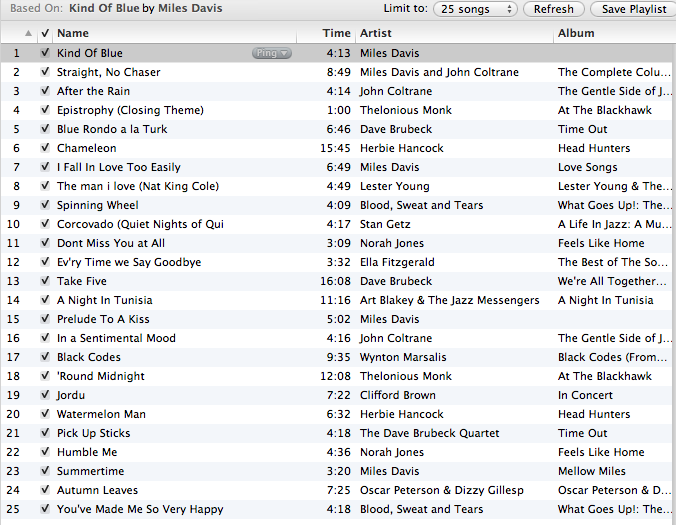
This looks like an excellent mix. All jazz artists. The most WTF results are the Blood, Sweat and Tears tracks – which is Jazz-Rock fusion, or the Norah Jones tracks which are more coffee house, but neither of these tracks rise above the WTF level. Well done iTunes! WTF score: 0
Next up is The Echo Nest.
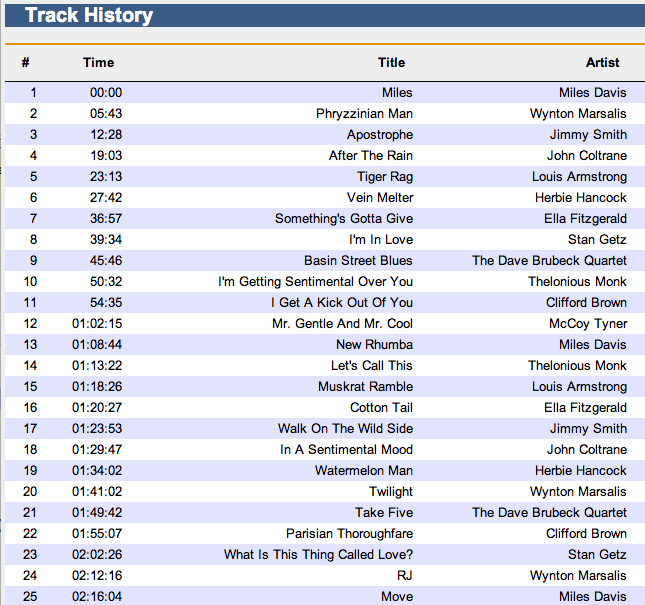
As with iTunes, the Echo Nest playlist has no WTFs, all hardcore jazz. I’d be pretty happy with this playlist, especially considering the limited amount of Jazz in my collection. I think this playlist may even be a bit better than the iTunes playlist. It is a bit more hardcore Jazz. If you are listening to Miles Davis, Norah Jones may not be for you. Well done Echo Nest. WTF score: 0
If you want to generate a similar playlist via our api use this API command:
http://developer.echonest.com/api/v4/playlist/static?api_key=3YDUQHGT9ZVUBFBR0&format=json &limit=true&song_id=SOAQMYC12A8C13A0A8 &type=song-radio&bucket=id%3ACAQHGXM12FDF53542C &variety=.12&artist_min_hotttnesss=.4
Next up is google:
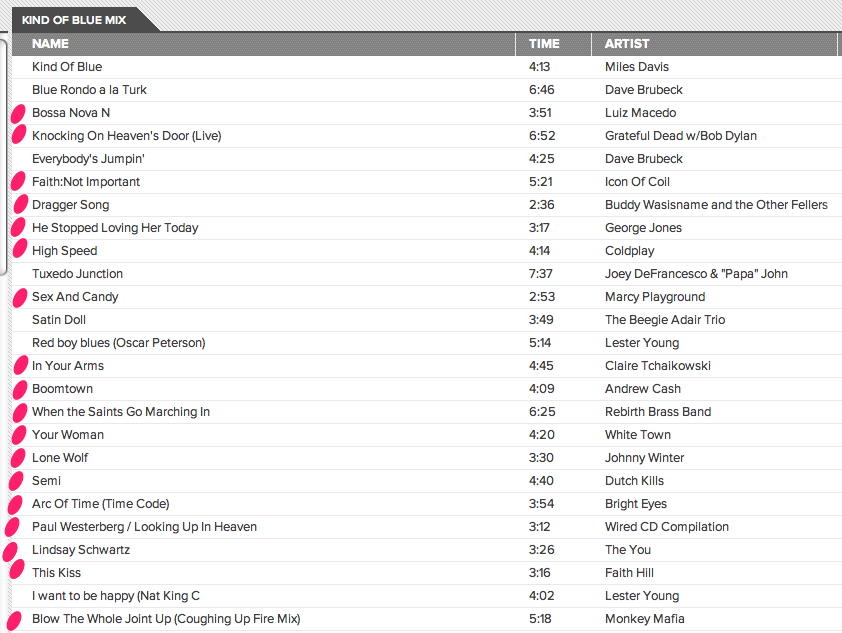
I’ve marked the playlist with red dots on the songs that I consider to be WTF songs. There are 18(!) songs on this 25 song playlist that are not justifiable. There’s electronica, rock, folk, Victorian era brass band and Coldplay. Yes, that’s right, there’s Coldplay on a Miles Davis playlist. WTF score: 18
After Trial 1 Scores are: iTunes: 0 WTFs, The Echo Nest 0 WTFs, Google Music: 18 WTFs
Trial #2 – Lady Gaga – Bad Romance
First up is iTunes:
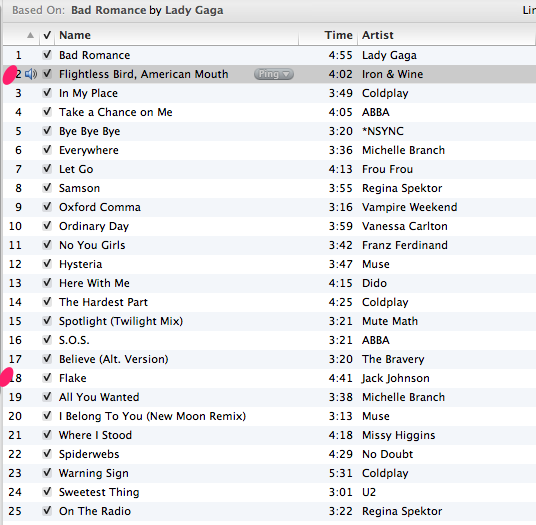
Next up: The Echo Nest
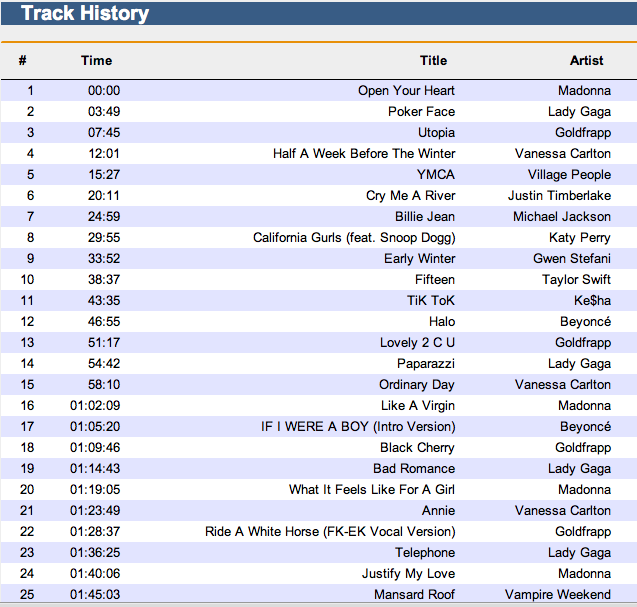
Next up, Google Instant Mix
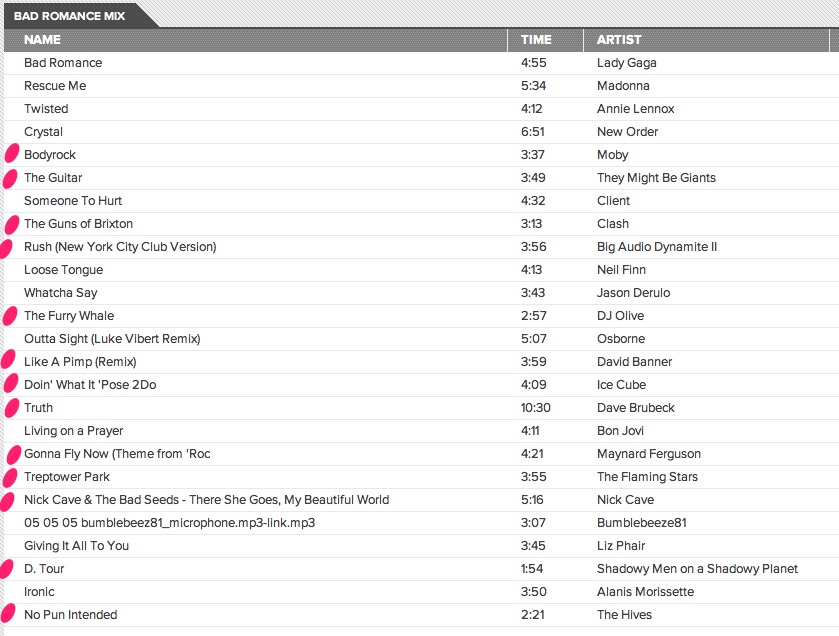
Google’s Instant Mix for Lady Gaga’s Bad Romance seems filled with non sequitur. Tracks by Dave Brubeck (cool jazz), Maynard Ferguson (big band jazz), are mixed in with tracks by Ice Cube and They Might be Giants. The most appropriate track in the playlist is a 20 year old track by Madonna. I think I was pretty lenient in counting WTFs on this one. Even then, it scores pretty poorly. WTF Score: 13
After Trial 2 Scores are: iTunes: 2 WTFs, The Echo Nest 0 WTFs, Google Music: 31WTFs
Trial #3 – The Nice – Rondo
First up: iTunes:
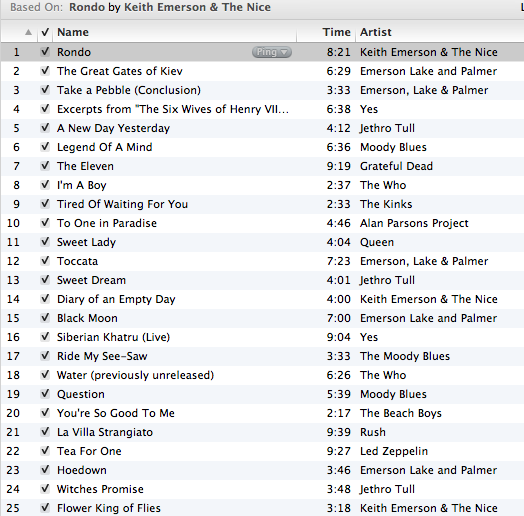
Next up is The Nest:
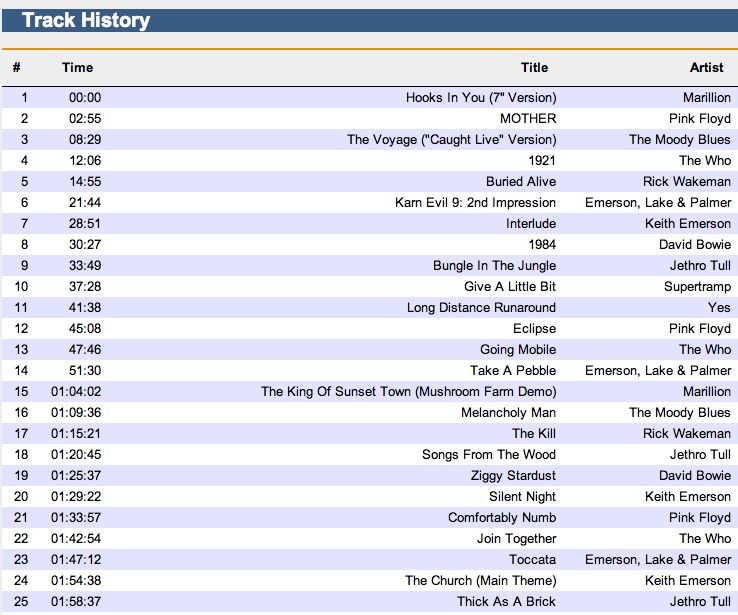
Next up is Google Instant Mix:
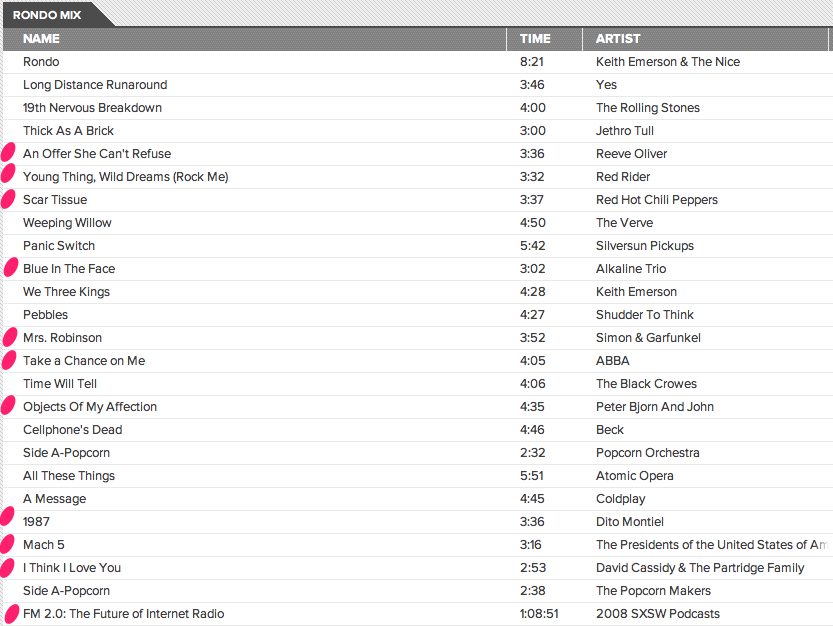
I would not like to listen to this playlist. It has a number songs that are just too far out. ABBA, Simon & Garfunkel, are WTF enough, but this playlist takes WTF three steps further. First offense, including a song with the same title more than once. This playlist has two versions of ‘Side A-Popcorn’. That’s a no-no in playlisting (except for cover playlists). Next offense is the song ‘I think I love you’ by the Partridge family. This track was not in my collection. It was one of the free tracks that Google gave me when I signed up. 70s bubblegum pop doesn’t belong on this list. However,as bad as The Partridge family song is, it is not the worst track on the playlist. That award goes to FM 2.0: The future of Internet Radio’. Yep, Instant Mix decided that we should conclude a prog rock playlist with an hour long panel about the future of online music. That’s a big WTF. I can’t imagine what algorithm would have led to that choice. Google really deserves extra WTF points for these gaffes, but I’ll be kind. WTF Score: 11
After Trial 3 Scores are: iTunes: 2 WTFs, The Echo Nest 0 WTFs, Google Music: 42WTFs
Trial #4 – Kraftwerk – Autobahn
I don’t have too much electronica, but I like to listen to it, especially when I’m working. Let’s try a playlist based on the group that started it all.
First up, iTunes.
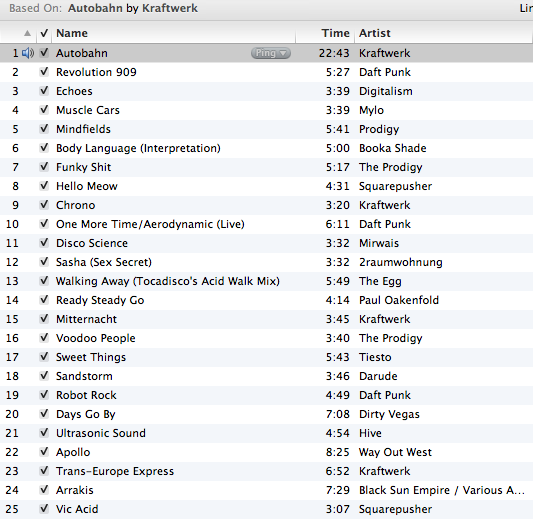
iTunes nails it here. Not a bad track. Perfect playlist for programming. Again, well done iTunes. WTF Score: 0
Next up, The Echo Nest
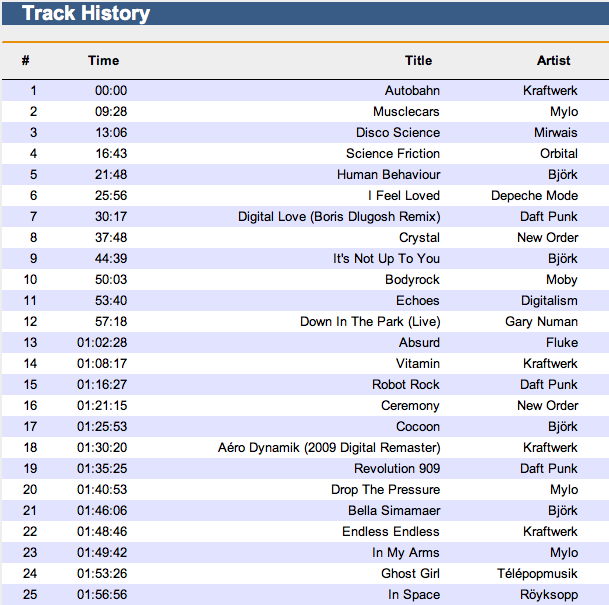
Another solid playlist, No WTFs. It is a bit more vocal heavy than the iTunes playlist. I think I prefer the iTunes version a bit more because of that. Still, nothing to complain about here: WTF Score: 0
Next Up Google
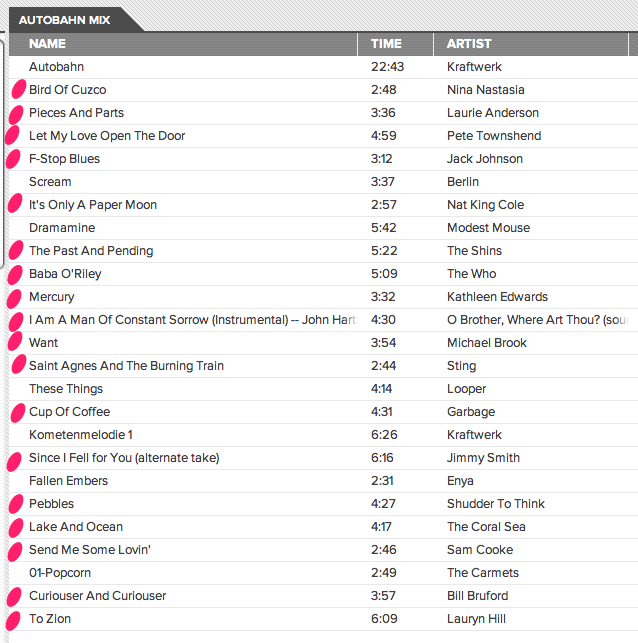
After listening to this playlist, I am starting to wonder if Google is just messing with us. They could do so much better by selecting songs at random within a top level genre than what they are doing now. This playlist only has 6 songs that can be considered OK, the rest are totally WTF. WTF Score: 18
After Trial 4 Scores are: iTunes: 2 WTFs, The Echo Nest 0 WTFs, Google Music: 60 WTFs
Trial #5 The Beatles – Polythene Pam
For the last trial I chose the song Polythene Pam by The Beatles. It is at the core of the amazing bit on side two of Abbey Road. The zenith of the Beatles music are (IMHO) the opening chords to this song. Lets see how everyone does:
First up: iTunes
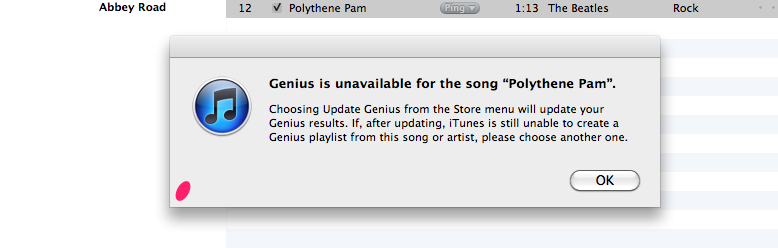
iTunes gets a bit WTF here. They can’t offer any recommendations based upon this song. This is totally puzzling to me since The Beatles have been available in the iTunes store for quite a while now. I tried to generate playlists seeded with many different Beatles songs and was not able to generate one playlist. Totally WTF. I think that not being able to generate a playlist for any Beatles song as seed should be worth at least 10 WTF points. WTF Score: 10
Next Up: The Echo Nest
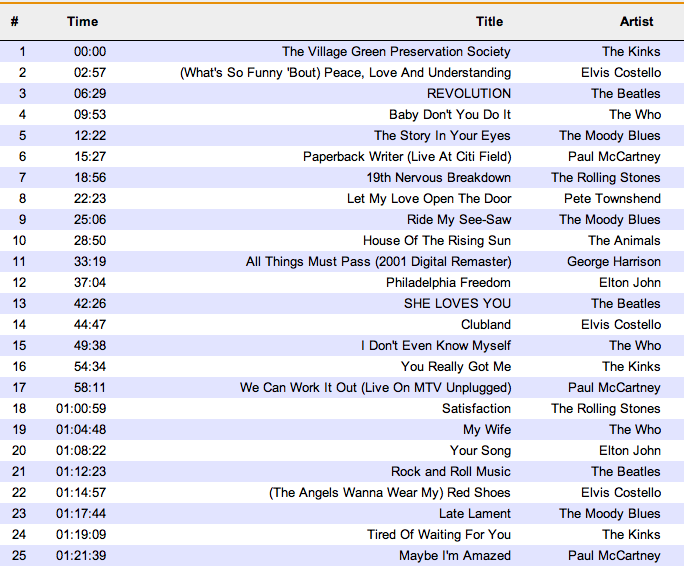
No worries with The Echo Nest playlist. Probably not the most creative playlist, but quite serviceable. WTF Score: 0
Next up Google
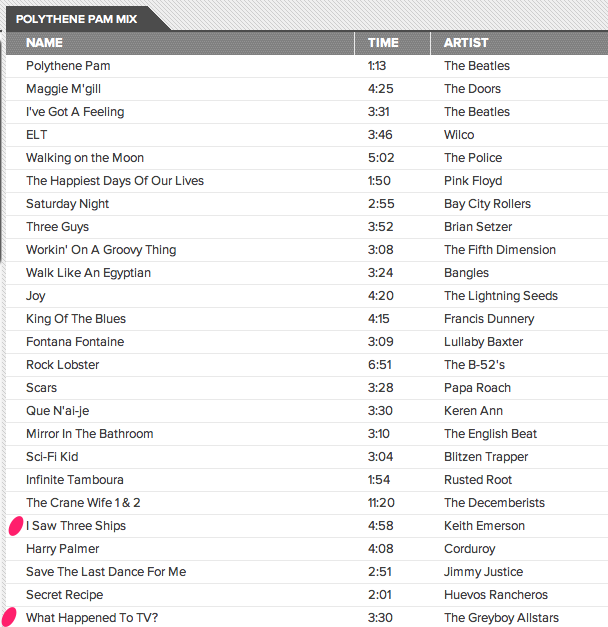
Instant Mix scores better on this playlist than it has on the other four. That’s not because I think they did a better job on this playlist, it is just that since the Beatles cover such a wide range of music styles, it is not hard to make a justification for just about any song. Still, I do like the variety in this playlist. There are just two WTFs on this playlist. WTF Score: 2.
After Trial 5 Scores are: iTunes: 12 WTFs, The Echo Nest 0 WTFs, Google Music: 62 WTFs
(lower scores are better)
Conclusions
I learned quite a bit during this evaluation. First of all, Apple Genius is actually quite good. The last time I took a close look at iTunes Genius was 3 years ago. It was generating pretty poor recommendations. Today, however, Genius is generating reliable recommendations for just about any track I could throw at it, with the notable exception of Beatles tracks.
I was also quite pleased to see how well The Echo Nest playlister performed. Our playlist engine is designed to work with extremely large collections (10million tracks) or with personal sized collections. It has lots of options to allow you to control all sorts of aspects of the playlisting. I was glad to see that even when operating in a very constrained situation of a single seed song, with no user feedback it performed well. I am certainly not an unbiased observer, so I hope that anyone who cares enough about this stuff will try to create their own playlists with The Echo Nest API and make their own judgements. The API docs are here: The Echo Nest Playlist API.
However, the biggest surprise of all in this evaluation is how poorly Google’s Instant Mix performed. Nearly half of all songs in Instant Mix playlists were head scratchers – songs that just didn’t belong in the playlist. These playlists were not usable. It is a bit of a puzzle as to why the playlists are so bad considering all of the smart people at Google. Google does say that this release is a Beta, so we can give them a little leeway here. And I certainly wouldn’t count Google out here. They are data kings, and once the data starts rolling from millions of users, you can bet that their playlists will improve over time, just like Apple’s did. Still, when Paul Joyce said that the Music Beta killer feature is ‘Instant Mix’, I wonder if perhaps what he meant to say was “the feature that kills Google Music is ‘Instant Mix’.”
Finding an artist’s peak year
Posted by Paul in Music, The Echo Nest on April 1, 2011
Many people have asked us here at the Echo Nest if, given our extensive musical data intelligence, we could potentially predict what artists will be popular in the future. While we believe that this is certainly within our capabilities, we see it as the final step in a long process.
So what’s the first step? To properly predict the future, we must first fully understand the past. To understand what artists will peak in the future, we must first figure out when current or past artists have peaked. Today marks the completion of this first step, culminating in the release of our artist/peak API:
http://developer.echonest.com/api/v4/artist/peak?name=The+Beatles&api_key=N6E4NIOVYMTHNDM8J
With this call you can see that the Beatles’s Peak year would have been 1977.
Given an artist, we will return the specific year in which they peaked:
- In most cases, though, the peak year will occur within the artist’s active years.
- In some cases, the year is prior to their active years, which we interpret as meaning that they were simply “late to the party”
- In other cases, the year is after their active years, which we interpret as meaning that these artists were ahead of their time, and that they ended their career too early.
With this new API call we can find out all sorts of things about music. Bieber peaked before he joined a label, The Beatles, Nirvana and Hendrix all stopped performing too soon, Metallica’s zenith was the Black Album, and Van Halen peaked after David Lee Roth left the band.
Join us in exploring the first concrete step in predictive analysis of popular music. If we’ve piqued your curiosity, take a peek at the peak method.
Shoutout to Mark Stoughton, chief of Q/A at The Echo Nest for architecting this find addition to our API.
Update – this API method is only available on April 1.
Memento Friday
It had to be done. Created with Echo Nest Remix.
Create an autocompleting artist suggest interface
Posted by Paul in code, Music, The Echo Nest on March 17, 2011
At The Echo Nest, we just rolled out the beta version of a new API method: artist/suggest – that lets you build autocomplete interfaces for artists. I wrote a little artist suggestion demo to show how to use the artist/suggest to build an autocomplete interface with jQuery.
The artist/suggest API tries to do the right thing when suggesting artist names. It presents matching artists in order of artist familiarity:
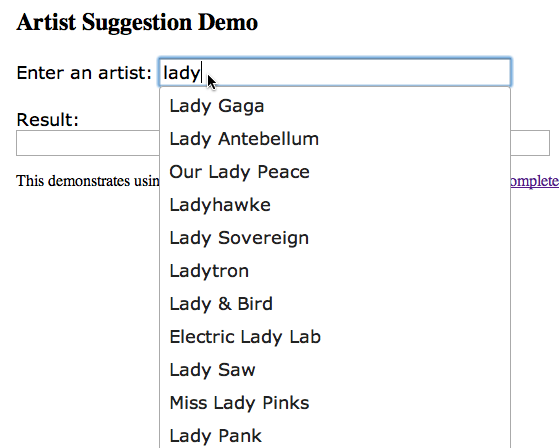
It deals with stop words (like the, and, and a) properly. You don’t need to type ‘the bea’ if you are looking for The Beatles but you can if you want to.
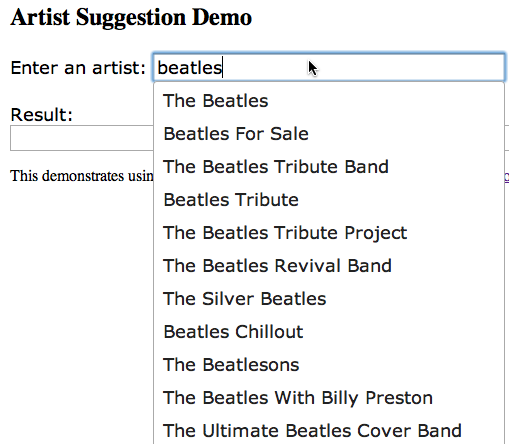
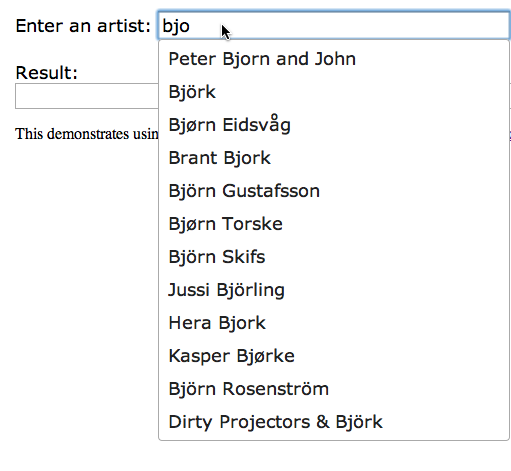
It deals with international characters in the expected way, so that we poor Americans that don’t know how to type umlauts can still listen to Björk:
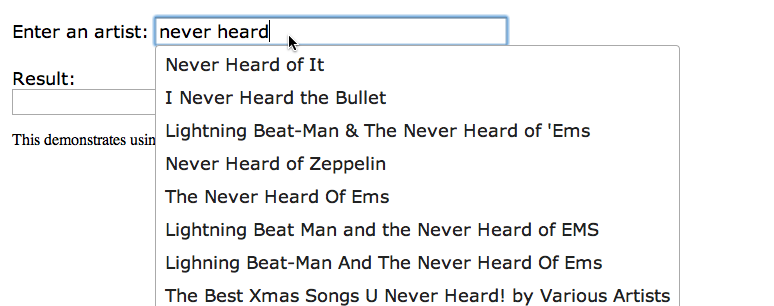
The artist/suggest API is backed by millions of artists, including many, many artists that you’ve never heard of:
Integrating with jQuery is straightforward using the jQuery UI Autocomplete widget. The core code is:
$(function() {
    $("#artist" ).autocomplete({
        source: function( request, response ) {
            $.ajax({
                url: "http://developer.echonest.com/api/v4/artist/suggest",
                dataType: "jsonp",
                data: {
                    results: 12,
                    api_key: "YOUR_API_KEY",
                    format:"jsonp",
                    name:request.term
                },
                success: function( data ) {
                    response( $.map( data.response.artists, function(item) {
                        return {
                            label: item.name,
                            value: item.name,
                            id: item.id
                        }
                    }));
                }
            });
        },
        minLength: 3,
        select: function( event, ui ) {
            $("#log").empty();
            $("#log").append(ui.item ? ui.item.id + ' ' + ui.item.label : '(nothing)');
        },
    });
});
The full code is here: http://static.echonest.com/samples/suggest/ArtistSuggestAutoComplete.html
A source function is defined that makes the jsonp call to the artist/suggest interface, and the response handler gets the extracts the matching artist names and ids from the result and puts them in a dictionary for use by the widget. Since the artist/suggest API also returns Echo Nest Artist IDs it is straightforward to turn make further Echo Nest calls to get detailed data for the artists. (Note that the artist/suggest API doesn’t allow you to specify buckets to add more data to the response like many of our other artist calls. This is so that we can keep the response time of the suggest API as low as possible for interactive applications).
We hope people will find the artist/suggest API. We are releasing it as a beta API – we may change how it works as we get a better understanding of how people want to use it. Feel free to send us any suggestions you may have.

