Archive for category fun
The Billboard Hot 100. In Spotify.
Posted by Paul in code, fun, web services on November 7, 2009
Inspired by Oscar’s 1001 Albums You Must Hear Before You Die …. in Spotify I put together an app that gets the Top charts from Billboard (using the nifty Billboard API) and resolves them to a Spotify ID – giving you a top 100 chart that you can play.
The Billboard Hot 100 in Spotify
Here’s the Top 10:
- I Gotta Feeling by The Black Eyed Peas
Weeks on chart:16 Peak:1 - Down by Jay Sean Lil Wayne
Weeks on chart:13 Peak:2 - Party In The U.S.A. by Miley Cyrus
Weeks on chart:7 Peak:2 - Run This Town by Jay-Z, Rihanna & Kanye West
Weeks on chart:9 Peak:2 - Whatcha Say by Jason DeRulo
Weeks on chart:7 Peak:5 - You Belong With Me by Taylor Swift
Weeks on chart:23 Peak:2 - Paparazzi by Lady Gaga
Weeks on chart:5 Peak:7 - Use Somebody by Kings Of Leon
Weeks on chart:35 Peak:4 - Obsessed by Mariah Carey
Weeks on chart:12 Peak:7 - Empire State Of Mind by Jay-Z + Alicia Keys
Weeks on chart:3 Peak:5
Note that the Billboard API purposely offers up slightly stale charts, so this is really the top 100 of a few weeks ago. I never listen to the Top 100, and I hadn’t heard of 50% of the artists so listening to the Billboard Top 100 was quite enlightening. I was surprised at how far removed the Top 100 is from the music that I (and everyone I know) listen to every day.
To build the list I used my Jspot – and a (yet to be released) Java client for the Billboard API. (If you are interested in this API, let me know and I’ll stick it up on google code). Of course it’d be really nifty if you could specify get and listen to a chart for a given week (i.e. let me listen to the Billboard chart for the week that I graduated from High School). Sound like something to do for Boston Music Hackday.
Update: I’ve made another list that is a little bit more inline with my own music tastes:
The Spotified Billboard Top Modern Rock/Alternative Albums
Where is my JSpot?
Posted by Paul in code, fun, Music, web services on November 3, 2009
I like Spotify. I like Java. So I combined them. Here’s a Java client for the new Spotify metadata API: JSpot
This client lets you do things like search for a track by name and get the Spotify ID for the track so you can play the track in Spotify. This is useful for all sorts of things like building web apps that use Spotify to play music, or perhaps to build a Playdar resolver so you can use Spotify and Playdar together.
Here’s some sample code that prints out the popularity and spotify ID for all versions of Weezer’s ‘My Name Is Jonas’.
    Spotify spotify = new Spotify();
    Results<Track> results = spotify.searchTrack("Weezer",  "My name is Jonas");
    for (Track track : results.getItems()) {
       System.out.printf("%.2f %s \n", track.getPopularity(), track.getId());
    }
This prints out:
If you have Spotify and you click on those links, and those tracks are available in your locale you should hear Weezer’s nerd anthem.
You can search for artists, albums and tracks and you can get all sorts of information back such as release dates for albums, countries where the music can be played, track length, popularity for artists, tracks and albums. It is very much a 0.1 release. The search functionality is complete so its quite useful, but I haven’t implemented the ‘lookup’ methods yet. There some javadocs. There’s a jar file: jspot.jar. And it is all open source: jspot at google code.
My worst ISMIR moment
I’ve been invited to be a session chair for the Oral Session on Tags that runs this morning. This brings back memories of my worst ISMIR moment which I wrote about in my old Duke Listens blog:
It was in my role as session chair that I had my worst ISMIR moment. I was doing fine making sure that the speakers ended on time (even when we had to swap speakers around when one chap couldn’t get his slides to appear on the projector). However there was one speaker who gave a talk about a topic that I just didn’t understand. I didn’t grasp the goal of the research, the methods, the conclusions or the applicability of the research. All the way through the talk I was wracking my brains trying to eek out an appropriate, salient question about the research. A question that wouldn’t mark me as the idiot that I clearly was. By the end of the talk I was regretting my decision to accept the position as session chair. I could only pray that someone else would ask the required question and save me from humiliating myself and insulting the speaker. The speaker concluded the talk, I stood up and thanked the speaker, offered a silent prayer to the God of Curiosity and then asked the assembled for questions. Silence. Long Silence. Really long silence. My worst nightmare. I was going to ask a question, but by this point I couldn’t even remember what the talk was about. It was going to be a bad question, something like “Why do you find this topic interesting?” or “Isn’t Victoria nice?”. Just microseconds before I uttered my feeble query, a hand went up, I was saved. Someone asked a question. I don’t remember the question, I just remember the relief. My job as session chair was complete, every speaker had their question.
This year, I think I’ll be a bit more comfortable as a session chair. I know the topic of the session pretty well, and I know most of the speakers too, but still, please don’t be offended if I ask you “How do you like Kobe?”
Tutorial Day at ISMIR
Posted by Paul in events, fun, Music, music information retrieval on October 26, 2009
Monday was tutorial day. After months of preparation, Justin finally got to present our material. I was a bit worried that our timing on the talk would be way out of wack and we’d have to self edit on the fly – but all of our time estimates seemed to be right on the money. whew! The tutorial was well attended with 80 or so registered – and lots of good questions at the end. All in all I was pleased at how it turned out. Here’s Justin talking about Echo Nest features:
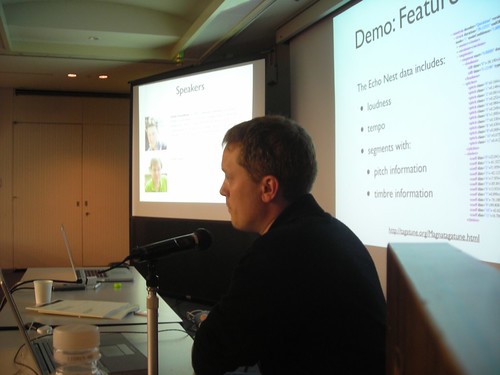
After the tutorial a bunch of us went into town for dinner. 15 of us managed to find a restaurant that could accommodate us – and after lots of miming and pointing at pictures on the menu we managed to get a good meal. Lots of fun.

Walking around Kobe

Justin on the Port Liner
My tutorial co-presenter Justin and I spent the a few hours walking around the center of Kobe before we did our final tutorial preparation. I had a great time, Kobe is really a fun city. It was great to see the “Welcome to Kobe’ ISMIR 2009 signs on the Port Liner (the Monorail that goes from the main trainstation to the conference center).
I had sushi in a conveyor-belt sushi restaurant. Justin patiently walked me through the protocols and condiments. I had a really fun time. Being in Japan is really like being in the future.


A shopping street in Kobe
The last quiet moment ….
The last quiet moment at the Echo Nest before Pladar summit and Music Hack Day take over.

Using Visualizations for Music Discovery
Posted by Paul in code, data, events, fun, Music, music information retrieval, research, The Echo Nest, visualization on October 22, 2009
On Monday, Justin and I will present our magnum opus – a three-hour long tutorial entitled: Using Visualizations for Music Discovery. In this talk we look the various techniques that can be used for visualization of music. We include a survey of the many existing visualizations of music, as well as talk about techniques and algorithms for creating visualizations. My hope is that this talk will be inspirational as well as educational spawning new music discovery visualizations. I’ve uploaded a PDF of our slide deck to slideshare. It’s a big deck, filled with examples, but note that large as it is, the PDF isn’t the whole talk. The tutorial will include many demonstrations and videos of visualizations that just are not practical to include in a PDF. If you have the chance, be sure to check out the tutorial at ISMIR in Kobe on the 26th.
Who’s going to Boston Music Hackday?
Posted by Paul in events, fun, Music, The Echo Nest, web services on October 21, 2009
Look at all the companies and organizations going to Music Hack Day.
 The Echo Nest
 SoundCloud
 Indaba Music
Harmonix
Amie Street
8tracks
Playdar
Bandsintown
Tourfilter
NPR
Boxee
Sonos
Aviary
Conduit Labs
Topspin Media
Noteflight
Dorkbot
 Libre.fm
It promises to be a really fun weekend. If you are interested in hacking music and working with the folks that are building the celestial jukebox make sure you sign up, slots are going fast. There’s one guy I’d  to get to come to the hack day. I’m sure he’d be fascinated with all that goes on.
Installing Playdar
Posted by Paul in code, fun, Music, The Echo Nest, web services on October 18, 2009
A few people have asked me the steps to go through to install playdar. Official instructions are here: Playdar source code. This is what I did to get it running on my Mac:
- Download and install XCode from Apple
- Download build and install Erlang
- Install MacPorts if you haven’t already done so
- Download and install git
- Install Taglib
- Grab the latest Playdar source:
git clone git://github.com/RJ/playdar-core.git - Build it by typing ‘make’ at the top level
- Copy etc/playdar.conf.example to etc/playdar.conf
- If you want to include the Echo Nest resolver do these bits:
- Get an Echo Nest API key from here: developer.echonest.com
- Download and install pyechonest (the python client for the Echo Nest library):
- Add your Echo Nest API key to echonest-resolver.py (at around line 22)
- Make sure the echonest-resolver.py is executable (chmod +x path/to/contrib/echonest-resolver.py)
- Edit etc/playdar.conf and add the path to the resolver in the scripts list. Line 22-26 should look something like this:
{scripts,[
 "/Users/plamere/tools/playdar-core/contrib/echonest/echonest-resolver.py"
 %"/path/to/a/resolver/script1.py",
 %"/path/to/a/resolver/script2.py"
]}.
- If you want to enable p2p sharing remove “p2p” from the module blacklist in the playdar.conf (around line 59)
- start Playdar with:
./start-dev.sh
- To add your local music to playdar – in a separate window type:
./playdarctl start-debug
./playdarctl scan /path/to/your/music - At this point, playdar should be running. You can check its status by going to:
http://localhost:60210/
- Try Playdar by going to http://www.playdar.org/demos/search.html. Click the ‘connect’ button to connect to Playdar – then search for a track – if Playdar finds it, it should appear in the search results. Start listening to music. Then visit Playlick and start building playlists.
- If p2p is enabled you can add a friends music collection to Playdar by typing this into the Erlang console window:
p2p_router:connect("hostname.example.com", 3389).
That’s a long way to go to get Playdar installed – so it is still only for the highly motivated, but people are working on making this easy – so if you aren’t ready to spend an hour tinkering with installs, wait a few days and there will be an easier way to install it all.
 Music Machinery