The Echo Nest Is Joining Spotify: What It Means To Me, and To Developers
Posted by Paul in Music, The Echo Nest on March 6, 2014
I love writing music apps and playing with music data. How much? Every weekend I wake up at 6am and spend a long morning writing a new music app or playing with music data. That’s after a work week at The Echo Nest, where I spend much of my time writing music apps and playing with music data. The holiday break is even more fun, because I get to spend a whole week working on a longer project like Six Degrees of Black Sabbath or the 3D Music Maze.
That’s why I love working for The Echo Nest. We have built an amazing open API, which anyone can use, for free, to create music apps. With this API, you can create phenomenal music discovery apps like Boil the Frog that take you on a journey between any two artists, or Music Popcorn, which guides you through hundreds of music genres, from the arcane to the mainstream. It also powers apps that create new music, like Girl Talk in a Box, which lets you play with your favorite song in the browser, or The Swinger, which creates a Swing version of any song:
One of my roles at The Echo Nest is to be the developer evangelist for our API — to teach developers what our API can do, and get them excited about building things with it. This is the best job ever. I get to go to all parts of the world to attend events like Music Hack Day and show a new crop of developers what they can do with The Echo Nest API. In that regard, it’s also the easiest job ever, because when I show apps that developers have built with The Echo Nest API, like The Bonhamizer and The Infinite Jukebox, or show how to create a Pandora-like radio experience with just a few lines of Python, developers can’t help but get excited about our API.
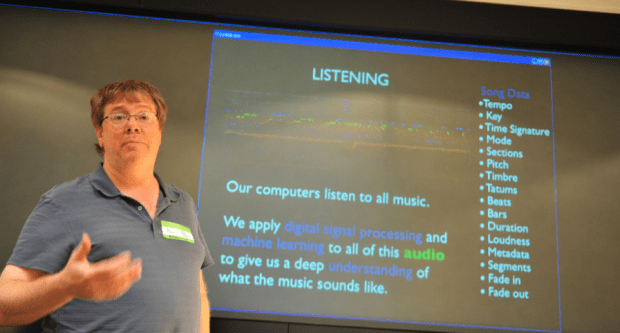
Photo by Thomas Bonte
At The Echo Nest we’ve built what I think is the best, most complete music API — and now our API is about to get so much better.
 Today, we’ve announced that The Echo Nest has been acquired by Spotify, the award-winning digital music service. As part of Spotify, The Echo Nest will use our deep understanding of music to give Spotify listeners the best possible personalized music listening experience.
Spotify has long been committed to fostering a music app developer ecosystem. They have a number of APIs for creating apps on the web, on mobile devices, and within the Spotify application. They’ve been a sponsor and active participant in Music Hack Days for years now. Developers love Spotify, because it makes it easy to add music to an app without any licensing fuss. It has an incredibly huge music catalog that is available in countries around the world.
Spotify and The Echo Nest APIs already work well together. The Echo Nest already knows Spotify’s music catalog. All of our artist, song, and playlisting APIs can return Spotify IDs, making it easy to build a smart app that plays music from Spotify. Developers have been building Spotify / Echo Nest apps for years. If you go to a Music Hack Day, one of the most common phrases you’ll hear is, “This Spotify app uses The Echo Nest API”.
I am incredibly excited about becoming part of Spotify, especially because of what it means for The Echo Nest API. First, to be clear, The Echo Nest API isn’t going to go away. We are committed to continuing to support our open API. Second, although we haven’t sorted through all the details, you can imagine that there’s a whole lot of data that Spotify has that we can potentially use to enhance our API. Perhaps the first visible change you’ll see in The Echo Nest API as a result of our becoming part of Spotify is that we will be able to keep our view of the Spotify ID space in our Project Rosetta Stone ID mapping layer incredibly fresh. No more lag between when an item appears in Spotify and when its ID appears in The Echo Nest.
The Echo Nest and the Spotify APIs are complementary. Spotify’s API provides everything a developer needs to play music and facilitate interaction with the listener, while The Echo Nest provides deep data on the music itself — what it sounds like, what people are saying about it, similar music its fans should listen to, and too much more to mention here. These two APIs together provide everything you need to create just about any music app you can think of.
I am a longtime fan of Spotify. I’ve been following them now for over seven years. I first blogged about Spotify way back in January of 2007 while they were still in stealth mode. I blogged about the Spotify haircuts, and their serious demeanor:

Those Crazy Spotify Guys in 2007
I blogged about the Spotify application when it was released to private beta (“Woah – Spotify is pretty cool”), and continued to blog about them every time they added another cool feature.
Last month, on a very cold and snowy day in Boston, I sat across a conference table from of bunch of really smart folks with Swedish accents. As they described their vision of a music platform, it became clear to me that they share the same obsession that we do with trying to find the best way to bring fans and music together.
Together, we can create the best music listening experience in history.
I’m totally excited to be working for Spotify now. Still, as with any new beginning, there’s an ending as well. We’ve worked hard, for many years, to build The Echo Nest — and as anyone who’s spent time here knows, we have a very special culture of people totally obsessed with building the best music platform. Of course this will continue, but as we become part of Spotify things will necessarily change, and the time when The Echo Nest was a scrappy music startup when no one in their right mind wanted to be a music startup will be just a sweet memory. To me, this is a bit like graduation day in high school — it is exciting to be moving on to bigger things, but also sad to say goodbye to that crazy time in life.
There is a big difference: When I graduated from high school and went off to college, I had to say goodbye to all my friends, but now as I go off to the college of Spotify, all my friends and classmates from high school are coming with me. How exciting is that!

Anti-preferences in regional listening
Posted by Paul in data, The Echo Nest, zero ui on February 28, 2014
In previous posts, we’ve seen that different regions of the country can have different listening preferences. So far we’ve looked at the distinctive artists in any particular region. Perhaps equally interesting is to look at artists that get much fewer listens in a particular region than you would expect. These are the regional anti-preferences, the artists that are generally popular across the United States, but get much less love in a particular part of the country.
To find these artists, we merely look for artists that drop the furthest in rank on the top-most-played chart for a region when compared to the whole U.S. For example, we can look at the top 50 artists in the United States, and find those artists of the 50 that drop furthest in rank on the New Hampshire chart. Try it yourself. Here are the results:
Artists listened to more in United States than they are in New Hampshire
| # | Artist | Rank in United States |
Rank in New Hampshire |
Delta |
|---|---|---|---|---|
| 1 | R. Kelly | 42 | 720 | -678 |
| 2 | 2Pac | 45 | 243 | -198 |
| 3 | Usher | 46 | 205 | -159 |
| 4 | Coldplay | 36 | 155 | -119 |
| 5 | Chris Brown | 37 | 120 | -83 |
R. Kelly is ranked the 42nd most popular artist in the U.S., but in New Hampshire he’s the 720th most popular, a drop of 678 positions on the chart making him the most ignored artist in New Hampshire.
We can do this for each of the states in the United States and of course we can put them on a map. Here’s a map that shows the most ignored artist of the U.S. top-50 artist in each state.
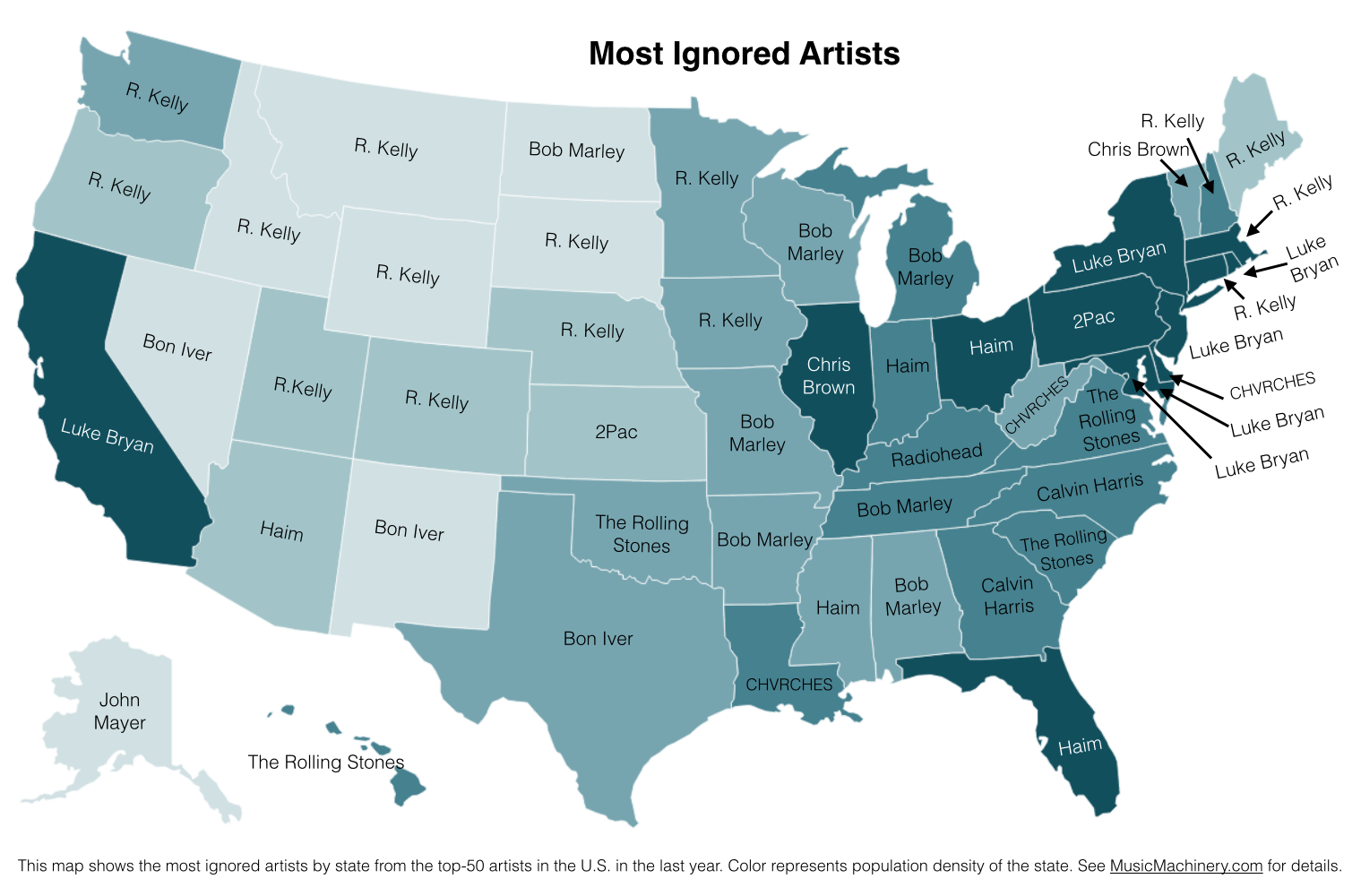
What can we do with this information? If we know where a music listener lives, but we know nothing else about them, we can potentially improve their listening experience by giving them music based upon their local charts instead of the global or national charts. We can also improve the listening even if we don’t know where the listener is from. As we can see from the map, certain artists are polarizing artists, liked in some circles and disliked in others. If we eliminate the polarizing artists for a listener that we know nothing about, we can reduce the risk of musically offending the listener. Of course, once we know a little bit about the music taste of a listener we can greatly improve their recommendations beyond what we can do based solely on demographic info such as the listener location.
Future work There are a few more experiments that I’d like to try with regard to exploring regional preferences. In particular I think it’d be fun to generate an artist similarity metric based solely on regional listening behaviors. In this world, Juicy J, the southern rapper, and Hillsong United, the worship band would be very similar since they both get lots of listens from people in Memphis. A few readers have suggested alternate scoring algorithms to try, and of course it would be interesting to repeat these experiments for other parts of the world. So much music data, so little time! However, this may be the last map I make for a while since the Internet must be getting sick of ‘artists on a map’ by now.
Credit and thanks to Randal Cooper (@fancycwabs) for creating the first set of anti-preference maps. Check out his blog and the Business Insider article about his work.
The data for the map is drawn from an aggregation of data across a wide range of music services powered by The Echo Nest and is based on the listening behavior of a quarter million online music listeners.
Favorite Artists vs Distinctive Artists by State
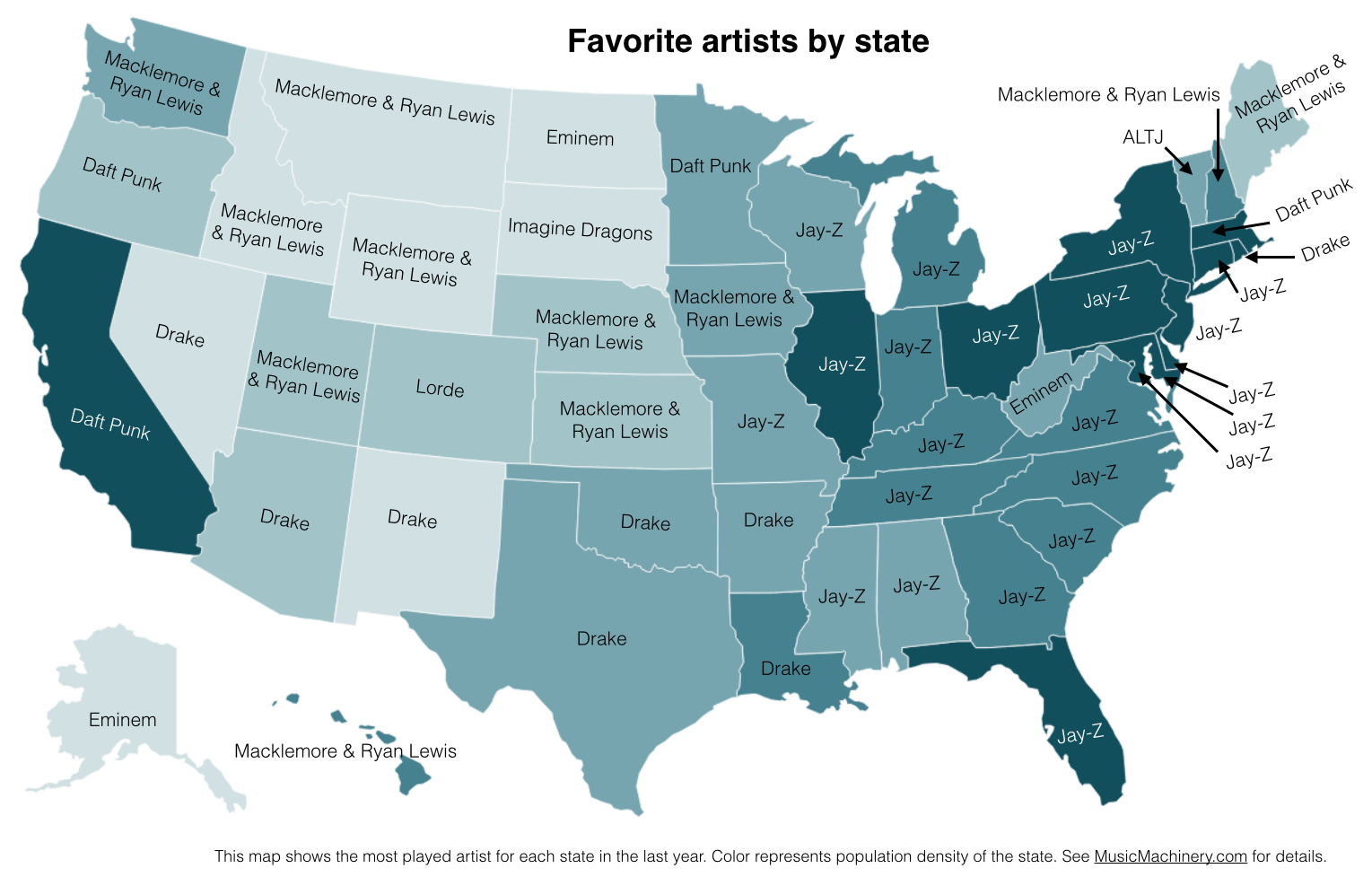
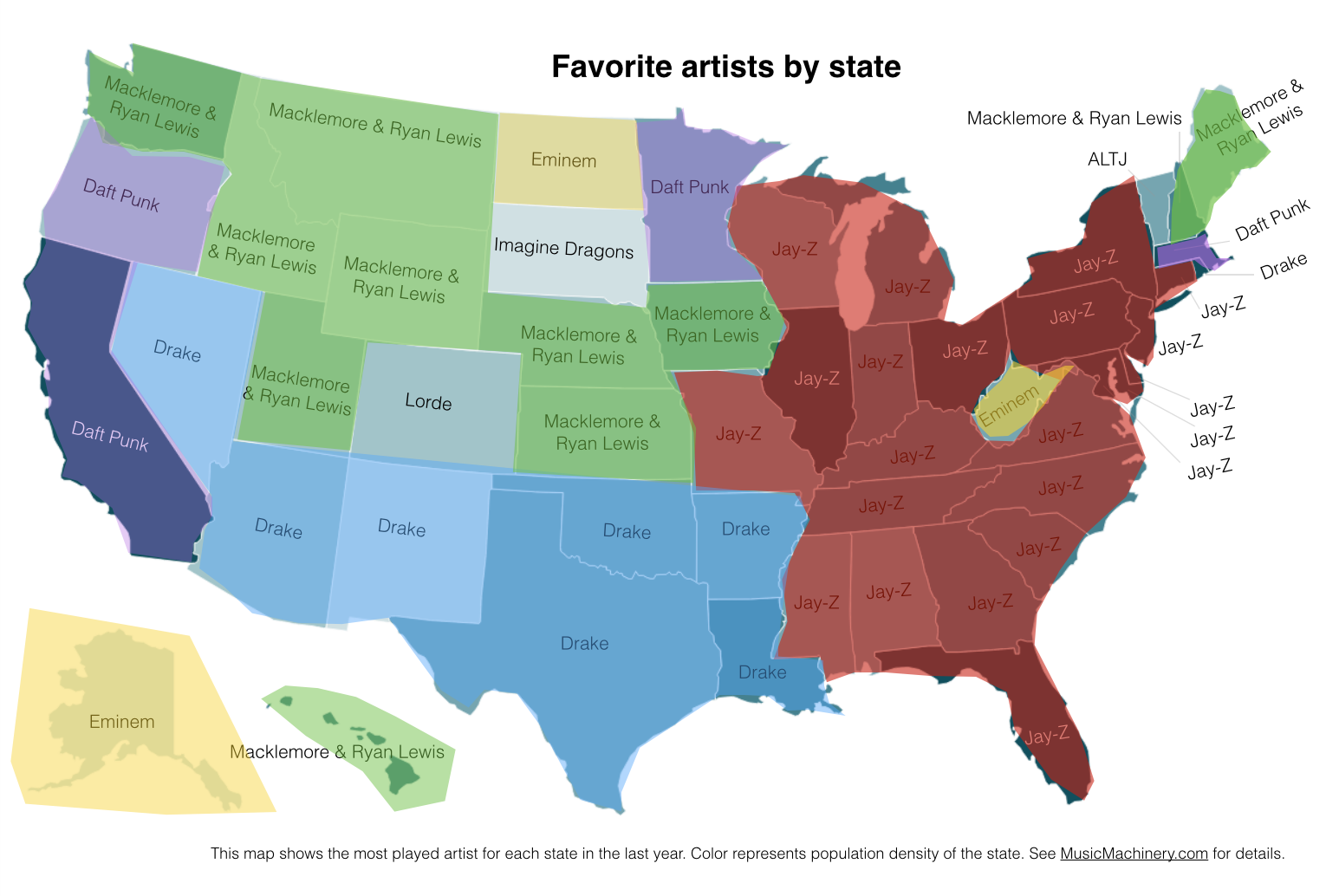
In my recent regional listening preferences post I published a map that showed the distinctive artists by state. The map was rather popular, but unfortunately was a source of confusion for some who thought that the map was showing the favorite artist by state. A few folks have asked what the map of favorite artists per state would look like and how it would compare to the distinctive map. Here are the two maps for comparison.
Favorite Artists by State
This map shows the most played artist in each state over the last year. It is interesting to see the regional differences in favorite artists and how just a handful of artists dominates the listening of wide areas of the country.
Most Distinctive Artists by State
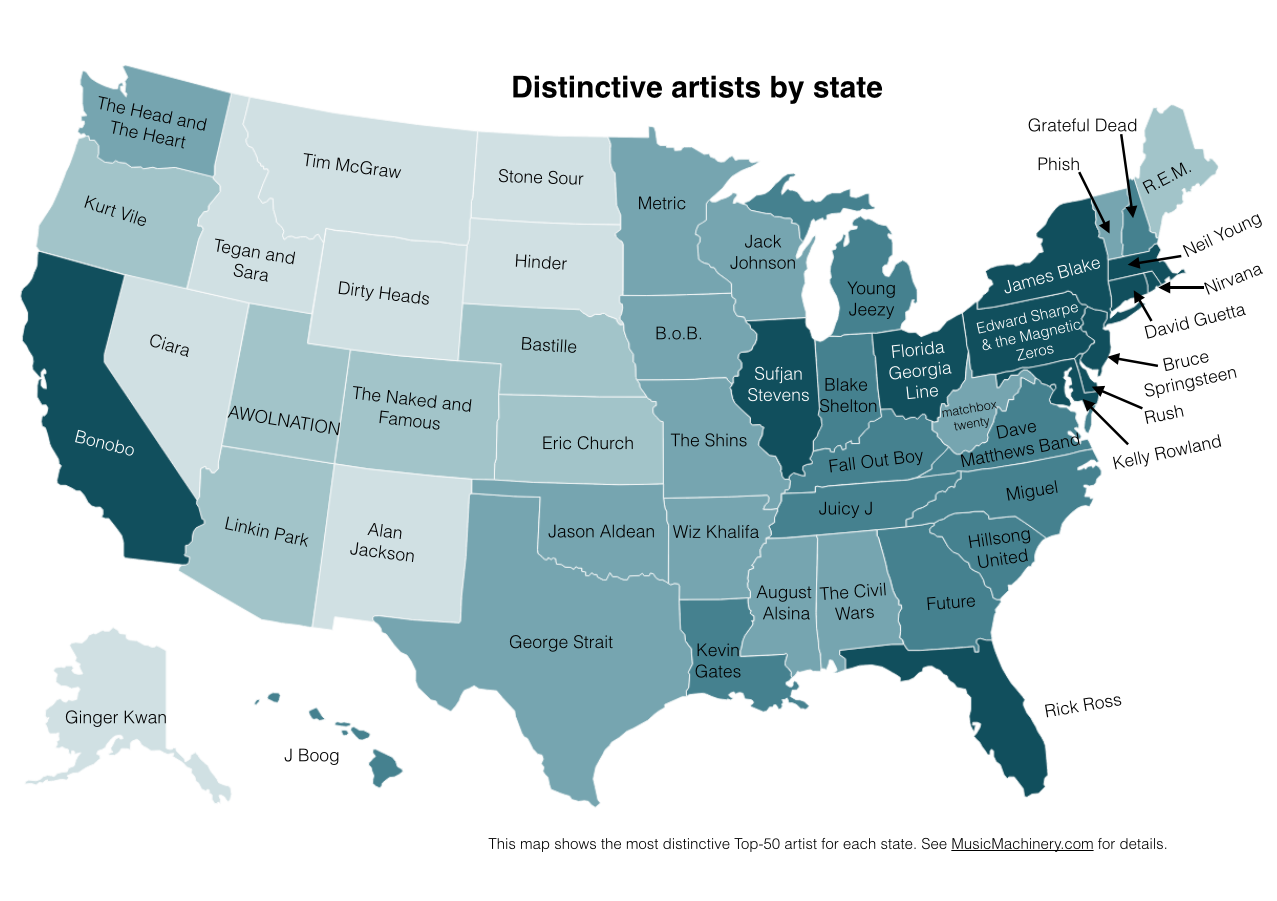
This is the previously published map that shows the artists that are listened to proportionally more frequently in a particular state than they are in all of the United States.
The data for both maps is drawn from an aggregation of data across a wide range of music services powered by The Echo Nest and is based on the listening behavior of a quarter million online music listeners.
It is interesting to see that even when we consider just the most popular artists, we can see regionalisms in listening preferences. I’ve highlighted the regions with color on this version of the map:
Favorite Artist Regions
Exploring regional listening preferences
In previous posts we looked at how gender and age can affect listening preferences. Today we take a look at how the location of a listener may affect their listening preferences.
For this study, I sampled the listening preferences of about a quarter million listeners that have a zip code associated with their account. update: Listener data is drawn from a variety of music streaming services that are powered by The Echo Nest. I aggregated these listeners into regions (state, regional and all-US). To compare regions I look at the top-N most popular artists based upon listener plays in each region and look for artists that have a substantial change in rank between the two regions. These artists are the artists that define the taste for the region.
As an example let’s compare Tennessee to New England. If we look at the top 100 artists listened to in Tennessee and see which artists fall the furthest on the New England chart we find these 10 artists:
| # | Artist | Rank in Tennessee |
Rank in New England |
Delta |
|---|---|---|---|---|
| 1 | Hillsong United | 97 | 1097 | -1000 |
| 2 | Juicy J | 47 | 664 | -617 |
| 3 | Young Jeezy | 78 | 579 | -501 |
| 4 | R. Kelly | 26 | 259 | -233 |
| 5 | 2 Chainz | 63 | 288 | -225 |
| 6 | Eric Church | 79 | 286 | -207 |
| 7 | The 1975 | 87 | 268 | -181 |
| 8 | T.I. | 40 | 211 | -171 |
| 9 | The Civil Wars | 22 | 150 | -128 |
| 10 | Blake Shelton | 58 | 184 | -126 |
The first artist, Hillsong United is the 97th most popular artist in Tennessee for our sample of listeners. In New England, Hillsong United drops all the way to the 1097th artist, a drop in rank of 1,000. Hillsong United is a Christian rock worship band. Tennessee listeners, living in the heart of the U.S. Bible Belt, listen to Hillsong United much more than their New England counterparts. Second on the Tennessee list is Juicy J,a rapper, songwriter and record producer from Memphis, Tennessee. Third is Young Jeezy from nearby Atlanta Georgia. The rest of the top 10 is dominated by southern rappers, country, and folk artists.
Now let’s look at top 100 New England artists and see which artists fall furthest on the Tennessee charts:
| # | Artist | Rank in New England |
Rank in Tennessee |
Delta |
|---|---|---|---|---|
| 1 | Phish | 89 | 431 | -342 |
| 2 | Grateful Dead | 45 | 222 | -177 |
| 3 | Talking Heads | 86 | 254 | -168 |
| 4 | Neil Young | 53 | 182 | -129 |
| 5 | Bonobo | 60 | 189 | -129 |
| 6 | Billy Joel | 90 | 218 | -128 |
| 7 | Bruce Springsteen | 48 | 175 | -127 |
| 8 | The XX | 44 | 158 | -114 |
| 9 | Modest Mouse | 85 | 179 | -94 |
| 10 | Bob Marley | 30 | 123 | -93 |
New England tastes run to jam bands, indie and classic rock.
Exploring Region differences on your own
I built an app that makes it easy to explore the regional differences in music. With the app you can select two regions and it will show you which artists are distinctive for each region.

Using this approach we can pick a single signature artist for each state. I do this by finding the top most distinctive popular artist for a state that hasn’t already been selected for a more populous state. Here’s the list of signature state artists:
| State | Name | State Rank | US Rank | Change |
| AK | Ginger Kwan | 33 | 12062 | -12029 |
| AL | The Civil Wars | 34 | 110 | -76 |
| AR | Wiz Khalifa | 15 | 69 | -54 |
| AZ | Linkin Park | 47 | 98 | -51 |
| CA | Bonobo | 28 | 85 | -57 |
| CO | The Naked And Famous | 48 | 125 | -77 |
| CT | David Guetta | 43 | 80 | -37 |
| DE | Rush | 38 | 385 | -347 |
| FL | Rick Ross | 44 | 103 | -59 |
| GA | Future | 33 | 226 | -193 |
| HI | J Boog | 40 | 4703 | -4663 |
| IA | B.o.B | 32 | 82 | -50 |
| ID | Tegan and Sara | 31 | 107 | -76 |
| IL | Sufjan Stevens | 38 | 68 | -30 |
| IN | Blake Shelton | 31 | 91 | -60 |
| KS | Eric Church | 48 | 162 | -114 |
| KY | Fall Out Boy | 17 | 59 | -42 |
| LA | Kevin Gates | 15 | 1359 | -1344 |
| MA | Neil Young | 49 | 128 | -79 |
| MD | Kelly Rowland | 45 | 217 | -172 |
| ME | R.E.M. | 28 | 197 | -169 |
| MI | Young Jeezy | 34 | 138 | -104 |
| MN | Metric | 41 | 211 | -170 |
| MO | The Shins | 29 | 67 | -38 |
| MS | August Alsina | 42 | 909 | -867 |
| MT | Tim McGraw | 36 | 187 | -151 |
| NC | Miguel | 37 | 88 | -51 |
| ND | Stone Sour | 47 | 735 | -688 |
| NE | Bastille | 48 | 89 | -41 |
| NH | Grateful Dead | 29 | 191 | -162 |
| NJ | Bruce Springsteen | 23 | 109 | -86 |
| NM | Alan Jackson | 45 | 425 | -380 |
| NV | Ciara | 34 | 106 | -72 |
| NY | James Blake | 47 | 130 | -83 |
| OH | Florida Georgia Line | 26 | 75 | -49 |
| OK | Jason Aldean | 24 | 84 | -60 |
| OR | Kurt Vile | 49 | 212 | -163 |
| PA | Edward Sharpe & the Magnetic Zeros | 43 | 77 | -34 |
| RI | Nirvana | 48 | 126 | -78 |
| SC | Hillsong United | 24 | 262 | -238 |
| SD | Hinder | 42 | 1154 | -1112 |
| TN | Juicy J | 47 | 151 | -104 |
| TX | George Strait | 16 | 199 | -183 |
| UT | AWOLNATION | 31 | 111 | -80 |
| VA | Dave Matthews Band | 48 | 113 | -65 |
| VT | Phish | 5 | 353 | -348 |
| WA | The Head and the Heart | 22 | 83 | -61 |
| WI | Jack Johnson | 45 | 99 | -54 |
| WV | matchbox twenty | 48 | 282 | -234 |
| WY | Dirty Heads | 48 | 1334 | -1286 |
It is pretty clear that people in different parts of the US listen to different kinds of music. These regionalisms can be used to help recommend music for people when you otherwise might not know anything about their music taste.
Note – the base map in the visualizations is shaded by population density.
The Tokyo Tune Train
I spent this weekend in the Harajuku neighborhood of Tokyo at Music Hack Day Tokyo. Inspired by the Tokyo Subway, and the love many people in Japan have for music games I thought I would build a Tokyo Subway-themed music game for my hack. The result is the Tokyo Tune Train.

The Tokyo Tune Train
The goal of the game is to drive a Tokyo Subway car through the maze of routes and make it to the final stop with the fewest deviations from the track (in my world, the trains don’t stay on the tracks unless you steer them). It’s a bit like Centipede or Snake, but with a train track and music integrated into the game play.

Headlights help you see up coming turns
The movement of the train is synchronized to a song – with every beat of the song, the train advances a hundred feet down the track. As long as you stay on the track, the song will play perfectly, but if you miss a turn, not only will you veer off the tracks you will also veer into a completely different part of the song. If you stop the train, the song will stop and continually play that one beat until you start again. If you go backwards the song will play backwards. You can speed the train up and slow it down (which, of course, also speeds up or slows down the song). A faster train is harder to drive but gets you to the destination quicker. You get points for good driving and getting to the destination in the quickest time. There’s an adjustable headlight on the train – the brighter the headlight, the further ahead you can see, making the drive easier, but the headlight uses lots of energy, so a brighter headlight will cost you a number of points. You can also drive during the day letting you see the whole line stretched out in front of you. It’s much easier to navigate, but driving during the day costs more points than (access to the tracks during the day is very expensive in my train system). There’s even an autopilot that will take over and drive the train perfectly for you, but it chews through points very rapidly, so use it sparingly.
This is the first game I’ve built in a long time. My goal was to make something that was fun to play in which music was an integral part of the game.
The Technical Bits
At the core of the game is the Echo Nest remix library. I essentially ripped Girl Talk in a Box apart and put in a new play engine that was tied to the game mechanic. The harder bit was figuring out how to build good labyrinth mazes that would get progressively twistier and would fill a 2-D plane. I played around with a number of algorithms, but none were satisfactory, so instead, I built a maze editor that lets you hand draw mazes and then export the data as json to be used by the app.

I enlisted the help of Elissa and Eric to build the mazes. They created 15 awesomely creative mazes that met the needs of the game much better than any maze algorithm, again confirming the superiority of human curators over the algorithm.

Professional labyrinth builders @elissab and @eswens conducting maze research at The Scramble
I briefly took a look at using Google Play Game service to manage the high-scores, but it looked like it would take at least an hour of precious hacking time to integrate and since it is a feature that wouldn’t appear in the demo, I decided it was not worth the effort.
The Demo
It was a great demo session at Music Hack Day Tokyo. There were easily 150 people crammed into the demo area – it was standing room only. The demo session was conducted in Japanese, so Taishi provided simultaneous translation for me. I was nervous giving the demo, so I let the train autopilot do most of the driving. The crowd seemed to really enjoy the demo, the hack got lots of votes for ‘favorite hack‘ on the hacker league page of hacks, and I got many compliments. I was pleased with the response and feedback

Taishi translated the demo while I try to drive a train in front of 150 hackers. Photo by @timfalls
A day later I see that a number of people have played the game and have posted their scores to twitter which is great to see (way better response than I received for my dark horse hack).
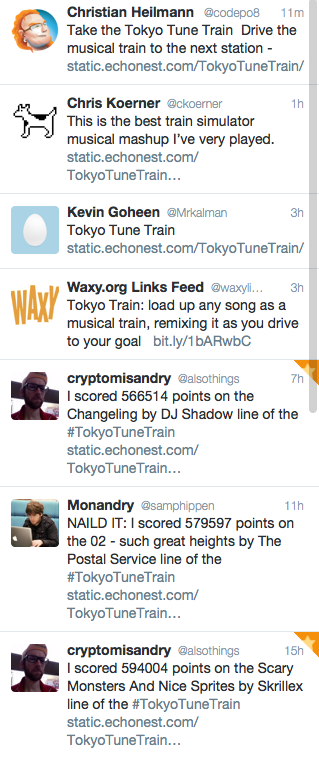
twitter feedback
Give the game a try and let me know what you think:
Ride the Equinox line of the Tokyo Tune Train
The code is on github.
Exploring age-specific preferences in listening
Earlier this week we looked at how gender can affect music listening preferences. In this post, we continue the tour through demographic data and explore how the age of the listener tells us something about their music taste.
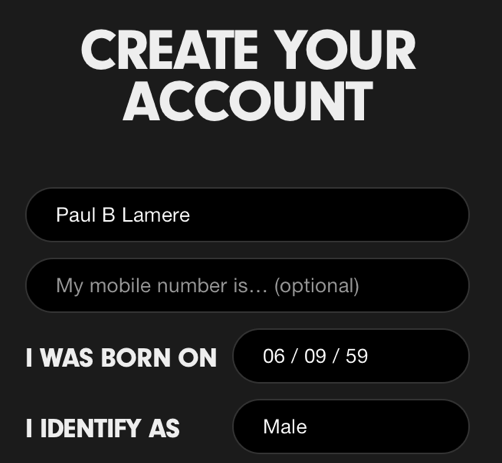
Where does the age data come from? As part of the enrollment process for most music services, the user is asked for a few pieces of demographic data, including gender and year-of-birth. As an example, here’s a typical user-enrollment screen from a popular music subscription service:
Is this age data any good? The first thing we need to do before we get too far with analyzing the age data is to get a feel for how accurate it is. If new users are entering random values for their date of birth then we won’t be able to use the listener’s age for anything useful. For this study, I looked at the age data submitted by several million listeners. This histogram shows the relative number of users by year of birth.
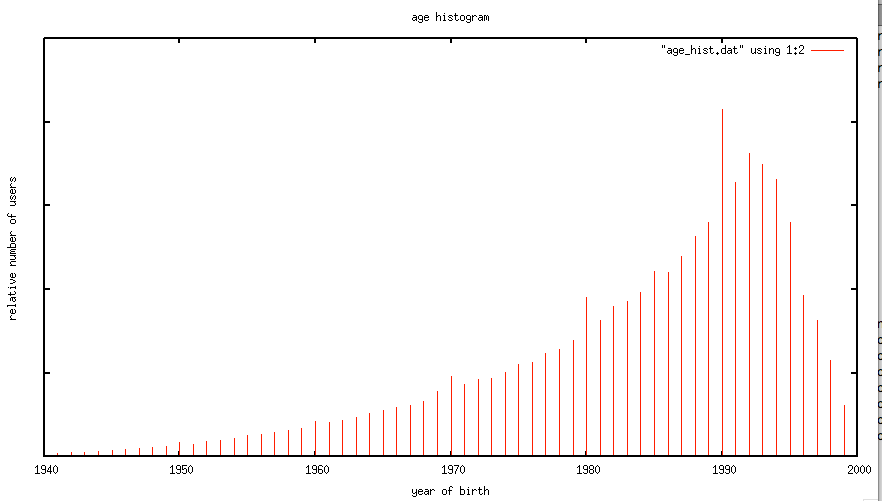
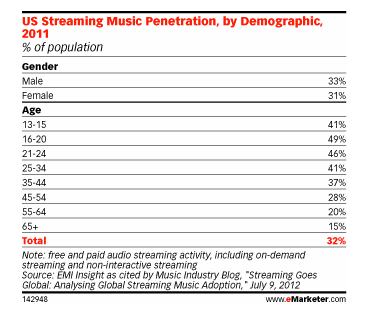
The first thing I notice is the curve has the shape one would expect. The number of listeners in each age bucket increases as the listener gets younger until around age 21 or so, at which points it drops off rapidly. The shape of the curve aligns with the data from this study by EMI in 2011 that shows the penetration of music streaming service by age demographic. This is a good indicator that our age data is an accurate representation of reality.
However, there are a few anomalies in the age data. There are unexpected peaks at each decade – likely due to people rounding their birth year to the nearest decade. A very small percentage (0.01 %) indicate that they are over 120 years old, which is quite unlikely. Despite this noise, the age data looks to be a valid and fairly accurate representation, in the aggregate, of the age of listeners. We should be able to use this data to understand how age impacts listening.
Does a 64-year-old listen to different music than a 13-year-old?
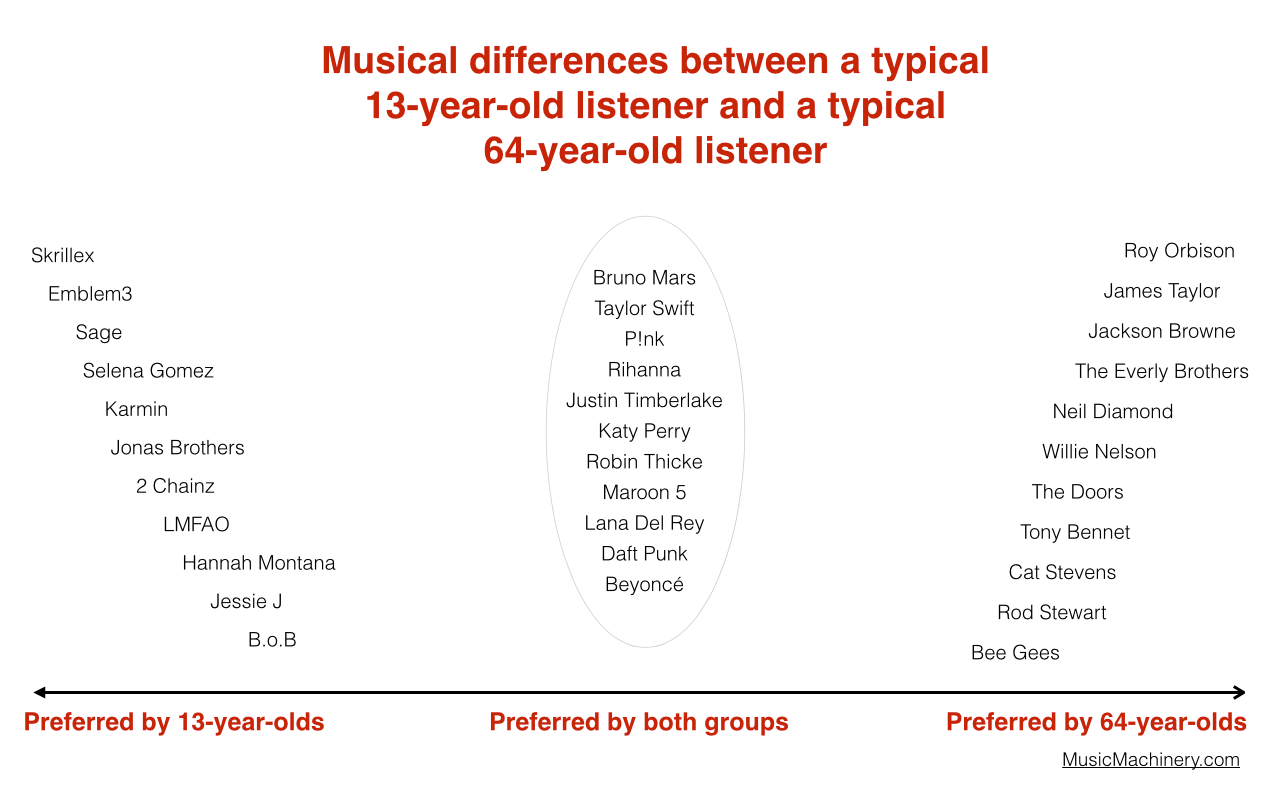
One would expect that people of different ages would have different music tastes. Let’s see if we can confirm this with our data. For starters, lets compare the average listening habits of 64-year-old listeners to that of the aggregate listening habits of the 13-year-old listener. For this experiment I selected 5,000 listeners in each age category, and aggregated their normalized artist plays to find the most-frequently-played artists. As expected, you can see that 64-year-old listeners have different tastes than 13-year-old listeners.
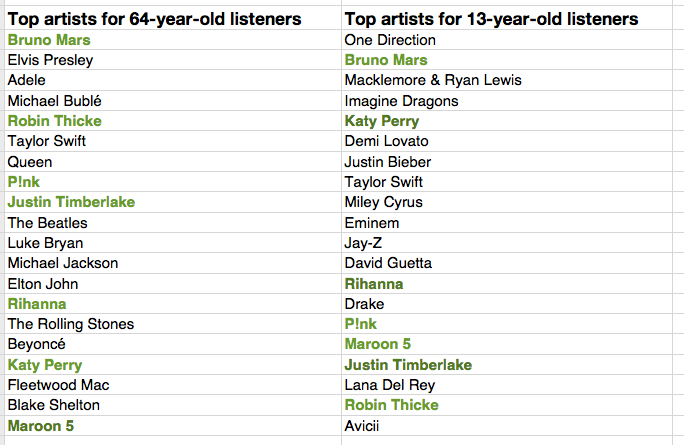
The top artists for the average 64-year-old listener include a mix of currently popular artists along with a number of artists from years gone by. While the top artists for the average 13-year-old includes only the most current artists. Still, there are seven artists (shown in bold) that overlap in the top 20 – an overlap rate of about 35%. This 35% overlap is consistent across all ranges of top artists for the two groups. No matter if we look at the top 100 or the top 1000 artists – there’s about a 35% overlap between the listening of 13- and 64-year-olds.

I suspect that 35% overlap is actually an overstatement of the real overlap between 13- and 64-year-olds. There are a few potential confounding effects:
- There’s a built-in popularity bias in music services. If you go to any popular music service you will see that they all feature a number of playlists filled with popular music. Playlists like The Billboard Top 100, The Viral 50, The Top Tracks, Popular New Releases etc. populate the home page or starting screen for most music services. This popularity bias inflates the apparent interest in popular music so, for instance, it may look like a 64-year-old is more interested in popular music than they really are because they are curious about what’s on all of those featured playlists.
- The age data isn’t perfect – for instance, there are certainly a number of people that we think are 64-years-old but are not. This will skew the results to artists that are more generally popular. We don’t really know how big this affect is, but it is certainly non-zero.
- People share listening accounts – this is perhaps the biggest confounding factor – that 64-year-old listener may be listening to music with their kids, their grand-kids, their neighbors and friends which means that not all of those plays should count as plays by a 64-year-old. Again, we don’t know how big this effect is, but it is certainly non-zero.
Let’s pause and have a listen to some music. First the favorite music of a typical 64-year-old listener:
And now the favorite music of a typical 13-year-old listener:
Finding the most distinctive artists
Perhaps more interesting than looking at how the two ages overlap in listening, is to look at how they differ – what are the artists that a 64-year-old will listen to that are rarely, if ever, listened to by a 13-year-old and vice versa. These are the most distinctive artists.
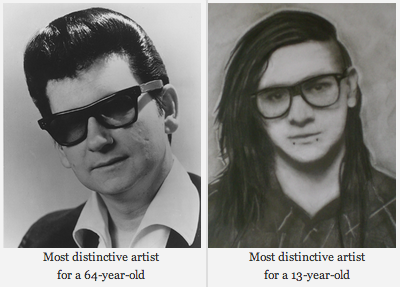
We can find the distinctive artists by identifying the artists in the top 100 of one group that fall the furthest in ranking in the other group. For example Skrillex is the 40th most listened to artist for the typical 13-year-old listener, but for 64-year-old listeners, Skrillex falls all the way to the 3,937 most listened to artist, making Skrillex one of the most distinguishing artist between the two groups of listeners. Likewise, Roy Orbison is the 42nd most listened to artist among 64-year-olds. He drops to position 4,673 among 13-year-olds making him one of the distinguishing artists that separate the 64-year-old from the 13-year-old.
We can use this technique to create playlists of artists that separate the 13-year-old from the 64-year-olds. Are you a 13-year-old, having a party and really wish that grandma would go to another room? Try this playlist:
Are you a 64-year-old and you want all of those 13 year-olds at the party to go home? Try this playlist:
We can also use this data to bring these two groups together. We can find the music that is liked the most among the two groups. We can do this by ordering artists by their worst ranking among the two groups. Artists like Skrillex and Roy Orbison fall to the bottom of the list since each is poorly ranked by one of the groups, while artists like Katy Perry and Bruno Mars rise to the top because they are favored by both groups.
Again, the confounding factors mentioned previously will bias the shared lists to more popular music. Nevertheless, if you are trying to make a playlist of music that will please both a 64-year-old and a 13-year-old, and you know nothing else about their music taste, this is probably your best bet.
Artists that are favored by both 64-year-old and 13-year-old listeners are: Bruno Mars, Taylor Swift, P!nk, Rihanna, Justin Timberlake, Katy Perry, Robin Thicke, Maroon 5, Lana Del Rey, Daft Punk, Beyoncé, Drake, Luke Bryan, Adele, Macklemore & Ryan Lewis, Miley Cyrus, David Guetta, Lorde, Jay-Z, Usher
We can sum up the differences between the two groups in this graphic:
Broadening our view
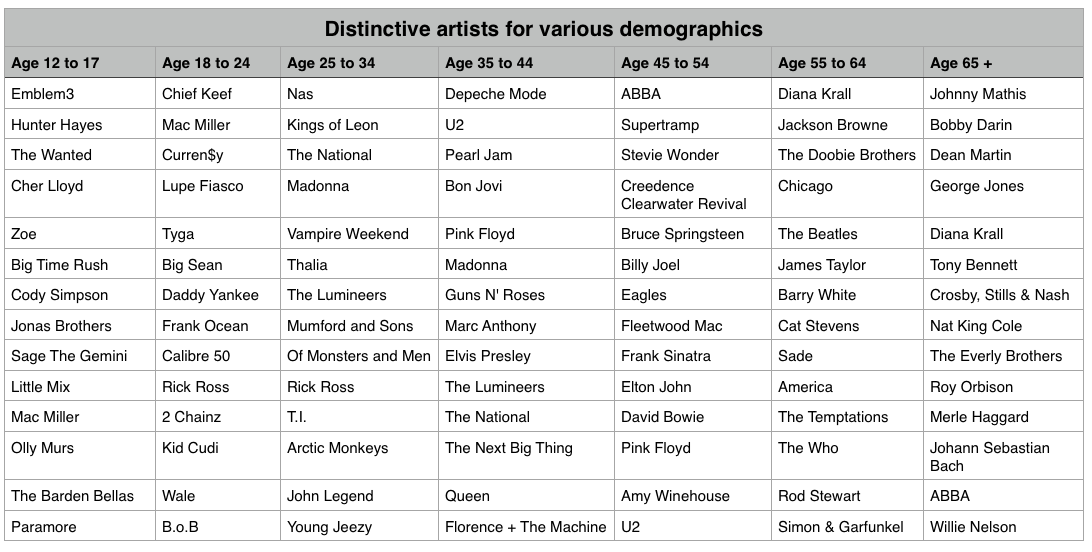
We’ve shown that, as expected, 13-year-olds and 64-year-olds have different listening preferences. We can apply the same techniques across the range of age demographics typically used by marketers. We can find the most distinctive artists for each demographic bucket. It is interesting to see the progression of music taste over time. For instance, it is clear that something happens to a music listener between the 25 to 34 and 35 to 44 age buckets. The typical listener goes from hipster (Lumineers, Vampire Weekend, The National), to old (Pearl Jam, U2, Bon Jovi).
It is interesting to look at the starting year for artists in each of these buckets to get a sense of how the artist’s own age relates to the age of their fans:
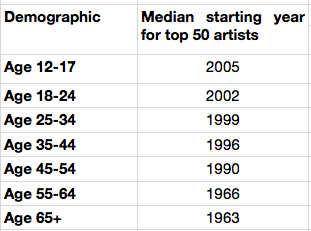
My take-way from this is that no matter how old you are, you don’t like the music from the 70s and the 80s so much.
Most homogenous Artists
We can also find the artists that are most acceptable across all demographics. These are the artists that are liked by more listeners in all of the groups. Like in the 13/64-year-old example, we can find these artists by ordering them by their worst ranking among all the demographic groups.
Most homogeneous artists: Bruno Mars, Rihanna, Katy Perry, Lana Del Rey, Beyoncé, P!nk, Jay-Z, Macklemore & Ryan Lewis, Daft Punk, Maroon 5, Justin Timberlake, Robin Thicke, David Guetta, Luke Bryan, Taylor Swift, Drake, Adele, Imagine Dragons, Miley Cyrus, Lorde
This is essentially the list of the most popular artists but with the most polarizing artists from any one demographic removed. If you don’t know the age of your listener, and you want to give the listener a low risk listening experience, these artists are a good place to start. And yes … this results in a somewhat bland, non-adventurous listening session – that’s the point. But as soon as you know a bit about the true listening preference of a new listener, you can pivot away from the bland and give them something much more in line with their music taste.
Rounding out the stats
There are a few more interesting bits of data we an pull out related to the age of the listener
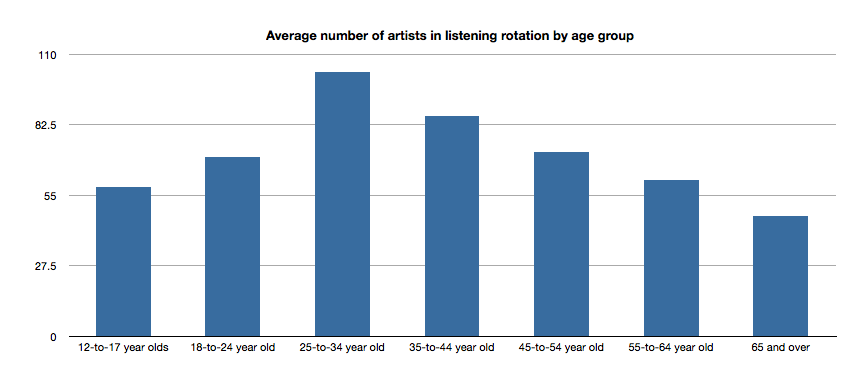
Average number of artists in listening rotation
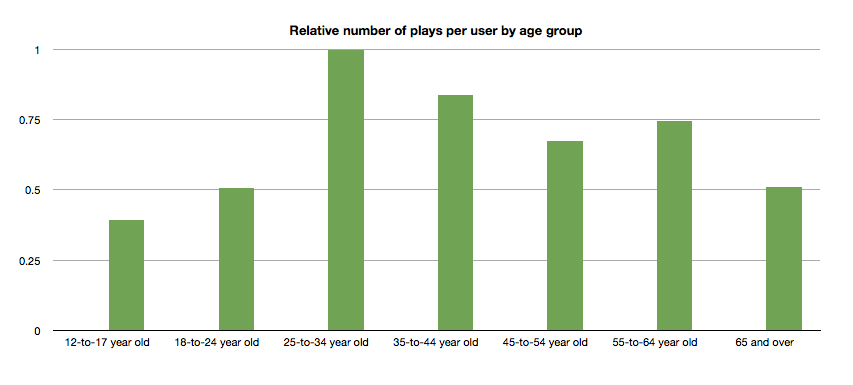
The typical 25- to 34-year old listener has more artists in active rotation than any other age group, while the 65+ listeners have the least.
Relative number of plays per user by age group
Likewise, the typical 25- to 34-year-old listener plays more music than any other category.
Tying it all up …
This quick tour through the ages confirms our thinking that the age of a listener plays a significant role in the type of music that they listen to. We can use this information to find music that is distinctive for a particular demographic. We can also use this information to help find artists that may be acceptable to a wide range of listeners. But we should be careful to consider how popularity bias may affect our view of the world. And perhaps most important of all, people don’t like music from the 70s or 80s so much.
Gender Specific Listening
Posted by Paul in data, Music, music information retrieval, recommendation, research, The Echo Nest, zero ui on February 10, 2014
One of the challenges faced by a music streaming service is to figure out what music to play for the brand-new listener. The first listening experience of a new listener can be critical to gaining that listener as a long time subscriber. However, figuring out what to play for that new listener is very difficult because often there’s absolutely no data available about what kind of music that listener likes. Some music services will interview the new listener to get an idea of their music tastes.
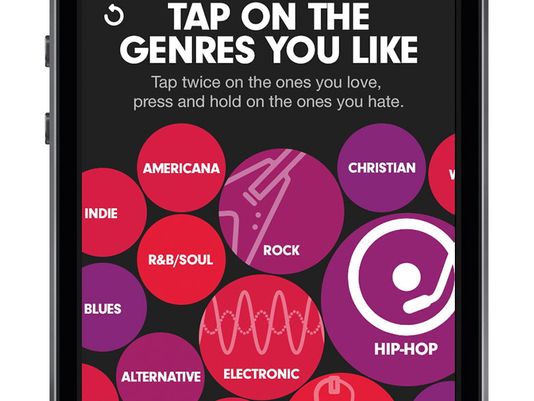
Selecting your favorite genres is part of the nifty user interview for Beat’s music
However, we’ve seen that for many listeners, especially the casual and indifferent listeners, this type of enrollment may be too complicated. Some listeners don’t know or care about the differences between Blues, R&B and Americana and thus won’t be able to tell you which they prefer. A listener whose only experience in starting a listening session is to turn on the radio may not be ready for a multi-screen interview about their music taste.
So what can a music service play for a listener when they have absolutely no data about that listener? A good place to start is to play music by the most popular artists. Given no other data, playing what’s popular is better than nothing. But perhaps we can do better than that. The key is in looking at the little bit of data that a new listener will give you.
For most music services, there’s a short user enrollment process that gets some basic info from the listener including their email address and some basic demographic information. Here’s the enrollment box for Spotify:
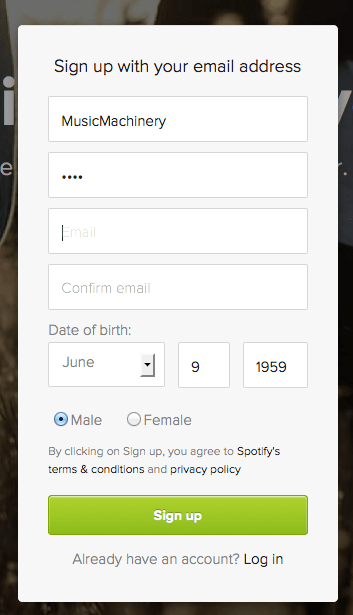
Included in this information is the date of birth and the gender of the listener. Perhaps we can use basic demographic data to generate a slightly more refined set of artists. For starters, lets consider gender. Let’s try to answer the question: If we know that a listener is male or female does that increase our understanding of what kind of music they might like? Let’s take a look.
Exploring Gender Differences in Listening
Do men listen to different music than women do? Anecdotally, we can think of lots of examples that point to yes – it seems like more of One Direction’s fans are female, while more heavy metal fans are male, but lets take a look at some data to see if this is really the case.
The Data – For this study, I looked at the recent listening of about 200 thousand randomly selected listeners that have self-identified as either male or female. From this set of listeners, I tallied up the number of male and female listeners for each artist and then simply ranked the artists in order or listeners. Here’s a quick look at the top 5 artists by gender.
Top 5 artists by gender
| Rank | All | Male | Female |
|---|---|---|---|
| 1 | Rihanna | Eminem | Rihanna |
| 2 | Bruno Mars | Daft Punk | Bruno Mars |
| 3 | Eminem | Jay-Z | Beyoncé |
| 4 | Katy Perry | Bruno Mars | Katy Perry |
| 5 | Justin Timberlake | Drake | P!nk |
Among the top 5 we see that the Male and Female listeners only share one artist in common:Bruno Mars. This trend continues as we look at the top 40 artists. Comparing lists by eye can be a bit difficult, so I created a slopegraph visualization to make it easier to compare. Click on this image to see the whole slopegraph:

click for full chart
Looking at the top 40 charts artists we see that more than a quarter of the artists are gender specific. Artists that top the female listener chart but are missing on the male listener chart include: Justin Bieber, Demi Lovato, Shakira, Britney Spears, One Direction, Christina Aguilera, Ke$ha, Ciara, Jennifer Lopez, Avril Lavigne and Nicki Minaj. Conversely, artists that top the male listener chart but are missing on the top 40 female listener chart include: Bob Marley, Kendrick Lamar, Wiz Khalifa, Avicii, T.I. Queen, J.Cole, Linkin Park, Kid Cudi and 50 Cent. While some artists seem to more easily cross gender lines like Rihanna, Justin Timberlake, Lana Del Rey and Robin Thicke.
No matter what size chart we look at – whether it is the top 40, top 200 or the top 1000 artists – about 30% of artists on a gender-specific chart don’t appear on the corresponding chart for the opposite gender. Similarly, about 15% of the artists that appear on a general chart of top artists will be of low relevance to a typical listener based on these gender-listening differences.
What does this all mean? If you don’t know anything about a listener except for their gender, you can reduce the listener WTFs by 15% for a typical listener by restricting plays to artists from the gender specific charts. But perhaps even more importantly, we can use this data to improve the listening experience for a listener even if we don’t know a listener’s gender at all. Looking at the data we see that there are a number of gender-polarizing artists on any chart. These are artists that are extremely popular for one gender, but not popular at all for the other. Chances are that if you play one of these polarizing artists for a listener that you know absolutely nothing about, 50% of the time you will get it wrong. Play One Direction and 50% of the time the listener won’t like it, just because 50% of the time the listener is male. This means that we can improve the listening experience for a listener, even if we don’t know their gender by eliminating the gender skewing artists and replacing them with more gender neutral artists.
Let’s see how this would affect our charts. Here are the new Top 40 artists when we account for gender differences.
| Rank | Old Rank | Artist |
|---|---|---|
| 1 | 2 | Bruno Mars |
| 2 | 1 | Rihanna |
| 3 | 5 | Justin Timberlake |
| 4 | 4 | Katy Perry |
| 5 | 6 | Drake |
| 6 | 15 | Chris Brown |
| 7 | 3 | Eminem |
| 8 | 8 | P!nk |
| 9 | 11 | David Guetta |
| 10 | 14 | Usher |
| 11 | 17 | Maroon 5 |
| 12 | 7 | Jay-Z |
| 13 | 13 | Adele |
| 14 | 9 | Beyoncé |
| 15 | 12 | Lil Wayne |
| 16 | 23 | Lana Del Rey |
| 17 | 25 | Robin Thicke |
| 18 | 24 | Pitbull |
| 19 | 27 | The Black Eyed Peas |
| 20 | 19 | Lady Gaga |
| 21 | 20 | Michael Jackson |
| 22 | 10 | Daft Punk |
| 23 | 18 | Miley Cyrus |
| 24 | 22 | Macklemore & Ryan Lewis |
| 25 | 28 | Coldplay |
| 26 | 16 | Taylor Swift |
| 27 | 26 | Calvin Harris |
| 28 | 21 | Alicia Keys |
| 29 | 29 | Imagine Dragons |
| 30 | 30 | Britney Spears |
| 31 | 44 | Ellie Goulding |
| 32 | 31 | Kanye West |
| 33 | 42 | J. Cole |
| 34 | 41 | T.I. |
| 35 | 52 | LMFAO |
| 36 | 32 | Shakira |
| 37 | 35 | Bob Marley |
| 38 | 54 | will.i.am |
| 39 | 36 | Ke$ha |
| 40 | 39 | Wiz Khalifa |
Artists promoted to the chart due to replace gender-skewed artists are in bold. Artists that were dropped from the top 40 are:
- Avicii – skews male
- Justin Bieber – skews female
- Christina Aguilera – skews female
- One Direction – skews female
- Demi Lovato – skews female
Who are the most gender skewed artists?
The Top 40 is a fairly narrow slice of music. It is much more interesting to look at how listening can skew across a much broader range of music. Here I look at the top 1,000 artists listened to by males and the top 1,000 artists listened to by females and find the artists that have the largest change in rank as they move from the male chart to the female chart. Artists that lose the most rank are artists that skew male the most, while artists that gain the most rank skew female.
Top male-skewed artists:
artists that skew towards male fans
- Iron Maiden
- Rage Against the Machine
- Van Halen
- N.W.A
- Jimi Hendrix
- Limp Bizkit
- Wu-Tang Clan
- Xzibit
- The Who
- Moby
- Alice in Chains
- Soundgarden
- Black Sabbath
- Stone Temple Pilots
- Mobb Deep
- Queens of the Stone Age
- Ice Cube
- Kavinsky
- Audioslave
- Pantera
Top female-skewed artists:
artists that skew towards female fans
- Danity Kane
- Cody Simpson
- Hannah Montana
- Emily Osment
- Playa LImbo
- Vanessa Hudgens
- Sandoval
- Miranda Lambert
- Sugarland
- Aly & AJ
- Christina Milian
- Noel Schajris
- Maria José
- Jesse McCartney
- Bridgit Mendler
- Ashanti
- Luis Fonsi
- La Oreja de Van Gogh
- Michelle Williams
- Lindsay Lohan
Gender-skewed Genres
By looking at the genres of the most gender skewed artists we can also get a sense of which genres are most gender skewed as well. Looking at the genres of the top 1000 artists listened to by male listeners and the top 1000 artists with female listeners we identify the most skewed genres:
Genres most skewed to female listeners:
- Pop
- Dance Pop
- Contemporary Hit Radio
- Urban Contemporary
- R&B
- Hot Adult Contemporary
- Latin Pop
- Teen Pop
- Neo soul
- Latin
- Pop rock
- Contemporary country
Genres most skewed to male listeners:
- Rock
- Hip Hop
- House
- Album Rock
- Rap
- Pop Rap
- Indie Rock
- Funk Rock
- Gangster Rap
- Electro house
- Classic rock
- Nu metal
Summary
This study confirms what we expected – that there are differences in gender listening. For mainstream listening about 30% of the artists in a typical male’s listening rotation won’t be found in a typical female listening rotation and vice versa. If we happen to know a listener’s gender and nothing else, we can improve their listening experience somewhat by replacing artists that skew to the opposite gender with more neutral artists. We can even improve the listening experience for a listener that we know absolutely nothing about – not even their gender – by replacing gender-polarized artists with artists that are more accepted by both genders.
Of course when we talk about gender differences in listening, we are talking about probabilities and statistics averaged over a large number of people. Yes, the typical One Direction fan is female, but that doesn’t mean that all One Direction fans are female. We can use gender to help us improve the listening experience for a brand new user, even if we don’t know the gender of that new user. But I suspect the benefits of using gender for music scheduling is limited to helping with the cold start problem. After a new user has listened to a dozen or so songs, we’ll have a much richer picture of the type of music they listen to – and we may discover that the new male listener really does like to listen to One Direction and Justin Bieber and that new female listener is a big classic rock fan that especially likes Jimi Hendrix.
update – 2/13 – commenter AW suggested that the word ‘bias’ was too loaded a term. I agree and have changed the post replacing ‘bias’ with ‘difference’
Let’s go to France to write some code
Posted by Paul in fun, hacking, Music, music hack day, The Echo Nest on February 7, 2014
This past weekend was the fourth annual MIDEM Music Hack Day held in Cannes. During about 48 hours 2 dozen or so hackers collected in a beautiful hacking space at the top of the Palais Des Festivals to build something cool with music and technology.
The MIDEM Music Hack Day is no ordinary Music Hack Day. It has a very limited enrollment so only hackers that have demonstrated the ability to create music hacks are invited. Add to that, the fact that there is about 50% more time to build hacks and the result is a set of very high quality hacks.
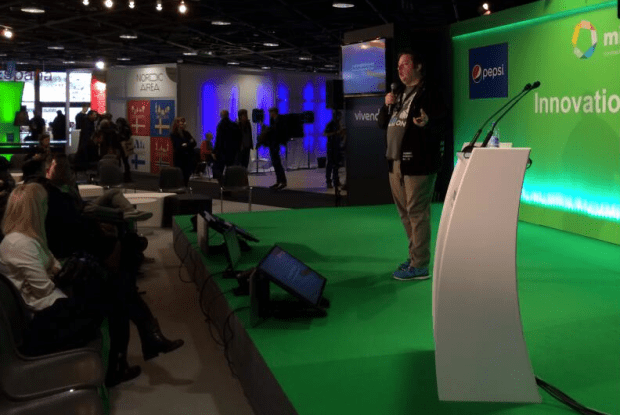
Martyn giving the hack talk (photo by @sydlawerence)
Martyn Davies, master Music Hack day coordinator, kicked off the event with a talk to the MIDEM attendees about what Music Hack Day is all about. Martyn talked about the things that drive the hackers to spend their weekends hacking on code – in particular how the Music Hack Day is a chance to combined their love for music and technology, be creative and to build something new and cool during the weekend. Martyn demonstrated two representative hacks built at previous Music Hack Days. First he showed the demo given by master hacker @sydlawrence of a hack called Disco Disco Tech. The excitement in Syd’s voice is worth the price of admission alone.
Next he showed one of my favorite Music Hack Day hacks of all time, Johnny Cash is Everywhere by @iainmullen
One of the special features of the MIDEM Music Hack Day is that non-hackers get to pitch their hacking ideas to the hackers about what apps they’d really like to see created over the weekend. There were a number of pitches ranging from a proposal for an artist-centric tool for organizing a creative music production team to a whimsical request to show what the music on the Internet sounds like when it decays. (Here’s one answer). All of the idea pitches were interesting, but here’s the secret. The hackers are not going to build your idea. It’s not because they don’t like your idea, it is because they already have tons of good ideas. The hackers are a very creative bunch, each with a long list of ideas waiting to be built. What the hackers usually lack is a solid block of time to implement their own ideas and so a hackathon is the perfect time to take that best idea on the list and work for a solid 24 hour to get it done. It is rare for a hacker to get excited about building someone else’s idea, when they have so many of their own. As they say: “ideas are cheap, execution is everything“.
Once the opening talks concluded we hackers made their way up to the top of the Palais des Festivals (the heart of MIDEM) to our hacking space. It’s a great space with lots of natural light, a terrace that overlooks the French Riviera, and it is some distance away from the main conference so we were not bothered by stray walk-ons.

View from the hacker space
To kick things off, we went around the room introducing ourselves, briefly talking about our background skills, and ideas, and almost immediately got to hacking. Since all the hackers were experienced hackers there was no need for the typical API workshops or learning sessions. Everyone knew, for instance, that I was from The Echo Nest and was ready to answer any questions about the Echo Nest API that should arise.
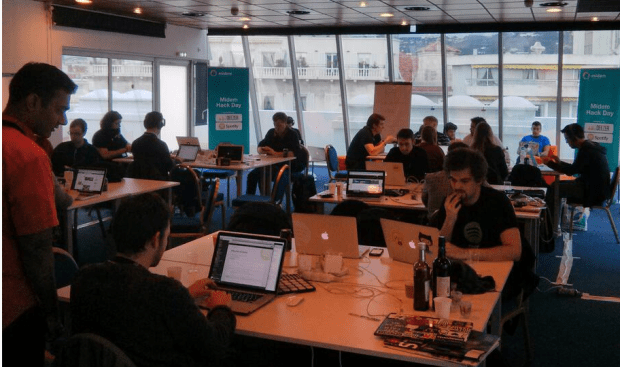
The hacking space (photo by @neomoha)
The next 46 hours was a blur of coding, punctuated by food delivery, the sound of the espresso maker and the occasional wandering pigeon.
Hacker Self Portraits
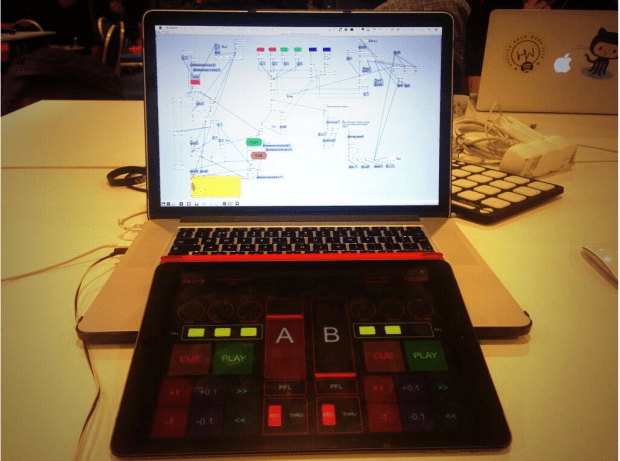
Yulile’s hack in progress
There’s a math error lurking in there …
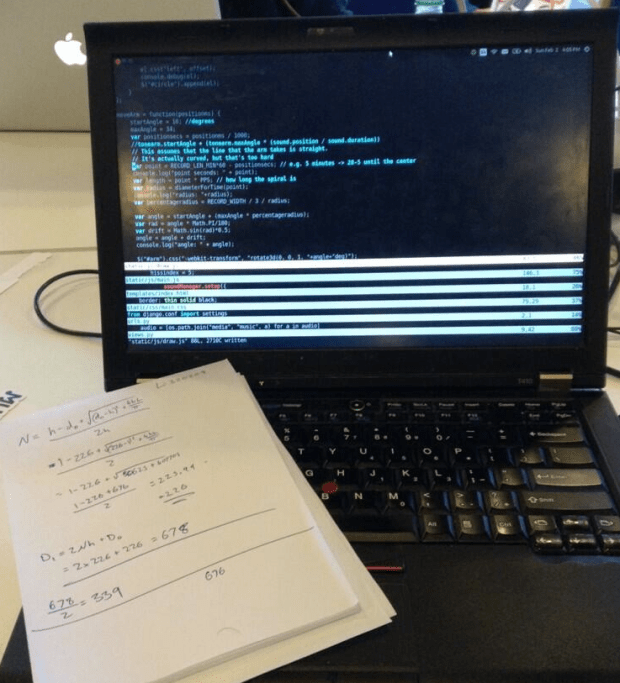
@alastairporter does the math to work out the path of a record groove for his hack
Early morning coding on the French Riveria
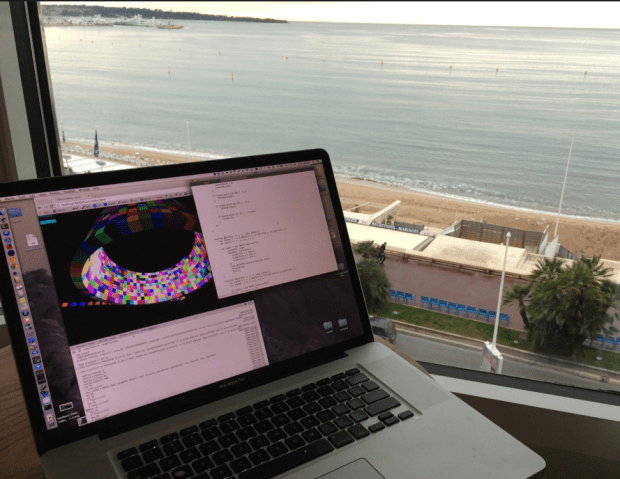
Typical view from the international executive music hacker suite
The Hacks
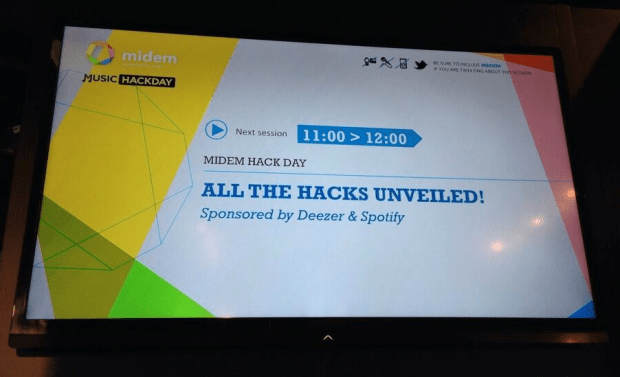
After 48 hours, we gathered in the Innovation Hall to demonstrate what we built. Each hacking team had about three minutes to show their stuff. Eighteen hacks were built. Here are some of my very favorites:
DJ Spotify – built by Yuli Levtov – This is a real hacker’s hack. Yuli had a problem. He wanted to use Spotify when he DJed, but Spotify won’t let you beat match and cross fade songs. In fact, Spotify won’t even let you play two streams at once. So Yuli got to work to make it happen. Along the way Yuli augmented his DJ playlists with BPM and key information from The Echo Nest (using a very clever growl hack). One of the highlights of my MIDEM week was listening to Yuli try to explain what OS virtualization is and how Soundflower works to a room full of Music Biz types. Yuli has a detailed blog post that describes how his hack works. Yuli’s hack was voted the best hack by the hackers. Well done Yuli!
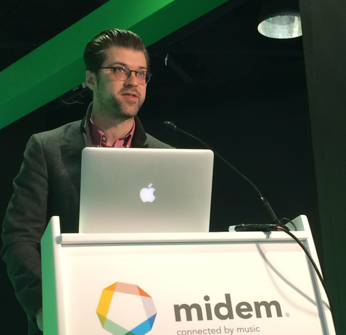 That One Song – by Matt Ogle and Hannah Donovan – For this hack, Matt added a feature to his super popular This Is My Jam site. Type in any band and let the Jam community tell you the one song you should hear first. Plus: playback options, commentary, and an alternative “B-side” song recommendation for each artist.
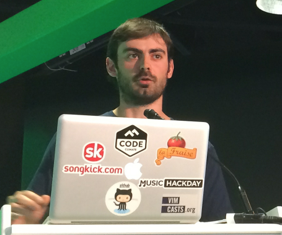 Skrillex Invader 20 – by Vivien Barousse – Imagine Guitar Hero meets Space Invaders meets Skrillex meets a Piano Keyboard. Skrillex Invader 20 is a small game designed to help you improve your skills on a piano keyboard.
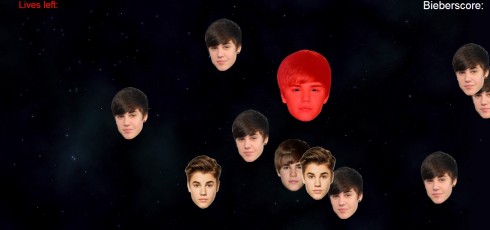
Bang The Biebs – by Robin Johnson – A hack that combined the Leap Motion with a game. This hack was special, not only for the Bieber banging, but because Robin used the hack as a way to learn Javascript. This was his first JS app.
Scratchy Record – by Alastair Porter – Playing music from mp3s today has no soul. Scratchy Record reproduces the joy that can be had listening to music on vinyl. From the dirty needle causing extra noise, to the pops and skips that we all love, to the need to get up half way through the album and turn it over. Scratchy Record has it all.
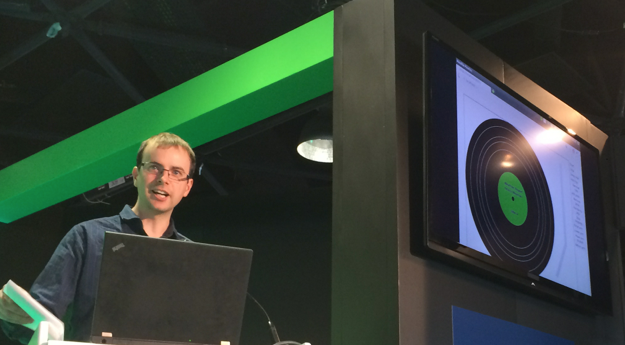
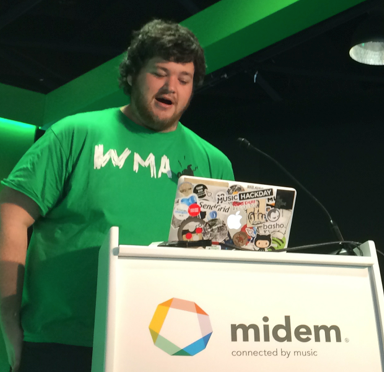
HappyClappy – by Peck, ankit and mager – an IOS app that lets you queue up songs by clapping the rhythm. Uses The Echo Nest to search for songs by BPM.
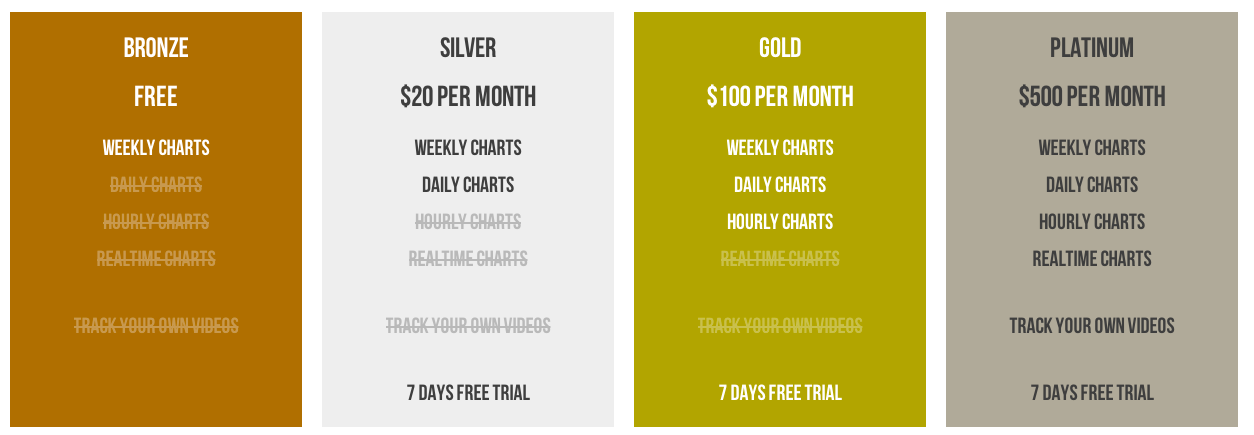
 PhatStats – Syd Lawerence – Syd tried to build a sustainable subscription business during the hack with PhatStats – A new tool to discover up and coming talent across the social web, and to monitor your videos and their engagement levels across the social web.
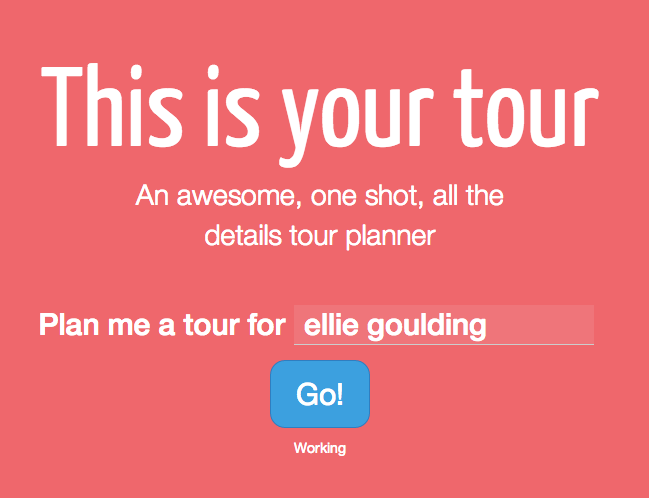
This is your tour – Sam Phippen – Going on tour is hard. You’ve got to find someone to tour with. You’ve got to pick cities and venues. You’ve got to book hotels, find places to eat and drink. All of this takes far too much time.
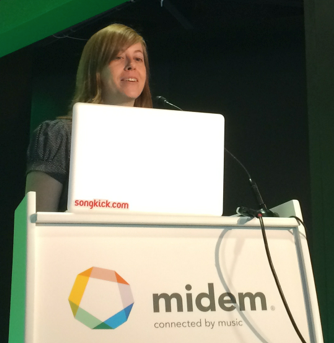 Nikantas – Sabrina Leandro – a clever app that helps you learn a new language through music lyrics. Fill in the blanks in lyrics of your favourite English, Spanish, Portuguese, French, German, or Italian artists. Can you recognise a word in a song? A word will be displayed on the screen, press the space key when the artist sings it
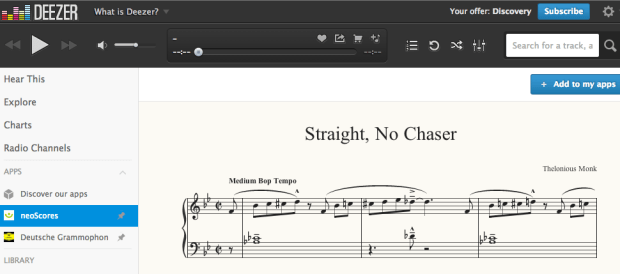
neoScores meets Deezer – Bob Hamblok – HTML5 sheet music score following inside Deezer.
Seevl hipster – by Alexandre Passant – Be a real hipster. Impress your friends with obscure music tastes. Do you want to impress your friend who’s into electro-folk, or that other one who only listens to avant-garde metal? Now you can! With seevl hipster, find obscure artists that match your friend tastes, and show-off on their Facebook wall.
Playlist Plus – Iain Mullan – Playlist Plus allows you to create a richer interactive version of a playlist. Add notes and comments to each track, to share with friends, or distribute an in-depth album review. Like a particular lyric? Bookmark it at the exact timestamp in the song. Think a track has a heavy Zeppelin influence? Link to the song/album it reminds you of. Cover version? Link to the original and let the reader stream it instantly from within your PlaylistPlus!
ScapeList – Mohammed Sordo – How does a landscape sound like? You take a picture of, let’s say, the Grand Canyon in Colorado, a la Instagram, but you also want to attach a song to it, a song that makes sense to you while you were taking that picture. Now imagine that other people went to the same place, took another picture of it but picked a different song. You end up with a playlist of songs related to that landscape, a ScapeList, curated by the users themselves, which you can listen to.

VideoFairy – by Suzie Blackman – A radio-style music discovery app designed for smart TV! It’s a bit like channel hopping, but for music videos. VideoFairy finds music videos from artists you’ll like with a simple interface that works with a remote control (use arrow keys and ‘enter’ on a keyboard).Designed for ‘lean back’ TV viewing with minimum interaction, you can sit back and watch new music recommended from your last.fm profile. Skip skip anything you don’t like with a simple tap of the remote.

Cannes Burn – my hack – a music visualizaton of Ellie Goulding’s Burn
I was unusually nervous and quite tired when I gave my demo, so I fell for a newbie demo mistake and had trouble getting my desktop to display properly. But when I finally did, my demo went off smoothly. I only had to say a few words and hit the play button, so despite the nerves, it was a pretty easy demo to give. Here’s my view of the audience while giving the demo:
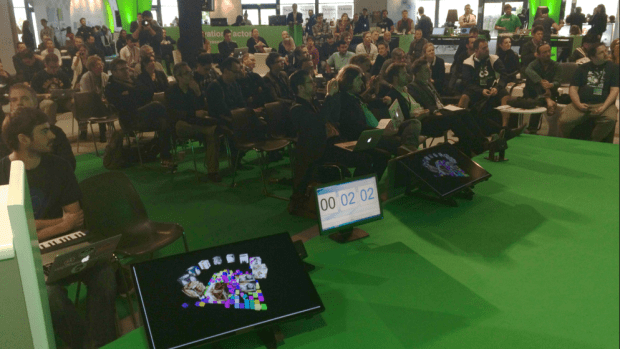
Demoing Cannes Burn to the MIDEM crowd
After we presented the hacks the hackers themselves voted for the best hack which went to Yuli for his amazing DJ Spotify. Yuli is quite the gracious and humble winner, making sure everyone got a glass of his winning champagne.
Post Hack
After all the hacking the exhausted hackers took some time to kick back, have a good dinner, a few drinks and long conversations into the night about life as an international music hacker.
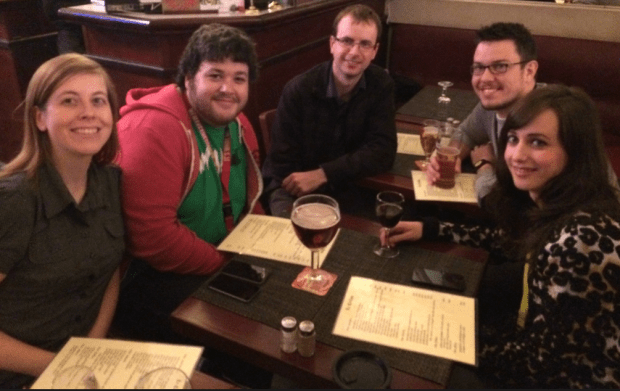
Post hack drinks with @saleandro @sydlawrence @alastairporter @iainmullen and @lucyeblair
Outro
Halfway through the MIDEM Music Hack Day I paused to take stock. Here I was, on the other side of the world sitting at the top of the Palais des Festival, overlooking the French Riviera, surrounded by friends and writing code. It was a great place to be, and I felt very fortunate to be there. This was all possible because the music biz folks realize that we hackers have lots of ideas that will advance the state-of-the-art in music tech, and even more importantly we have the ability to actually turn those ideas into reality. And so, they treat us very well. It is good to be a music hacker.
Creative hacking
My hack at the MIDEM Music Hack Day this year is what I’d call a Creative Hack. I built it, not because it answered any business use case or because it demonstrated some advanced capability of some platform or music tech ecosystem, I built it because I was feeling creative and I wanted to express my creativity in the best way that I can which is to write a computer program. The result is something I’m particularly proud of. It’s a dynamic visualization of the song Burn by Ellie Goulding. Here’s a short, low-res excerpt, but I strongly suggest that you go and watch the full version here: Cannes Burn
[youtube http://www.youtube.com/watch?v=Fys0RGi3kA8&feature=youtu.be]Unlike all of the other hacks that I’ve built, this one feels really personal to me. I wasn’t just trying to solve a technical problem. I was trying to capture the essence of the song in code, trying to tell its story and maybe even touch the viewer. The challenge wasn’t in the coding it was in the feeling.
After every hack day, I’m usually feeling a little depressed. I call it post-hacking depression. It is partially caused by being sleep deprived for 48 hours, but the biggest component is that I’ve put my all into something for 48 hours and then it is just over. The demo is done, the code is checked into github, the app is deployed online and people are visiting it (or not). The thing that just totally and completely took over my life for two days is completely gone. It is easy to reflect back on the weekend and wonder if all that time and energy was worth it.
Monday night after the MIDEM hack day was over I was in the midst of my post-hack depression sitting in a little pub called Le Crillon when a guy came up to me and said “I saw your hack. It made me feel something. Your hack moved me.”
Cannes Burn won’t be my post popular hack, nor is it my most challenging hack, but it may be my favorite hack because I was able to write some code and make somebody that I didn’t know feel something.
Cannes Burn
This weekend brought me to Cannes and the French Riviera for the MIDEM Music Hack Day where I’ve spent about 40 hours working on my music hack called Cannes Burn. Cannes Burn is a visualization that accompanies the song Burn by Ellie Goulding. Go check it out if you haven’t already seen it before reading on. It requires a modern computer and browser that supports webgl.
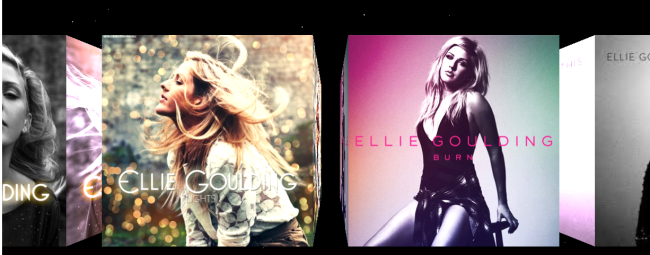
The Hack uses the new ENsync.js library that I created last week. ENsync uses the Echo Nest analysis to provide synchronization of a JS web app with music. With ENsync you can setup elaborate animations that are triggered by musical events (such on every bar, beat or tatum). The Hack also uses threejs – the amazing 3D library by Mr.Doob.
Creating the hack was a whole lot of fun – I spent hours building 3D shapes out of flying cubes. I probably listened to the song Burn many hundreds of times this weekend. (Thanks to my hacker neighbors who put up with my endless Ellie looping without complaint).
It has been a great weekend here in Cannes. It is so inspiring to be surrounded by a bunch of really smart folks who are passionate about music and technology and see and hear how they are building their stuff. Such a great, sharing vibe from all of the hackers. I feel really lucky to part of it all!
Check out all the hacks on hacker league: MIDEM Music Hack Day Hacks and check out my hack at: Cannes Burn
 Music Machinery