Archive for category The Echo Nest
Are these the angriest tracks on the web?
I built a playlist of songs that most frequently appear in playlists with the words angry or mad with the Smart Playlist Builder. These are arguably some of the angriest tracks on the web.
http://www.rdio.com/people/plamere/playlists/5779446/Top_angry_songs_created_with_SPB/
It is interesting to compare these angry tracks to the top tracks tagged with angry at Last.fm.
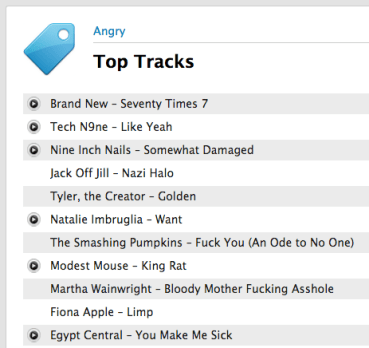
I can’t decide whether the list derived from angry playlists is better or worse than the list driven by social tags. I’d love to hear your opinion. Take a look at these two lists and tell me which list is a better list of angry tracks and why.
yep, this is totally unscientific poll, but I’m still interested in what you think.
Using the wisdom of the crowds to build better playlists
At music sites like Rdio and Spotify, music fans have been creating and sharing music playlists for years. Sometimes these playlists are carefully crafted sets of songs for particular contexts like gaming or sleep and sometimes they are just random collections of songs. If I am looking for music for a particular context, it is easy to just search for a playlist that matches that context. For instance, if I am going on roadtrip there are hundreds of roadtrip playlists on Rdio for me to chose from. Similarly, if I am going for a run, there’s no shortage of running playlists to chose from. However, if I am going for a run, I will need to pick one of those hundreds of playlists, and I don’t really know if the one I pick is going to be of the carefully crafted variety or if it was thrown together haphazardly, leaving me with a lousy playlist for my run. Thus I have a problem – What is the best way to pick a playlist for a particular context?
Naturally, we can solve this problem with data. We can take a wisdom of the crowds approach to solving this problem. To create a running playlist, instead of relying on a single person to create the playlist, we can enlist the collective opinion of everyone who has ever created a running playlist to create a better list.
I’ve built a web app to do just this. It lets you search through Rdio playlists for keywords. It will then aggregate all of the songs in the matching playlists and surface up the songs that appear in the most playlists. So if Kanye West’s Stronger appears in more running playlists than any other song, it will appear first in the resulting playlist. Thus songs, that the collective agree are good songs for running get pushed to the top of the list. It’s a simple idea that works quite well. Here are some example playlists created with this approach:
Best Running Songs
http://www.rdio.com/people/plamere/playlists/5773579/Top_best_running_songs_via_SPB/
Coding
http://www.rdio.com/people/plamere/playlists/5773559/Top_coding_songs_via_SPB/
Sad Love Songs
http://www.rdio.com/people/plamere/playlists/5773508/Top_sad_love_songs_songs_via_SPB/
Chillout
http://www.rdio.com/people/plamere/playlists/5773867/Top_chillout_songs_via_SPB/
Date Night
http://www.rdio.com/people/plamere/playlists/5773474/Top_date_night_songs_via_SPB/
Sexy Time
http://www.rdio.com/people/plamere/playlists/5773535/Top_sexytime_songs_via_SPB/
This wisdom of the crowds approach to playlisting isn’t limited to contexts like running or coding, you can also use it to give you an introduction to a genre or artist as well.
Country
http://www.rdio.com/people/plamere/playlists/5773544/Top_country_songs_via_SPB/
Post Rock
http://www.rdio.com/people/plamere/playlists/5773642/Top_post_rock_songs_via_SPB/
Weezer
http://www.rdio.com/people/plamere/playlists/5773606/Top_weezer_songs_via_SPB/
The Smart Playlist Builder
The app that builds these nifty playlists is called The Smart Playlist Builder. You type in a few keywords and it will search Rdio for all the matching playlists. It will show you the matching playlists, giving you a chance to refine your query. You can search for words, phrases and you can exclude terms as well. The query sad “love songs” -country will search for playlists with the word sad, and the phrase love songs in the title, but will exclude any that have the word country.
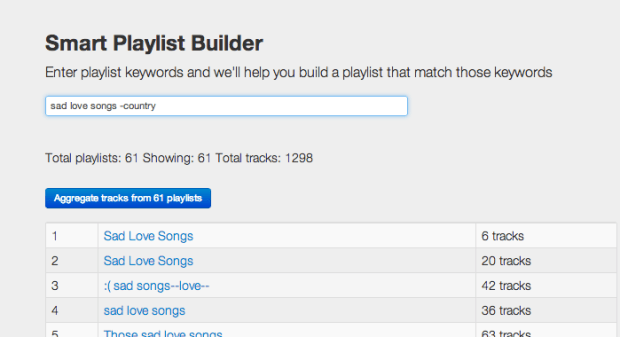
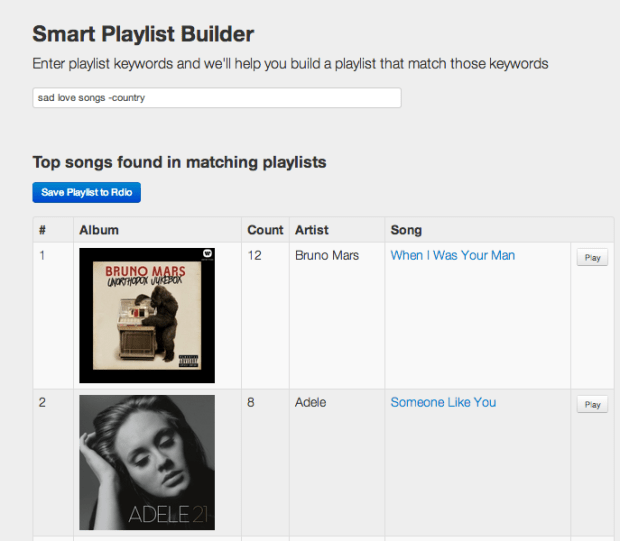
When you are happy with your query you can aggregate the tracks from the matching playlists. This will give you a list of the top 100 songs that appeared in the matching playlists.
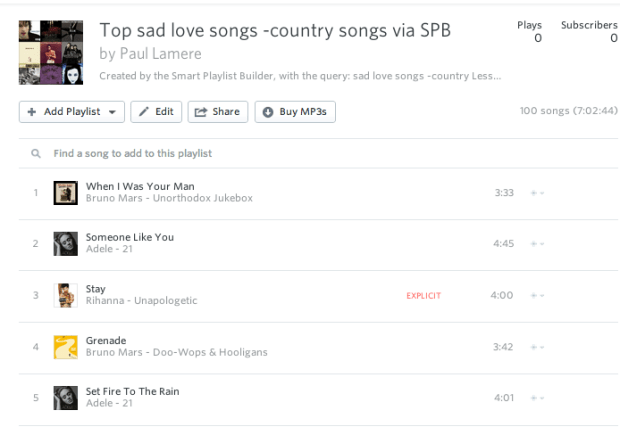
If you are happy with the resulting playlist, you can save it to Rdio, where you can do all the fine tuning of the playlist such as re-ordering, adding and deleting songs.
The Smart Playlist Builder uses the really nifty Rdio API. The Rdio folks have done a fantastic job of giving developers access to their music and data. Well done Rdio team!
Go ahead and give The Smart Playlist Builder a try to see how the wisdom of the crowds can help you make playlists.
The Most Replayed Songs
Posted by Paul in data, Music, The Echo Nest on August 27, 2013
 I still remember the evening well. It was midnight during the summer of 1982. I was living in a thin-walled apartment, trying unsuccessfully to go to sleep while the people who lived upstairs were music bingeing on The B52’s Rock Lobster. They listened to the song continuously on repeat for hours, giving me the chance to ponder the rich world of undersea life, filled with manta rays, narwhals and dogfish.
We tend to binge on things we like – potato chips, Ben & Jerry’s, and Battlestar Galactica. Music is no exception. Sometimes we like a song so much, that as soon as it’s over, we want to hear it again. But not all songs are equally replayable. There are some songs that have some secret mysterious ingredients that makes us want to listen to the song over and over again. What are these most replayed songs? Let’s look at some data to find out.
The Data – For this experiment I used a week’s worth of song play data from the summer of 2013 that consists of user / song / play-timestamp triples. This data set has on the order of 100 million of these triples for about a half million unique users and 5 million unique songs. To find replays I looked for consecutive plays by a user of song within a time window (to ensure that the replays are in the same listening session). Songs with low numbers of plays or fans were filtered out.
For starters, I simply counted up the most replayed songs. As expected, this yields very boring results – the list of the top most replayed songs is exactly the same as the most played songs. No surprise here. The most played songs are also the most replayed songs.
Top Most Replayed Songs – (A boring result)
- Robin Thicke — Blurred Lines featuring T.I., Pharrell
- Jay-Z — Holy Grail featuring Justin Timberlake
- Miley Cyrus — We Can’t Stop
- Imagine Dragons — Radioactive
- Macklemore — Can’t Hold Us (feat. Ray Dalton)
To make this more interesting, instead of looking at the absolute number of replays, I adjusted for popularity by looking at the ratio of replays to the total number of plays for each song. This replay ratio tells us the what percentage of plays of a song are replays. If we plot the replay ratio vs. the number of fans a song has the outliers become quite clear. Some songs are replayed at a higher rate than others.

click to open an interactive version of this chart.
I made an interactive version of this graph, you can mouse over the songs to see what they are and click on the songs to listen to them.
Sorting the results by the replay ratio yields a much more interesting result. It surfaces up a few classes of frequently replayed songs: background noise, children’s music, soft and smooth pop and friday night party music. Here’s the color coded list of the top 20:
Top Replayed songs by percentage
- 91% replays White Noise For Baby Sleep — Ocean Waves
- 86% replays Eric West — Reckless (From Playing for Keeps)
- 86% replays Soundtracks For The Masters — Les Contes D’hoffmann: Barcarole
- 83% replays White Noise For Baby Sleep — Warm Rain
- 83% replays Rain Sounds — Relax Ocean Waves
- 82% replays Dennis Wilson — Friday Night
- 81% replays Sleep — Ocean Waves for Sleep – White Noise
- 74% replays White Noise Sleep Relaxation White Noise Relaxation: Ocean Waves 7hz
- 74% replays Ween — Ocean Man
- 73% replays Children’s Songs Music — Whole World In His Hands
- 71% replays Glee Cast — Friday (Glee Cast Version)
- 63% replays Rain Sounds — Rain On the Window
- 63% replays Rihanna — Cheers (Drink To That)
- 60% replays Group 1 Crew — He Said (feat. Chris August)
- 59% replays Karsten Glück Simone Sommerland — Schlaflied für Anne
- 56% replays Monica — With You
- 54% replays Jessie Ware — Wildest Moments
- 53% replays Tim McGraw — I Like It, I Love It
- 53% replays Rain Sounds — Morning Rain In Sedona
- 52% replays Rain Sounds — Rain Sounds
It is no surprise that the list is dominated by background noise. There’s nothing like ambient ocean waves or rain sounds to help baby go to sleep in the noisy city. A five minute track of ambient white noise may be played dozens of times during every nap. It is not uncommon to find 8 hour long stretches of the same five minute white noise audio track played on auto repeat.
The top most replayed song is Reckless by Eric West from the ‘shamelessly sentimental’ 2012 movie Playing for Keeps (4% rotten). 86% of the time this song is played it is a replay. This is the song that you can’t listen to just once. It is the Lays potato chip of music. Beware, if you listen to it, you may be caught in its web and you’ll never be able to escape. Listen at your own risk:
Luckily, most people don’t listen to this song even once. It is only part of the regular listening rotation of a couple hundred listeners. Still, it points to a pattern that we’ll see more of – overly sentimental music has high replay value.
Top Replayed Popular Songs
Perhaps even more interesting is to look at the top most replayed popular songs. We can do this by restricting the songs in the results to those that are by artists that have a significant fan base:
- 31% replays Miley Cyrus — The Climb
- 16% replays August Alsina — I Luv This sh*t featuring Trinidad James
- 15% replays Brad Paisley — Whiskey Lullaby
- 14% replays Tamar Braxton — The One
- 14% replays Chris Brown — Love More
- 14% replays Anna Kendrick — Cups (Pitch Perfect’s “When I’m Gone”)
- 13% replays Avenged Sevenfold — Hail to the King
- 13% replays Jay-Z — Big Pimpin’
- 13% replays Labrinth — Beneath Your Beautiful
- 13% replays Karmin — Acapella
- 12% replays Lana Del Rey — Summertime Sadness [Lana Del Rey vs. Cedric Gervais]
- 12% replays MGMT — Electric Feel
- 12% replays One Direction — Best Song Ever
- 12% replays Big Sean — Beware featuring Lil Wayne, Jhené Aiko
- 12% replays Chris Brown — Don’t Think They Know
- 11% replays Justin Bieber — Boyfriend
- 11% replays Avicii — Wake Me Up
- 11% replays 2 Chainz — Feds Watching featuring Pharrell
- 10% replays Paramore — Still Into You
- 10% replays Alicia Keys — Fire We Make
- 10% replays Lorde — Royals
- 10% replays Miley Cyrus — We Can’t Stop
- 10% replays Ciara — Body Party
- 9% replays Marc Anthony — Vivir Mi Vida
- 9% replays Ellie Goulding — Burn
- 9% replays Fantasia — Without Me
- 9% replays Rich Homie Quan — Type of Way
- 9% replays The Weeknd — Wicked Games (Explicit)
- 9% replays A$AP Ferg — Work REMIX
- 9% replays Jay-Z — Part II (On The Run) featuring Beyoncé
It is hard to believe, but the data doesn’t lie – More than 30% of the time after someone listens to Miley Cyrus’s The Climb they listen to it again right away – proving that there is indeed always going to be another mountain that you are going to need to climb. Miley Cyrus is well represented – her aptly named song We can’t Stop is the most replayed song of the top ten most popular songs.
Here are the top 30 most replayed popular songs in Spotify and Rdio playlists for you to enjoy, but I’m sure you’ll never get to the end of the playlist, you’ll just get stuck repeating The Best Song Ever or Boyfriend forever.
Here’s the Rdio version of the Top 30 Most Replayed popular songs:
http://www.rdio.com/people/plamere/playlists/5733386/Most_replayed/Most Manually Replayed
More than once I’ve come back from lunch to find that I left my music player on auto repeat and it has played the last song 20 times while I was away. The song was playing, but no one was listening. It is more interesting to find songs replays in which the replay is manually initiated. These are the songs that grabbed the attention of the listener enough to make them interact with their player and actually queue the song up again. We can find manually replayed songs by looking at replay timestamps. Replays generated by autorepeat will have a very regular timestamp delta, while manual replay timestamps will have more random delta between timestamps.
Here are the top manually replayed songs:
- Body Party by Ciara
- Still Into You by Paramore
- Tapout featuring Lil Wayne, Birdman, Mack Maine, Nicki Minaj, Future by Rich Gang
- Part II (On The Run) featuring Beyoncé by Jay-Z
- Feds Watching featuring Pharrell by 2 Chainz
- Royals by Lorde
- V.S.O.P. by K. Michelle
- Just Give Me A Reason by Pink
- Don’t Think They Know by Chris Brown
- Wake Me Up by Avicii
There’s an Rdio playlist of these songs: Most Manually Replayed
So what?
Why do we care which songs are most replayed? It’s part of our never ending goal to try to better understand how people interact with music. For instance, recognizing when music is being used in a context like helping the baby go to sleep is important – without taking this context into account, the thousands of plays of Ocean Waves and Warn Rain would dominate the taste profile that we build for that new mom and dad. We want to make sure that when that mom and dad are ready to listen to music, we can recommend something besides white noise.
Looking at replays can help us identify new artists for certain audiences. For instance, parents looking for an alternative to Miley Cyrus for their pre-teen playlists after Miley’s recent VMA performance, may look to an artist like Fifth Harmony. Their song Miss Movin’ On has similar replay statistics to the classic Miley songs:
http://www.rdio.com/artist/Fifth_Harmony/album/Miss_Movin%27_On/track/Miss_Movin%27_On/Finally, looking at replays is another tool to help us understand the music that people really like. If the neighbors play Rock Lobster 20 times in a row, you can be sure that they really, really like that song. (And despite, or perhaps because of, that night 30 years ago, I like the song too). You should give it a listen, or two…
http://www.rdio.com/artist/The_B-52%27s/album/Rock_Lobster_/_6060-842_(Digital_45)/track/Rock_Lobster/One Minute Radio
Posted by Paul in Music, playlist, The Echo Nest on August 16, 2013
If you’ve got a short attention span when it comes to new music, you may be interested in One Minute Radio. One Minute Radio is a Pandora-style radio app with the twist that it only every plays songs that are less than a minute long. Select a genre and you’ll get a playlist of very short songs.

Now I can’t testify that you’ll always get a great sounding playlist – you’ll hear intros, false starts and novelty songs throughout, but it is certainly interesting. And some genres are chock full of good short songs, like punk, speed metal, thrash metal and, surprisingly, even classical.
OMR was inspired by a conversation with Glenn about the best default for song duration filters in our playlisting API. Check out One Minute Radio. The source is on github too.
The Saddest Stylophone – my #wowhack2 hack
Posted by Paul in hacking, Music, The Echo Nest on August 15, 2013
Last week, I ventured to Gothenburg Sweden to participate in the Way Out West Hack 2 – a music-oriented hackathon associated with the Way Out West Music Festival.

I was, of course, representing and supporting The Echo Nest API during the hack, but I also put together my own Echo Nest-based hack: The Saddest Stylophone. The hack creates an auto accompaniment for just about any song played on the Stylophone – an analog synthesizer toy created in the 60s that you play with a stylus.

Two hacking pivots on the way … The road to the Saddest Stylophone was by no means a straight line. In fact, when I arrived at #wowhack2 I had in mind a very different hack – but after the first hour at the hackathon it became clear that the WIFI at the event was going to be sketchy at best, and it was going to be very slow going for any hack (including the hack I had planned) that was going to need zippy access to to the web, and so after an hour I shelved that idea for another hack day. The next idea was to see if I could use the Echo Nest analysis data to convert any song to an 8-bit chiptune version.  This is not new ground, Brian McFee had a go at this back at the 2012 MIT Music Hack Day. I thought it would be interesting to try a different approach and use an off-the-shelf 8bit software synth and the Echo Nest pitch data. My intention was to use a Javascript sound engine called jsfx to generate the audio. It seemed like it pretty straightforward way to create authentic 8bit sounds. In small doses jsfx worked great, but when I started to create sequences of overlapping sounds my browser would crash. Every time. After spending a few hours trying to figure out a way to get jsfx to work reliably, I had to abandon jsfx. It just wasn’t designed to generate lots of short overlapping and simultaneous sounds, and so I spent some time looking for another synthesizer. I finally settled on timbre.js. Timbre.js seemed like a fully featured synth. Anyone with a Csound background
 would be comfortable with creating sounds with Timbre.js It did not take long before I was generating tones that were tracking the melody and chord changes of a song. My plan was to create a set of tone generators, and dynamically control the dynamics envelope based upon the Echo Nest segment data. This is when I hit my next roadblock. The timbre.js docs are pretty good, but I just couldn’t find out how to dynamically adjust parameters such as the ADSR table. I’m sure there’s a way to do it, but when there’s only 12 hours left in a 24 hour hackathon, the two hours spent looking through JS library source seemed like forever, and I began to think that I’d not figure out how to get fine grained control over the synth. I was pretty happy with how well I was able to track a song and play along with it, but without ADSR control or even simple control over dynamics the output sounded pretty crappy. In fact I hadn’t heard anything that sounded so bad since I heard @skattyadz
  play a tune on his Stylophone at the Midem Music Hack Day earlier this year. That thought turned out to be the best observation I had during the hackathon. I could hide all of my troubles trying to get a good sounding output by declaring that my hack was a Stylophone simulator. Just like a Stylophone, my app would not be capable of playing multiple tones at once, it would not have complex changes in dynamics, it would only have a one and half octave range, it would not even have a pleasing tone. All I’d need to do would be to convincingly track a melody or harmonic line in a song and I’d be successful. And so, after my third pivot, I finally had a hack that I felt I’d be able to finish in time for the demo session and not embarrass myself. I was quite pleased with the results.
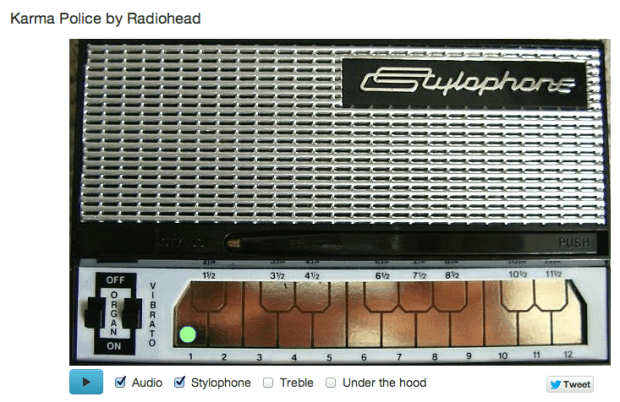
How does it work? The Sad Stylophone takes advantage of the Echo Nest detailed analysis. The analysis provides detailed information about a song. It includes information about where all the bars and beats are, and includes a very detailed map of the segments of a song. Segments are typically small, somewhat homogenous audio snippets in a song, corresponding to musical events (like a strummed chord on the guitar or a brass hit from the band).
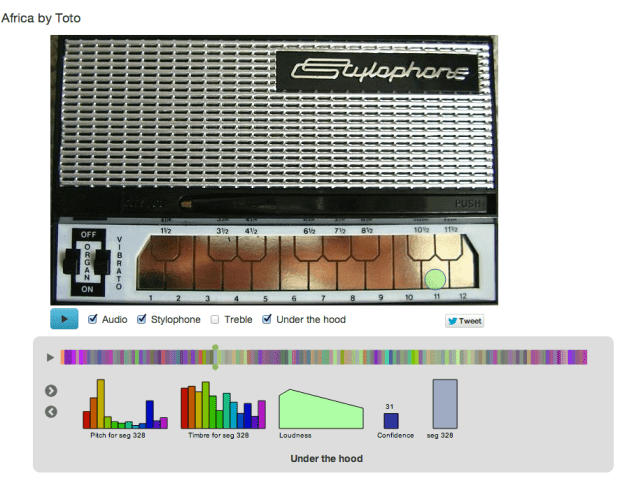
A single segment contains detailed information on the pitch, timbre, loudness. For pitch it contains a vector of 12 floating point values that correspond to the amount of energy at each of the notes in the 12-note western scale. Here’s a graphic representation of a single segment:

This graphic shows the pitch vector, the timbre vector, the loudness, confidence and duration of a segment.
The Saddest Stylophone only uses the pitch, duration and confidence data from each segment. First, it filters segments to combine short, low confidence segments with higher confidence segments. Next it filters out segments that don’t have a predominant frequency component in the pitch vector. Then for each surviving segment, it picks the strongest of the 12 pitch bins and maps that pitch to a note on the Stylophone. Since the Stylophone supports an octave and a half (20 notes), we need to map 12 notes onto 20 notes. We do this by unfolding the 12 bins by reducing inter-note jumps to less than half an octave when possible. For example, if between segment one and segment two we would jump 8 notes higher, we instead check to see if it would be possible to jump to 4 notes lower instead (which would be an octave lower than segment two) while still remaining within the Stylophone range. If so, we replace the upward long jump with the downward, shorter jump. The result of this a list of notes and timings mapped on to the 20 notes of the Stylophone. We then map the note onto the proper frequency and key position – the rest is just playing the note via timbre.js at the proper time in sync with the original audio track and animating the stylus using Raphael.
I’ve upgraded the app to include an Under the hood selection that, when clicked opens up a visualization that shows the detailed info for a segment, so you can follow along and see how each segment is mapped onto a note. You can interact with visualization, stepping through the segments, and auditioning and visualizing them.
That’t the story of the Saddest Stylophone – it was not the hack I thought I was going to make when I got to #wowhack – but I was pleased with the result, when The Sad Stylophone plays well, it really can make any song sound sadder and more pathetic. Its a win. I’m not the only one – wired.co.uk listed it as one of the five best hacks at the hackathon.
Give it a try at Saddest Stylophone.
Getting the Hotttest Artists in any genre with The Echo Nest API
Posted by Paul in code, The Echo Nest on March 29, 2013
If you spend a few hours listening to broadcast radio it becomes pretty evident who the most popular pop artists are. You can’t go too long before you hear a song by Justin Timberlake, Rihanna, Bruno Mars or P!nk. The hotttest pop artists get lots of airplay. But what about all the other music out there? Who are the hotttest gothic metal artists? Who are the most popular Texas blues artists? Those are the kind of questions we try to answer with today’s Echo Nest demo: The Hotttest Artists
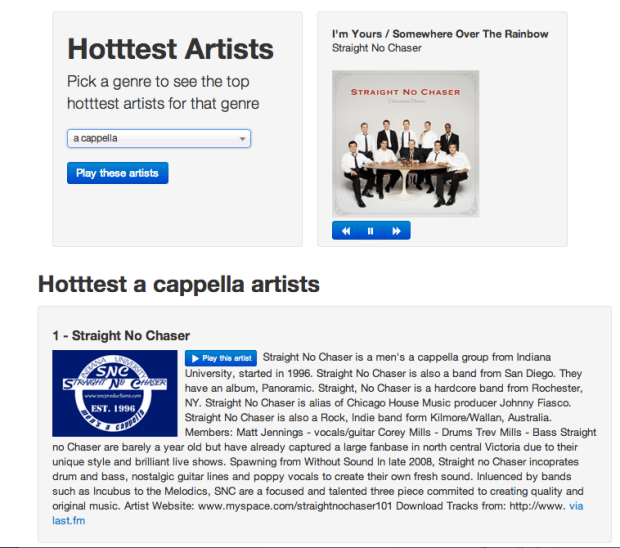
This app lets you select from among over 400 different genres from a cappella to Zydeco and see who are the hotttest artists in that genre. The output includes a brief bio and image of the artist, and of course you can listen to any artist via Rdio. The app is an interesting way to explore all of the different genres out there and sample some different types of music. The source is available on github. The whole thing including all Javascript, html and CSS is less than 500 lines.
Try out the Hotttest Artist app and be sure to check out all of the other Echo Nest demos on our demo page.
Getting Artist Images with the Echo Nest API
Posted by Paul in code, The Echo Nest on March 27, 2013
This week I’ve been writing a few web apps to demonstrate how to do stuff with The Echo Nest API. One app shows how you can use The Echo Nest API to get artist images. The app is nice and simple. Type in the name of an artist and it will show you 100 images of the artist.
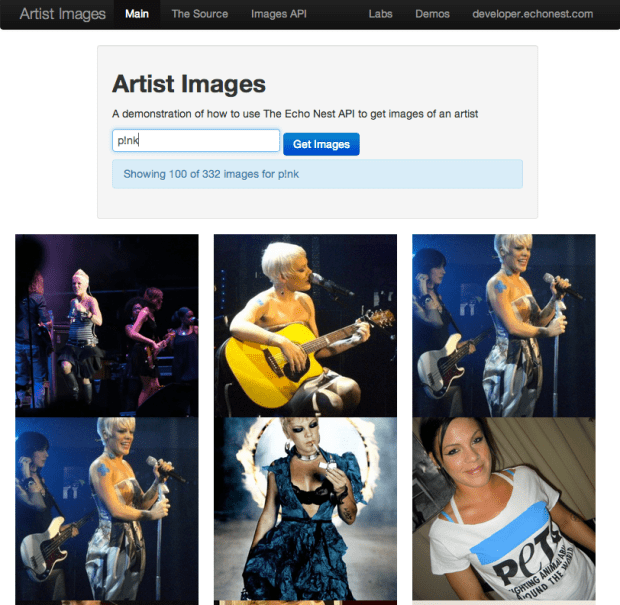
The core code to get the images is here:
function fetchImages(artist) {
    var url = 'http://developer.echonest.com/api/v4/artist/images';

    var args = {
            format:'json',
            api_key: 'MY-API-KEY',
            name: artist,
            results: 100,
    };

    info("Fetching images for " + artist);
    $.getJSON(url, args,
            function(data) {
                $("#results").empty();
                if (! ('images' in data.response)) {
                    error("Can't find any images for " + artist);
                } else {
                    $.each(data.response.images, function(index, item) {
                        var div = formatItem(index, item);
                        $("#results").append(div);
                    });
                }
            },
            function() {
                error("Trouble getting blog posts for " + artist);
            }
        );
}
The full source is on github.
With jQuery’s getJSON call, it is quite straightforward to retrieve the list of images from The Echo Nest for formatting and display.
The most interesting bits for me was learning how to make square images regardless of the aspect ratio of the image, without distorting them. This is done with a little CSS magic. Each image div gets a class like so:
        .image-container {
            width: 240px;
            height: 240px;
            background-size: cover;
            background-image:"http://example.com/url/to/image.png";
            background-repeat: no-repeat;
            background-position: 50% 50%;
            float:left;
        }
Try out the Artist Image demo , marvel at the square images and be sure to visit the Echo Nest Demo page to see all of the other demos I’ve been posting this week.
Using speechiness to make stand-up comedy playlists
Posted by Paul in code, data, The Echo Nest on March 20, 2013
One of the Echo Nest attributes calculated for every song is ‘speechiness’. This is an estimate of the amount of spoken word in a particular track. High values indicate that there’s a good deal of speech in the track, and low values indicate that there is very little speech. This attribute can be used to help create interesting playlists. For example, a music service like Spotify has hundreds of stand-up comedy albums in their collection. If you wanted to use the Echo Nest API to create a playlist of these routines you could create an artist-description playlist with a call like so:
However, this call wouldn’t generate the playlist that you want. Intermixed with stand-up routines would be comedy musical numbers by Tenacious D, The Lonely Island or “Weird Al”. That’s where the ‘speechiness’ attribute comes in. We can add a speechiness filter to our playlist call to give us spoken-word comedy tracks like so:
It is a pretty effective way to generate comedy playlists.
I made a demo app that shows this called The Comedy Playlister. It generates a Spotify playlist of comedy routines.
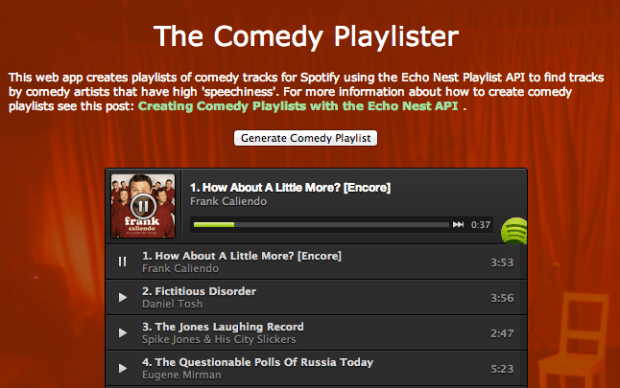
It does a pretty good job of finding comedy. Now I just need some way of filtering out Larry The Cable Guy. The app is on line here: The Comedy Playlister. The source is on github.
How the Bonhamizer works
Posted by Paul in code, fun, The Echo Nest on February 21, 2013
I spent this weekend at Music Hack Day San Franciso. Music Hack Day is an event where people who are passionate about music and technology get together to build cool, music-related stuff. This San Francisco event was the 30th Music Hack Day with around 200 hackers in attendance. Many cool hacks were built. Check out this Projects page on Hacker League for the full list.
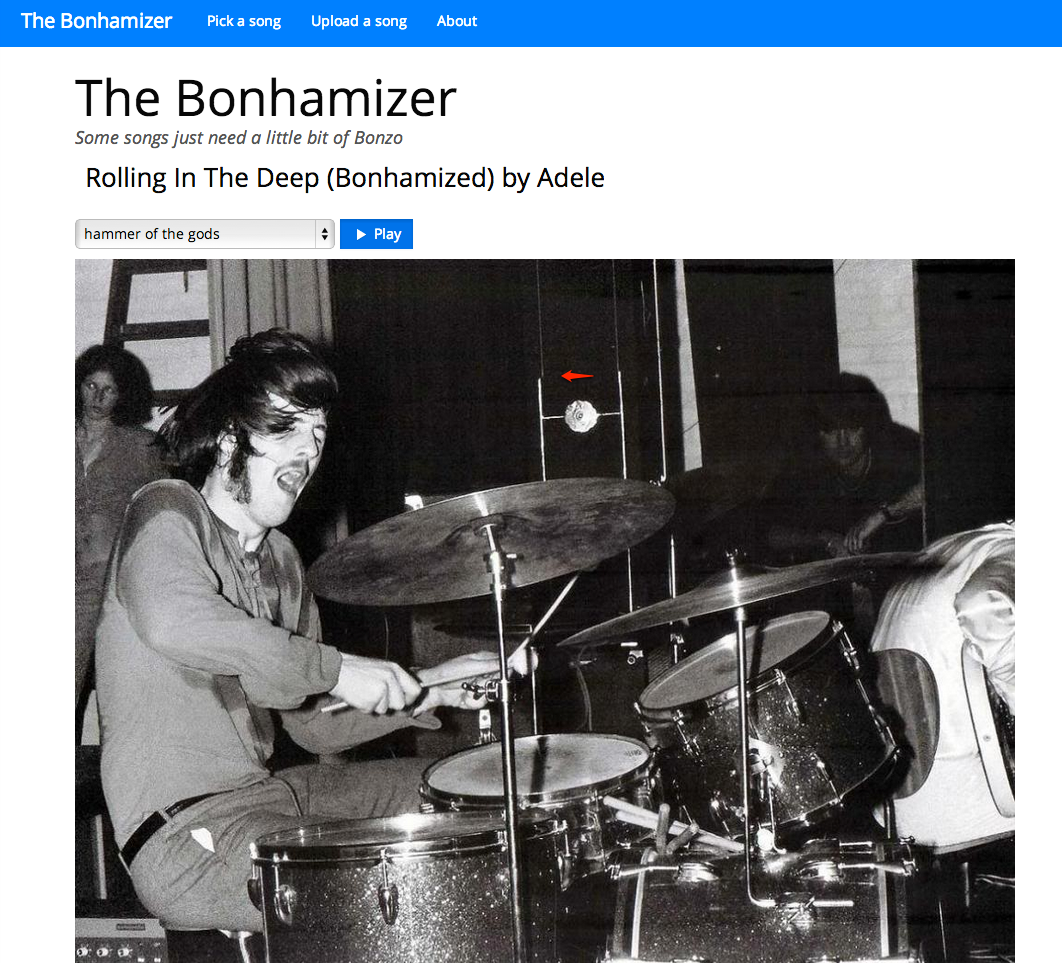
My weekend hack is called The Bonhamizer. It takes just about any song and re-renders it as if John Bonham was playing the drums on the track. For many tracks it works really well (and others not so much). I thought I’d give a bit more detail on how the hack works.
Data Sources
For starters, I needed some good clean recordings of John Bonham playing the drums. Luckily, there’s
set of 23 drum out takes from the “In through the out door” recording session. For instance, there’s
this awesome recording of the drums for “All of my Love”. Not only do you get the sound of Bonhmam
pounding the crap out of the drums, you can hear him grunting and groaning. Super stuff. This particular
recording would become the ‘Hammer of the Gods’ in the Bonhamizer.
From this set of audio, I picked four really solid drum patterns for use in the Bonhamizer.
Of course you can’t just play the drum recording and any arbitrary song recording at the same time and expect the drums to align with the music. To make the drums play well with any song a number of things need to be done (1) Align the tempos of the recordings, (2) Align the beats of the recordings, (3) Play the drums at the right times to enhance the impact of the drums.
To guide this process I used the Echo Nest Analyzer to analyze the song being Bonhamized as well as the Bonham beats. The analyzer provides a detailed map for the beat structure and timing for the song and the beats. In particular, the analyzer provides a detailed map of where each beat starts and stops, the loudness of the audio at each beat, and a measure of the confidence of the beat (which can be interpreted as how likely the logical beat represents a real physical beat in the song).
Aligning the tempos (We don’t need no stinkin’ time stretcher)
Perhaps the biggest challenge of implementing the Bonhamizer is to align the tempo of the song and the Bonham beats. The tempo of the ‘Hammer of the Gods’ Bonham beat is 93 beats per minute. If fun.’s Some Nights is at 107 beats per minute we have to either speed Bonham up or slow fun. down to get the tempos to match.
Since the application is written in Javascript and intended to run entirely in the browser, I don’t have access to server side time stretching/shifting libraries like SoundTouch or Dirac. Any time shifting needs to be done in Javascript. Writing a real-time (or even an ahead-of-time) time-shifter in Javascript is beyond what I could do in a 24 coding session. But with the help of the Echo Nest beat data and the Web Audio API there’s a really hacky (but neat) way to adjust song tempos without too many audio artifacts.
The Echo Nest analysis data includes the complete beat timing info. I know where every beat starts and how long it is. With the Web Audio API I can play any snippet of audio from an MP3, with millisecond timing accuracy. Using this data I can speed a song up by playing a song beat-by-beat, but adjusting the starting time and duration of each beat to correspond to the desired tempo. If I want to speed up the Bonham beats by a dozen beats per minute, I just play each beat about 200 ms shorter than it should be. Likewise, if I need to slow down a song, I can just let each beat play for longer than it should before the next beat plays. Yes, this can lead to horrible audio artifacts, but many of the sins of this hacky tempo adjust will be covered up by those big fat drum hits that will be landing on top of them.
I first used this hacky tempo adjustment in the Girl Talk in a Box hack. Here’s a few examples of songs with large tempo adjustments. In this example, AWOLNation’s SAIL is sped up by 25% you can hear the shortened beats.
And in this example with Sail slowed down by 25% you can hear double strikes for each beat.
I use this hacky tempo adjust to align the tempo of the song and the Bonham beats, but since I imagine that if a band had John Bonham playing the drums they would be driven to play a little faster, so I make sure that I speed on the song a little bit when I can.
Speeding up the drum beats by playing each drum beat a bit shorter than it is supposed to play gives pretty good audio results. However, using the technique to slow beats down can get a bit touchy. If a beat is played for too long, we will leak into the next beat. Audibly this sounds like a drummer’s flam. For the Bonhamizer this weakness is really an advantage. Here’s an example track with the Bonham beats slowed down enough so that you can easily hear the flam.
When to play (and not play) the drums
If the Bonhamizer overlaid every track with Bonham drums from start to finish, it would not be a very good sounding app. Songs have loud parts and soft parts, they have breaks and drops, they have dramatic tempo changes. It is important for the Bonhamizer to adapt to the song. It is much more dramatic for drums to refrain from striking during the quiet a capella solos and then landing like the Hammer of the Gods when the full band comes in as in this fun. track.
There are a couple of pieces of data from the Echo Nest analysis that I can use to help decide when to the drums should play. First, there’s detailed loudness info. For each beat in the song I retrieve information on how loud the beat is. I can use this info to find the loud and the quiet parts of the song and react accordingly. The second piece of information is the beat confidence. Each beat is tagged with a confidence level by the Echo Nest analyzer. This is an indication of how sure the analyzer is that a beat really happened there. If a song has a very strong and steady beat, most of the beat confidences will be high. If a song is frequently changing tempo, or has weak beat onsets then many of the beat confidence levels will be low, especially during the tempo transition periods. We can use both the loudness and the confidence levels to help us decide when the drums should play.
For example, here’s a plot that shows the beat confidence level for the first few hundred beats of Some Nights.
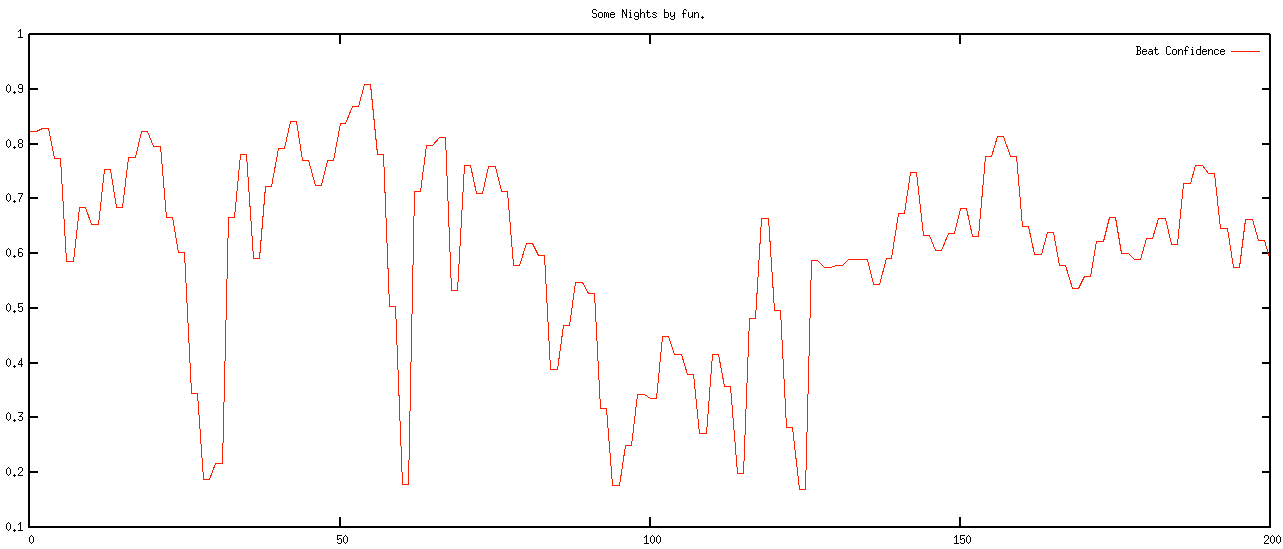
The red curve shows the confidence level of the beats. You can see that the confidence ebbs and flows in the song. Likewise we can look at the normalized loudness levels at the beat level, as shown by the green curve in the plot below:
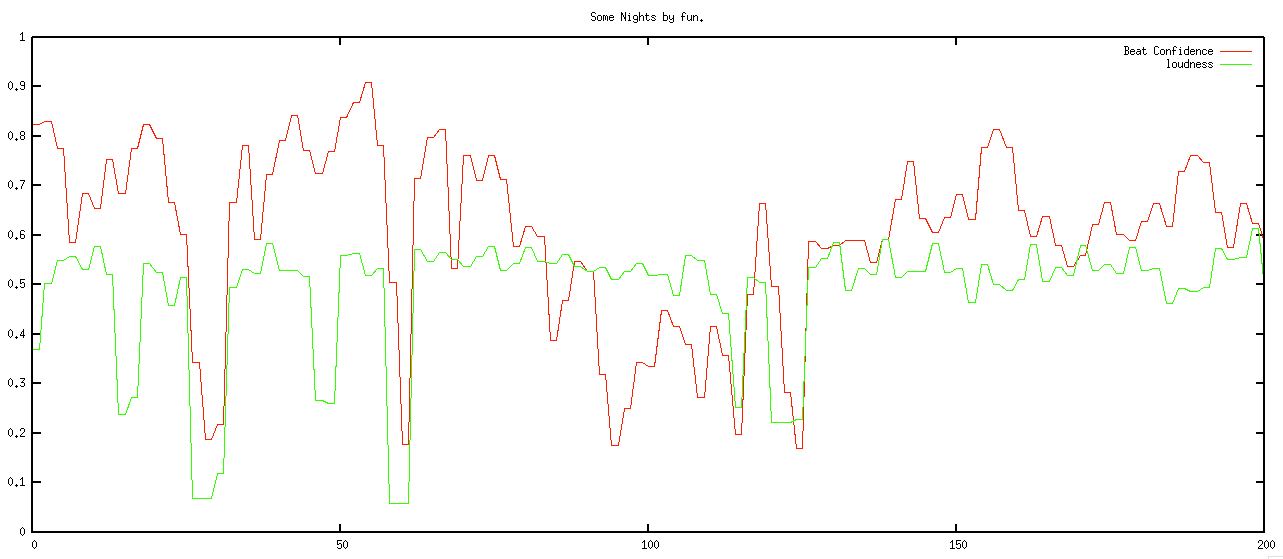
We want to play the drums during the louder and high confidence sections of the song, and not play them otherwise. However, if just simply match the loudness and confidence curves we will have drums that stutter start and stop, yielding a very unnatural sound. Instead, we need to filter these levels so that we get a more natural starting and stopping of the drums. The filter needs to respond quickly to changes – so for instance, if the song suddenly gets loud, we’d like the drums to come in right away, but the filter also needs to reject spurious changes – so if the song is loud and confident for only a few beats, the drums should hold back. To implement this I used a simple forward looking runlength filter. The filter looks for state changes in the confidence and loudness levels. If it sees one and it looks like the new state is going to be stable for the near future, then the new state is accepted, otherwise it is rejected. The code is simple:
This file contains hidden or bidirectional Unicode text that may be interpreted or compiled differently than what appears below. To review, open the file in an editor that reveals hidden Unicode characters.
Learn more about bidirectional Unicode characters
| function runLength(quanta, confidenceThreshold, loudnessThreshold, lookAhead, lookaheadMatch) { | |
| var lastState = false; | |
| for (var i = 0; i < quanta.length; i++) { | |
| quanta[i].needsDrums = false; | |
| } | |
| for (var i = 0; i < quanta.length -1; i+=2) { | |
| var newState = getState(quanta[i], confidenceThreshold, loudnessThreshold); | |
| if (newState != lastState) { | |
| // look ahead | |
| var matchCount = 0 | |
| var curCount = 0; | |
| for (var j = i + 1; j < quanta.length && j <= i + lookAhead; j++) { | |
| var q = quanta[j]; | |
| var nstate = getState(q, confidenceThreshold, loudnessThreshold); | |
| if (nstate == newState) { | |
| matchCount++; | |
| } | |
| curCount++; | |
| } | |
| if (matchCount > lookaheadMatch) { | |
| curState = newState; | |
| } else { | |
| curState = lastState; | |
| } | |
| } else { | |
| curState = newState; | |
| } | |
| quanta[i].needsDrums = curState; | |
| quanta[i+1].needsDrums = curState; | |
| lastState = curState; | |
| } | |
| } | |
| function getState(q, confidenceThreshold, loudnessThreshold) { | |
| var conf = q.confidence; | |
| var volume = q.oseg.loudness_max; | |
| var nstate = conf >= confidenceThreshold && volume > loudnessThreshold; | |
| return nstate; | |
| } |
When the filter is applied we get a nice drum transitions – they start when the music gets louder and the tempo is regular and they stop when its soft or the tempo is changing or irregular:
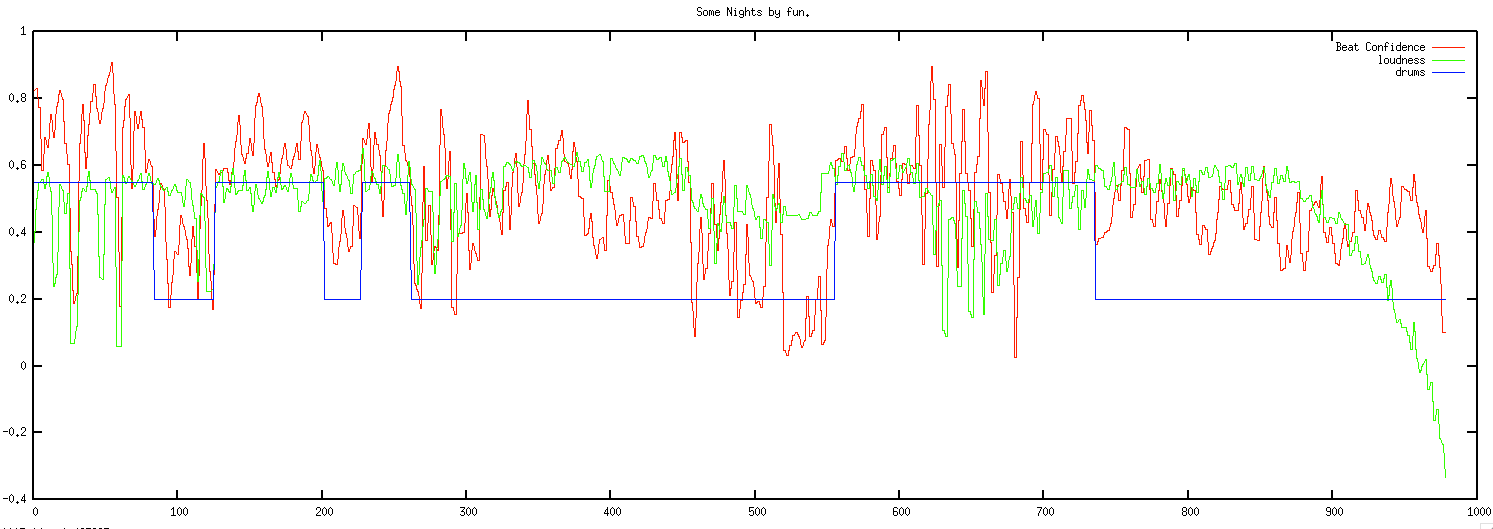
This above plot shows the confidence and loudness levels for the Some Nights by Fun. The blue curve shows when the drums play. Here’s a detailed view of the first 200 beats:
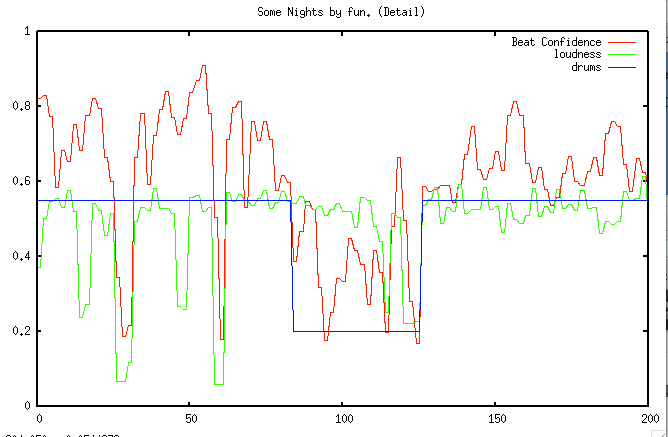
You can see how transient changes in loudness and confidence are ignored, while longer term changes trigger state changes in the drums.
Note that some songs are always too soft or most of the beats are not confident enough to warrent adding drums. If the filter rejects 80% of the song, then we tell the user that ‘Bonzo doesn’t really want to play this song’.
Aligning the song and the beats
At this point we now have tempo matched the song and the drums and have figured out when to and when not to play the drums. There’s just a few things left to do. First thing, we need to make sure that each of the song and drum beats in a bar lines up so the both the song and drums are playing the same beat within a bar (beat 1, beat 2, beat 3, beat 4, beat 1 …). This is easy to do since the Echo Nest analysis provides bar info along with the beat info. We align the beats by finding the bar position of the starting beat in the song and shifting the drum beats so that the bar position of the drum beats align with the song.
A seemingly more challenging issue is to deal with mismatched time signatures. All of the Bonham beats are in 4-4 time, but not all songs are in 4. Luckily, the Echo Nest analysis can tell us the time signature of the song. I use a simple but fairly effective strategy. If a song is in 3/4 time I just drop one of the beats in the Bonham beat pattern to turn the drumming into a matching 3/4 time pattern. It is 4 lines of code:
if (timeSignature == 3) {
    if (drumInfo.cur % 4 == 1) {
        drumInfo.cur+=1;
    }
 }
Here’s an example with Norwegian Wood (which is in 3/4 time). This approach can be used for more exotic time signatures (such as 5/4 or 7/4) as well. For songs in 5/4, an extra Bonham beat can be inserted into each measure. (Note that I never got around to implementing this bit, so songs that are not in 4/4 or 3/4 will not sound very good).
Playing it all
Once we have aligned tempos, filtered the drums and aligned the beats, it is time to play the song. This is all done with the Web Audio API, which makes it possible for us to play the song beat by beat with fine grained control of the timing.
Issues + To DOs
There are certainly a number of issues with the Bonhamizer that I may address some day.
I’d like to be able to pick the best Bonham beat pattern automatically instead of relying on the user to pick the beat. It may be interesting to try to vary the beat patterns within a song too, to make things a bit more interesting. The overall loudness of the songs vs. the drums could be dynamically matched. Right now, the songs and drums play at their natural volume. Most times that’s fine, but sometimes one will overwhelm the other. As noted above, I still need to make it work with more exotic time signatures too.
Reception
The Bonhamizer has been out on the web for about 3 days but in that time about 100K songs have been Bonhamized. There have been positive articles in The Verge, Consequence of Sound, MetalSucks, Bad Ass Digest and Drummer Zone. It is big in Japan. Despite all its flaws, people seem to like the Bonhamizer. That makes me happy. One interesting bit of feedback I received was from Jonathan Foote (father of MIR). He pointed me to Frank Zappa and his experiments with xenochrony The mind boggles. My biggest regret is the name. I really should have called it the autobonhamator. But it is too late now … sigh.
All the code for the Bonhamizer is on github. Feel free to explore it, fork and it make your own Peartifier or Moonimator or Palmerizer.
The Stockholm Python User Group
Posted by Paul in code, data, events, The Echo Nest on January 25, 2013
In a lucky coincidence I happened to be in Stockholm yesterday which allowed me to give a short talk at the Stockholm Python user Group. About 80 or so Pythonistas gathered at Campanja to hear talks about Machine Learning and Python. The first two talks were deep dives into particular aspects of machine learning and Python. My talk was quite a bit lighter. I described the Million Song Data Set and suggested that it would be a good source of data for anyone looking for a machine learning research. I then went on to show a half a dozen or so demos that were (or could be) built on top of the Million Song Data Set. A few folks at the event asked for links, so here you go:
Core Data: Echo Nest analysis for a million songs
Complimentary Data
- Second Hand Songs – 20K cover songs
- MusixMatch – 237K bucket-of-words lyric sets
- Last.fm tags – song level tags for 500K tracks. plus 57 million sim. track pairs
- Echo Nest Taste profile subset – 1M users, 48M user/song/play count triples
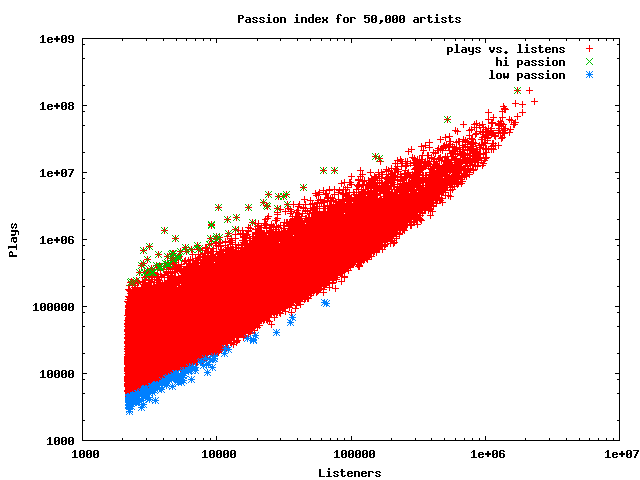
Data Mining Listening Data: The Passion Index
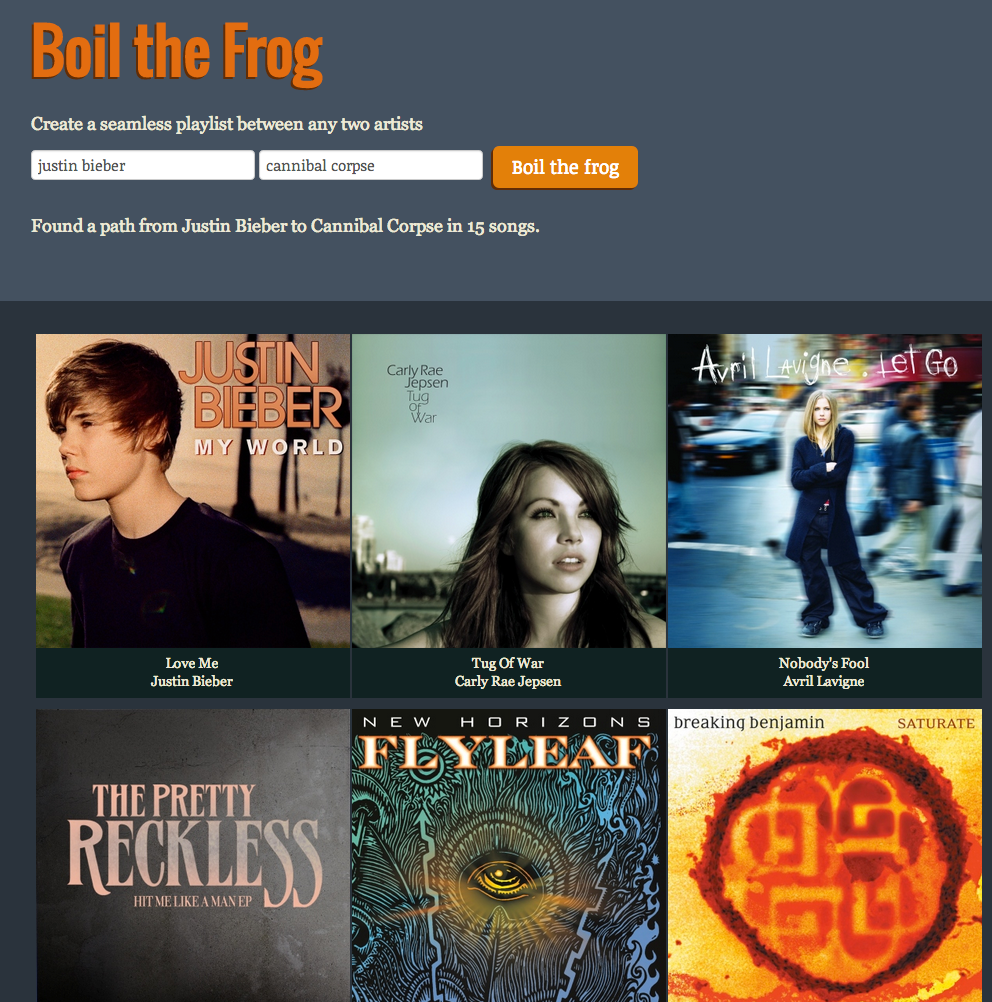
Fun with Artist Similarity Graphs: Boil the Frog
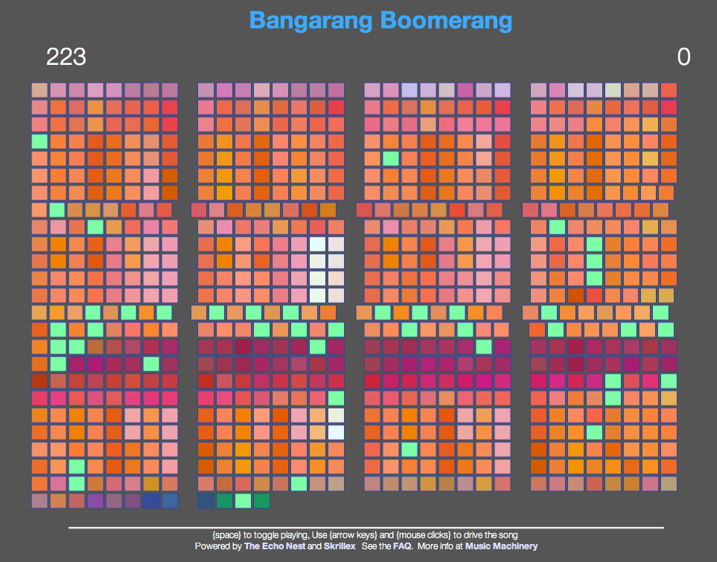
Post about In Search of the Click Track and a web app for exploring click tracks

Turning music into silly putty – Echo Nest Remix
[youtube http://www.youtube.com/watch?v=2oofdoS1lDg]Interactive Music
I really enjoyed giving the talk. The audience was really into the topic and remained engaged through out. Afterwards I had lots of stimulating discussions about the music tech world. The Stockholm Pythonistas were a very welcoming bunch. Thanks for letting me talk. Here’s a picture I took at the very end of the talk:

 Music Machinery