Archive for March, 2009
Roundtrip tagging
Posted by Paul in Music, recommendation on March 5, 2009
Over the last 5 years, Last.fm has built an incredible database of social tags around music. They have collected millions of short text descriptions of artists, albums and tracks. These tags are a great way to explore for new music, and Last.fm exploits these tags on their site to great effect. But what if you want to use the tags to help you play music from your own collection? Until now you were out of luck – you had to resort to the iTunes style of exploring your personal music collection – resulting in lots of playlists from artists in proper alphabetical order but with no musical cohesiveness. Now, Last.fm has just released a prototype, called Boffin that allows you to use the great body of last.fm social tags to play music in your own collection. The program is called Boffin – I took it for a quick spin and I really like it.
When you run Boffin for the first time, it enrolls your music collection. For me, with about 10K tracks, this took less than 5 minutes. During this time, Boffin is ‘phoning home’ to last.fm to get the tags that have been applied to your artists and tracks. I call this Round Trip Tagging – we give some tags to last.fm when we tag music, and they give lots of tags back to us to let us label our own collection. Once enrolled, Boffin gives you a tag cloud interface to your music collection. Select a few tags, hit the play button and you are listening to your own music. Here’s what my Boffin tag cloud looks like:
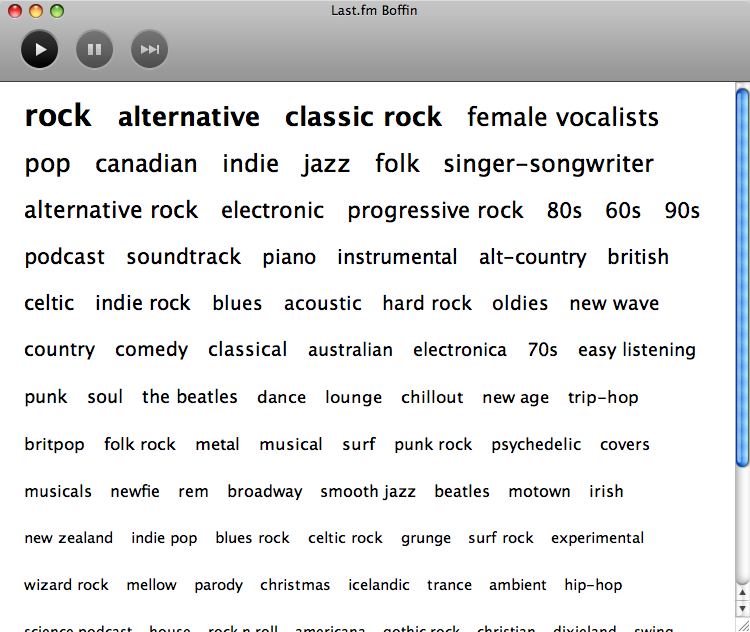
Of course, the listening experience is going to be good, because I’m listening to my own music and, presumably, I like that music already.
For a prototype application, Boffin is really well polished (at least the mac version is). While enrolling my music collection, Boffin shows images of all the artists in my collection that it is finding. I was rather amazed at how fast they were able to enroll my collection (I guess Boffin isn’t subject to the rate limits that users of the Last.fm developer API are subjected to). I did find a few times that I thought Boffin had hung up, because I couldn’t select tags anymore, but it turns out that Boffin disables tag selection when it is actually playing music. Once I hit the stop button, I could select tags with no worries. Boffin will even make it easy to generate the popular wordle tag cloud of my personal collection:

Good job to the folks at Last.fm, Boffin is pretty neat!
the sound of a million passwords changing
A bad day for my friends at Spotify. First the news of a security breach that compromised the personal information of their one million users – followed by the outage of the Spotify.com website as a million people all tried to change their passwords at once. But despite all of this trouble, the Spotify player kept playing music.
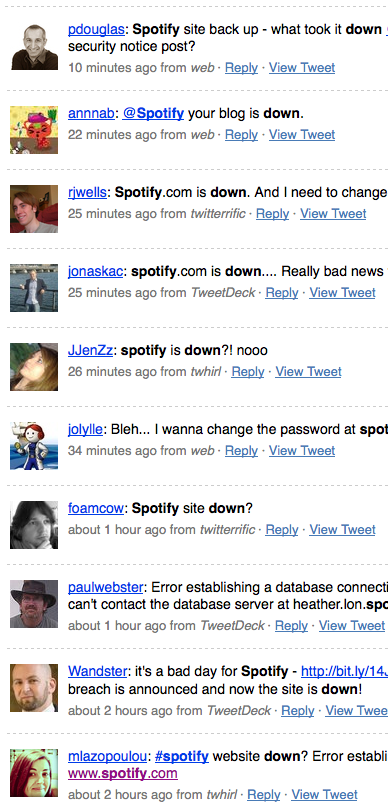
It is interesting to see how Spotify is handling their first big crises. So far, they seem to be doing most things right – they are being open about what the problem was and they have already fixed the problem that has caused the breach. Looks like they may need to be a bigger web server though.
In search of the click track
Posted by Paul in code, fun, Music, The Echo Nest on March 2, 2009
Sometime in the last 10 or 20 years, rock drumming has changed. Many drummers will now don headphones in the studio (and sometimes even for live performances) and synchronize their playing to an electronic metronome – the click track. This allows for easier digital editing of the recording. Since all of the measures are of equal duration, it is easy to move measures or phrases around without worry that the timing may be off. The click track has a down side – some say that songs recorded against a click track sound sterile, that the missing tempo deviations added life to a song.
I’ve always been curious about which drummers use a click track and which don’t, so I thought it might be fun to try to build a click track detector using the Echo Nest remix SDK ( remix is a Python library that allows you to analyze and manipulate music). In my first attempt, I used remix to analyze a track and then I just printed out the duration of each beat in a song and used gnuplot to plot the data. The results weren’t so good – the plot was rather noisy. It turns out there’s quite a bit of variation from beat to beat. In my second attempt I averaged the beat durations over a short window, and the resulting plot was quite good.
Now to see if we can use the plots as a click track detector. I started with a track where I knew the drummer didn’t use a click track. I’m pretty sure that Ringo never used one – so I started with the old Beatle’s track – Dizzy Miss Lizzie. Here’s the resulting plot:
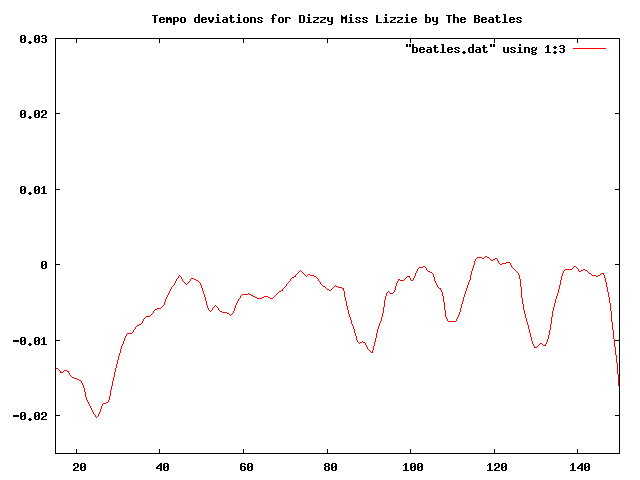 This plot shows the beat duration variation (in seconds) from the average beat duration over the course of about two minutes of the song (I trimmed off the first 10 seconds, since many songs take a few seconds to get going). In this plot you can clearly see the beat duration vary over time. The 3 dips at about 90, 110 and 130 correspond to the end of a 12 bar verse, where Ringo would slightly speed up.
Now lets compare this to a computer generated drum track. I created a track in GarageBand with a looping drum and ran the same analysis. Here’s the resulting plot:
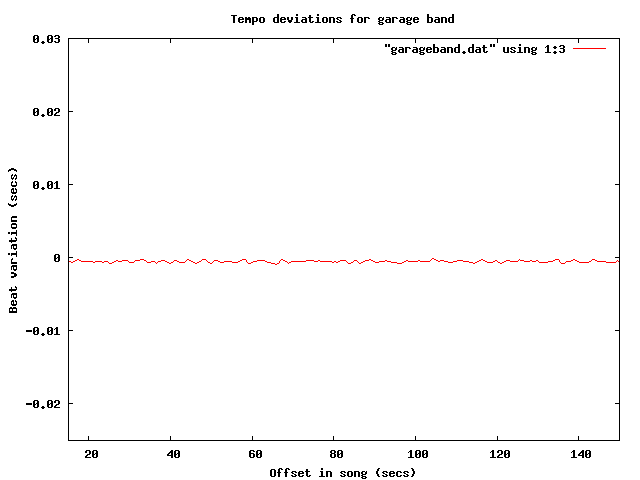
Tempo deviations for a computer generated track
The difference is quite obvious, and stark. The computer gives a nice steady, sterile beat, compared to Ringo’s.
Now let’s try some real music that we suspect is recorded to a click track. It seems that most pop music nowadays is overproduced, so my suspicion is that an artist like Britney Spears will record against a click track. I ran the analysis on “Hit me baby one more time” (believe it or not, the song was not in my collection, so I had to go and find it on the internet, did you know that it is pretty easy to find music on the internet?). Here’s the plot:
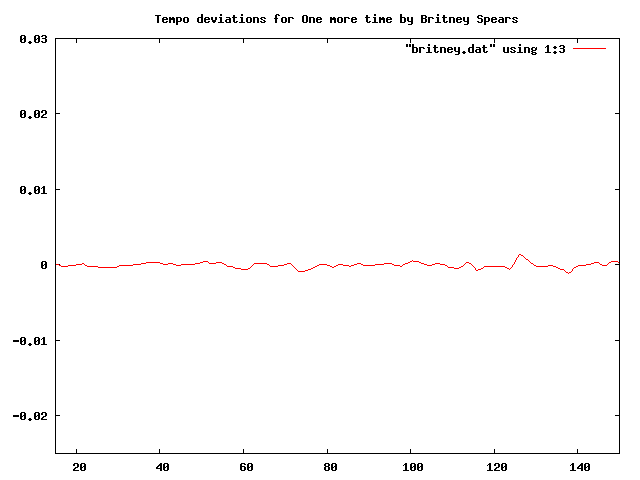
Britney is as flat as a computer
I think it is pretty clear from the plot that “Hit me baby one more time” was recorded with a click track. And it is pretty clear that these plots make a pretty good click track detector. Flat lines correspond to tracks with little variation in beat duration. So lets explore some artists to see if they use click tracks.
First up: Weezer:

Troublemaker by weezer
Nope, no click track for Weezer. This was a bit of a surprise for me.
How about Green Day?
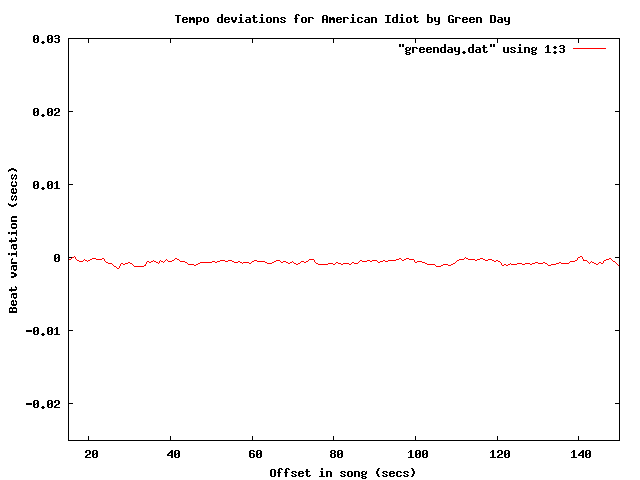
Yep – clearly a click track there. How about Metallica?

No click track for Lars! Nickeback?
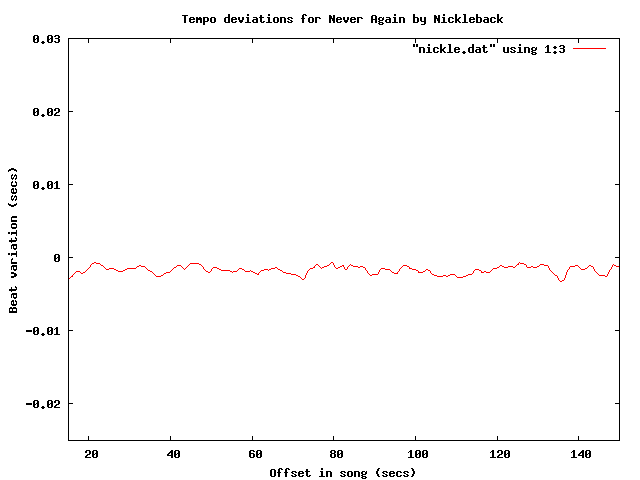 update: fixed nickleback plot labels (thanks tedder)
No surprise there – Nickleback uses a click track. Another numetal band (one that I rather like alot) is Breaking Benjamin:
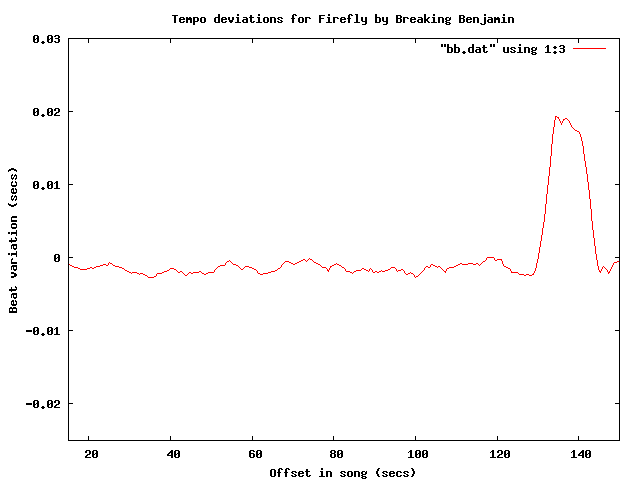 It is clear that they use a click track too – but what is interesting here is that you can see the bridge – the hump that starts at about 130 seconds into the song.
Of course John Bonham never used a click track – but lets check for fun:

So there you have it, using the Echo Nest remix SDK, gnuplot and some human analysis of the generated plots it is pretty easy to see which tracks are recorded against a click track. To make it really clear, I’ve overlayed a few of the plots:

One final plot … the venerable stairway to heaven is noted for its gradual increase in intensity – part of that is from the volume and part comes from in increase in tempo. Jimmy Page stated that the song “speeds up like an adrenaline flow”. Let’s see if we can see this:

The steady downward slope shows shorter beat durations over the course of the song (meaning a faster song). That’s something you just can’t do with a click track. Update – as a number of commenters have pointed out, yes you can do this with a click track.
The code to generate the data for the plots is very simple:
def main(inputFile):
    audiofile = audio.LocalAudioFile(inputFile)
    beats = audiofile.analysis.beats
    avgList = []
    time = 0;
    output = []
    sum = 0
    for beat in beats:
        time += beat.duration
        avg = runningAverage(avgList, beat.duration)
        sum += avg
        output.append((time, avg))
    base = sum / len(output)
    for d in output:
        print d[0], d[1] - base

def runningAverage(list, dur):
   max = 16
   list.append(dur)
   if len(list) > max:
        list.pop(0)
   return sum(list) / len(list)
I’m still a poor python programmer, so no doubt there are better Pythonic ways to do things – so let me know how to improve my Python code.
If any readers are particularly curious about whether an artist uses a click track let me know and I’ll generate the plots – or better yet, just get your own API key and run the code for yourself.
Update: If you live in the NYC area, and want to see/hear some more about remix, you might want to attend dorkbot-nyc tomorrow (Wednesday, March 4) where Brian will be talking about and demoing remix.
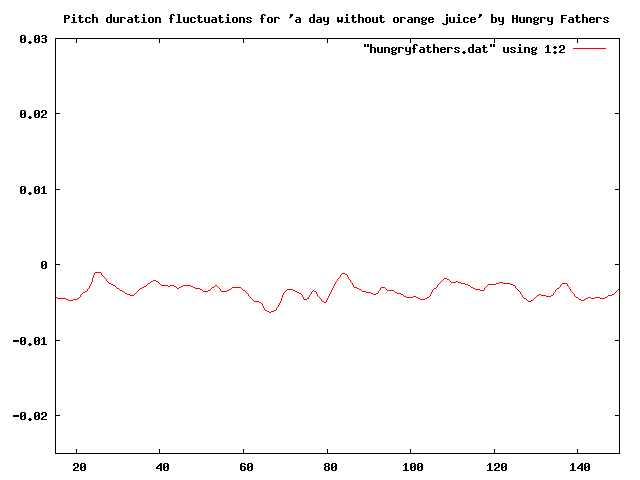
Update – Sten wondered (in the comments) how his band Hungry Fathers would plot given that their drummer uses a click track. Here’s an analysis of their crowd pleaser “A day without orange juice” that seems to indicate that they do indeed use a click track:
Update: More reader contributed click plots are here: More on click tracks ….
Update 2: I’ve written an application that lets you generate your own interactive click plots: The Echo Nest BPM Explorer
sched.org support added to SXSW Artist Catalog
Posted by Paul in search, The Echo Nest on March 1, 2009
I’ve just pushed out a new version of my SXSW Artist Catalog that lets you add any artist to your SXSW schedule (via sched.org). Each artist now has a ‘schedule at sched.org’ link which brings you directly to the sched.org page for the artist where you can select the artist event that you are interested in and then add it to your schedule. It is pretty handy.
By the way, the integration with sched.org could not have been easier. Taylor McKnight added a search url of the form:
http://sxsw2009.sched.org/?searchword=DEVO
that brings you to the DEVO page at sched.org. Very nice.
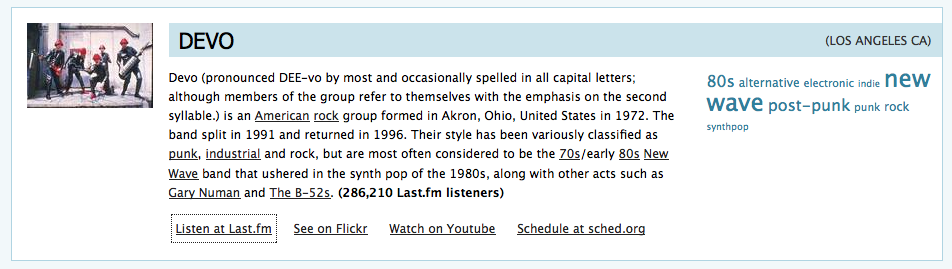
While adding the sched support, I also did a recrawl of all the artist info, so the data should be pretty fresh.
Thanks to Steve for fixing things for me after I had botched things up on the deploy, and thanks in general to Sun for continuing to host the catalog.
By the way, doing this update was a bit of a nightmare. The key data for the guide is the artist list that is crawled from the SXSW site – but the SXSW folks have recently changed the format of the artist list (spreading it out over multiple pages, adding more context, etc ). I didn’t want to have to rewrite the parsing code (when working on a spare time project, just the thought of working with regular expressions makes me close the IDE and fire up Team Fortress 2). Luckily, I had anticipated this event – my SXSW crawler had diligently been creating archives of every SXSW crawl, so if they did change formats, I could fall back on a previous crawl without needing to work on the parser. I’m so smart. Except that I had a bug. Here’s the archive code:
 public void createArchive(URL url) throws IOException {
   createArchiveDir();
   File file = new File(getArchiveName());
   if (!file.exists()) {
     URLConnection connection = url.openConnection();
     BufferedReader in = new BufferedReader(
          newInputStreamReader(connection.getInputStream()));
     PrintWriter out = new PrintWriter(getArchiveName());
     String line = null;
     try {
       while ((line = in.readLine()) != null) {
          out.println(line);
       }
     } finally {
        in.close();
     }
  }
See the bug? Yep, I forgot to close the output file – which means that all of my many archive files were missing the last block of data, making them useless. My pennance for this code-and-test sin was that I had to go and rewrite the SXSW parser to support the new format. But this turned out to be a good thing, since SXSW has been adding more artists. So this push has a new fresh crawl, with the absolute latest artists, fresh data from all of the sites like Youtube, Flicker, Last.fm and The Echo Nest. My bug makes more work for me, but a better catalog for you.
 Music Machinery